All Zoho Survey tables explained

Introduction
Hey everyone! Sometimes, deciphering the structure and meaning of data in Zoho
Analytics, especially when Zoho’s native syncs and integrations are
activated, can be quite challenging. That’s why I’ve put together an
overview, not only to aid myself but also to assist others in navigating
through these complexities.
Collectors
The table plays an important role in the administration of surveys, especially when using the multi-collector feature. This feature makes it possible to distribute a survey to different groups and then filter the results by group.
What is a collector?
A collector is basically a way to distribute a single survey in different ways. Normally a survey is shared via a single link, but with this feature separate links can be created for different groups. This makes it easier to filter and analyze responses by group. In addition, numerous settings such as restrictions, quotas, visibility and hash URLs can be set separately for each collector.
A practical example illustrates this: Suppose you are organizing a workshop for many different customers from different companies and want to get feedback from the participants. Instead of creating separate surveys per company, you can create a single survey and send it to each participant using multi-collectors. This way, all incoming responses are already automatically segmented by company without participants having to provide information manually.
The Collectors table therefore makes it easier for you to organize survey activities.
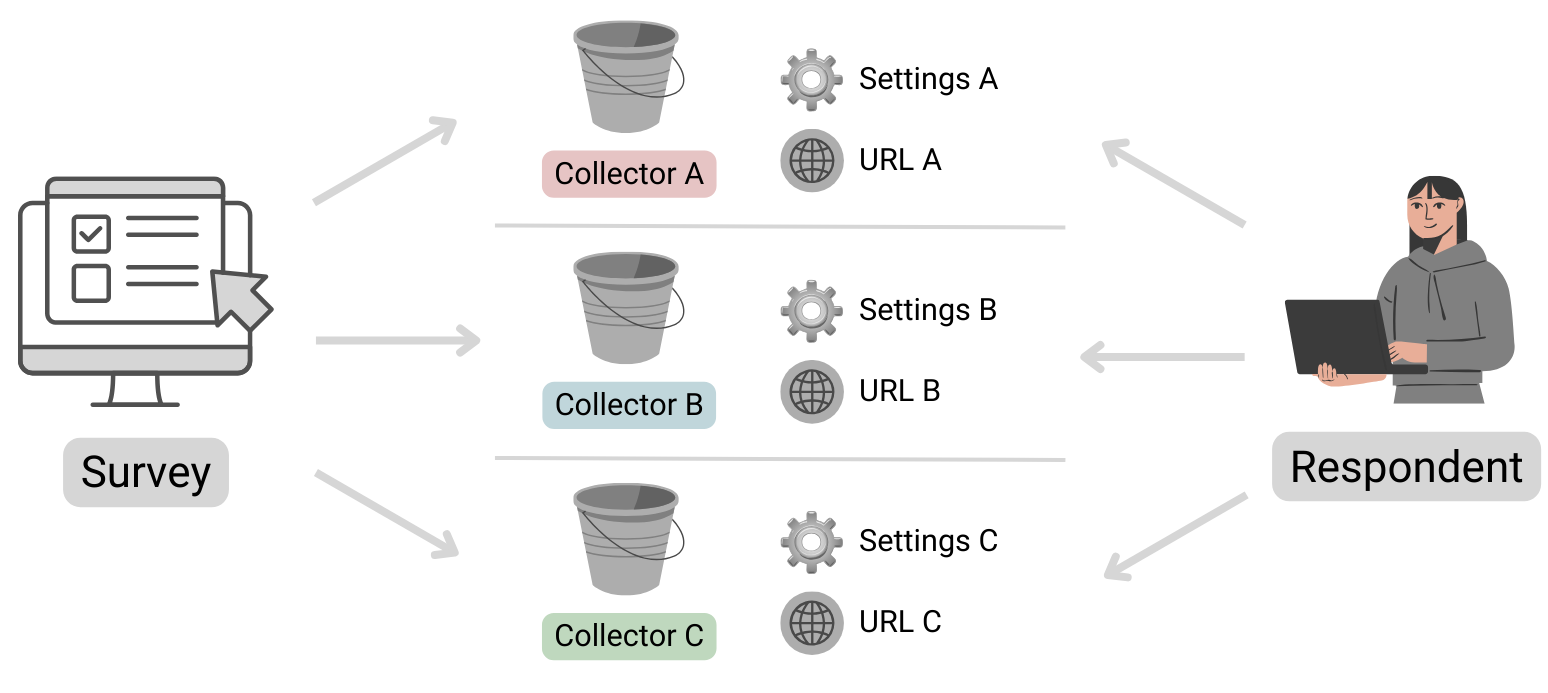
Table structure
| Column name | Data type | Explanation | Table relationships | Values |
|---|---|---|---|---|
| ID | Number | Primary key | Respondents.Collector ID | |
| Name | Text | Name of the collector | ||
| Unique URL | Text | The public URL where the survey can be accessed | ||
| Survey ID | Text | Reference to the survey to which this collector belongs | Surveys.ID | |
| Status | Text | Indicates whether the collector is still accepting submissions or is already closed. | open, closed | |
| Type | Text | Specifies whether the collector is public or private. If a survey is set as private, it can only be opened by logged-in Zoho users. | public, private | |
| Offline URL | Text | Zoho Survey offers the option of completing surveys offline. This
means that responses can be received even without an Internet connection
and can be viewed and uploaded after authentication. Further
information can be found here: https://help.zoho.com/portal/en/kb/survey/launch/offline-survey/articles/offline-surveys
Attention: Even if this function is deactivated, a URL is displayed here. If this is opened, a corresponding message appears stating that it cannot be accessed. |
||
| Offline Enabled | Boolean (DecisionBox) | Indicates whether the offline feature is activated or not. |
|
|
| Published Date | Date + Time | Time at which the Collector was published. | ||
| Cut Off Date | Date | Time at which the collector should be closed (this is the deadline specified in the settings).If a collector was closed manually, the date is not entered here (unfortunately this cannot be found anywhere else). | ||
| Multiple Response | Text | This column is always empty, even the support team couldn’t help me here. It looks as if information on restrictions is stored here (Editor 🡆 Publish 🡆 Restrictions 🡆 Response Restriction). |
Surveys
This table stores basic information about a survey.
Table structure
| Column name | Data type | Explanation | Table relationships | Values |
|---|---|---|---|---|
| ID | Number | Primary key | Responses.Survey IDQuestions.Survey IDVariables.Survey IDResponse Variables.Survey IDCollectors.Survey IDPages.Survey ID | |
| Language | Text | Identification of the standard language selected for the survey | Set 1 of the ISO 639 language codes | |
| Created Date | Date + Time | Date on which the survey was created (the publication date can be found in the Collectors table!) | ||
| Modified Date | Date + Time | Time of the last editing of the survey | ||
| Page Count | Positive number | Indicates the total number of pages in the survey. | ||
| Title | Text | A different title can be configured in the settings if the name of the survey (table column ‘Name’) is not to be used. | ||
| Submit Button | Text | The text stored in the settings for the button to send the survey | ||
| Back Button | Text | The text stored in the settings for the button to go back to the previous page has been changed. | ||
| Enable Back | Text | Indicates whether the respondent can return to the previous page or whether the button is not displayed. | true, false (Attention! Zoho uses the text true and false here and not the data type Desicion Box, this inconsistency is confusing and must be taken into account). | |
| Next Button | Text | The text that was defined in the settings for the button to go to the next page | ||
| Group ID | Number | Reference to the department in which the survey was created | Departments.ID | |
| Name | Text | Survey name | ||
| Type | Text | As a rule, the value “survey” is available here. However, if scores
have been configured under Editor 🡆 Advanced settings, the value scoring is available instead. |
survey, scoring |
Automatically import new surveys is selected, there should normally be no missing data!Pages
The table contains all the information about the pages in the survey. Normally, this table should not play a major role in evaluations, unless you want to use the page title for segmentation.
Table structure
| Column name | Data type | Explanation | Table relationships |
|---|---|---|---|
| ID | Number | Primary key | Responses.Page ID
Questions.Page ID |
| Title | Text | Title of the page | |
| Description | Text | Description text | |
| Question Count | Positive number | Indicates the total number of questions on the corresponding page | |
| Survey ID | Number | Reference to the survey in which this page exists | Surveys.ID |
Questions
All data relating to the individual questions is stored here.
Table structure
| Column name | Data type | Explanation | Table relationships | Values |
|---|---|---|---|---|
| ID | Number | Primary key | Responses.Question ID | |
| Type | Text | Indicates the type of question | ||
| Text | Text | Question text | ||
| Page ID | Number | Reference to the page on which the question is located | Pages.ID | |
| Trashed | Boolean (DecisionBox) | Indicates whether the question is visible or whether it has been deleted |
|
|
| Mandatory Enabled | Boolean (DecisionBox) | Indicates whether the question is defined as a mandatory fieldThis column can contain the value NULL! Further information on the supported question types can be found below. |
|
|
| Random Enabled | Boolean (DecisionBox) | Indicates whether a random order of answer options is activated for the questionThis column can contain the value NULL! Further information on the supported question types can be found below. |
|
|
| Hint Enabled | Boolean (DecisionBox) | Indicates whether a hint text is stored for the questionThis column can contain the value NULL! Further information on the supported question types can be found below. |
|
|
| Other Option | Boolean (DecisionBox) | An optional “Other” field can be activated for certain questions. This column indicates whether this setting is active. Please note that the “Other” field cannot be used for all question types. Therefore, this column may contain the value NULL. Further information on the supported question types can be found below. |
|
|
| Hint | Text | If configured, the information text is stored here | ||
| No. Of Stars | Positive number | Maximum number of stars to be awardedThis column can contain the value NULL! Further information on the supported question types can be found below. |
Question types
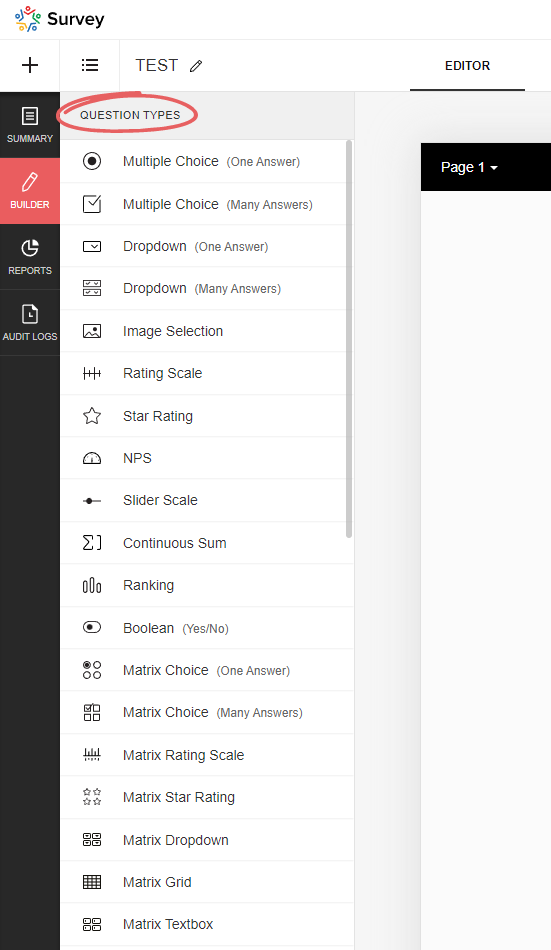
Zoho Survey offers a variety of question types, and depending on which type you select, certain options may not be available, resulting in the corresponding Boolean (DecisionBox) fields having the value NULL. In the table below you will find an overview of all available question types.
| Type | Field name (on the UI) | Note | Mandatory Enabled | Random Enabled | Hint Enabled | Other Option | No. Of Stars |
|---|---|---|---|---|---|---|---|
| full_name | Full name | NULL | NULL | Yes/No | NULL | NULL | |
| demographic | Contact details | NULL | NULL | Yes/No | NULL | NULL | |
| heading_descriptive | Heading and description | This is not a question! This element is only used to display text | NULL | NULL | NULL | NULL | NULL |
| single_drop_down | Dropdown field (one answer) | Yes/No | Yes/No | Yes/No | Yes/No | NULL | |
| multi_select_dropdown | Dropdown field (many answers) | Yes/No | Yes/No | Yes/No | Yes/No | NULL | |
| likert_rating | Rating Scale | The following setting is selected: Likert scale (can be selected when initially added) | Yes/No | NULL | Yes/No | NULL | NULL |
| image_star_rating | Image Selection | The following setting is selected: Star rating | Yes/No | NULL | Yes/No | NULL | Positive number |
| image_single_choice | Image Selection | The following setting is selected: Multiple selection (one answer) | Yes/No | Yes/No | Yes/No | NULL | NULL |
| image_multiple_choice | Image Selection | The following setting is selected: Multiple selection (multiple answers) | Yes/No | Yes/No | Yes/No | NULL | NULL |
| boolean_choice | Boolean | Yes/No | NULL | Yes/No | NULL | NULL | |
| combined_file_upload | File Upload | Yes/No | NULL | Yes/No | NULL | NULL | |
| calendar_box | Date/Time | Yes/No | NULL | Yes/No | NULL | NULL | |
| email_textbox | Yes/No | NULL | Yes/No | NULL | NULL | ||
| single_textbox | Short Answer | Yes/No | NULL | Yes/No | NULL | NULL | |
| textarea | Long Answer | Yes/No | NULL | Yes/No | NULL | NULL | |
| continuous_sum | Continuous Sum | Yes/No | NULL | Yes/No | NULL | NULL | |
| matrix_text_box | Matrix Textbox | Yes/No | NULL | Yes/No | NULL | NULL | |
| matrix_radio_box | Matrix Choice (One Answer) | Yes/No | NULL | Yes/No | Yes/No | NULL | |
| matrix_check_box | Matrix Choice (Many Answers) | Yes/No | NULL | Yes/No | Yes/No | NULL | |
| matrix_likert_rating | Matrix Rating Scale | The following setting is selected: Likert scale (can be selected when initially added) | Yes/No | NULL | Yes/No | NULL | NULL |
| matrix_grid | Matrix Grid | Yes/No | NULL | Yes/No | NULL | NULL | |
| matrix_drop_down | Matrix Dropdown | Yes/No | NULL | Yes/No | Yes/No | NULL | |
| matrix_star_rating | Matrix Star Rating | Yes/No | NULL | Yes/No | NULL | Positive number | |
| multiple_textbox | Multiple Textboxes | Yes/No | NULL | Yes/No | NULL | NULL | |
| single_choice | Multiple Choice (One Answer) | Yes/No | Yes/No | Yes/No | Yes/No | NULL | |
| multiple_choice | Multiple Choice (Many Answers) | Yes/No | Yes/No | Yes/No | Yes/No | NULL | |
| nps | NPS | Yes/No | NULL | Yes/No | NULL | NULL | |
| ranking | Ranking | Yes/No | NULL | Yes/No | NULL | NULL | |
| slider | Slider Scale | Yes/No | NULL | Yes/No | NULL | NULL | |
| signature | Signature | Yes/No | NULL | Yes/No | NULL | NULL | |
| star_rating | Star Rating | Yes/No | NULL | Yes/No | NULL | Positive number | |
| numeric_textbox | Number | Yes/No | NULL | Yes/No | NULL | NULL | |
| matrix_weightage | Matrix Rating Scale | The following setting is selected: Weighted selection (can be selected during initial addition) | Yes/No | NULL | Yes/No | NULL | NULL |
| choice_weightage | Rating Scale | The following setting is selected: Weighted selection (can be selected during initial addition) | Yes/No | NULL | Yes/No | NULL | NULL |
Respondents
This table stores data on the specific completion of the survey, including information on who completed it and when, and to which collector it belongs.
Table structure
| Column name | Data type | Explanation | Table relationships | Values |
|---|---|---|---|---|
| ID | Number | Primary key | Responses.Respondent IDResponse Variables.Respondent ID | |
| Start Date | Date + Time | Time at which the respondent opened the survey | ||
| End Date | Date + Time | Time at which the respondent submitted/completed the survey. If the survey has not yet been completed, this value is of course empty | ||
| IP Address | Text | IP address of the respondent; whether this data is saved or not depends on the setting in the collector (under general restrictions) | ||
| Status | Text | Indicates whether or not the survey has already been completed or submitted by the user | completed, partial | |
| Collector ID | Number | Reference to the collector through which the survey data was collected | Collectors.ID | |
| Survey ID | Number | Reference to the survey | Surveys.ID | |
| Time Taken in Minutes | Decimal number | Time difference between start and end time in minutes | ||
| Time Taken | Number | Time difference between start and end time in seconds | ||
| Survey Modified Time | Date + Time | Time at which the survey was last edited |
partial). Please take this into account when evaluating the data, as these should generally be excluded…Response Variables
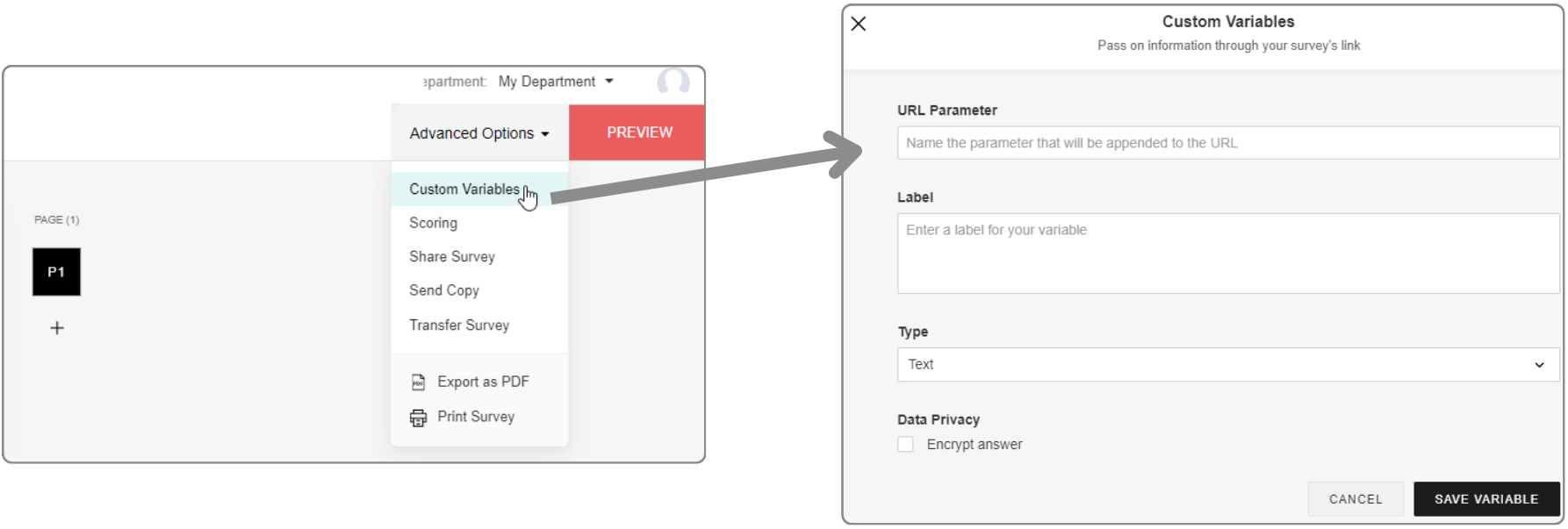
URL parameters can be configured in the editor under Advanced settings. If data has been transferred in a survey link and a response has been submitted, this data is saved here.
In addition, URL parameters can also be used as response restrictions, whereby these can be set per collector. This means that only one submission is permitted per unique URL parameter value.
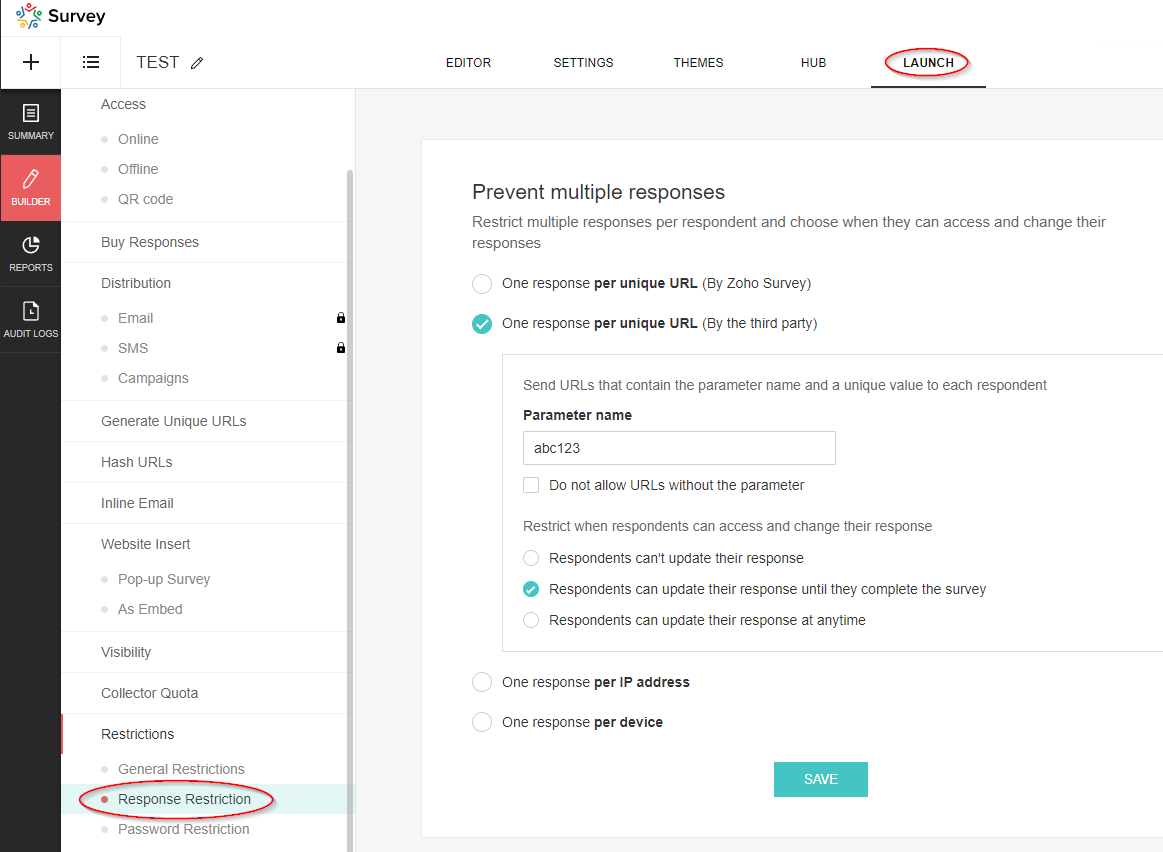
These parameters are not visible in the editor under Advanced settings, but are also saved in this table.
Table structure
| Column name | Data type | Explanation | Table relationships | Values |
|---|---|---|---|---|
| Respondent ID | Number | Reference to the data set of the respondent | Respondents.ID | |
| Variable ID | Number | Reference to the variable | Variables.ID | |
| Variable Label | Text | Description | ||
| Variable Value | Text | Value of the variable | ||
| Skipped By Logic | Boolean (DecisionBox) | ? |
|
|
| Survey ID | Number | Reference to the survey | Surveys.ID |
Variables
This table contains the basic data of the variables (URL parameters).
Table structure
| Column name | Data type | Explanation | Table relationships | Values |
|---|---|---|---|---|
| ID | Number | Primary key | Response Variables.Variable ID | |
| Name | Text | Name of the parameter, i.e. the exact string used in the URL | ||
| Label | Text | Description of the parameter | ||
| Type | Text | Data type |
|
|
| Unique Order | Text | Order in which the parameters were added (in the advanced settings) | Capital letters (A, B, C, etc.) | |
| Trashed | Boolean (DecisionBox) | Indicator whether the parameter has been deleted |
|
|
| Respondent / Custom | Text | If the parameter is used for the response restriction, the value is Respondent, otherwise it is Custom. |
|
|
| Survey ID | Number | Reference to the survey | Surveys.ID |
Responses
This table is of particular interest as it contains the answers to the questions that were submitted.
Table structure
| Column name | Data type | Explanation | Table relationships | Values |
|---|---|---|---|---|
| Respondent ID | Number | Reference to the respondent’s data record | Respondents.ID | |
| Question ID | Number | Reference to the question | Questions.ID | |
| Option ID | Number | Reference to the option: “Option” refers to the selected value in a drop-down field or the selected answer in a multiple choice question. Image selection questions also refer to an option. However, it should be noted that this does not currently contain any information about the image, so it is unfortunately useless. For further details, please see the section on the corresponding table! | Options.ID | |
| Text | Text | Answer to the question. This field is empty if it is a dropdown field or a multiple choice question (then the answer is the selected option) | ||
| Row ID | Number | Reference to the row | Rows.ID | |
| Column ID | Number | Reference to the column | Columns.ID | |
| Row | Text | The name of the row (this is simply a lookup, unfortunately the value at the time of the evaluation is not saved) | Rows.Text | |
| Column | Text | The name of the column (this is simply a lookup, unfortunately the value at the time of the evaluation is not saved) | Columns.Text | |
| Option | Text | The name of the option (this is simply a lookup, unfortunately the value at the time of evaluation is not saved) | ||
| Survey ID | Number | Reference to the survey | Surveys.ID | |
| Field ID | Number | Reference to the field if it is a text field or a number field. Further information can be found in the section on the corresponding table! | Fields.ID | |
| Not Applicable Enabled | Boolean (DecisionBox) | For certain questions, you can add the option “Not applicable”. If this option was selected by the respondent, this flag is set. The option can be activated for the following question types: ranking, image_star_rating, matrix_star_rating, matrix_likert_rating | Yes, No | |
| Others | Text | For certain questions, it is possible to activate the “Other” option. You can find more information on this in the section on question types! If this option is activated and the respondent has used it, the answer is not recorded in the “Text” field, but in this field. | ||
| Page ID | Number | Reference to the page on which the answered question is located. | Pages.ID | |
| Field | Text | The name of the field (this is simply a lookup, unfortunately the value at the time of the evaluation is not saved) | Fields.Text |
Rows
The row information for multi-line questions, such as those that occur in a matrix, is recorded in this table. The data in this table relates to the following question types (Questions.Type):
- matrix_likert_rating
- matrix_grid
- matrix_check_box
- matrix_star_rating
- matrix_radio_box
- matrix_text_box
- matrix_weightage
- ranking
- matrix_drop_down
- image_star_rating
Table structure
| Column name | Data type | Explanation | Table relationships | Values |
|---|---|---|---|---|
| ID | Number | Primary key | Responses.Row ID | |
| Question ID | Number | Reference to the question | Questions.ID | |
| Text | Text | Name of the row | ||
| Survey ID | Number | Reference to the survey | Surveys.ID | |
| Unique Order | Text | Specifies the sequence |
Columns
The column information for questions with multiple columns that only occur in a matrix is recorded in this table. The entries in this table refer to the following question types (Questions.Type):
- matrix_grid
- matrix_text_box
- matrix_radio_box
- matrix_drop_down
- matrix_check_box
- matrix_weightage
Table structure
| Column name | Data type | Explanation | Table relationships | Values |
|---|---|---|---|---|
| ID | Number | Primary key | Responses.Column ID | |
| Text | Text | Name of the column | ||
| Question ID | Number | Reference to the question | Questions.ID | |
| Survey ID | Number | Reference to the survey | Surveys.ID |
Fields
This table contains information on group input fields that are used to enable multiple entries per question. This also includes the file upload field and the Boolean (DecisionBox) field, as multiple fields can also be configured here as an option.
In the table, the fields of the following question types (Questions.Type) are listed:
- continuous_sum
- demographic
- Boolean (DecisionBox)_choice
- multiple_textbox
- full_name
- combined_file_upload
Table structure
| Column name | Data type | Explanation | Table relationships | Values |
|---|---|---|---|---|
| ID | Number | Primary key | Responses.Field ID | |
| Text | Text | Name - Attention! If there is only a single switch, “Boolean (DecisionBox)” is displayed here. Otherwise, the corresponding values for the labels will of course appear. | ||
| Type | Text | Indicates the type of input field. | single_textbox, numeric_textbox, email_textbox, file_upload, single_choice | |
| Unique Order | Text | Specifies the order. | ||
| Sequence No | Number | Specifies the order. | ||
| Question ID | Number | Reference to the question | Questions.ID | |
| Survey ID | Number | Reference to the survey | Surveys.ID | |
| Mandatory Enabled | Boolean (DecisionBox) | Indicates whether the field is defined as a mandatory field or not. | Yes, No |
Options
The selectable values that are available in drop-down fields or for multiple-choice questions are saved here. There is also an option for image selection questions. However, it should be noted that this option currently contains no information on the image and is therefore unfortunately useless. In addition, this table is also important for weighted rating scales, as the weightings are saved here. A look at this table is therefore essential for evaluations with this type of scale.
Options are saved for the following question types (Questions.Type):
- matrix_drop_down
- single_choice
- single_drop_down
- image_single_choice
- multi_select_dropdown
- multi_select_dropdown
- multiple_choice
- matrix_weightage
- choice_weightage
Table structure
| Column name | Data type | Explanation | Table relationships | Values |
|---|---|---|---|---|
| ID | Number | Primary key | Responses.Option ID | |
| Text | Text | Name of the option/answer | ||
| Question ID | Number | Reference to the question | Questions.ID | |
| Survey ID | Number | Reference to the survey | Surveys.ID | |
| Column ID | Number | Reference to the column | Columns.ID | |
| Weightage | Number | For questions of the rating scale type and the Weighted selection option set, the respective weighting is displayed here. |