Kaizen 224 - Quote-driven Deal Reconciliation Using Zoho CRM Functions and Automation

Kaizen 224 - Quote-driven Deal Reconciliation Using Zoho CRM Functions and Automation


Hello everyone!
Welcome back to another instalment in the Kaizen series.

This post covers quote-driven deal reconciliation, emphasizing Functions and Automation to address practical sales challenges.

Business Challenge

Sales organizations often mark deals as Closed Won before commercial transactions fully conclude. Quotes generate promptly upon closure, yet businesses typically provide a brief window such as one week for renegotiation or payment. During this period, currency fluctuations, payment delays, and risk thresholds can significantly alter the final deal value.

This Kaizen demonstrates how Zoho CRM Functions and Automation work together to reconcile deal financials with quote activity over time. Sales, finance, and operations teams can thus access accurate, policy-compliant values.
Here is a typical sequence:
  1. Deal closes with Closed Won status
  2. Quote generates immediately
  3. Customer receives grace period (e.g., one week) for payment or adjustments
Key factors during this window:
  1. Exchange rates fluctuate
  2. Payments may succeed or fail
  3. Business absorbs limited losses(up to 10%, for example)
  4. Major variances trigger renegotiation
CRM must reflect actual outcomes rather than initial closure assumptions. Quotes serve as the authoritative commercial record, with final deal values depending on execution timing. This approach captures intermediate and final financial states to enable automated decisions and audits.

Key business scenarios covered

Scenario 1: Payment is made during the grace period

  1. Quote is generated on day 0
  2. Customer completes payment on day 7
  3. Exchange rate has changed since quote generation

Business Requirement

The business wants to calculate the actual payable amount using the exchange rate on the payment day and store it explicitly in CRM.

Outcome

The realized value is captured and stored, ensuring that reports and downstream systems reflect the true commercial result.

Scenario 2: Acceptable loss threshold (10%)

  1. Exchange rate movement results in a loss
  2. The business is willing to absorb losses up to 10%
  3. Loss exceeds the acceptable threshold

Business requirement

If the loss exceeds the defined tolerance, the quote should move to renegotiation instead of being accepted automatically.

Outcome

CRM enforces pricing policy consistently, without manual intervention or subjective judgment.

Scenario 3: Significant currency fluctuations

  1. Exchange rate volatility is unusually high
  2. Even if loss is within limits, risk exposure is significant

Business requirement

Large fluctuations should trigger renegotiation, regardless of absolute loss percentage.

Outcome

Financial risk is handled proactively based on measurable criteria.

Scenario 4: No payment after the grace period

  1. Customer does not pay within the allowed window
  2. Updated exchange rate is favorable to the business

Business Requirement

If the updated rate is profitable, the quote can be revised and reissued with the new amount.

Outcome

CRM reflects market-aligned pricing while maintaining transparency around why the amount changed.

Why Zoho CRM Functions is the best fit?

This reconciliation pattern requires the following capabilities beyond static configuration.
  1. Reading and reconciling data across Deals and Quotes
  2. Applying time-based and threshold-based business rules
  3. Writing calculated values into dedicated fields
  4. Supporting multiple decision paths(accept, renegotiate, revise)
  5. Running logic at specific business moments
Zoho CRM Functions provide the flexibility and control required to implement this logic cleanly, while automation ensures it runs consistently and reliably.

Custom fields used in this post

Deals

  1. Final Accepted Amount - Currency - Amount finally agreed and accepted
  2. FX Impact Percentage - Percent - Gain or loss due to exchange movement
  3. Reconciliation Status - Picklist - Accepted or Renegotiate
  4. Reconciled On - DateTime- Timestamp of final reconciliation

Quotes

  1. Quote Reference Amount - Currency - Amount at quote generation
  2. Quote Exchange Rate - Decimal - Exchange rate used in quote
  3. Payment Due Date - Date - End of grace period
  4. Potential Payable Amount - Currency - Recalculated amount at evaluation time
  5. FX Variance Percentage - Decimal - Difference vs quoted amount
  6. FX Evaluation Status - Picklist - Pending or Evaluated
  7. Recalculate FX - Checkbox - Explicit recalculation trigger
These fields capture commercial intent and outcome, not just static numbers.

High level automation flow

  1. Deal is marked Closed Won
    1. Workflow triggers a function to generate a Quote
  2. Business updates evaluation inputs when needed
  3. User explicitly triggers FX recalculation
  4. Function
    1. Calculates financial impact
    2. Updates quote and deal
    3. Applies business decisions
  5. CRM reflects finalized commercial reality

Function 1: Generate a Quote from the Deal

This function creates a Quote automatically when a Deal is closed, ensuring downstream processes start immediately and consistently.
void automation.generateQuoteFromDeal(int dealId)
{
deal = zoho.crm.getRecordById("Deals", dealId);
if(deal == null) return;

amount = deal.get("Amount");
exchangeRate = deal.get("Exchange_Rate");
account = deal.get("Account_Name");

productItem = Map();
productItem.put("product", {"id":"<PRODUCT_ID>"});
productItem.put("quantity", 1);
productItem.put("list_price", amount);

productList = List();
productList.add(productItem);

quoteMap = Map();
quoteMap.put("Subject", "Quote for Deal");
quoteMap.put("Deal_Name", dealId);
quoteMap.put("Account_Name", account.get("id"));
quoteMap.put("Product_Details", productList);
quoteMap.put("Quote_Stage", "Draft");
quoteMap.put("Valid_Till", zoho.currentdate.addDay(7));
quoteMap.put("Quote_Reference_Amount", amount);
quoteMap.put("Quote_Exchange_Rate", exchangeRate);

zoho.crm.createRecord("Quotes", quoteMap);
}

Function 2: Reconcile Deal from Quote

This function calculates payable values, evaluates financial impact, and updates the Deal with finalized financial information.
void automation.reconcileDealFromQuote(Int quoteId)
{
info "Starting FX reconciliation for Quote ID: " + quoteId;

// -------------------------------------------------
// Fetch Quote
// -------------------------------------------------
quote = zoho.crm.getRecordById("Quotes", quoteId);
if(quote == null)
{
info "Quote not found";
return;
}

dealInfo = quote.get("Deal_Name");
if(dealInfo == null)
{
info "Quote not linked to Deal";
return;
}

dealId = dealInfo.get("id");

deal = zoho.crm.getRecordById("Deals", dealId);
if(deal == null)
{
info "Deal not found";
return;
}

// -------------------------------------------------
// Mark FX Evaluation as PENDING
// -------------------------------------------------
zoho.crm.updateRecord(
"Quotes",
quoteId,
{"FX_Evaluation_Status" : "Pending"}
);

// -------------------------------------------------
// Read required FX inputs
// -------------------------------------------------
quotedAmount = quote.get("Quote_Reference_Amount");
quoteRate = quote.get("Quote_Exchange_Rate");
evaluationRate = quote.get("Evaluation_Exchange_Rate");

info "Quoted Amount: " + quotedAmount;
info "Quote Rate: " + quoteRate;
info "Evaluation Rate: " + evaluationRate;

if(quotedAmount == null || quoteRate == null || evaluationRate == null)
{
info "Missing required FX inputs";
return;
}

// -------------------------------------------------
// FX Calculations(rounded)
// -------------------------------------------------
payableAmount = (quotedAmount * evaluationRate / quoteRate).round(2);
fxVariance = (((payableAmount - quotedAmount) / quotedAmount) * 100).round(2);

info "Payable Amount: " + payableAmount;
info "FX Variance %: " + fxVariance;

// -------------------------------------------------
// Decide Quote Stage(Business decision here)
// -------------------------------------------------
quoteStage = "";
reconciliationStatus = "";

if(fxVariance <= 10)
{
quoteStage = "Acceptable FX Impact";
reconciliationStatus = "Accepted";
}
else
{
quoteStage = "FX Impact Exceeds Threshold";
reconciliationStatus = "Renegotiate";
}

// -------------------------------------------------
// Update Quote(Final state)
// -------------------------------------------------
quoteUpdate = Map();
quoteUpdate.put("Potential_Payable_Amount", payableAmount);
quoteUpdate.put("FX_Variance_Percentage", fxVariance);
quoteUpdate.put("FX_Evaluation_Status", "Evaluated");
quoteUpdate.put("Quote_Stage", quoteStage);
quoteUpdate.put("Recalculate_FX", false);

quoteResp = zoho.crm.updateRecord("Quotes", quoteId, quoteUpdate);
info "Quote update response:";
info quoteResp;

// -------------------------------------------------
// Update Deal
// -------------------------------------------------
dealUpdate = Map();
dealUpdate.put("Final_Accepted_Amount", payableAmount);
dealUpdate.put("FX_Impact_Percentage", fxVariance);
dealUpdate.put("Reconciliation_Status", reconciliationStatus);
dealUpdate.put(
"Reconciled_On",
zoho.currenttime.toString("yyyy-MM-dd'T'HH:mm:ssXXX")
);

dealResp = zoho.crm.updateRecord("Deals", dealId, dealUpdate);
info "Deal update response:";
info dealResp;

info "FX reconciliation completed successfully";
}

Workflow


Module: Quotes
Trigger: On create or edit
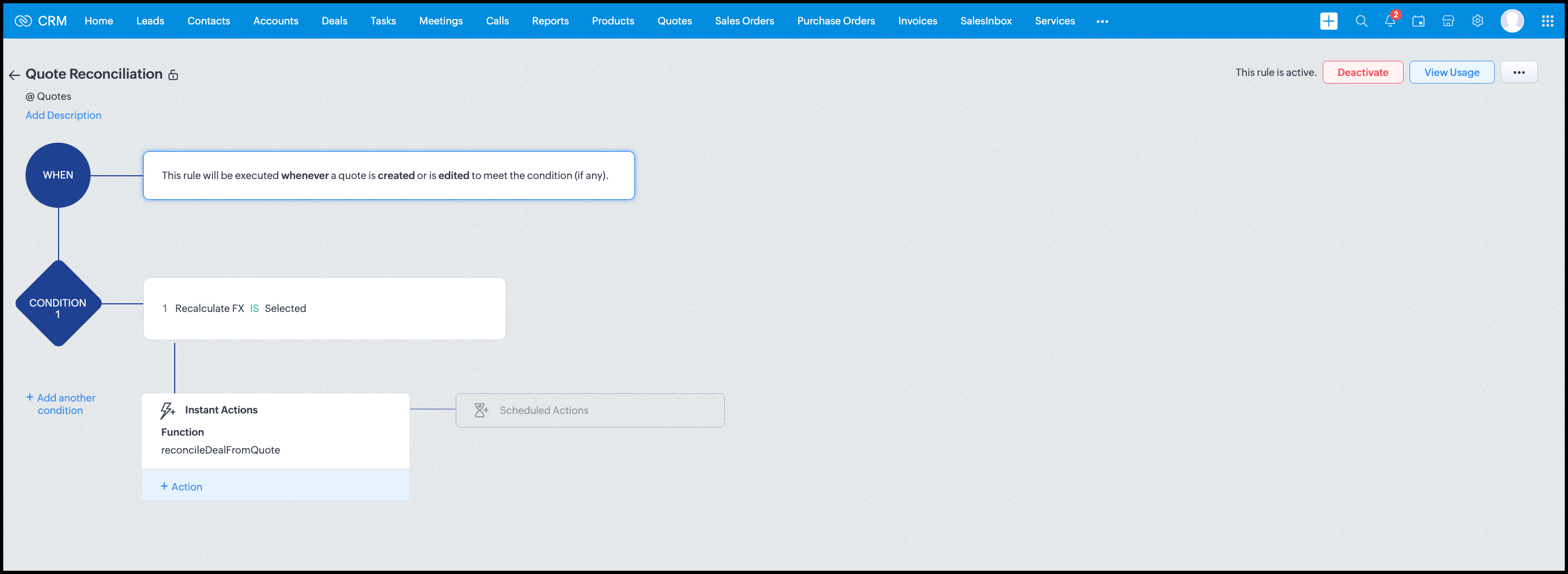
Condition: Recalculate FX = true
Action: Execute reconcileDealFromQuote
Argument: quoteId -> ${Quotes.id}

All decision logic lives inside the function.

Business Outcome

After implementing this pattern,
  1. Deals and quotes stay aligned with real-world behavior
  2. FX risk is measurable and auditable
  3. Renegotiation is policy-driven
  4. Reports reflect finalized values, not assumptions
  5. Sales and finance operate on the same truth.

Summary

Zoho CRM extends beyond static closures by reconciling deals against quote behavior. Functions plus Automation enforce pricing, limit exposure, and capture true outcomes reliably at scale.
The true value of this implementation is not the calculation itself, but the fact that it produces stable, auditable financial states that can be reused across reporting, approvals, integrations, and policy enforcement.

Further extensions

Executive reporting and dashboards

You can build Dashboards that answer questions like
  1. Total revenue before vs after FX reconciliation
  2. Total FX gain or loss by
    1. Region
    2. Currency
    3. Quarter
  3. Sales owner
  4. Percentage of deals renegotiated due to FX risk
Without the function,
  1. FX impact is implicit
  2. Numbers keep changing
  3. Finance does not trust reports
With the function,
  1. Final Accepted Amount is stable
  2. FX Impact % is explicit
  3. Reconciled On gives a time anchor

Policy enforcement and compliance

Examples
  1. Automatically flag deals where FX loss > 10% but status = Accepted
  2. Audit trail for
    1. Who recalculated FX
    2. When renegotiation was triggered
  3. SLA checks when Deals are not reconciled within 'X' days of quote creation
For many companies, FX policy violations are discovered at a later point in time, but you now enforce them at the moment of decision.

Sales coaching and deal hygiene

Unlock insights such as
  1. Which sales reps close deals with high FX volatility or frequently trigger renegotiation?
  2. Which regions or currencies produce unstable deals?
  3. Which deals are consistently over-optimistic at closure?

Other scenarios

  1. Approval and exception workflows
  2. Integration with ERP or accounting systems
  3. Predictive insights to forecast FX risk
  4. Historical snapshots for audit and analytics

We hope you found this post useful. Let us know your feedback in the comments or write to us at support@zohocrm.com.

Thanks!


=============================================================================


    • Sticky Posts

    • Announcing the new SKILL.md for Zoho CRM and the updated OAS repository!

      We are introducing a new zoho-crm skill to make working with Zoho CRM Developer tools (like APIs, functions, widgets, client scripts, queries etc) easier and faster, with the help of AI in your preferred AI harness like Claude Code, Codex, Cursor, VSCode
    • Kaizen #256 - Build an Arrival Readiness Web Tab in Zoho CRM

      Hi everyone! Welcome back to the Kaizen series! In the post, we discuss a use case in hospitality industry: how an Arrival Readiness web tab widget can be used to let reception staff identify and resolve issues before arrival of guests. Use case In the
    • Kaizen #198: Using Client Script for Custom Validation in Blueprint

      Nearing 200th Kaizen Post – 1 More to the Big Two-Oh-Oh! Do you have any questions, suggestions, or topics you would like us to cover in future posts? Your insights and suggestions help us shape future content and make this series better for everyone.
    • Kaizen #226: Using ZRC in Client Script

      Hello everyone! Welcome to another week of Kaizen. In today's post, lets see what is ZRC (Zoho Request Client) and how we can use ZRC methods in Client Script to get inputs from a Salesperson and update the Lead status with a single button click. In this
    • Kaizen #222 - Client Script Support for Notes Related List

      Hello everyone! Welcome to another week of Kaizen. The final Kaizen post of the year 2025 is here! With the new Client Script support for the Notes Related List, you can validate, enrich, and manage notes across modules. In this post, we’ll explore how
    • Recent Topics

    • I have been looking for CVID to get segmate list where & how can fnd it?

      I am trying to get segment details from the Zoho API. The API documentation says that the CVID is a mandatory parameter, but I cannot find the CVID in the "getmailinglists" API. Can you tell me where to find the CVID?
    • How do I increase the email attachment size in Zoho CRM ?

      It looks like I'm limited to 10MB when sending an attachment using the email widget on a record in Zoho CRM. Is there a way to increase the size? Or can I use some other tool? From what I'm reading online, I'm maxed out at 10MB. Any insight would be greatly
    • Introducing Incentives for Zoho CRM: Build, automate, and track sales commissions

      Dear Customers, We are here with an amazing news! We built a direct solution to help manage your commission provisioning activity in your business. From creating commission plans to issuing payouts, this application leverages your sales reps’ performance
    • Subforms and automation

      If a user updates a field how do we create an automation etc. We have a field for returned parts and i want to get an email when that field is ticked. How please as Zoho tells me no automation on subforms. The Reason- Why having waited for ever for FSM
    • Cannot format "start date" field in Zoho Flow

      I am trying to recreate a flow that connects Inventory package creation to Zoho projects (where a task is created in a defined project). I've been able to troubleshoot everything EXCEPT the date fields; specifically the "start date" - which is quite important
    • Dynamic Signature - Record owner

      Hi everyone, I’m using Zoho Writer merge templates from Zoho CRM and have two questions: Owner signature: How can I automatically insert the CRM record owner’s signature in the merged document? I’m not sure where this signature is stored or how to reference
    • Add ZeptoMail to Zoho One

      Hi Zoho Team, I would like to request that ZeptoMail be added as a fully included application within Zoho One. Why this is important Zoho One is positioned as a unified business operating system that brings the applications an organization needs under
    • GETTING THERE THANKS

      So we are still testing thanks to the great Zoho team for firstly getting pricelists working (essential) and writing some code to hide delivery and pickup options. Brilliant. So price lists are a definite mainly because of VAT. We run our Zoho books with
    • Time Zone is incorrect

      Time zone is not working properly...I've checked it twice. I'm eastern U.S. time it's currently 12:22 pm EST. CRM shows 3:22 pm EST.
    • CRM wants to access other apps and services on this device (Documents area)

      Did anyone else see this today? It only seemed to popup in the Documents area. Blocking it did not stop the ability to upload files there... Why is this coming up and what apps/services is it requesting in the background? Also, is it applicable elsewhere
    • Custom module - change from autonumber to name

      I fear I know the answer to this already, but thought I'd ask the question. I created a custom module and instead of having a name as being the primary field, I changed it to an auto-number. I didn't realise that all searches would only show this reference.
    • How can I populate dropdown data with information from another source or app?

      I want to maintain a list of items in another app (say in excel or another database) and sync those as items in a drop down menu, instead of copy pasting to import. Is this kind of a feature available?
    • Dynamic Field Folders in OneDrive

      Hi, With the 2 options today we have either a Dynamic Parent Folder and lots of attachments all in that one folder with only the ability to set the file name (Which is also not incremented so if I upload 5 photos to one field they are all named the same
    • Zoho Tables is now available in Zoho One!

      Hello Zoho One users, We’re excited to announce that Zoho Tables is now included as a part of Zoho One suite! As teams grow, managing projects, approvals, inventories, campaign trackers, and operational workflows across multiple spreadsheets become difficult.
    • Getting there -thanks

      So we are still testing thanks to the great Zoho team for firstly getting pricelists working (essential) and writing some code to hide delivery and pickup options. Brilliant. So price lists are a definite mainly because of VAT. We run our Zoho books with
    • Automatically remove commas

      Team, Please be consistent in Zoho Books. In Payments, you have commas here: But when we copy and paste the amount in the Payments Made field, it does not accept it because the default setting is no commas. Please have Zoho Books remove commas autom
    • #3 Making it look like my business

      Day 3: Meera had created her first invoice. The numbers were right, but something still felt unfinished. Her studio name was there, but the address did not look the way she wanted. Her logo was missing, and the invoice did not really feel like it came
    • Zoho Books - France

      L’équipe de Zoho France reçoit régulièrement des questions sur la conformité de ses applications de finances (Zoho Books/ Zoho Invoice) pour le marché français. Voici quelques points pour clarifier la question : Zoho Books est un logiciel de comptabilité
    • Scan & Fill with double quote key/value pairs

      Hi, An old Ticket moved to a Topic/Idea: I love the idea of the new Scan & Fill as it nearly covers my previous request for a QR Scanner to read a multi-part QR Code. My QR Codes are hard-coded as below: {"key1":"value1","key2":"value2","key3":"value3"}
    • Increase the "Maximum Saved Entries per User" Options Limit

      Hi, You can create lots of saved entries, yet the Limit when you apply one is 25, we may often expect 32 to be in draft, and therefore want to enforce that, can we increase the limit of this field from 25 to 100 (As you can just turn it off and have more
    • HEIC File Type Viewer

      Hi, It would be nice to be able to click on the images in the All Entries/Reports Tables which are HEIC the same as JPG, PNG, etc. so they open in a viewer from Zoho or the Attachment Service, today HEIC requires you to download each image and open it
    • Map Dependency Upgrades in Zoho CRM

      Map Dependency Fields enhancements are now available across all DCs. Hello everyone, We’ve introduced a set of enhancements to Map Dependency Fields to make setup simpler, faster, and more intuitive. Map Dependency helps control how values appear across
    • Specific ListView Canvas on Canvas Home Page Always Loads Most Recent ListView, Not the One Specified

      I had mentioned this to ZOHO, but I mainly wanted to see if others in the Community are also facing this problem. I created a Canvas ListView for a Custom Module, and then created a Canvas Home page (technically on a tab item, but I'm not sure if that
    • Programmatic Itemized Expenses?

      It does not appear that it is possible to create itemized expenses programmatically (via the API)? Is this correct, or am I misunderstanding the situation?
    • Zoho Forms Submission URL

      Hi Zoho, It would be great to have a URL which can take us to specific form entries. For example: https://forms.zoho.eu/ACCOUNTNAME/report/FORMNAME/records/UNIQUE-REF I currently have a use case where I want to use Zoho Flow to create a module entry in
    • Optional Parameter in Deluge Sendmail function to link email to record

      I love sendmail - it offers flexibility (and, with standalone functions, commonality with minimal maintenance) over the years the templates hadn't offered. I understand the templates have come a long way, but I still prefer sendmail most days. That said...
    • Zoho CRM Functions: Redesigned Interface, Rich Analytics, and Multi-Language Support

      Hello everyone! We have given Functions in Zoho CRM a major overhaul with a new interface that makes it easier to build, organize, monitor, and troubleshoot your functions throughout their lifecycle. As part of this revamp, we have also introduced a unified
    • 📣 And the Bigin Customer Award winners are...

      50+ entries. Customers from across the globe. So many great Bigin stories. And now, it's time to celebrate the people who stood out. We launched the Bigin Customer Awards to see how businesses are using Bigin in their own unique ways, and you did not
    • Report Configuration - Unable to select "File_Upload" under Supporting Document

      Good day everyone. I encounter this issue whereby i have difficulty to select "File_Upload" under Supporting Document when i configuring my report. Ps: I have create Supporting Document in Zoho creator form as subform and the add this "File Upload" inside
    • Zoho CRM Multi-select values not translated

      Hello! I have some issue with translate custom multi-select fields in zoho CRM in other language. I download export file, but it has all my custom fields and picklist values exept multi-select fields picklist values.  Please, help me to undestand, is
    • Go Multilingual with Instant Bot Auto-Translation

      Imagine you run a travel company with customers across different regions. Your website chatbot helps visitors discover travel packages, answers questions, and makes bookings. As your business expands into new markets, you want to offer the same experience
    • Create Flexible Layouts with Layout Rules

      In a project, when a work moves from planning to execution, the information teams need can change at every stage. A project can need one set of details, a phase can need another, and a custom process may require an entirely different set of information.
    • Zoho Sites after login page blank

      after i login to zoho sites, it stalls at a blank screen please help
    • Map My Client Locations for Zoho CRM Extension: Turn CRM Addresses Into Action

      Hello everyone, Your CRM knows who your customers are. Now, see where they are on the interactive map directly from Zoho CRM. Introducing Map My Client Locations for Zoho CRM, an extension built for businesses that rely on sales visits, field service,
    • Find the conversions hiding outside your funnel: User Journeys is now live in PageSense

      Hello Everyone, We are excited to announce that User Journeys is now live in Zoho PageSense. Here is what that means for you. Funnels are great for one thing. They tell you how the path you designed is performing. Homepage to product to cart to checkout,
    • Zoho CRM Error message #2 : Fixing [Invalid Credentials] and [Authentication Fail] while configuring IMAP

      Hi Everyone! As a part of our Zoho CRM Error messages series, we're going to focus on couple of error messages that you might encounter while configuring IMAP and ways to resolve them. These are: [Invalid Credentials] [Authentication Fail] The annoying
    • Zoho Community Digest - August 2026 | Part 4

      Hi everyone, and welcome back! We're closing out August with a strong final week, from Incentives for Zoho CRM bringing commission management inside the platform to Sequences in Bigin automating customer follow-ups end to end. There's also an IP allowlist
    • Related Lists: Consolidate cross-module data

      A new and efficient way to connect your project data across the boundaries of modules, entities, and applications. Introducing related lists to incorporate related records from any module, entity, or external source directly into the detail view of a
    • Zoho Workshops in Frankfurt a.M. | 07. & 08. Oktober 2026 | Nur noch 1 Monat

      Liebe deutschsprachige Zoho Community, Nur noch einen Monat bis zu den Zoho Workshops in Frankfurt! Am 7. und 8. Oktober ist es soweit: Die Zoho Workshops kehren zurück und finden dieses Mal im Radisson Blu Hotel, Frankfurt am Main, statt. Wenn Sie Ihre
    • Billing Status and WO Status Field Colors -

      Hello Team, I noticed that the colors of the Billing Status and WO Status fields in the WO module have been changed. (Org ID:170000078905) This is not urgent to correct, but I wanted to bring it to your attention so you can check whether this is a system
    • Next Page