Announcing Zoho Analytics 6.0 Beta!
We are delighted to open up the next major version, Zoho Analytics 6.0 Beta! The new version comes packed with a wide range of functionalities for all persona, namely business users, data analysts, data engineers, and data scientists. Zoho Analytics team has meticulously developed these functionalities with a focus on current and future business needs, incorporating valuable user & market feedback.

New capabilities in Zoho Analytics 6.0 Beta includes more data connectors, new visualizations, new interactions, advanced analytical models , the ability to build custom ML models, and 60+ features.

Note: 6.0 Beta is now available in all paid plans to try out. Features available in specific plans are annotated inline.
1. Data Connectors & Data Management
New Connectors
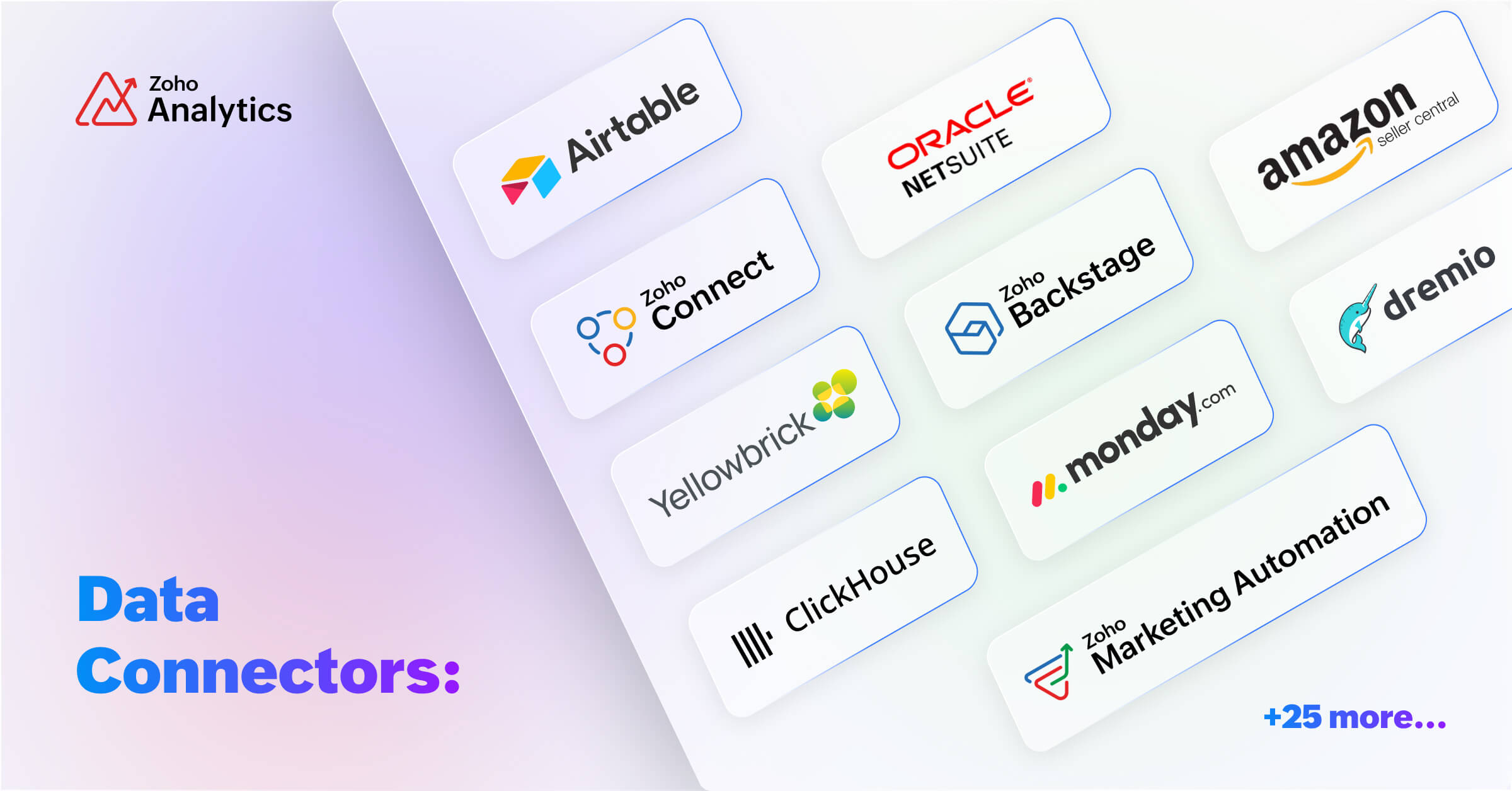
We are expanding our already available 500+ data connectors with 25+ new connectors for big data platforms and business applications that includes Yellowbricks, ClickHouse, Dremio, Zoho Connect, Zoho Marketing Automation, Zoho Backstage, Amazon Seller Central, Airtable and many more.
Also, managing data has now become easier with the following features -- Audit history, Sync history, and Import roll back.
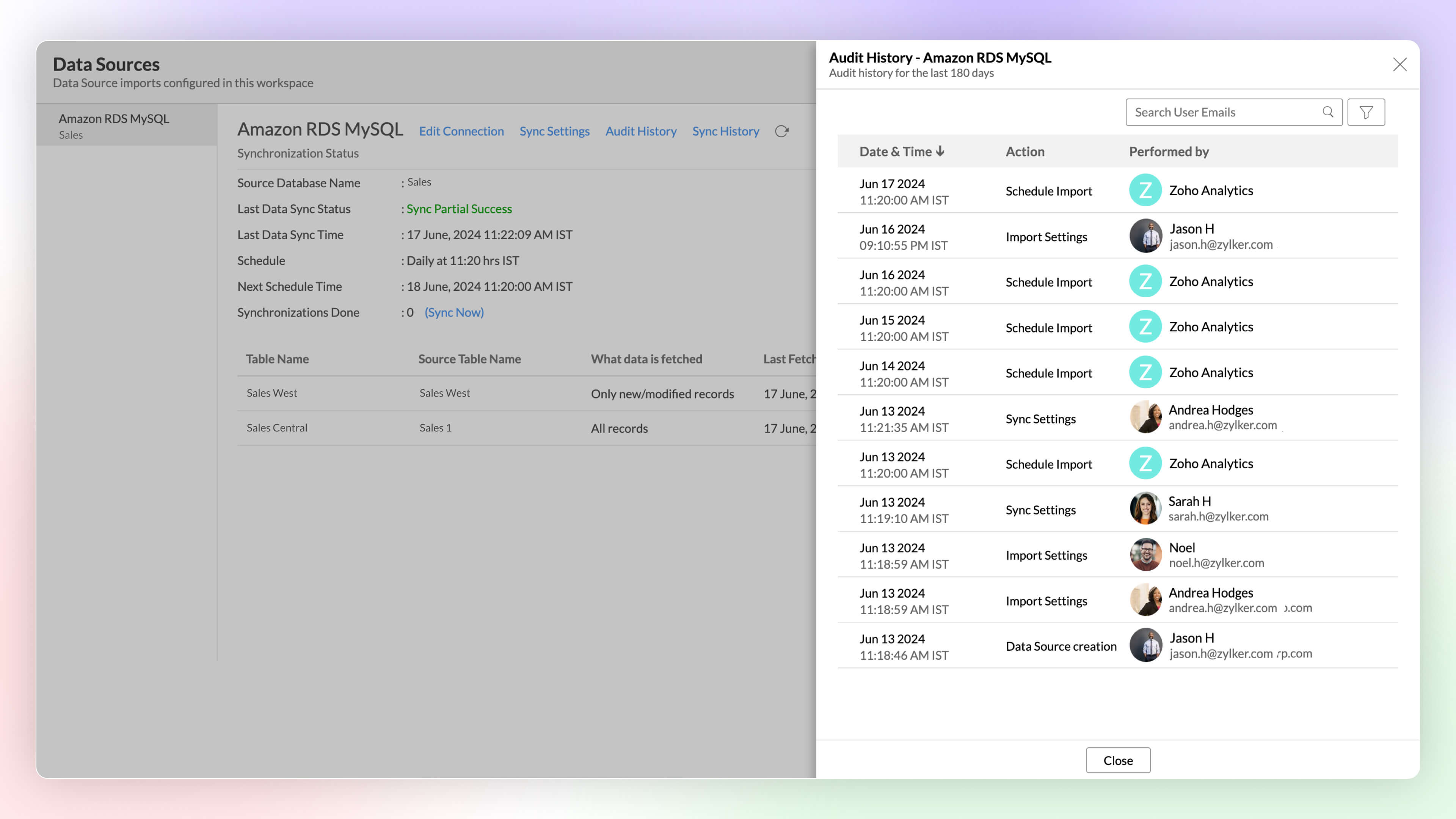
Audit History
Audit logs are crucial for maintaining security and troubleshooting issues. They provide a comprehensive record of user and system Actions, including details of the time when the action occurred and information about the administrator who performed the action.
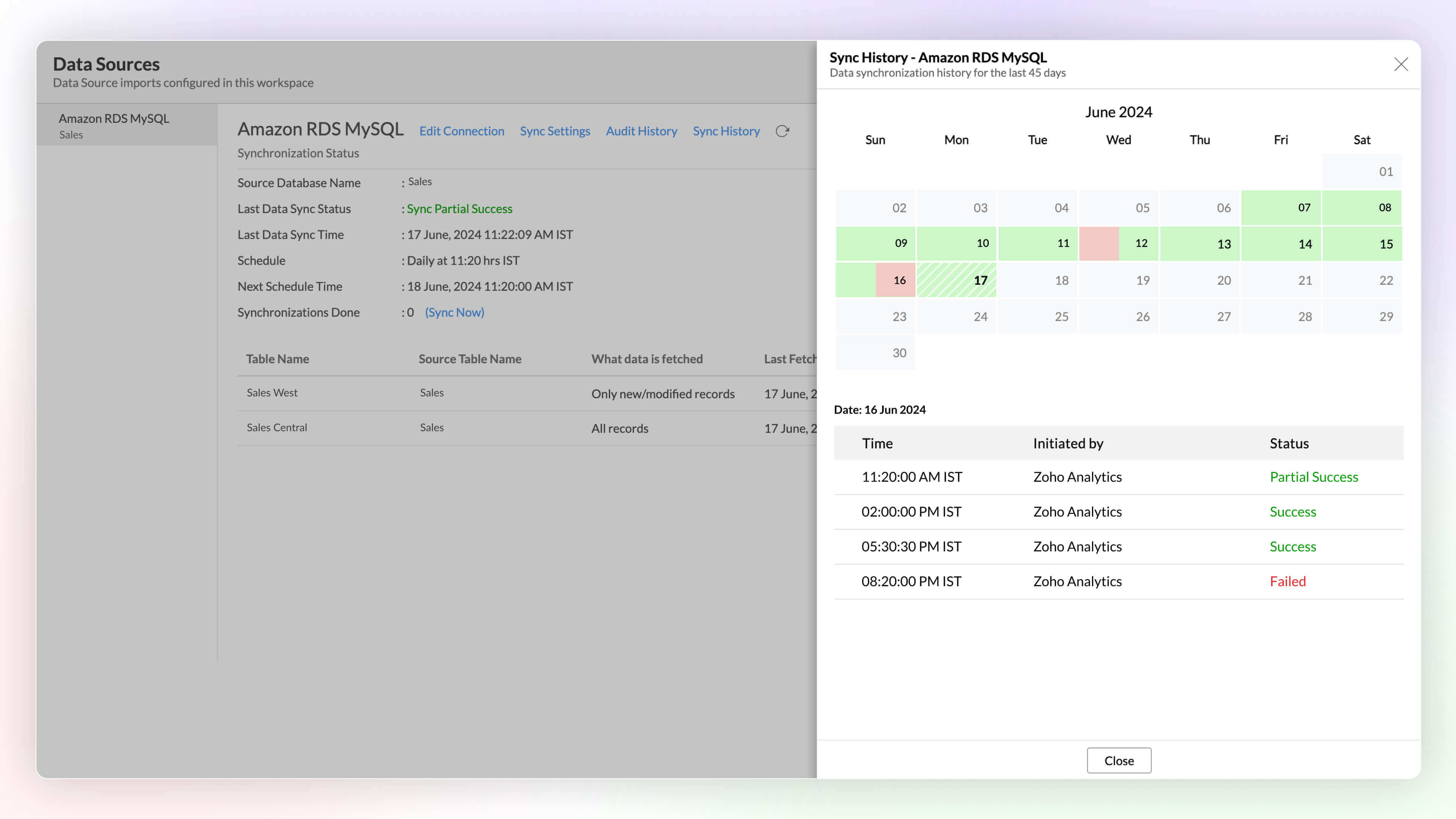
Sync History
Sync history provides a detailed record of data synchronization activities, making it easy for the administrators to track the status of each data sync. The sync operations are color-coded for immediate recognition. Successful data syncs are indicated in green, and failed data syncs are marked in red with the reasons for failure along with the necessary action to be taken.
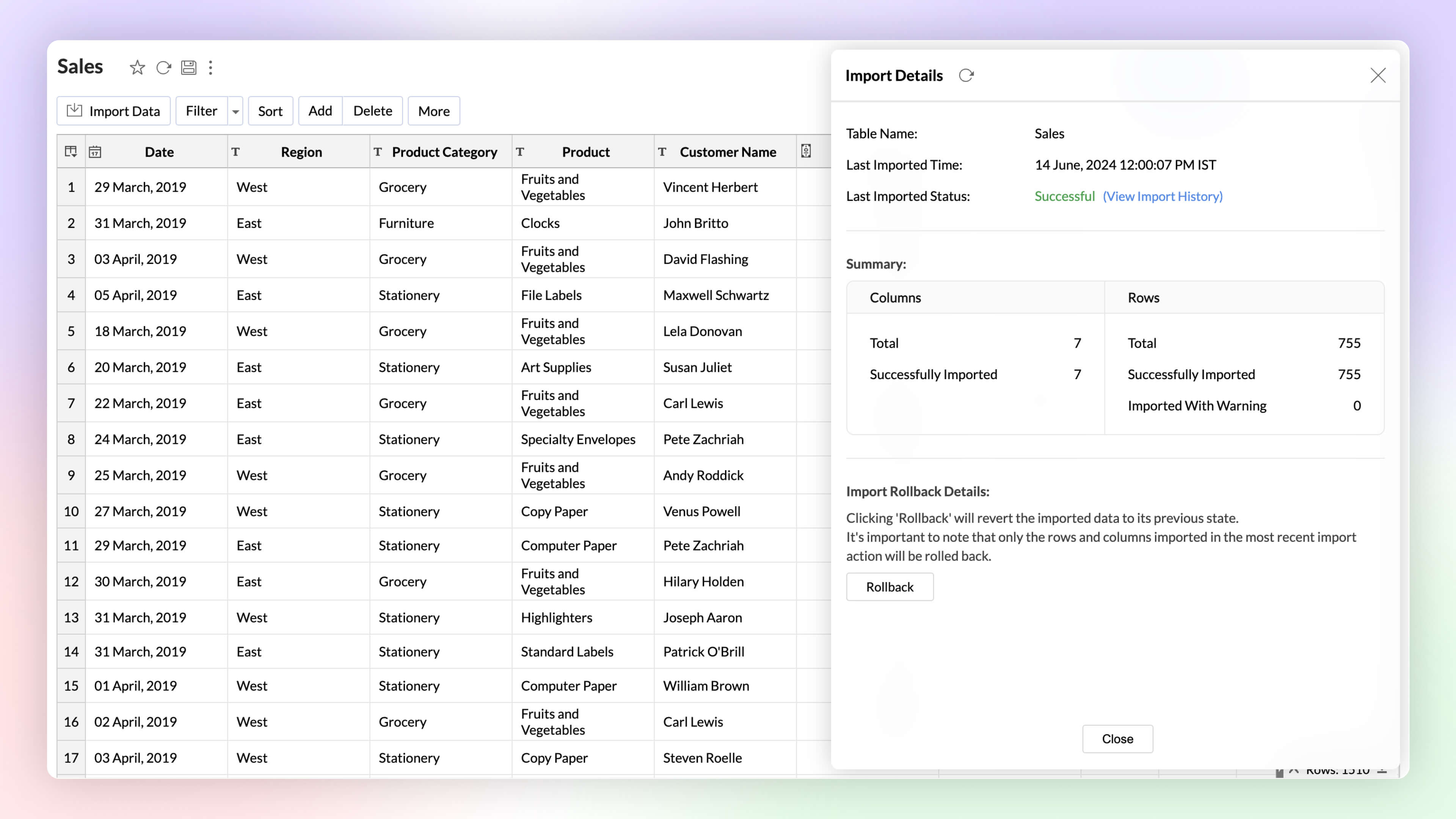
Import Rollback 
Automated imports can sometimes have errors and inconsistencies in data, and this can affect the data quality and the results. The import rollback capability reverts the current data import version to its previous version without affecting the existing data flow and analysis, ensuring data integrity.
Unified Metrics
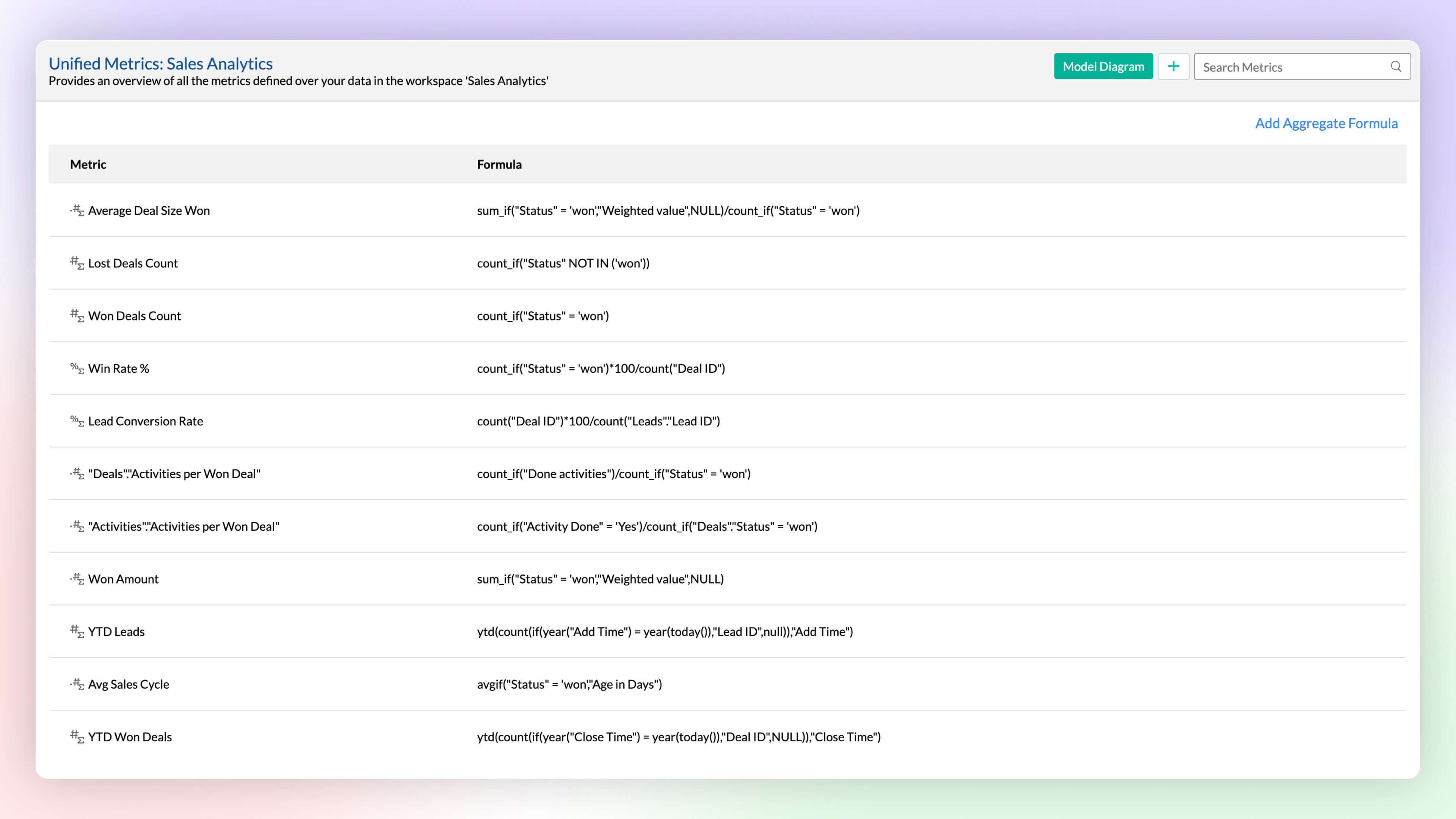
Workspace will have data imported from varied sources, and each data source or table will have different metrics (aggregates) computed for analysis. A unified metrics consolidates all the metrics used across the workspace, helps in standardization, promotes usage, and avoids duplication.
Data Bucketing
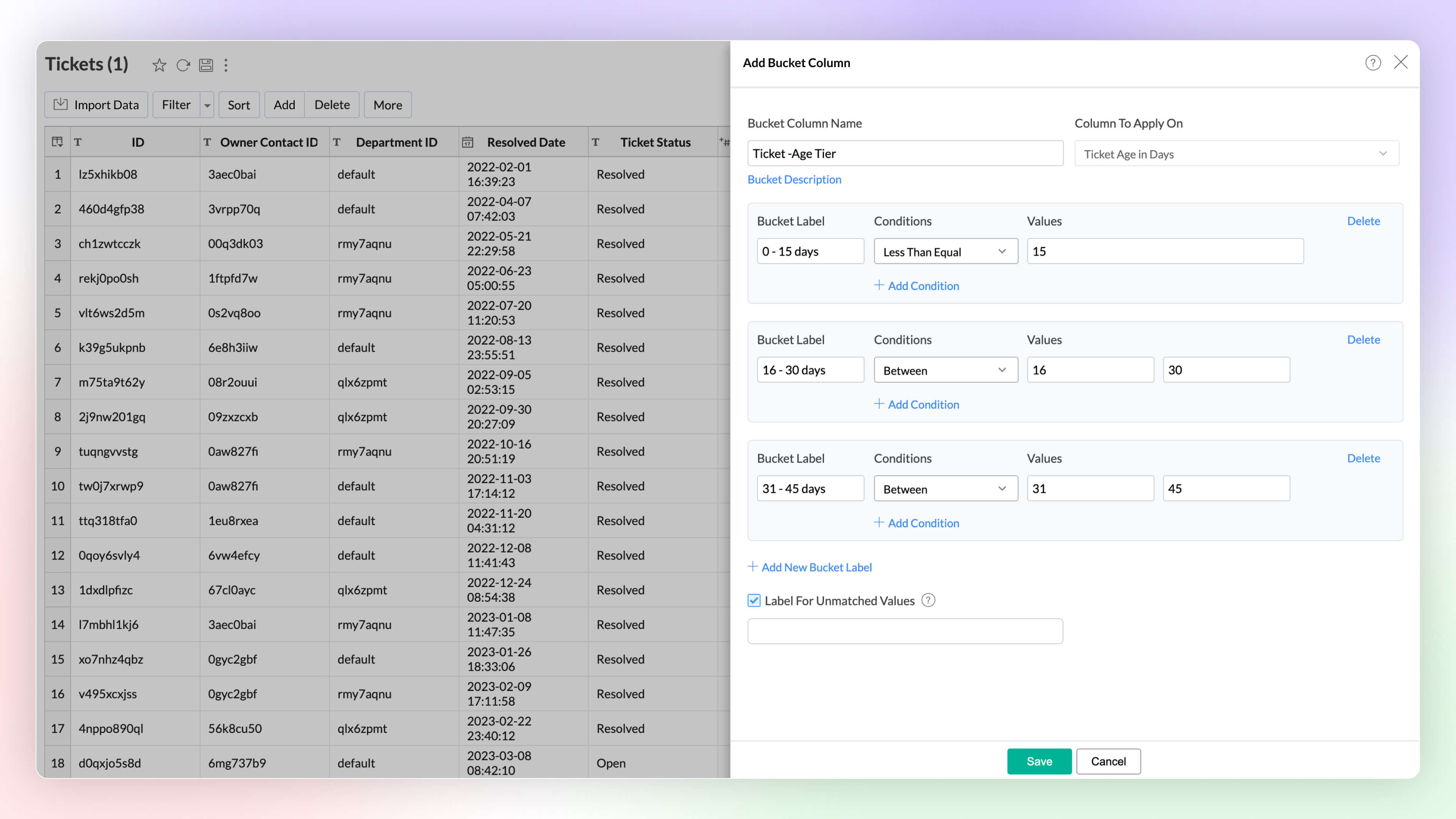
Categorize or group data points easily with the Bucket Columns options in Zoho Analytics. (Until now, users had to write formulas to achieve this; now, it is available as an inbuilt option.) Bucketing reduces the number of distinct values (cardinality). It facilitates the transformation of numerical data into different categorical bins and makes data analysis easier.
2. Visual Analytics
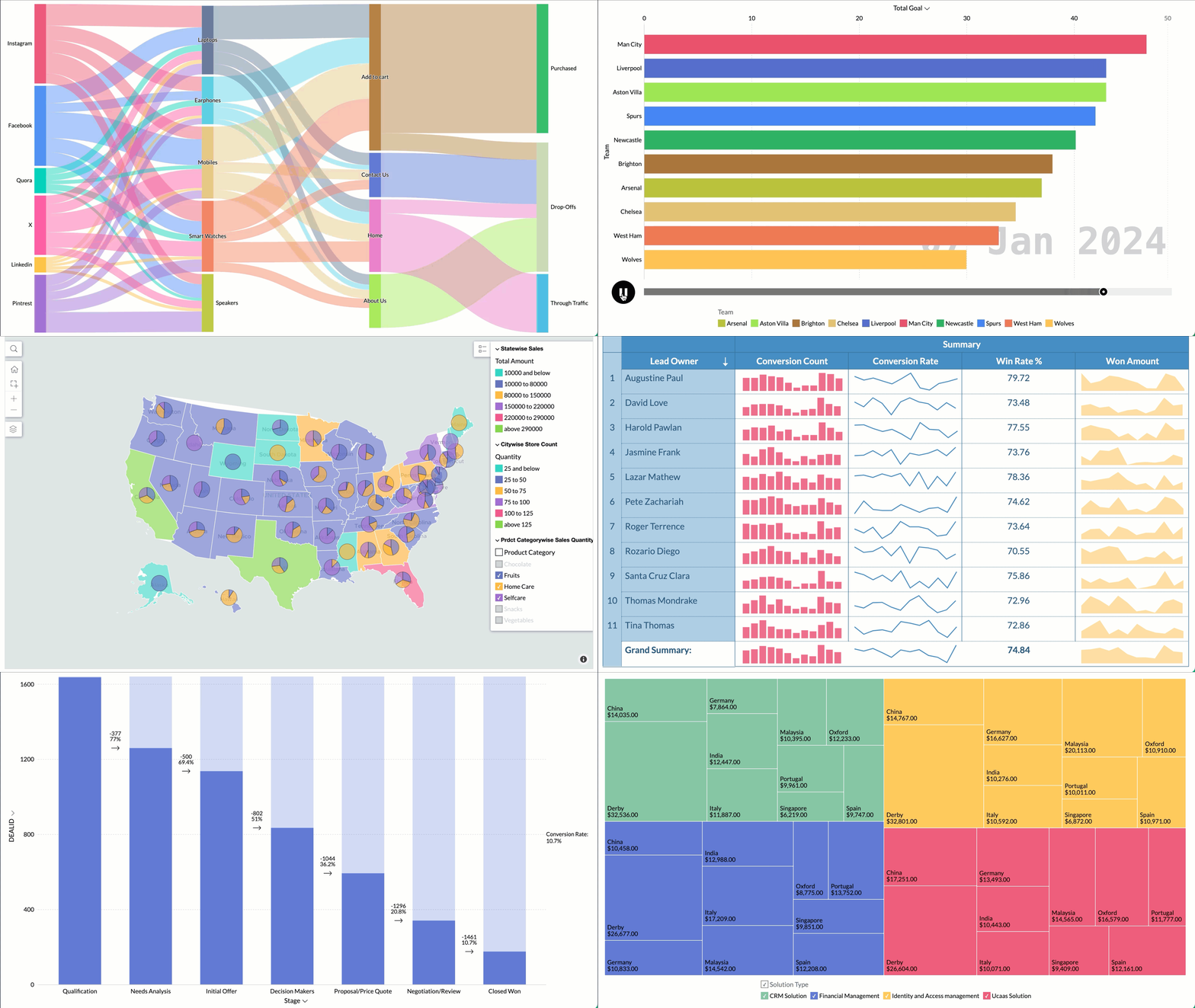
Zoho Analytics supports 7+ new chart types (on top of 50+ existing ones) with extensive customization options to enhance the presentation and interpretation of the data.
- Sankey charts are best suited for visualizing the flow of any process, as they clearly capture the movement of data from one point to another. It helps understand the movement of events through interconnected lines.
- Racing charts are animated views that are best suited for visualizing the changes in the data over a period of time where the relative ranking of categories is important. They highlight and help comprehend the fluctuations and progression in the data. These types of charts grab the user's attention instantly, providing an immersive experience and helping craft a compelling story about the data.
- Spark lines are compact charts that show the trends and variations in the data without taking up much space. They are widely used alongside pivot tables and help grasp trends and allow quick comparison of metrics across different fields. Zoho Analytics supports three variations that includes line chart, area chart, and bar chart.
- Geo Map Layering, add multiple data layers to the geo map to visualize various dimensions of information. This feature includes interactive options for enhanced data exploration.
- Sunburst charts represent hierarchical data through a series of rings, or concentric circles. Each ring corresponds to a level in the hierarchy. The central or innermost circle represents the root node, or the top-level category. Moving outwards, each subsequent ring represents a subcategory, where the outermost ring is the leaf node. The size of each arc in the ring is proportional to the value of the data.
- Conversion bar charts show the connected stages of a process and the gradual decrease in data as it moves through different stages of the process. Each stage is represented by a bar, with a step or stair case pattern indicating the shift in values (along with conversion percentage) at each stage.
- Tree Map is a visualization composed of differently-sized rectangles that represent your data values. This is beneficial when you want to depict the part to whole relationship among various categories.
Zia Suggestions
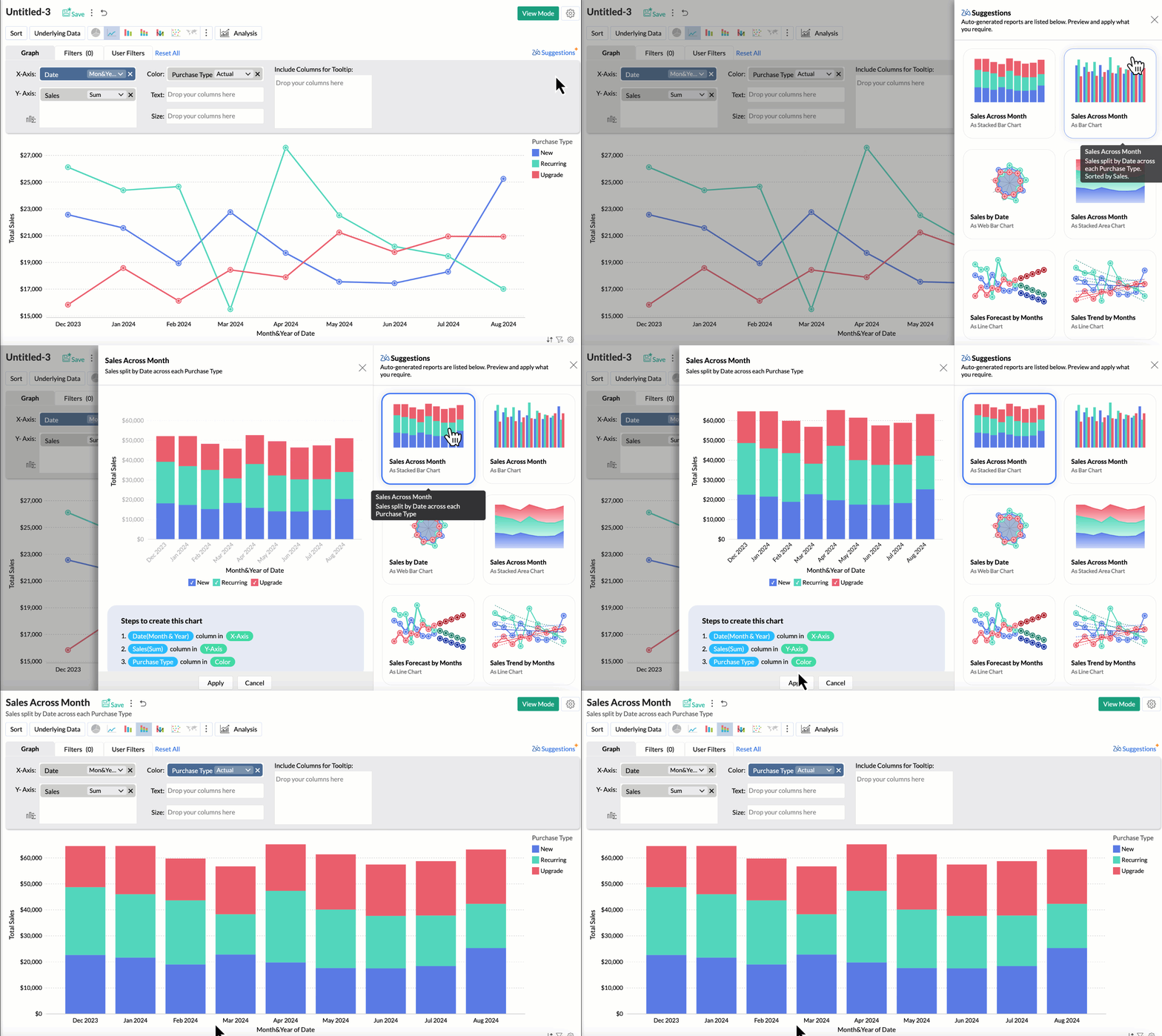
Now, with the new Zia Suggestions, you can effortlessly receive insightful chart recommendations while you are in the creation process. Zia suggests a variety of charts suggestions tailored to your data, allowing you to preview and apply them seamlessly with just a click.
Global User Filter in Dashboards
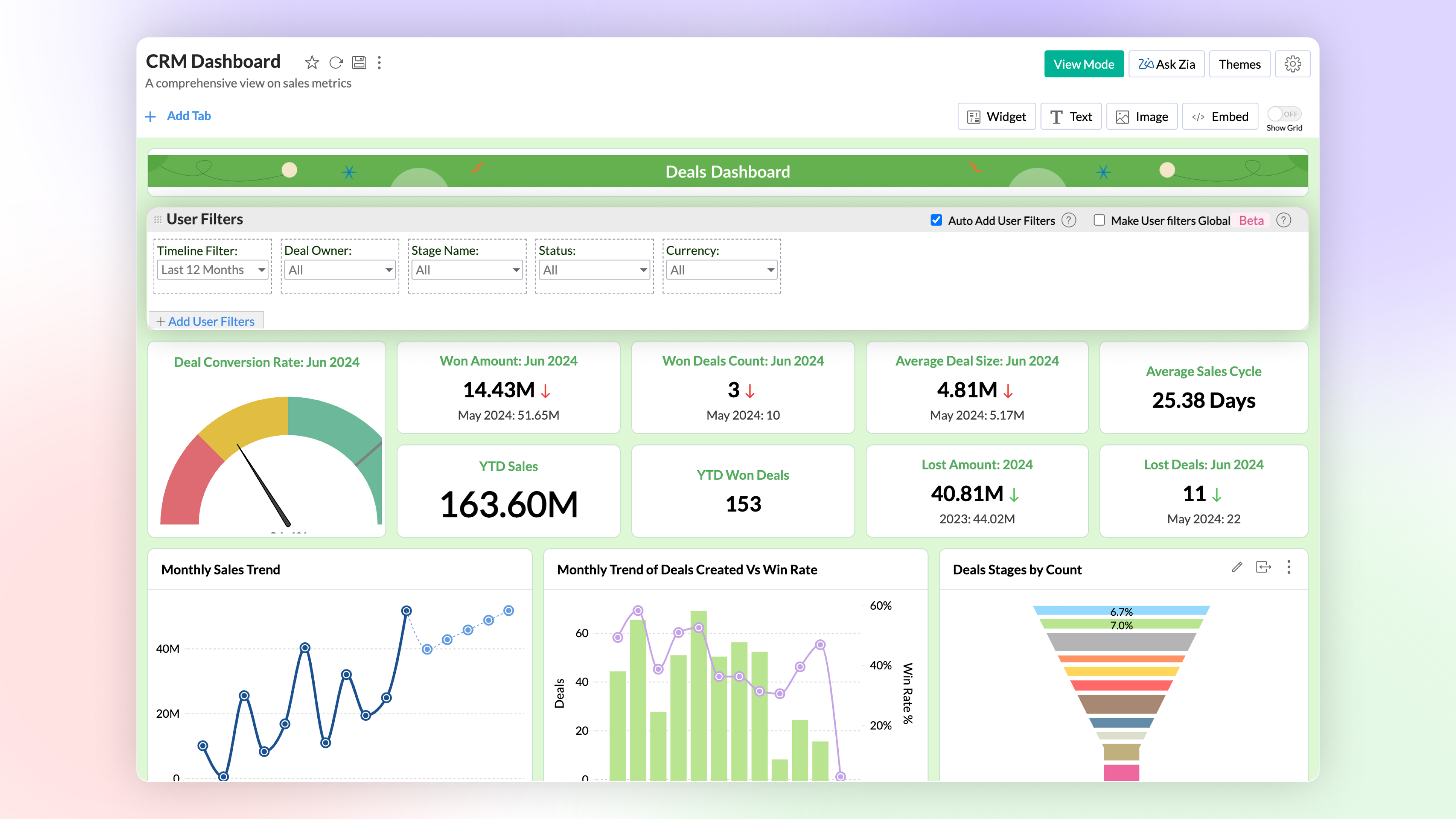
You can now have a common user filter across all tabs in the dashboard. Global user filter gets applied across all reports in all tabs of the dashboard.
3. Advanced Data Analytics
Zoho Analytics now supports two more advanced data analytics methods: Anomaly Detection and Cluster Analysis.
Anomaly Detection 
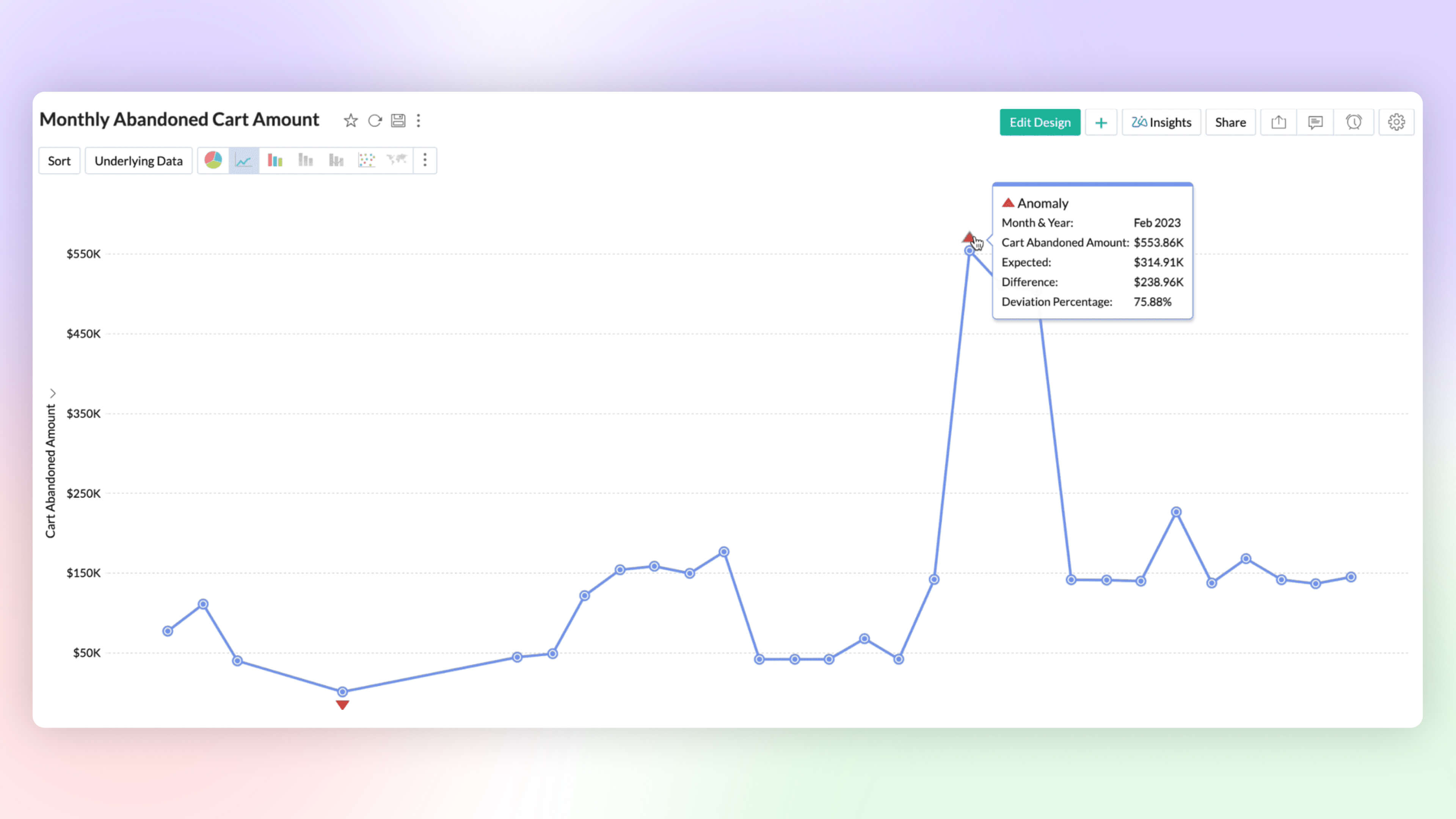
Anomaly detection helps you to flag outliers in your data or metrics easily. You can now create charts which highlight anomalous points visually for your attention and action. Zoho Analytics deploys robust ML algorithms and various statistical models for detecting outliers.
Cluster Analysis 
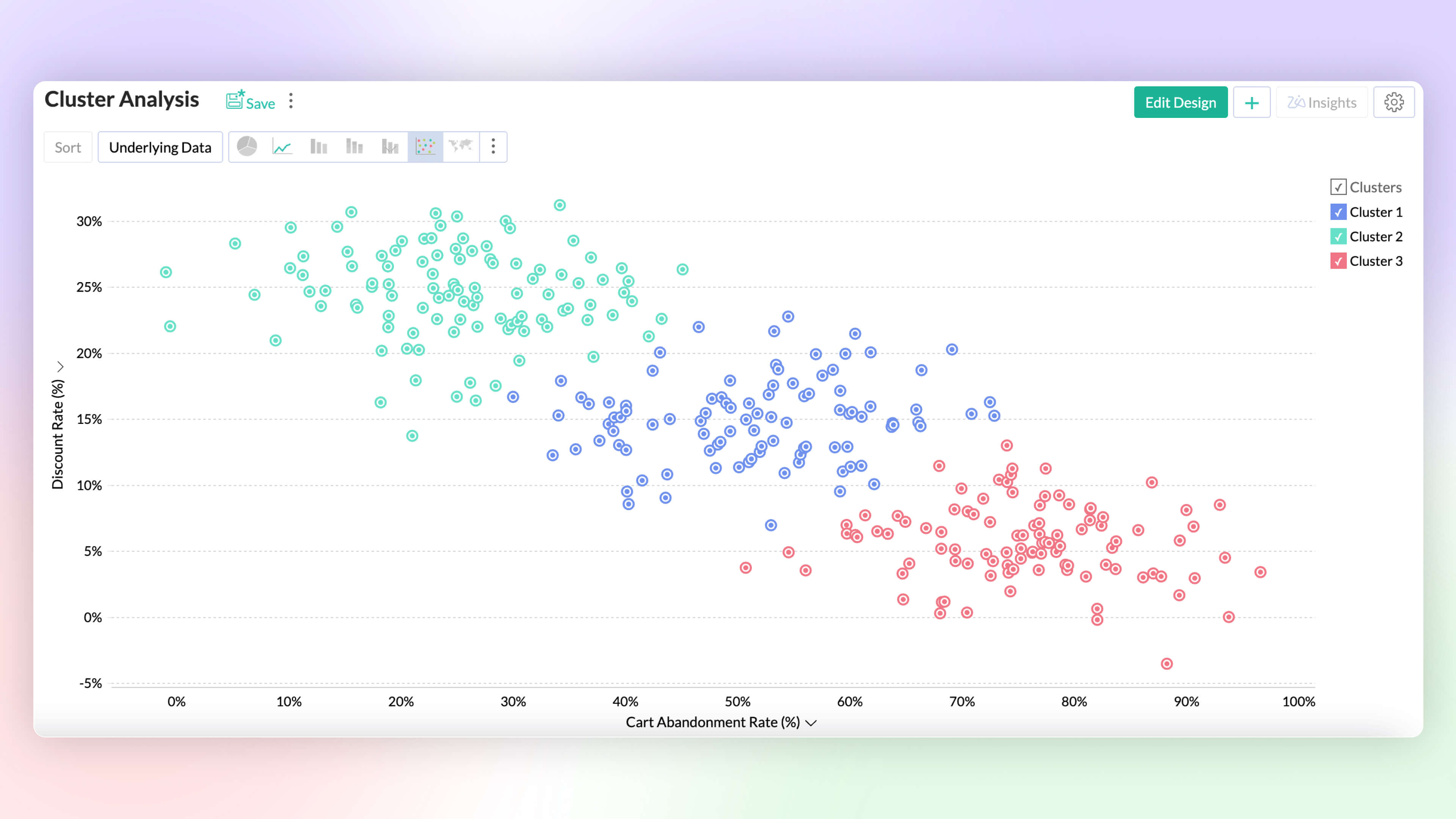
Cluster analysis groups similar data points together based on certain factors or conditions. Each cluster contains data points that are more similar to each other than to those in other clusters, reducing the complexity of the data. Zoho Analytics deploys K-means, K-modes and K-prototypes algorithms for clustering the data points.
Alerts Based on Threshold and Anomalies
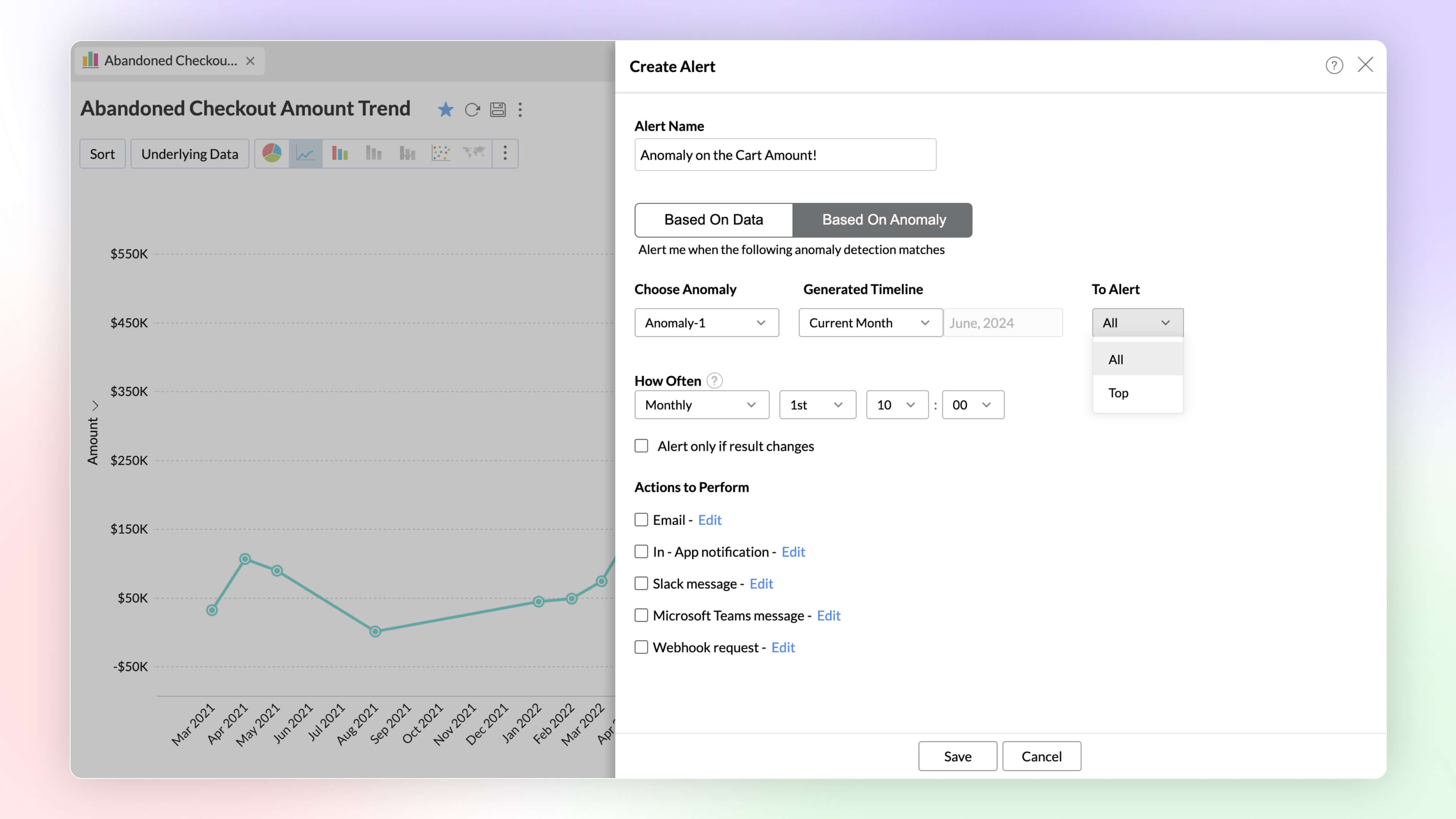
Set data alerts based on thresholds and anomalies to ensure timely identification of vital change in the key business metrics and potential issues.
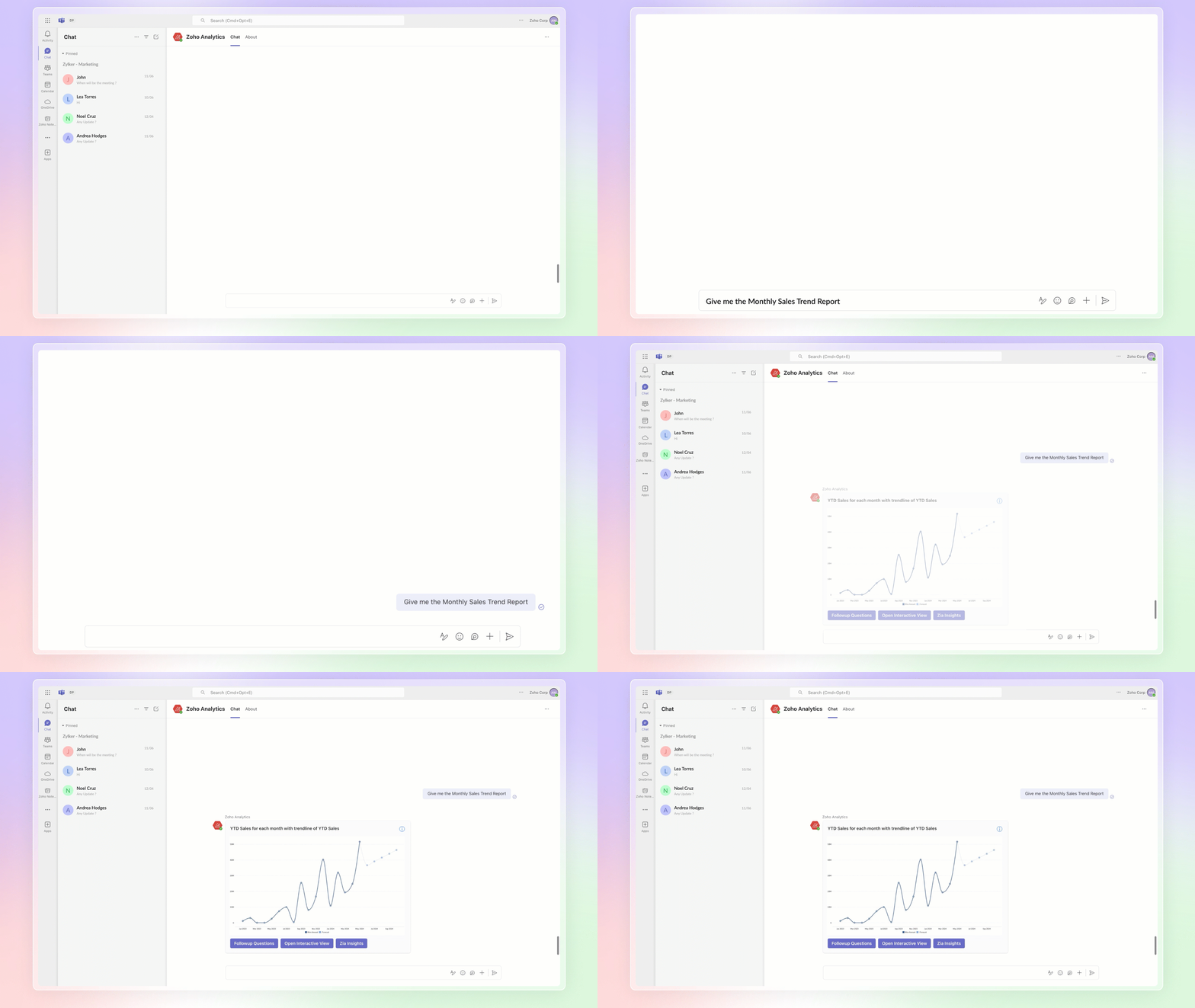
Ask Zia Bot in Microsoft Teams
Combine the generative AI capabilities of Zoho Analytics' Ask Zia with Microsoft Teams. Get answers to your data queries, access key business insights quickly, predict future trends, and build reports right from within Microsoft Teams with Ask Zia bot.
4. Build your ML Models with AutoML & Code Studio
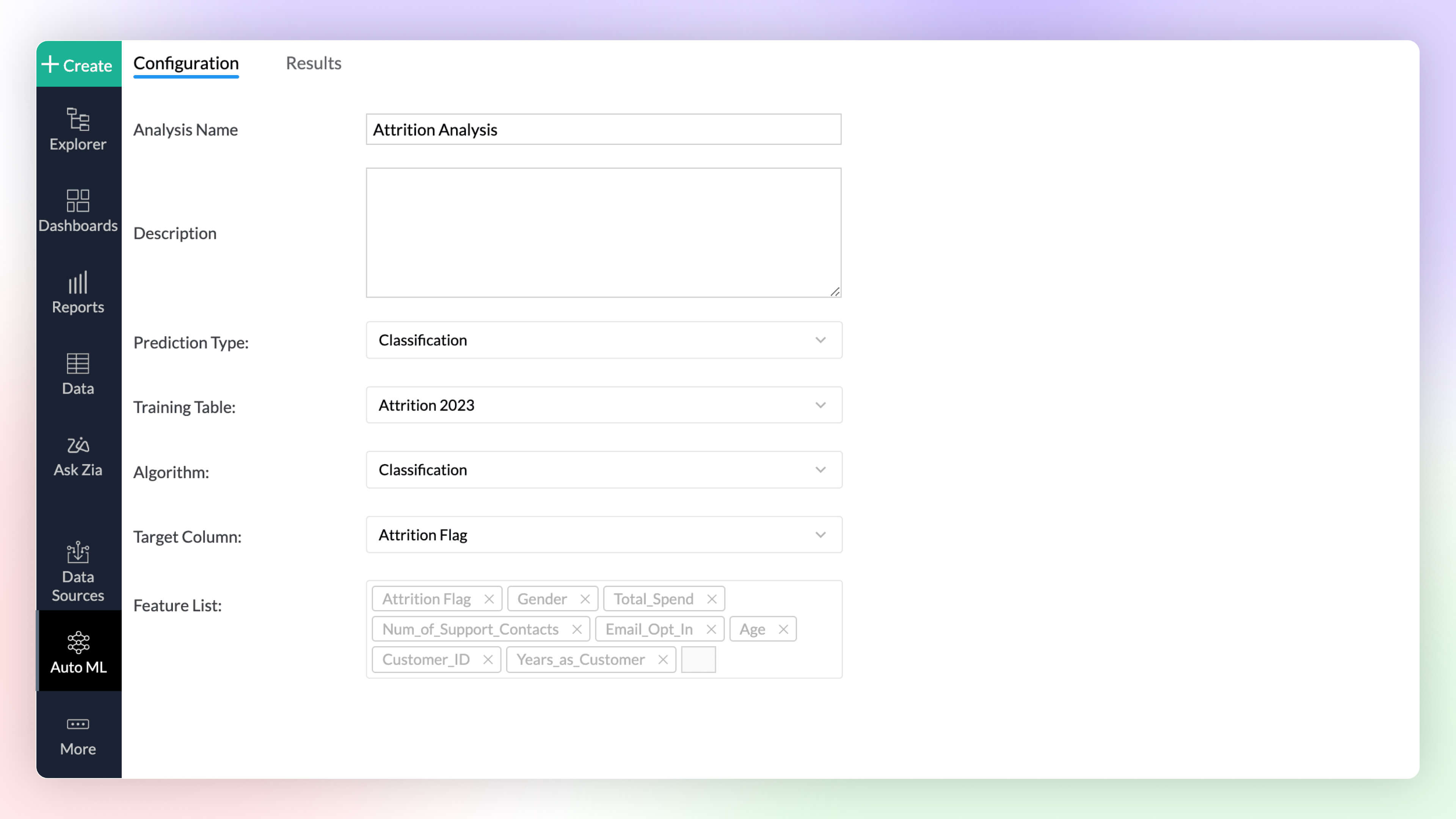
Auto ML 
Automated machine learning provides a code-free (low-code/no-code) experience to train, verify, and build custom machine learning models with high efficiency. The simple and user-friendly design makes it possible for people with varied data-level expertise to create ML models easily for their custom needs.
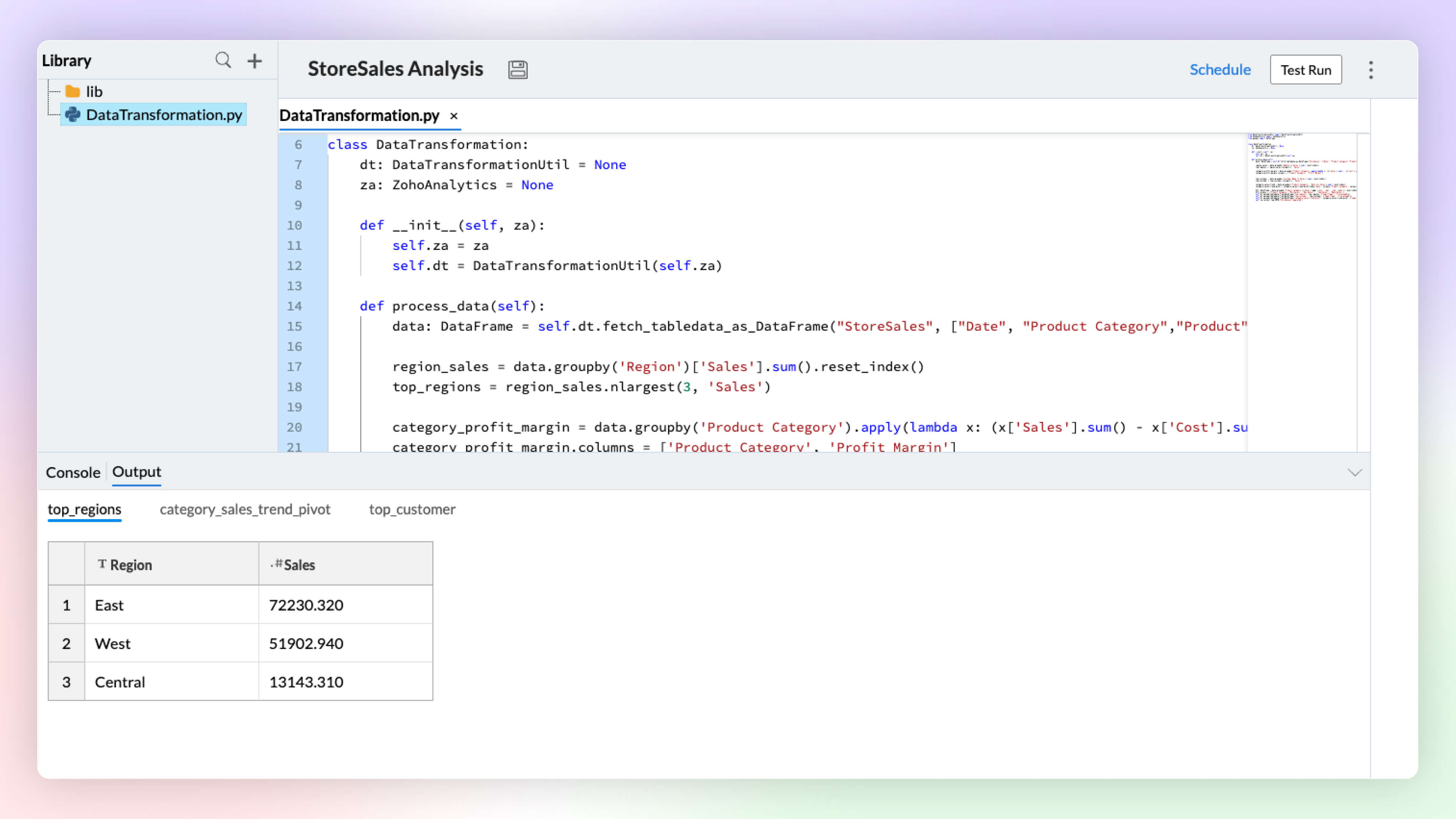
Code Studio 
Python Code Studio enables you to build/import custom logic and ML models for your specific data preparation, transformation, enrichment, and analytical modeling needs.
5. Data Storytelling
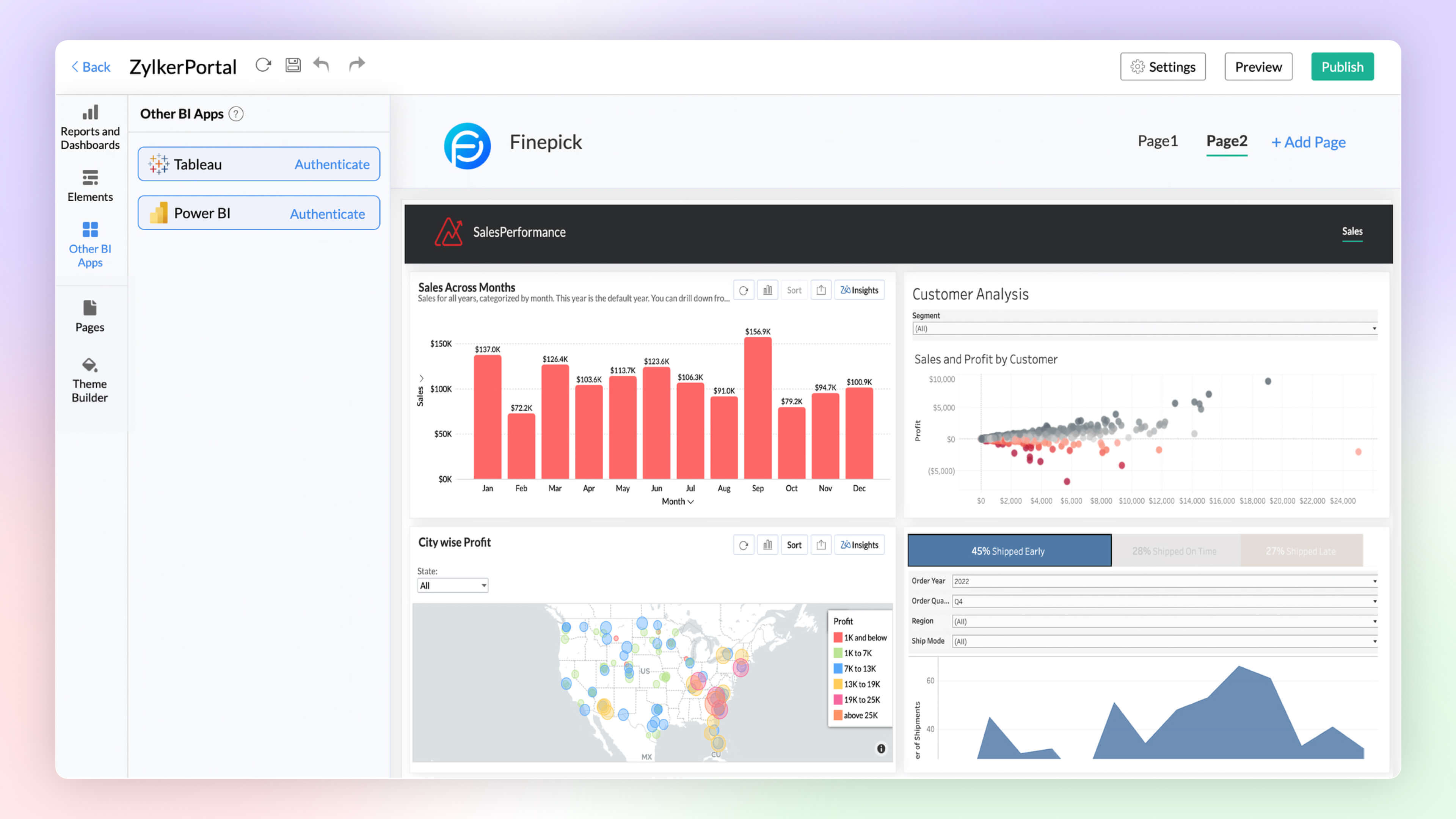
BI Fabric
Create unified BI portals for your organization's business needs. Collate reports from other BI applications like Tableau and Power BI. Having a unified portal improves collaboration, promotes centralized accessibility, and makes it easy for C-level executives to make robust business decisions.
Visual Zia Insights
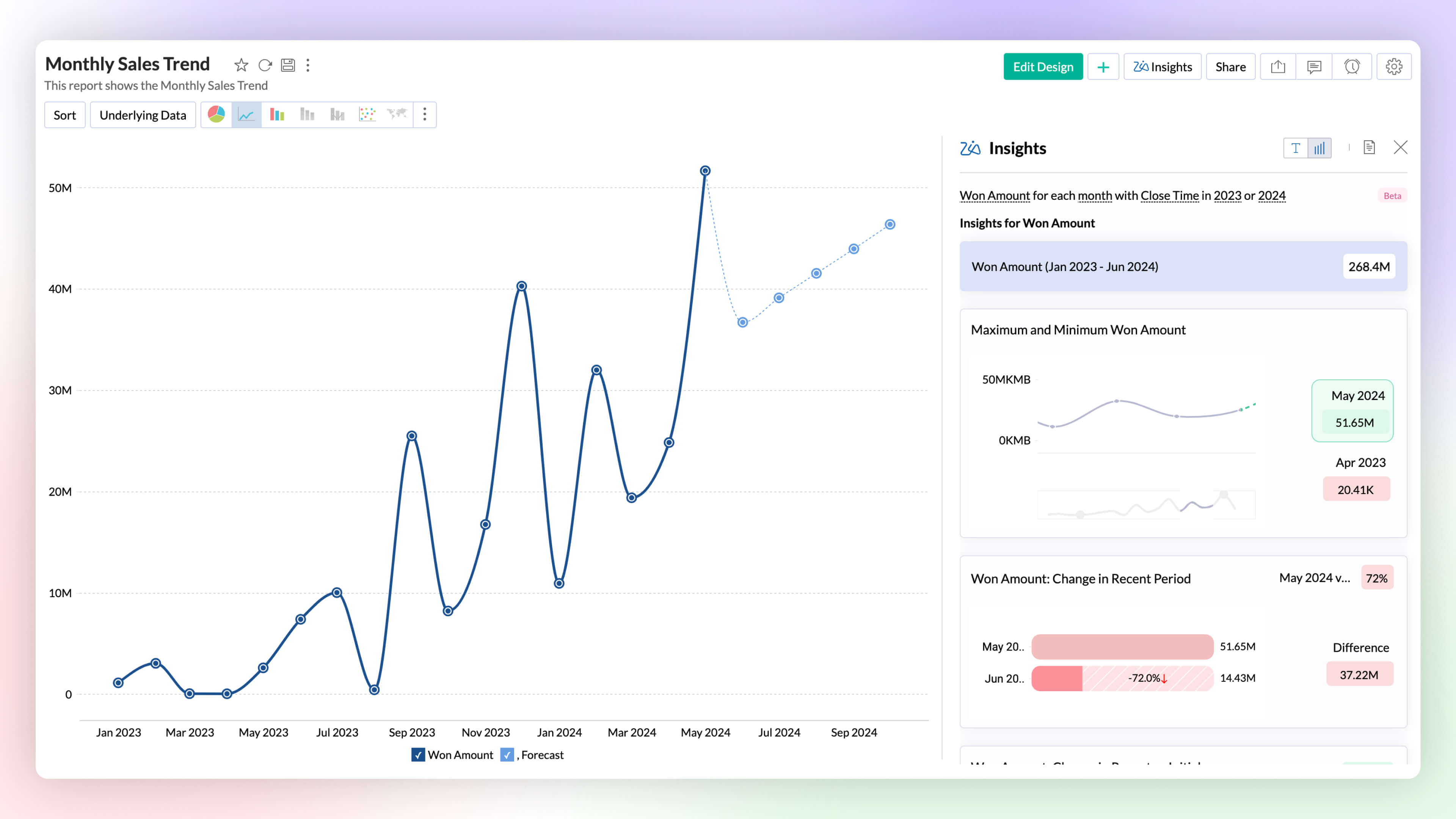
Zia Insights now provides visual narratives! Visuals help process information far more efficiently than lengthy text descriptions. These visuals facilitate multi-dimensional interpretations like comparison, contribution, distribution, trends and proportions.
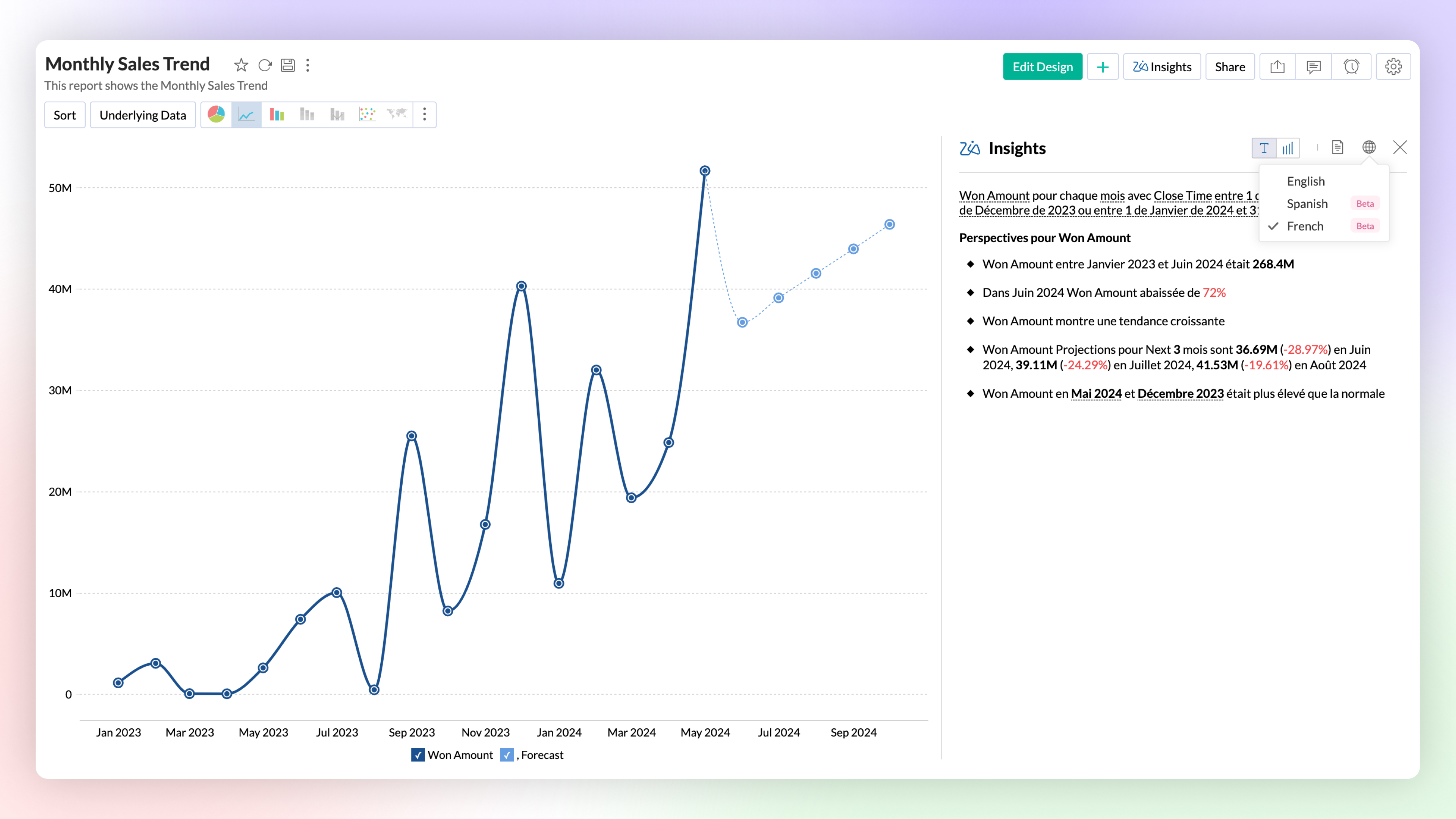
Zia Insights -Multilingual Support
Zia Insights is now available in French and Spanish. Users can choose their preferred language when accessing Zia Insights for a specific report.
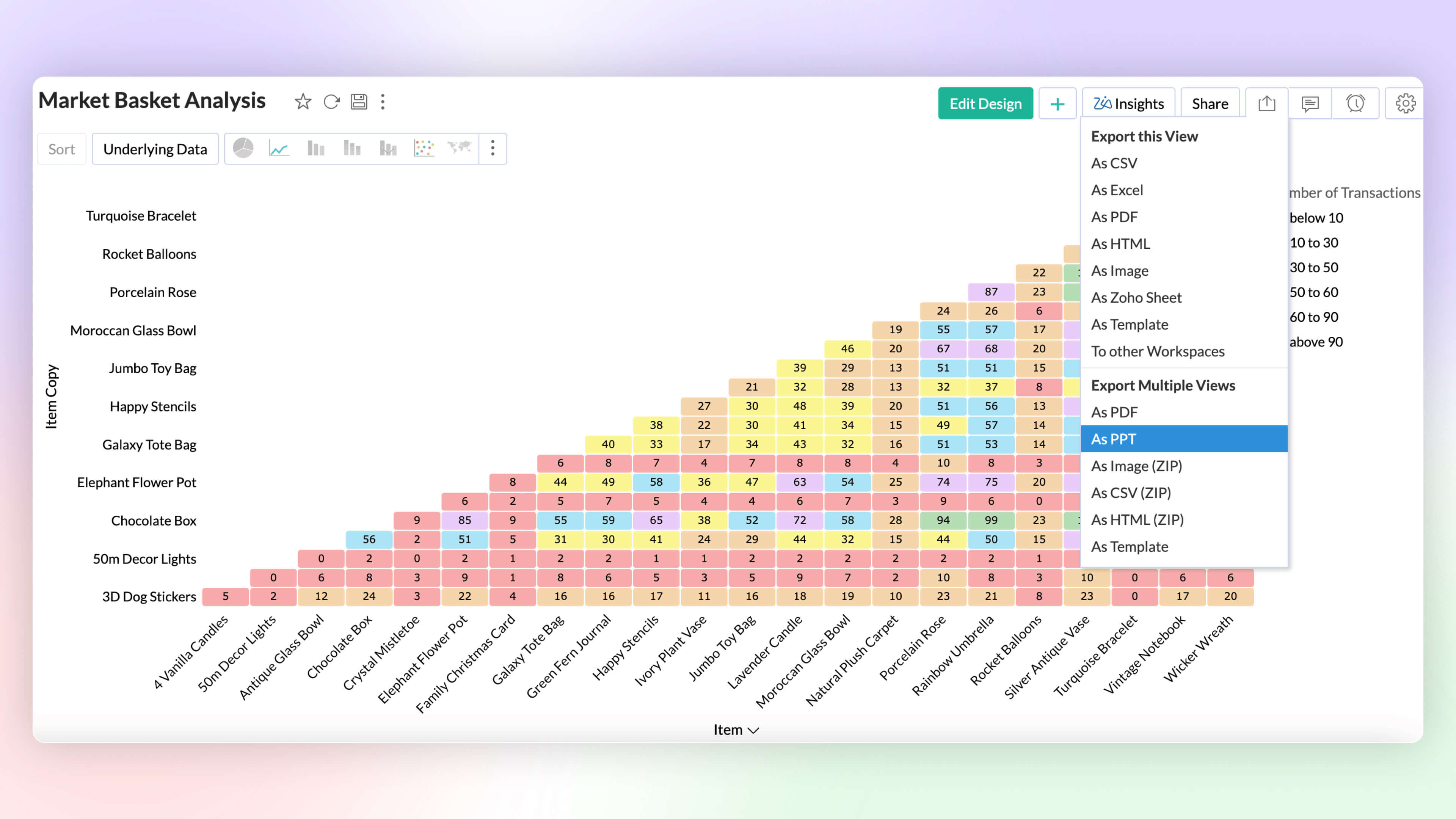
Export as PPT
Export multiple views as a Microsoft PowerPoint presentation. Enhance security by protecting the file with a password.
6. More enhancements
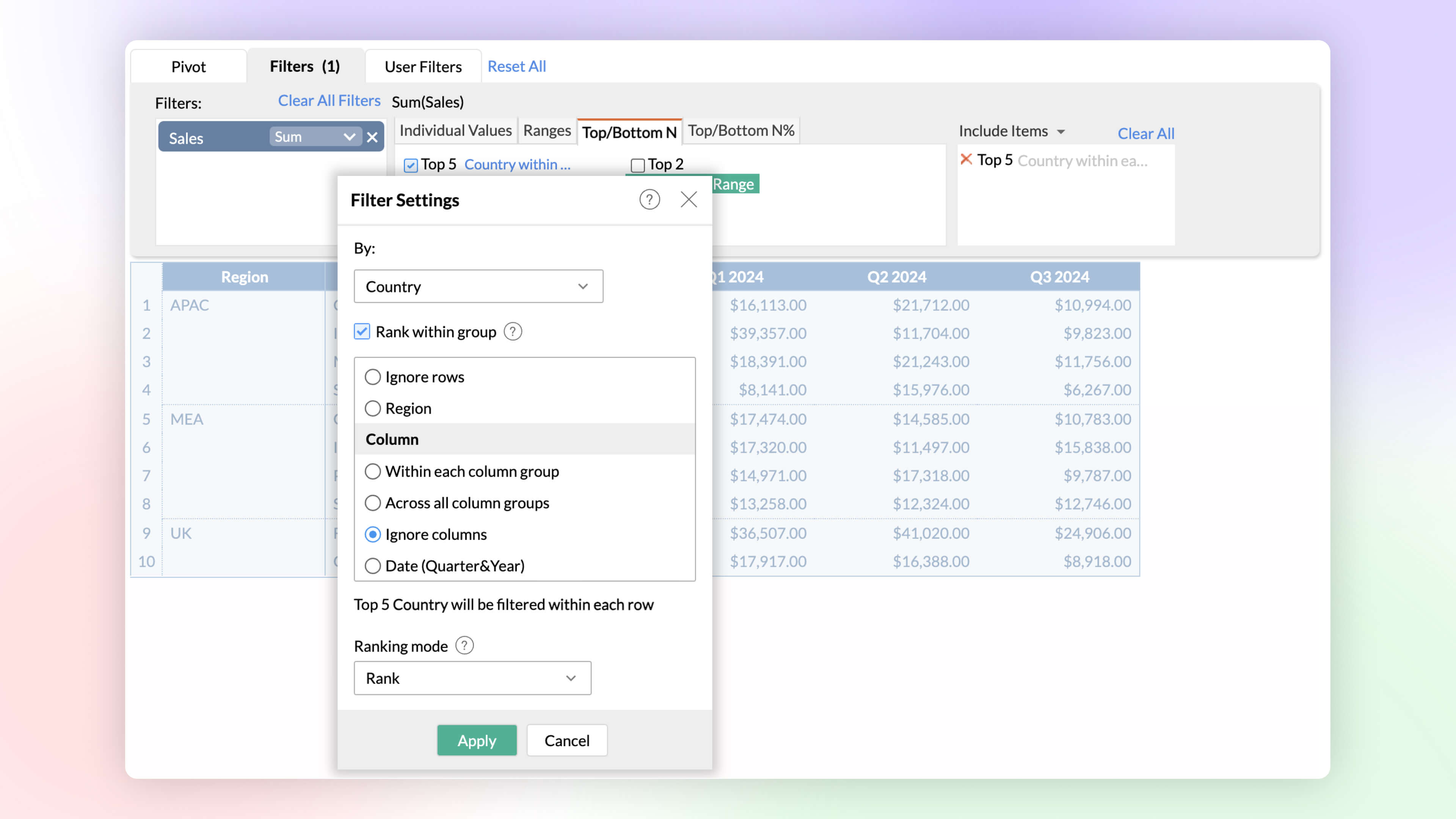
Rank within Filters
Identify and analyze top and bottom performers across various dimensions. The rank-based ability helps find the top or bottom performers within and across individual groups without having to write complex formulas.
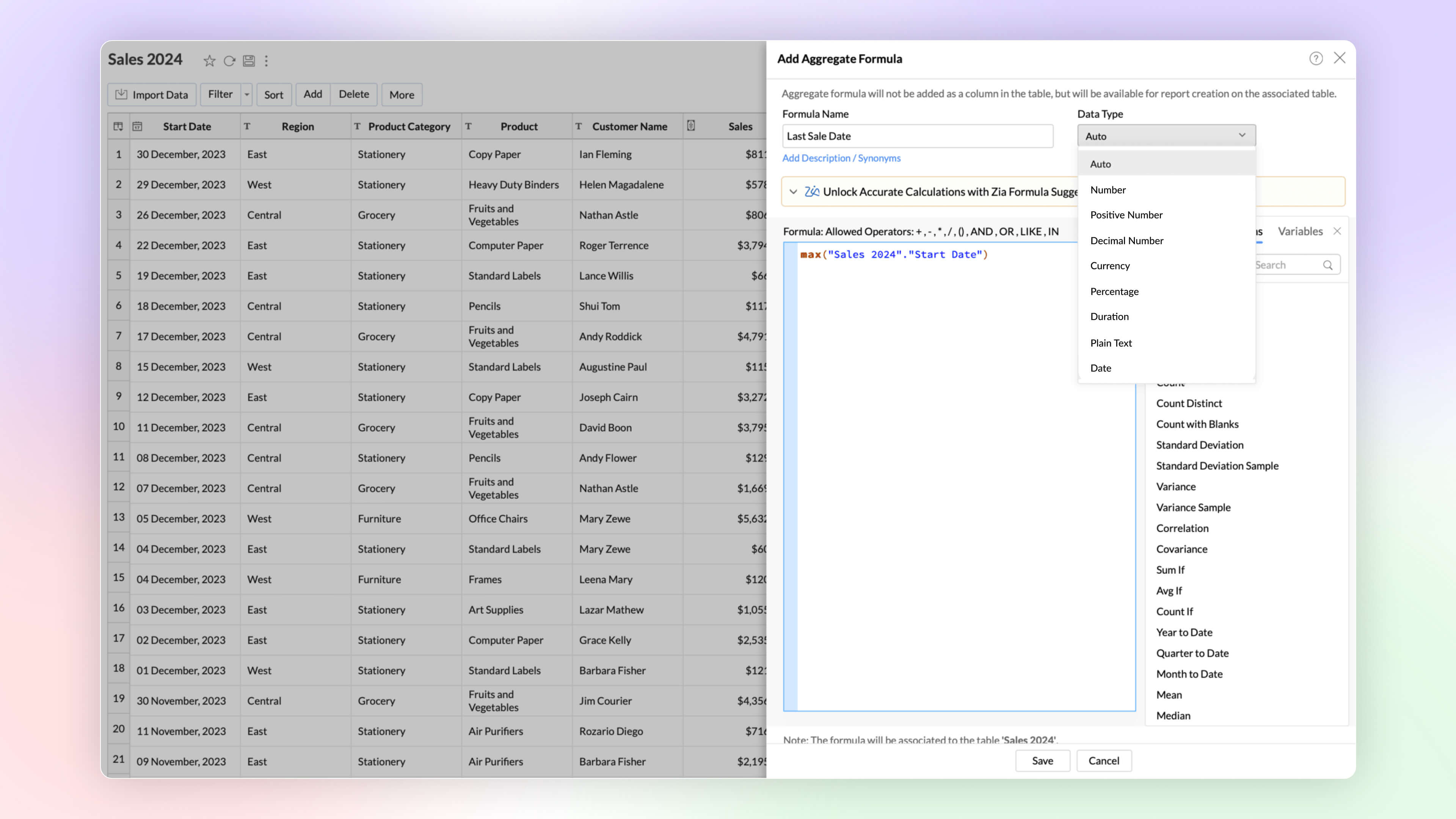
Date and String data types in Aggregate Formula
Zoho Analytics now supports the date and plain text as return data types in aggregate functions. This improvement proves immensely beneficial in scenarios such as cohort analysis, project milestone tracking, and various other use cases.
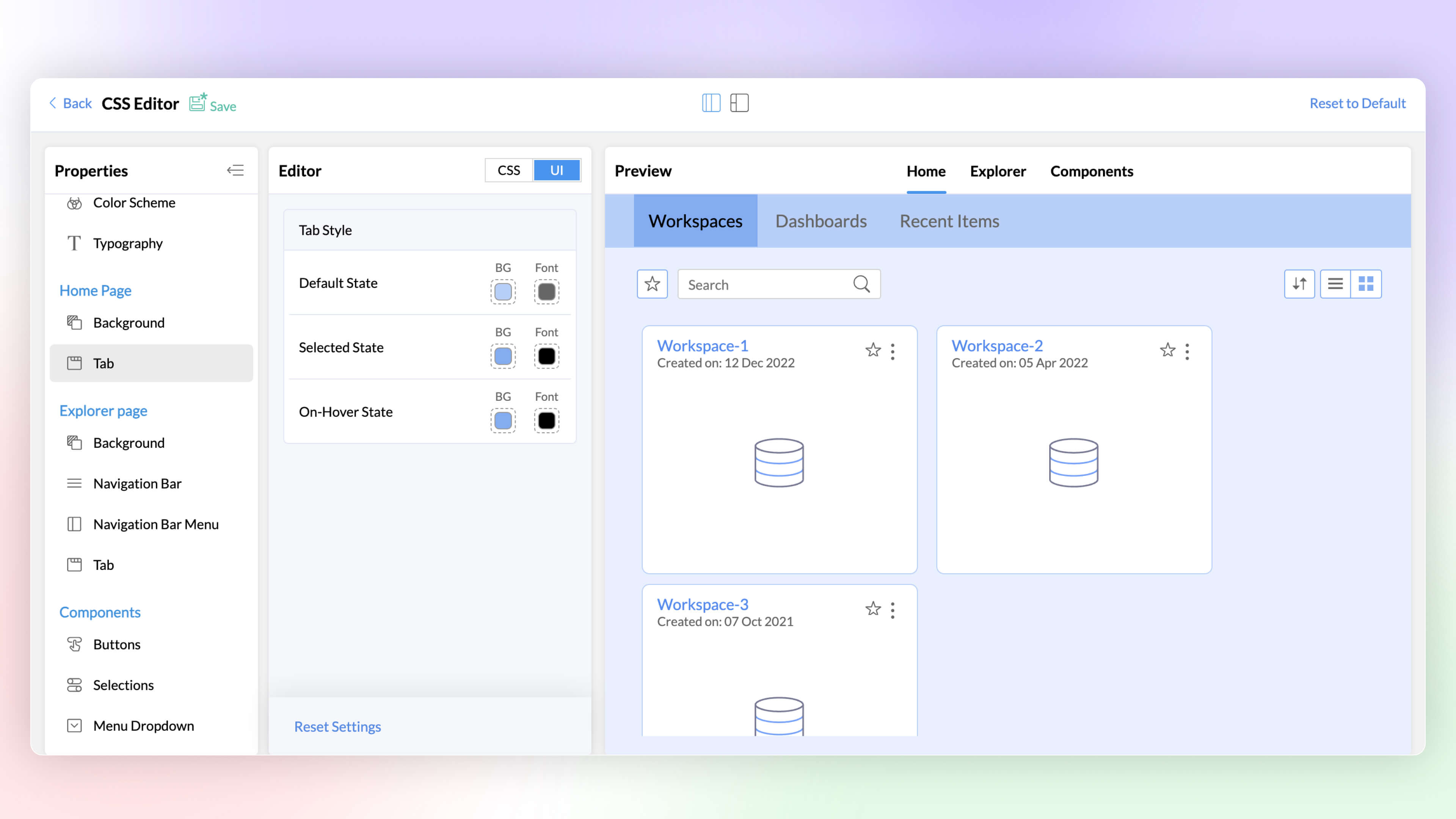
White Label CSS Customization
Elevate the visual appeal of your white labeled product and align it with your brand through the CSS customization feature. This latest addition to Zoho Analytics enables you to customize text, colors, and more on pages, tabs, selections, hover options, enhancing the overall look and feel.
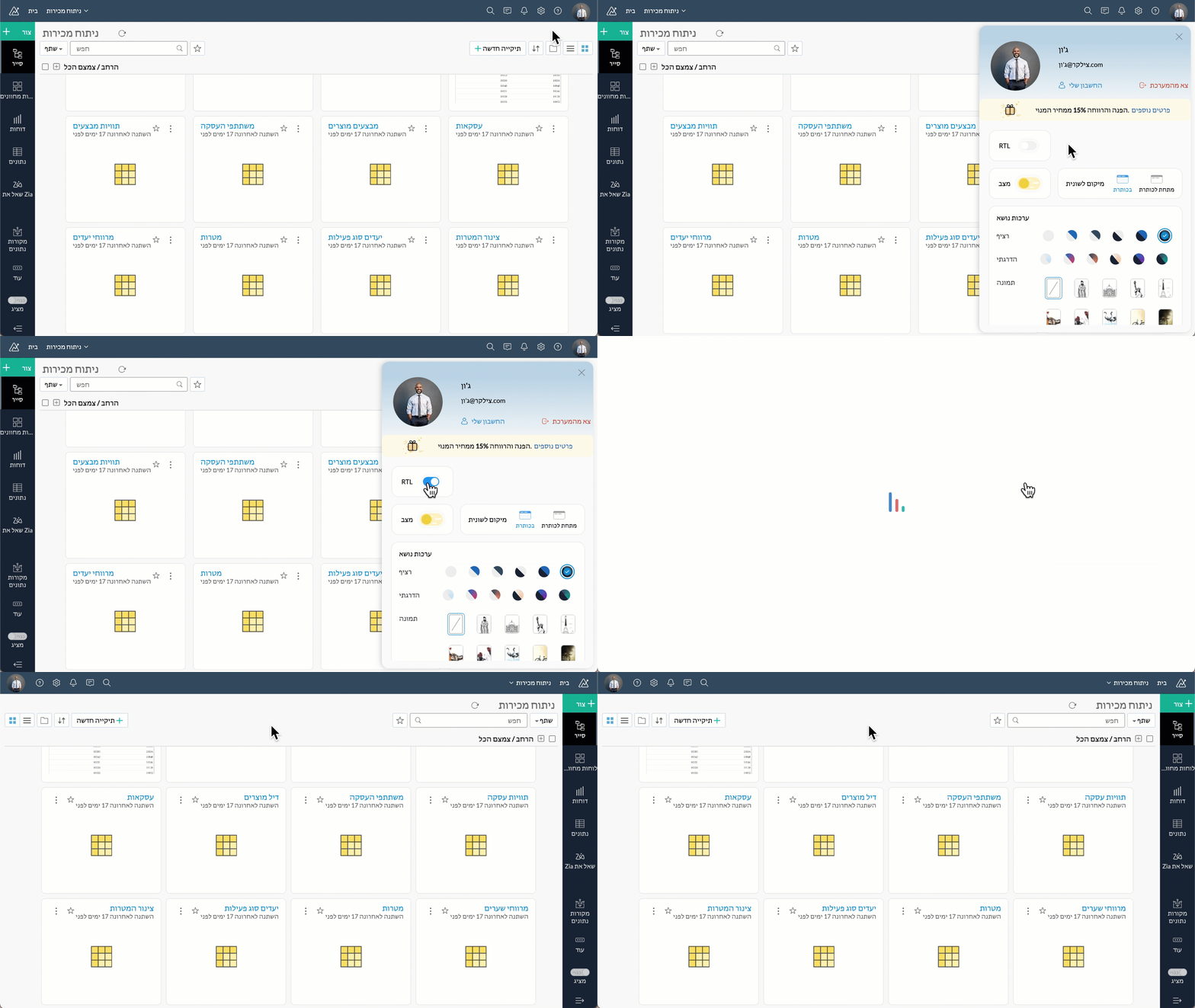
Right to left User Interface
Zoho Analytics now supports a right to left user interface. This option is best suited for languages like Arabic and Hebrew that are read from right to left.
Security
At Zoho Analytics, ensuring data privacy and security remains our topmost priority. We have implemented additional measures to strengthen security through the following enhancements.
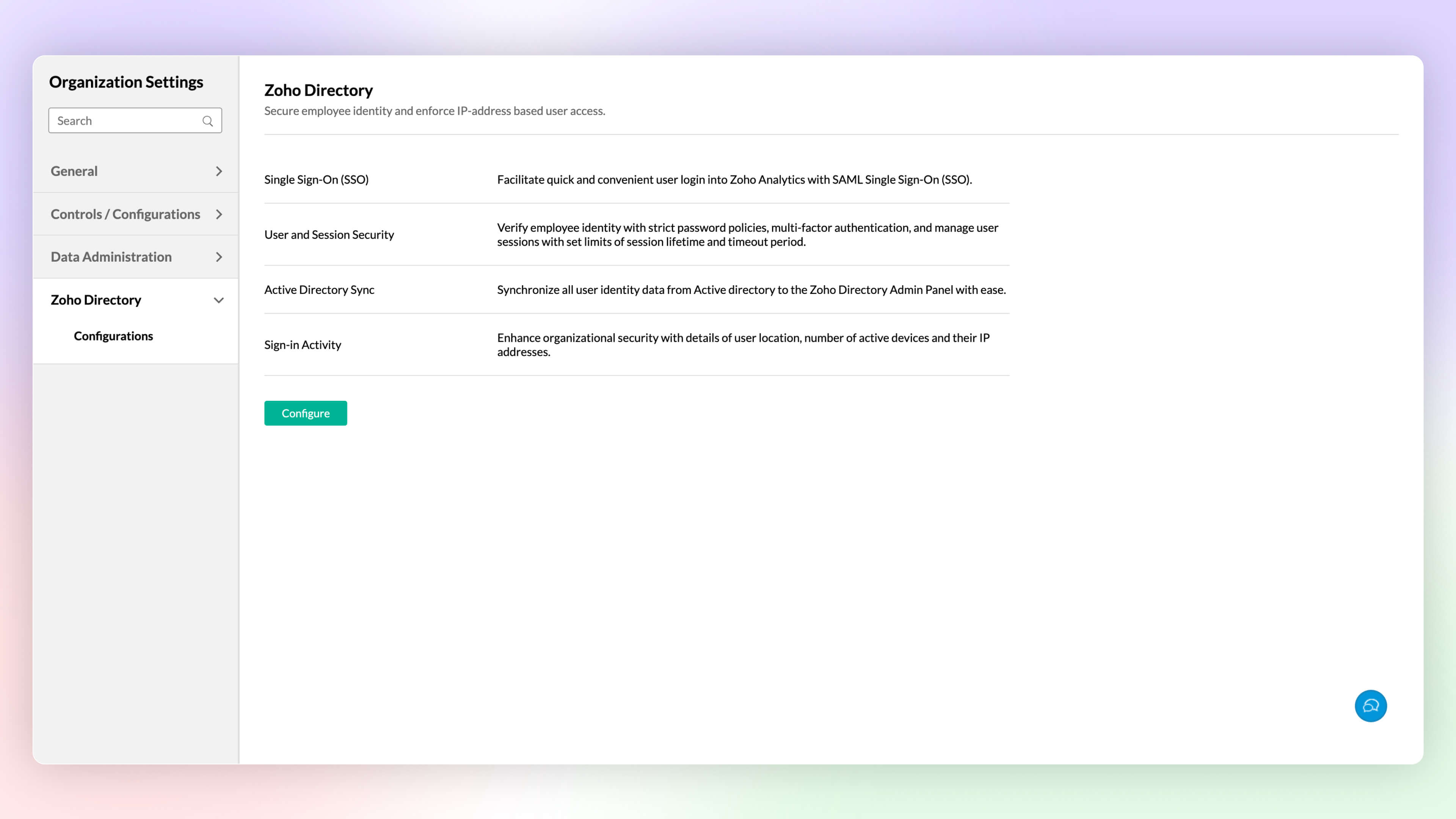
Zoho Directory
Zoho Analytics' integration with Zoho Directory allows administrators to handle identity and user access management with ease. You can now easily setup Single Sign-on, setup Active Directory sync, manage user access, etc.,with Zoho Directory.
Workspace Level IP Restriction
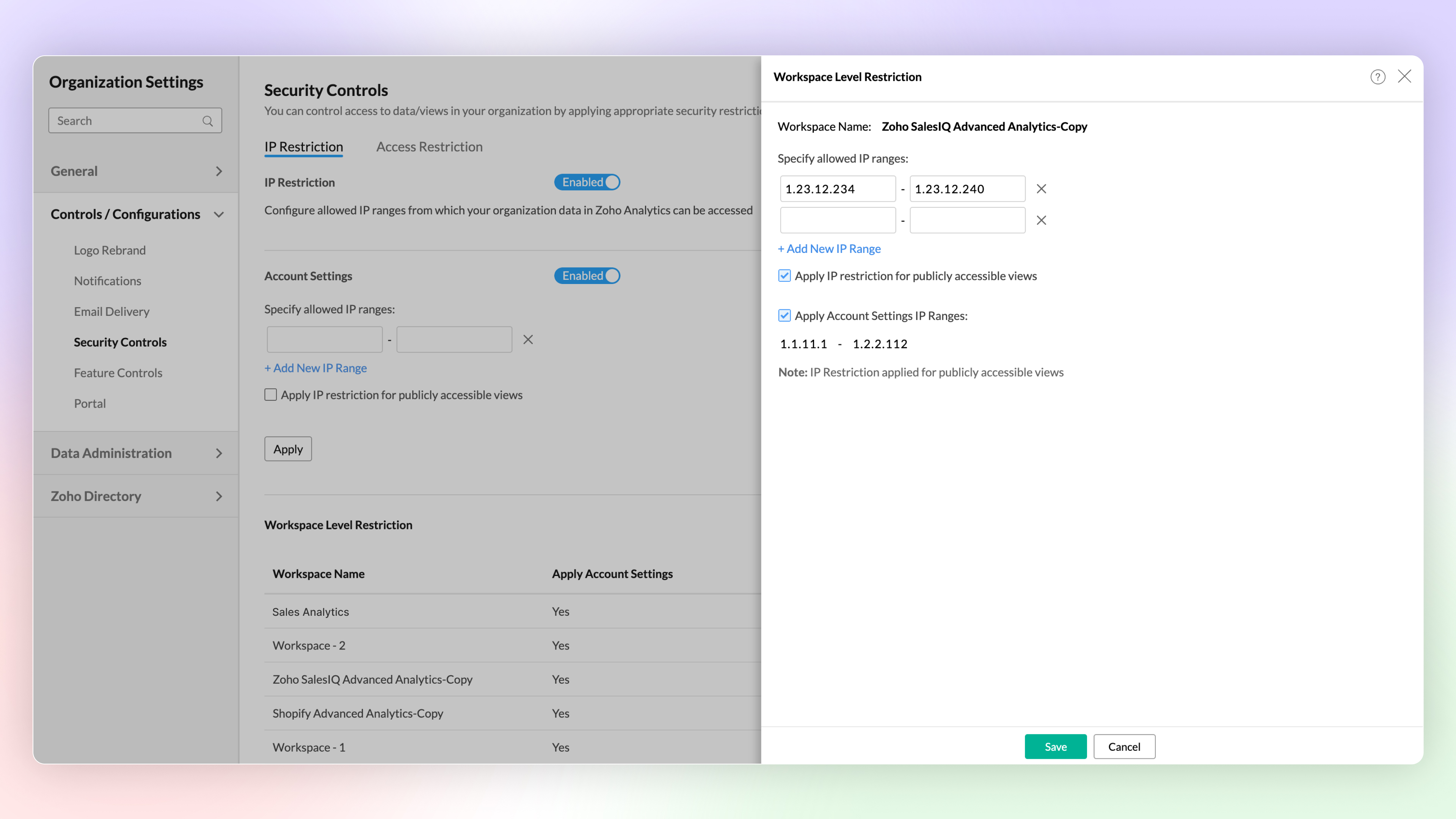
Configure workspace-level IP restrictions for enhanced security and to prevent unauthorized access. Previously, IP restrictions were available only at the account level.
Zoho Analytics Mobile App
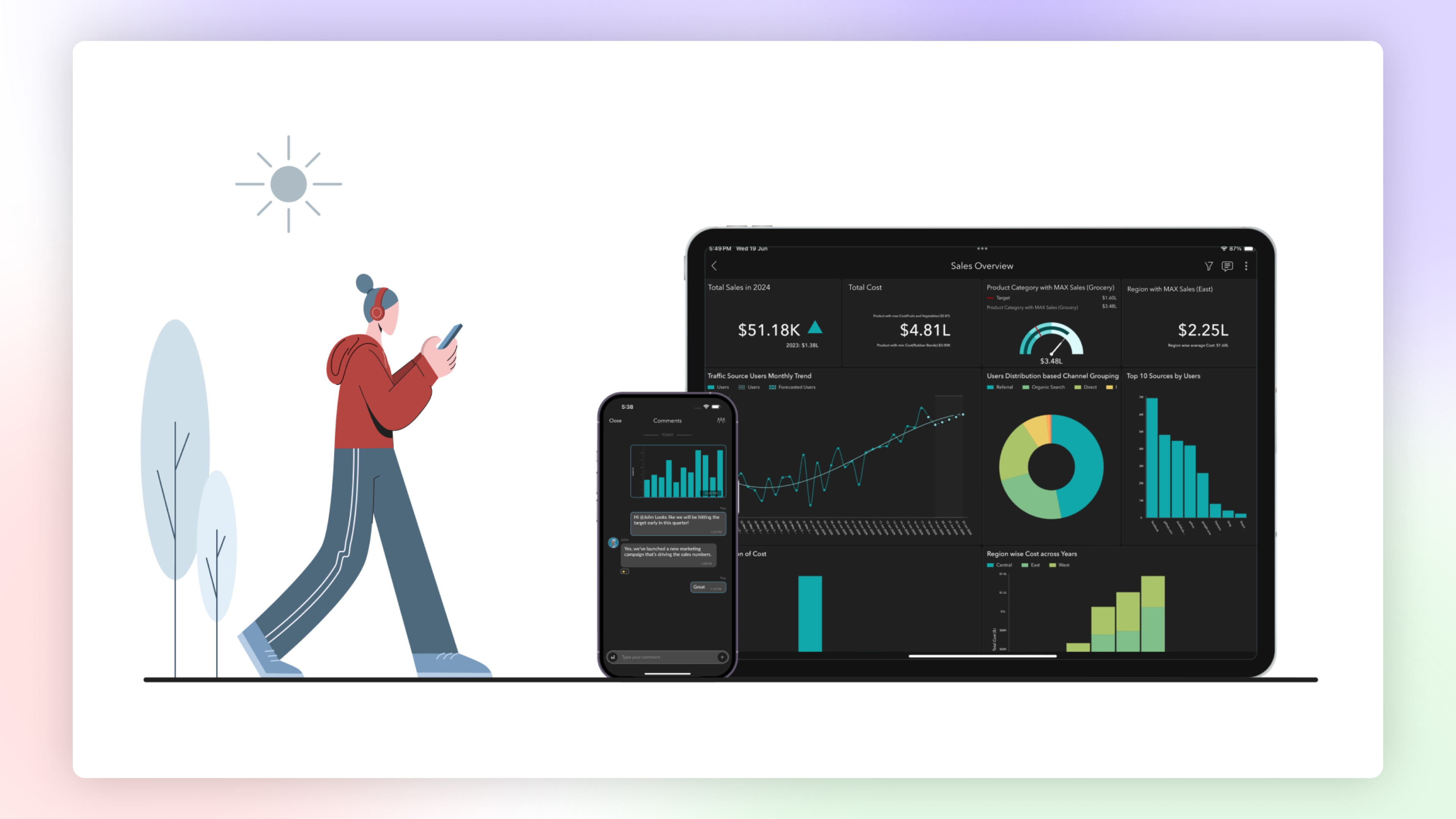
The Zoho Analytics Mobile app has been upgraded as a native app, optimized for your specific device. This enhancement provides faster loading times, high-quality visuals, and advanced security features specific to your device's operating system to protect your data.
Email Schedule APIs
A new set of APIs are now available for managing your email schedules. These APIs enable you to create, update, trigger and delete email schedules easily.
Features in Private Beta
ChatGPT in Ask Zia
Ask Zia now integrates with ChatGPT assisting you to write complex queries and formulas for effective data analysis.
Diagnostic Analysis
Zia insights now supports diagnostic analysis helping you understand the root causes for a certain outcome.
Custom Connector
Zoho Analytics now enables you create your own integration with third party applications.
Try Zoho Analytics 6.0 Beta!
Do try out the new features and share your valuable feedback with us at support@zohoanalytics.com. Your suggestions are crucial to helping us improve and serve you better.
Topic Participants
Nisha Angel J
Sellers
paul
César Pedrolini
Heike
Sticky Posts
What's New in Zoho Analytics - November 2025
We're thrilled to announce a significant update focused on expanding your data connectivity, enhancing visualization capabilities, and delivering a more powerful, intuitive, and performant analytics experience. Here’s a look at what’s new. Explore What'sWhat's New in Zoho Analytics - October 2025
Hello Users! We're are back with a fresh set of updates and enhancements to make data analysis faster and more insightful. Take a quick look at what’s new and see how these updates can power up your reports and dashboards. Explore What's New! ExtremeWhat’s New in Zoho Analytics – September 2025
Hello Users!! In this month’s update, we’re raising the bar across multiple touchpoints, from how you bring in data, plan and track projects to how you design and brand your dashboards. We’ve added the all-new Gantt chart for project visualization, expandedAnnouncing Agentic AI - Ask Zia!
We are delighted to roll out the new agentic AI capabilities in Ask Zia, where every stage of the BI workflow is assisted by AI. With a human-in-the-loop approach, Ask Zia ensures that you’re in command of the decision, while AI handles the complexity.Invitation-Based User Access in Zoho Analytics
Hello everyone, We’re rolling out an important update on how users are added to your Zoho Analytics Organization and Workspaces. Previously, when admins added users, they were automatically added to the organization. Moving forward, to improve security
Recent Topics
Client Portal ZOHO ONE
Dear Zoho one is fantastic option for companies but it seems to me that it is still an aggregation of aps let me explain I have zoho books with client portal so client access their invoice then I have zoho project with client portal so they can access their project but not their invoice without another URL another LOGIN Are you planning in creating a beautiful UI portal for client so we can control access to client in one location to multiple aps at least unify project and invoice aps that wouldEmail Insights included in Bigin emals are marked as SPAM everywhere
Today I noticed that email recipients who use Office 365 never receive emails sent from Bigin. Further examination showed that all Email Insights links in email headers are marked as spam/phishing by Office 365. Example screen included. The problem isData Import | Zoho Analytics Custom Query Window Size
Please increase the window size for the Custom Query Data Import. It's impossible to work with such a small query window.Name changed in settings for mailbox but still not changed when typed in To field
In the email account secretary@ i have updaetd the new staff members details but the old members name still appears when I type secretary@ in the To field. I cant work out where Zoho is finding the old name from. I have deleted the browser cache. If ICannot add my name to my domain name
I want to have My name@mydomain.com and it says my name is linked to another account already. Please fix it since I do not have another account.Invoice status on write-off is "Paid" - how do I change this to "Written off"
HI guys, I want to write off a couple of outstanding invoices, but when I do this, the status of the invoices shows as "Paid". Clearly this is not the case and I need to be able to see that they are written off in the customer's history. Is there a wayEstablishing new Zoho email account on laptop
Good Morning: I am very long time Outlook business user and decided to try your email service last night and had established an account. I am trying to verify my account; how do I establish my Zoho email account on my laptop? I opened the account withunable to send message reason 550 5.4.6 unusual sending activity
My email account can't send message. It shows unable to send message reason 550 5.4.6 unusual sending activity detectedhow to add email to existing organization i w
I am already registered my organization and i have an email id. I need one more email id but i can't find anywhere .i want the cheapest email id . how to add ?e-mail bloqueado
Estou com meu e-mail lucas@peplus.me bloqueado, preciso desbloquear para retorno de usos em minhas atividades.zoho labels api not working
We're using n8n to automte email reply using zoho api. I'm facing issue with label api. I added the required scopes but its not working. i followed zoho api documentation but didn't work. also, where do i find/how do i create zoho oauth token mentioneeedDesk DMARC forwarding failure for some senders
I am not receiving important emails into Desk, because of DMARC errors. Here's what's happening: 1. email is sent from customer e.g. john@doe.com, to my email address, e.g info@acme.com 2. email is delivered successfully to info@acme.com (a shared inboxStreams/Shared email doesn't show up in windows trident app. It works fine on MAC. Is there any difference between 2 install ?
I can see streams/share email boxs on my MAC version of trident app but i can't see them in windows version of trident app. Is there any difference between 2 install? I try to find setting but not able to see any setting to add stream/share email boxes.add zoho account
How to add a zoho mail to previous zoho account? I have twoZoho Desk Mobile App Year-End Roundup - 2025
Dear Zoho Desk users, Greetings! As you gear up for the festive season, we are excited to share a quick journey into all that is released in 2025! Zia's generative AI capabilities Zia insights can be highly beneficial in helping agents manage daily supportNarrative 17: The role of Zia AI in customer support
Behind the scenes of a successful ticketing system: BTS Series Narrative 17: The role of Zia AI in customer support Overview Zia in Zoho Desk is a layered AI assistant that combines generative AI, prediction, and automation to support agents, automateDomain Transaction
I have purchased a domain name called trainedworkforce.co.in I made the payment got the receipt but the domain is still not purchased after successful transaction .Ability to Set a Unified Tab Order/View for All Users in Zoho Projects
Hello Zoho Projects Team, We hope you are doing well. We would like to submit a feature request regarding tab/menu organization in Zoho Projects. Current Behavior: The tab (module) order in Zoho Projects is user-specific. Each user (internal or external)Zohomail - The "All Messages" vs "In Box"
Why do some new email message appear under the all messages view but not in my inbox? That's really annoying but to be fair I've experienced the same with gmail.error while listing mails
I can't access email in any of my folders: Oops, an error occurred - retry produces the second error response: error while listing mails (cannot parse null string). I've signed in and out of Zoho, restarted my iMac.Introducing the Zoho Projects Learning Space
Every product has its learning curve, and sometimes having a guided path makes the learning experience smoother. With that goal, we introduce a dedicated learning space for Zoho Projects, a platform where you can explore lessons, learn at your own pace,Where to show Customization Field ?
Dear Sir, I have made some New Field in Item Field Customisation. Now I don't require that field in Estimate, Sales Orders etc. I just wants that field in Sales Invoice to Show/Hide... Is that possible ?Zoho Desk 2025 round-up: Key highlights on feature releases
Hello everyone, As we gear up for 2026, here is a detailed round-up of all feature releases in Zoho Desk web throughout the year. For consolidated information on releases check out the What’s New page You can also watch these webinars. Zia in web ZiaPrint Sales Orders, Purchase Orders or Invoices from API
Hello, Is it possible to use the print option that is available in Sales Orders Purchase Orders and Invoices with the API?. I don't see any information in the docs about this. ThanksHow to show a hided report??
in CRM Report , I clicked Hide incidently , how to show the floder again? Nowhere I can find the hided report floder...Converting Customer Invoice to Purchase Bill
Hi, In my service-based business, I sometimes create the customer invoice first, and later I receive the purchase bill from the vendor for the same job. Is there any option in Zoho Books to: Convert a customer invoice into a purchase bill, or Link/associateEmail tracking inquiry
I am trying to track when my emails are opened and clicked like I previously did in HubSpot. HubSpot pretty much did the entire process automatically. After digging through, I finally found in settings --> emails --> BCC Dropbox there is an email I canMass Update of Lookup Fields not possible
Hello List I've created a custom field for Leads and Contacts 'Current Campaign'. This is very Handy as I can filter leads and then related them to a campaign. Everything ready, but then I realized that mass update doesn't work for lookup fields... aCollapsible Sections & Section Navigation Needed
The flexibility of Zoho CRM has expanded greatly in the last few years, to the point that a leads module is now permissible to contain up to 350 fields. We don't use that many, but we are using 168 fields which are broken apart into 18 different sections.Quick Create needs Client Script support
As per the title. We need client scripts to apply at a Quick Create level. We enforce logic on the form to ensure data quality, automate field values, etc. However, all this is lost when a user attempts a "Quick Create". It is disappointing because, fromDownload Attached Files
Hi everyone, Brand new to Zoho Creator. I have a form with a subform. The subform has a field for "File Upload" I have this in a subform to allow multiple files to be uploaded to the parent form. Once the files are uploaded, how can i download or view them? Is this a setting I am just not seeing? If there isn't a way to download them, could i create another form field that dynamically creates the file's URL? That way a user can click the URL to get to the file? Any help with this would be greatlyTicket layout based on field or contact
Hi! I want to support the following use-case: we are delivering custom IT solutions to different accounts we have, thus our ticket layouts, fields and languages (priority, status field values should be Hungarian) will be different. How should I setupNo funcionan correctamente el calculo de las horas laborales para informe de tickets
Hola, estoy intentando sacar estadísticas de tiempo de primera respuesta y resolución en horario laboral de mis tickets, pero el calculo de horas en horario laboral no funciona correctamente cree los horarios con los feriados : Ajusté los acuerdos deZoho Mail Android app update: Set out of office response exclusively for organization members and external users, response interval
Hello everyone! We have now introduced an option to configure out of office messages exclusively for organization members and external users within the Zoho Mail app. Additionally, now you can also customize response intervals for the Out of office messages.Feature Request: Detailed View - Related Block Links!
Desperately need a view record link option on records displaying in the related blocks on a Detail View. For the love of god, please add this feature. Thank you!Sub-Form Padding in CSV Export
Hi, When you use the Sub-Form, and for example you have a Date Field on the Main Page, then Option 1 and Option 2 fields on the Subform, when you export this to CSV the Date column will only have the Date in 1 row, the first row, it would be nice to padDependent / Dynamic DropDown in ZohoSheets
Has anyone figured out a way to create a Dropdown, the values of which is dependent on Values entered in the other cell ?How do I change the order of fields in the new Task screen?
I have gone into the Task module layout, and moving the fields around does not seem to move them in the Create Task screen. Screenshot below. I have a field (Description) that we want to use frequently, but it is inconveniently placed within the MoreZoho → ShipStation Integration – Sales Order–Driven Fulfilment Workflow
Hello All, I’m reaching out to explore the best way to integrate a shipping tool into our inventory which will speed our process up. We are looking to integrate ShipStation into our existing order-to-fulfilment workflow, as we’re keen to standardise onIA ou je peux trouver comment utiliser IA
Je voudrais utiliser IA dans l'interface zoho pour m'aider quand j'ai des questions de rôle partage ou autre configuration d'automatisation, j'utiliser ChatGPT externe mais il ne connait pas toujours l'interface zoho et les réponses sont parfois longueNext Page