Augmenting subform capabilities
Greetings, everyone!
Finally, the day has come for us to announce some of the most anticipated, requested, and exciting updates to
subforms in Zoho Creator.
As you're aware, subforms are an integral part of Creator forms, as they help in establishing proper modelling of the app, collecting rows of data, and setting up users to enter data that has a parent-child relationship. With this new set of updates, we've bought in a paradigm shift to subforms, as they'll be getting an all-new look for an improved user experience, along with new capabilities for solving challenges. This post will give you a sneak peek into these new subform enhancements.
Do you find it difficult to scroll subforms horizontally? Do you wish you could drag and drop subform rows? Do you want to manipulate subform fields via Deluge script? Then your wait has come to an end—continue reading to learn more on how you can now do all of this in subforms.
Subform list and pop-up view
As announced in the
March 2023 post, the List
view type of subforms will display the subform as a pop-up, and the current method of displaying subforms has been christened
Grid.
To further understand how this can be helpful, let's put ourselves in the shoes of a supply chain manager. Their job requires them to regularly keep track of inventory lists in their warehouses.
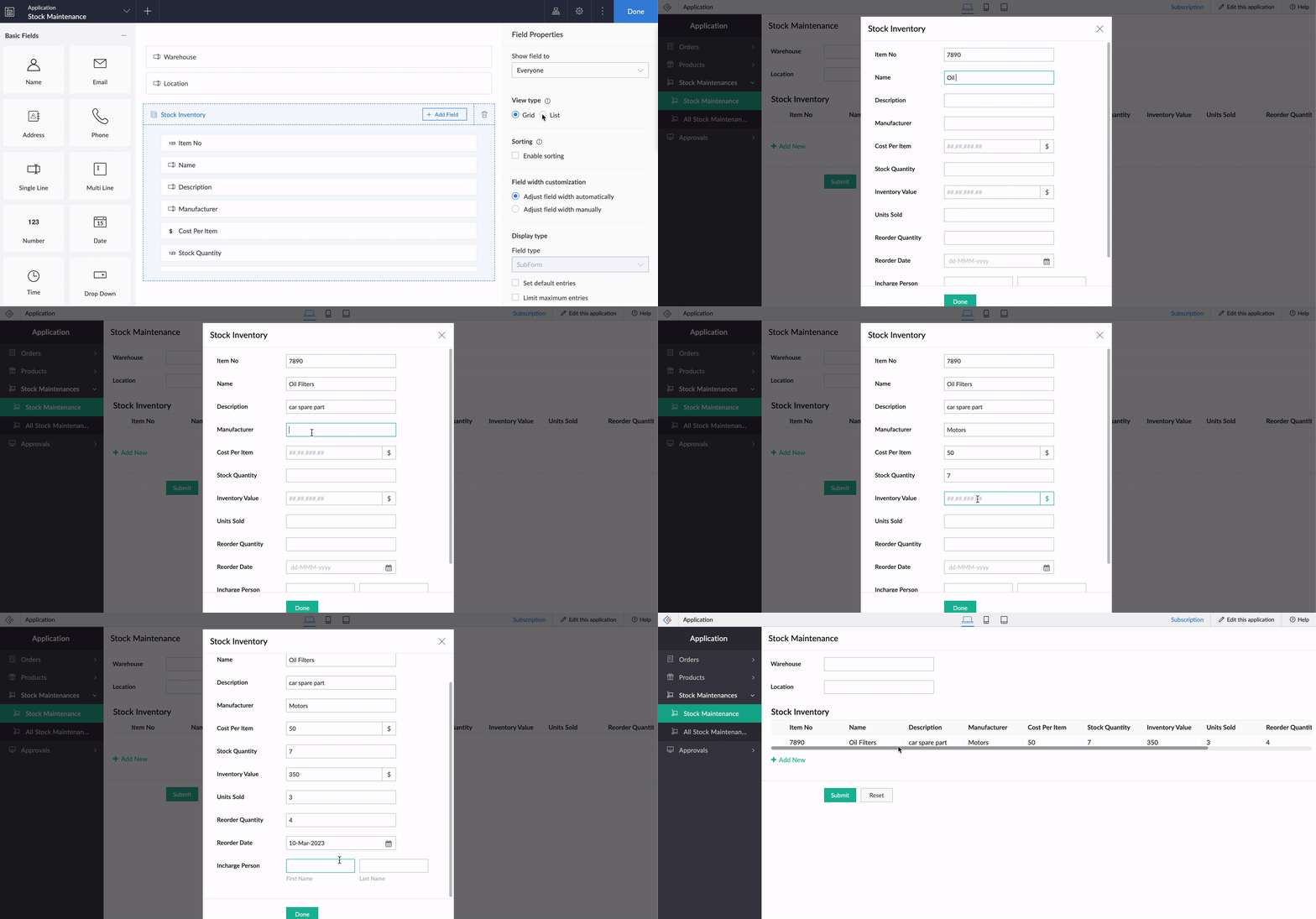
Let's assume there's a form collecting warehouse details, like name, location, and stock inventory. For collecting the stock inventory details, a subform is present with these fields—Item No, Name, Manufacturer, Description, Cost Per Item, Stock Quantity, Inventory Value, Units Sold, Reorder Quantity, Reorder Date,
and
Person In Charge.
Now, the default view type will tire you out from scrolling back and forth horizontally, and results in a frustrating time-consuming process. We all long for a new way to avoid this and make data entry swifter.
To achieve this, make use of the new List option under
Subform->Field Properties->View Type.
List view, which looks similar to our list report, is a table-like subform without inline inputs. When you try adding or updating data in each row, a pop-up will be displayed listing out the fields with vertical scrolling, thereby ensuring a vastly superior user experience and more effective space management.
Crucially, it also helps to load subform rows quickly while editing records, by reducing the loading time.
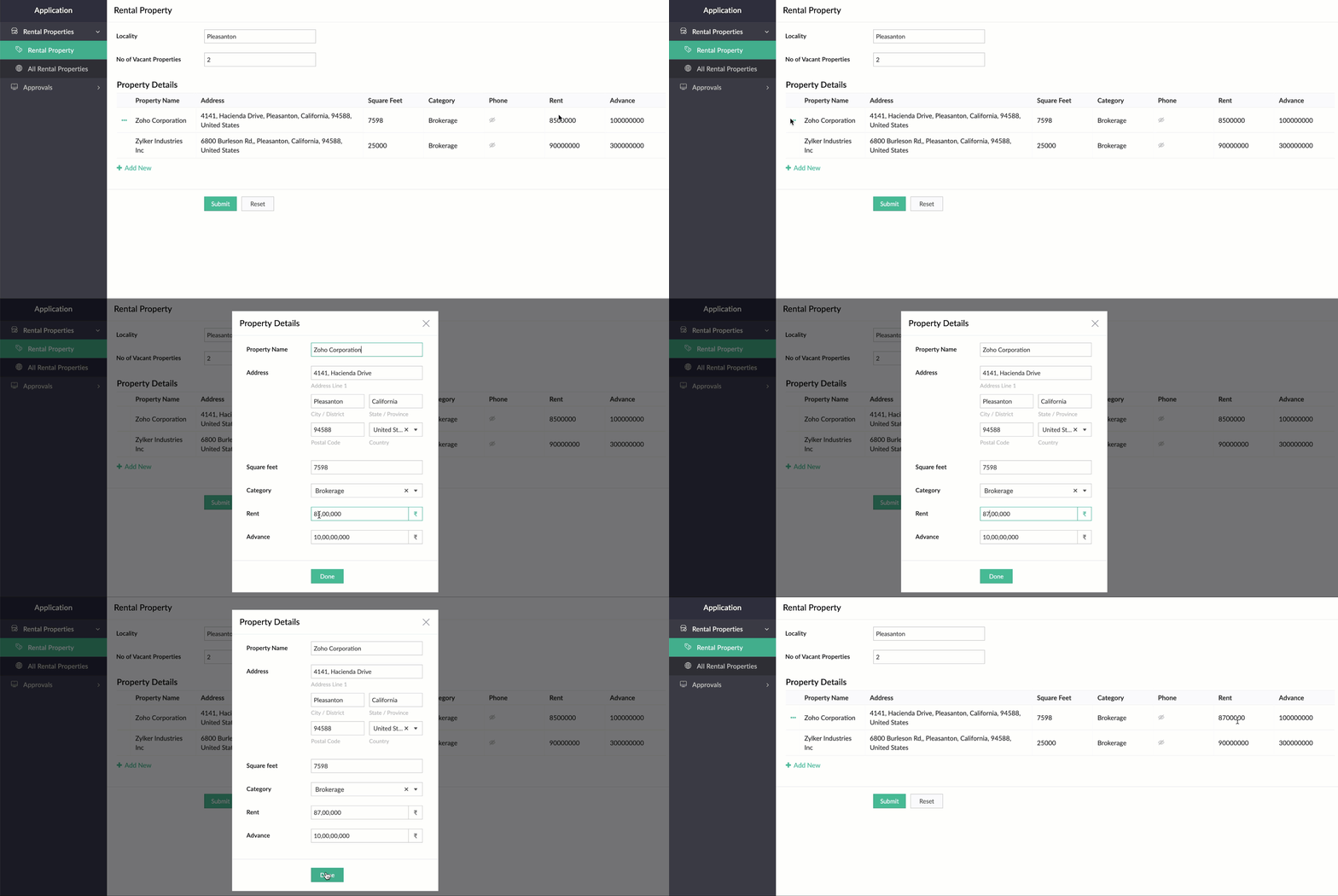
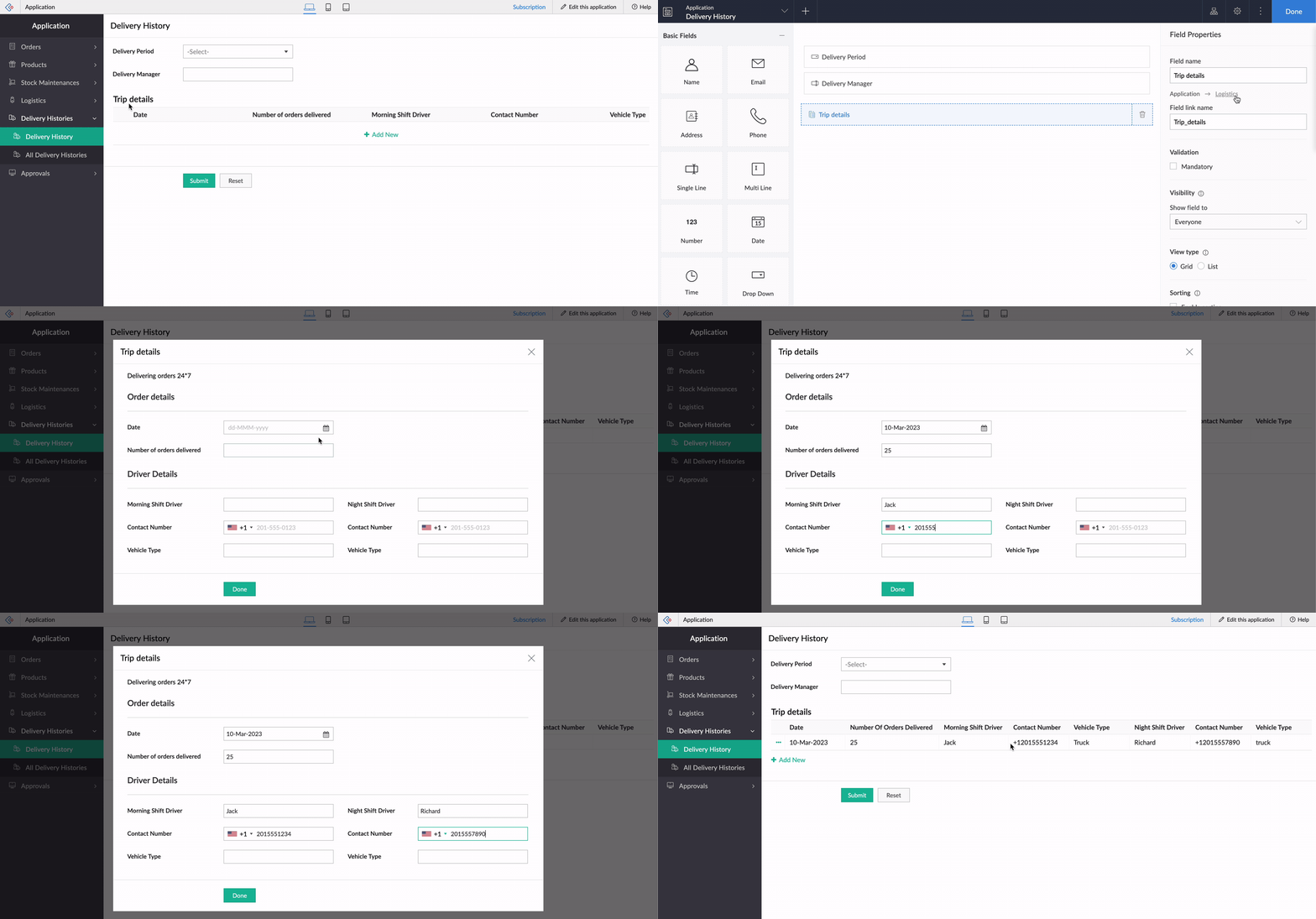
While using an existing form as a subform, the form's exact structure will be replicated in the pop-up, to ensure consistency in the look and feel of the form. To understand this better, let's assume our form has a two-column layout, with
Section
and Note
fields. Now the same customizations will be displayed in the pop-up, too!
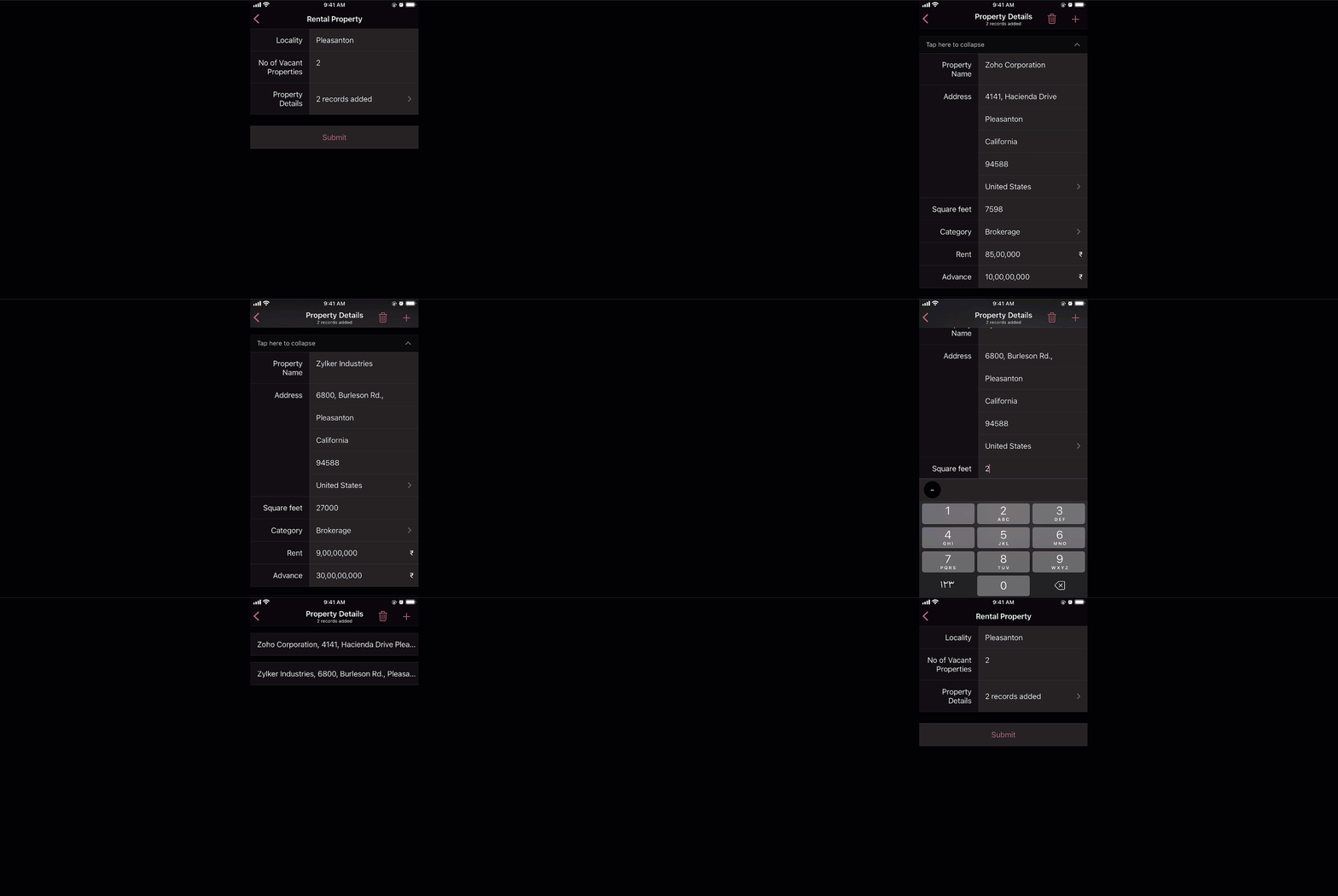
And that's not all—the new List view type is being extended to mobile apps, too. When it's enabled, the subform will be opened in the next screen, where users can add their data. This data will then be added as a subform row.
Custom sorting
Currently, the only sorting option in subforms is
field-based sorting, where you can choose a field based on which rows are sorted, either in ascending or descending order. Though this works well for basic cases, the need may arise in some cases to sort the subform in random order. With the new custom sorting support, you can effortlessly drag and drop subform rows to rearrange them.
To understand how it works, let's consider a task manager working on a To-Do List
form, to plan activities for a current project. For this, they have a main form collecting
project details, date-time,
and
milestones,
and a subform for maintaining the to-do list with the following fields:
Task Name, Description, Category, Status, Deliverables, Priority, and
Deadline. Here, before submitting the list, they want to rearrange some tasks based on their daily routine.
To achieve this, they use the Custom sorting option under
Subform->Field Properties->Sort type.
Now, with custom sorting, all they need to do to reorder the row sequence—both while adding and editing records—is simply drag and drop them in the required position.
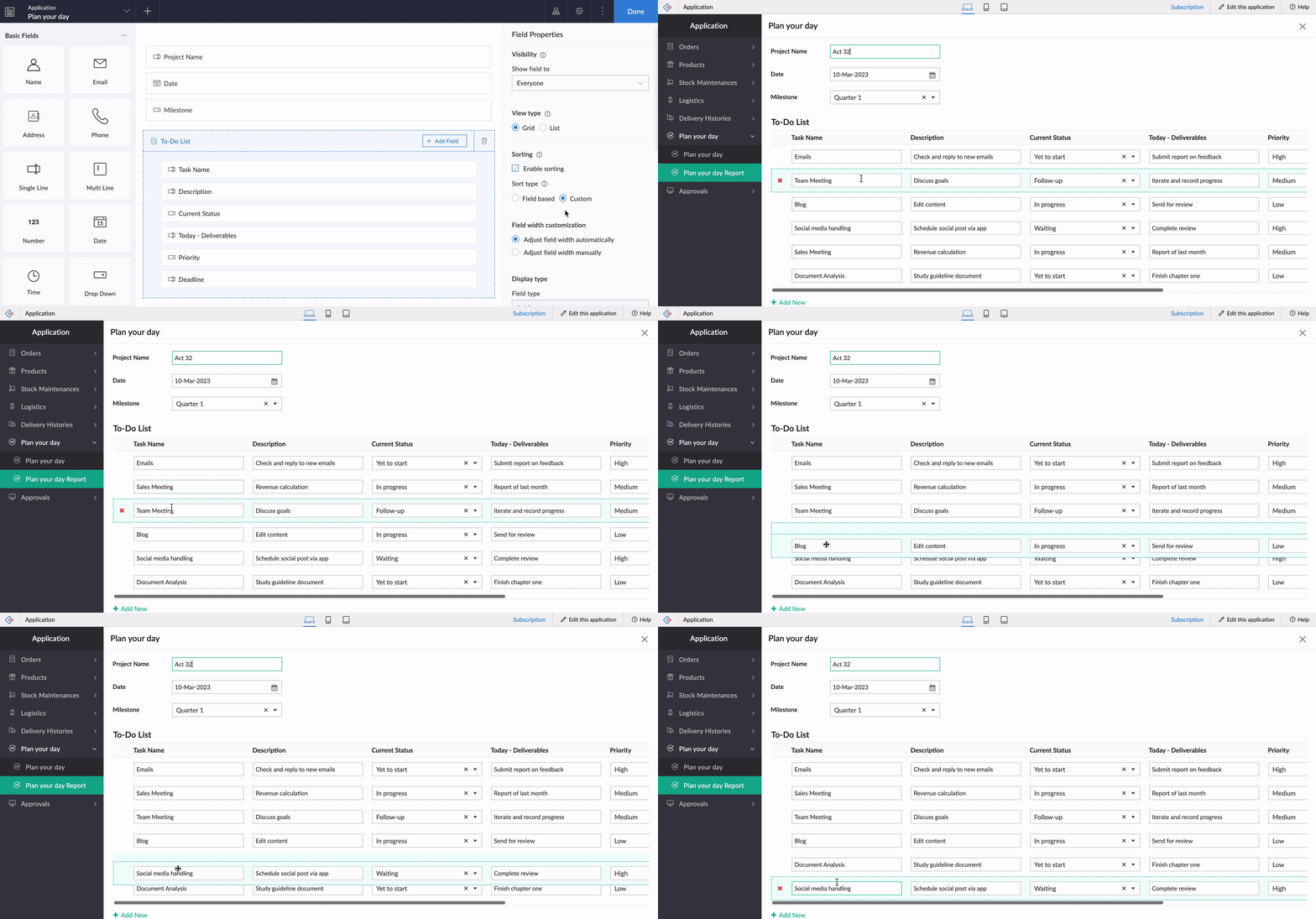
The same order will be retained in reports or while opening the form for updating the list.
Note:
Custom sorting can be used both in List and Grid-type subforms.
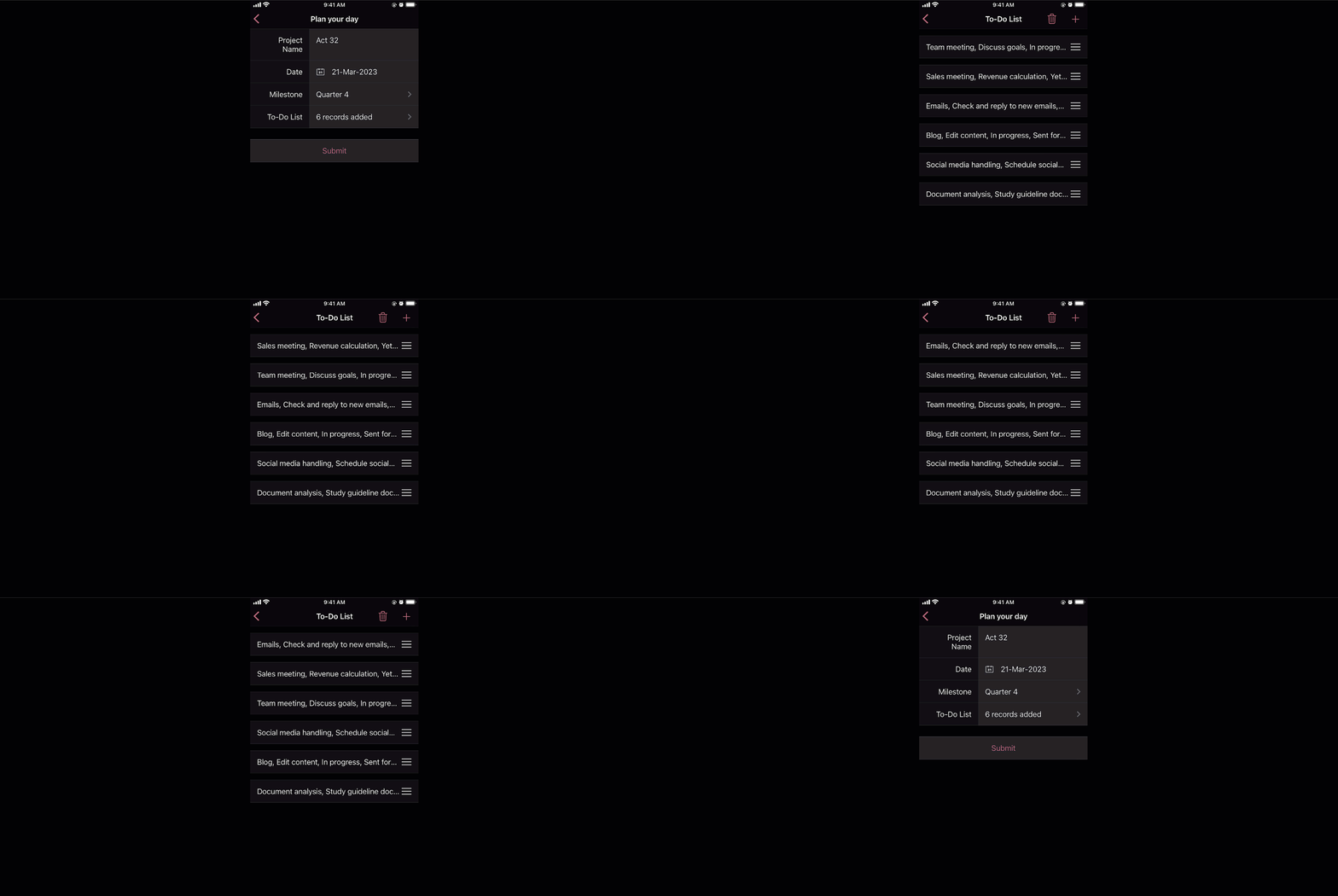
Custom sorting will also be available on the mobile apps and you can effortlessly rearrange fields in subforms.
Deluge tasks for row-level actions
You can use a combination of workflows and Deluge scripts to help your subforms handle complex business logic. With that in mind, we formulated the idea of bringing in actions that help you take control at the row level of subforms.
In the past, you may have come across business scenarios which required you to hide/show or enable/disable a particular field in a specific subform row. Now, with new dedicated Deluge tasks, you can bid adieu to shortcuts and workarounds.
Note:
Deluge tasks can be used both in List and Grid-type subforms.
Enable/disable
The new enable and disable subform Deluge tasks can be used to enable and disable specific fields.
Syntax:
enable row.subform_field
disable row.subform_field
disable row.subform_field
Events:
On add row, On delete row, On user input of subform field
Let's assume a Vehicle form has fields like
Customer Name, Vehicle Model, and Date of Booking,
and a subform to collect payment details with the following fields:
Payment Date, Payment Method, Credit Card Number, Bank Account Number,
and
Transaction Ref Number.
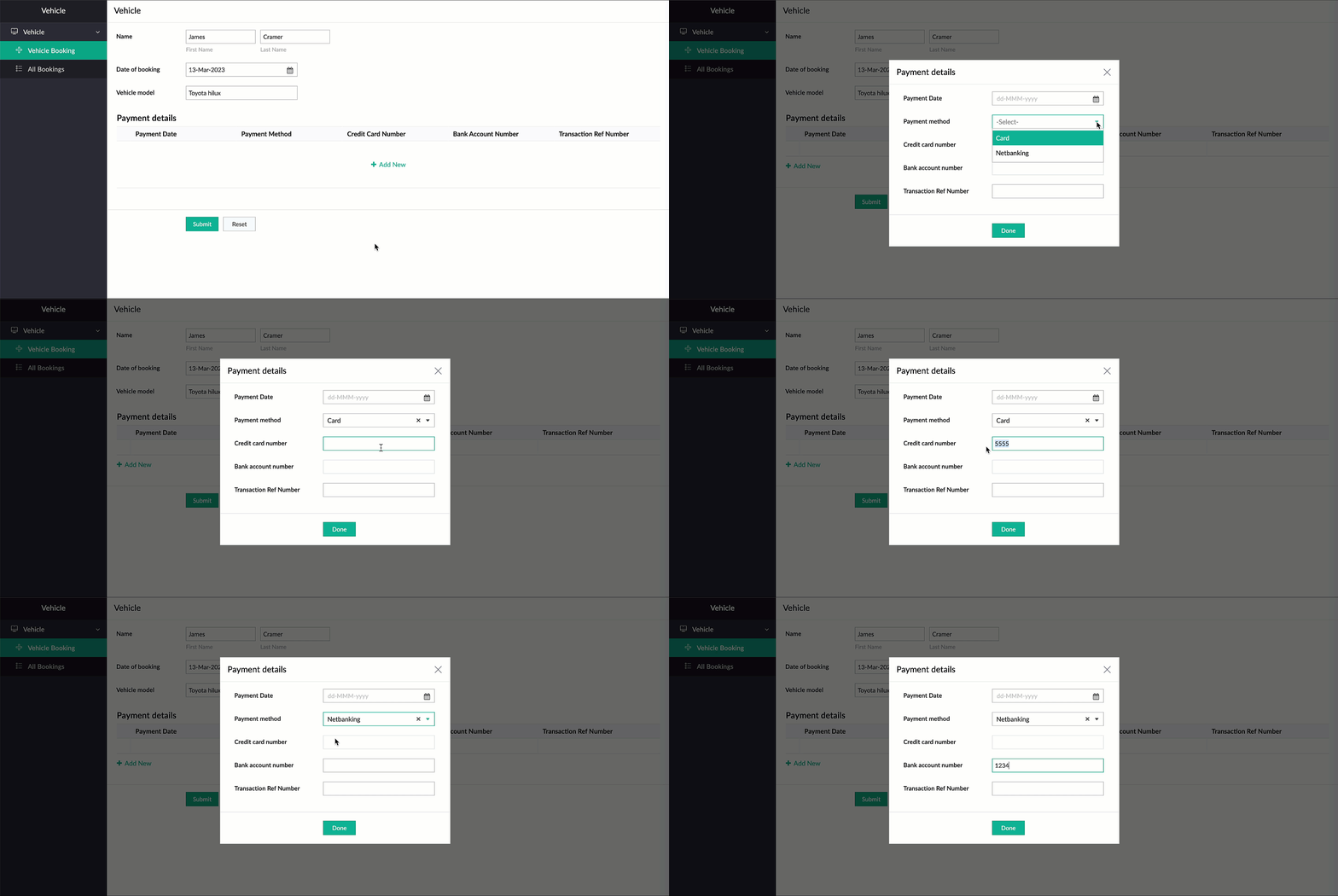
Now, there are two payment options—Card and Netbanking. If Card is chosen, then the Credit Card Number field should be enabled and the Bank Account Number field should be disabled. Similarly, when Netbanking is chosen, then the Bank Account Number field should be enabled and the Credit Card Number field disabled.
Code snippet:
if(Payment_details.Payment_method == "Card")
{
enable row.Credit_card_number;
disable row.Bank_account_number;
}
if(Payment_details.Payment_method == "Netbanking")
{
enable row.Bank_account_number;
disable row.Credit_card_number;
}
{
enable row.Credit_card_number;
disable row.Bank_account_number;
}
if(Payment_details.Payment_method == "Netbanking")
{
enable row.Bank_account_number;
disable row.Credit_card_number;
}
Hide/show
The new show
and
hide subform
Deluge tasks can be used to show and hide specific fields.
Syntax: hide row.subform_field
show row.subform_field
show row.subform_field
Events: On add row, On delete row, On user input of subform field
Let's use the example of a rental property manager who needs to keep track of a list of properties that are available in every locality. For this, a form is used for collecting information like Locality and No of Vacant Properties, and a subform will be used to list property details with the following fields: Property Name, Address, Square Feet, Rent, Advance, Category, and Contact Number.
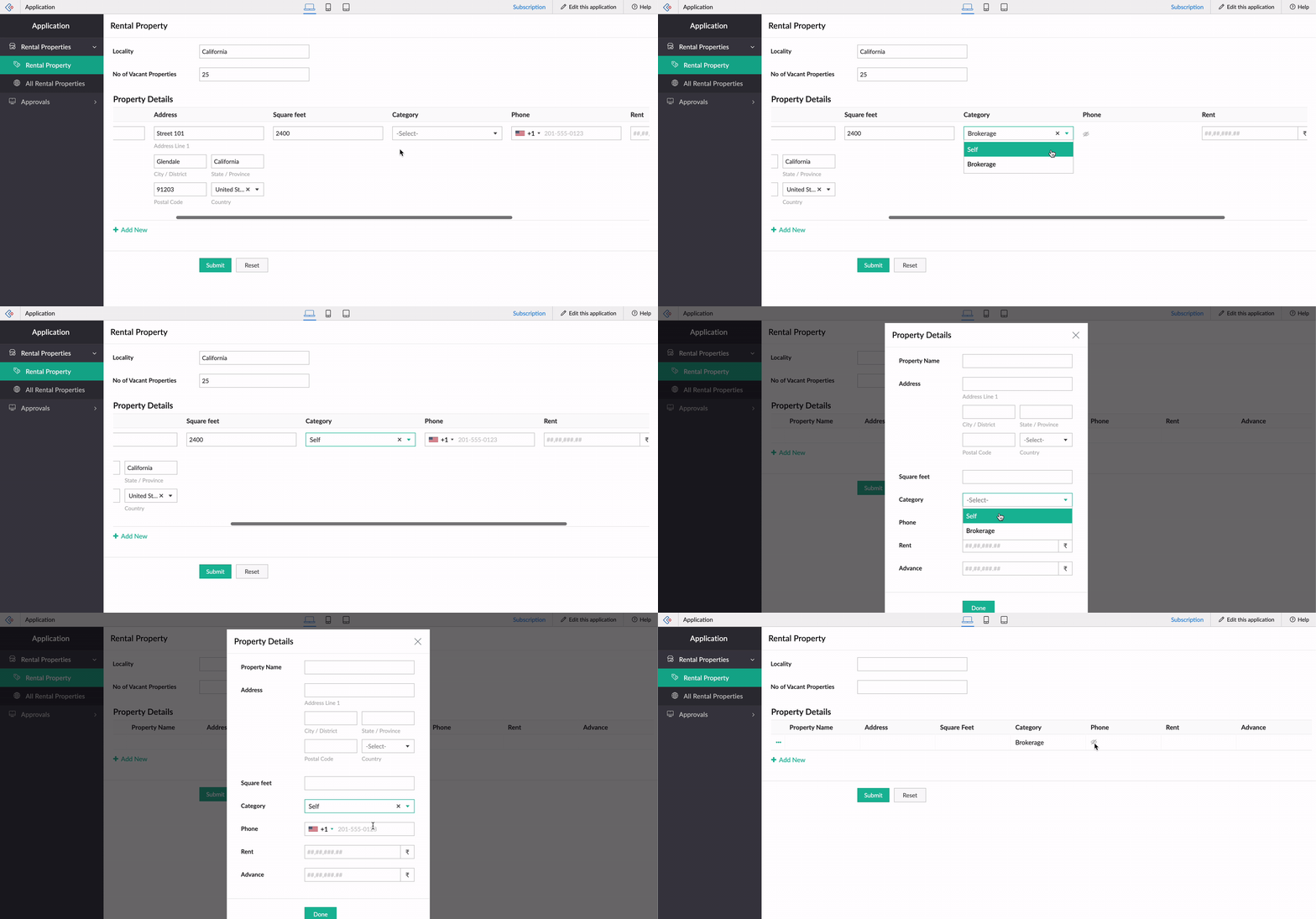
When the category is Brokerage, we need to hide the contact number of the landlord. We can use the new Deluge tasks to achieve this.
Code snippet
:
if(row.Category == "Brokerage")
{
hide row.Phone_Number;
}
else
{
show row.Phone_Number;
}
-----
That's it from us on our subform enhancements! We expect these updates to be rolled out in the upcoming weeks. Once done, we'll pop in a comment below and also update our Release Notes page.
Don't forget—your feedback helps us make Creator better and stronger. We'd love to hear what you think about these updates. Please use the space below or send your feedback to
support@zohocreator.com.
Regards,
Zoho Creator Team
Topic Participants
Ashwin Vishal R
Jean Le Gal
stevesmith41
Darren Burn
Anurag Jaiswal
Sticky Posts
Introducing Zoho Creator's 2025 Release Projection 2
Hello Creators! I'm Prakash, from the Creator product management team, and today I'm delighted to unveil our next set of features as part of Release Projection 2 for 2025. With thoughtful analysis and planning, we've curated powerful new capabilitiesZoho Creator - 2023 Release Projection 1
Hello everyone! A very Happy New Year to you and your family. Hope you're all good and having a great time using Zoho Creator to make your lives easier and your businesses prosper. 2022 was an action-packed year for us at Creator, and we hope to continueZoho Creator User Group meetups in a city near you! - Oct - Nov, 2023
Greetings from the Zoho Creator team! We're hosting a series of Zoho Creator meetups in various cities across the globe, and we'd love to meet you there! Our meetups are a great opportunity to network with industry peers, exchange ideas and best practices,Zoho Creator - 2023 Release Projection 2
Hello everyone! Time truly flies when you're having an incredible journey, and today we mark the completion of an eventful and action-packed six months. It feels like just yesterday when we embarked on this adventure together with the launch of our newUpcoming Updates - August 2022
Hi all, Greetings from the Zoho Creator team! Today we've got news for you on some exciting updates. And rest assured— there’s more to come! In this post, we'll be going over the upcoming features and improvements for this month as mentioned below. A
Recent Topics
Outgoing blocked: Unusual activity detected.
I just made payment for my Zohomail Today and have been debited so i will like to be Unblocked because this is what it says (Outgoing blocked: Unusual activity detected) Thank you i await your swift responsesIntegrating with My Own Application and ZOHO CRM Simultaneously
I have my own WhatsApp bot that uses my WhatsApp business account. I want to use the same phone number to integrate with ZOHO as well. What is the recommended way to do that? Should I integrate my application with ZOHO, forwarding messages whenever theHow do i move multiple tickets to a different department?
Hello, i have several tickets that have been assigned to the wrong department. I am talking about hundreds of automatically generated ones that come from a separate system. How can i select them all at once to move them to another department in one go? I can select them in "unsassigned open tickets view" but i can't find a "move to another department" option. I also can't seem to assign multiple tickets to the same agent in that same view. Could somebody advice?Account for Cryptocurrency Holdings in Zoho Books/Custom Currencies?
Hello, I've recently started using Zoho to run my small business and I've really been enjoying all of its features. However, I've been struggling to find a way to account for cryptocurrencies in Zoho Books. My company mines a Cryptocurrency token calledTransferring CRM Attachments to Workdrive
relatedrecords = zoho.crm.getRelatedRecords("Attachments","Conditions",conId); attachid = List(); for each ele in relatedrecords { attachementId = ele.get("id"); attachid.add(attachementId); } for each ele in attachid { counter = 1; downloadFile = invokeurl [ url: "https://www.zohoapis.com/crm/v2/Conditions/" + conId + "/Attachments/" + ele type: GET connection : "work_drive" ]; resp2 = zoho.crm.attachFile("Deals",dealId,downloadFile); resp3 = zoho.workdrive.uploadFile(downloadFile, dealWD, "PlaceHolder"+counter+"",New Customization options in the module builder: Quick Create and Detail view
Hello everyone, We have introduced two new components to the module builder: Quick create and Detail view. The Quick Create Component It is a mini form used to create a record and associate it to the parent record from a lookup field. For example, if you have a Deals lookup in the Contacts module, then you can associate existing deals or create a deal and associate it with the contact. You can customize this Quick Create form by adding standard as well as custom fields. There is no limit to the numberunblock my zoho mail account. outlines@zoho.com
please unblock my zoho mail account, outlines@zoho.comSMTP email sending problem
Hello, I've sent emails before, but you haven't responded. Please respond. My work is being disrupted. I can't send emails via SMTP. Initially, there were no problems, but now I'm constantly receiving 550 bounce errors. I can't use the service I paidMailk got blocked / Inquiry About Email Sending Limits and Upgrade Options
Dear Zoho Support Team, My name is Kamr Elsayed I created this account to use for applying for vocational training in Germany. As part of this process, I send multiple emails to different companies. However, after sending only 8 emails today, I receivedForwarder
Hi, I tried to add a forwarder from which emails are sent to my main zoho account email . However, it asks me for a code that should be received at the forwarder email, which is still not activated to send to my zoho emial account. So how can I get theNo chat option
Chat option is not supported.Direct “Add to Google Calendar” Option in Zoho Meeting
Hello Zoho Meeting Team, Hope you are doing well. We would like to request an enhancement related to the “Add to Calendar” functionality in Zoho Meeting. Currently, when we open Zoho Meeting and view our meetings under My Calendar, there is an Add toDKIM cannot be enabled for the domain as no verified default selector present
Hi Support Team, For Domain DKIM record trying to enable status. but showing error "DKIM cannot be enabled for the domain as no verified default selector present" So, please resolve the issue. Thank you.unable to send message reason 554 5.1.8 Email outgoing blocked
unable to send message reason 554 5.1.8 Email outgoing blockedI can't log in to my account on Thunderbird
I've just had to rebuild my PC (calamitous mess from Microsoft with Win10/Win 11 'upgrade' - they confirmed I had to start with a new build). I have used Zoho mail for years via Mozilla Thunderbird, but now I've had to download the latest version of TBird,Should I Use DMARC?
When I configure Zoho Mail's DMARC settings, it's mandatory to fill in the RUA and RUF (Aggregate notification email address*, Forensic notification email address*) addresses. When we enter an email address in these fields, we receive reports from theIntroducing Profile Summary: Faster Candidate Insights with Zia
We’re excited to launch Profile Summary, a powerful new feature in Zoho Recruit that transforms how you review candidate profiles. What used to take minutes of resume scanning can now be assessed in seconds—thanks to Zia. A Quick Example Say you’re hiringBooks API Receiving an Error that Doesn't Make Sense when Creating Credit Note - trying to use 'ignore_auto_number_generation' argument
Hello, I'm working on a newly created routine and I'm getting an error that doesn't make sense when trying to create a new Credit Note. Here is my POST request. Endpoint: https://www.zohoapis.com/books/v3/creditnotes?organization_id=########## Body: {How to move emails to Shared Mailbox?
Hello, I created a Shred Mailbox instead of using a distribution group. But I cannot move previous emails to certain shared mailbox. Is it possible move some emails from inbox to shared mailbox?Collaboration with free plan user.
Hello. Do both users need to be on Pro plan to collaborate? Or can a Pro user share a note with a free plan user with the ability to edit?Connection to other user
Zoho Cliq handles sharing of Custom OAuth Connections that require individual user logins.Analytics Portal
I have the "standard plan" and want to explore the portal option; I activated the 15-day trial but do not see the pricing for the add-on. How can I get the price under "Upgrade add-ons." Thanks RudyCan I filter a Lookup field to only show related records from another Lookup in Zoho CRM?
In our Leads module, we have two Lookup fields: Recruitment Agency – the agency that the lead came from Recruiter – the individual contact from that agency who sent us the lead Both fields link correctly to their respective records in CRM. However, ourZoho Books API invoice email bouncing with 'relaying-issues' error
I have waited over 30 days for zoho books uk to assist with the following and i have had no replies or tickets erronously closed. The service has been terrible - very unlike zoho! So i am raising this here hoping that a community member can assist: Hello,How do I filter contacts by account parameters?
Need to filter a contact view according to account parameter, eg account type. Without this filter users are overwhelmed with irrelevant contacts. Workaround is to create a custom 'Contact Type' field but this unbearable duplicity as the information alreadyZoho Writer to Zoho Sign Template Misalignment – Request for Community
We are currently facing a critical issue impacting our live business operations due to a misalignment problem between Zoho Writer templates and Zoho Sign output. Issue Summary: We have an automated workflow in Zoho CRM using Deluge scripts that generatesAccount blocked
Yesterday I got my Zeptomail account blocked due to too many hard bounces. My account is used exclusively for sending transactional emails (eg. your order has been shipped, a form has been filled, etc) and the sudden blocking impacted hundreds of websitesMigration Tool Download
Since apparently you have to ask for the migration tool to download (why?), I need the download for the migration tool for exchange servers. Please forward link, thanks.IF Formula
Hi, I'm having trouble setting up a custom formula in a field. Can you help me with it? The formula should do the following: If the created date is less or equal to 30 days the field should display a string New in pieline or Exisitng pipeline if aboveAutorespond to one specific sender
Is there any way to create a rule or filter that sends an automatic reply to messages from one specific email address? I really need to set up something like a "vacation response" but only for one "received from" address.View comprehensive logs of all actions in Custom Module History
Hello everyone, We are happy to announce our new feature, Detail View in Custom Module History, which enhances visibility, control and accountability over your records. Users can now access a detailed timeline of every action that has been performed onTrack ZohoForm Conversion using Postmessage event
Hi, I’ve been using a third-party lead tracking tool to capture leads from my website along with their source. Earlier, with the HubSpot form, the third-party script was able to detect the postMessage event that iframe forms typically send back to theEmail task creator when task is updated/marked complete
I am looking for a way to notify the creator of a task in zoho todo when - Task is updated Task is closed Comments entered 1 and 2 are critical, and I cannot find a zoho flow to do this. There is no way that as a manager I will know when someone has completedEmail Recall Feature In Zoho Mail Which Should Also Work For Outside Organisation Members
Add a feature to recall or undo sending an email within a configurable short time window (e.g., 30 seconds to 2 minutes) after hitting send, similar to Gmail’s undo send. Currently the sent email can not be recall If the recipient is not from within yourhow to treat a same person as customer and vendor in zoho
hi team, in my company, few persons acting as creditors as well as debtors (which means sometimes we pay them... some times we paid by them). in that case i would like to maintain a same ledger for that person.in zoho books it is treating creditor andHow to implement calculating average value of averaged values?
Hi, I'm trying to implement a formula in my layout for a module that calculates the average of 2 averaged values, but I can't do so using the formula custom field. To calculate the 2 averaged values, I could use the formula custom field, but in the customZoho Recruit update published job boards
If we have a job thats already posted on several different job boards and we edit this job in zoho recruit (e.g. the description of the job), does this then automatically update this new information to all the published job boards? If not, how does theNarrative 14: The magic bazaar of Desk
Behind the scenes of a successful ticketing system: BTS Series Narrative 14: The magic bazaar of Desk Marketplace is a centralized platform where users can discover Zoho and third-party applications that can be integrated with their Desk account to facilitateCollections Management: #2 Late Payment Automation
"Sir, I'll process the payment by evening, please don't apply any late payment charges", the customer said while arranging papers on his desk. Sanjay stood there with a tired smile. He had already visited twice that week. Payment collection was one thing.Create a table in the layout section of modules
Dear Sirs, I would like to know whether is possible to create a table under new fields in layouts section of modules. In fact in this section there are single line, multi line, pick list, multi-select, date, formula etc. but I am unable to add a tableNext Page