Augmenting subform capabilities
Greetings, everyone!
Finally, the day has come for us to announce some of the most anticipated, requested, and exciting updates to
subforms in Zoho Creator.
As you're aware, subforms are an integral part of Creator forms, as they help in establishing proper modelling of the app, collecting rows of data, and setting up users to enter data that has a parent-child relationship. With this new set of updates, we've bought in a paradigm shift to subforms, as they'll be getting an all-new look for an improved user experience, along with new capabilities for solving challenges. This post will give you a sneak peek into these new subform enhancements.
Do you find it difficult to scroll subforms horizontally? Do you wish you could drag and drop subform rows? Do you want to manipulate subform fields via Deluge script? Then your wait has come to an end—continue reading to learn more on how you can now do all of this in subforms.
Subform list and pop-up view
As announced in the
March 2023 post, the List
view type of subforms will display the subform as a pop-up, and the current method of displaying subforms has been christened
Grid.
To further understand how this can be helpful, let's put ourselves in the shoes of a supply chain manager. Their job requires them to regularly keep track of inventory lists in their warehouses.
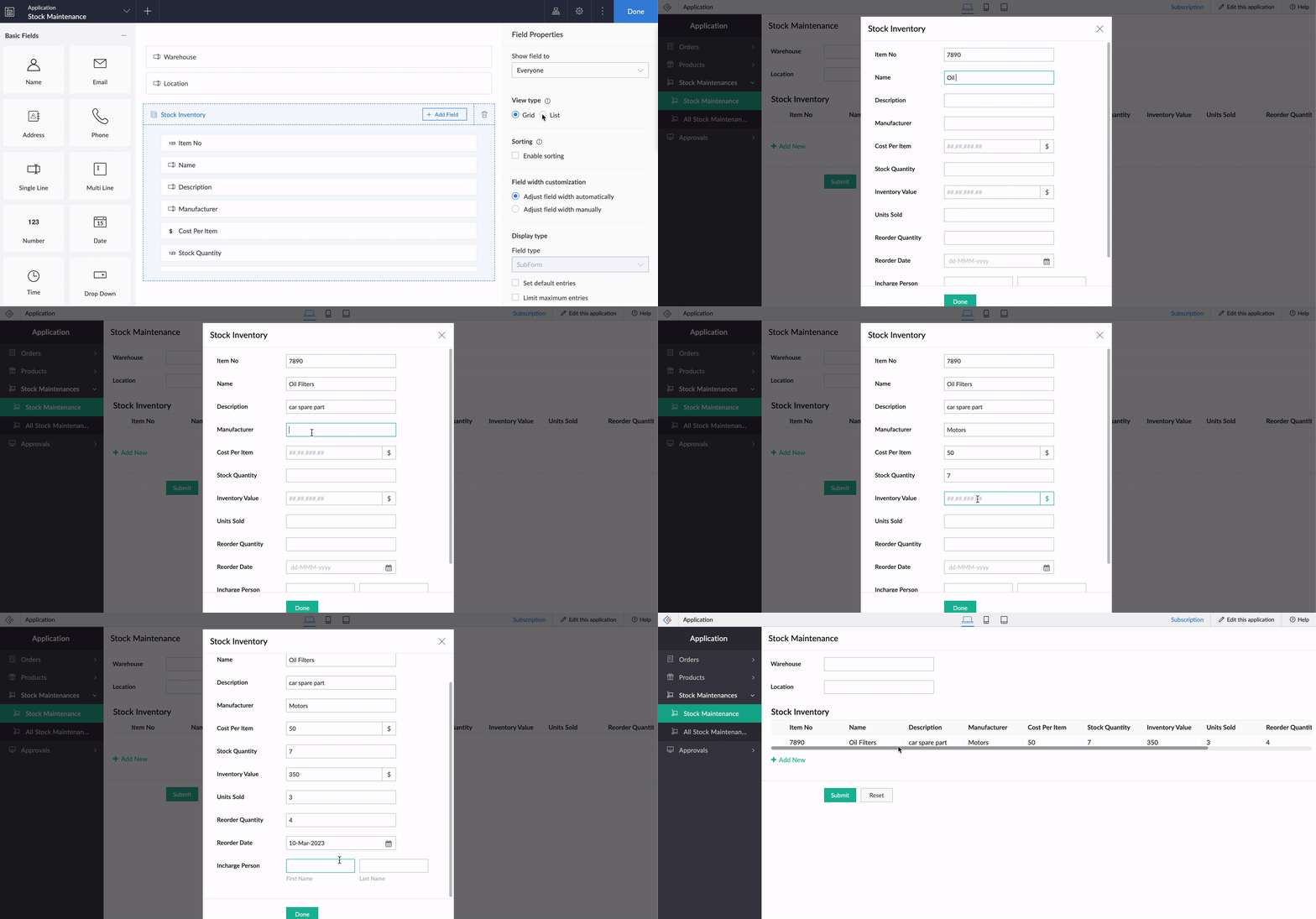
Let's assume there's a form collecting warehouse details, like name, location, and stock inventory. For collecting the stock inventory details, a subform is present with these fields—Item No, Name, Manufacturer, Description, Cost Per Item, Stock Quantity, Inventory Value, Units Sold, Reorder Quantity, Reorder Date,
and
Person In Charge.
Now, the default view type will tire you out from scrolling back and forth horizontally, and results in a frustrating time-consuming process. We all long for a new way to avoid this and make data entry swifter.
To achieve this, make use of the new List option under
Subform->Field Properties->View Type.
List view, which looks similar to our list report, is a table-like subform without inline inputs. When you try adding or updating data in each row, a pop-up will be displayed listing out the fields with vertical scrolling, thereby ensuring a vastly superior user experience and more effective space management.
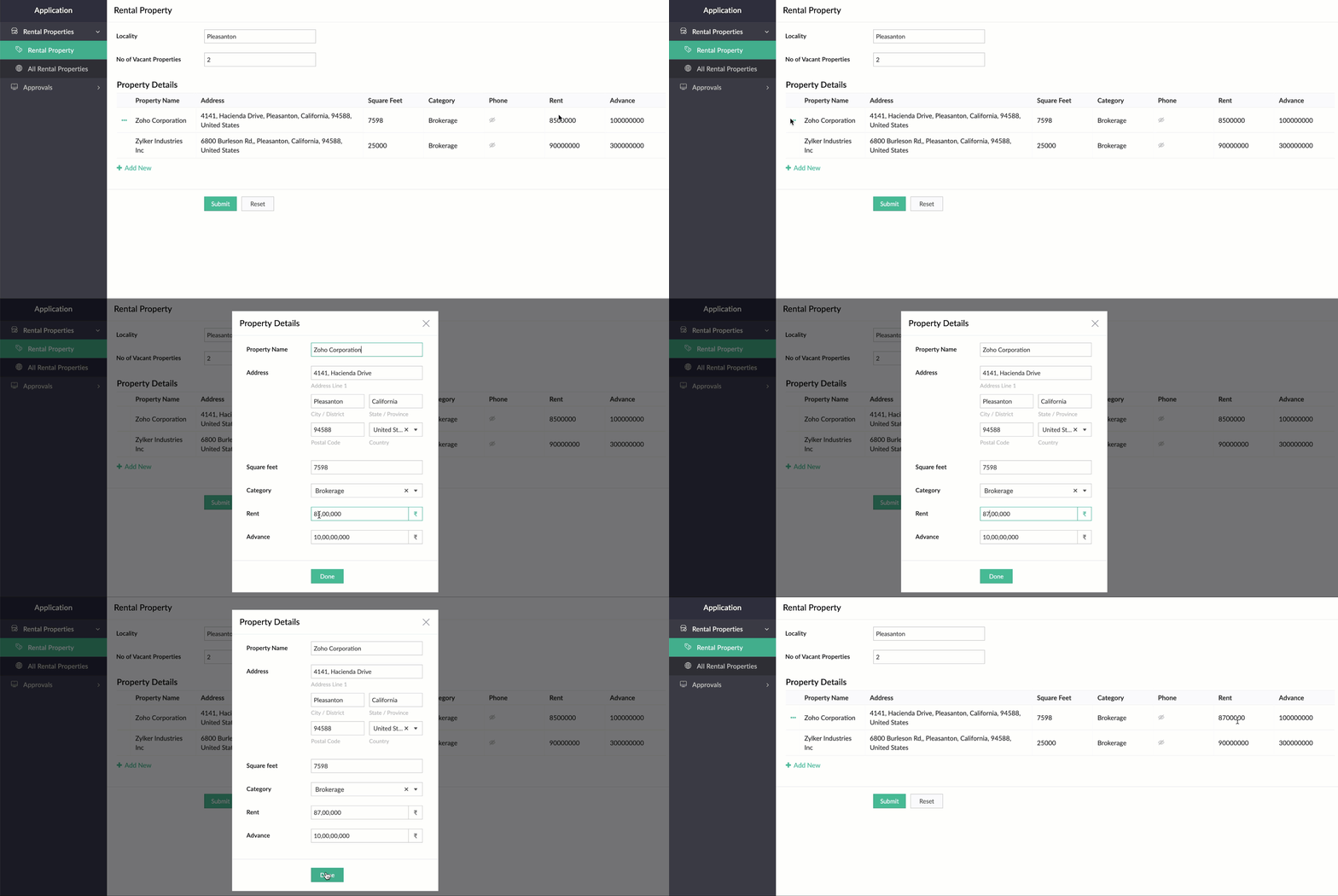
Crucially, it also helps to load subform rows quickly while editing records, by reducing the loading time.
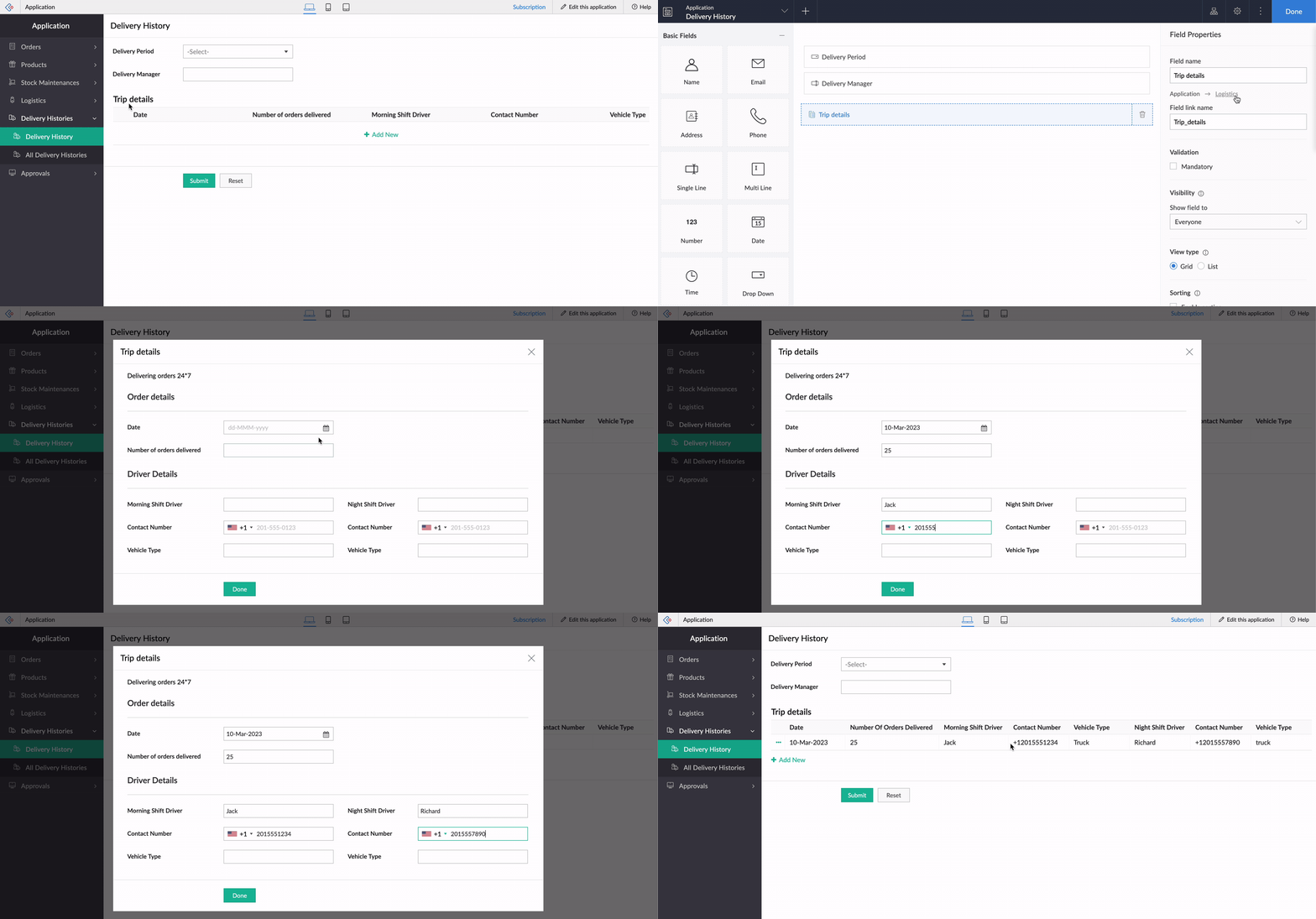
While using an existing form as a subform, the form's exact structure will be replicated in the pop-up, to ensure consistency in the look and feel of the form. To understand this better, let's assume our form has a two-column layout, with
Section
and Note
fields. Now the same customizations will be displayed in the pop-up, too!
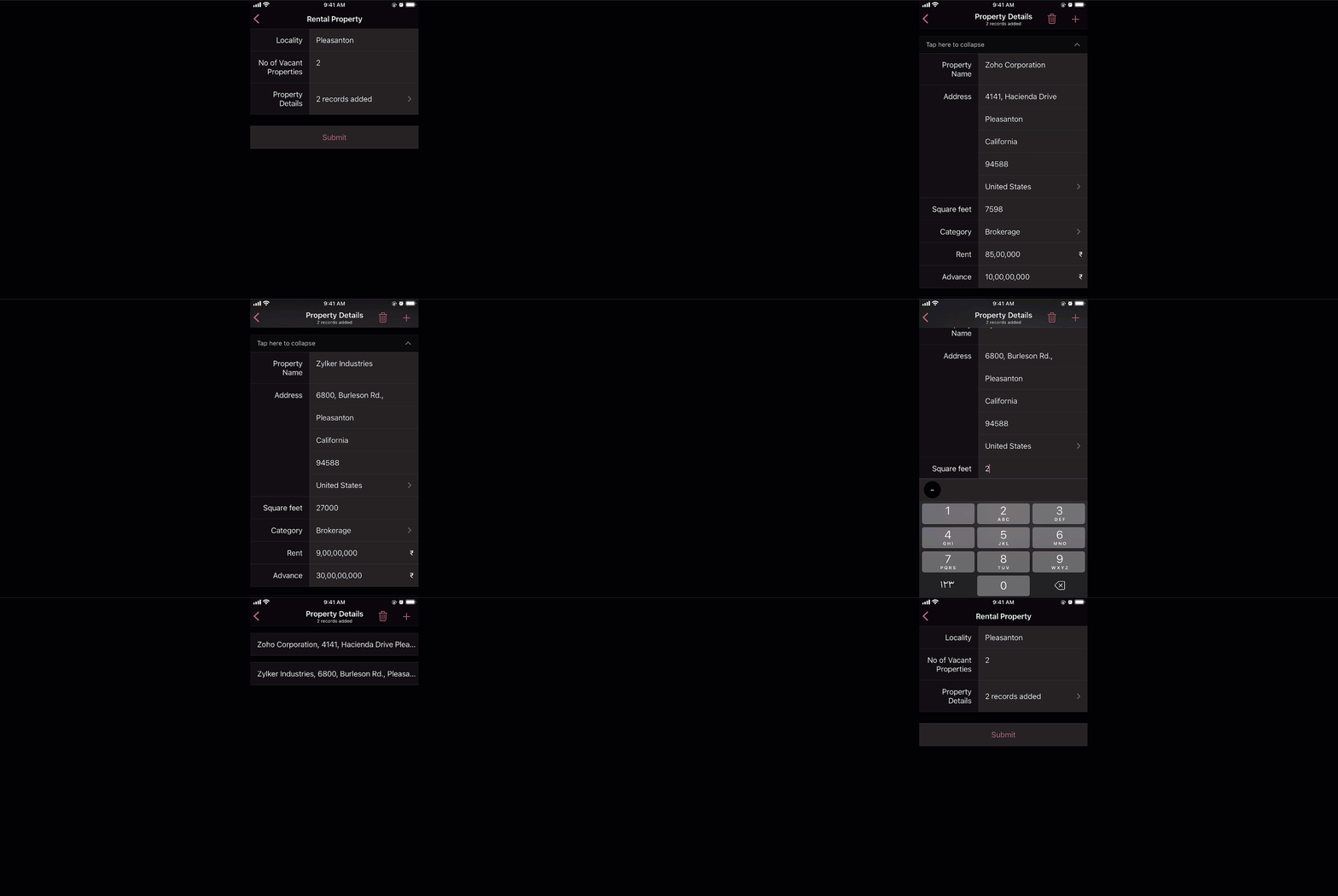
And that's not all—the new List view type is being extended to mobile apps, too. When it's enabled, the subform will be opened in the next screen, where users can add their data. This data will then be added as a subform row.
Custom sorting
Currently, the only sorting option in subforms is
field-based sorting, where you can choose a field based on which rows are sorted, either in ascending or descending order. Though this works well for basic cases, the need may arise in some cases to sort the subform in random order. With the new custom sorting support, you can effortlessly drag and drop subform rows to rearrange them.
To understand how it works, let's consider a task manager working on a To-Do List
form, to plan activities for a current project. For this, they have a main form collecting
project details, date-time,
and
milestones,
and a subform for maintaining the to-do list with the following fields:
Task Name, Description, Category, Status, Deliverables, Priority, and
Deadline. Here, before submitting the list, they want to rearrange some tasks based on their daily routine.
To achieve this, they use the Custom sorting option under
Subform->Field Properties->Sort type.
Now, with custom sorting, all they need to do to reorder the row sequence—both while adding and editing records—is simply drag and drop them in the required position.
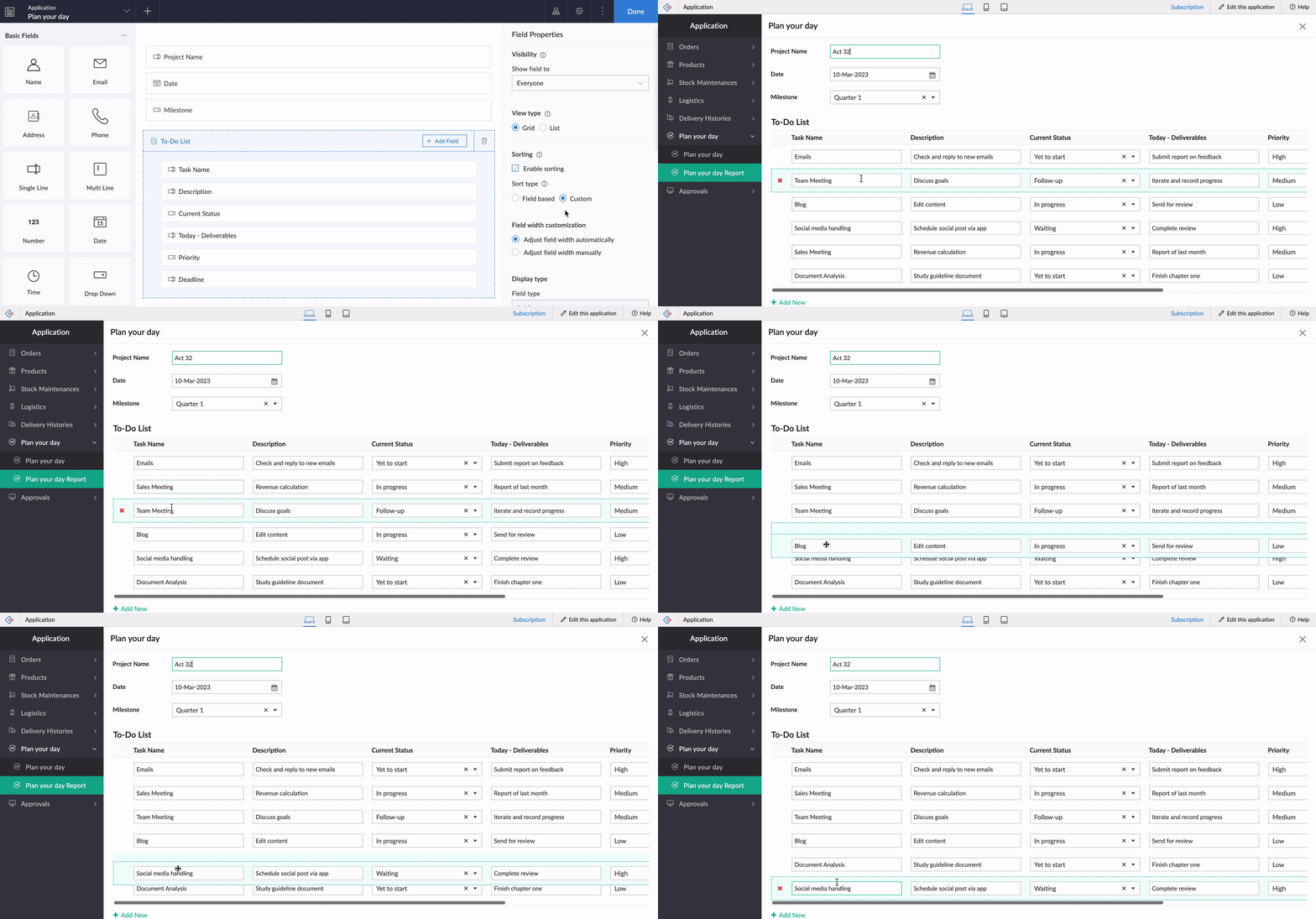
The same order will be retained in reports or while opening the form for updating the list.
Note:
Custom sorting can be used both in List and Grid-type subforms.
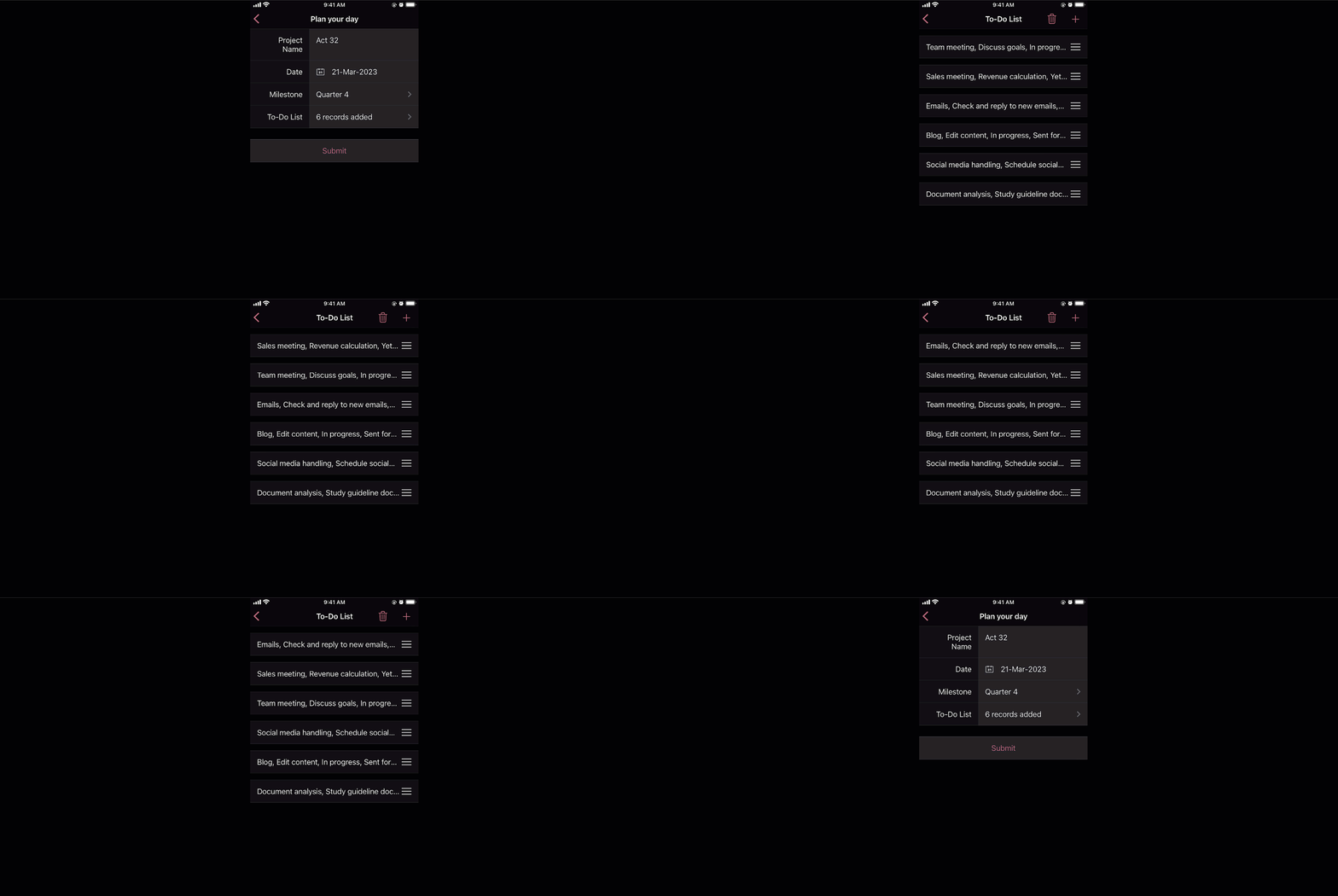
Custom sorting will also be available on the mobile apps and you can effortlessly rearrange fields in subforms.
Deluge tasks for row-level actions
You can use a combination of workflows and Deluge scripts to help your subforms handle complex business logic. With that in mind, we formulated the idea of bringing in actions that help you take control at the row level of subforms.
In the past, you may have come across business scenarios which required you to hide/show or enable/disable a particular field in a specific subform row. Now, with new dedicated Deluge tasks, you can bid adieu to shortcuts and workarounds.
Note:
Deluge tasks can be used both in List and Grid-type subforms.
Enable/disable
The new enable and disable subform Deluge tasks can be used to enable and disable specific fields.
Syntax:
enable row.subform_field
disable row.subform_field
disable row.subform_field
Events:
On add row, On delete row, On user input of subform field
Let's assume a Vehicle form has fields like
Customer Name, Vehicle Model, and Date of Booking,
and a subform to collect payment details with the following fields:
Payment Date, Payment Method, Credit Card Number, Bank Account Number,
and
Transaction Ref Number.
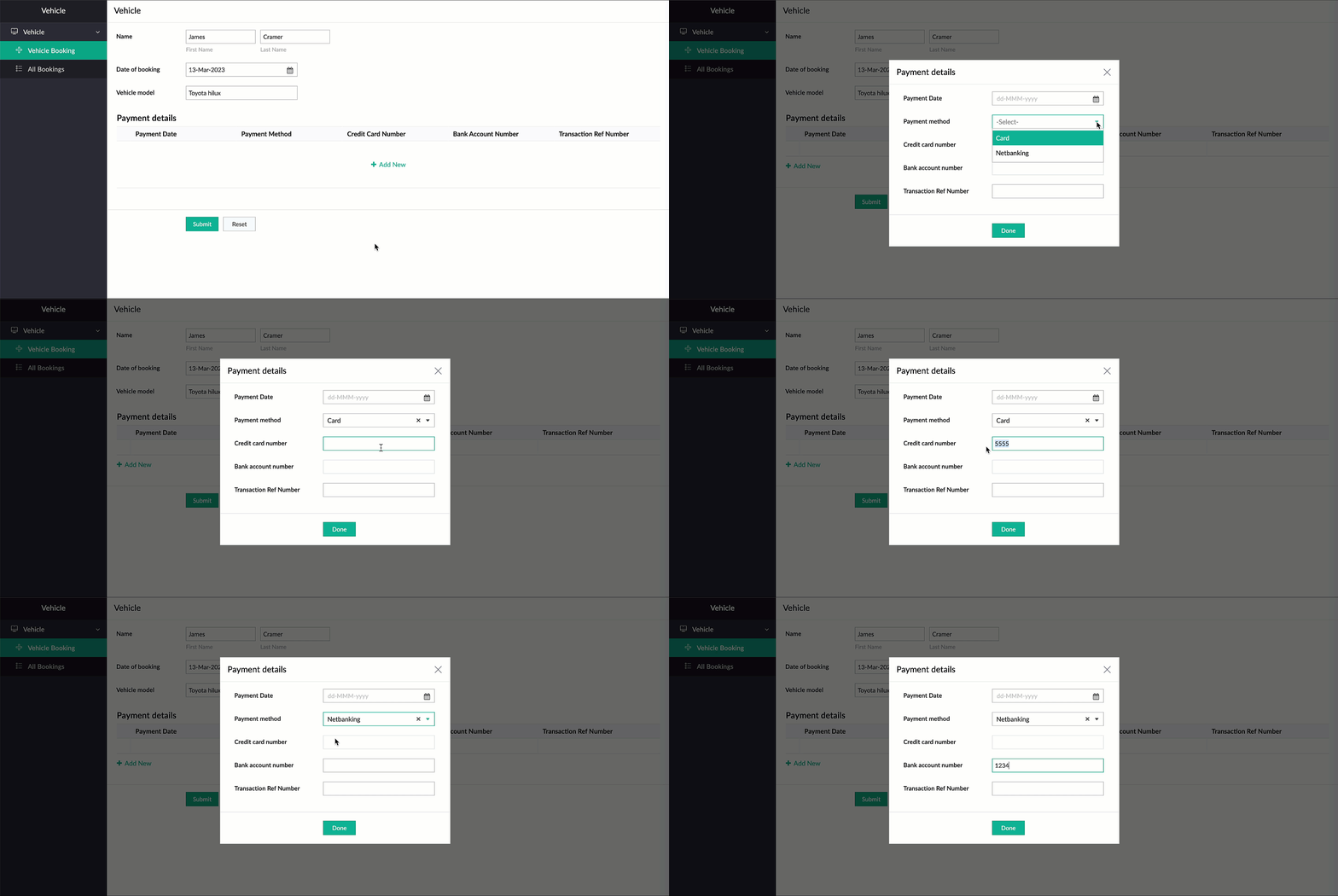
Now, there are two payment options—Card and Netbanking. If Card is chosen, then the Credit Card Number field should be enabled and the Bank Account Number field should be disabled. Similarly, when Netbanking is chosen, then the Bank Account Number field should be enabled and the Credit Card Number field disabled.
Code snippet:
if(Payment_details.Payment_method == "Card")
{
enable row.Credit_card_number;
disable row.Bank_account_number;
}
if(Payment_details.Payment_method == "Netbanking")
{
enable row.Bank_account_number;
disable row.Credit_card_number;
}
{
enable row.Credit_card_number;
disable row.Bank_account_number;
}
if(Payment_details.Payment_method == "Netbanking")
{
enable row.Bank_account_number;
disable row.Credit_card_number;
}
Hide/show
The new show
and
hide subform
Deluge tasks can be used to show and hide specific fields.
Syntax: hide row.subform_field
show row.subform_field
show row.subform_field
Events: On add row, On delete row, On user input of subform field
Let's use the example of a rental property manager who needs to keep track of a list of properties that are available in every locality. For this, a form is used for collecting information like Locality and No of Vacant Properties, and a subform will be used to list property details with the following fields: Property Name, Address, Square Feet, Rent, Advance, Category, and Contact Number.
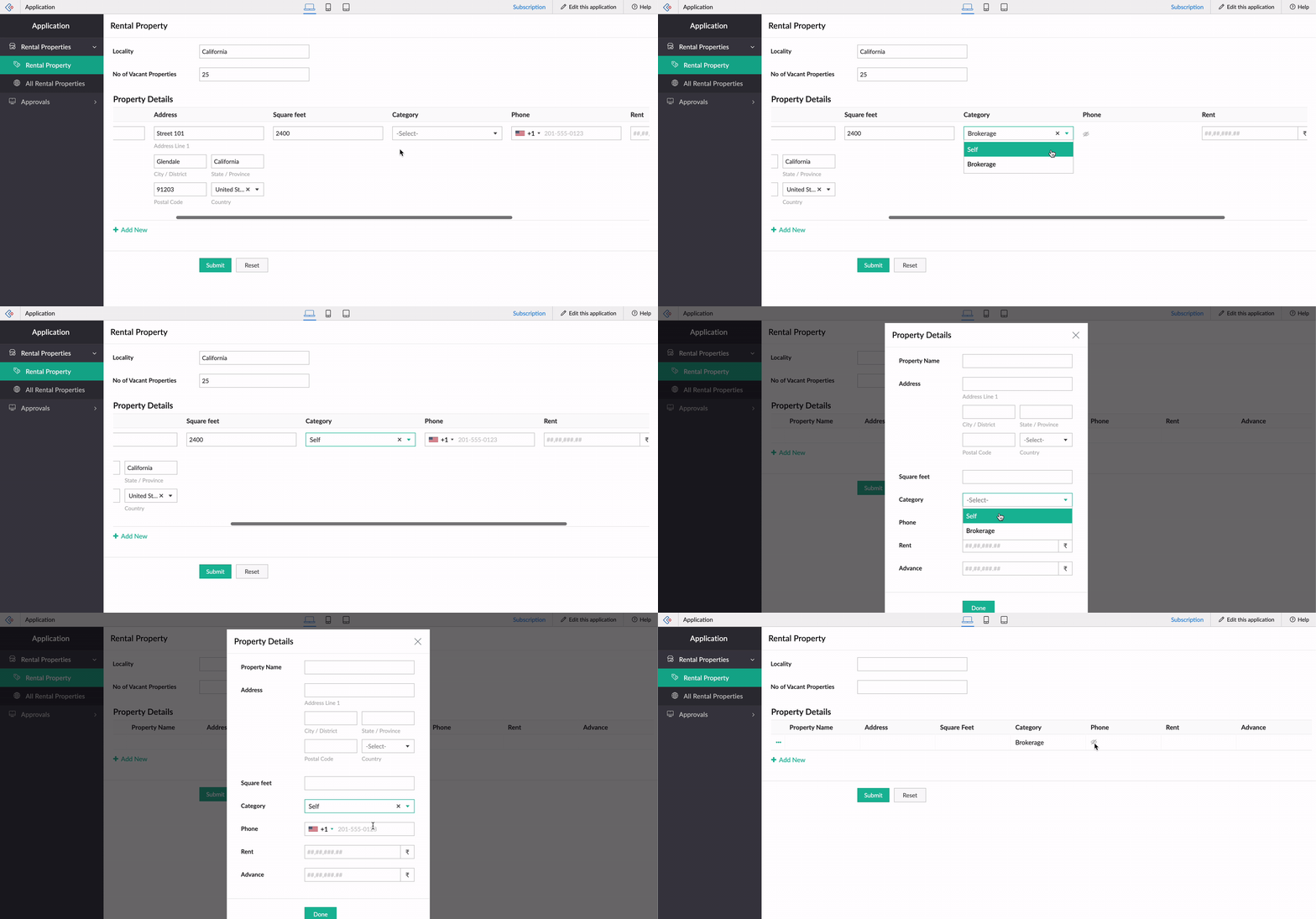
When the category is Brokerage, we need to hide the contact number of the landlord. We can use the new Deluge tasks to achieve this.
Code snippet
:
if(row.Category == "Brokerage")
{
hide row.Phone_Number;
}
else
{
show row.Phone_Number;
}
-----
That's it from us on our subform enhancements! We expect these updates to be rolled out in the upcoming weeks. Once done, we'll pop in a comment below and also update our Release Notes page.
Don't forget—your feedback helps us make Creator better and stronger. We'd love to hear what you think about these updates. Please use the space below or send your feedback to
support@zohocreator.com.
Regards,
Zoho Creator Team
Topic Participants
Ashwin Vishal R
Jean Le Gal
stevesmith41
Darren Burn
Anurag Jaiswal
Sticky Posts
Introducing Zoho Creator's 2025 Release Projection 2
Hello Creators! I'm Prakash, from the Creator product management team, and today I'm delighted to unveil our next set of features as part of Release Projection 2 for 2025. With thoughtful analysis and planning, we've curated powerful new capabilitiesZoho Creator - 2023 Release Projection 1
Hello everyone! A very Happy New Year to you and your family. Hope you're all good and having a great time using Zoho Creator to make your lives easier and your businesses prosper. 2022 was an action-packed year for us at Creator, and we hope to continueZoho Creator User Group meetups in a city near you! - Oct - Nov, 2023
Greetings from the Zoho Creator team! We're hosting a series of Zoho Creator meetups in various cities across the globe, and we'd love to meet you there! Our meetups are a great opportunity to network with industry peers, exchange ideas and best practices,Zoho Creator - 2023 Release Projection 2
Hello everyone! Time truly flies when you're having an incredible journey, and today we mark the completion of an eventful and action-packed six months. It feels like just yesterday when we embarked on this adventure together with the launch of our newUpcoming Updates - August 2022
Hi all, Greetings from the Zoho Creator team! Today we've got news for you on some exciting updates. And rest assured— there’s more to come! In this post, we'll be going over the upcoming features and improvements for this month as mentioned below. A
Recent Topics
Ability to Link Reported Issues from Zoho Desk to Specific Tasks or Subtasks in Zoho Projects
Hi Zoho Desk Team, Hope you're doing well. When reporting a bug from Zoho Desk to Zoho Projects, we’ve noticed that it’s currently not possible to select an existing task or subtask to associate the issue with. However, when working directly inside ZohoPrint Tickets
We have field engineers who visit customers. We would like the option to print a job sheet with full details of the job and account/contact details.Zoho Desk integration with Power BI
Hi, I want to be able to create a Power BI report which has live updates of ticket data from zoho desk, is this possile at all? Thanks JackAbility to Attach Images When Reporting Issues to Zoho Projects from Zoho Desk
Hi Zoho Desk Team, Hope you’re doing well. We’re using the Zoho Desk–Zoho Projects integration to report bugs directly from support tickets into the Zoho Projects issue tracker. This integration is extremely useful and helps us maintain smooth coordinationAbility to Choose Task List and Add Subtasks When Creating Tasks from Zoho Desk
Hi Zoho Desk Team, Hope you’re doing well. We’re using the Zoho Desk–Zoho Projects integration to seamlessly connect customer tickets with project tasks. While the integration works great overall, we noticed two important limitations that affect our workflowSync Task Status from Zoho Projects to Zoho Desk
Hi Zoho Desk Team, Hope you’re doing well. We’re actively using the Zoho Desk–Zoho Projects integration, which helps our support and project teams stay aligned. However, we noticed that when we change a task’s status in Zoho Projects, the change is notDefault/Private Departments in Zoho Desk
1) How does one configure a department to be private? 2) Also, how does one change the default department? 1) On the list of my company's Zoho Departments, I see that we have a default department, but I am unable to choose which department should be default. 2) From the Zoho documentation I see that in order to create a private department, one should uncheck "Display in customer portal" on the Add Department screen. However, is there a way to change this setting after the department has been created?Zoho CRM IP Addresses to Whitelist
We were told to whitelist IP addresses from Zoho CRM. (CRM, not Zoho Mail.) What is the current list of IP Addresses to whitelist for outbound mail? Is there a website where these IP addresses are published and updated? Everything I could find is overColor of Text Box Changes
Sometimes I find the color of text boxes changed to a different color. This seems to happen when I reopen the same slide deck later. In the image that I am attaching, you see that the colors of the whole "virus," the "irology" part of "virology," andThe difference between Zoho Marketing Automation and Zoho Campaigns
Greetings Marketers! This post aims to differentiate between Zoho Marketing Automation and Zoho Campaigns. By the time you get to the end of the post, you will be able to choose a product that objectively suits you. What is Zoho Marketing Automation?Zoho Mail Android app update - View emails shared via Permalink on the app.
Hello everyone! In the latest version(v2.8.2) of the Zoho Mail Android app update, we have brought in support to access the emails shared via permalink within the app. Earlier, when you click the permalink of an email, you'll be redirected to a mobileLet us view and export the full price books data from CRM
I quote out of CRM, some of my clients have specialised pricing for specific products - therefore we use Price Books to manage these special prices. I can only see the breakdown of the products listed in the price book and the specialised pricing forHow to create a Zoho Mail extension similar to Outlook's OnSend add-in?
Hi, I want to create a Zoho Mail extension similar to Outlook’s OnSend add-in. The extension should: Let the user select headers and footers from a taskpane while composing an email. When the user clicks Send, the extension should: Automatically insertHow to display Motivator components in Zoho CRM home page ?
Hello, I created KPI's, games and so but I want to be able to see my KPI's and my tasks at the same time. Is this possible to display Motivator components in Zoho CRM home page ? Has someone any idea ? Thanks for your help.Introducing Record Summary: smarter insights at your fingertips
Hello everyone, We’re excited to introduce the Record Summary feature. This powerful addition makes use of Zia to simplify how you interact with your CRM data, providing a seamless, consolidated view of critical record information. Scrolling through theDelegates should be able to delete expenses
I understand the data integrity of this request. It would be nice if there was a toggle switch in the Policy setting that would allow a delegate to delete expenses from their managers account. Some managers here never touch their expense reports, andFunction #9: Copy attachments of Sales Order to Purchase Order on conversion
This week, we have written a custom function that automatically copies the attachments uploaded for a sales order to the corresponding purchase order after you convert it. Here's how to configure it in your Zoho Books organization. Custom Function: HitKaizen #8 - Handling Recurrence and Participants in the Events Module via API
Hello everyone! We are back this week with an exciting post—Handling recurrence and participants in the Events module through API. First things first—What is the Events module? "Events" is a part of the Activities module in Zoho CRM. An event is an activity that happens at a given place and time. You can find Events on the user's Zoho CRM's home page, Activities home page, Calendar, and in other related records. What are the types of Events? Events are of two types—Recurring and non-recurring events.Marketer’s Space - Get Holiday-Ready with Zoho Campaigns
Hello marketers, Welcome back to another post in Marketer’s Space! Q4 is packed with opportunities to connect with your audience - from Halloween, Black Friday, and Cyber Monday, to Thanksgiving, Christmas, and New Year. In this post, we’ll look at howPersonalized demo
can I know more about the personalized demo we are construction company andCan I collect email addresses in a form??
Can I add new subscribers to my email list (hosted in FloDesk) when they check a box and add their email address on a Zoho form?Zoho CRM Android app updates: Kiosk and multiple file upload support for subforms
Hello everyone, We've rolled out new enhancements to the Zoho CRM Android app to bring better mobile CRM experience and efficiency. Let's take a quick look at what's new: Kiosk Multiple file uploads for subforms Kiosk Kiosk is a no-code tool in Zoho CRMAlerts for mentions in comments
We are testing the use of Writer internally and found that when a user is mentioned in a comment, there is no email alert for the mention. Is this something that's configurable, and if so, where can we enable this option?Zoho Mail Android app update: Manage folders
Hello everyone! In the latest version(v2.9) of the Zoho Mail Android app update, we have brought in support for an option to manage folders. You can now create, edit, and delete folders from within the mobile app. You can also manage folders for the POPvalidation rules doesn't work in Blueprint when it is validated using function?
I have tried to create a validation rule in the deal module. it works if I try to create a deal manually or if I try to update the empty field inside a deal. but when I try to update the field via the blueprint mandatory field, it seems the validationGet Zoho Mail API working (including DRE Connector, Oauth Token, ZUID, ZOID & ACCOUNT_ID)
Disclaimer: I’m not a professional coder! Do you need to use Zoho Mail API? Me too. It lets you do all sorts of things — like reading the complete header of an email, or forwarding an email with its attachments — which is what I wanted to do. But settingRevenue Deferrals
Does ZOHO books and subscriptions handle Revenue Deferrals?Can I make a website open inside Zoho whenever I log in?
Hi Zoho Team, Every day, I check a few websites for updates, for example, Rojgar--result, where I see the latest government job results and notifications. I was wondering if there’s any option in Zoho to make a website like that open inside Zoho wheneverKaizen #214 - Workflow APIs - Part 2
Welcome back to another week of Kaizen! Last week, we discussed how Zylker Cloud Services used the Workflow APIs to discover and audit all the automations in their CRM, listing every workflow, checking triggers, and understanding their automation limits.Zoho CRM Community Digest - September 2025 | Part 1
Hello Everyone! September's Here! Before we jump into product updates, and community highlights, here's a quick spotlight! Zoho has launched a Professional Sales Rep Certification course on Coursera, tailored for sales professionals to strengthen theirUpload my theme.
Hello. I would like to upload my own theme, this one: https://themeforest.net/item/panagea-travel-and-tours-listings-template/21957086 Is it compatible and where I upload it? If not I will hire a developer, what do I have to ask when I search for one?Product Updates in Zoho Workplace applications | September 2025
Hello Workplace Community, Let’s take a look at the new features and enhancements that went live across all Workplace applications this September. Zoho Mail Attach email as EML file in Compose Effortlessly attach emails as EML file in Compose by simplyVehicle Tracking
we have GPS devices that installed on our vehicles, and we would like to know if it's possible to get vehicle live location data from the GPS device To Zoho Creator App. Thank You🤝 Rencontres, partage et inspiration au Zoho Community Meetup de novembre
Chers utilisateurs, Bonne nouvelle 🎉 : notre Meetup Zoho Community approche, et nous serions ravis de vous y voir ! 📍 Toulouse : le 25 novembre 📍 Lyon : le 27 novembre (🎯 Il ne reste que quelques places !) Que vous soyez débutant ou utilisateur avancé,Need Help Mapping GST Registration Number Field Between Zoho Books & Zoho CRM + Slow Sync Issues
am facing an issue with field mapping between Zoho Books and Zoho CRM. I want to map the GST Registration Number field from the Customer module in Zoho Books to a custom GST field inside the Accounts module in Zoho CRM. However, I am getting a warningNotification received when self-assigning tickets
When I assign tickets in Zoho Desk the relevant agent gets a notification email. When assigning myself a ticket in Zoho Desk, I get a notification email. Now, as I am the person who assigned the ticket to myself, getting a notification in this regardNouveauté dans Zoho Writer - Création de documents et de modèles assistée par l'IA
Zia, l’assistant IA de Zoho Writer, soutient les utilisateurs dans l’amélioration de leur écriture et la création de contenus : correction orthographique et grammaticale en temps réel, suggestions adaptées au contexte, détection du plagiat, révisionsSession Expired
I constantly get "Session Expired" and need to relogin or close and open the application again. This gets really frustrating during the day. Is this something that can be solved? This really makes me want to leave the app as it is no go to need to reopenDisable Buttons for Users with Profiles without permission
Hey, I've noticed that users without permission of setting up things in the marketplace, can still see the icon: On a click, you see this: It would be way better, if they couldn't see this menu icon at all. (Aside from the fact that it completely misplacedZoho Analytics - Make text clickable in underlying data
Hi Community, I have a simple sales report based on a Invoice query table. I have included a link on to each invoice on the table and sent the Invoice number URL to the link. This works find in the query table, but when I click underlying data on theNext Page