Automation Series: Sync Task Status with Zoho Desk Tickets
In Zoho Projects, you can automatically close and reopen an associated Zoho Desk ticket when the status of a task is changed. This syncs the current state of the task with the support ticket without manual updates.
For instance, a support team handling post-implementation requests raise tickets in Zoho Desk and creates task directly from the ticket to track resolution in Zoho Projects.
When a task is marked as Closed in Zoho Projects, a custom function associated with the workflow rule is executed, to check if the task is linked to a ticket in Zoho Desk. If a team member closes the task, the corresponding ticket status will also be marked as Closed. If the task is reopened in Zoho Projects, the ticket will also be reopened automatically. This ensures both teams stay in sync without any manual follow-up.

This can be implemented by establishing a connection and creating a custom function.
Follow the steps mentioned below to create and execute the Custom Function.
To configure this flow,
1. Navigate to the upper-right corner of the page and click  → Developer Space → Connections and create the following two connections:
- Create a connection named "projectsanddesk" with the scopeZohoProjects.tasks.ALL.

- Create a separate connection named "deskandprojects" with the scope Desk.tickets.ALL.
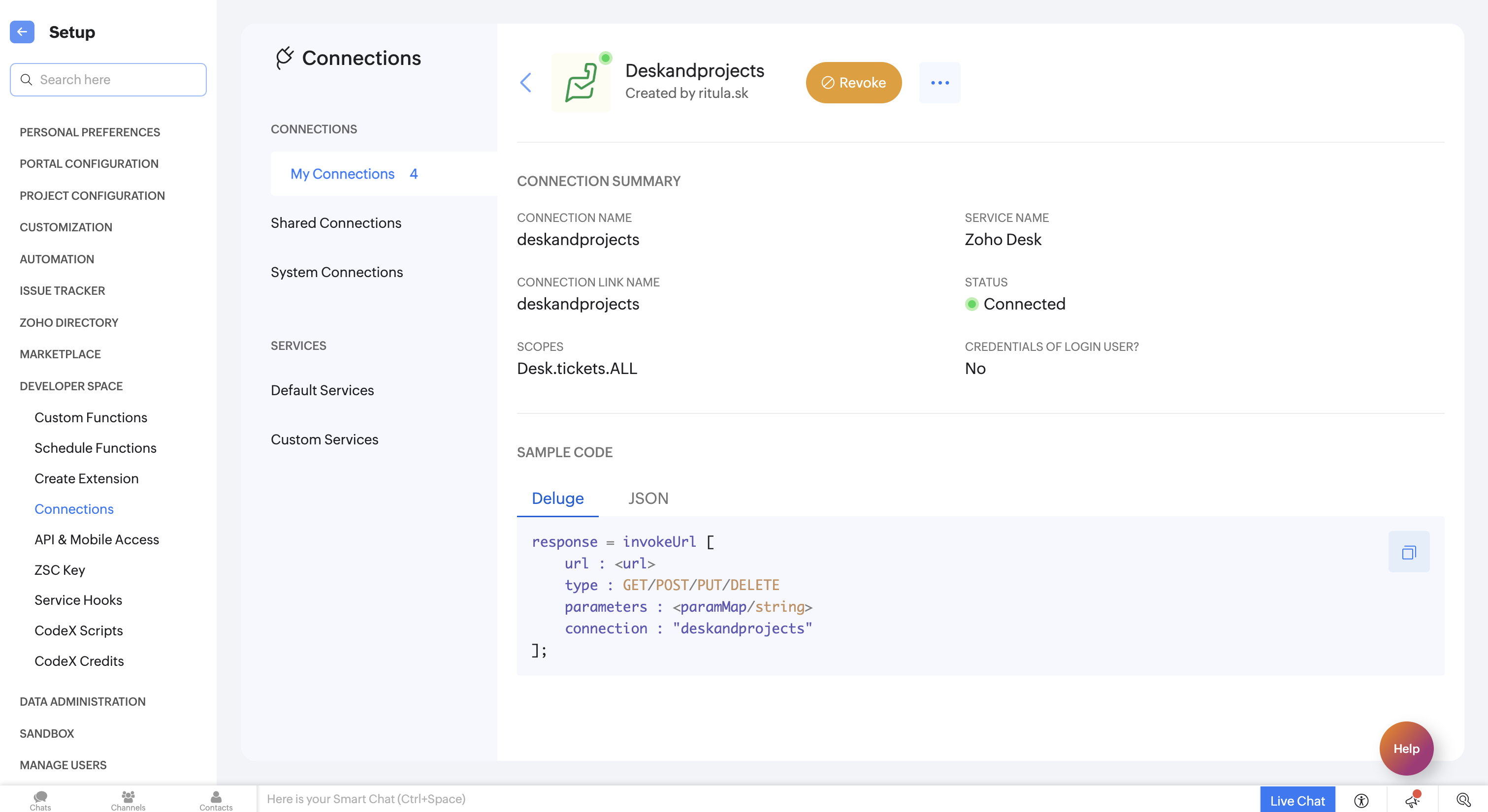
2. Navigate to Custom Functions and under the Task tab, create a new custom function and add the following Deluge script.
- // Scope: ZohoProjects.tasks.ALL, Desk.tickets.ALL
- response = zoho.projects.getRecordById(portal_id,project_id,"Tasks",task_id,"projectsanddesk");
- Desk_tid = response.get("tasks").get(0).get("desk").get("ticket").get("id");
- status = response.get("tasks").get(0).get("status").get("type");
- if (status = "closed")
- {
- param = {"status":"Closed"};
- response = zoho.desk.update(60036693555,"tickets",Desk_tid,param,"deskandprojects");
- }
- else
- {
- param = {"status":"Open"};
- response = zoho.desk.update(60036693555,"tickets",Desk_tid,param,"deskandprojects");
- }
- return "success";

- Line 2: Uses the "projectsanddesk" connection to fetch task details from Zoho Projects.
- Lines 8 and 13: Uses the "deskandprojects" connection to update the linked ticket in Zoho Desk.
- Line 8 and 13: Replace 60036693555 with your Zoho Desk Organisation ID. To find it, navigate to Settings → Developer Space → APIs in your Zoho Desk account.
3. Add the arguments mentioned below.
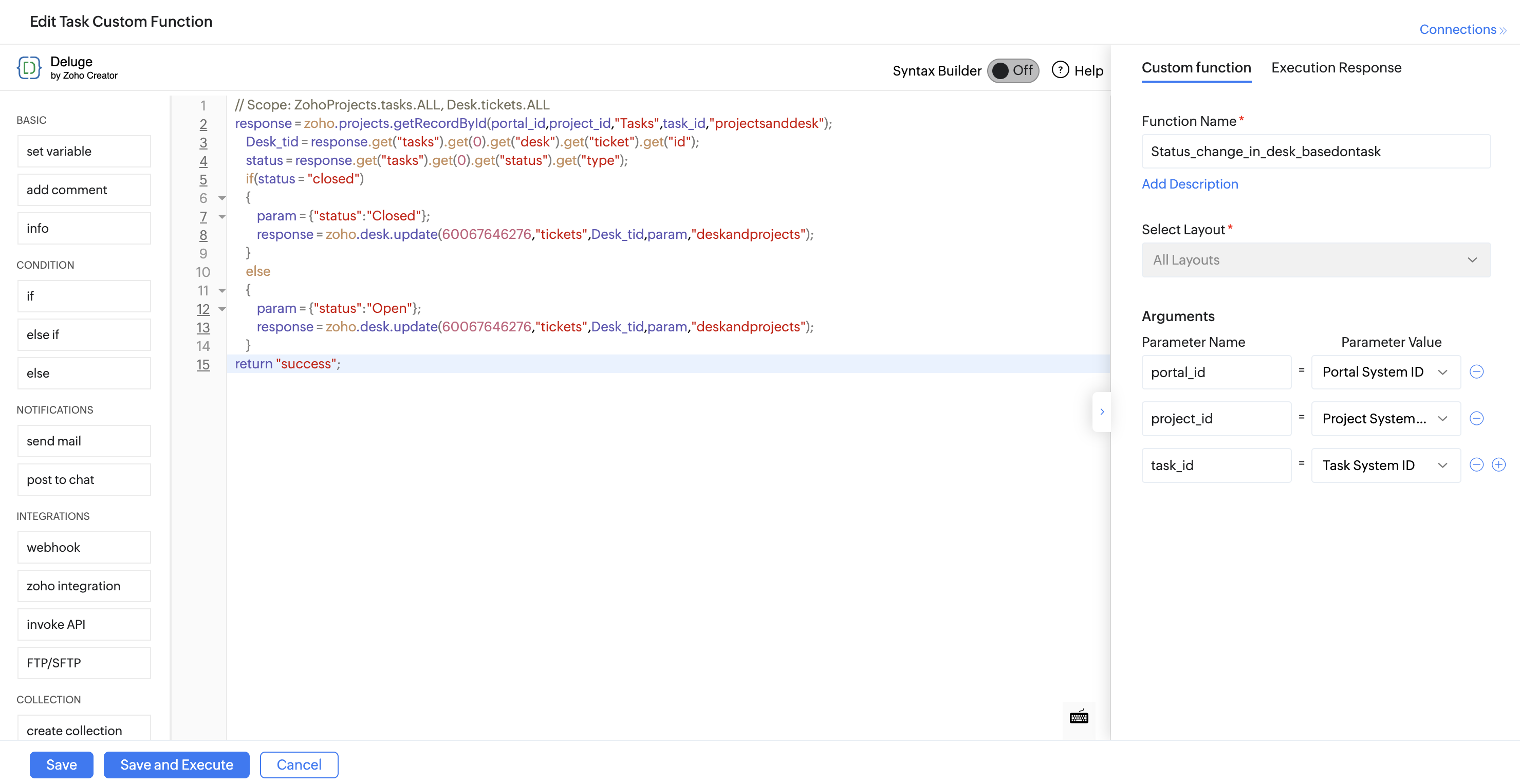
4. Click Save and enter the Task ID when prompted.
5. Once the custom function is saved, associate it with a workflow rule.
6. Navigate to → Automation → Workflow Rules → Task Tab → New Workflow Rule.
7. Configure the workflow to trigger Based on User Action when a task is Updated.
8. Set the criteria as Task Status is Updated.
9. Click +Add Action → Associate Custom Function→ Save Rule.


Once the rule is saved, and the criteria matches the rule, the status of the associated Zoho Desk ticket will be updated automatically.
If you have any questions, feel free to drop a comment below or reach out to us at support@zohoprojects.com.