Dear user,
You're probably one of those businesses using your CRM as a single source of truth. It's where sales, project execution, and finance teams go to analyze past decisions and formulate future strategies. But what happens when project data is either missing or out of sync with the CRM? Delayed or missed action results in missed opportunities.
It's important to allow users to track projects and allow salespeople and stakeholders to keep an eye on the client lifecycle without leaving the CRM.
The Zoho Projects-Zoho CRM integration
The existing Zoho CRM
plugin for Zoho Projects helps users associate and create new projects right from their CRM modules, as well as map project tasks to CRM deal activities, at a basic level.
But there's more to it than meets the eye. In this post, we're exploring how to sync data so that project activities drive action inside Zoho CRM and vice versa. Let's dive in.
Accelerate onboarding with discovery
When CRM has a sales qualified lead (SQL) or qualifies a lead as "hot," discovery or onboarding tasks should be created in the appropriate project, assigning the lead owner to the task. This reduces manual coordination and facilitates better tracking, reduced wait times, and faster execution.'Closed Won' to Active Projects
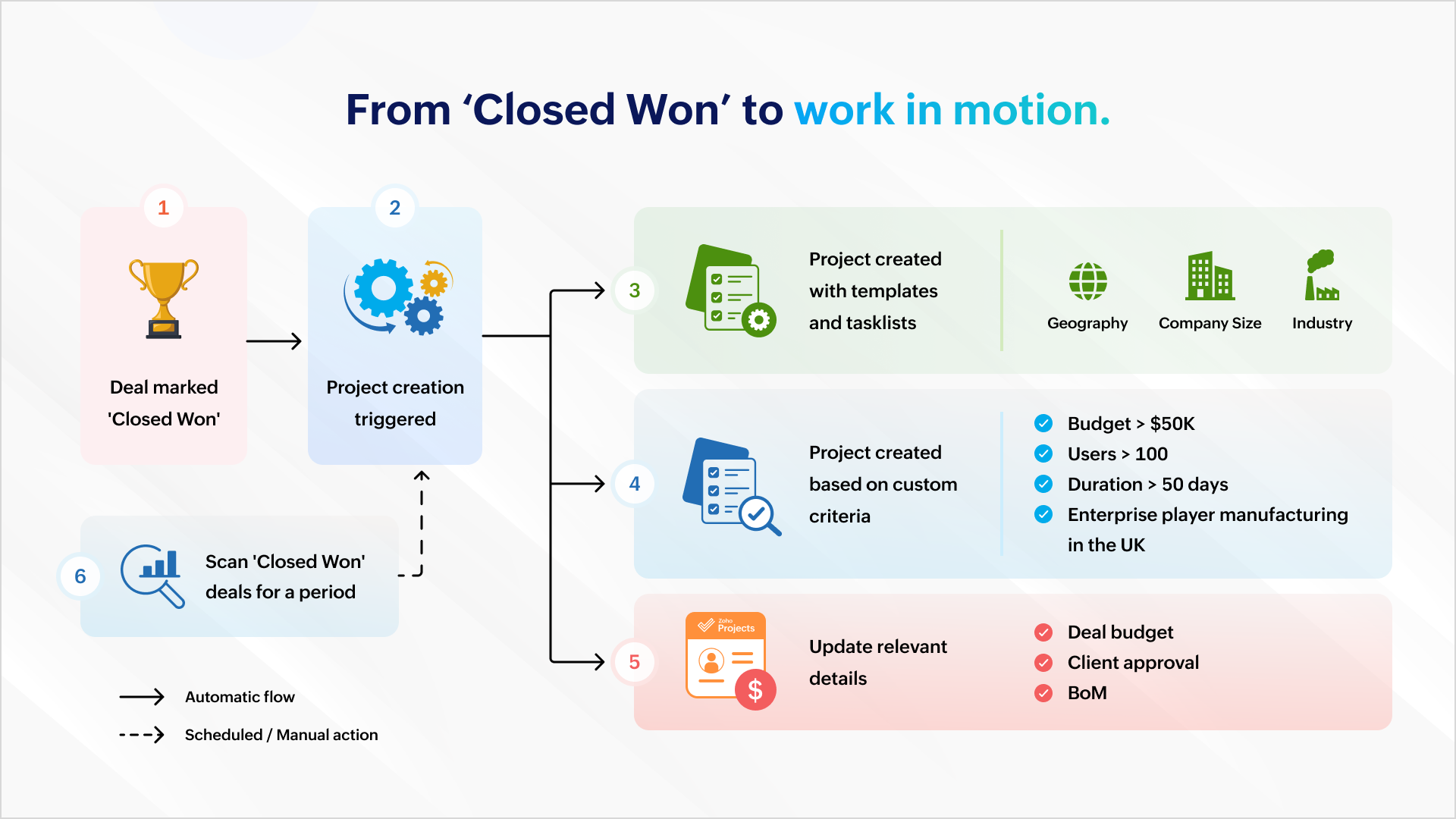
Once a deal is won, a project can be created automatically to ensure work commences immediately. Project creation can be automated with predefined task lists (for EU compliance or HIPAA-readiness) and project templates based on geography, company size, or industry.
It can also be based on custom criteria like a high-value deal (say, a budget that's greater than $50K), a bigger deal size (say, more than 100 users), a fast-track deal (needs closure within 50 days) or a combination of criteria (say, enterprise businesses in the manufacturing sector in the UK).
The deal's budget can be auto-populated during or after project creation so that users are mindful of expenses and effort.
You can scan all the "closed won" deals this quarter and create a project which matches your criteria.
Managing ownership and assignments
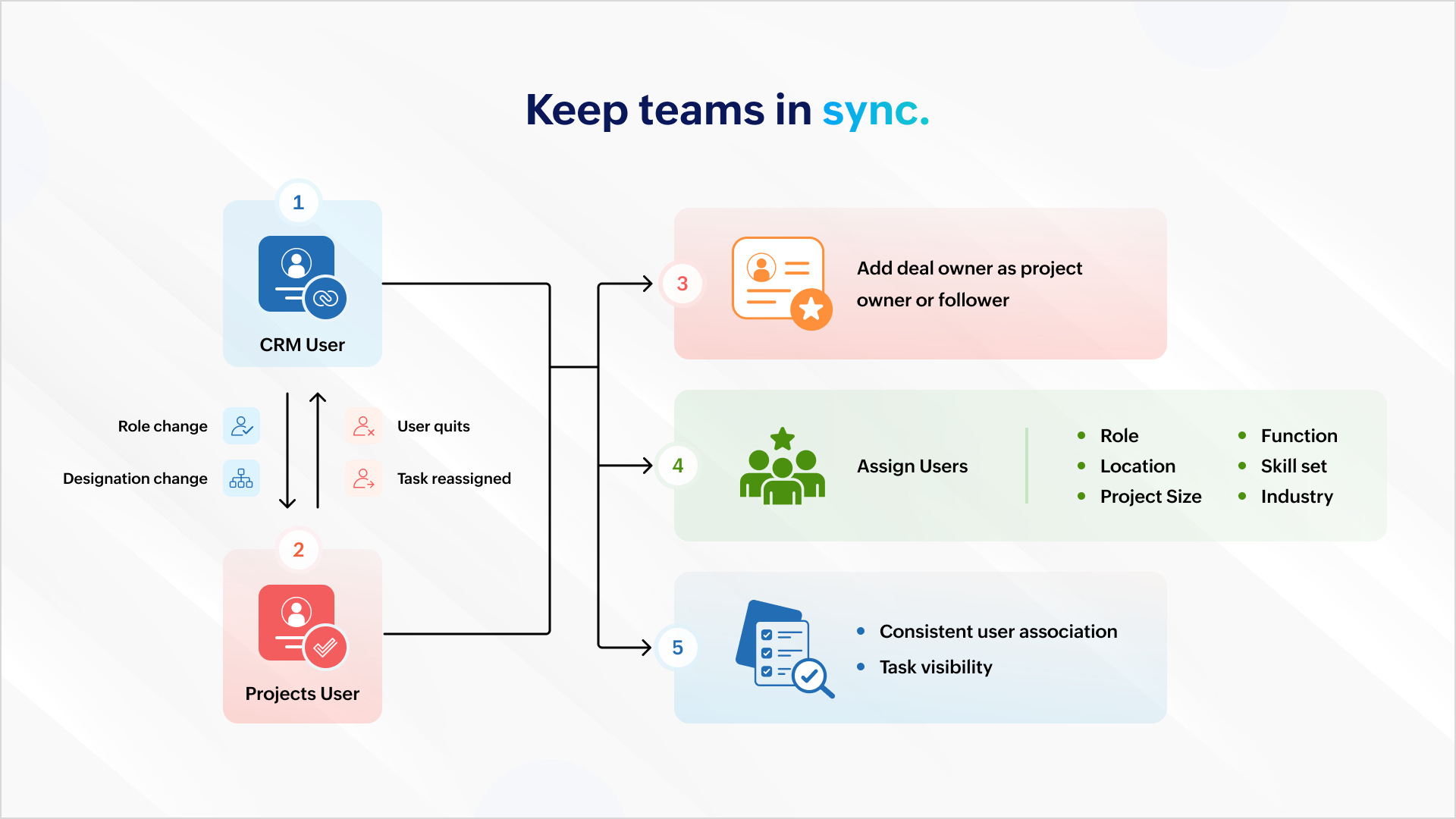
All role and designation changes should reflect uniformly across both platforms to ensure consistent association and task visibility. If a projects user quits or is assigned a new task, the reassignment should reflect inside Zoho CRM.
You can also add the deal owner as the project owner or project follower to ensure accountability carries over. Project users can then be assigned based on role, location, function, skill set, project size, industry, and more.
Deal management
Mapping your project phases to respective deal stages helps mirror project status inside the CRM. Estimated project spends and project completion percent can help identify possible bottlenecks.
Notifying relevant stakeholders about delays or budget overruns helps them intervene and get involved early in damage control. Marking the deal as "At Risk" also ensures it gets the necessary attention among relevant stakeholders.
Tracking
Tasks created in a project must be logged as activities against the associated deal to ensure stakeholders have a complete view of the progress.
Similarly, when users log time in Zoho Projects, it should update against the respective deal in CRM. This gives a picture of the billable hours consumed and the hours remaining to identify scope creep.
Stay on top of issues
It's important to keep customer success and account management teams up to date with showstoppers and blocking issues. This requires creating a case for each issue logged in Zoho Projects so that managers can take ownership and take issues to closure with constant monitoring.
Invoicing
Milestone completion should automatically draft an invoice and send it for approval. Automating invoicing based on project progress gives more time to focus on essential work.
Compliance
It's important that deals don't spring up surprise data during an audit. Zoho Books, Zoho CRM, and Zoho Projects can restrict deal activity during the "Legal Review" stage. Records can return to business as usual when legal review is complete.
And, there's more..
What we discussed here is only the tip of the iceberg. You can do more with analytics, insight-based actions, and advanced forecasting.
As a business owner or head of operations, charting your business process and identifying the gaps, problems, and aspirations will help your identify more opportunities. Once you have what you want, there are two ways to go about it.
1. Customization
You can create workflow rules, custom functions, blueprints, conditional field updates, and webhooks to strengthen automation, alert other systems, and receive data all by yourself.
But there's the risk of your org users meddling with the setup during everyday work.
2. Work with a partner
If you think you don't have the time for it or require assistance, our partners can help. As certified Zoho Experts, partners can help you customize your requirements and help you set it up. They can also help you package the entire setup (workflow rules, custom functions, etc.) into a single installable unit like a plugin or an extension from Zoho Marketplace. The custom plugin can then be installed and set up according to your needs.
AI-powered utilities
You can leverage MCP for Zoho Projects and orchestrate project management from your favorite LLMs using natural language.
This means you can get answers and initiate actions for the following requests right from a chat box:
"Show me all tasks that don't have a task owner."
"List the least profitable projects from the previous year."
"Create onboarding tasks for all hot leads in Mumbai."
"Generate invoices for milestones completed this week."
We will showcase an extension with custom capabilities to track activities and initiate automated action in one of our upcoming articles. Write to us if you are interested and we can talk -
support@zohoprojects.com.
Best,
The Zoho Projects Team
Recent Topics
First Day of Work Week selection - Add every day of the week
It would be very helpful to have every day of the week available as a choice for the start of a work week. In fact, it would be even MORE helpful if we could select a different work week per Customer. For instance, for one client, I invoice weekly: Friday through Thursday (so the first day of that work week, as far as Zoho is concerned, is Friday). For another client, I invoice monthly, and would keep the traditional M-F work week.
The 3.1 biggest problems with Kiosk right now
I can see a lot of promise in Kiosk, but it currently has limited functionality that makes it a bit of an ugly duckling. It's great at some things, but woeful at others, meaning people must rely on multiple tools within CRM for their business processes.
multiple Brands separate topic landing pages
hii, i cant seem to figure out how to separate brands from the select topics marketing landingpage. i can only add topics for other brands, but i want to keep them complete separate
Is there a way to sync Tags between CRM and Campaigns/Marketing Hub?
I wonder if there is a way to synch the tags between CRM and Marketing-Hub / Campaigns?
Does anyone else wish you could download Mail Merge quotations from the Zoho CRM mobile app?
Is it just me, or has anyone else run into this? I’m in sales, so I’m rarely at my desk. I’m usually in meetings, visiting clients, or travelling. One thing that genuinely frustrates me is that if a client asks me for a quotation, I can’t generate or
Assign account to a ticket created with WebToCase
We use Zoho Desk. Our large client uses WebToCase form to submit tickets. I have two workflow rules: When a contact is created and its email ends with example.com, it runs a custom function, which assigns the new contact the right account Example with
How to track the source of form submissions using referrer names in Zoho Forms?
Ever wondered where your users are accessing your form links from? By tracking the origin of your form entries—whether it's from social media, email campaigns, direct links, or embedded on your website—you can identify which channels are driving the most
Zoho One Backup of entire account
Hello, When using Zoho one is there a way to backup your entire account of all apps that you are using \ activively using in a single step or do you have to backup each applications data individually? Thanks,
Custom invoice template issue
Hi. I created a custom invoice template, but it isn't working properly. Even though I select my custom template, Zoho still opens the standard one while showing that the custom one is selected. Please advise on how to fix this
Can't view nor download attachments
Me and a number of people I know suddenly stopped being able to either view nor download attachments that arrive in new emails we receive since this morning. Older emails work just fine and we can download/view them. Zoho Mail states the it wasn't able
Zoho CRM APIs
Hello, I think as a developer, it is very important to have the ability to manage, develop, and execute functions directly from my local development environment (for example, VS Code). Zoho CRM should have a way to create, deploy, and manage functions
Record Payment - Auto Populate Amount as payments are selected
When recording payments you have the option of clicking on "Pay in Full" next to the bill which automatically adds the total at the bottom of the page next to "Amount used for payments" but this should also auto populate / update the total at the top
Zoho Projects - Add Event Change as Trigger
I am currently trying to create an automation in Zoho Flow that sends a notification when an Event is updated in Zoho Projects. At present, Zoho Projects only provides a trigger for Event creation. There is no trigger available when an existing Event
Tips & Tricks #4: Zoho People - Mejoras y Novedades durante el Q2 de 2026
¡Hola, Comunidad de Zoho en Español! Os traemos una selección de las novedades y mejoras más interesantes que llegaron a Zoho People durante el segundo trimestre de 2026. En este artículo te hablamos de: Zia, el asistente de IA para RR. HH. OKR llega
You do not have sufficient permissions to perform this operation. Contact your administrator.
When I attempt to log a call I initiate the +New Call and Start Calling and I click Answered Call in the popup dialog box that follows. Any attempt to save or close this dialog box results in "You do not have sufficient permissions to perform this operation. Contact your administrator." The only way I can get the popup to disappear is to refresh the page and it will go away. I have found others reporting this issue when they attempt to run reports. Any suggestions? Thank you in advance for taking
More flexibility on Hosted Pages ?
I like more flexibility on Hosted Pages, this is due to the fact I am not a programmer I wold like to have more customization on Hosted Pages like: - add Addons and coupon to a plan already suscribed in the past - cutomize the look an feel (as a form
Marketer's Space: Write CTAs your audience can't ignore
Hello Marketers! Welcome back to Marketer's Space! Today we're zeroing in on a small concept that decides whether your whole campaign was worth sending: the call-to-action (CTA). You could write the sharpest subject line and design the most polished template
Button to renew offline subscription.
If i have a customer who pays offline, and wants to renew the subscription, you have to wait till the end of the subscription and reactivate it. or else it affects metrics. There is a way to upgrade or downgrade a subscription, immedeatly or at the end
Public Forms for an all-inclusive feedback system
The more we seek information from the customers, the more we solve their needs and gain their trust. However, reaching out to every customer to seek requirements, solve their issues, and gather feedback can be tasking. Circulating a public form helps
How to embed event list page from Backstage onto my site
I'd like to embed the events list page from Zoho Backstage ( https://biz2bizlinksevents.zohobackstage.com/events) into my site, but when I use an iframe it says the page refused to connect. My other iframes with microsites from Zoho recruit and forms
Function #40: Notify users when invoices exceed the credit limit
Hello everyone, and welcome back to our series! Businesses tend to offer goods or services on credit to customers, which can, in overtime, lead to the accumulation of significant overdue balances. To address this, Zoho Books allows you to define a Credit
Zoho CRM - Kiosk Studio: Build Once, Execute Multiple Times with Loops
Hello Everyone, Introducing Loop Functionality in Kiosk Studio. If you've ever built a Kiosk that needed to perform the same action multiple times like updating a list of contacts, scheduling calls for a batch of leads, or processing multiple products
Manual Journal not affecting the YE Trial Balance
I have done a manual journal moving an expense from prior year to current year. However, it is not affecting the prior year figures at all, when I go to the expense the journal isn't even reflecting at all. I have made sure dates are correct and both
Tip #82 – Let Zia Answer Bot Handle the Questions So You Can Focus on the Fix – 'Insider Insights'
Tip #82 – Let Zia Answer Bot Handle the Questions So You Can Focus on the Fix – 'Insider Insights' Hello Zoho Assist Community! Imagine you're in the middle of a critical remote session. The customer, a project manager at a mid-sized firm, has been locked
Caso de Éxito: Namencis Education crece un 117% con Zoho One
"Hemos estado creciendo en torno a un 117% al año, que es una barbaridad. Tuvimos una rentabilidad del 33%, que antes no teníamos ni por asomo. Escalamos en tres años lo que no habíamos escalado en los anteriores siete." Borja Domínguez, CTO de Namencis
Introducing Workqueue: your all-in-one view to manage daily work
Hello all, We’re excited to introduce a major productivity boost to your CRM experience: Workqueue, a dynamic, all-in-one workspace that brings every important sales activity, approval, and follow-up right to your fingertips. What is Workqueue? Sales
[IDEA] Bring Layout - Conditional Rules and Client Scripts to Zoho Books
The problem We run Zoho Books with two e-invoicing integrations: myData (Greek tax authority, AADE) and PEPPOL (EU e-invoicing). Between the two, our Invoice form carries a large number of custom fields — document type codes, VAT exemption categories,
Introducing the Revamped Zoho Projects Chrome Extension
Zoho Projects Chrome Extension brings your project management capabilities directly to your browser. Users can access all their portals, create tasks, file issues, log time, and stay updated on project activities without navigating to the main application.
Bigin Android app update: Alerts while creating tasks outside of working days, conflicting events and calls.
Hello everyone! In the most recent version of the Bigin Android app, we have brought in support to display an alert if task is being scheduled outside of the working days. Also, when scheduling an event or call in the Activities module, a conflict alert
Create modules using natural language prompts
Hello all, We’ve introduced a new enhancement to Zia that allows you to create custom and team modules in Zoho CRM using plain language prompts. Why this enhancement? Creating a custom module traditionally involves multiple steps—choosing field types,
Collapsible Sections & Section Navigation Needed
The flexibility of Zoho CRM has expanded greatly in the last few years, to the point that a leads module is now permissible to contain up to 350 fields. We don't use that many, but we are using 168 fields which are broken apart into 18 different sections.
Can the SEO Keyword field be increased from 100 characters to the industry standard 160 characters
Hello, Currently Commerce restricts the SEO meta-keywords to 100 characters, which I'd always found to be a bit constraining, often times not enough space to suit my needs. I recently discovered however that search engines will accept up to 160 characters
Cookies Consent Management in Webforms
Hello Everyone! We are excited to introduce Cookie Consent Management for webforms. Read on to learn more. Webforms are online forms embedded on websites that allow users to submit data and create records in Zoho CRM. These forms utilize cookies to track
Trigger workflows from SLA escalations in Zoho Desk?
Hey everyone, I’m currently working with SLA escalation rules in Zoho Desk and ran into a limitation that I’m hoping someone here has solved more elegantly. As far as I can tell, SLA escalations only support fairly limited actions (like changing the ticket
Como exportar la base a excel sin perder datos
Estimados quisiera saber como exportar o descargar la base de tickets para hacer estadisticas sin perder datos al copiar
Show my cost or profit while creating estimate
Hi, While creating estimate it becomes very important to know exact profit or purchased price of the products at one side just for our reference so we can decide whether we can offer better disc or not .
Mise à jour de Zoho Books – France
Chers clients, Merci pour votre patience et votre soutien continu. Avec les évolutions réglementaires à venir en France nous introduisons de nouvelles fonctionnalités dans Zoho Books pour les clients français. Ces mises à jour ont été conçues pour répondre
Is there any way to have Dataprep ingest RSS?
As stated by the title. Does the Zoho environment offer tools that I can use to, directly or using workarounds, have Dataprep ingest an RSS feed? Thanks
Connect ZOHO social with Google Data Studio and download data from ZOHO social
Dear ZOHO team, I am writing this message to enquire about how to connect ZOHO social with Google data studio since our company would like to use Google data studio to generate reports. Is it a way to download data from ZOHO social? Best regards, Chris
Zoho People Whats New - Q2 2026
Hello Users! We're excited to share the latest updates introduced in Zoho People during Q2 2026. This release brings a range of new features and enhancements designed to simplify HR operations, automate routine processes, and deliver a smarter, more connected
Next Page