CRM : La validation des données
Soyons honnête : il est difficile d'avoir un CRM parfaitement organisé. Le garder dénué d'erreur demande du temps et de l'organisation. La bonne nouvelle est qu'avec une méthode adaptée, vous pouvez arriver à tout et sans trop de difficulté.
En l'occurence, l'une des tâches les plus ardues d'un CRM est de garantir la validité des données qu'il contient.
C'est simple : ce que vous retirerez de votre CRM sera le reflet de ce que vous y mettez. Si des données de mauvaises qualités se retrouvent dans votre CRM, vous pouvez vous attendre à des résultats mitigés. La meilleure façon d'éviter cela est d'utiliser la validation des données.
Qu'est-ce que la validation des données ?
La validation des données est tout simplement un système de processus mis en place pour garantir que toutes les informations saisies dans votre CRM sont correctes et d'actualités. Sans ces données "propres", un CRM peut devenir vulnérable aux erreurs et aux lacunes dans les informations fournies, ce qui se répercute sur votre équipe, et directement sur vos activités.
Zoho CRM possède justement une solution pour répondre à cette exigence : elle se nomme "Règles de validation", et vous aide à surmonter ce problème en stoppant l'insertion de mauvaises données avant même qu'elles ne puissent entrer dans le CRM.
Les données insérées par vos collaborateurs peuvent être automatiquement soumises à l'approbation d'un supérieur, en se basant sur des fonctions personnalisées.
Les règles de validation dans Zoho CRM vous permettent ainsi de définir l'exactitude et la validité des données qui entrent dans le système CRM. Vous allez pouvoir définir les valeurs indésirables d'un champ : si une valeur saisie pour un enregistrement correspond aux critères définis dans la règle, le CRM lancera une alerte et stoppera l'enregistrement.
Prenons cet exemple, que nous allons par la suite vous démontrer à travers des captures d'écran :
- Votre entreprise désire s'introduire sur le marché français, ou y lance un nouveau produit. À cette occasion, elle décide d'offrir une offre promotionnelle de 25% à ses clients Français. Vous pouvez ainsi paramétrer une règle n'autorisant cette réduction uniquement pour le marché "France", et une seconde qui n'autorise aucun dépassement de remise.
Si quelqu'un saisi alors une remise pour un autre pays, ou une remise qui dépasse 25%, l'action sera automatiquement bloquée, et le manager du service sera automatiquement alerté. Pratique non ?
Voici comment appliquer la validation des données, étape par étape :
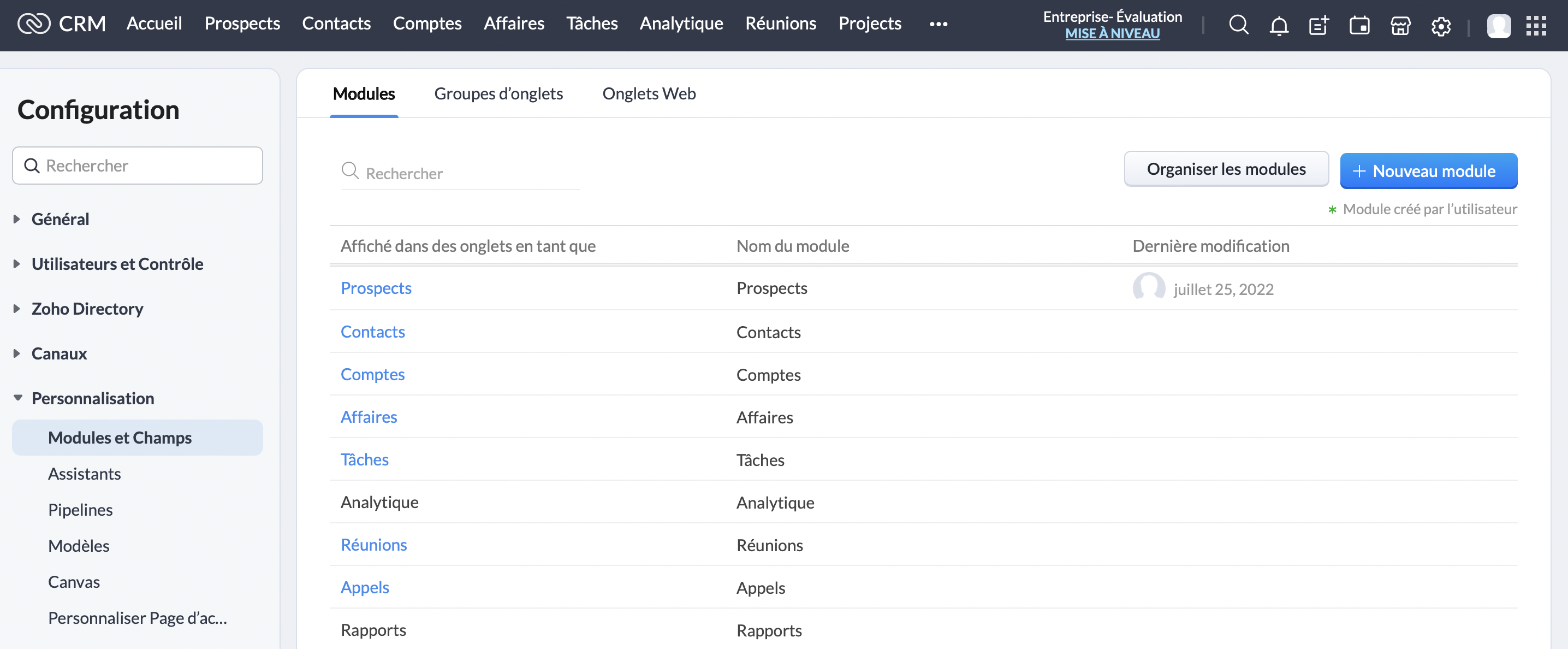
Cliquez sur le module "Prospects" :
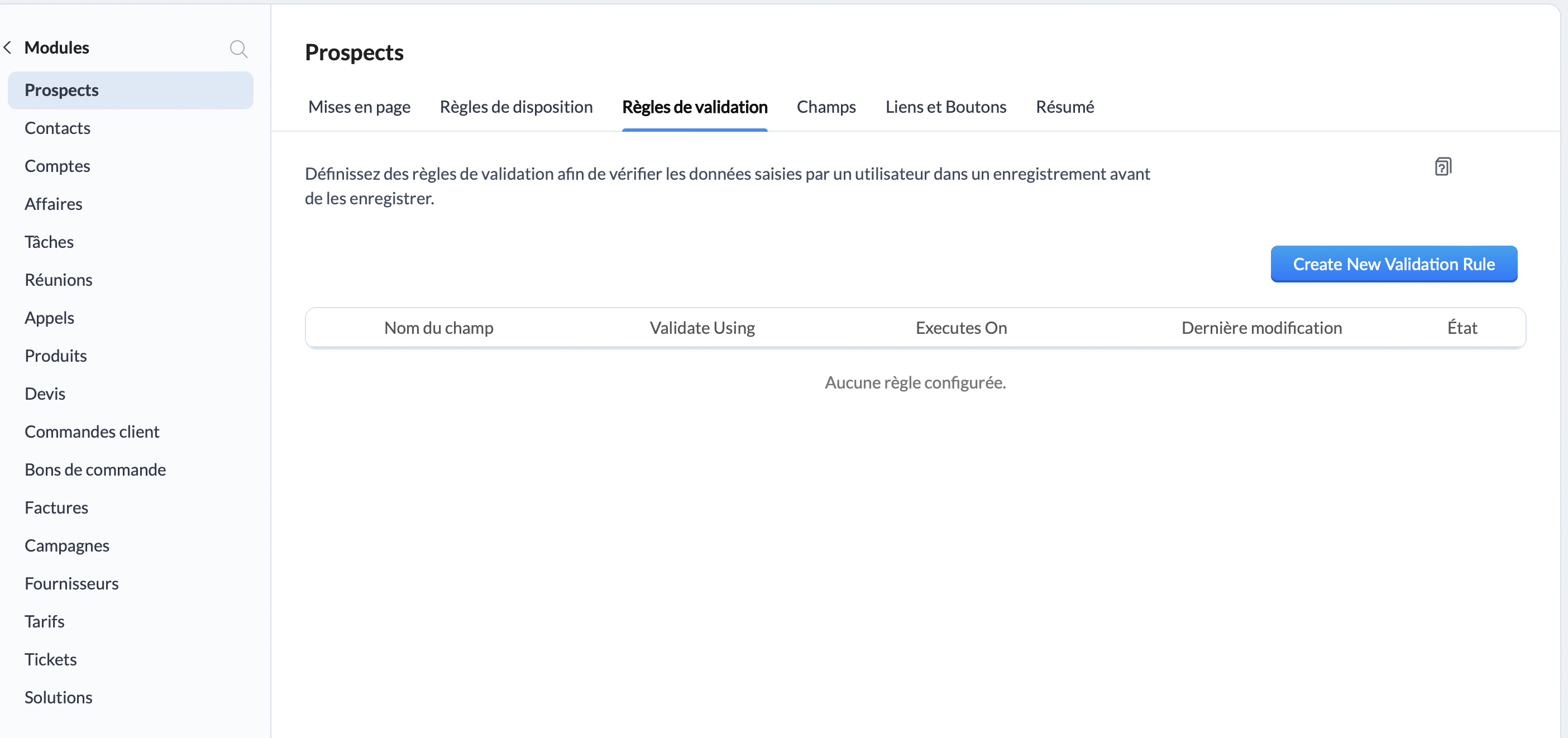
Une fois sur l'interface "Prospects", rendez-vous sur "Règles de validation", et cliquez sur le bouton "Create New Validation Rule" :
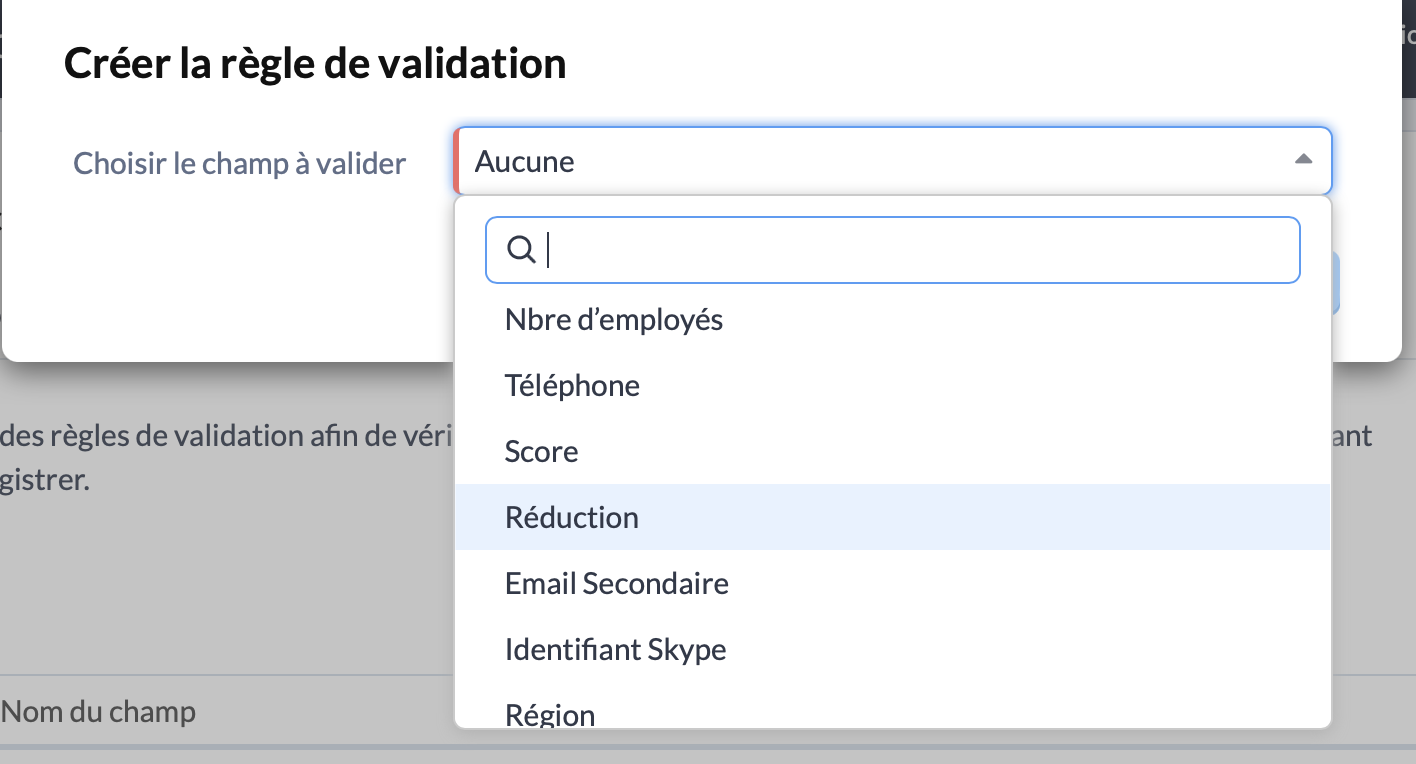
Une fenêtre va alors s'ouvrir, à travers laquelle vous allez pouvoir choisir le champs pour lequel vous souhaitez ajouter une règle de validation. Pour cet exemple, nous allons choisir "Réduction" :
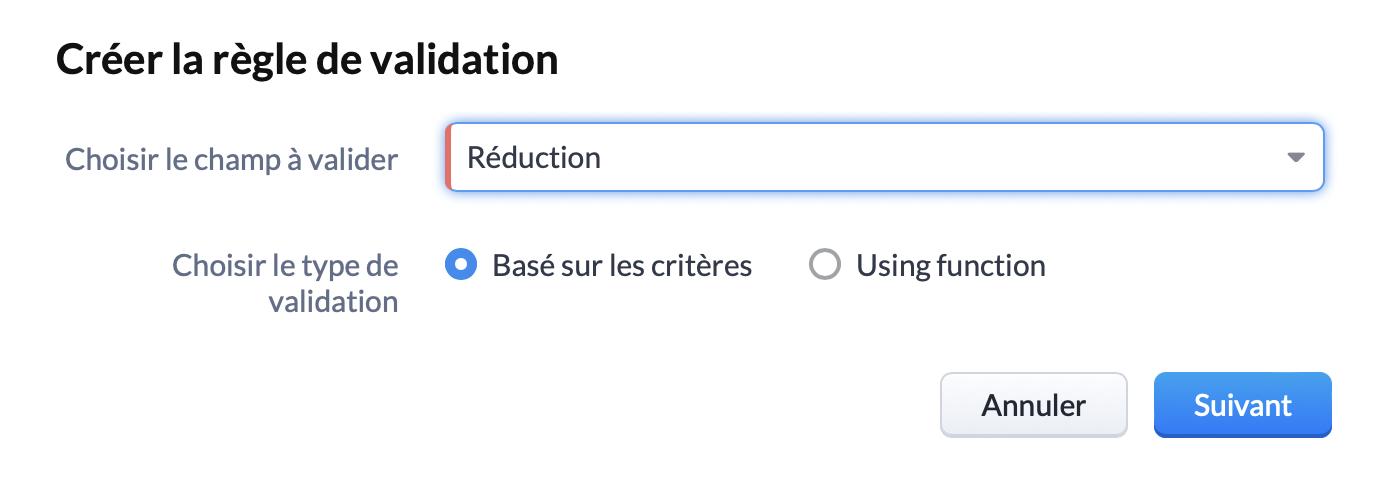
Choisissez le type de validation "Basé sur les critères" et cliquez sur "Suivant" :
Vous y êtes presque ! Vous voilà arrivé sur l'interface qui nous intéresse. Ici, vous pouvez spécifier le critère de validation. Pour rappel, pour notre exemple nous choisissons une limite de réduction de 25%. Nous allons donc sélectionner "Réduction, Supérieure >, 25."
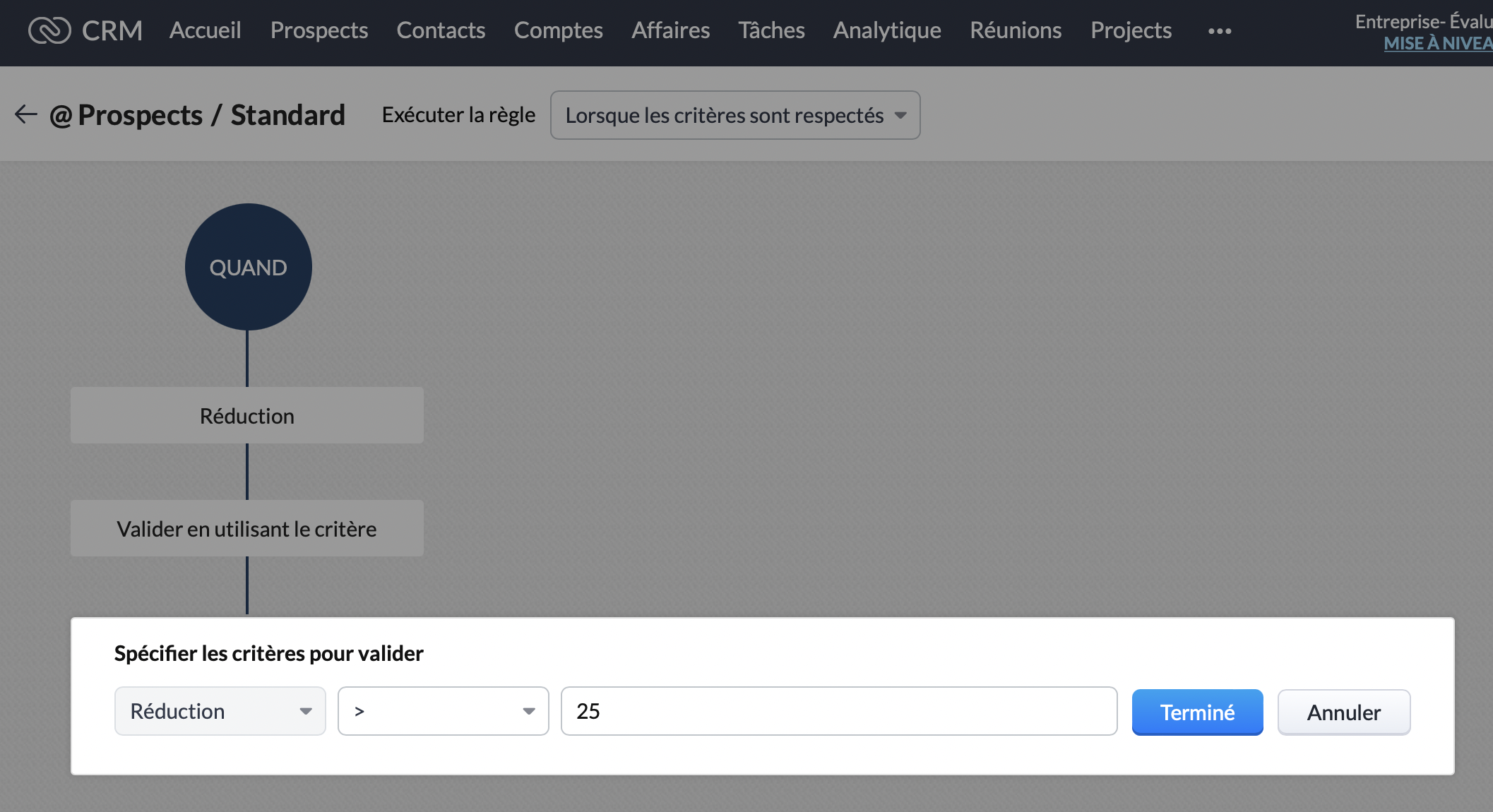
Ensuite, nous souhaitons que cette remise ne soit applicable que pour le marché Français. Dans le bloc "Cette règle sera appliquée pour tous les enregistrements", cliquez sur modifier :
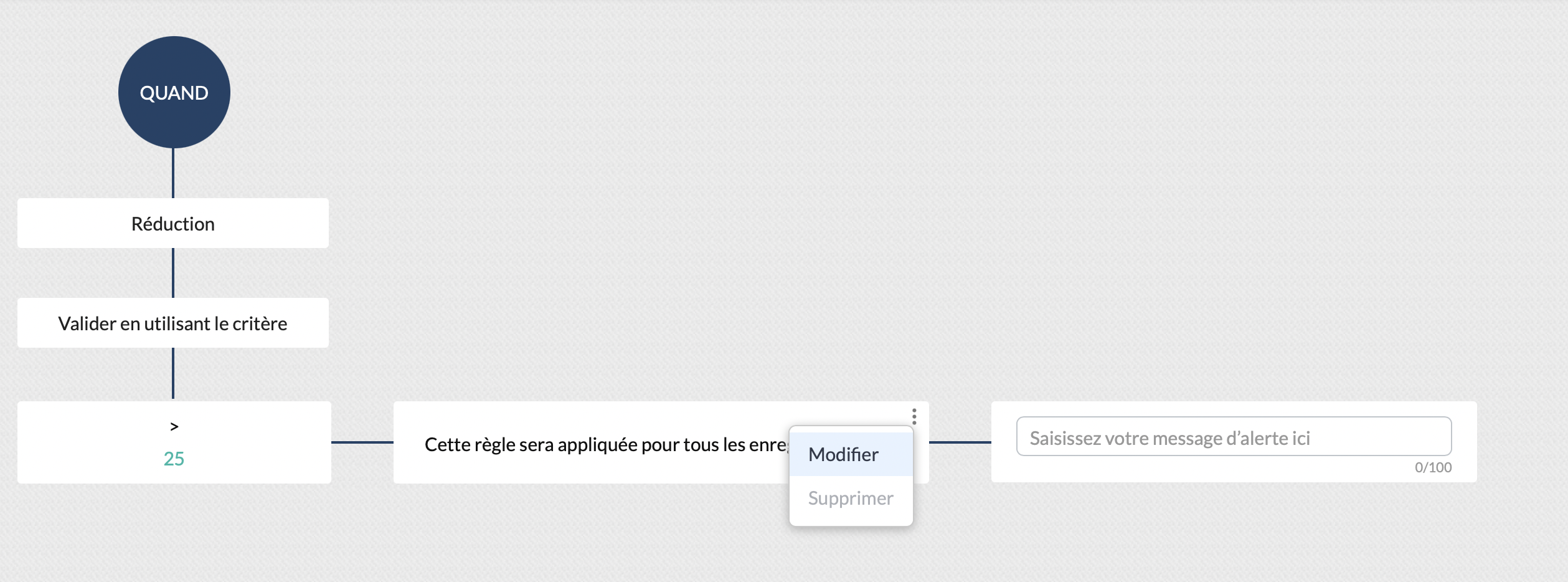
Vous pouvez ainsi sélectionner le critère "Pays, est, "France". Cliquez sur "Terminé" :
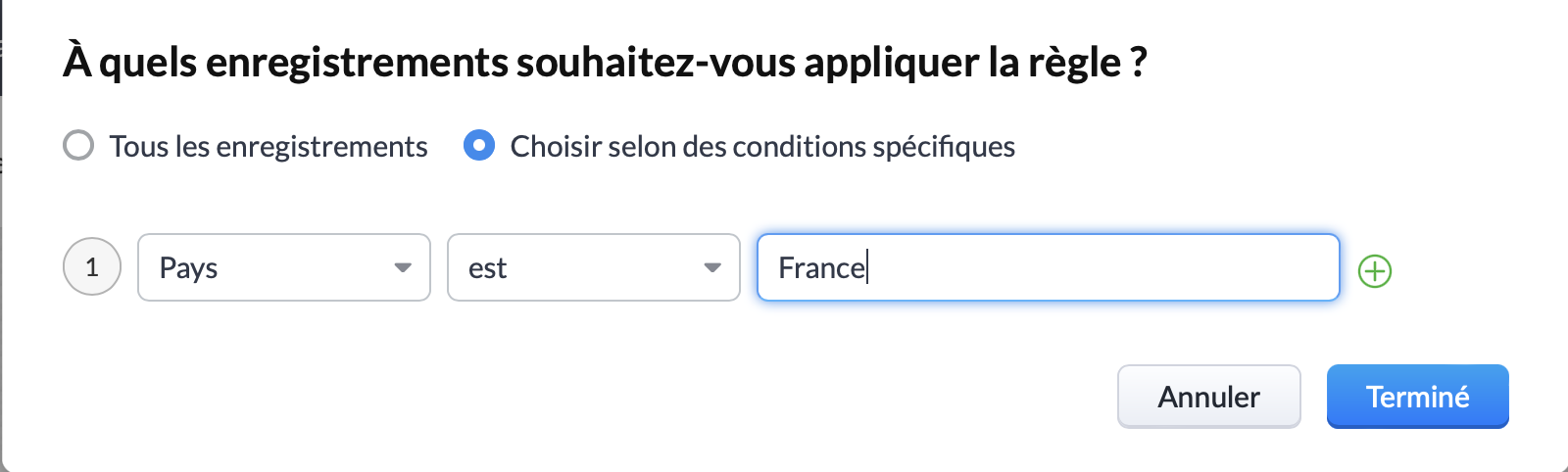
Vous pouvez ainsi constater que le critère de réduction est correctement appliqué, et qu'il s'applique bien pour la France. La prochaine et dernière étape consiste à rédiger le message qui sera affiché si l'un de vos collaborateurs dépasse ces critères :
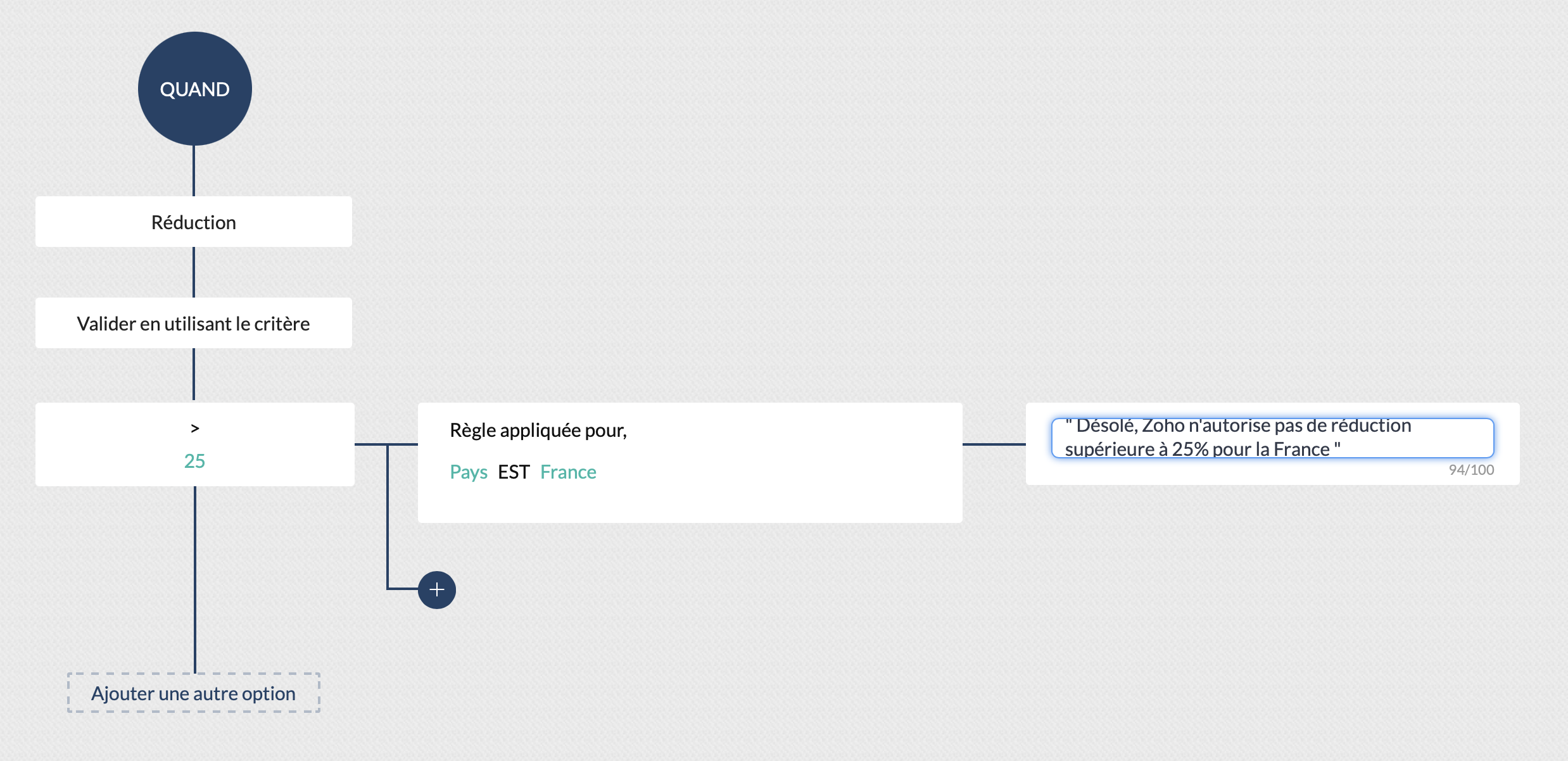
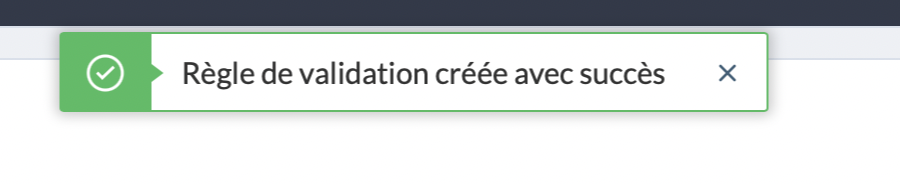
Cliquez sur "Valider" et... Félicitations ! Vous avez créé votre première règle de validation !
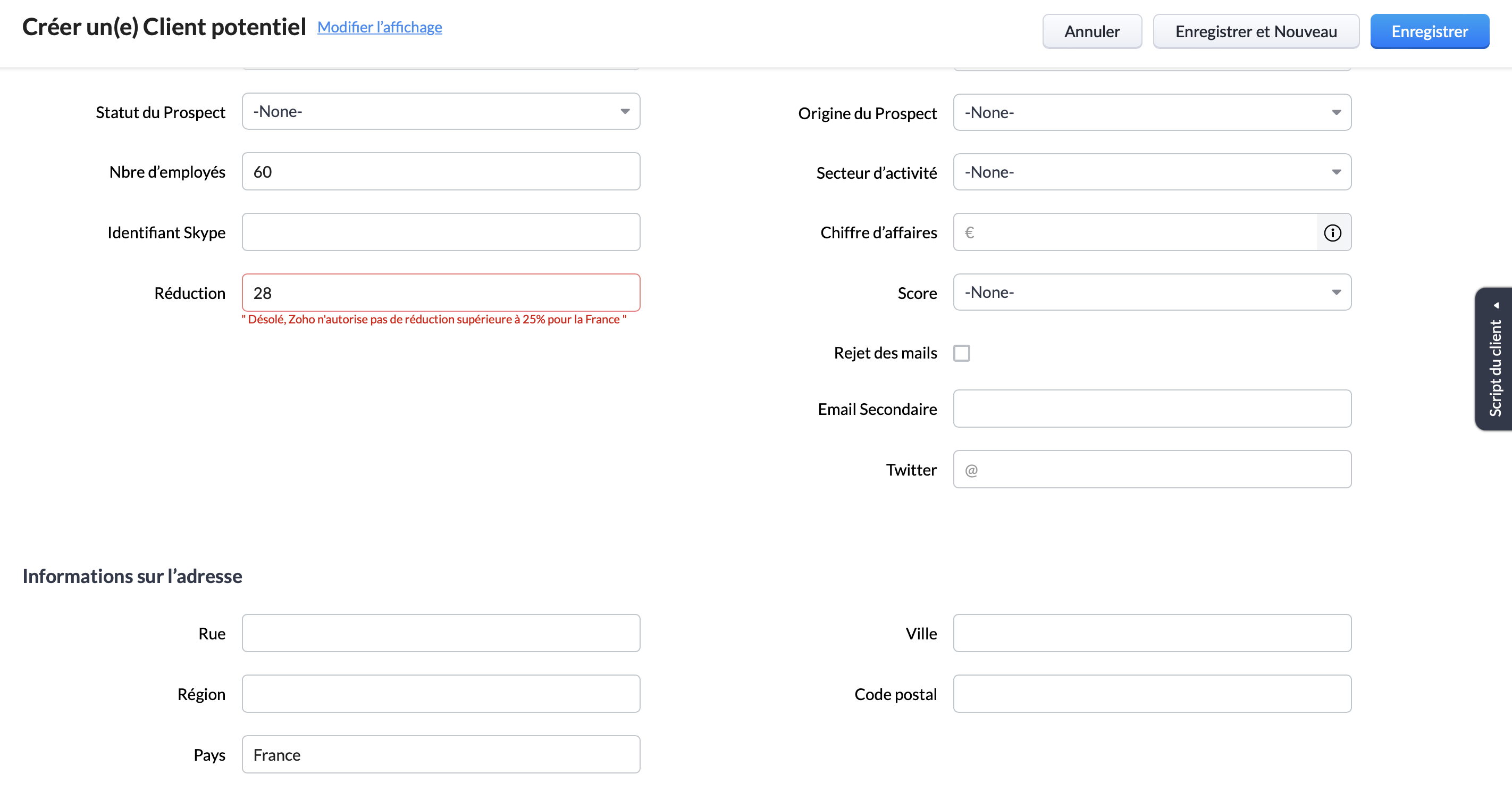
Pour s'assurer qu'elle est bien valide, vous pouvez créer un nouveau prospect remplissant la condition d'appartenir au marché Français, et tenter d'appliquer une réduction supérieure à 25%. Ici, nous pouvons voir le message d'erreur s'afficher, la règle de validation est donc bien appliquée :
Pour conclure, il est important de rappeler que bien que nous ayons choisi pour cet exemple les critères "pays" et "remise", les règles de validation peuvent être paramétrées pour tout type de critères. Par exemple : numéro de téléphone, nombre d'utilisateur, origine du prospect etc.
Vous pouvez ainsi vous assurer du respect de l'intégralité de vos processus, d'une manière totalement automatisée.
Topic Participants
Antoine Perrault
Sticky Posts
CRM - Astuce #5 : Effectuer des actions en masses
Bonjour à tous, Au programme du jour : éviter les répétitions grâce à la fonction "en masse". Gagnez du temps sur ces actions simples pour vous concentrez sur votre entreprise. Allez dans le module concerné et cliquer sur les : (...) Suppression enZoho CRM - Il y a du nouveau chez les modèles d'e-mails
Bonjour à tous, Nous sommes ravis d'annoncer que les modèles d'email dans Zoho CRM sont désormais adaptés au design pour tous les ordinateurs et mobiles. Le responsive design désigne une méthode selon laquelle les pages sont conçues pour s'afficherNouveautés Zoho CRM : la page d'accueil et le tableau de bord actualisés !
Bonjour à tous, Nous avons apporté quelques améliorations à la page d'accueil des utilisateurs et à l'onglet Tableau de bord, en voici un aperçu. Des composants supplémentaires dans la page d'accueil pour les nouveaux inscrits : Dans l'onglet Accueil,CRM Blueprint #5: Glossaire
Bonjour à tous, Voici le dernier volet de notre série sur les Blueprints : un glossaire pour comprendre tous les termes nécessaire à l'automatisation de votre process. État : fait référence à chaque étape de votre processus. Par exemple : qualification,CRM : Ajoutez de la couleur à vos balises CRM
Bonjour à tous, Les tags sont des identifiants uniques qui peuvent être associés à différents enregistrements ce qui permet de rechercher, trier, catégoriser, filtrer et segmenter efficacement les enregistrements. Cette nouvelle amélioration a pour but
Recent Topics
Translation from Chinese (Simplified) to Chinese (Traditional) is not working. It randomly translated. Google Translate accurately but zoho translate is not working at all
Hi friends, The newly added language for translation. https://www.zoho.com/deluge/help/ai-tasks/translate.html "zh" - Chinese "zh-CN" - Chinese (Simplified) "zh-TW" - Chinese (Traditional) my original text: 郑这钻 (and it is zh-CN) translated traditionalConsultant-Only Booking Page
Zoho Bookings does not allow for Meeting Type OR Workspace-Wide booking pages to be turned off. This is detrimental to organizations that have territory-based or assigned accounts, because if prospects can go to these booking pages and either select theAll new Address Field in Zoho CRM: maintain structured and accurate address inputs
The address field will be available exclusively for IN DC users. We'll keep you updated on the DC-specific rollout soon. It's currently available for all new sign-ups and for existing Zoho CRM orgs which are in the Professional edition. Latest updateCall result pop up on call when call ends
I’d like to be able to create a pop up that appears after a call has finished that allows me to select the Call Result. I'm using RingCentral. I have seen from a previous, now locked, thread on Zoho Cares that this capability has been implemented, butCustom Sorting based on other columns in table
I need the ability to apply custom sorting to a text-based dimension in the X axis where the sorting is based on another column in the table. For example, I have a chart report where the X axis is a text label. I would like to be able to sort those textFeature Request: Enable Custom PDF Layout Editor for All Modules (Including Package Slips)
Hello Zoho Community and Product Team, I am writing to share a suggestion that would significantly enhance the customization capabilities within Zoho Books. We all appreciate the power of the Custom PDF Layouts (the "New" template engine) that allowsIs there a way to invoke deluge function from within a widget?
Hi! I have custom functions in deluge and I was wondering whether there is any way to call this function through a widget? Something like on click of a button inside a widget, run the deluge custom function. Would this be possible?Can a default task Priority be set?
The "Priority" field in the Task layout does not allow a default to be set. Is there another way of doing it? Because the current default is "None" and the Zoho Kanban board design has selected this field as critical information to surface by includingAdding a threshold to a line chart based on date range
I have a line chart that is tracking a percentage over time. It also has a filter for 50 different clients. I would like to create a threshold that is based on a portion of the date range. As I understand it, this would be done by adding a column to theResize Signature field dynamically
On the tablet, it is perfect. But on smaller mobile devices and PCs, both web and application, it is too small for people to sign. Is there any plan to make the signature field size dynamically in the future update?Super Admin Logging in as another User
How can a Super Admin login as another user. For example, I have a sales rep that is having issues with their Accounts and I want to view their Zoho Account with out having to do a GTM and sharing screens. Moderation Update (8th Aug 2025): We are workingZoho Creator Application - New User Not able to access the application
In Zoho Creator, The newly added user not able to access the " Added Application" - User has received the Invitation Email, but while clicking "confirm Account" in the invitation Email, the following error message has appeared. "Sorry! you cannot acceptDeleting Salutation Field
We have updated our lead input screen and 'Salutation' has appeared. This is not visible in the 'Edit Pgae Layout' screen so cannot be moved to 'List of Removed Fields' Salutation is visible in the list in 'Customization - Fields' however I can only 'Edit' or 'Replace' I cannot delete and I do not need this field on my lead input screen. Please can you advise how to get rid of this. Screen shots can be provided if needed. Thank you TashaAuto-Generate & Update Asset Serial Numbers using a custom function (Assets Module)
Hello Team, I’ve been working on a script to automate one of our processes in Zoho FSM, and the core functionality has been successfully implemented. However, I’m encountering an issue related to serial number allocation, which is not working as expected.Partner with HDFC And Sbi Bank.
Hdfc and sbi both are very popular bank if zoho books become partner with this banks then many of the zoho books users will benefit premium features of partnered banks.Zoho Mail iOS app update: Access Delegated Mailbox.
Hello everyone! You can now access the delegated mailbox from within the iOS version of the Zoho Mail app. To access the delegated mailbox: Open the Zoho Mail app. Go on to the 'Email' module. Tap the profile picture. Choose the delegated mailbox PleaseHow to convert Lead's country field from Text to Pick List
Hi, I would like to change the default country field in ZCRM from text to pick list. It looks like not I can't delete default country field and recreate it as pick list nor can i create an new custom field country because such a label belong to default field. So what do I have to do? Any ideas? LHow create a draft via workflow?
I wish to create a workflow rule for specific emails that creates a draft response - not an automatic email reply, but just a draft with a set response ready to be verified by an agent who can then manually select recipients. Alternatively, the workflowNew feature: Invite additional guests for your bookings
Hello everyone, Greetings from Zoho Bookings! We are happy to announce the much-awaited feature Guest Invite, which enhances your booking experience like never before. This feature allows additional participants to be invited for the bookings to makeImproved Contact Sync flow in Google Integration with Zoho CRM
Hello Everyone, Your contact sync in Google integration just got revamped! We have redesigned the sync process to give users more control over what data flows into Google and ensure that this data flows effortlessly between Zoho CRM and Google. With thisImage field in custom module
Hi guy, Is there any hope of adding a custom image field in the custom module? We created a custom module to keep track of assets, and it would be helpful if we could attach an image to the record. Thanks Rudyالخصم على مستوى فاتورة المبيعات
السلام عليكم ورحمة الله وبركاته مطلوب في إنشاء خصم على مستوى فاتورة المبيعات وليس على مستوى البند أريد معرفة الطريقة؟VAT and Taxes option not available
Dear ZOHO Team , The VAT and Taxes options in my ZOHO books account not available,I tried to find how to enable or check the way to use this option but unfortunately couldn't find it anywhere ,I'm in UAE ,kindly let me know what to do to solve this issueDefault Tagging on API-generated Transactions
If one assigns tags to an Item or Customer, those tags get auto-populated in each line item of an Invoice or Sales Order when one creates those documents. However, if one creates the Sales Order or Invoice via the API (either directly coding or usingDirect Feed (Bank)
Is Direct feed integration for AlRajhi and ADCB bank supported by Zoho Books in GCC/SaudiSales Order, Invoice and Payment numbers
Hi zoho friends, it is me again, the slow learner. I'm wondering if there is a way to have it so the Sales order, invoice and payment numbers are all the same? It would be easier for me if they were the same number so there is not so many reference numbersMS Teams for daily call operations
Hello all, Our most anticipated and crucial update is finally here! Organizations using Microsoft Teams phone system can now integrate it effectively with Zoho CRM for tasks like dialling numbers and logging calls. We are enhancing our MS Teams functionalityCustomer Satisfaction (CSAT) Report
From data to decisions: A deep dive into ticketing system reports The customer satisfaction (CSAT) report helps teams understand how customers feel about their support experience, identify service gaps, and continuously improve the help desk. It turnsTimeline Tracking Support for records updates via module import and bulk write api
Note: This update is currently available in Early Access and will soon be rolled out across all data centers (DCs) and for all editions of Zoho CRM. The update will be available to all users within your organization, regardless of their profiles or roles.Shifts in Zoho People vs Zoho Shifts?
Hello Zoho People Team, We hope you are doing well. We are evaluating the Shifts functionality within Zoho People and comparing it to the standalone Zoho Shifts product. We’ve encountered comments and discussions suggesting that the Shifts feature insideDisable fields in During action in Blueprint?
Hi there. I've tried field disable (setReadOnly(true)) using client script and the event is onMandatoryFormLoad on detail page, assuming it'll work on blueprint fields, but it bears no result. Is this the expected behaviour? That we can't do this yet?Develop and publish a Zoho Recruit extension on the marketplace
Hi, I'd like to develop a new extension for Zoho Recruit. I've started to use Zoho Developers creating a Zoho CRM extension. But when I try to create a new extension here https://sigma.zoho.com/workspace/testtesttestest/apps/new I d'ont see the option of Zoho Recruit (only CRM, Desk, Projects...). I do see extensions for Zoho Recruit in the marketplace. How would I go about to create one if the option is not available in sigma ? Cheers, Rémi.Best Email Backup Wizard in 2026
While searching for an email backup solution, my main hesitation was reliability. As a user, I had already seen many tools that looked promising but failed when handling large mailboxes, skipped folders, or caused authentication issues during the backupSubforms and automation
If a user updates a field how do we create an automation etc. We have a field for returned parts and i want to get an email when that field is ticked. How please as Zoho tells me no automation on subforms. The Reason- Why having waited for ever for FSMAllow Managers to Create Shifts for Their Departments in Zoho People
Hello Zoho People Product Team, Greetings and hope you are doing well. This feature request is related to Zoho People - please don't move it to zoho one! We would like to submit a feature request regarding shift management permissions in Zoho People.Zoho Learn and Zoho CRM integration
I would like to see an integration between Zoho Learn and Zoho CRM. 1. To be able to add articles in a related list in all modules 2. Zia to suggest related articles in a Deal or Case or Lead 3. Ability to read / search articles during a call / followMaintain steady traffic to your domain: How Domain Aliasing helps
Consider this scenario: An organization has its primary domain as administrator.com. Now it wants to shorten its domain to admin.com because it's simpler and easier to remember. However, changing the domain completely can cause the following problems:Why Sharing Rules do Not support relative date comparison???
I am creating a Sharing Rule and simply want to share where "Last Day of Coverage" (Date field) is Greater than TODAY (Starting Tomorrow). However, sharing rules don't have the option to compare a date field to a relative date (like today), only to StaticHow do I migrate OLM file to Gmail?
Migrating emails from Outlook for Mac to Gmail can be challenging because Gmail does not support OLM files directly. This limitation often causes confusion and delays, especially when users need quick access to important emails and mailbox data on a web-basedCRM x WorkDrive: File storage for new CRM signups is now powered by WorkDrive
Availability Editions: All DCs: All Release plan: Released for new signups in all DCs. It will be enabled for existing users in a phased manner in the upcoming months. Help documentation: Documents in Zoho CRM Manage folders in Documents tab Manage filesNext Page