All new Address Field in Zoho CRM: maintain structured and accurate address inputs

All new Address Field in Zoho CRM: maintain structured and accurate address inputs

AlertThe address field will be available exclusively for IN DC users. We'll keep you updated on the DC-specific rollout soon.
  • It's currently available for all new sign-ups and for existing Zoho CRM orgs which are in the Professional edition.


Info
Latest update on 11th November 2025:
Our developers are working on a few aspects/use cases for release of the new address fields in the other DCs. We will update the post when we have a rollout plan for this.


Managing addresses in Zoho CRM just became simpler and more effective. With the new custom address field type, you no longer need multiple separate fields or ambiguous text entries. You can now easily capture and manage address data comprehensively in a single, structured, and user-friendly field.


Why the new address field?

Until now, there was no single, collective way to capture a complete address in Zoho CRM. If you were the admin of a sales team and got the task of collecting client addresses, you had two options:
  1. You could create separate fields—one for street, one for city, one for state, one for country, and so on. But if you wanted states to change based on the country selected, you'd have to enter all the country and state values yourself manually and then set up dependency rules.
  2. Or you could create a single multiline text field for the whole address. That avoided the setup work, but it came at the cost of functionality; you couldn't filter by country or state, and you couldn't use the data for quick reporting or territory-based analysis.
Either way, it was a lot of manual work, and neither method gave you a quick, consolidated way to both read and act on the address information.

The new address field eliminates all of this headache by enabling you to capture all the necessary components in one structured field while still being able to view, filter, and report on them individually.
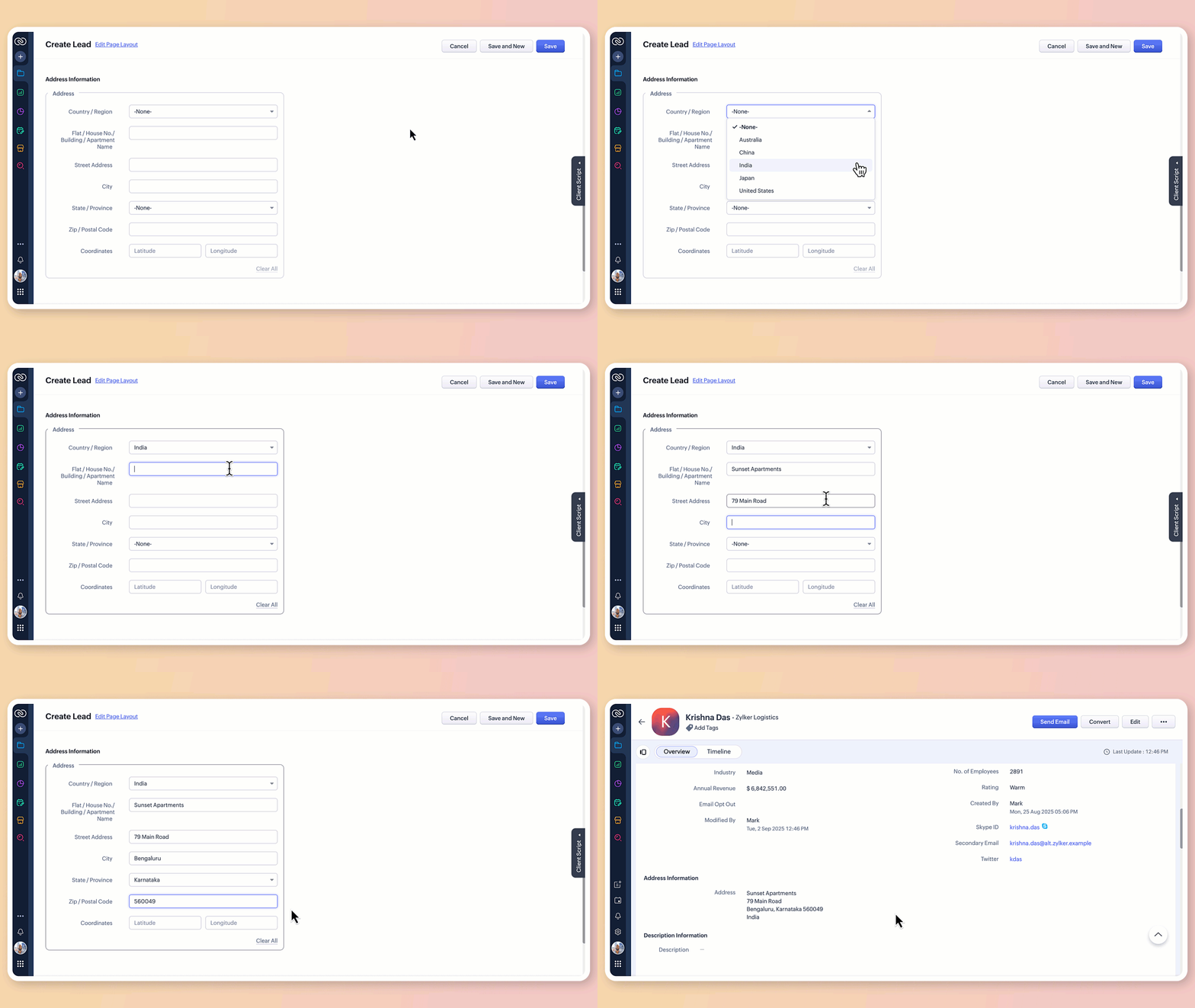

What does the new address field offer?

1. Structured address input

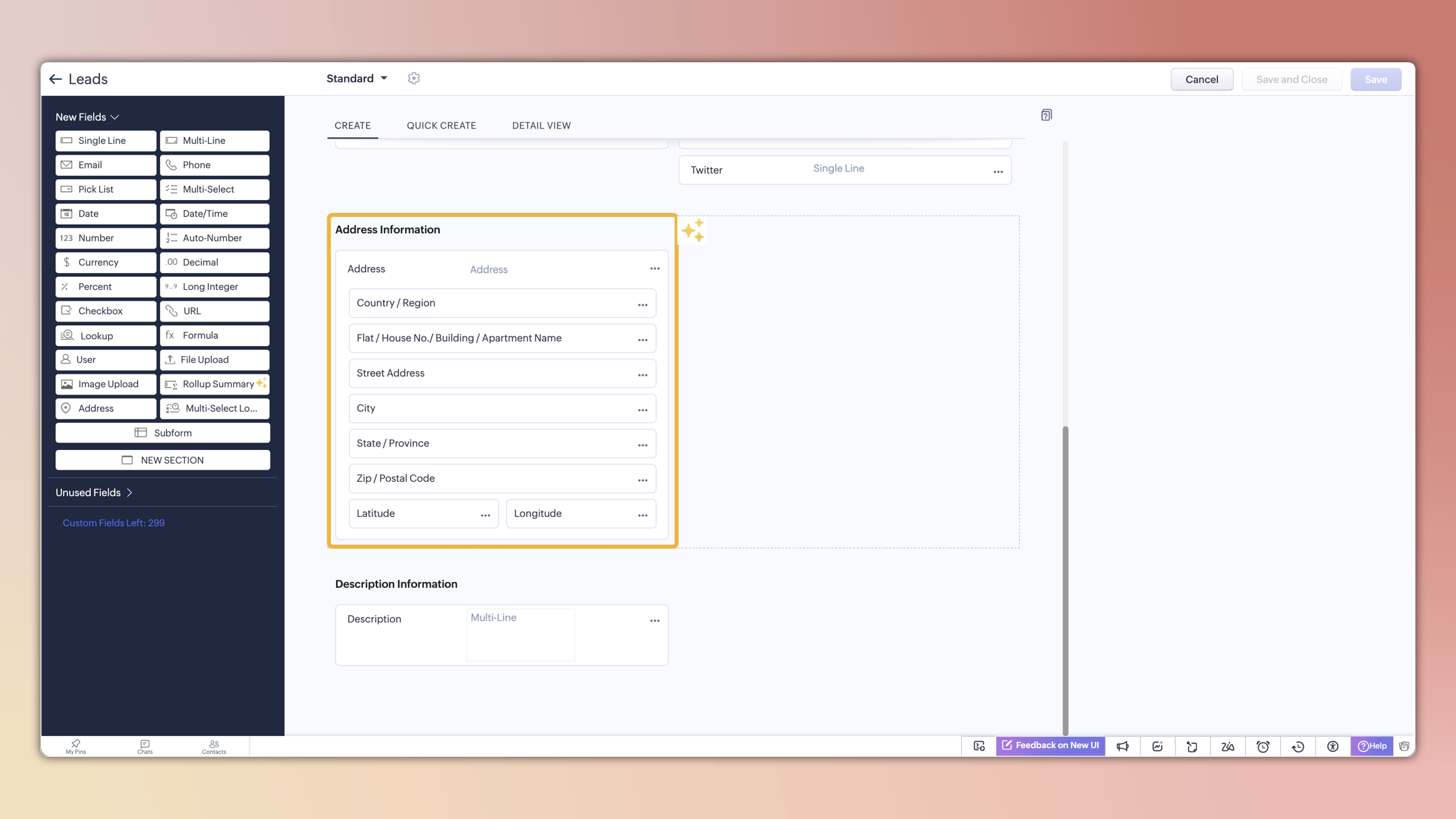
The all-new address field breaks down location details into clearly defined components:

  • Country/region

  • Flat/house number/building/apartment name

  • Street address

  • City

  • State/province

  • Zip/postal code

  • Precise geographic coordinates in latitude and longitude

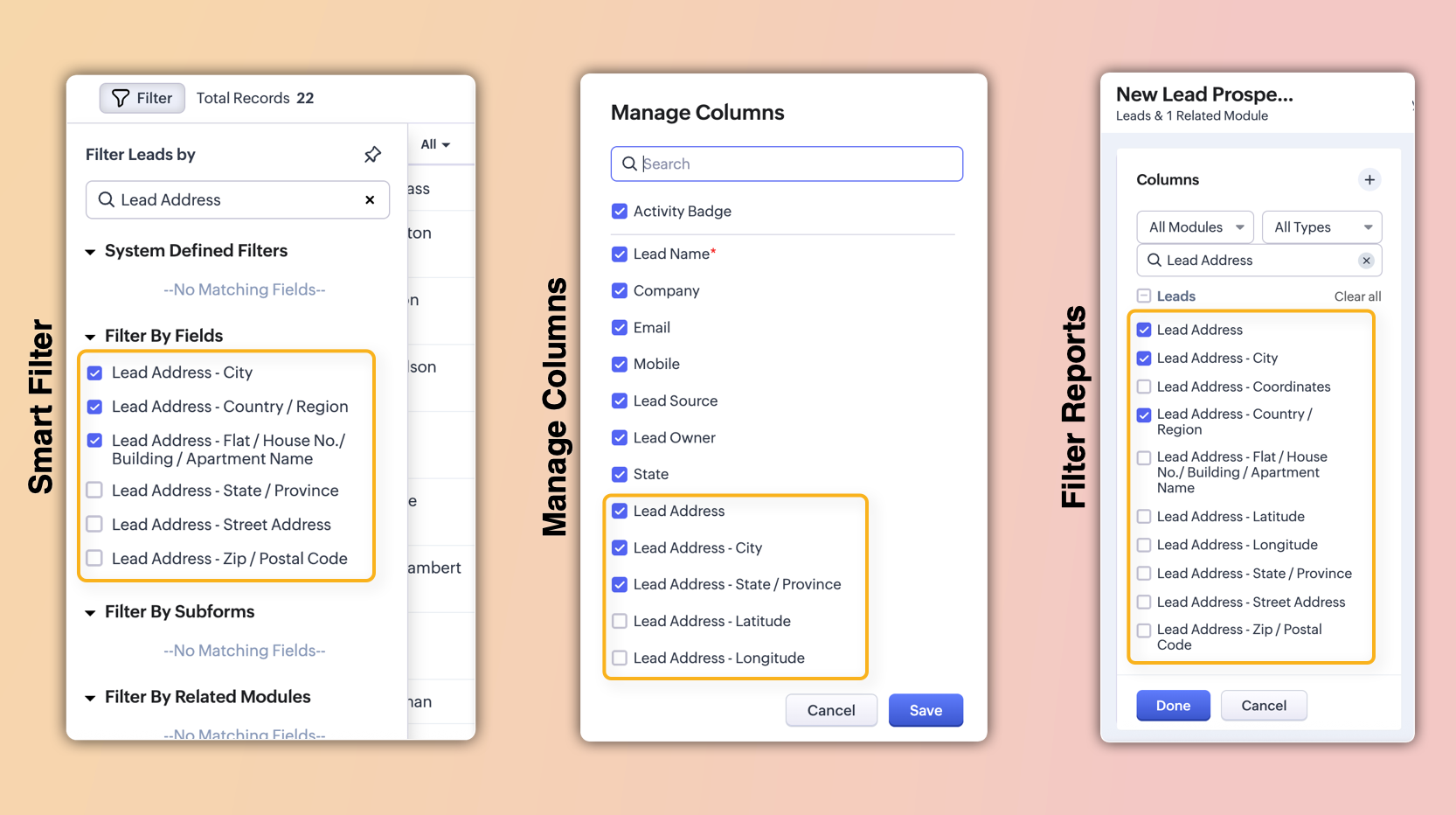
These sub-fields will also be individually available for viewing, filtering, and applying criteria. This enables users to configure, search, and report on address data with greater precision and flexibility.

2. Global sets for countries and states

The new address field comes pre-loaded with standardized lists of countries and their respective states/provinces.

  • Selecting a country instantly filters the available states, so you don't have to set up dependencies manually or type them in.
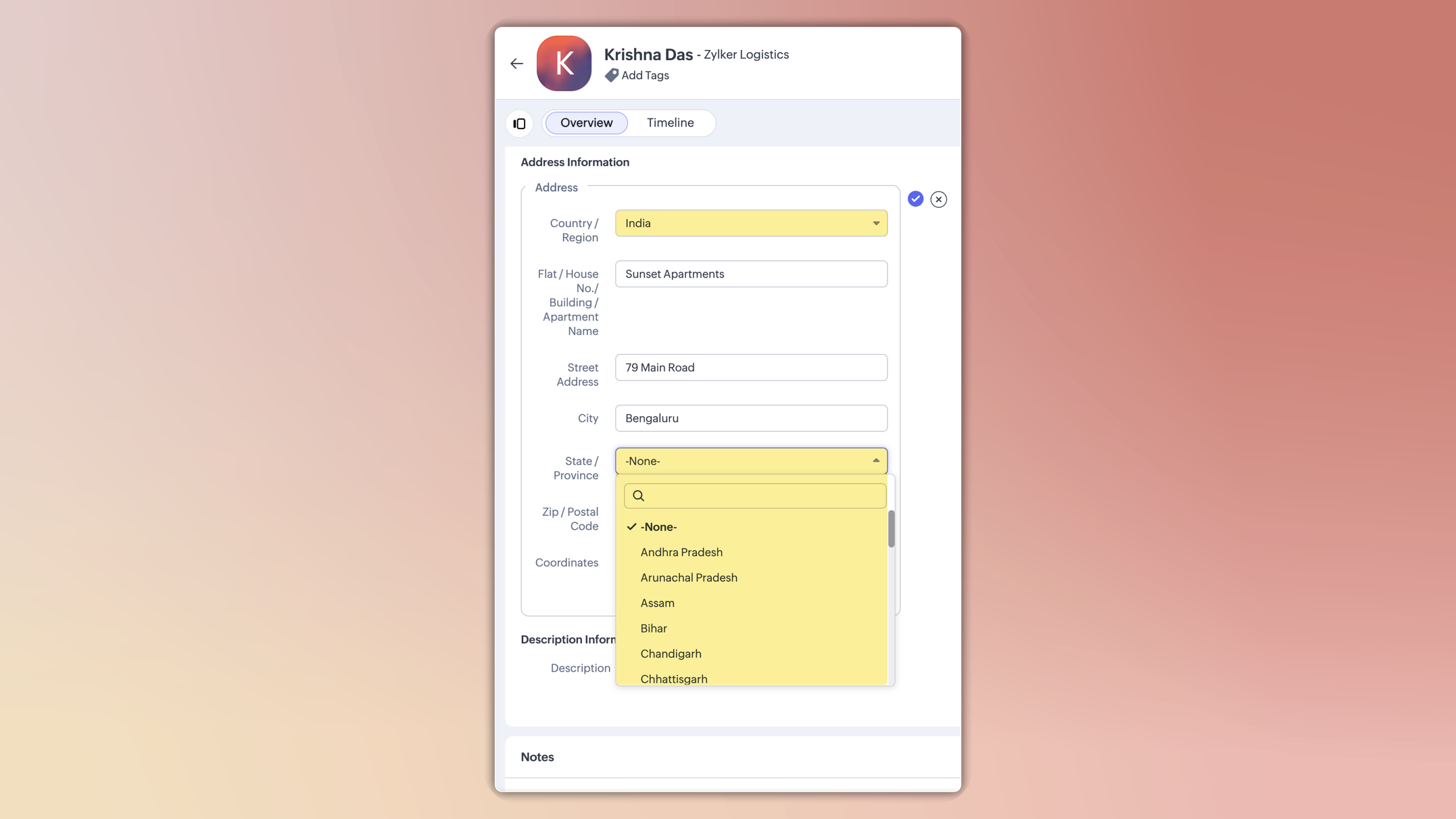

  • This ensures consistent spelling, eliminates typos, and keeps reporting clean.

  • You can also customize these lists in the Global Sets page by adding or removing values based on your business needs.
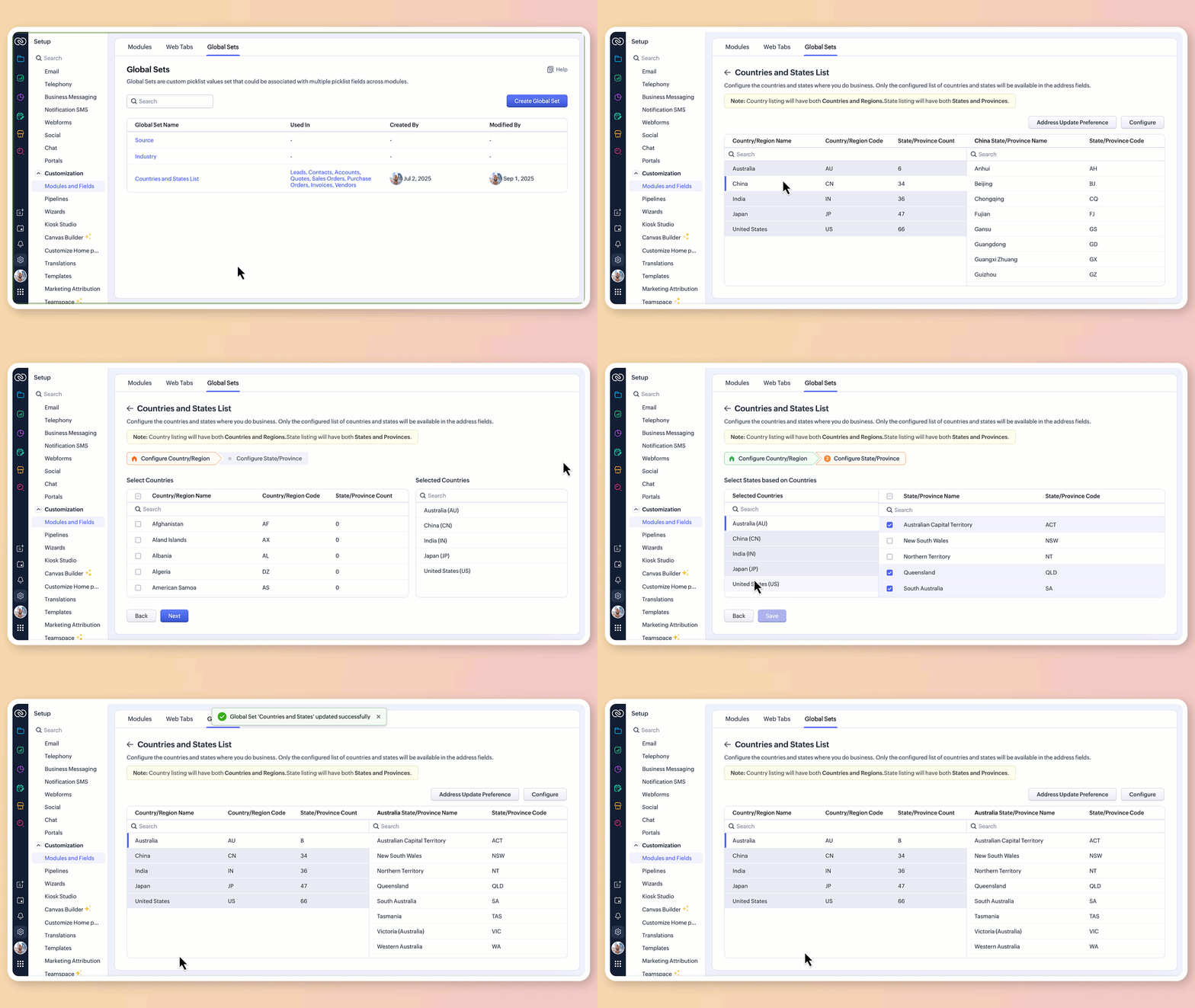

3.Maintain accuracy with address update preferences

To avoid mismatched or invalid country and state data, you can now set address update preferences in your org.

  • Choose to allow only configured country and state values in records, irrespective of the update source.

  • Choose how invalid entries are handled:
    You can either skip the country/state update alone and proceed with the record creation or update, or stop the entire record creation or update altogether if an invalid value is detected.


Info

Feature availability and limits

  • Editions supported: Professional, Enterprise, and Ultimate

  • Modules supported: All modules except user modules, linking modules, and Tasks, Calls, and Meetings modules

  • Limits: Up to two custom address fields per module

Alert

Points to be noted:

  • For new signups: The system-defined address fields will be available in the new address format for: Leads, Contacts, Accounts, Vendors, Quotes, Invoices, Sales Orders, and Purchase Orders modules.Additionally, admins can configure custom address fields for these modules if required.

  • Existing orgs: Admins can incorporate the new address field into their modules manually by adding it via the layout editor. The address field will be available as a custom field in the field tray.

  • Address field is not supported in Webforms, Field updates in Automation and Process management, Zia Enrichment. (The support for the same is in progress and will be updated shortly.)

Please share your feedback in the comments below.

Thanks,

Nizamuddin


    • Recent Topics

    • Scan and Fill CRM Lookup Field

      Not sure if there is a reason why this isn't possible or if I'm just missing it. But I would like to be able to use the scan and fill feature on the mobile app to prefill the CRM lookup field and fetch the rest of the data in the form.
    • Customer Management: #2 Organize Customers to Enhance Efficiency

      When Ankit started his digital services firm, things felt simple. A client would call, ask for a website or a one-time consultation, Ankit would send an invoice, get paid, and move on. "Just one client, one invoice. Easy.", he thought. Fast forward a
    • Zoho Mail and Zoho Flow integration to automatically create ToDo tasks from outbound emails

      How do i setup Zoho Mail and Zoho Flow integration to automatically create ToDo tasks from outbound emails
    • Attachments between Zoho and Clickup, using Flow.

      Olá suporte Flow, tudo bem ? Estamos usando o flow para integrar Zoho Desk com o clickup. Não localizamos a opção de integrar anexos entre do zoho Desk para o clickup. Gostaríamos de saber se migrando para o plano pago, teremos suporte para fazer a integração
    • Adding an Account on Zoho Mail Trigger in Zoho Flow

      I'm trying to create a flow using the zoho mail trigger "Email Receive". My problem is that when I select this trigger, it only shows one account from the account dropdown. I'm planning to assign it on a different email. How can I add other email ad
    • Linnworks

      Unless I am missing something, the Linnworks integration is very basic and limited. I have reached out to support but the first response was completely useless and trying to get a reply in a timely manner is very difficult. Surely I should be able to
    • Test data won't load

      I am using a Flow to receive orders from WooCommerce and add them to a Zoho Creator app. I recently received an order which failed, and when attempting to test the order I found that it just shows a loading animation and shows up in the history as "queued."
    • AddHour resets the time to 00:00:00 before adding the hour.

      Based on the documentation here: https://www.zoho.com/deluge/help/functions/datetime/addhour.html Here's my custom function: string ConvertDateFormat(string inputDate) { // Extract only the date-time part (before the timezone) dateTimePart = inputDate.subString(0,19);
    • WhatsApp Report in Bigin CRM

      Reporting feature for Bigin CRM’s integrated WhatsApp that provides insights such as: Number of WhatsApp conversations closed Number of messages sent and received Number of conversations replied to Response and closure metrics for WhatsApp chats More
    • How to Hide System-DefinedTemplates in Service Report

      Is there any option available to hide system-defined templates? these templates are causing confusion for field users.
    • auto close automated alert tickets which are similar

      Hello ZOHO Community, we are using ZOHO Desk to process automated monitoring alerts. Scenario: Our monitoring system creates a ticket when a threshold is exceeded, e.g. Subject: Computer 1 – CPU usage 100% – Error A few minutes later, once the issue resolves
    • Checking client unsubscribe details

      Hi team, Can you please let me know where we can check if a client has unsubscribed, along with the date and time it was done? If this information is not available at our end, please help confirm the unsubscribe date for the below email ID from the backend:
    • WhatsApp Link is not integrating

      Hello, I am using zoho flow. when new row added in google sheet it sends email to respected person. In email body I have a text "Share via WhatsApp". behind this text I putted a link. But when the recipient receives email and wants to share my given info
    • Zoho flow - Webhook

      If I choose an app as a trigger in Zoho Flow, is it still possible to add a webhook later in the same flow?
    • Zoho Flow + Bigin + Shopify

      We are testing Zoho Flow for the first time and want to create a flow based in first purchases. When a client makes his first order, we're going to add the "primeiracompra" (first order) tag to his account in Shopify (it's not efficient, but that's the
    • Adding multiple Attendee email addresses when adding a Zoho Calendar event in Zoho Flow

      I am trying to integrate Notion and Zoho Calendar via Zoho Flow. However, the Attendee email address supported by Zoho Calendar - Create event only supports one email address, so I am having difficulty implementing automation to automatically register
    • Is it The Flow? Or is it me?

      I want to do some basic level stuff, take two fields from a webhook, create a zsheet from a template using one field with date appended, create a folder using both fields as the name, and put the zsheet into that folder. I was going to elaborate - but
    • Having problem with data transferring from Google sheet to ZMA

      When connecting Google sheet with Zoho marketing automation it is having the email as a mandatory field. Can I change it as non-mandatory field or is there any other way to trasnfer data from google sheet to ZMA. I have leads which we get from whatsapp,
    • Ability for admin to access or make changes in zoho form without asking for ownership

      Currently in zoho form only form owner can make the changes in the form and if someone else has to make changes then we have to transfer the ownership to them and even admin also cant access it . So i think admin must have the ability or option to access
    • Dropbox to Workdrive synchronisation

      I want to get all the files and folders from Dropbox to Workdrive and each time a new file or folder is added in dropbox i want it to be available in Workdrive and wise versa. Sync Updates to Files Trigger: "File updated" (Dropbox). Action: "Upload file"
    • Microsoft Planner Task to Service Desk Plus Request - error n4001

      Hi there. I'm trying to create a flow that will create a new request in ServiceDesk Plus when a new task is created in Microsoft Planner. I have succesfully connected both Planner and ServiceDesk Plus, and have configured the 'create request' section
    • Trailing Space in "Date and time scheduled "

      I am trying to use the Zoho Projects - Create event action in a flow. It is failing with the output error as: "Action did not execute successfully due to an unknown error. Contact support for more details." The input is: { "Duration - Minutes": 30, "Project":
    • Project name by deal name; project creation via flow

      Hello, I want to create a project in zoho projects using flow by a trigger at the crm. My trigger is the update of a deal (stage). The project name should be the account name/ deal name. But I dont find the solution to it. Can you please give me the answer
    • Slack / Zoho Flow; Repl

      I am trying to add a comment in a zoho ticket when someone reply's to a message in a thread. The Message posted to public channel trigger doesn't seem to pick up thread messages. I also cannot use the thread_ts field as it doesn't seem to pull that in.
    • Get Holiday ready with Zoho Mail's Templates

      As the holiday season approaches, it’s time to step away from work and unwind. You may not be able to respond to every email or send individual messages to wish everyone holidays greetings—but It is still important to stay connected. How do you send thoughtful
    • Maintain knowledge base integrity by moderating article comments

      Hello everyone, A knowledge base provides a self-service platform where customers can refer to articles, user manuals, and other resources to learn about the company's products or services and troubleshoot problems. Often, readers leave a comment on the
    • Customize folder permissions in a Team Folder in a Team Folder via zoho Flow

      HI All, on the nth level folder of a team folder I would like to Customize folder permissions when it's created in the flow of Creating folders. That last level I only want to grant access to a specific group, goup ID 201XXXXXXXX. Can you help with a
    • Associating a Candidate to a Job Listing

      Hello, I am trying to use Zoho Forms embedded on my website for candidates to apply for a job opening. I want the form then to tie directly with zoho recruit and have the candidate be automatically inputed into Recruit as well as associated with the specific
    • Automate reminder emails for events

      Hi team, I am trying to automate send event reminders via zoho campaign to my attendees 1 day prior to my scheduled events. I used zoho flow, autoresponder in zoho campaign, as well as I used workflow and automation - but none of these methods are working.
    • Update related module entry Zoho Flow not working with custom module ?

      Hi everyone. I am facing an issue here on Zoho Flow. Basically what I am doing is checking when a module entry is being filled in with an Event ID. Event is a custom module that I created. If the field is being filled in I fetch the contact with its ID
    • How to disable time log on / time log off

      Hi We use zoho people just to manage our HR Collaborators. We don't need that each persona check in and out the time tracker. How to disable from the screen that ?
    • Passing the CRM

      Hi, I am hoping someone can help. I have a zoho form that has a CRM lookup field. I was hoping to send this to my publicly to clients via a text message and the form then attaches the signed form back to the custom module. This work absolutely fine when
    • Zoho Flow - Add to Google Calendar from trigger in Zoho Creator App

      Hello! New to Zoho Flow, but I believe I have everything setup the way it should be however getting an error saying "Google Calendar says "Bad Request". Any idea where I should start looking? Essentially some background: Zoho Creator app has a trigger
    • Picklist field shows "none" as default

      Hello, Is there an option to avoid showing "none" as the default value in a picklist field? I also don't want to see any option displayed. My expectation is to have a blank bar, and then when I display the drop-down list, I can choose whichever I wa
    • Customer ticket creation via Microsoft Teams

      Hi all, I'm looking to see if someone could point me in the right direction. I'd love to make it so my customers/ end users can make tickets, see responses and respond within microsoft teams. As Admin and an Agent i've installed the zoho assist app within
    • Email authentication

      أريد التحقق من البريد الإلكتروني
    • What’s New in Zoho Analytics – December 2025

      December is a special time of the year to celebrate progress, reflect on what we have achieved, and prepare for what’s ahead! As we wrap up the year, this month’s updates focus on refining experiences, strengthening analytics workflows, and setting the
    • Marketing Tip #12: Earn trust with payment badges and clear policies

      Online shoppers want to know they can trust your store. Displaying trust signals such as SSL-secure payment badges, return and refund policies, and verified reviews shows visitors that your store is reliable. These visual cues can turn hesitation into
    • The improved portal experience: Introducing the template view for inventory modules, enhanced configurations, and PDF export support

      Availability: Open for all DCs. Editions: All Hello everyone, You can now achieve a seamless, brand-aligned portal experience with our enhanced configuration options and the new template view for inventory modules. Your clients will now be able to view
    • Zoho Analytics Bulk Api Import json Data

      HI, I’m trying to bulk-update rows in Zoho Analytics, and below are the request and response details. I’d like to understand the required parameters for constructing a bulk API request to import or update data in a table using Deluge. Any guidance on
    • Next Page