Introducing Connected Workflows in Zoho CRM for Everyone : Free Your Teams to Focus on What Matters

Introducing Connected Workflows in Zoho CRM for Everyone : Free Your Teams to Focus on What Matters

Hello Everyone,

We’re thrilled to introduce the next big evolution in Zoho CRM for Everyone -- Connected Workflows. This new feature builds on our commitment to deliver a CRM that’s truly inclusive, adaptable, and designed for consistent collaboration across your entire organization and not just your sales team.

With the launch of Connected Records, we enabled teams to share contextual information and stay aligned through record connections across modules. Now, with Connected Workflows, we’re taking it one step further by enabling Zoho CRM to coordinate work across teams and enable them to deliver their best for customers.

What are Connected Workflows? 

While Connected Records make it easy to share customer context across your customer journey, however, many of the processes involved in your customer's journey need to be consistently carried out. That’s where Connected Workflows come in.

Connected workflows help free your teams from manual coordination by enhancing coordination across multiple teams and improving customer relationship management. They allow you to automate your entire customer journey that spans across multiple customer-facing teams.

With Connected Workflows, you can build smooth coordination between departments like Sales, Marketing, Legal, Onboarding, and Training  so that each step in the customer journey is coordinated without manual follow-ups or miscommunication.


How to create Connected workflows? 

"Users should have the Connected Workflows permission enabled in their profile settings."

Every connected workflow begins with a primary module, either an organization module or a team module, depending on your customer journey.

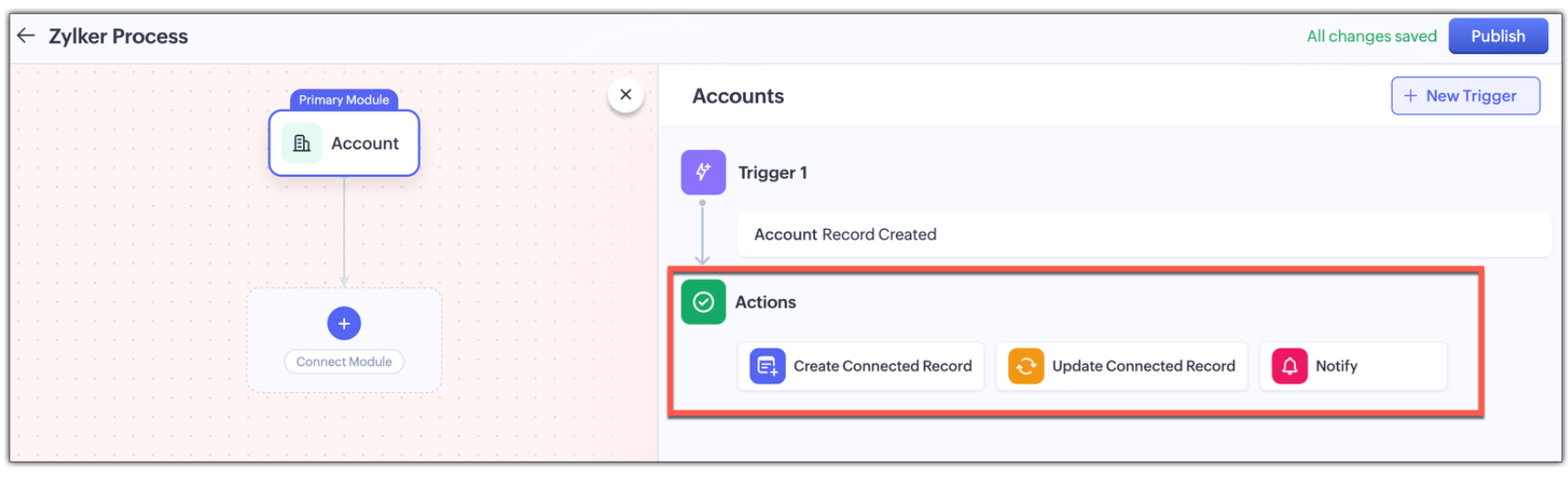
Triggers : Initiate by setting up triggers by configuring either a single trigger or multiple triggers for a module. The triggers are :
  • when a record is created in the module
  • When a record is edited record in the module,
  • When a record is created or edited in the module, or
  • When a field in the record is edited in the module.
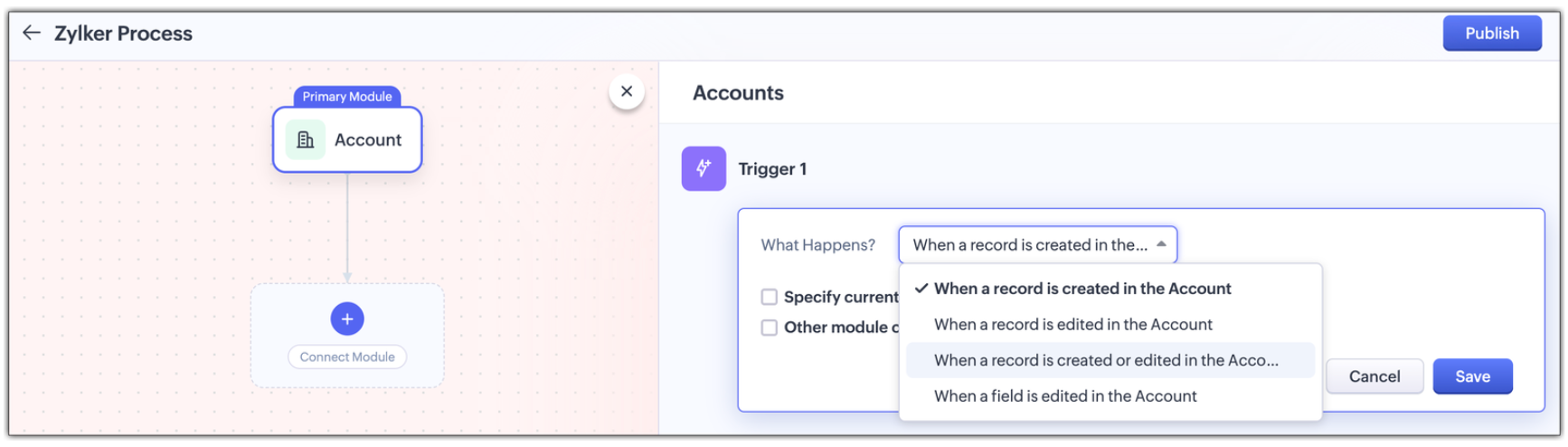
Multi-module criteria for Triggers : You can configure multiple criteria for triggers to execute actions in any other related modules; Enable other module criteria option for this. This ensures actions run when related modules are updated with values matching the trigger.
 
Actions : Assign one or more actions for each trigger . The actions are :
  • Creating a new connected record in the associated module
  • Updating an existing connected record in the associate module, or
  • Notifying users via email. 

Use Case: Automating the customer journey from a sales enquiry  to customer success

A typical customer journey goes through four stages, and we know that even though the sales team is the initial point of contact, multiple teams are involved and will support the sales team to win the customer.                                                        

Involved Teams
Initial Evaluation
Sales Team is the point of contact
Marketing team supports with customer-facing content in the Case Study Module
Demo Request
Sales Team schedules a product demo
Pre-sales team provides product demos in the Product demo module
Customer Onboarding
Sales Team updates the sale cycle stage to 'Closed Won'
Onboarding team helps the customer get started post-sale in the Onboarding Assistance module
Product Training
Sales Team arranges for training sessions
Training team helps the customer to be fully equipped to use the product in the Training module
 
Here's how Connected Workflows can automate the sales process and achieve coordination between the multiple teams involved.  

We’ll create a connected workflow with Deals as the primary module and configure three triggers:

Trigger 1: When a new record is created → Create a connected Case Study record for Marketing (Action)

Trigger 2: When Lead Status is "Qualified" → Create a Product Demo record and notify the Pre-sales Team(Action)

Trigger 3: When Deal Stage is "Closed Won" → Create an Onboarding record for handoff prep(Action)

This sets up three connected modules: Case Study, Demo Request, and Onboarding, as shown in the image below.

 Now we will configure the associated modules.
  • Case Study
    Trigger : When status is "Completed" → Notify Sales Team about availability(Action)

  • Demo Request 
    Trigger : When status is "Completed" → Notify Sales Team that demo was given(Action)

  • Feedbacks (manually created from Demo Request)
    Trigger : When new record is created  → Email lead with feedback form(Action)

  • Onboarding 
    Trigger :
    When status is "Completed" → Notify Training Team to start sessions and Sales Team of onboarding completion; also create a Training record(Action)

  • Training (automatically created from Onboarding)
    Trigger :
    When new record is created → Update Account type to "Customer" and notify Sales Team of training completion(Action


Now let's look at how all these modules have been connected to carry out a customer journey in the GIF below.


In this entire customer journey, there is no loss of customer context, no repeated back-and-forth between teams, and no delays due to miscommunication. Each team receives a connected record with all the relevant data they need to execute their part of the process.
Here is another video with a detailed explanation on how connected workflows works :

How Are Connected Workflows Different from Traditional Workflows?     

  • Connected Workflows go beyond one module; they’re designed to coordinate across team boundaries and hence use multiple modules to build a workflow.
  • Connected workflows trigger follow-up tasks/actions in both org and team modules.
  • Connected Workflows generate connected records as part of the process, so new requests are automatically created in modules, and those teams will have full context from day one. Users can save the time they take to create requests from the Request tab with this feature.

Why use connected workflows for your business? 

  • No more manual follow-ups because of automating cross-team coordination and reducing dependency on reminders or emails.
  • Achieving consistent execution across your customer's journey.
  • Providing end-to-end visibility where teams see the full customer journey, not just their part in the entire journey.
  • Above all, providing contextual coordination among multiple teams by minimizing delays between hand-offs.
 

We believe Connected Workflows will be a game-changer in how you deliver exceptional customer experience. We’re excited for you to start building your first Connected Workflow. Let us know in the comments if you have any queries.

Availability :
  • This enhancement is available only in Zoho CRM's new UI.
  • The number of connected workflows that can be created edition-wise are :
    • Standard Edition.      : 2
    • Professional Edition : 2
    • Enterprise Edition    : 10
    • Ultimate Edition.      : 10
    • Click here to learn about others limitations for this feature.

Early Access for Connected Workflows

We are in the process of opening out connected workflows for our customers, however, if you’d like early access to explore and use this feature, we’ve got you covered!

Fill out this form to get early access.

We’d love for you to try it out and share your feedback.


Regards,
Serena Woolridge
Zoho CRM Marketing Team


    • Recent Topics

    • Share saved filters between others

      Hi, I am in charge to setup all zoho system in our company. I am preparing saved filters for everybody, but the only one can see its me. How can others see it? Thanks
    • Webinar Alert: Learn how to decode your landing page performance with analytics

      Every click, scroll, and drop-off tells a story. Are you listening? Join our Landing Page Analytics webinar to understand how data can reveal what’s working and what’s costing you conversions. In this session, you'll discover The most important metrics
    • Campaign Status Field in CRM

      I'm wanting to create a custom view in CRM that shows all those who have recently hard bounced in past campaigns so we can clean up the database. An old Zoho article said it was possible, but I don't see the option to push campaign status field to CRM,
    • Zoho Forms for Vertical Studio Subscriber Organizations

      We’re excited to introduce the Zoho Forms integration with Vertical Studio. This allows you to capture data using forms and send it directly to your Vertical Studio modules. With this integration, form submissions can be used to create or update records,
    • Zoho Flow not handling Boolean properly

      Hi, I have a checkbox in one system that I'm trying to sync with a checkbox in Zoho CRM. The value from the source system comes in as blank (unticked) or 1 (ticked). I've written the following custom function to convert the output to either boolean false
    • Printing invoice from creator using writer

      Hello. I have created my invoices using Zoho Writer and i'm sending data to them from Zoho Creator by selecting a row in a report and then clicking a button which has workflow connected to it to send the date to the invoice in writer. This is working
    • How to Initiate WhatsApp Message on SalesIQ?

      I've just activated a Business WhatsApp phone number through SalesIQ because of its touted omnichannel chat approach. Sounds exciting. I understand that when a customer sends me a WA message, I can reply to it on SalesIQ and keep the chat going, perfect.
    • i want to delete organization or tranfer ownership

      I accidentally created a Zoho organisation and now I cannot accept an invite from another organisation. I am the Super Admin and cannot leave. Please either delete my organisation or transfer ownership so I can leave.
    • Bulk upload images and specifications to products

      Hi, Many users have asked this over the years and I am also asking the same. Is there any way in which we can bulk upload product (variant) images and product specifications. The current way to upload/select image for every variant is too cumbersome.
    • Zoho FSM API Delete Record

      Hi FSM Team, It would be great if you could delete a record via API. Thank you,
    • Marketing Tip #26: Optimize product images for SEO

      Product images can do more than make your store look good. They can also help customers discover your products through search. Since search engines can’t "see" images, they rely on text signals to understand what an image is about. Two small actions make
    • Allow rejected records (Approval process) to re-enter Blueprints

      Cannot seem to get my head around the key differences between the Blueprints and the Approval Process. For me it seems like different flavours of more or less the same thing - especially now that we have the option of Record Locking. Have a quote to sales
    • Every time an event is updated, all participants receive an update email. How can I deactivate this?

      Every time an event is updated in Zoho CRM (e.g. change description, link to Lead) every participant of this meeting gets an update email. Another customer noticed this problem years ago in the Japanese community: https://help.zoho.com/portal/ja/community/topic/any-time-an-event-is-updated-on-zohocrm-calendar-it-sends-multiple-invites-to-the-participants-how-do-i-stop-that-from-happening
    • Streamlining E-commerce Photography with AI Background Tools

      Hey Zoho Community, I’ve been messing around with ways to make product images less of a headache for fashion brands on Zoho Commerce. You know how boring generic backdrops can get, and how much time traditional photoshoots eat up, right? I tried out this
    • Add @Mention Notifications in Zoho Cliq for Zoho Project Mentions

      Hello Zoho Projects Team, We hope you are doing well. We would like to submit a feature request regarding "Projects Bot" Cliq bot notifications for @mentions inside Zoho Projects comments (Tasks and Issues). Current Behavior: At the moment, when someone
    • WO Completion Status Not Updating Automatically

      Hello Latha, Hope you are doing well. Over the past few days, we have been facing an issue with WO completion. When an AP is marked as complete, the work order status is not automatically updating to “Completed,” and we have to mark it manually. Could
    • Is it possible to create a meeting in Zoho Crm which automatically creates a Google Meet link?

      We are using Google's own "Zoho CRM for Google" integration and also Zoho's "Google Apps Sync" tools, but none of them provide us with the ability to create a meeting in Zoho CRM that then adds a Google Meet link into the meeting. Is this something that
    • Customer Message Edit/Delete Function & Backend Visibility Inquiry

      目前客服已发送的对话支持编辑和删除功能,请问在 Zoho 系统后台,是否可以查看客服具体发送了什么内容,以及删除或修改了哪些信息?如果无法查看,这个功能是否可以通过设置关闭客服的编辑和删除权限?如可以,请告知具体设置路径。 Currently, customer service agents are able to edit and delete messages after sending them. In the Zoho system backend, is it possible to view
    • In App Auto Refresh/Update Features

      Hi,    I am trying to use Zoho Creator for Restaurant management. While using the android apps, I reliased the apps would not auto refresh if there is new entries i.e new kitchen order ticket (KOT) from other users.   The apps does received notification but would not auto refresh, users required to refresh the apps manually in order to see the new KOT in the apps.    I am wondering why this features is not implemented? Or is this feature being considered to be implemented in the future? With the
    • Sync Task Status from Zoho Projects to Zoho Desk

      Hi Zoho Desk Team, Hope you’re doing well. We’re actively using the Zoho Desk–Zoho Projects integration, which helps our support and project teams stay aligned. However, we noticed that when we change a task’s status in Zoho Projects, the change is not
    • Lost the ability to sort by ticket owner

      Hi all, in the last week or so, we have lost the ability to sort tickets by Ticket Owner. Unlike the other columns which we can hover over and click on to sort, Ticket Owner is no longer clickable. Is it just us, or are other customers seeing this too?
    • Placeholder doesnt work in email tempalate

      Hi Team,  I have put in the customer happiness rating place holder in my email template but when I pick the template in my ticket and send it to client, the place holder doesnt get generated. What am I missing here? screenshot attached. 
    • Search API filter/sort ignores comment-triggered modifiedTime updates

      Summary When a comment is added to a Call or Account, the parent record's modifiedTime is correctly bumped. This bumped value is visible in: GET /api/v1/calls/{id} ✅ GET /api/v1/calls/search without a filter ✅ — the record's response body shows the new
    • Automation#17: Auto-Create Tasks in Zoho Projects Upon Ticket Creation in Zoho Desk

      Hello Everyone, This edition delivers the solution to automatically create a task in Zoho Projects when a ticket is created in Zoho Desk. Zylker Resorts uses Zoho Desk for bookings and handling guest requests. Zylker resorts outsources cab bookings to
    • Introducing parent-child ticketing in Zoho Desk [Early access]

      Hello Zoho Desk users! We have introduced the parent-child ticketing system to help customer service teams ensure efficient resolution of issues involving multiple, related tickets. You can now combine repetitive and interconnected tickets into parent-child
    • Remove Bounced email addresses from CRM after running a campaign

      HI, Is there a simple way to remove bounced leads in the CRM where there email doesn't exist anymore after running a campaign?
    • Building a custom site

      do we have an option in Zoho to build custom sites like adding custom functionalities? want to make a site like jumble puzzle answers for today. Is it doable? Please assist.
    • How to Automate an Unsubscribe based on Scoring

      I automatically assign a negative point score to bounced emails and would like to automate unsubscription of these emails from our Campaigns, without losing the contact data. (Oftentimes the lead is no longer at a business, but I want to keep the business
    • Recurring Addons

      Hi, I know you can set the pricing interval for addons to weekly, monthly and yearly & set it for one off or recurring, which these are fine as a base addon item. It really would be helpful if when creating a subscription when you add on the addon item
    • Start Workflow from Deluge Script

      I have developed a customized process from our CRM that leverages a deluge script to create a statement of work document. Once the document has been created via the merge and store function, I would like the ability to start a workdrive review & approve
    • Option+C shortcut conflict

      In the latest Cliq release, you introduced `Option+C` shortcut to start a new audio call. In Polish, `option+C` is used for letter `ć`. I changed this button combo but `Option+C` is still being blocked and doesn't allow me to write letter `ć`.
    • Need Easy Way to Update Item Prices in Bulk

      Hello Everyone, In Zoho Books, updating selling prices is taking too much time. Right now we have to either edit items one by one or do Excel export/import. It will be very useful if Zoho gives a simple option to: Select multiple items and update prices
    • Items Landed Cost and Profit?

      Hello, we recently went live with Zoho Inventory, and I have a question about the Landed Cost feature. The FAQ reads: "Tracking the landed cost helps determine the overall cost incurred in procuring the product. This, in turn, helps you to decide the
    • How to set custom Sales Order numbers

      I am trying to create Sales Orders with data from Jotform submissions. Auto number generation is disabled within Books. Whereas the flow Input recognizes the number (40732 in this example), the Output does not. How can I fix this? I'd like the number
    • Displaying Rate Inclusive of GST per unit

      Hello, Currently when I enter the pricing of a line item it shows the overall amount (price including tax * quantity). I would like to see price/unit inclusive of GST. Is there any way to simplify this and to be able to view it? I've attached my current
    • RouteIQ user Licensefor Non–Zoho One User

      Zoho RouteIQ needs to be purchased for Zoho CRM. The current setup uses the Zoho One plan, but RouteIQ is required for a different user who is not part of Zoho One. However, they need access to routes and customer details within RouteIQ for planning their
    • Introducing the New Applications Module

      We're excited to introduce the Applications module, a powerful new feature designed to revolutionize how you manage job applications. This module offers a more streamlined, efficient approach to tracking and processing candidates throughout your recruitment
    • Zoho Browser??

      hai guys, this sounds awkward but can v get a ZOHO BROWSER same as zoho writer, etc. where i can browse websites @ home and continue browsing the same websites @ my office, as v have the option in Firefox, once i save and close the browser and again when i open it i will be getting the same sites. If u people r not clear with my explanation, plz let me know. Thanks, Sandeep  
    • since the new interface of ZOHO writer can't turn of automatic reminder option for merge documents

      Since the new interface of ZOHO writer I have this problem. I have a large set of templates that I use to send documents to ZOHO Sign. But now in all those templates the box for Sending reminders is ticked, which i don't want. But even if I untick the
    • Sales Allowed Beyond Available Stock and Payment Recorded Without Restriction

      Hi, While testing in Zoho Inventory, I noticed that a sales order can be created with a quantity exceeding the available stock in the selected warehouse. In my case: Available stock: 5 units Ordered quantity: 6 units Despite this: I was able to convert
    • Next Page