Subscription Information & Storage Management in Zoho Recruit
Subscription Information & Storage Management in Zoho Recruit


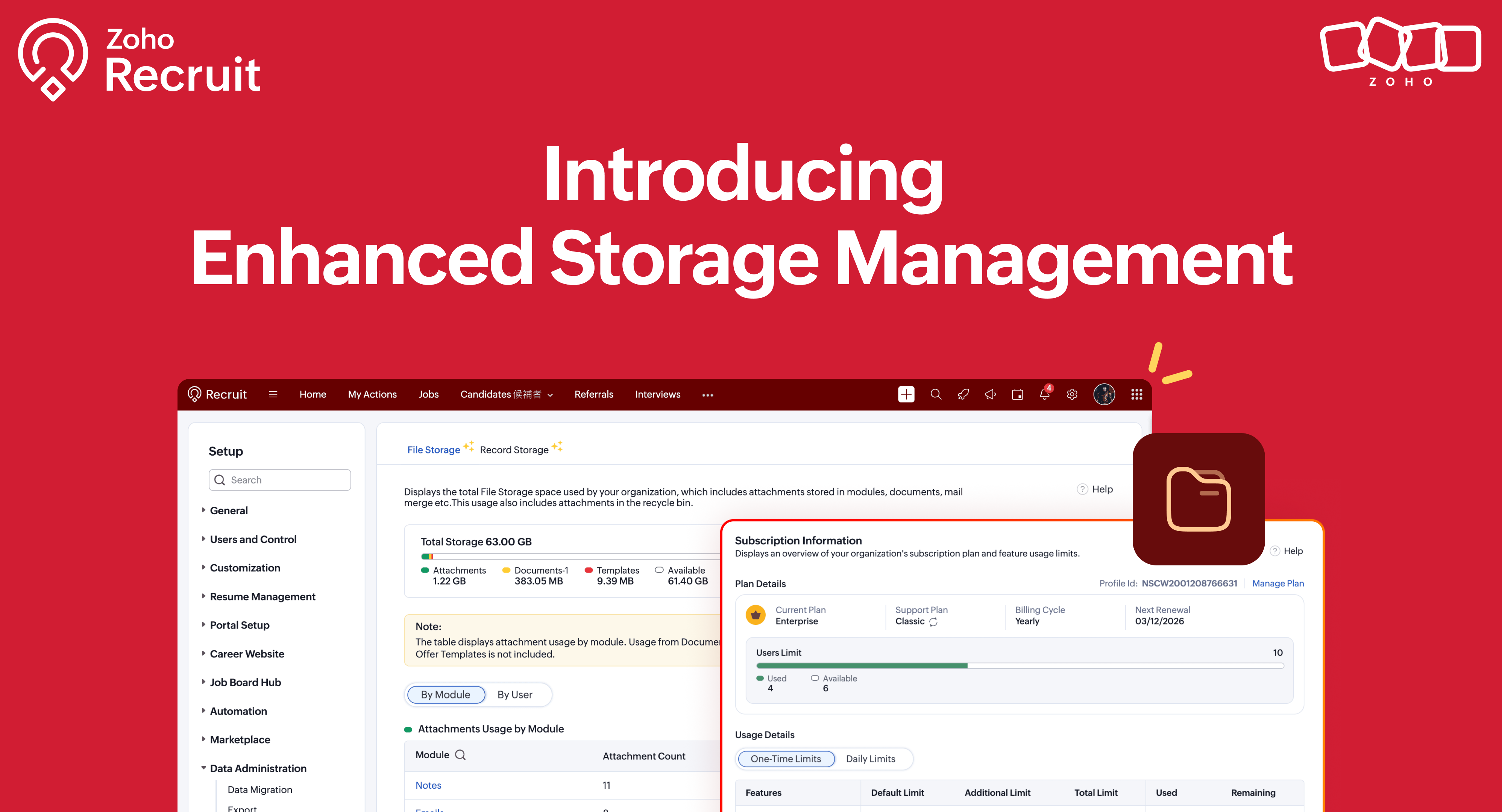
We’re excited to roll out two new enhancements in Zoho Recruit, Subscription Information and Storage Management — designed to give admins complete visibility into subscription details, feature limits, and storage consumption — all from one place inside Setup.

What's New

 1. Subscription Information   

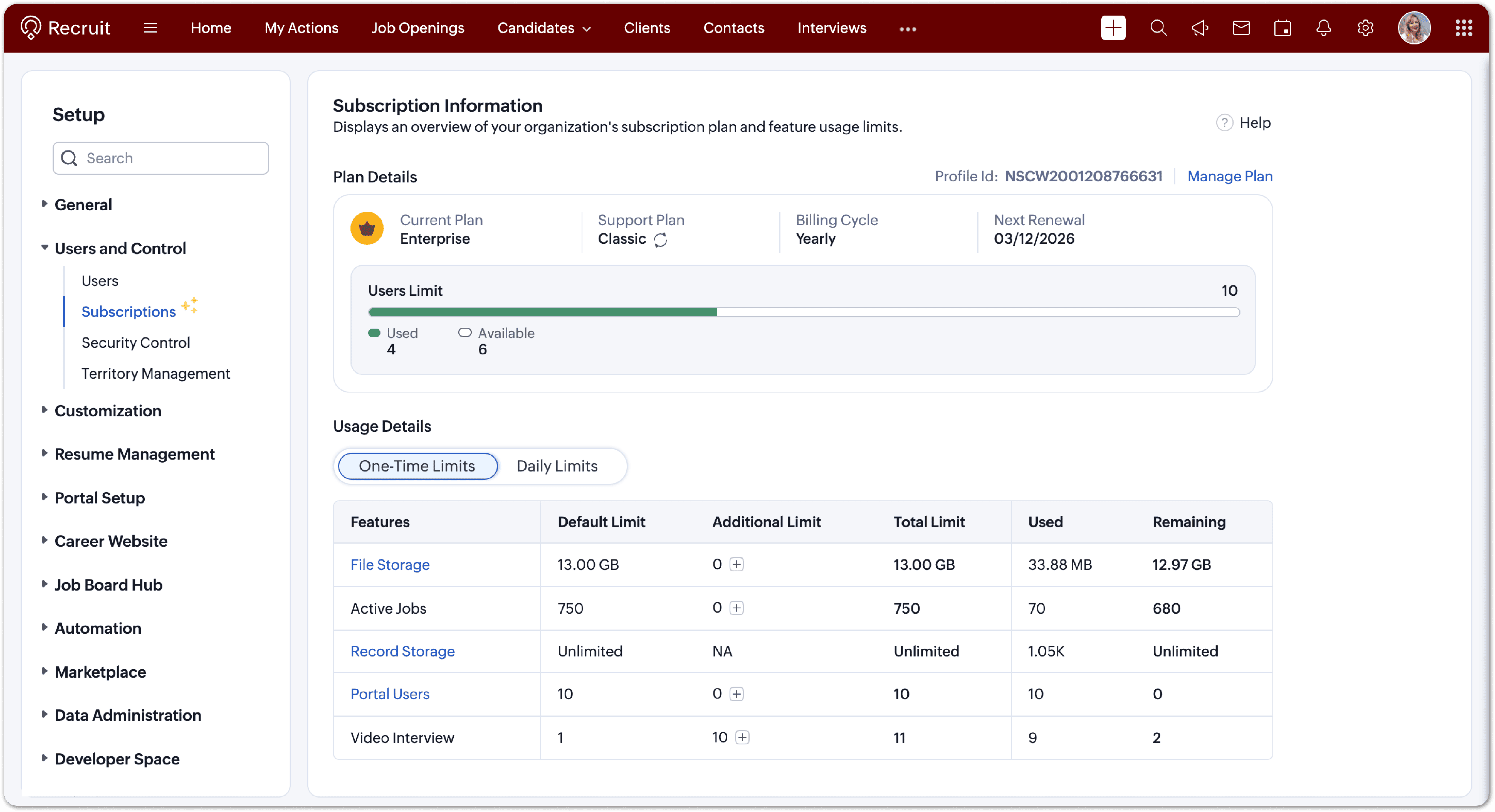
A dedicated section to view and manage your organization’s subscription details, feature limits, and usage in one glance. Refer to our help documentation to know more 

How to Access  

Go to Setup → Users and Control → Subscriptions


You can now:
  1. View your current plan (edition, billing cycle, renewal date, support level).
  2. Check user and employee limits with a clear used vs. available indicator.
  3. Monitor feature usage under one-time and daily limits.
  4. Upgrade limits or renew your plan directly when needed.
  5. Each limit is displayed with intuitive bars and usage data, helping you keep your account optimized and compliant with your plan’s capacity. 

 2. Storage Management   

Track how your storage space is used across files and records and manage it efficiently.

How to Access  

Go to Setup → Data Administration → Storage
You’ll find two tabs:
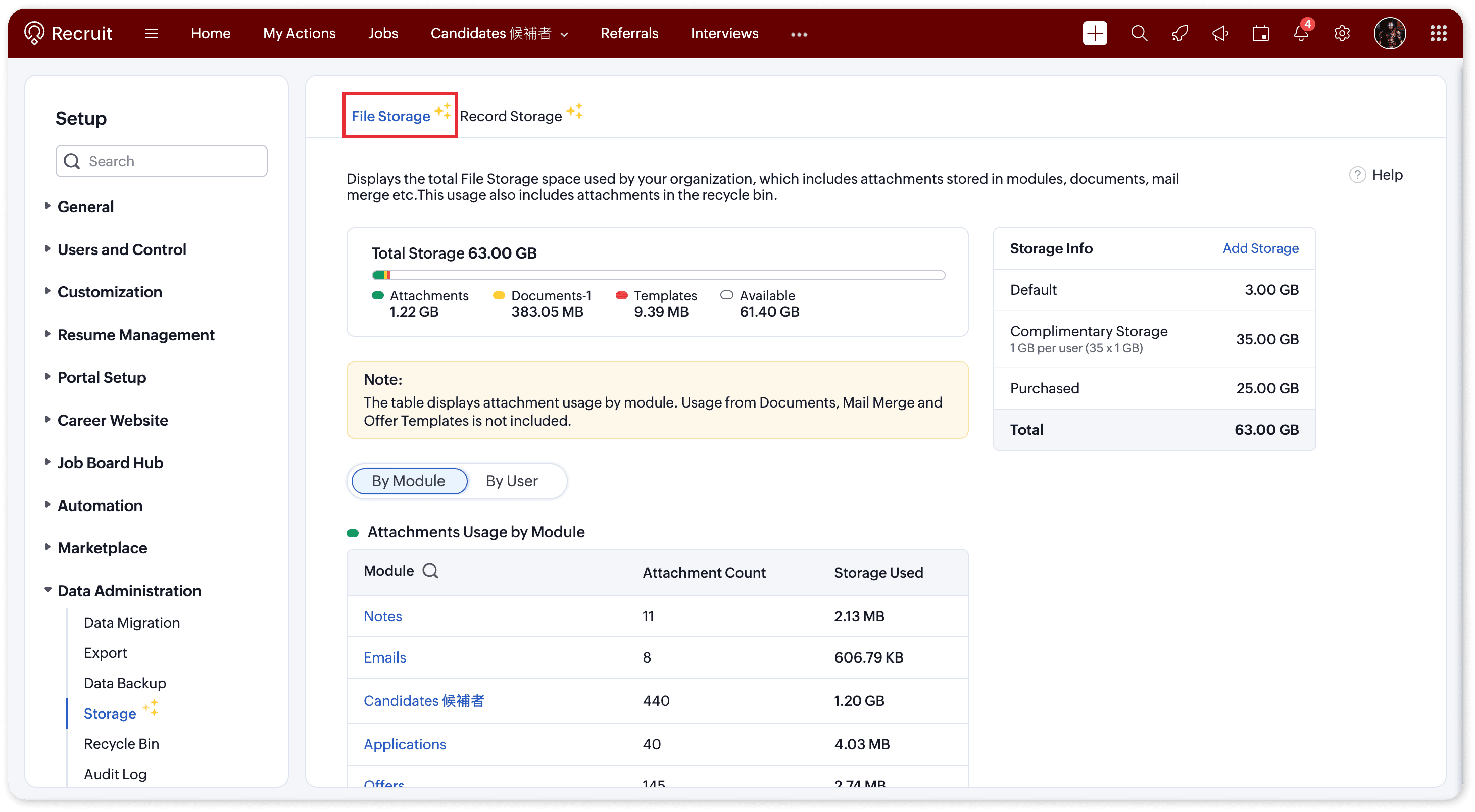
  1. File Storage – For attachments, documents, and templates
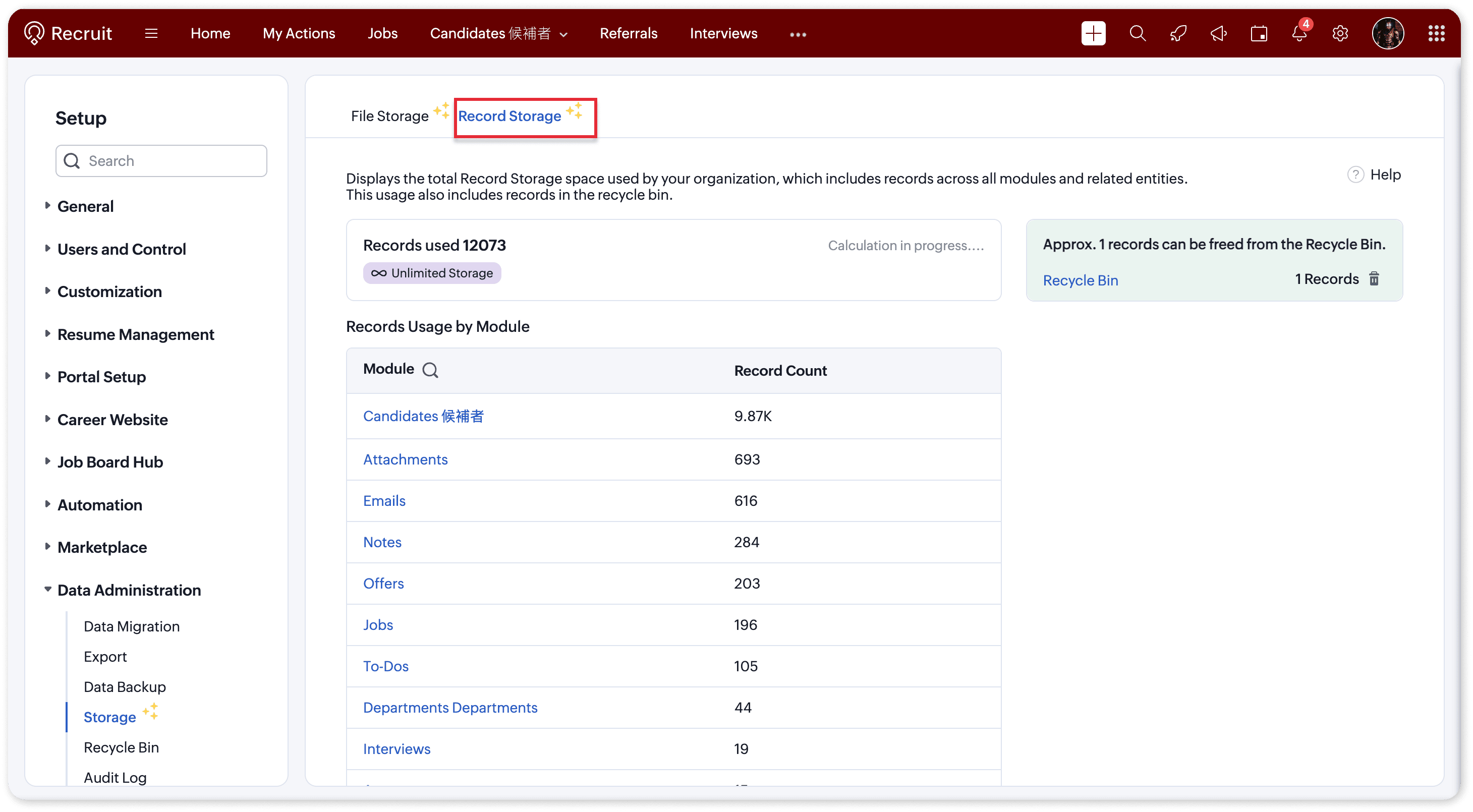
  2. Record Storage – For records created across all modules

File Storage   

Monitor all file attachments, templates, and documents uploaded across Recruit.

You can now:
  1. View total storage (default + complimentary + purchased).
  2. Check space used vs. available.
  3. Track storage by module (Candidates, Jobs, Applications, Offers, Emails, Notes, etc.) or by user.
Each plan also includes complimentary storage per user 
  1. Enterprise: 1 GB per user
  2. Professional: 512 MB per user
  3. Standard: 256 MB per user


Need more? Simply click “Add Storage” to purchase extra capacity and ensure uninterrupted usage to all attachments.

 Record Storage   

Understand how many records your organization has created across modules like Candidates, Jobs, Emails, Notes, and more. Refer to our help documentation to know more
 
You can now:
  1. View total records used vs. available.
  2. See a module-wise breakdown of record usage.
  3. Identify and clear Recycle Bin items to free up space.
Each edition comes with its own record limits:
  1. Free: 5,000 records
  2. Standard: 100,000 records
  3. Professional: 500,000 records
  4. Enterprise: Unlimited 


Why this matters

Running out of storage can interrupt your team’s ability to upload attachments or create new records. With these insights, admins can:
  1. Proactively monitor storage usage
  2. Identify high-usage modules or users
  3. Purchase or allocate additional storage with ease
This ensures smooth operations and uninterrupted hiring workflows, even as your data grows.
Idea
Pro Tip:
  1. Before purchasing additional space, try clearing out Recycle Bin records,  it’s a quick way to reclaim storage instantly.
  2. When sending bulk/mass emails to candidates, if the email body and attachments are frequently reused (for example, an onboarding email sent to multiple candidates), it’s more efficient to create an email template and add the required attachments to it. Using this template for mass emails helps reduce storage usage and avoids uploading the same attachments repeatedly.

Need Help?  

If you have any queries please reach out to support@zohorecruit.com for assistance.

Regards,
Team Zoho Recruit

    • Sticky Posts

    • Zoho Recruit Community Meet-up - India (Venues Finalised)

      Zoho Recruit Community Meet-up - India (Venues Finalised) Namaste, India. 🙏🏼 The Zoho Recruit team is hitting the road—and we're absolutely excited behind the scenes. Join us for the Zoho Recruit India Meet-up 2026, a morning designed to make your recruiting
    • Zoho Recruit Community Meetup - London 🇬🇧 (Venue Finalised)

      Hello Recruiters! We’re excited to announce that the Zoho Recruit team is coming to the UK for an in-person Zoho User Group (ZUG) Meetup in London! This is your chance to connect with fellow Zoho users, learn from experts, and walk away with actionable
    • An update to improve email delivery | Email Authentication & Relay

      Update Rollout Latest Update: Enterprise users (8th July, 2025) This update is now live for Enterprise plan users in all regions. This includes People Plus, but not Zoho One, which will be covered in an upcoming update. Professional users (31st May 2025)
    • Zoho Recruit User Group Meet-up | INDIA 2025 (Venue Finalised)

      Hello Zoho Recruit users from India, We’re pleased and excited to announce our 2025 edition of Zoho user group meet-up in India in five cities! In this meet-up, our team of experts will help you understand the intricate nuances to use Zoho Recruit better,
    • Zoho Recruit is coming to the UK | Zoho Community Learning Series

      Customers from the United Kingdom, Exciting news: We will be in London for the Zoho Recruit user meet up. Our team will help you better understand the intricate nuances of Zoho Recruit to help you hire faster, inform about new and upcoming features, and
    • Recent Topics

    • From Zoho CRM to Paper : Design & Print Data Directly using Canvas Print View

      Hello Everyone, We are excited to announce a new addition to your Canvas in Zoho CRM - Print View. Canvas print view helps you transform your custom CRM layouts into print-ready documents, so you can bring your digital data to the physical world with
    • Announcing Kiosk 1.1 - Customize screen titles, configure new fields & actions, use values from your Kiosk to update fields, and more.

      Hello all We are back again with more enhancements to Kiosk. So what's new? Enhancements made to the Components Add titles for your Kiosk screens and adjust its width to suit your viewing preferences. Three new fields can be added to your screen: Percentage,
    • Removing To or CC Addresses from Desk Ticket

      I was hoping i could find a way to remove unnecessary email addresses from tickets submitted via email. For example, a customer may email the support address AND others who are in the helpdesk notification group, in either the TO or CC address. This results
    • CRM Percent custom fields: When will it show the % symbol and behave like %?

      1. Actually Percent custom fields fail to show the % symbol. 2. When in formulas Percent fields work like number: 100 x 5% = 5 ideal world 100 x 5% = 500 what happens actually 3. When importing Percent fields the % symbol has to be removed and the data
    • Using IMAP configuration for shared email inboxes

      Our customer service team utilizes shared email boxes to allow multiple people to view and handle incoming customer requests. For example, the customer sends an email to info@xxxx.com and multiple people can view it and handle the request. How can I configure
    • Introducing Color Coding of Picklist Values

      Dear Everyone, Greetings!! Zoho CRM is uplifting the user experience. Recently, we had some notable aesthetic improvements in CRM like Kanban View UI enhancement, New List view UI enhancement, color coding of tags, and color coding of picklists in meetings.
    • Where can I find the best mail backup tool for Windows?

      Later this evening I found Mail Backup Tool in google. Actually I was looking for a solution to download/save emails to my local drive. As I had plenty of important data stored in my email account. So i was not in a mood to take this thing lightly. This made me curious to found any software which can help me to backup my data to hard drive. Then I found the above application which was like a gem. A complete email backup solution for Zoho Mail, Gmail, Yahoo Mail, Office 365 and more than 40+ email
    • Custom Display Field for Lookup Dropdowns in Zoho CRM

      Could Zoho CRM support changing the display field in lookup dropdowns, like Zoho Creator does? This would make it much easier to select the right record by showing a more useful field instead of only the default one. It would improve speed, clarity, and
    • Super Admin Logging in as another User

      How can a Super Admin login as another user. For example, I have a sales rep that is having issues with their Accounts and I want to view their Zoho Account with out having to do a GTM and sharing screens. Moderation Update (8th Aug 2025): We are working
    • A2P 10DLC Opt-in Rejection Issue with Zoho Creator Public Form

      Hi everyone, I’m working on an A2P 10DLC SMS campaign and running into repeated rejections due to opt-in issues. I’m using Zoho Creator for the registration flow. The form is public (no login required). Users enter their phone number and there is an unchecked
    • Introducing Zoho Sprints 3.0

      Zoho Sprints is consistently evolving in steady increments. The introduction of the latest version, with its enterprise level solutions, brings to you advanced capabilities that propel your agile efforts in the right direction. Here's a quick glimpse
    • Es posible cambiar el lenguaje de los modulos del ASAP?

      Es posible cambiar el lenguaje de estos textos? Tengo Zoho configurado en español pero aun así me muestra estos textos en ingles:
    • Option to Automatically Publish Job Openings to the Career Website via API or Workflow

      Currently, when creating Job Openings using the Zoho Recruit API, the records are successfully inserted into the system. However, there is no way to automatically publish these Job Openings to the Career Website. In the Job Opening field data, there are
    • Evaluate applicants faster: Profile Summary and Skill Sets now in Applications

      Evaluating applicants often requires switching between modules to understand their skills and background. With this update, we’ve extended two capabilities directly to the Applications module: Skill Sets and Profile Summary. You can now review applicants
    • Free webinar: How to use passkeys with Zoho Vault

      Hi everyone! Passkeys are transforming the way we sign in—making authentication safer, faster, and completely passwordless. No more memorizing complex passwords or worrying about credential theft. With Zoho Vault, you can securely manage both passwords
    • Adding Markdown text using Zoho Desk API into the Knowledge Base

      Hi Zoho Community members, We currently maintain the documentation of out company in its website. This documentation is written in markdown text format and we would like to add it in Zoho Knowledge Base. Do you know if there is REST API functionality
    • Is it possible to embed Zoho Bookmarks in the Cliq sidebar?

      Is there any way that each Zoho user can access their bookmarks (that live in https://bookmarks.zoho.eu/ which is technically a part of Zoho Mail) directly within Cliq? As a widget, or an item in the sidebar? My team does not use Mail, it uses Cliq all
    • Enhancing Zia's service with better contextual responses and article generation

      Hello everyone, We are enhancing Zia's Generative AI service to make your support experience smarter. Here's how: Increased accuracy with Qwen One of the key challenges in AI is delivering responses that are both contextually accurate and empathetic while
    • Let us add Lookup fields in the Blueprint Transitions

      We are unable to add Lookup Fields in the blueprint transitions in Zoho Desk, we wanted to make it a requirement for our workflow but since it's not available in the transition we cannot. The lookup field exists in the Layout: But it cannot be added/selected
    • Countries List Global Set- Complete with Phone Country Code and Continent.

      Dear Zoho Team I saw your recent addition to the Global Sets regarding the Countries list and states. While working on it, why didn't you also add things like Continent and Phone Country Code? Also, some ISO codes from some Countries/regions are mis
    • How can we clear a signature field with deluge?

      I would like to clear a signature field in the Edit -> On Load. I have tried input.signature = ""; input.signature = null; clear input.signature; None of the above is working. is there any other way I am missing?
    • Dynamic image in form works in the app but not on the customer portal.

      img = frm_Fichas[ID == input.Nombre].Foto; imgno = Nophoto[ID2 = 1].Image; if(len(img) > 1) { img = img.replaceAll("/sharedBy/appLinkName/",zoho.appuri); img = img.replaceAll("viewLinkName","Fichas_de_personal_public"); img = img.replaceAll("fieldName","Foto");
    • Online PDF Editor

      Hello Team, There is a small glitch i found when i was using your online software called "PDF Editor", There is a menu bar on right side comes when we click on 3 dots for any pdf, but that entire menu has no options to choose, that is totally blank, please
    • How do you print a refund check to customer?

      Maybe this is a dumb question, but how does anyone print a refund check to a customer? We cant find anywhere to either just print a check and pick a customer, or where to do so from a credit note.
    • Client and Vendor portal at the same time

      We have companies that serve both as clients and vendors and they are linked. However, we have a problem giving them access to the vendor/client portal. If they accept the invitation from the client portal, when we try to invite them to the vendor portal
    • Customize Sign-out Button

      Are there some url parameters I can use to make a form button sign-out the user from the app? The sign-out link on the top right is small. Here's and example of the url for the top right sign-out: https://creator.zoho.com/logoutpage.jsp?sharedBy=niskypto&appID=212085000006568003&appLinkName=MYAPP&signOutUrl=niskypto/MYAPP/view-login/SOMEPAGE Note: In my account, the sign-out is set to redirect users to my website. Can I also override this with some url parameters? John M. Whitney
    • Zoho Recruit - Email Relay

      Good day, Has anyone succeeded in setting up an email relay for Office 365? If I add the details from https://support.microsoft.com/en-us/office/pop-imap-and-smtp-settings-8361e398-8af4-4e97-b147-6c6c4ac95353, I get the connection error. Regards, Eka
    • Zoho Recruit -> Exchange Online Relay

      HI! I have tried to connect Recruit to our MS 365 Exchange Online without any luck. I use this guide https://help.zoho.com/portal/en/kb/recruit/outreach/email-relay/articles/email-relay-zoho-recruit#Configuring_Email_Relay_Settings Do anyone have the
    • Zoho Sprints iOS app update: Global view, screen capture control, file encryption, tags enhancement

      Hello everyone! We are excited to introduce new features in the latest version(v2.1) of the Zoho Sprints iOS app update. Let’s take a quick look at what’s new. 1. Global view Global view brings all your project items into one centralised space. You can
    • Error AS101 when adding new email alias

      Hi, I am trying to add apple@(mydomain).com The error AS101 is shown while I try to add the alias.
    • CRM x WorkDrive: We're rolling out the WorkDrive-powered file storage experience for existing users

      Release plan: Gradual rollout to customers without file storage add-ons, in this order: 1. Standalone CRM 2. CRM Plus and Zoho One DCs: All | Editions: All Available now for: - Standalone CRM accounts in Free and Standard editions without file storage
    • an issue in Zoho CRM where the workflow rule is not triggering

      H I’m currently facing an issue in Zoho CRM where the workflow rule is not triggering when a new lead is created through a webform. I’ve double-checked the criteria and field updates, everything seems fine but it still doesn’t fire. Has anyone faced this
    • 401 Unauthenticated Error – Zoho CRM to Google Sheets Integration

      Hi I'm building an Automation Function in Zoho CRM using Deluge that appends contact data from Zoho CRM into a Google Sheet whenever a new contact is created. WHAT I'VE DONE: I created a connection in Zoho CRM (Developer Hub → Connections) with the following
    • Power up your Kiosk Studio with Real-Time Data Capture, Client Scripts & More!

      Hello Everyone, We’re thrilled to announce a powerful set of enhancements to Kiosk Studio in Zoho CRM. These new updates give you more flexibility, faster record handling, and real-time data capture, making your Kiosk flows smarter and more efficient
    • Real signature in Zoho Expense PDF report ?

      Hello ! Is there a way to put a real signature on the signature line when a PDF report is generated in Zoho Expense? Through Zoho Sign or another way? Can't seem to make it work.
    • Books <-> CRM synchronisation with custom Fields

      Hello, We are synchronising Books Customers with CRM Accounts. In CRM Accounts I set up last year a "segments" multiselect field shown below In Books, I set up a custom multi-select field with the same value as in the CRM And set up the synchronisation inside Books. Want to synchronise the Books Segments with the CRM Segments, but the later doesn't exist, and another non-existing is there ?! First, I don't understand where the field Segmentation is coming from. Second, I set CRM Segmentation to sync
    • Income not showing in direct bank feed

      Hi, I am trying to enter income without knowing or mentioning customer, as i am told, my client wants single or cash basis accounting but i seriously struggling......................
    • I am not able to check in and checkout in zoho people even location access allowed

      This issue i am facing in mackbook air m1, I allowed location in chrome browser and i also tried in safari but getting similar issue. Please have a look ASAP.
    • Preview future shift rotation in Shift Schedule

      Hi, What if, instead of the current behavior, the Shift Rotation feature in Zoho People allowed users to preview future shift schedules before the scheduler execution? Currently, when a shift rotation is configured (for example, monthly rotation), the
    • Automatically Update Ticket Status in Zoho Desk Based on Actions in Zoho Projects

      Hi Zoho Desk Team, Hope you’re doing well. We’re using the Zoho Desk–Zoho Projects integration to manage tasks related to customer tickets, and it works well for linking and tracking progress. However, there are a few important automation capabilities
    • Next Page