Hello everyone!
Welcome back to another week of Kaizen. In last week's
post in the
Kaizen series, we discussed how subforms work in Zoho CRM and how to manipulate subform data using Zoho CRM APIs.
In this post, we will discuss how to manipulate a multi-select lookup fields using Zoho CRM APIs.
Multi-select lookup field
The Multi-Select Lookup Field enables you to establish a many-to-many relationship between two different modules in CRM. It allows you to associate multiple records with each other, from two different modules.
These associations are stored in an individual module called "
Linking Module". Consider there are two modules,
Employees and
Skills. The Employees module contains details regarding Zylker's workforce, and the Skills module contains details regarding various skills like Social Media Marketing and Content Marketing.
We want to associate multiple skills to an employee. So, a multi-select lookup can be created in the Employees module. When doing so, similar multi-select lookup field will be automatically created in the Skills module, along with the EmpXSkills linking module by Zoho CRM. The underlying data model is described in the below image.
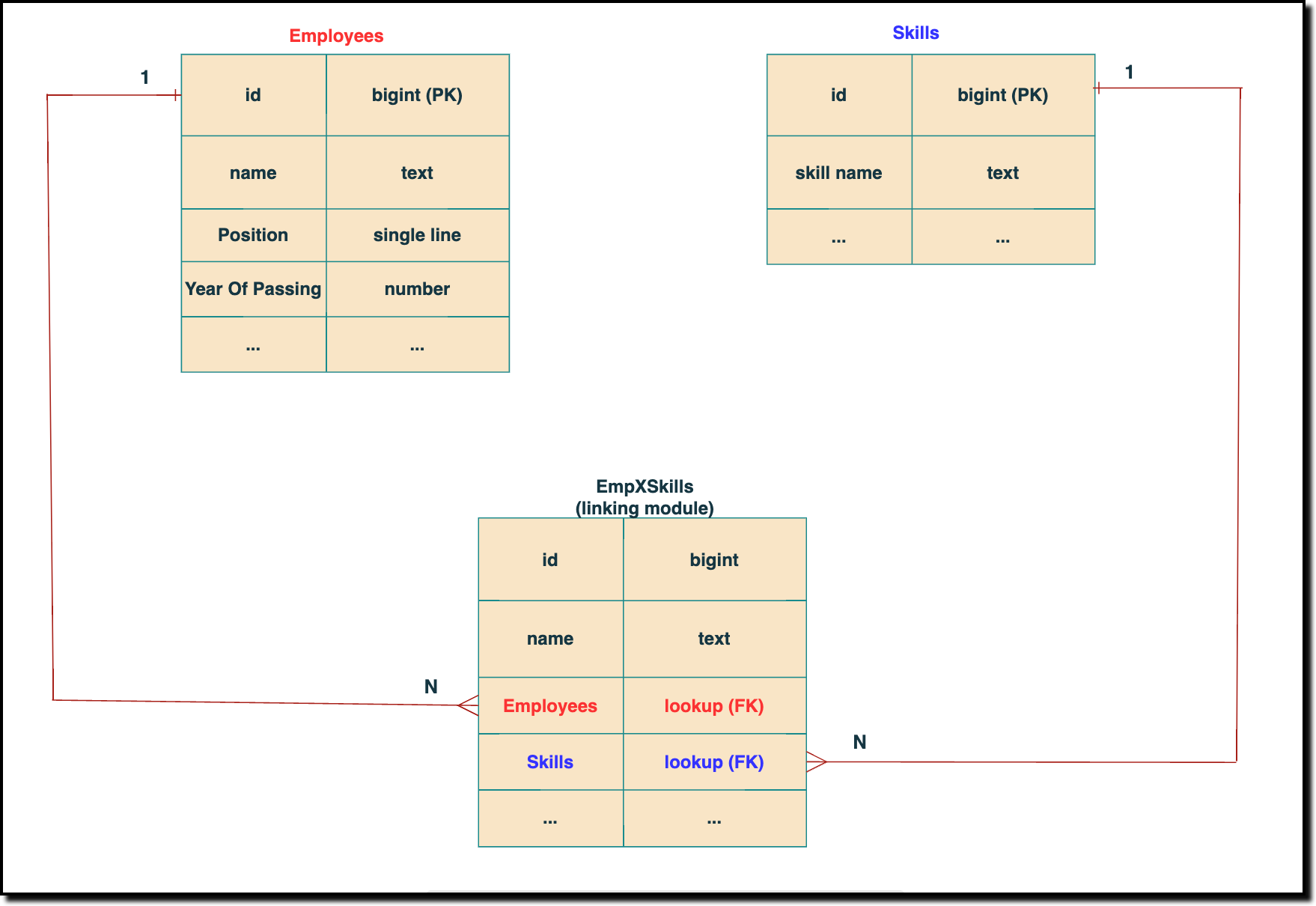
The above chart shows the data model representation when you create a multi-select lookup field in a module. Here, there are two lookup fields—one pointing to the Employees module and the other pointing to the Skills module. In the linking module, two lookup fields (lookup fields with api names - Employees and Skills) will be created. The lookup fields, one pointing to Employees and the other pointing to Skills from the linking module, establish a connection between the linking module and its associated module.
How to associate an employee's skills while creating an Employee record through the Insert Records API
API names you need before invoking the API
- The API name of the multi-select lookup field in the modules you want to insert data.
- API names of the lookup fields in the linking module. Eg: here the API Name of the linking module is "EmpXSkills" and the corresponding lookup field api names are "Employees" & "Skills". You can use the Fields Metadata API for Employees and Skills to get these details.
Step 1
Know the API name of the multi-select lookup field in the module (In our case, Skills is the multi-select lookup field in the Employees module)
To know the API names of the multi-select lookup fields, make a
GET - Fields Metadata API call. Among all the Employee's fields, multi-select lookup field can be identified by the json key
data_type with the value
multiselectlookup. The corresponding connected module can be found from the json connected_module. Below is the API call & response for such a multi-select lookup field.
Request URL : {api-domain}/crm/v6/settings/fields?module=Employees
Request Method: GET
Sample Response:
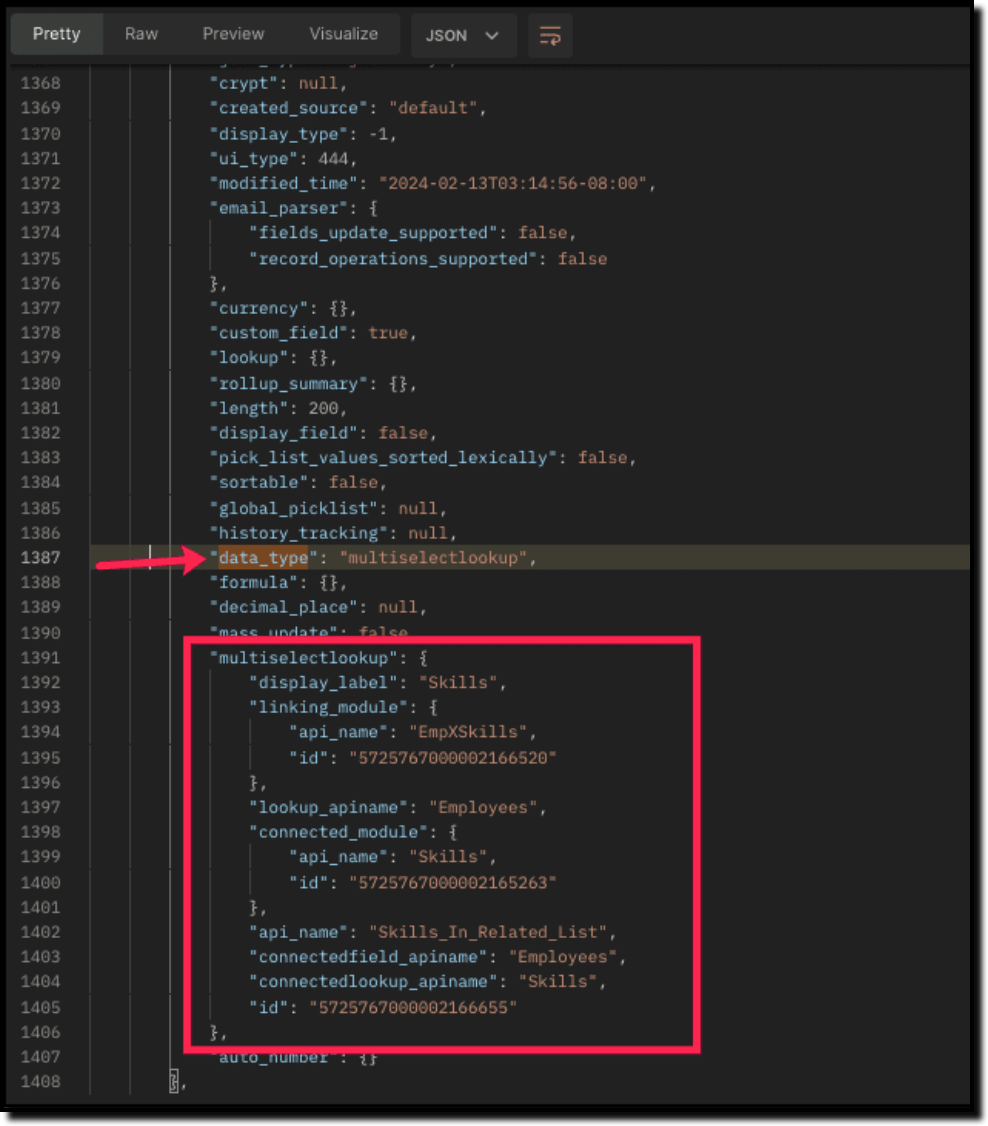
The above highlighted keys are the details of the Multi select lookup field. The corresponding keys are explained below:
"multiselectlookup": { "display_label": "Skills", //Display label of the MxN field in the Employees module "linking_module": { "api_name": "EmpXSkills", //API name of the linking module "id": "5725767000002166520" ... "lookup_apiname": "Employees", //API name of the Employee lookup field in the linking module "connected_module": { "api_name": "Skills", //API name of the connected module "id": "5725767000002165263" }, "api_name": "Skills_In_Related_List", //API of the related list of the connected module Skills in the Employees module. "connectedfield_apiname": "Employees", //API Name of the multi-select lookup field in the connected module (Skills) "connectedlookup_apiname": "Skills", //API name of the Skills module lookup field in the linking module. "id": "5725767000002166655" //Related List ID }, ... |
Step 2
Using the api_name of the linking module, make a
GET Fields metadata API call to get the list of
fields (along with their
api_name) present in it. It lists all fields of the linking module in the response.
Sample Request and Response
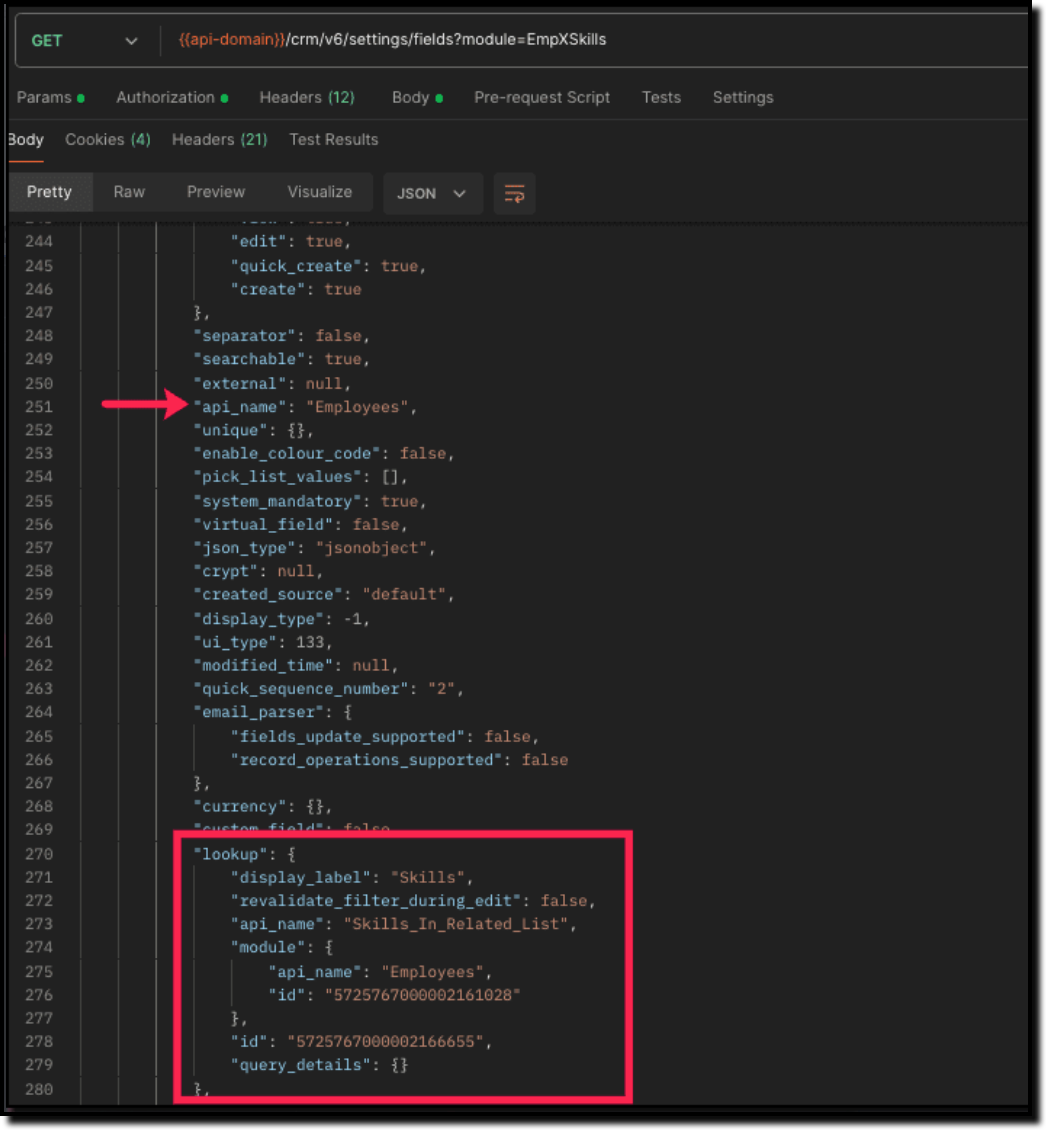
Search for the "data_type": "lookup" in the response. The lookup fields represent the connected modules in association with the linking module.
For example, in our case, the response will have two lookup fields. One of the lookup fields (with api name Employees) points to the Employees module, and the other one (with api name Skills) points to the Skills module.
Step 3
To associate records via the MxN field, you need to know the
IDs of the records in the Skills module. Here is the input body to insert the skills in the
Employee module with the multi-select lookup field
Skills.
Here is the input body to insert a new Employee record and associate a Skills record to it using the MxN field.
Request URL: {{api-domain}}/crm/v6/Employees
Request Method: POST
Sample Input:
{ "data": [ { "Name": "Patricia", "Position": "Marketing Specialist", "Year_of_Experience": 5, "Skills": [ //API name of the multi-select lookup field in Employee module { "Skills": { //API Name of the lookup field pointing to the Skills module in the linking module "name": "Marketing", "id": "5725767000002149427" //Record ID in the Skills module } }, { "Skills": { "name": "Social Media Marketing", "id": "5725767000002149476" } } ] } ] }
|
How to disassociate an employee & skills relation while updating an Employee record through the Update Records API
Request URL: {{api-domain}}/crm/v6/Employees
Request Method: PUT
Sample Input:
{ "data": [ { "id": "7890710000097291", "Name": "Patricia", "Position": "Marketing Specialist", "Year_of_Experience": 5, "Skills": [ { "_delete": null, //This association in the linking module will be deleted "id": "5725767000008126002" //Record created in the linking module } ] } ] }
|
Sending _delete:null will cause delinking of the association.
How to associate an employee's skills via "Linking Module"
You can associate the relationship between Employees and Skills module by creating records in the Linking module (EmpXSkills). Use the API names for the corresponding lookup fields, Employee (API Name: Employees) and Skills (API Name: Skills) in the input body.
Request URL: {{api-domain}}/crm/v6/EmpXSkills
Request Method: POST
Sample Input
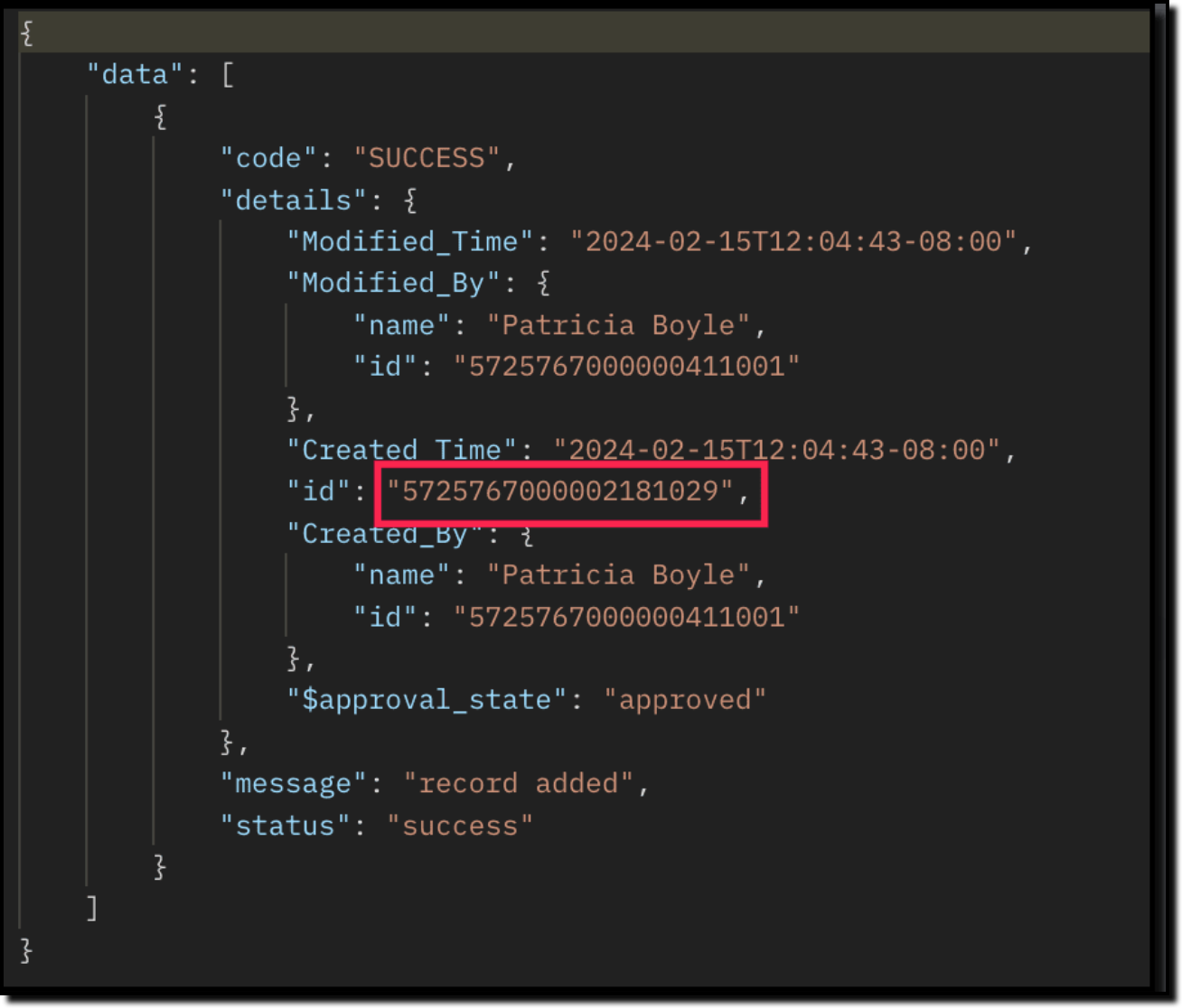
{ "data": [ { "Name": "Patricia", "Employees": { "id": "5725767000002161001" //unique record ID in the Employees module. GET your ID here }, "Skills": { "id": "5725767000002149476" //unique record ID in the Skills module. GET your ID here } } ] } |
The id in the above response is the Primary Key ID of an Employee-Skill association record in the linking module. This ID can later be used to do specific operations like association update or deletion via API.
How to disassociate an employee & skills relationship via "Linking Module"
Use the Delete Records API to delete the record which corresponds to the specific relation between
Employee and
Skills module in the
EmpXSkills module. You can get the record ID for the specific association using the
Get Records API for the linking module.
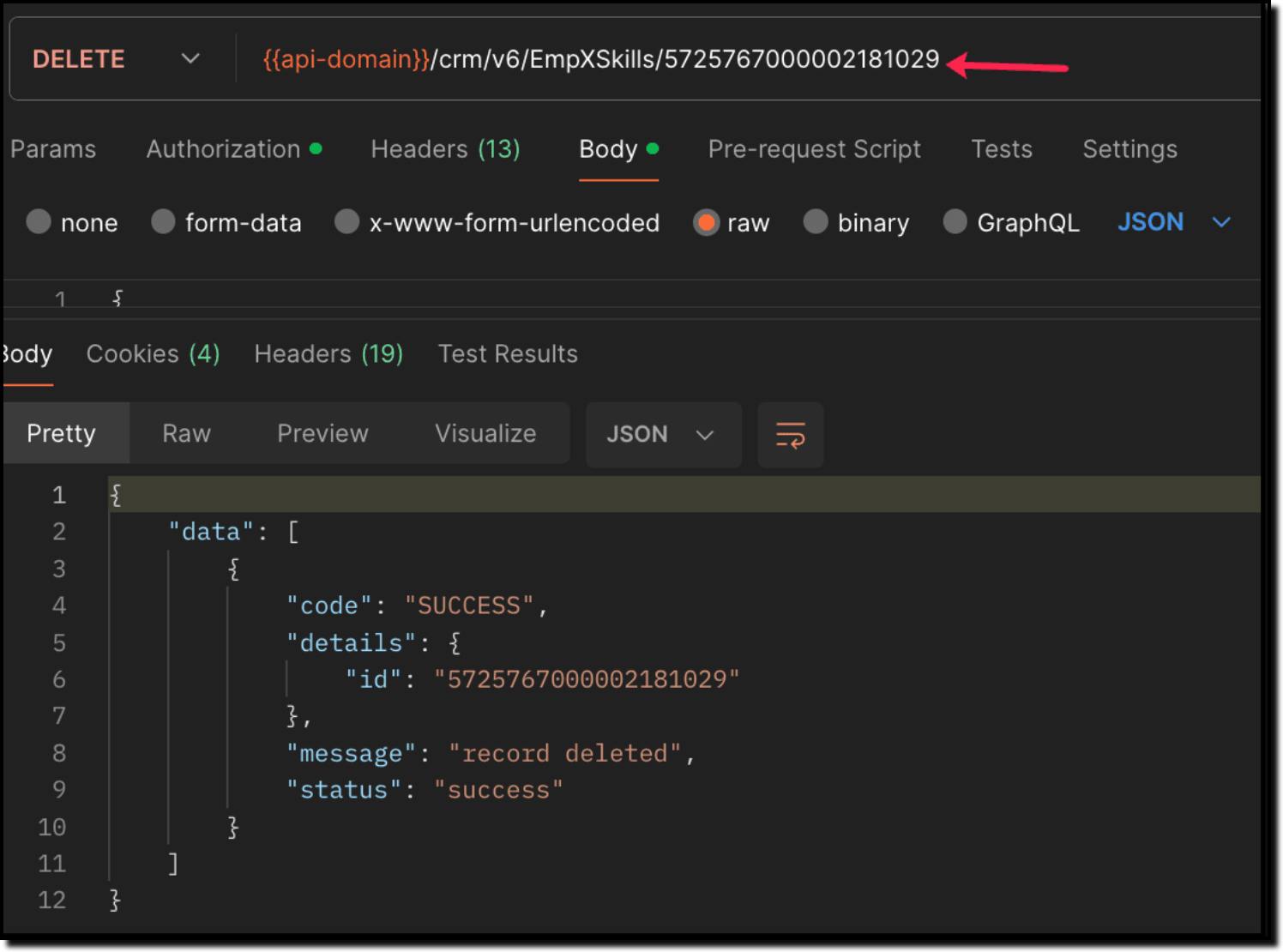
Use the Delete Record API to delete the specific record, thereby deleting the specific association between the Employee and Skills record. Please note that only the association is removed, and not the individual records.
Sample Request and Response
When to use create/update operation in Employees/EmpXSkills module?
Use "Employees" module: When you want to create/update records in the Employees module, and associate the record with a Skills record in a single API call.
Use "EmpXSkills" module: When you want to associate/disassociate the relationship between existing Employees and Skills records.
Retrieve data via COQL API and Bulk Read API
There may be situations where you need to fetch records based upon certain conditions.
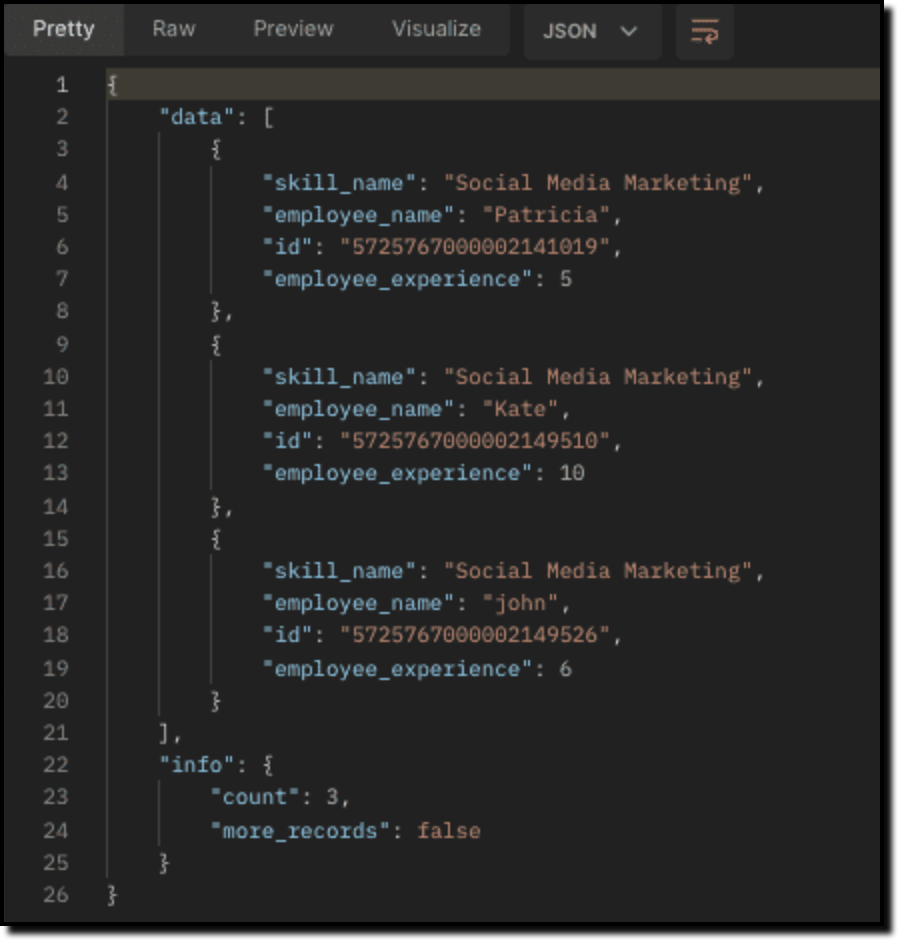
For example, Zylker's HR team wants to retrieve the list of employees having more than 4 years of experience and are experts in Social media marketing. In this case, they can use Zoho CRM's COQL API or Bulk Read API. Let's see how to achieve this.
Retrieving MxN data via COQL API
We know that both the Employees and Skills modules' association data is maintained in the linking module. In order to retrieve data from the linking module, query using the API name of the lookup fields in the linking module.
Request URL: {{api-domain}}/crm/v6/coql
Request Method: POST
Sample Input:
{
"select_query" : "select Employees.Name as employee_name, Employees.Year_of_Experience as employee_experience, Skills.Name as skill_name from EmpXSkills where Employees.Year_of_Experience > 4 and Skills.Name like '%Social%'" }
|
From the SQL perspective, above COQL can be interpreted as
select emp.Name as employee_name, emp.Year_of_Experience as employee_experience, skill.Name as skill_name from EmpXSkills left join Employees as emp on EmpXSkills.Employees = emp.id left join Skills as ski on EmpXSkills.Skills = ski.id where emp.Year_of_Experience > 4 and ski.Name like '%Social%' |
Sample Response
Retrieving MxN data via Bulk Read API
Bulk Read API allows you to fetch a large set of data i.e., you can fetch a maximum of 200,000 records in a single API call.
To export linking module records, use its API name.
Request Method: POST
Sample input to export linking module's records:
{ "callback": { "method": "post" }, "query": { "module": { "api_name": "EmpXSkills" //API name of the linking module }, "file_type": "csv" } } |
Export linking module records that meet the specified criteria
To export linking module's records based on the given criteria above (similar to the COQL API).
{ "callback": { "method": "post" }, "query": { "module": { "api_name": "EmpXSkills" }, "fields": [ "Employees.Name", "Employees.Year_of_Experience", "Skills.Name" ], "criteria": { "group": [ { "field": { "api_name": "Employees.Year_of_Experience" }, "comparator": "greater_than", "value": "4" }, { "field": { "api_name": "Skills.Name" }, "comparator": "contains", "value": "Social" } ], "group_operator": "AND" } } }
|
As the API is an asynchronous API, the response will not be available instantly; the bulk read job is scheduled, and the status can be checked. Once the job is completed, you will be notified in the callback URL. The records are available in a downloadable CSV file or ICS file (for events). See the
Bulk Read API document to know how to view the status of the scheduled job and download the file, along with more sample requests and responses.
We trust that this post meets your needs and is helpful. Let us know your thoughts in the comment section or reach out to us at support@zohocrm.com
Stay tuned for more insights in our upcoming Kaizen posts!
------------------------------------------------------------------------------------------------------------------------------
-------------------------------------------------------------------------------------------------------------------------------
Cheers!
Additional Reading:
Kaizen Posts:
Recent Topics
What's New in Zoho Inventory | June 2026
Hello users, June 2026 introduces a range of exciting enhancements to Zoho Inventory. With the full rollout of the Zoho Inventory Windows application, the launch of Terminal Payments, and new tracking combinations in Advanced Inventory Tracking, you can
Tax/Vat Number Field As Standard - Customer & Vendor
Hello, when are you'll going to have the customer & vendor tax/vat number as a standard field under the relevant profile pages? I find it strange that after 6 years of using Zoho Inventory that I still have to use a custom field for a tax/vat number,
Is there a way to show contact emails in the Account?
I know I can see the emails I have sent and received on a Contact detail view, but I want to be able to see all the emails that have been sent and received between all an Accounts Contacts on the Account Detail view. That way when I see the Account detail
Zoho CRM - Feature Request - Conditional Lead Conversion
Hi CRM team, My feature request is to allow admins to create some conversion logic in the Lead Conversion settings. It is a common case where we want to convert a Lead to a Commercial or Residential Deal layout. Layout rules are not ideal because the
Zoho CRM Approval Process based on Field Update
Hello, In current structure, Zoho CRM send records to approval based on record creation and edit. I think, it should be to set approval process trigger based on any field update in record. When the user update any field, the record can assign to approval
Free webinar: Automate signature workflows with Zoho Sign and Zoho WorkDrive
Hi there! Are you still storing and managing physical paperwork before and after signing? This traditional method is bulky, costly, and impractical at scale. Attend our free webinar to learn how you can connect Zoho Sign, our digital signature app, with
Global Sets for Multi-Select pick lists
When is this feature coming to Zoho CRM? It would be very useful now we have got used to having it for the normal pick lists.
Introducing the Zoho Projects Learning Space
Every product has its learning curve, and sometimes having a guided path makes the learning experience smoother. With that goal, we introduce a dedicated learning space for Zoho Projects, a platform where you can explore lessons, learn at your own pace,
Leave request problem on mobile phones
Hello, When any employee attempts to submit a leave request on an Android or iOS phone, the error shown in the attachment appears. How can we solve this problem?
[Webinar] Digitizing forms and form-based workflows
Live webinar on August 13, 2026 | Time: 2 PM IST | 2 PM EDT Hi, Struggling with paper forms, manual data entry, disconnected approvals, and form data that never reaches the apps that need it? Join our live webinar to learn how Zoho Writer's fillable templates
Get a realistic picture of your revenue with Forecast Adjustments in Zoho CRM
#crm25q1 Dear Customers, We hope you're doing well! Today, we're here with an important enhancement for business decision makers: forecast adjustments. Let's get straight to it! With technology on the rise and CX at its core, businesses are constantly
Multi-currency and Products
One of the main reasons I have gone down the Zoho route is because I need multi-currency support. However, I find that products can only be priced in the home currency, We sell to the US and UK. However, we maintain different price lists for each. There
Price Book in foreign currency
We have many customers who buy in foreign currency (USD), where our base currency is our local currency (AUD). It would be normal (it is in Zoho Books, Zoho Inventory etc.) to assign a currency to a price book, but I cannot find this option in Zoho CRM
Assign Price Book to Accounts (again!)
I can see this topic has been bumping about for over 10 years and unfortunately Zoho hasn't seen the need (or use case) in CRM to be able to assign an account to a price book to automate quoting (amongst other things). Strange given they DO assign price
Remove "Subject" as a required field on quotations
Not sure why, but Zoho has made 'Subject' a system defined required field. I'm not entirely sure why subject would be required as a key field (i.e. you cannot deactivate it or change it from required). It doesn't make much sense on many product quotations,
Approve records efficiently: Useful enhancements to My Jobs module and Approval process in Zoho CRM
Dear Customers, As you might know, approval process is a process automation tool that allows you to automate approvals in your organization and My Jobs is where you approve requests from a single point of view. Here's how you'd go about it: You’d add
Tip #7 - Siri shortcuts in Zoho CRM
Hello Everyone, Here is a tip about the 'Siri Shortcuts' feature and how it works in the iOS version of the Zoho CRM mobile app. What are Siri shortcuts? Siri Shortcuts are quick actions across your apps on iOS. They can perform an action automatically
Text/SMS With Zoho Desk
Hi Guys- Considering using SMS to get faster responses from customers that we are helping. Have a bunch of questions; 1) Which provider is better ClickaTell or Screen Magic. Screen Magic seems easier to setup, but appears to be 2x as expensive for United States. I cannot find the sender id for Clickatell to even complete the configuration. 2) Can customer's reply to text messages? If so are responses linked back to the zoho ticket? If not, how are you handling this, a simple "DO NOT REPLY" as
Introducing parent-child ticketing in Zoho Desk [Early access]
Hello Zoho Desk users! We have introduced the parent-child ticketing system to help customer service teams ensure efficient resolution of issues involving multiple, related tickets. You can now combine repetitive and interconnected tickets into parent-child
Need complete Zoho Commerce theme ZIP example and safe staging workflow
I want to build a complete custom Zoho Commerce storefront through Edit Code, including: • Global header and footer • Responsive homepage • Category, search and filter pages • Product cards and product-detail pages • Cart and checkout wrapper • Mobile
Add Support to Upload Inventory Items with Categories or Enable Separate Upload for Inventory Categories
Currently, Zoho Inventory does not support uploading new items along with their parent and sub inventory categories using the item import feature. This creates challenges for businesses with structured inventory hierarchies when trying to upload items
Error 1011 saving website personalisation — blocking all changes (corrupted "home_page.content" field)
When trying to save changes under Settings → Brands → MY COMPANY → Website → Personalisation → Messenger, I receive the following error: "Either the request parameters are invalid or absent" upon checking on the developer console of the browser I get
HR Helpdesk Cases
We have Zoho One Enterprise. I'm trying to find HR Helpdesk Cases, but my UI does not match the documentation. I'm not sure how to move forward.
i need active of my whatsapp business number in zoho
i am waiting from 3 days for active of my whatsapp business account in crm ,its too late to configure.its just showing account details i can't able to know its connected or not anything else
Sub-Form Padding in CSV Export
Hi, When you use the Sub-Form, and for example you have a Date Field on the Main Page, then Option 1 and Option 2 fields on the Subform, when you export this to CSV the Date column will only have the Date in 1 row, the first row, it would be nice to pad
Integrate your Outlook/ Office 365 inbox with Zoho CRM via Graph API
Hello folks, In addition to the existing IMAP and POP options, you can now integrate your Outlook/Office 365 inbox with Zoho CRM via Graph API. Why did we add this option? Microsoft Graph API offers a single endpoint to access data from across Microsoft’s
Analytics Dashboard User Filters Default Value
User Filters on Dashboard do not allow Unknown to be set as a default filter value. I have to include NULL values in my dashboard among other values but I can't include NULL/Unknown by default in Dashboard User Filters.
Microsoft is retiring Exchange Web Services (EWS): Here's what it means for Zoho Mail users
Microsoft has officially announced the retirement of Exchange Web Services (EWS) for Exchange Online. If your organization is planning to migrate from Microsoft 365 to Zoho Mail, you may be wondering what this change means for you. The good news is that
Zoho Writer page break in a merge repeating region always adds an unwanted blank page
Hi I'm merging a Zoho CRM record to a Zoho Writer document with a repeating region to display subform records on their own page within the document. When I try to insert a page break in a repeating region, the resulting merge always adds an unwanted blank
ZeptoMail account pending review, SMTP blocked with relaying-issues
Hi ZeptoMail team/community, Our ZeptoMail account has been pending review for more than 3 business days and still shows: “Your account is yet to be reviewed.” I already created a support ticket, but have not received an update yet. Ticket details: Request
Zoho ERP | Product updates | June 2026
Hello users, We launched Zoho ERP on January 23, and since then, our goal has been to help businesses streamline and manage their operations with greater efficiency, flexibility, and control. Since the launch, we've continued to enhance the platform every
Tip #83- Give Customers a Faster Way to Reach You with the Quick Support Plugin – 'Insider Insights'
Hello Zoho Assist Community! Think about the last time a customer needed urgent support. They emailed in, waited for a response, got a session link, couldn't find it in their inbox, called back, and by the time the session actually started, a good chunk
How to Open .mbox file in Gmail with Attachments?
Gmail offer users to backup INBOX folder in .mbox file format via Google Takeout Feature. Howver there is no such option to Restore Gmail MBOX. Thus I would like to suggest you to choose an alternate approach i.e. MBOX to Gmail Wizard. This utility will open .mbox file in Gmail with attachments. Steps to open MBOX file in Gmail are; Run MBOX to Gmail Wizard Click Add File and add .mbox file. Enter your Gmail login credentials. Click Convert button. Finished! This is how you can open MBOX file in
Seperate rating scales for KRA's and Competencies in appraisals
Is there a way to set-up different rating scales for KRA's and Competencies?? I would like to have; Met/Not met for KRA's and a 1-5 scale for the competencies I know how to set up custom ratings but it spans across both sections and I need them to be
Is there a CRM Deluge function available to convert an RTF (rich text field) to plain text (with no formatting tags)?
I know that we can run reports so that RTF fields can either show as plain text or the text or the text with the formatting fields included (which is wonderful, btw, as it helps me adjust tags when I need to troubleshoot and just see what I need to see
How do I set the value of a Lookup field in SlyteUI?
I am using the "crm-field" component in a SlyteUI project (code attached) https://www.zohocrm.dev/explore/slyteui/ui-components/crm-field/api#Properties The client would like to have this field pre-populated with a value. When I try to input the record
Mise à jour de Zoho Books – France
Chers clients, Merci pour votre patience et votre soutien continu. Avec les évolutions réglementaires à venir en France nous introduisons de nouvelles fonctionnalités dans Zoho Books pour les clients français. Ces mises à jour ont été conçues pour répondre
CRM Developer Update: Mandatory field behavior changes in Zoho CRM APIs
We are planning a few updates to Zoho CRM APIs that are expected to be rolled out by the end of October 2026. These changes are not live yet. We are sharing this early so developers and partners can review the impact and prepare in advance. What is changing?
Show Available Stock as a Column in Item Views (Including by Warehouse)
It would be very useful to have Available Stock as a standard column in the Items list view. Currently Stock On Hand does not show the real picture for businesses managing orders and inventory. Example: Stock on Hand: 100 Committed to Sales Orders: 80
What's New in Zoho POS - July 2026
Hello everyone, Welcome to Zoho POS’s monthly update, where we share our latest feature updates, enhancements, events, and more. Let’s take a look at how July went. Support for Saudi's ZATCA Phase 2 e-invoicing We have added support for ZATCA (Zakat,
Next Page