Kaizen #59 - Creating alerts and custom messages using Client Script
Hello everyone!
We are happy to resume our Zoho CRM Developer Community series - The Kaizen series!
Welcome back to the new start of Kaizen!
What is Client Script?
The Client Script feature gives you a seamless platform for achieving and extending your business cases in Zoho CRM by allowing Java Script code execution in your browser. It enables you to configure events for the UI components and define the actions once those events are triggered.
The ZDK Client Functions available in Client Script are,
ZDK Client Function | Description |
showMessage | To display a text message on create/clone/edit/detail(canvas) page. |
showConfirmation | To display a confirmation box with accept and reject message on create/clone/edit/detail(canvas) page. |
showAlert | To show alert message on create/clone/edit/detail(canvas) page. |
openMailer | To open mailer component from detail(canvas) page. |
Use Case
Let us consider that you want to achieve the following using Client Script.
- Calculate age based on Date of Birth and display the message "Age is more than 80" whenever the age is above 80 in create page of Policyholder module.
- Show the alert message "You cannot change the Rating of a verified account" whenever you try to update the field Rating in Accounts module.
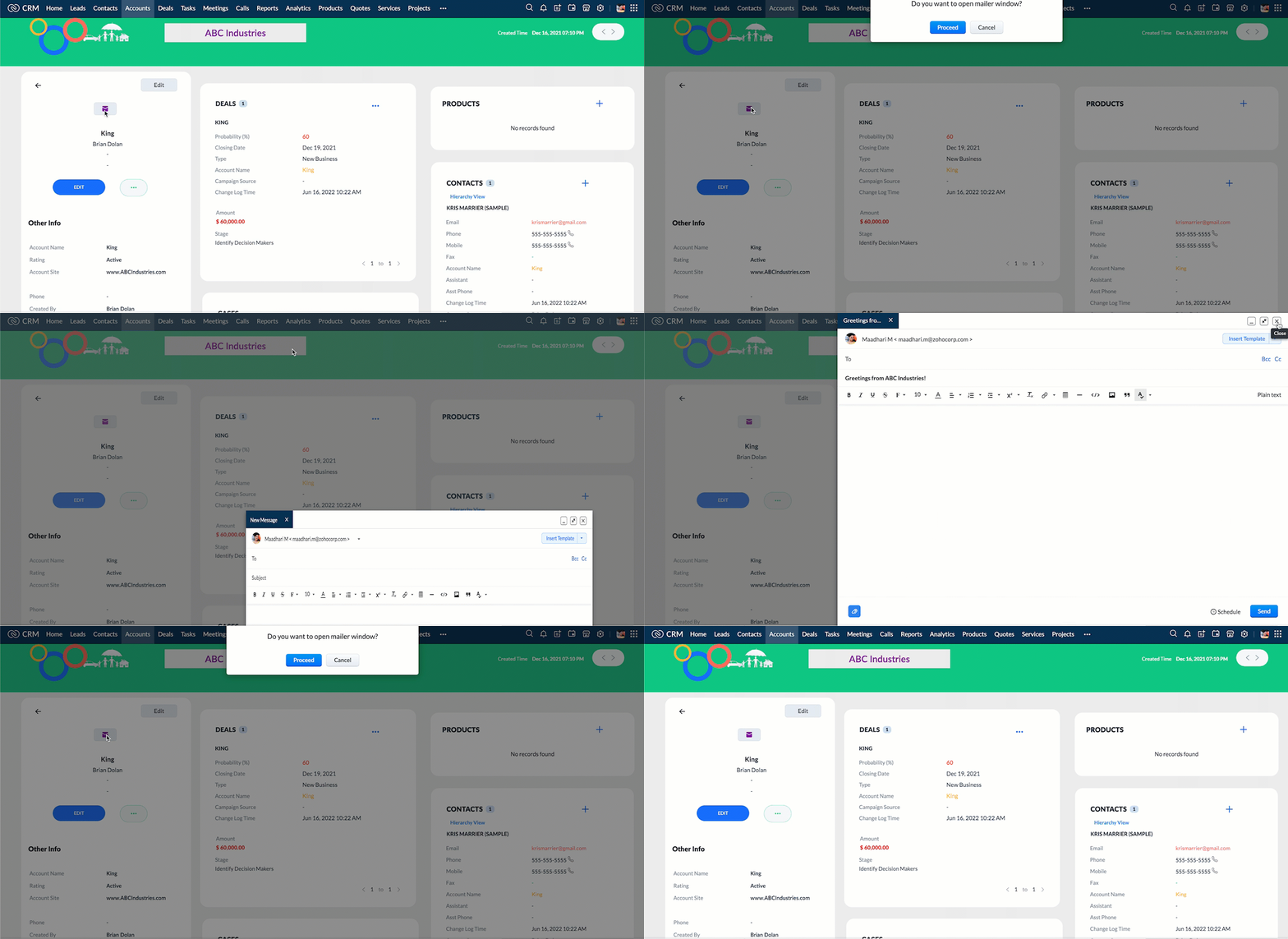
- When you click the mail button on detail(canvas) page, ask for confirmation and open a mailer window.
Solution using Client Script
Note:
The solution listed in this post includes detail(canvas) page and create page.
To create a canvas page,
- Go to Setup > Customization > Canvas
- Click Create Record Detail Page.
- On the Create a Custom Record pop up that appears, select the module as "Accounts" and select the required layout for the canvas page
- Choose a template from the gallery and click Select.
- Enter a name and save the canvas page.
- Click Canvas Assignment and assign the page to the required profiles.
- Click here for more details on creating a canvas page(Customizing the record detail page).
1. Calculate age based on Date of Birth and display the message "Age is more than 80" whenever the age is above 80 in create page of Policyholder module
- Go to Setup > Developer Space > Client Script. Click +New Script.
- Specify the details to create a script and click Next.
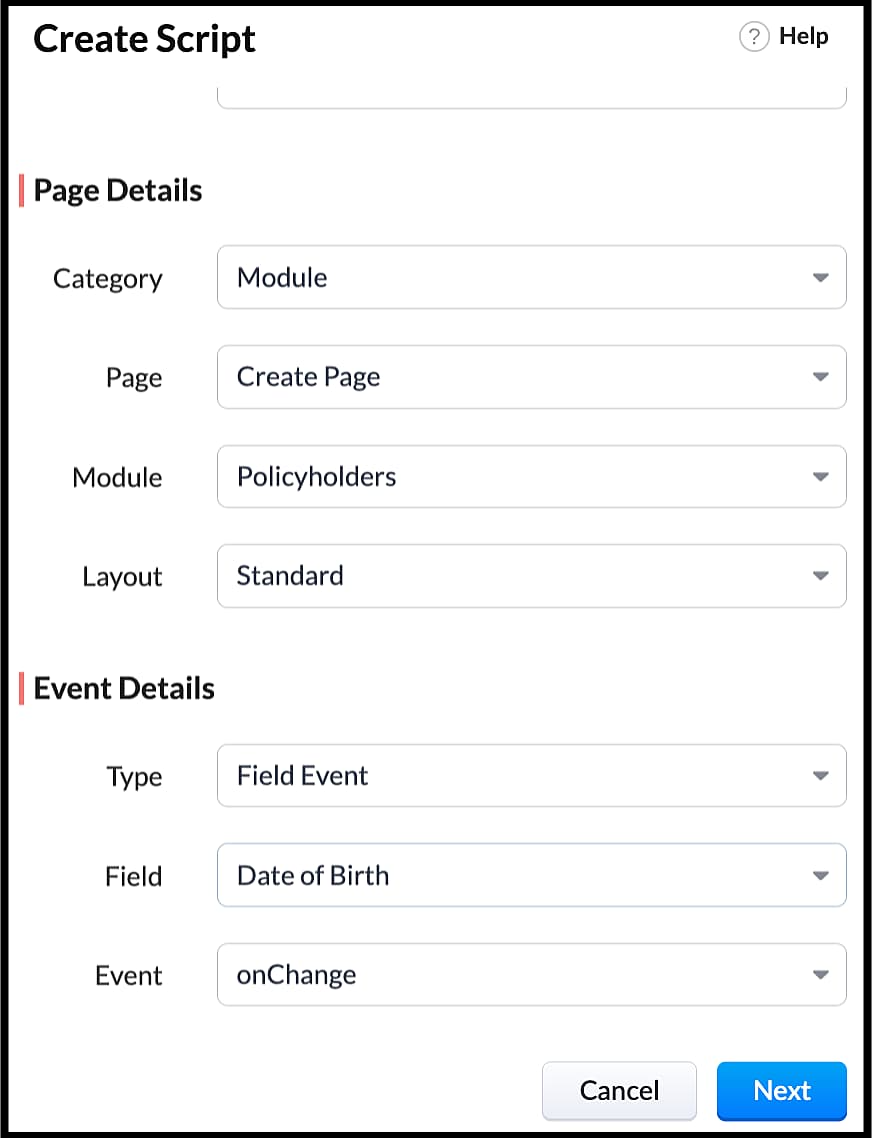
- Enter the following script in the Client Script IDE and click save.
- function getAge(dateString)
- {
- var today = new Date();
- var birthDate = new Date(dateString);
- var age = today.getFullYear() - birthDate.getFullYear();
- var m = today.getMonth() - birthDate.getMonth();
- if (m < 0 || (m === 0 && today.getDate() < birthDate.getDate()))
- {
- age--;
- }
- return age;
- }
- let age = getAge(value);
- var age_field = ZDK.Page.getField("Age");
- var category_field = await ZDK.Page.getField("Category");
- age_field.setValue(age);
- if (age > 80) {
- ZDK.Client.showMessage('Age is more than 80', { type: 'info' });
- }
- You can see the code working from the create page. You can also see how the client script works using the Run component of the Client Script IDE.
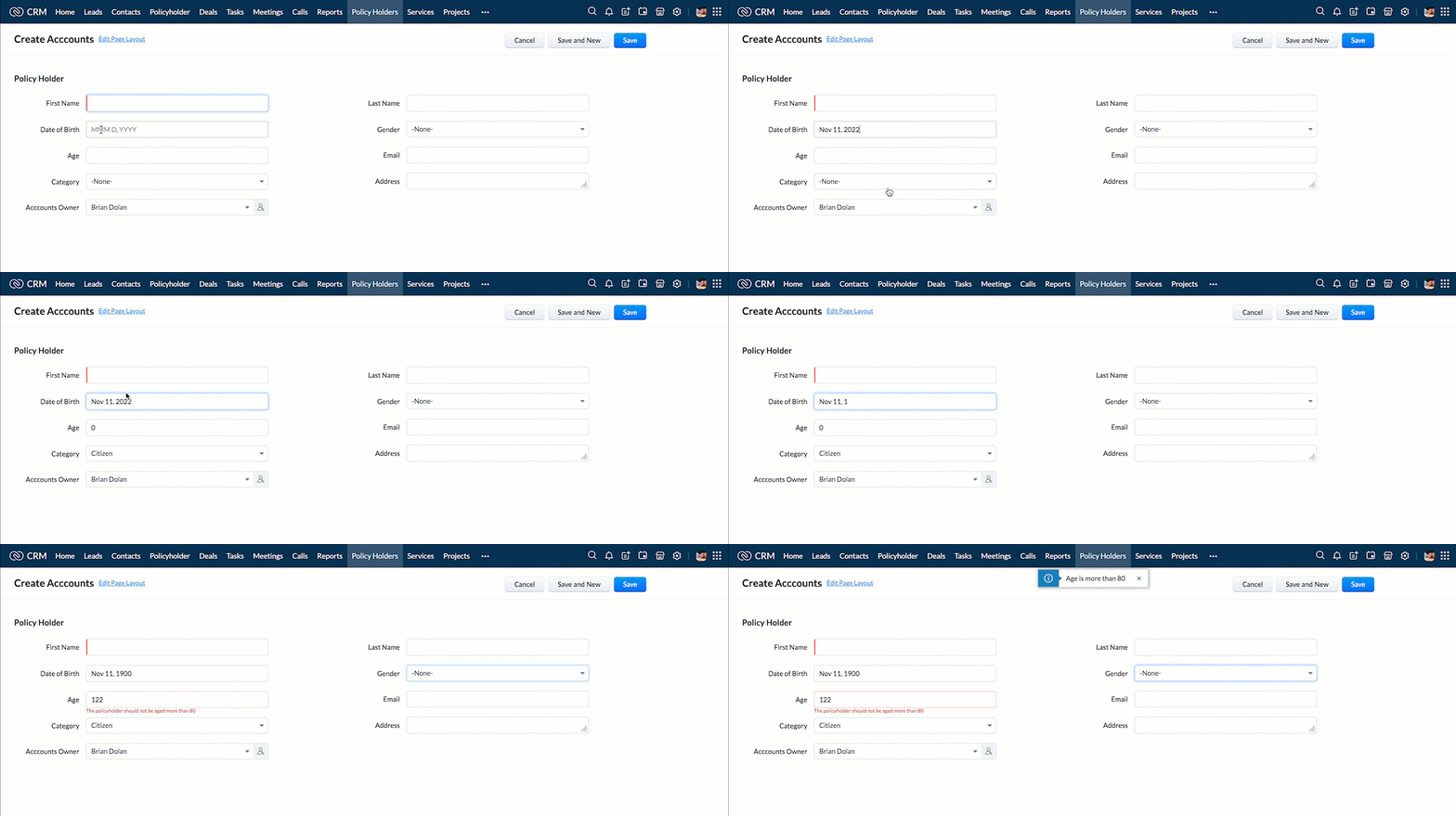
- You can use any of the following types in showMessage() function
Possible 'type' | Script |
info | ZDK.Client.showMessage('message', { type: 'info' }); |
warning | ZDK.Client.showMessage('message', { type: warning }); |
| error | ZDK.Client.showMessage('message', { type: error }); |
success | ZDK.Client.showMessage('message', { type: success }); |
2. Show the alert message whenever you try to update the field Rating
- Go to Setup > Developer Space > Client Script. Click +New Script.
- Specify the details to create a script and click Next.
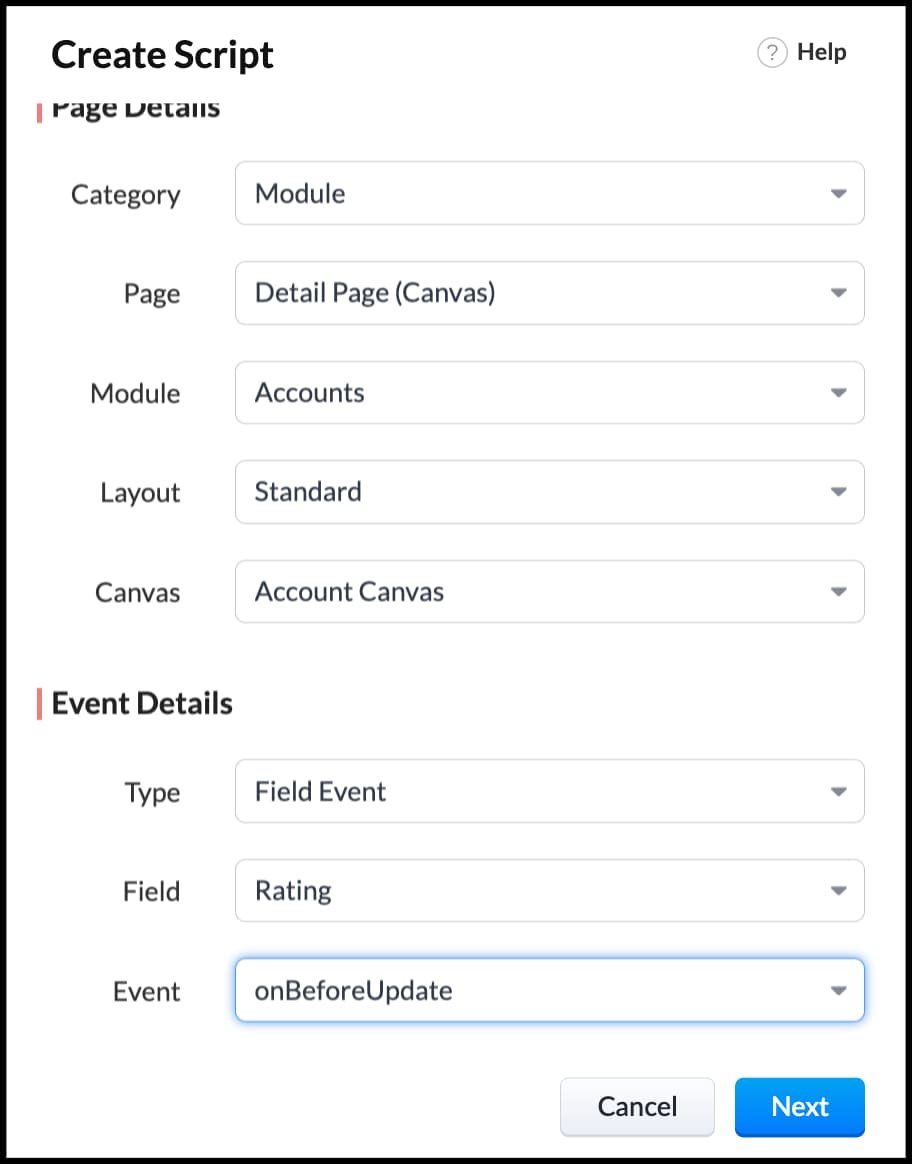
- Enter the following script in the Client Script IDE and click save.
- ZDK.Client.showAlert('You cannot change the Rating after account creation');
- Here is how the Client Script works. You can also see how the client script works using the Run component of the Client Script IDE.
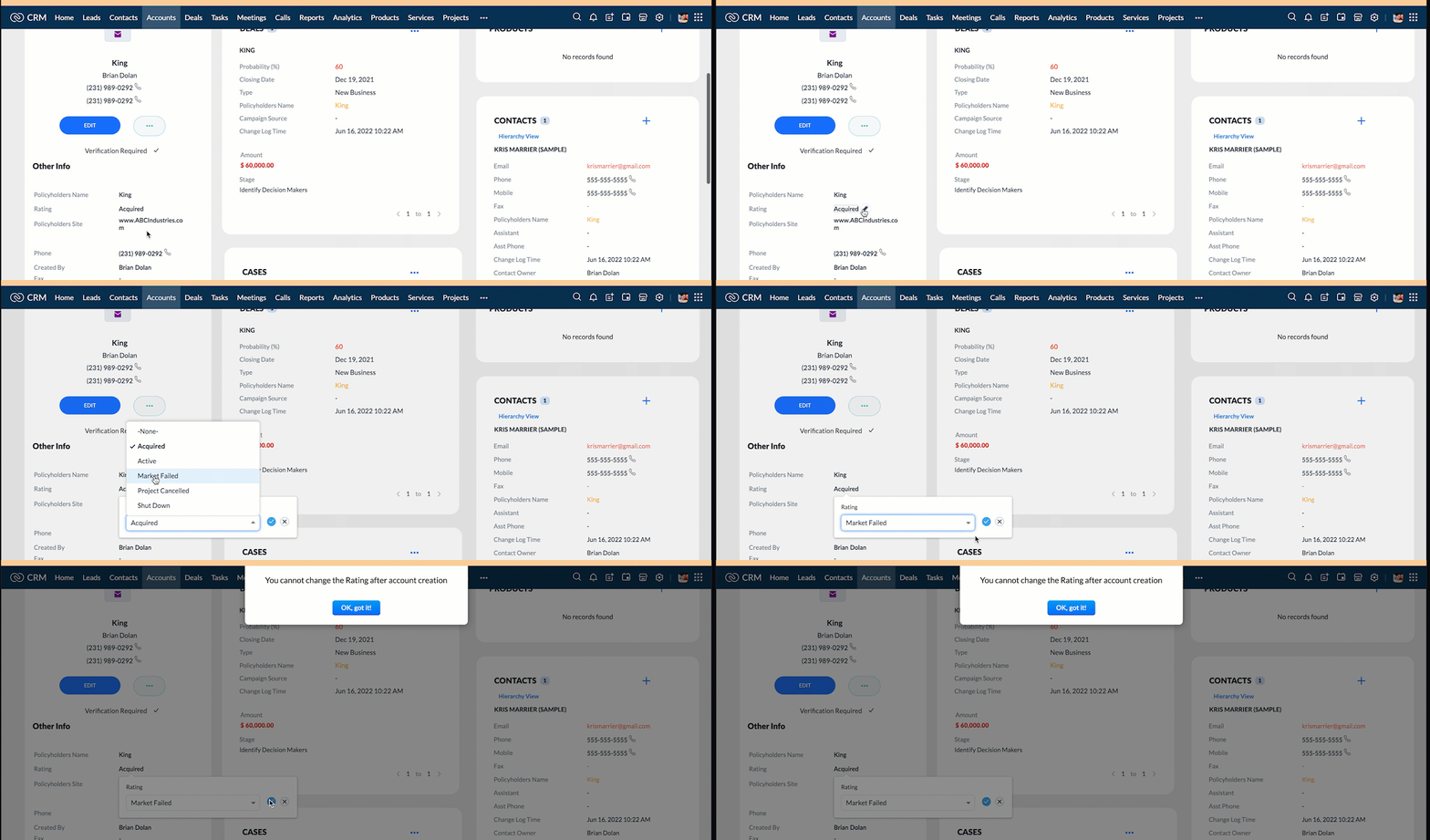
3. Configure the mailer box with the click of a button
First of all, you need to add the button to the detail(canvas) page.
- Go to Setup > Customization > Canvas.
- Right click on the Canvas page for Accounts module and click Edit.
- Click Elements, drag and drop the button wherever required and specify a label for the button.
- Right click on the button, select Add Element ID and enter the ID of the button in the pop up that appears.
- Once the button is created, you can configure Client Script in two ways:
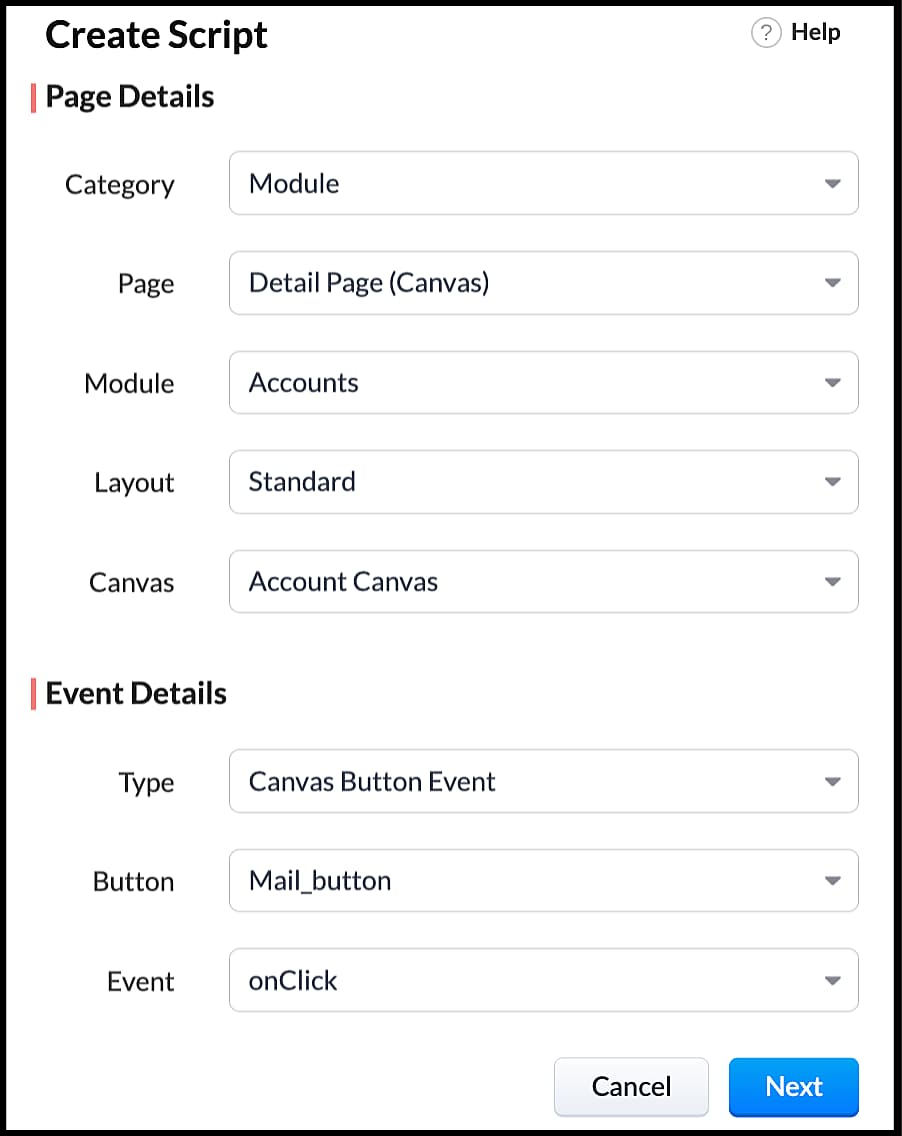
- Right click on the button--> Add Client Script-->onClick. The Client Script IDE appears with the event type as Canvas Button Event.
(or)
- Go to Setup > Developer Space > Client Script. Click +New Script.
- Specify the details to create a script and click Next.
- Enter the following script and click save.
- var isProceed = ZDK.Client.showConfirmation('Do you want to open the mailer window?','Proceed','Cancel');
- //If user clicks Proceed button
- if (isProceed) {
- ZDK.Client.openMailer({ from: '', to: [{ email: '', label: 'ABC Industries' }], cc: [{ email: '', label: 'ABC Industries' }], subject: 'Greetings from ABC Industries!', body: ' ' });
- }
- The showConfirmation() function will return a boolean value based on the user selection. You should capture this boolean value using a variable and write the actions based on the boolean value returned. Here the variable isProceed will capture the user response and based on that boolean value, the mailer box will get displayed.
- Here is how the client Script works,
We hope you found this post useful. We will meet you next week with another interesting topic!
If you have any questions let us know in the comment section.
Cheers!
Click here for more details on Client Script in Zoho CRM.
Related Links
Topic Participants
Maadhari M
tbiedma
Joe Sweeney
Anz
Jason
Sticky Posts
How to reach the official Zoho Support channels and avoid fake ones.
Dear Customers, Thanks a lot for choosing Zoho! Our applications are built to help achieve your day-to-day business goals. We are committed to engaging with you, to understand and develop solutions that enhance your productivity. We are happy and ready to help you use our services effectively. Understanding and avoiding fake support Just like using popular bank names and financial applications for phishing purposes, using Zoho and claiming to be providing Zoho Support or services with false numbersFunction #35: Close all tasks associated with a lead and create a new task.
Welcome back everyone! Last week, we learnt how to close all tasks of a deal depending upon the deal stage. This week, let's look at a custom function that lets you close all of the tasks associated with a lead while simultaneously creating a new task, like when you need to halt all progress towards a lead while the lead is not available at the moment but create a reminder task. Business scenario: The success of a company, in one way or another, is determined by the leads it gets. Each lead is justZoho CRM Webinar - Redesigning Daily User Experiences with Canvas
<br> Your users across roles use the CRM for day-to-day tasks that are necessary. Whether they perform their tasks on time, the right way, or at all depends on a lot of factors, including User Experience. Many businesses struggle with rigid layouts,Join us at the Canada ZUG Meetup: What’s New in Zoho CRM
Hello Zoho Community! Start your year with fresh insights into Zoho CRM’s latest updates and tools. Whether you're a CRM beginner or a experienced user, this meetup is crafted to help you optimise your processes and leverage new features. Explore practicalCRM Hack #2: Automate sending of birthday greetings to your customers.
Hello everyone! What sets you apart as a sales person is your ability to add that personal touch to your business relationship with your customers. Sending a gift on a special day, or leaving a note wishing them on their birthdays, are small, yet significant actions that show your customers that you care. And these are actions done without any expectations :) You must be engaging with a lot of customers and it is highly unlikely that they all are your friends on Facebook or some social channel,
Recent Topics
Introducing note actions and dynamic visibility in Kiosk Studio
Hello all, We are introducing enhancements to Kiosk Studio that will improve the product scope and meet your custom needs more precisely. What's new? Add notes as Actions: You can add notes to CRM records as kiosk Actions, as well as insert merge fieldsRegarding the Recipient Email change
I was not being able to change the Recipient email. Kindly resolve the problemRequest to Customize Module Bar Placement in New Zoho CRM UI
Hello Support and Zoho Community, I've been exploring the new UI of Zoho CRM "For Everyone" and have noticed a potential concern for my users. We are accustomed to having the module names displayed across the top, which made navigation more intuitivekanban view for client portal
Are kanban views an option for client portals? Access to Kanban views in the client portals would solve some mobile-compliant issues I have with the UI. Kanban functions very nicely on mobile and would be a super asset for my clients and vendors as they【Zoho CRM】サンドボックスのアップデート:メール送信トレイ機能の追加
ユーザーの皆さま、こんにちは。コミュニティチームの藤澤です。 CRMのサンドボックス(テスト環境)にメールの送信トレイ機能が追加されました。 本番環境でメール配信の前に、サンドボックスで送信される全てのメールを確認・検証できます。ワークフロー、承認プロセス、一括送信など、あらゆる送信パターンに対応しています。 「メールの送信トレイ」機能を使うと、顧客へ送信する前にメールの内容を事前確認できます。項目の欠落や書式の乱れなど、あらゆる問題をサンドボックス内でチェックできるため、本番環境でのトラブルを未然に防ぐことに役立ちます。Force mandatory entry on one of two fields on Contacts
We are finding our users aren't always entering a phone number or email address of a contact. We would like to make these fields mandatory but realize they won't always have both pieces of information, but should at least have one. Is there a way to makeHow can I prevent having recepients from being added as contacts in Zoho Desk?
How can I prevent having recepients from being automatically added as contacts in Zoho Desk? There's no option to disable this.Agent Concern
would like to ask the difference between an agent and a light agent. can a light agent close a ticket. thank you.Train Zoho Answer Bot Based on Customer
Hi all, Is it currently possible to mark Help Centre articles to a specific customer, and restrict the answer bot to only use relevant information if it is either marked as "General", or tagged for the specific customer in question? We currently haveNon-depreciating fixed asset
Hi! There are non-depreciable fixed assets (e.g. land). It would be very useful to be able to create a new type of fixed asset (within the fixed assets module) with a ‘No depreciation’ depreciation method. There is always the option of recording landWill Zoho Search work with Zoho Learn
Currently, Zoho Search only works with Zoho Wiki which will be phased out. Moving forward, will Zoho Search be enabled for Zoho Learn? Thanks.How to use filters on all products page? Or even a category page?
Hello, I am trying to create some filters so users can use filters to find products they are looking for. So what i am trying is to create a filter according to price lets say. So if i define it this way i am expecting to see this filter option on categoryaudio and video comments in tasks in zoho projects
Hi, is it planned to have the ability to post audio and video comments? the whatsapp wechat format of communicating is a reality... tools like zoho project would facilitate a lot teamwork by facilitating the way in which we can give feedback in audio and video rather than only text. thx!Zoho Projects app update: Voice notes for Tasks and Bugs module
Hello everyone! In the latest version(v3.9.37) of the Zoho Projects Android app update, we have introduced voice notes for the Tasks and Bugs module. The voice notes can be added as an attachment or can be transcribed into text. Recording and attachingBoas práticas de desenvolvimento em Deluge
O Deluge (Data Enriched Language for the Universal Grid Environment) é a linguagem de script utilizada em diversas aplicações do ecossistema Zoho, como Zoho Creator, Zoho CRM, Zoho Books e Zoho Flow. Ela foi projetada para permitir automações rápidasSeeking a WhatsApp Business App (not API) Zoho CRM integration
We have a business need to integrated WhatsApp Business App (not API) into Zoho CRM to centrally manage communications between our Sales team and Leads & Contact. Is there a reputable integration available for this scenario of ours? Core features we wouldZoho Sign 2025–2026: What's new and what's next
Hello! Every year at Zoho Sign, we work hard to make document signing and agreement execution easy for all users. This year we sat down with our head of product, Mr. Subramanian Thayumanasamy, to discuss what we delivered in 2025 and our goals for 2026.Creditos API
Queria saber se alguém poderia me ajudar a resolver um problema na compra e utilização de créditos de mensagens API do WhatsApp. ja tentei todos o tutoriais porem não consegui realizar a compre, pois ao clicar no botão de comprar créditos aparece a mensagemIntergrating multi location Square account with Zoho Books
Hi, I have one Square account but has multiple locations. I would like to integrate that account and show aggregated sales in zoho books. How can I do that? thanks.Is there a way to configure dark mode for Campaigns emails that go out to customers?
I've found a lot of information on how to configure dark mode for my (The user) personal Zoho workspace and email, but is there any way to edit dark mode settings on emails that we send out to customers via campaigns? We sent out a test email the otherCan I hide empty Contact fields from view?
Some contacts have a lot of empty fields, others are mostly filled. Is there a way I can hide/show empty fields without changing the actual Layout? I would like to de-clutter my view, and also be able to add information later as I am able. I would beAuto-publish job openings on my Zoho Recruit Careers Website
I have developed a script using the Zoho Recruit API that successfully inserts new jobOpening records to my Zoho Recruit website, but my goal is to auto-publish to the Careers Website. The jobOpening field data shows two possible candidates to make thisCredit Card Terminal for Zoho Books
Hello, Instead of punching the credit card number manually for customer payment, do you have a third-party hardware credit card reader that works with Braintree? Thank YouHow do you print out the invoices comments
I have some invoices where i need to print out the comments that show when reminders and etc were sent how do we print those out in Zoho Books.Feature Request: Enable Custom PDF Layout Editor for All Modules (Including Package Slips)
Hello Zoho Community and Product Team, I am writing to share a suggestion that would significantly enhance the customization capabilities within Zoho Books. We all appreciate the power of the Custom PDF Layouts (the "New" template engine) that allowsNeed advice for product/item search functionality when adding invoices.
My client uses "Catalog or Vendor" name and Product code to search for his items. But Zoho only allow to search by product name and SKU when adding items to Invoices/Estimates. Clients product codes are not unique as they may overlap from different catalogs/vendors.How to dynamically pass IDs from one API response to a second API call in Zoho DataPrep?
Hi Team, I am setting up a global consolidated reporting pipeline in Zoho Analytics (India) using Zoho DataPrep as the ETL engine. I am pulling data from multiple Zoho Books Data Centers (US, Singapore, India) thats why i used the URL Source (OAuth 2.0)Feature Request: "Send Invitation" Toggle for Events
I am writing to request a critical "Quality of Life" update for the Activities module. Currently, adding people to the Participants field in an Event triggers an automatic email invitation/acceptance tracking with no way to opt-out. For general eventsAccount Review Pending - Daily Limit 100
Hi ZeptoMail Team, I'm writing to request a manual review of my account. I am currently stuck on the 100-email daily limit and cannot purchase credits. Status: My domain is already verified (DKIM/CNAME). Issue: The "Customer Validation" option is no longerAutomation Series: Move Tasks to a different Task List on Status Change
In Zoho Projects, you can automatically move a task from one task list to another when its status is updated. This keeps your tasks organised and ensures better visibility while reducing manual work. For instance, during a product launch, the marketingIntroducing Bigin's all new integration with Microsoft Teams
Picture this: You are on call with your team to discuss some important deals that need to be closed soon. While discussing each deal, your team has to switch back and forth between your Teams account and Bigin account to refer to details about the deal.Scaling the customer journey: What's new in CommandCenter
Dear Customers, The last time we connected about CommandCenter, it was about the tool's new controls and revamped UI. Personally, the overhaul of the UI from the last update, still excites me. Today, we're here with news about its scalability and addedAdjusting Physical Inventory
Not getting very far with support on this one, they say they are going to fix it but nothings happened since November. Please give this a thumbs up if you would like to see this feature or comment if you have some insight. Use Case: Inventory set to beDynamic Remaining Quantity in Lookup During Allocation
Hi everyone, From what I understand in Zoho Creator, lookup fields only display the stored value from the source record and do not dynamically update while a form is being filled. Because of this, showing a real-time updated remaining quantity insideIs it possible to use HTML formatting in SMS messages sent from Zoho?
Hi everyone, I have a question regarding sending SMS from Zoho When we send emails from Zoho, we can include HTML code to format the message (like adding links, styling, etc.). Is it possible to do something similar when sending SMS messages through ZohoImportant update: Migrate to the new SalesIQ live chat widget before April 14, 2026
The old SalesIQ live chat widget will be deprecated on April 14, 2026. This is a final reminder to migrate to the new SalesIQ live chat widget before this date. After April 14, 2026, the old widget will no longer be maintained, which can lead to slowerIf your IM chats aren’t auto-assigning, here’s what to check
Hey everyone! We’ve been seeing quite a few questions around Instant Messaging (IM) Chat Routing in Zoho Desk, especially around how it actually behaves in real time. So I thought I’d share a practical breakdown of what’s happening behind the scenes.connect zoho creator with google drive
Hello everyone, I need to connect to a folder drive. The idea, is that google drive loads a text document with some data, I must read that text document to be able to autofill a form that I have in zoho creator with that data. I also attach PDFs and placeUploaded files are not included when using "Include user submitted data" in Email Notification
In Send Email notification workflow in Zoho Creator, there is an option called "Include user submitted data" which allows the email to contain all the form submission details. However, when this option is enabled, files or images uploaded through FileExtend Zoho Canvas Customization to Zoho Creator Forms and Reports
Currently, Zoho Canvas allows users to design and customize the UI of Zoho CRM modules with a much better visual experience. This helps organizations create cleaner layouts, improve usability, and design interfaces that match their workflows. However,Next Page