Let’s Talk Recruit: Forms that think before you do!
Let’s Talk Recruit: Forms that think before you do!


Welcome back to our
Let's Talk Recruit series. In our previous post, we shared highlights from our community meetups held across India.

This time, we’re talking about something that often gets overlooked but makes a huge difference once you set it up right: Webforms and Form Rules.

Let’s say you're rolling out a hiring drive or posting jobs on multiple channels. Candidates start pouring in—but half of them forget to attach their resumes, a few skip critical questions, and some apply to the wrong roles altogether. And that’s before you’ve even started shortlisting.

That’s exactly the kind of cleanup Webforms and Form Rules are built to prevent. They help you collect the right details, personalize the experience for candidates, and automate the little things that usually slow you down. And once you get the hang of them, you'll wonder why you didn’t start sooner.

The Problem

If your team still relies on email attachments or inconsistent spreadsheets to gather applicant info, chances are you’re wasting time fixing errors that shouldn’t exist in the first place.

  • Candidates entering outdated contact details

  • Missing info on key fields like skill set, location, or availability

  • Manually categorizing candidates for different roles or hiring pipelines

Without a structure in place, things slip through the cracks. And when you're hiring at scale, that’s a problem.

Why Webforms matter  

A webform is often the first step a candidate takes to engage with your company. Whether it’s embedded on your careers page, linked on a social post, or shared during campus drives — it sets the tone.

But a lot of recruiters still use basic forms. Candidates fill them out, and then it’s a game of manual edits, sorting, and follow-ups.

What if the form did more? What if it already knew:

  • Which fields to show and when?

  • Whom to assign the record to?

  • Whether the candidate should be redirected after submission?

That’s where form rules come in.

What are Form Rules?  

Form rules let you customize the candidate’s experience while they’re filling out the form by triggering actions based on their input.

Actions include:
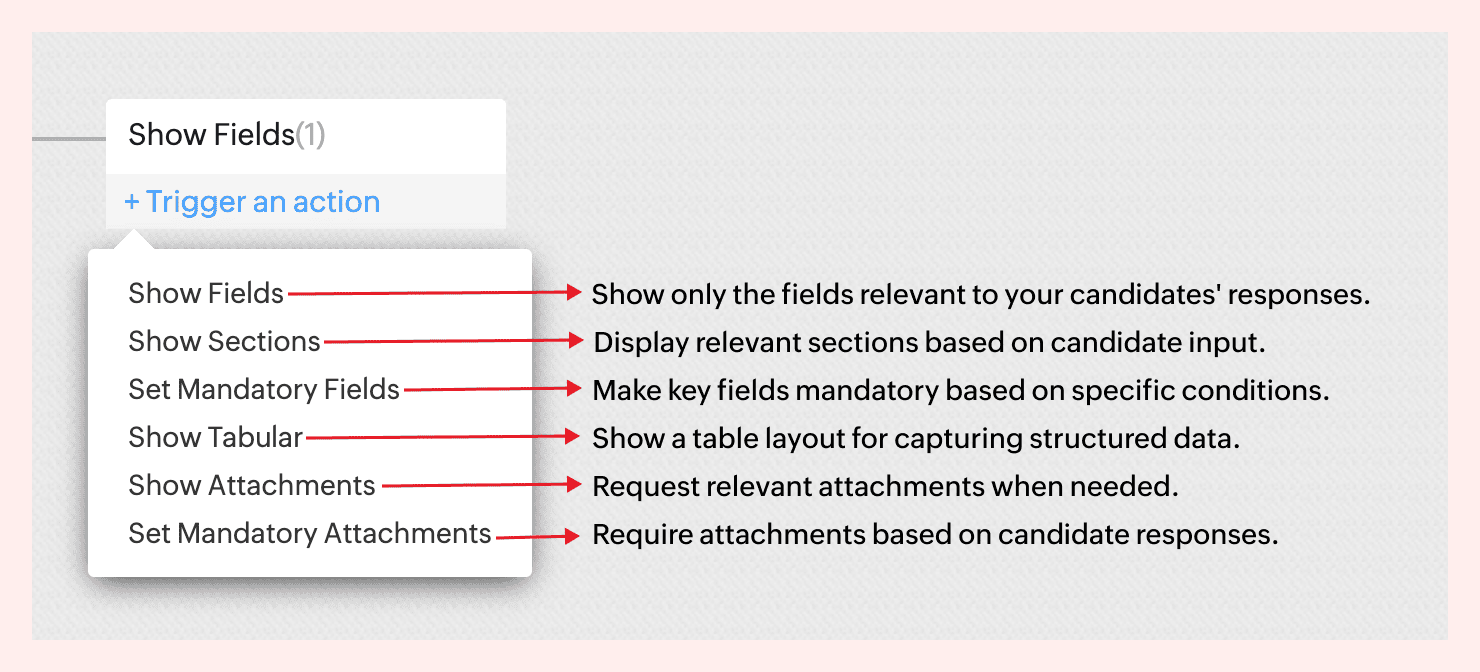

For instance, not all candidates come with the same background—and your forms shouldn’t treat them like they do.
If a candidate indicates they’re a fresher, there’s no need to show fields like Work History or Current Salary. But if they’re experienced, you might want to ask about key projects, past employers, or management experience.


With form rules, you can create this branching logic in just a few clicks—keeping the form clean for early talent and detailed where it matters.
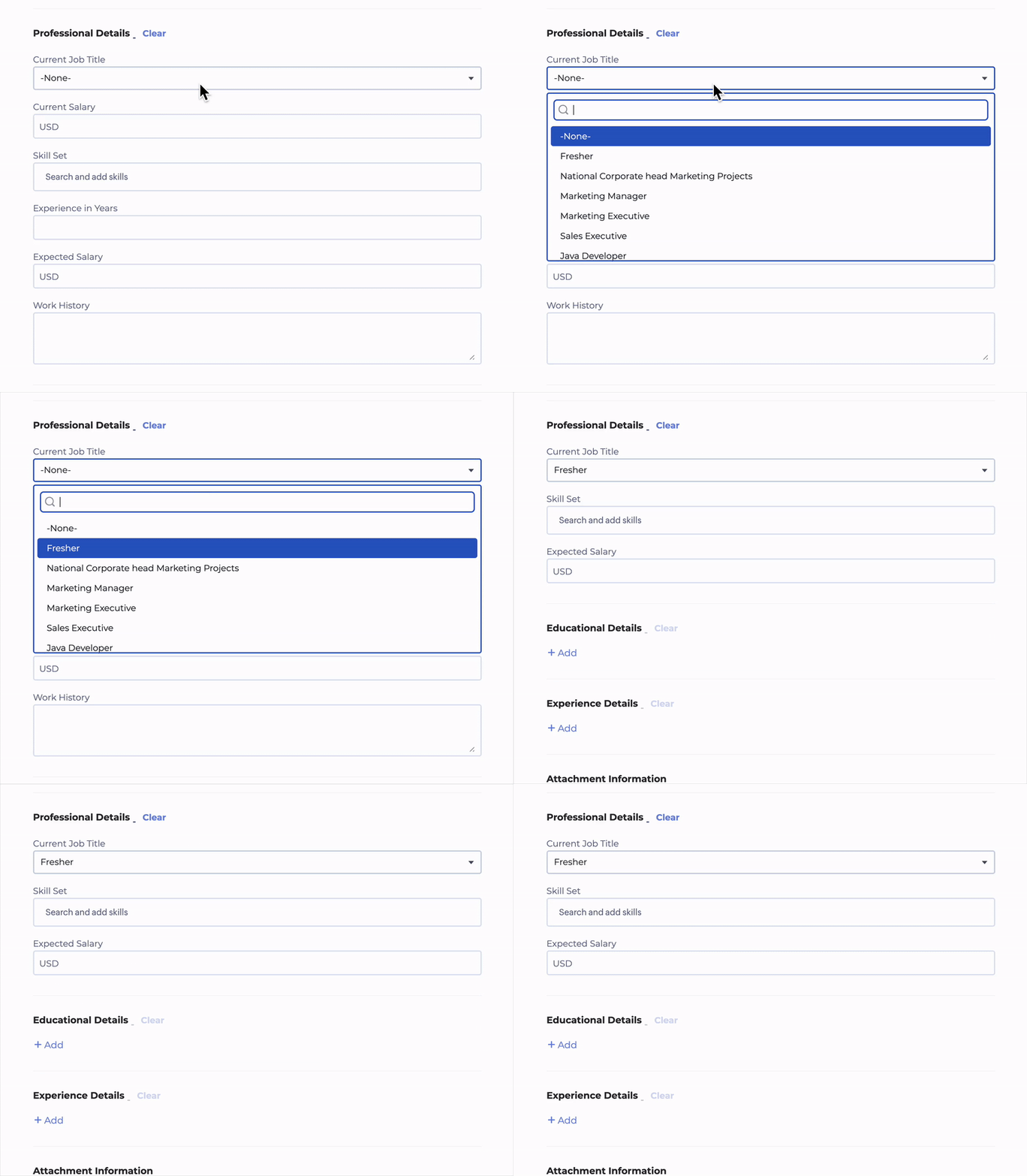
 

No code required. Just simple logic-based conditions.
→ Learn more  

A few use cases to consider  

Client Intake to Job Requisition  
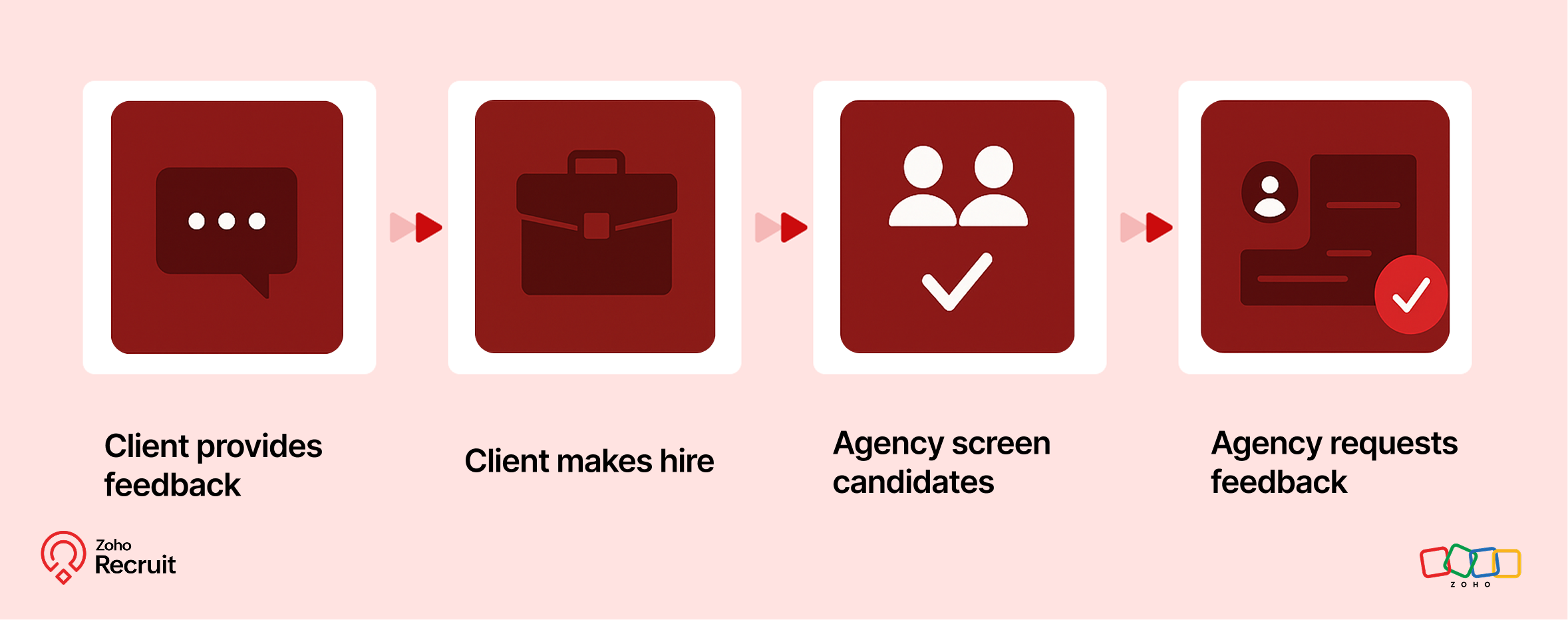

Step 1: Client submits contact form
Embed a Contact webform on your website to capture leads—clients who want to work with your staffing agency.

Step 2: Client shares job details
Once onboarded, clients can submit job requirements through a Job Requisition form. These details feed directly into your system.

Step 3: Agency hires candidates
Use the shared job details to source, match, and hire candidates for the role.

Step 4: Agency requests feedback
After successfully filling positions, request feedback from clients using a Feedback webform.

Candidate Onboarding & Documentation  
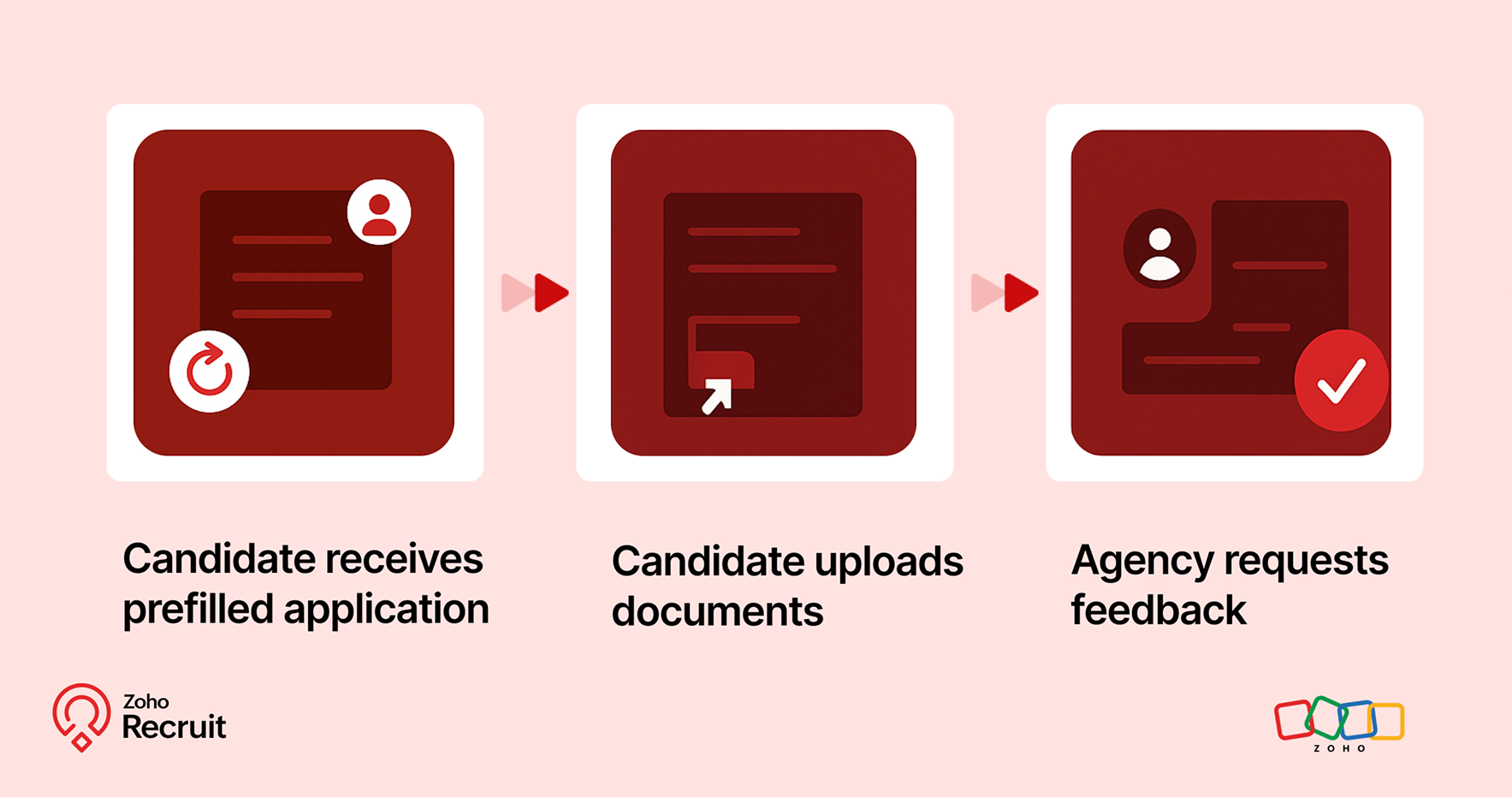

Step 1: Candidate receives prefilled application
Once candidates are selected, use known data to prefill details into a Background Check form.

Step 2: Candidate uploads documents
Share the form with candidates to collect necessary documents—ensuring accuracy and reducing redundant data entry.

Step 3: Agency requests feedback
After onboarding is complete, send a Feedback webform to capture the candidate’s experience.

Notes
Note:
Throughout the process, Form Rules keep the experience smooth—displaying only relevant fields, validating entries, and guiding users as they fill out each form.

A quick look at the numbers  

Webforms and Form Rules aren’t just about convenience — they actually influence how well candidates interact with your hiring process.
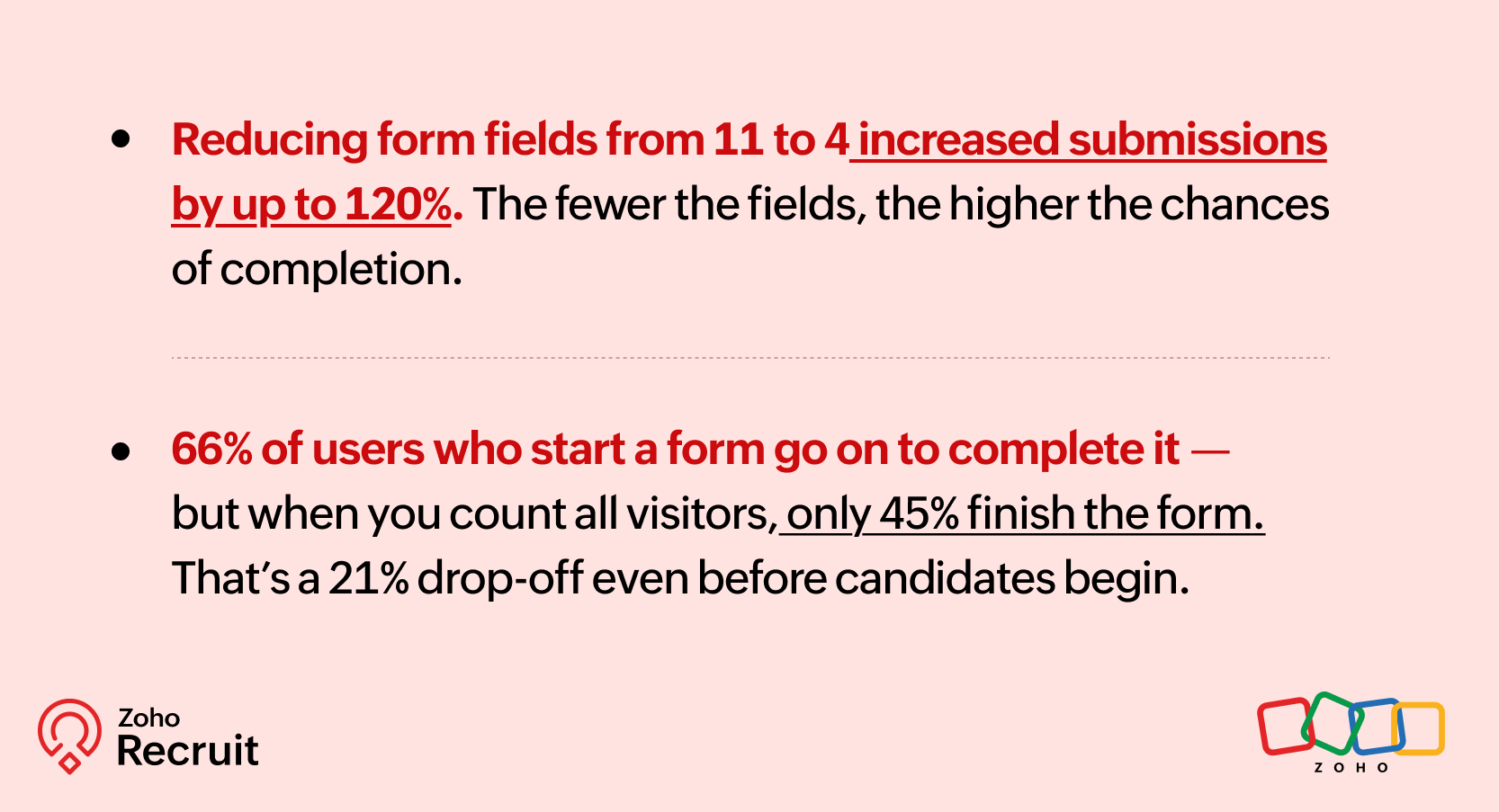

Sources: [1] [2]

These numbers reinforce what we already know — clearer, shorter, and smarter forms can keep more candidates moving forward.

Getting started: A few setup tips  

If you’re new to webforms or haven’t reviewed your setup in a while, here are three things to check:

  1. Do you have job-specific forms?
    A generic form might be easier to maintain — but it might also be collecting unnecessary or missing important info.

  2. Have you mapped fields correctly?
    Ensure that all form fields map directly to your Recruit modules (Candidate, Job Opening, etc.) to avoid duplicates or errors.

  3. Are you using rules to simplify things?
    Even one simple rule — like showing a “Notice Period” field only for full-time roles — can improve form quality.

Need help setting this up? Here’s how to build a webform and how to configure Form Rules.

Let’s Talk Recruit!

Do you already use Webforms in your hiring flow? Have you explored conditional form rules yet—or is that still on your to-do list?

Drop your experience below or tell us what kind of form use case you'd love to automate—we're all ears (and maybe one of our product folks will drop in with a tip or two!).

    • Sticky Posts

    • Zoho Recruit Community Meet-up - India (Venues Finalised)

      Zoho Recruit Community Meet-up - India (Venues Finalised) Namaste, India. 🙏🏼 The Zoho Recruit team is hitting the road—and we're absolutely excited behind the scenes. Join us for the Zoho Recruit India Meet-up 2026, a morning designed to make your recruiting
    • Zoho Recruit Community Meetup - London 🇬🇧 (Venue Finalised)

      Hello Recruiters! We’re excited to announce that the Zoho Recruit team is coming to the UK for an in-person Zoho User Group (ZUG) Meetup in London! This is your chance to connect with fellow Zoho users, learn from experts, and walk away with actionable
    • An update to improve email delivery | Email Authentication & Relay

      Update Rollout Latest Update: Enterprise users (8th July, 2025) This update is now live for Enterprise plan users in all regions. This includes People Plus, but not Zoho One, which will be covered in an upcoming update. Professional users (31st May 2025)
    • Zoho Recruit User Group Meet-up | INDIA 2025 (Venue Finalised)

      Hello Zoho Recruit users from India, We’re pleased and excited to announce our 2025 edition of Zoho user group meet-up in India in five cities! In this meet-up, our team of experts will help you understand the intricate nuances to use Zoho Recruit better,
    • Zoho Recruit is coming to the UK | Zoho Community Learning Series

      Customers from the United Kingdom, Exciting news: We will be in London for the Zoho Recruit user meet up. Our team will help you better understand the intricate nuances of Zoho Recruit to help you hire faster, inform about new and upcoming features, and
    • Recent Topics

    • Undelivered Mail

      I suspect that there are recipient's servers that blocks my emails. I receive the following email from mailer-daemon@mail.zoho.eu : A message that you sent could not be delivered to one or more of its recipients. This is a permanent error. pantelis.sarantos@unipakhellas.gr,
    • Email not loading on PC

      Hello, my email opens on but it doesn’t load on PC. I don’t have other issues with the email, all the configurations are ok and I face with following issue in the photo. It says “ mail.zoho.com refused to connect” I will be very thankful if anyone can
    • Why are bounce/error emails being sent to info@ instead of contact@?

      I have my Zoho Mail and WordPress site configured so that normal website emails should go to contact@hybridbatteryservice.com. However, I keep receiving technical bounce/error emails and delivery failure notifications at info@hybridbatteryservice.com
    • Do Not Disturb status not respected when Cliq bar is enabled across Zoho apps

      Hi Zoho Cliq team, I want to report what appears to be a bug with how the Do Not Disturb status interacts with the embedded Cliq bar in other Zoho apps. **Issue:** When my Cliq status is set to Do Not Disturb, I continue to receive notification tones
    • Zoho Webinar Summer Broadcast 2026

      What if your webinar platform could connect directly with your business tools, automate routine tasks, trigger actions across your workflows, and support every stage of your webinar lifecycle? That’s the question we’ve been answering so far this year.
    • Zoho CRM Layout Rules: Nine New Actions, Profile-Based Execution, and Interactive Preview

      Hello everyone, Availability: This feature is now available for customers in the JP and SA DCs. It is planned to be released for other customers in soon. We’re excited to announce powerful new enhancements to Layout Rules in Zoho CRM - a feature built
    • Invalid request when trying to access Mail

      When I click on the red button to access Zoho Mail at https://mail.zoho.com/zm/, I get a big yellow warning triangle with "invlid request, The input passed is invalid or the URL is invoked without valid parameters. Please check your input and try ag
    • Whats the average response time for ticket submitted?

      I submitted a request to unblock my mail accounts. They seem to be blocked for outgoing mail, and I have been waiting for days to have this fixed with no reply. I have submitted 2 tickets and an email. My work has to completely stop. I pay for the service
    • All new Address Field in Zoho CRM: maintain structured and accurate address inputs

      Availability Update: 29 September 2025: It's currently available for all new sign-ups and for existing Zoho CRM orgs which are in the Professional edition exclusively for IN DC users. 2 March 2026: Available to users in all DCs except US and EU DC. 24
    • Is there any way to have Dataprep ingest RSS?

      As stated by the title. Does the Zoho environment offer tools that I can use to, directly or using workarounds, have Dataprep ingest an RSS feed? Thanks
    • Introducing Color Coding of Picklist Values

      Dear Everyone, Greetings!! Zoho CRM is uplifting the user experience. Recently, we had some notable aesthetic improvements in CRM like Kanban View UI enhancement, New List view UI enhancement, color coding of tags, and color coding of picklists in meetings.
    • Important updates to your Widget JS APIs

      Hello everyone, Greetings from Zoho Creator! This is an urgent notice for developers and Partners who use widgets in their Zoho Creator applications. We previously announced an update to the CDN URLs used for loading the Widget JS API, with a deadline
    • Deluge sendmail in Zoho Desk schedule can't send email from a verified email address

      I am trying to add a scheduled action with ZDesk using a Deluge function that sends a weekly email to specific ticket client contacts I've already verified the email address for use in ZDesk, but sendmail won't allow it in its "from:" clause. I've attached
    • Mailbox delegation “Send As” error

      I believe there may be an issue with mailbox delegation. When I create a delegation from the Admin Console, it works correctly if I select Read permissions. However, if I select Send As permission for the delegated user, I immediately receive the following
    • Restrict Zoho Cliq Webinars and Announcements to Admins Only

      Hi Zoho Team, We hope you're doing well. We would like to raise a feature request regarding in-app announcements in Zoho Cliq, such as the recent webinar popup about the Cliq Developer Platform: While these announcements are useful, they are not always
    • how do i get mail.mydomain.com to point to zoho mail web-mail?

      I have started using zohomail, and am loving it. With my previous provider, I used to go to mail.mydomain.com, and it would take me to my webmail. I am not able to find the mapping for zoho's webmail to map to it. It is difficult to go to webmail with
    • Number of decimal places

      Hi Latha, I have added the following three fields to the Company module. Currently, these fields only allow a maximum of 2 decimal places. However, for some of our requirements, we need to enter values with up to 10 decimal places. Could you please help
    • zoho imap connection stopped working 05/28 12pm EST

      Hi, beginning Thursday, 5/28, ~12 pm est imap to siteground stopped working. When I tried to reconnect the account, connection was failing with the following message: Unable to connect SMTP server:gvam1107.siteground.biz, Port: 587. I did notice that
    • User Name in Zoho Cliq Not Updating Across Apps?

      We updated the name of a user in Zoho. (From Sue to Taylor) Her name has not been updated in Cliq on all apps. When in Zoho One, if I go to Cliq directly, it is correct, but if I am in another app, and the Cliq bar pops up on the bottom, it will be the
    • Service currently unavailable

      The Zoho Mail Webmail is working, the Mail Admin Console is not: "Our service is temporarily unavailable, please try after sometime." How long must I wait to retry? edit: To add to this, the Webmail is not working 100% - I can open mail in the inbox,
    • Service currently unavailable

      Service currently unavailable It is not possible to access email; the entire Zohoworkplace platform is down
    • User Permission Log

      Our external auditors are asking for a way to view changes made to user permissions (basically, a user permission change log). Is this feature built into Creator? 
    • E-mail down

      We cannot get into our email inboxes, are you affected by a Microsoft update issue? How long do you think as to restoration?
    • ZOHO MAIL SERVICE NOT WORKING

      Hello i've a problem my zoho mail account says a display with this text "our service is temporally unavaible"
    • ايميل مجانى

      Can I create a free email account on Zahoo?
    • Sign up for email for a domain

      Hi - I thought I had signed up for a domain of <domain>.com, but only see the email of @zohomail.com . How do I get the <domain.com> domain linked to my email?
    • Feature Request: Include Creator-applicable Deluge updates in the Creator Release Notes

      I'd like to put forward a suggestion about how Deluge updates are surfaced to Zoho Creator developers, and I'm hoping the Creator team will consider it. Zoho Creator is built on Deluge. Every workflow, custom function, validation and schedule we write
    • Zoho Books | Product updates | June 2026

      Hello users, Welcome to this month's roundup of what's new in Zoho Books! We have an exciting line-up this time. The highlight is the launch of the all-new France Edition with full ISCA compliance. We're also introducing features such as Layout Rules
    • Partner with HDFC And Sbi Bank.

      Hdfc and sbi both are very popular bank if zoho books become partner with this banks then many of the zoho books users will benefit premium features of partnered banks.
    • name change of company in same GSTIN registration . how to retain historical company name for past transactions?

      hello I have recently change my company name from BHANU DIAM to BHANUMATI IMPEX in same GSTIN registration number While i have update the company name in profile name that change all my historic data like sale invoices and purchase bill , i would like
    • AUTOMATION OF INVOICE PROCESSING

      Dear Zoho Books Product Team, I hope this message finds you well. I’m reaching out as a dedicated Zoho Books user with a product idea that I genuinely believe could transform how businesses handle purchase invoicing — and set Zoho Books apart as the smartest
    • Zoho Books | Product updates | July 2026

      Hello users, We’re excited to bring you the latest updates in Zoho Books for July 2026! This month's release introduces Terminal Payments, CMP-08 filing for composition taxpayers, SEPA Credit Transfer support, the new Receipts and Payments Report for
    • Zoho ERP | Product updates | June 2026

      Hello users, We launched Zoho ERP on January 23, and since then, our goal has been to help businesses streamline and manage their operations with greater efficiency, flexibility, and control. Since the launch, we've continued to enhance the platform every
    • Solution to Import OST File into Office 365.

      In today’s digital workplace, organizations are rapidly moving toward cloud-based email systems for better flexibility, security, and collaboration. Microsoft 365 has become one of the most widely used platforms for business communication. A common requirement
    • Zia AI capabilities now available in all paid editions

      Hello everyone, We are expanding the availability of AI-powered features in Desk to the other paid subscriptions from 7th July 2026. Right now, the following AI-based features are available for Enterprise edition users: Intelligence: Sentiment analysis,
    • Zoho Contacts *Web Interface Does Not Load* (Tested in Firefox, Safari)

      When trying to load https://contacts.zoho.com the error shown in the console is: The resource from “https://static.zohocdn.com/zmail/zm/newContactsChange11/js/main.js” was blocked due to MIME type (“application/json”) mismatch (X-Content-Type-Options:
    • Admin-Side Calendar Delegation from the Admin Console (Parity with Zoho Mail Mailbox Delegation)

      Summary Zoho Mail already lets organization admins delegate a user's mailbox to another user directly from the Admin Console — no approval from the mailbox owner required (Users > select user > Mail Settings > Delegated to > + Add). Zoho Calendar has
    • Cliq iOS can't see shared screen

      Hello, I had this morning a video call with a colleague. She is using Cliq Desktop MacOS and wanted to share her screen with me. I'm on iPad. I noticed, while she shared her screen, I could only see her video, but not the shared screen... Does Cliq iOS is able to display shared screen, or is it somewhere else to be found ? Regards
    • How use .PK12 certifcate for sign

      Hello! Is it possible to use my personal digital certificate (as a COMMODO .pk12) to sign documents? Thank you
    • Automating CRM backup storage?

      Hi there, We've recently set up automatic backups for our Zoho CRM account. We were hoping that the backup functionality would not require any manual work on our end, but it seems that we are always required to download the backups ourselves, store them,
    • Next Page