Mailbox delegation - A secure way to enable collaboration
Admins often encounter scenarios where a user needs another team member to access and manage their mailbox during extended leave, role transitions, or while handling high email volumes.
In such situations, ensuring business continuity without sharing login credentials or compromising security is critical.
Before enabling access, admins should consider:
Sharing mailbox passwords creates serious security and compliance risks.
Emails may be missed or delayed if access is not provided promptly.
Delegates usually require specific permissions, not full account access.
Administrators need visibility into delegation mappings and access controls.
To address these needs, the Mailbox delegation feature in the Zoho Mail Admin Console allows users to securely access and manage emails on behalf of a mailbox owner within the organization.
When a mailbox is delegated:
The delegate can read, respond to, and manage emails.
No password sharing is required.
The delegate does not need to log in as the mailbox owner.
Admins can define the level of permissions granted.
Why use mailbox delegation?
Executive assistance & shared responsibility
Team-based email handling
Temporary coverage during absence
Steps to enable mailbox delegation
To enable or disable mailbox delegation in an email policy:
Log in to Zoho Mail Admin Console.
Navigate to Mail Settings > Email policy > Policies.
Choose the policy for which you want to enable/ disable Mailbox delegation access.
Navigate to General > Mailbox delegation access.
Turn On/ Off the toggle switch to enable/ disable the access.
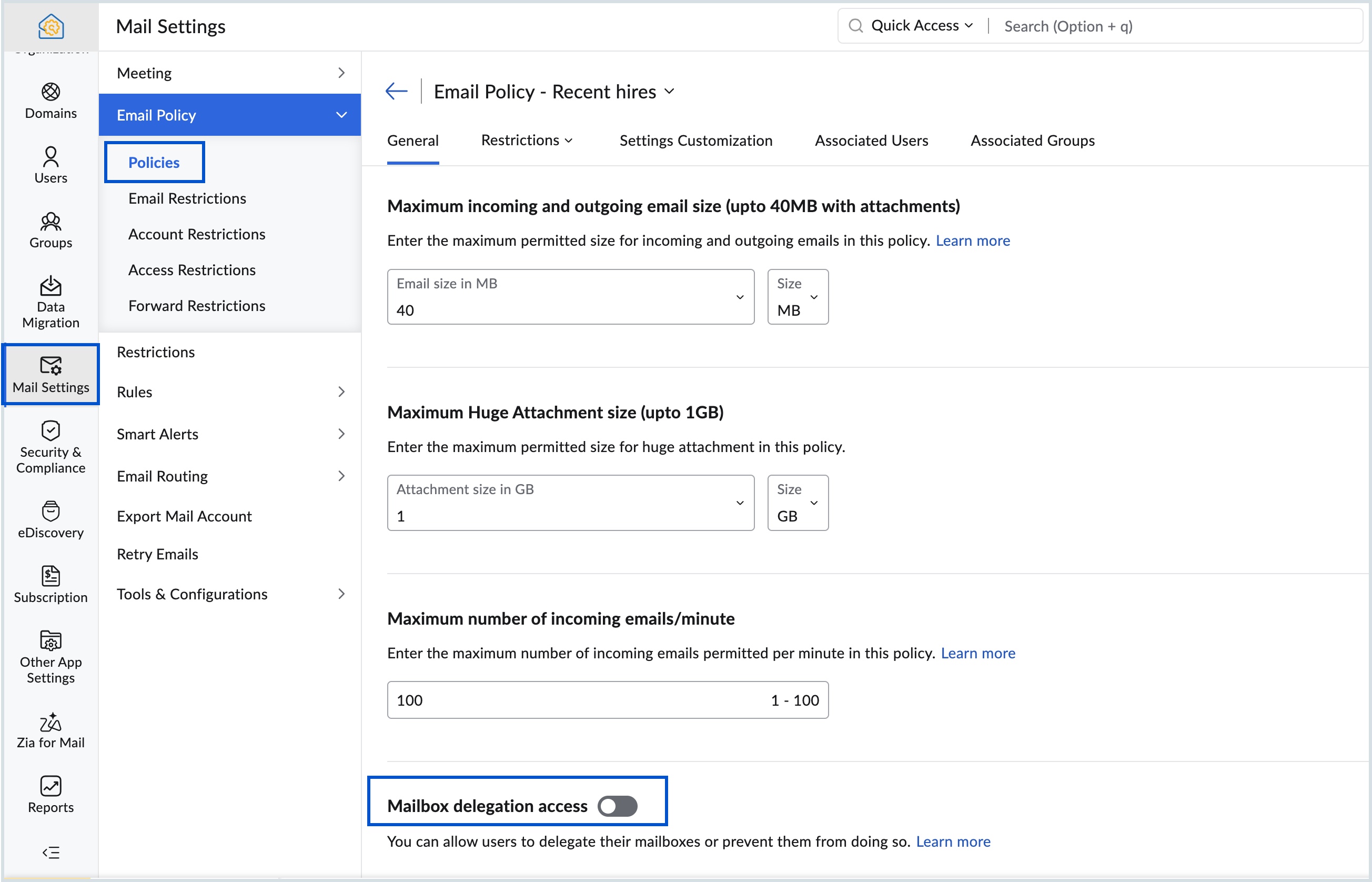
Know more about the steps to delegate a user's mailbox.
Topic Participants
Saranya A
Sticky Posts
Mailbox delegation - A secure way to enable collaboration
Admins often encounter scenarios where a user needs another team member to access and manage their mailbox during extended leave, role transitions, or while handling high email volumes. In such situations, ensuring business continuity without sharingEmail Forwarding: Maintain business continuity
As an administrator, ensuring uninterrupted email communication is critical when a role-based employee is unavailable due to extended leave or a temporary role change. Emails from customers, partners, and internal teams must continue to be received andMaintain steady traffic to your domain: How Domain Aliasing helps
Consider this scenario: An organization has its primary domain as administrator.com. Now it wants to shorten its domain to admin.com because it's simpler and easier to remember. However, changing the domain completely can cause the following problems:Facing email delivery issues? Verify your domain's DNS records
Have you ever wondered why your legitimate emails are landing in the recipient’s spam folder? Or been surprised to see emails sent from your registered domain getting rejected by recipient email servers? Why does this happen? In most cases, this happensEmail Administrators! Join our tips & troubleshooting series
Greetings to all the admins out there! This announcement is exclusively for you. As we step into the New Year, we’re excited to start a dedicated series of admin-specific tips curated to support you. These posts will help you overcome everyday challenges
Recent Topics
Can the Trigger be changed?
I'm afraid I already know the answer, but here goes... After activating a workflow (under Campaigns > Automations), Then later choosing to Edit the workflow, Can the Workflow's Trigger be changed? Currently the entire Trigger section + options are goneMarketer's Space: Proven tips to improve open rates – Part I
Hello Marketers! Welcome back to another post in Marketer's Space! In this week's post, we'll discuss the ever-important concept of open rates. This will be a multi-part series, as we have a range of topics to cover. Open rates—which measure the percentageCan't send nor receive emails on my external email accounts since this morning
Greetings, I have two external accounts integrated into Zoho mail through POP3 + SMTP. These accounts have always worked normally since the day I've set them up. Starting 10:30 AM this morning (Western European Time) both suddenly stopped sending andCreating Custom PDF Template from Form
I am trying to create a custom PDF from form submissions. I have the standard subscription and it indicates that PDF forms are included. I cannot find anywhere to create PDF forms. I try to follow the instructions from here: https://help.zoho.com/portal/en/kb/forms/form-settings/pdf-settings/pdf-editor/articles/creating-your-own-pdf-template#Creating_your_template_from_the_scratchImportant Update: Facebook Metrics Deprecation & Impact on Zoho Analytics
Dear Zoho Analytics users, Facebook has deprecated a set of metrics from the Facebook Pages Insights API, effective November 15, 2025. As a result, these changes will affect any reports and dashboards in Zoho Analytics that rely on Facebook Pages data.Introducing Zoho MCP for Bigin
Hello Biginners! We're excited to introduce Zoho MCP for Bigin, a completely new way of interacting with Bigin data using AI. With Zoho MCP, you can securely connect your Bigin account with popular AI tools like Claude, Cursor, Windsurf, and VS Code,MCP > Creator connection failing with Claude
I'm trying to get claude to access any of my Zoho Creator apps and it keeps failing. I have enabled all tools for creator and ensured in claude settings that everything is authorised. Here is what claude says : Unfortunately, the error messages I'm receivingIs it possible to sync data every 5–10 minutes in Zoho Analytics (CRM or Excel imports)?
Hello Team, I want to know if Zoho Analytics supports near real-time syncing of data from different sources. My requirements: I am importing data from Zoho CRM → Zoho Analytics I also have some datasets maintained in Excel/CSV I want both data sourcesFeature Request: Dynamic Dimension Control for zc_LoadIn Popups
As detailed in this community discussion, Zoho Creator's zc_LoadIn parameter is a vital tool for opening components (forms, reports, or pages) in modal dialogs via HTML snippets, Notes, or Rich Text Fields. While powerful, this feature suffers from aSubforms in stateless forms
I think the title says it all. We need to be able to add subforms to stateless forms. Currently the only workaround is to create a Form and delete each record upon submission of the form. I need to build an interface to update our inventory. BasicallyText wrap column headers in reports?
Is it possible to auto wrap column headers so that a longer multi-word header displays as two lines when the column is narrower than the width of the header title?What’s New in Zoho Inventory — Latest Features, Integrations & Updates | December 2025
Zoho Inventory has evolved significantly over the past months, bringing you smarter, faster, and more connected tools to streamline your operations. Whether you’re managing multichannel sales, complex fulfillment workflows, or fast-moving stock, our newestMarketer’s Space - Multi-Channel Campaigns for the Biggest Shopping Week with Zoho Marketing Automation
Hello marketers, Welcome back to another post in Marketers Space! The biggest shopping week of the year is almost here, and it’s your moment to shine without the stress. With Black Friday and Cyber Monday just around the corner, being present across email,Pricing Strategies: #5 Stay local, Price & Sell Global
Arun had always dreamed of taking his handmade craft business beyond his hometown. For years, he sold locally. Most of his customers are familiar faces, in our usual currency and with the exact expectations. But one day, a traveller visited his workshopNo feedback from Zoho Books regarding Yodlee feeds for Investec
I reported on 6 Feb 2025 that the Bank Feeds for Investec bank via Yodlee are not working. To date there has been no resolution. You are charging us for a suite of products where the functionality does not work. Please advise how you will refund me forService One. Bill Another. Zero Hassle.
In field service operations, one challenge often comes up: the person who needs the service isn’t always the one who pays for it. Think about tenants vs. property managers, corporate offices vs. their finance departments, or school buildings vs. centralPresenting ABM for Zoho CRM: Expand and retain your customers with precision
Picture this scenario: You're a growing SaaS company ready to launch a powerful business suite, and are looking to gain traction and momentum. But as a business with a tight budget, you know acquiring new customers is slow, expensive, and often deliversCan Zoho Flows repeat Actions more than once?
I'm attempting to make an intentional Zoho Flow loop using the below layout. However, when "WithinLimit" condition is met, the program fails to execute the action "Get & Add Request Co..." again. Is this by design? Is Zoho Flows unable to repeat actionsVideo interviews not compatible on mobile
Hi Zoho, The 2-way video interview feature you have added to Recruit would be great if the candidate was able to use the link to the video on a mobile phone, it doesn't work on Samsung browser, it doesn't work on chrome/firefox mobile version of browser,Zoho Desk View Open Tickets and Open Shared Tickets
Hi, I would like to create a custom view so that an agent can view all the open tickets he has access to, including the shared tickets created by a different department. Currently my team has to swich between two views (Open Tickets and Shared Open Tickets).Enviro Recycling EHF Fee's
I'm in Canada and each province has it's own recycling program with it's own fee's. There are numerous categories that electronics fall into and each category has a taxable rate applied to it. I need a way to be able to apply the correct rate dependingZoho Desk API - Influence which layout is used
Hello, how can the ticket layout be changed using the API? I would like to choose the layout directly when creating the ticket. If this is not possible, my question would be how can I change it afterwards? Best regards, SvenHas CSS Changed for Common Elements?
I noticed today that the standard title headings on my Forms and Reports display smaller in size than before. Google Dev Tools (attached), seems to confirm my suspicion. Something appears to be overriding the 1.375rem to 1.125rem. The font size on theText field alignment
Is it possible to align text in the text field? Or even better, is there a possibility to have a field which accepts only numbers?email moderation issue when email is sent in the name of a mail group
Symptom: an email that is sent by a mail group moderator in the name of a moderated mail group is held back for approval. Reproduction: Create a moderated mail group with members and moderators. Allow that mails can be sent in the name of the group (extendedPipeline in Custom Modules
I love the way the Sales Pipeline looks and functions with reports. I would like to add the save pipeline features and visualization to a custom module, however, I only see that these pipelines are only available for the Deals module. Is there a way to add pipelines to custom modules?Tip #53- Remote Billing: Your End-to-End Billing Solution in Zoho Assist- 'Insider Insights'
Manual invoicing, after every remote support session, can be time-consuming and often error-prone. As an MSP, IT admin, or even a freelance support technician, it may become overwhelming to keep track of session time, service rates, and client invoices.Record history and ticket interaction tab in contacts and accounts
Hello everyone! We have improved the History tab to help users trace updates in the interaction activity logs of the Contacts and Accounts detail pages in the Customer Module. This enhancement make it easier to get clear details about who made each update,Is there an API to "File a Ticket" in Desk
Hi, Is there an API to "File a Ticket" in Desk to zoho projects?Keyboard UX for Assemblies
The new Assembly module has a counter-intuitive behavior that ought to be corrected. When an Assembly is ready to be entered, there are two options given, the blue-highlighted "Assemble" and the gray "Save as Draft". This correctly implies that the normalWhy can't I see images uploaded by other users in the Library for Campaigns
We are several users of zoho Campaign. I have uploaded visuals of our company, but my team members can't see them.zoho sheet stuck
I Need help. ZOHO sheets stuck on the loading screen. I've already deleted the system cache and cookies of my browser (google chrome) but it's still not opening.Tip of the Week #78 – Cut response time with multichannel shared inboxes
If you’ve ever felt your team juggling between multiple email accounts, social pages, and chat apps just to reply to customers, you’re not alone. Managing conversations in multiple channels can quickly turn messy. Important messages across inboxes, repliesNeed a way to run a client script longet than 10 seconds
By The Grace of G-D. Hi, Currently, Client Scripts are Timing out at 10 seconds. We have complex logics that needs more time. Can you add a feature request to increase the timeout?FSM Improvement Idea - Show an Import button when there is no data
I am setting up FSM for a client and I noticed that there is no option to import data, see screenshot below. Even when you click Create Contact there is only an option to Import from Zoho Invoice. It is only after you add at lease 1 record that the ImportUI Improvement - Ability to Collapse Flow
The UI for Flow is generally pretty good. However, when multiple decision trees are used, the layout can get pretty convoluted and hard-to-follow (see one of my Flows below): In these cases, even the auto-arrange fails to make this something that a normalTasks Statuses
Hi, The task status "Completed" is a final status which closes the task. We need to have a status "Cancelled". However, when the status is set to "Cancelled", the task prompt still has a blue button to Close Task. When the customer clicks that and closesAdd Lookup Field in Tasks Module
Hello, I have a need to add a Lookup field in addition to the ones that are already there in the Tasks module. I've seen this thread and so understand that the reason lookup fields may not be part of it is that there are already links to the tables (Create New Tasks Layout in CRM
I am able to do this in Leads, Contacts, Meetings, Calls - every other module, but cannot create a new layout in tasks. I have the appropriate access but it's simply not appearing as an option. Only "Standard" option shows. Please help!Using IMAP configuration for shared email inboxes
Our customer service team utilizes shared email boxes to allow multiple people to view and handle incoming customer requests. For example, the customer sends an email to info@xxxx.com and multiple people can view it and handle the request. How can I configureNext Page