Response Time Report
From data to decisions: A deep dive into ticketing system reports
Every organization that interacts with its customers should have an established timeframe for how soon an agent is expected to send the first response and any reply to any follow-up messages.
It's common for the support team to operate under a service level agreement that requires the first response to any customer ticket to be sent within one hour of ticket creation.

If a team has 10 agents, the manager does not need to check each ticket to see if the response time SLA is met. Instead, the response time report can help identify whether all responses are sent on time or if there is a delay.
What are time-based reports?
Time-based reports are valuable tools that help us understand how well things are going by breaking down key metrics over specific periods. By tracking, measuring, and visualizing data, these reports allow us to evaluate performance, spot trends, and make better decisions. They enable businesses to monitor efficiency, productivity, and operational effectiveness.
If a ticket was raised on February 23, and the response was sent on February 28, the manager can review the details to understand why there was a delay. This might be due to reasons such as holidays, a mistake by a new agent who is unfamiliar with the process, or unusually high demand for support. By identifying the cause, the manager can offer more training on SLA processes, adjust the way agents' workloads are allocated, or arrange for extra help during holidays to ensure timely customer responses in the future.
Example of response time reports
Suppose a ticket was raised on February 23rd about a patient’s health concern, and the response was sent on February 28th. In this case, the hospital manager can review the details to see why there was a delay in addressing the patient's needs. This delay may be caused by factors such as holidays affecting staffing levels, staff being unfamiliar with the ticketing process related to patient care, or an increased workload resulting from a sudden rise in patients.
By figuring out the cause of the delay, the manager can take proactive steps. For example, they could provide more training on the standard procedures for handling patient inquiries to ensure all staff understand the process. The manager might also adjust the workload by redistributing cases among staff or bringing in temporary help during busy times or holidays.
Another strategy is to form a dedicated task force to handle customer inquiries during peak periods to provide quicker responses. By tackling these issues, the organization can improve its operations and ensure timely responses to ensure customer satisfaction.

Availability: All paid versions
Specific attributes of the report
- Ticket ID: Zoho Desk identifies and distinguishes tickets using a unique reference number called a ticket ID.
- Subject: The ticket subject is typically a summary or description of the issue the customer is experiencing.
- Ticket owner: Owner of the ticket.
- Contact name: The customer's contact name.
- Event owner: The owner of the event.
- Event team: The change in the ticket's status.
- Responded by: The name of the agent who responded to the customer's ticket.
- Agent responded time: The time the response was sent.
- Agent response time: The total time taken to respond to the ticket.
- Team response time: The time the team responded to the ticket.
- System response time: The total time the team took to respond to the ticket
- Is first response: Confirms if this is the first response in the conversation's thread.
- Status: The current status of the ticket.
- Status during event: The status of the ticket at a particular point in time.
- Channel: The channel through which the ticket was submitted.
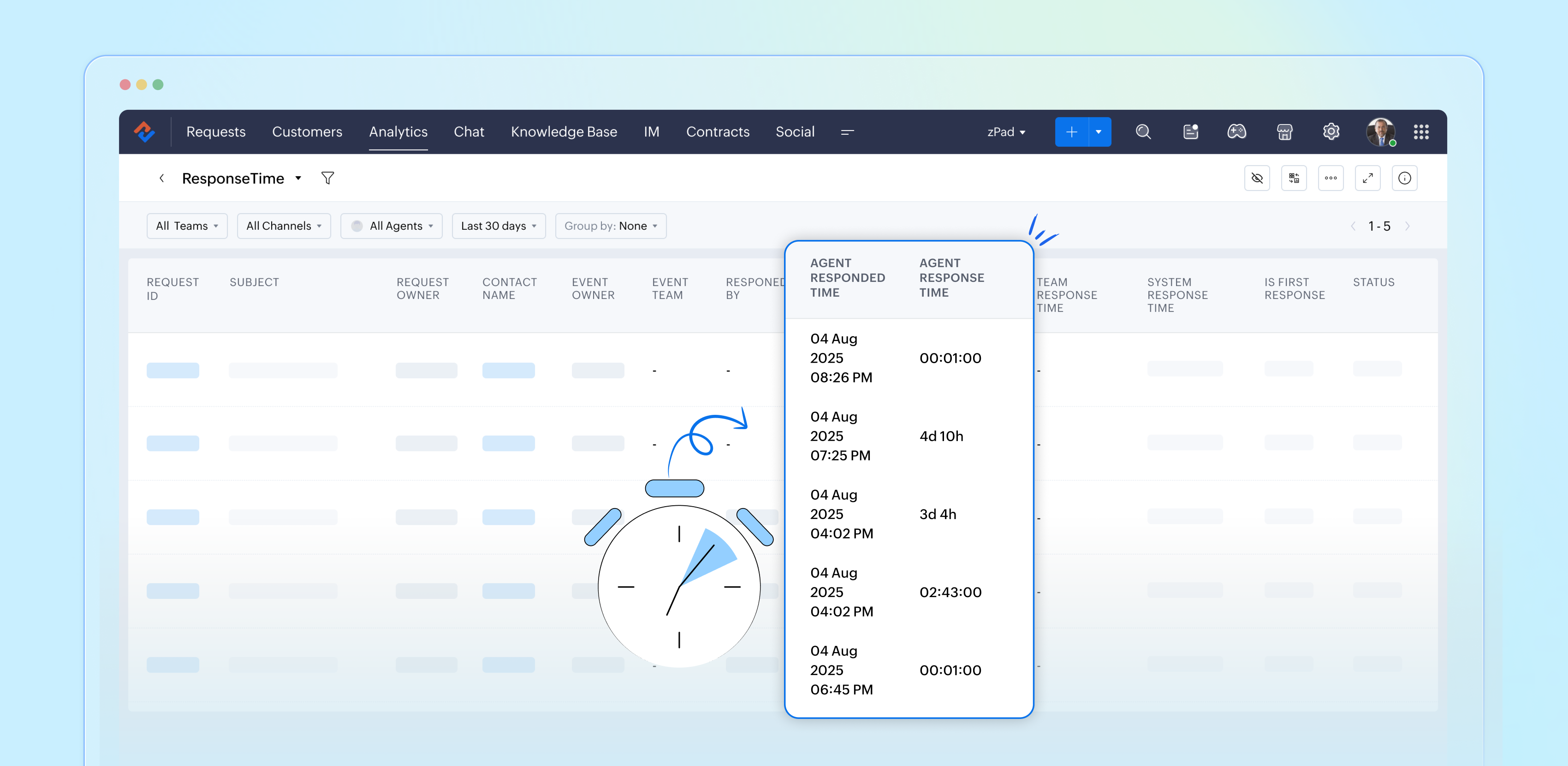
Importance of response time reports
Response time reports are important for support systems. They measure how quickly agents reply to customer inquiries.
- Enhance customer satisfaction
- Easily promote customer loyalty
- Enable performance tracking
- Drive operational efficiency
- Support data-driven decisions
- Reinforce brand reputation
Analyze and improve response times with reports
By closely examining both our first response times and the tickets that require more attention, the support team can gather valuable insights from every customer interaction. This continual analysis of response time reports allows us to identify patterns and areas for improvement, ultimately enhancing our overall performance and ensuring a superior experience for our customers.
Please stay tuned for more articles in our Desk Reports series.
Regards,
Kavya Rao
The Zoho Desk Team

Also read:
Time-based reports
Topic Participants
Kavya Rao Addepalli
Sticky Posts
Zoho Desk Partners with Microsoft's M365 Copilot for seamless customer service experiences
Hello Zoho Desk users, We are happy to announce that Zoho Desk has partnered with Microsoft's M365 to empower customer service teams with enhanced capabilities and seamless experiences for agents. Microsoft announced their partnership during their keynoteWhatsApp pricing changes: Pay per message starting July 1, 2025
Starting July 1, 2025, WhatsApp is shifting from conversation-based pricing to per-message billing. That means every business-initiated message you send will count. Not just the first one in a 24-hour window. Pricing updates on the WhatsApp Business PlatformLive Webinar - Work smarter with Zoho Desk and Zoho Workplace integration
Hello customers! Zoho Desk and Zoho Workplace are coming together for a webinar on 14th May, 2024. Zoho Workplace is a suite of productivity apps for email, chat, docs, calls, and more at one single place. Zoho Desk is closely integrated with a few toolsApple iOS 17 and iPadOS 17 updates for Zoho Desk users
Hello Zoho Desk users! Apple recently announced the release of iOS 17 and iPad OS 17. These latest OS updates will help you stay productive and efficient, through interactive and seamless user experiences. Zoho Desk has incorporated the updates to helpZoho Desk Cheat Sheet For The Year-End
Check out these Zoho Desk best practices to end this year on a high and have a great one ahead! #1 Set Business (Holiday) Hours - If you have limited working hours, please make sure you restrict your business hours or set them as holidays for the coming days. Let your customers know when you will, and won't, be available. #2 Update the Annual Holiday List - Check the holidays for the new year and update the holiday schedule. Usually, holidays from the current year will be carried over for the next
Recent Topics
Force mandatory entry on one of two fields on Contacts
We are finding our users aren't always entering a phone number or email address of a contact. We would like to make these fields mandatory but realize they won't always have both pieces of information, but should at least have one. Is there a way to makeHow can I prevent having recepients from being added as contacts in Zoho Desk?
How can I prevent having recepients from being automatically added as contacts in Zoho Desk? There's no option to disable this.Agent Concern
would like to ask the difference between an agent and a light agent. can a light agent close a ticket. thank you.Train Zoho Answer Bot Based on Customer
Hi all, Is it currently possible to mark Help Centre articles to a specific customer, and restrict the answer bot to only use relevant information if it is either marked as "General", or tagged for the specific customer in question? We currently haveNon-depreciating fixed asset
Hi! There are non-depreciable fixed assets (e.g. land). It would be very useful to be able to create a new type of fixed asset (within the fixed assets module) with a ‘No depreciation’ depreciation method. There is always the option of recording landAn internal server error occurs when attempting to upload the FCM Credential (JSON) to enable push notifications
When I go to the Push Notifications Configuration section of the SalesIQ dashboard and try to upload an FCM credential file, a server error appears.Errorcode 554
Hello, I am unble to send any single email during the whole time due to the Zoho IP 136.143.188.16 being blocked by SpamCop. Please can somebody help me?Spamcop
Have been trying to email several of our clients and many of our emails keep getting bounced back with an error that states: ERROR CODE :550 - "JunkMail rejected - sender4-op-o16.zoho.com [136.143.188.16]:17694 is in an RBL: Blocked - see spamcop.net/bl.shtml?136.143.188.16"Will Zoho Search work with Zoho Learn
Currently, Zoho Search only works with Zoho Wiki which will be phased out. Moving forward, will Zoho Search be enabled for Zoho Learn? Thanks.How to use filters on all products page? Or even a category page?
Hello, I am trying to create some filters so users can use filters to find products they are looking for. So what i am trying is to create a filter according to price lets say. So if i define it this way i am expecting to see this filter option on categoryZoho Projects app update: Voice notes for Tasks and Bugs module
Hello everyone! In the latest version(v3.9.37) of the Zoho Projects Android app update, we have introduced voice notes for the Tasks and Bugs module. The voice notes can be added as an attachment or can be transcribed into text. Recording and attachingBoas práticas de desenvolvimento em Deluge
O Deluge (Data Enriched Language for the Universal Grid Environment) é a linguagem de script utilizada em diversas aplicações do ecossistema Zoho, como Zoho Creator, Zoho CRM, Zoho Books e Zoho Flow. Ela foi projetada para permitir automações rápidasHow do I automate my package and shipment process
Hey, I have a very basic problem regarding automating my package and shipment. My business does not require me to have those modules and manage them currently and since I'm new to zoho I want to start with just the basics. I just need to automaticallyHow do I automate my package and shipment process
Hey, I have a very basic problem regarding automating my package and shipment. My business does not require me to have those modules and manage them currently and since I'm new to zoho I want to start with just the basics. I just need to automaticallyIntergrating multi location Square account with Zoho Books
Hi, I have one Square account but has multiple locations. I would like to integrate that account and show aggregated sales in zoho books. How can I do that? thanks.Emails being blocked / spamcop
Hello, I am unablr to send any single email during the whole time due to the Zoho IP 136.143.188.16 being blocked by SpamCop.net Please help on this.Zoho IP blocked by SpamCop 136.143.188.16
Hello, I am unble to send any single email during the whole time due to the Zoho IP 136.143.188.16 being blocjed by SpamCop.net Please help on this.Is there a way to configure dark mode for Campaigns emails that go out to customers?
I've found a lot of information on how to configure dark mode for my (The user) personal Zoho workspace and email, but is there any way to edit dark mode settings on emails that we send out to customers via campaigns? We sent out a test email the otherCan I hide empty Contact fields from view?
Some contacts have a lot of empty fields, others are mostly filled. Is there a way I can hide/show empty fields without changing the actual Layout? I would like to de-clutter my view, and also be able to add information later as I am able. I would beAuto-publish job openings on my Zoho Recruit Careers Website
I have developed a script using the Zoho Recruit API that successfully inserts new jobOpening records to my Zoho Recruit website, but my goal is to auto-publish to the Careers Website. The jobOpening field data shows two possible candidates to make thisCredit Card Terminal for Zoho Books
Hello, Instead of punching the credit card number manually for customer payment, do you have a third-party hardware credit card reader that works with Braintree? Thank YouHow do you print out the invoices comments
I have some invoices where i need to print out the comments that show when reminders and etc were sent how do we print those out in Zoho Books.Feature Request: Enable Custom PDF Layout Editor for All Modules (Including Package Slips)
Hello Zoho Community and Product Team, I am writing to share a suggestion that would significantly enhance the customization capabilities within Zoho Books. We all appreciate the power of the Custom PDF Layouts (the "New" template engine) that allowsNeed advice for product/item search functionality when adding invoices.
My client uses "Catalog or Vendor" name and Product code to search for his items. But Zoho only allow to search by product name and SKU when adding items to Invoices/Estimates. Clients product codes are not unique as they may overlap from different catalogs/vendors.How to dynamically pass IDs from one API response to a second API call in Zoho DataPrep?
Hi Team, I am setting up a global consolidated reporting pipeline in Zoho Analytics (India) using Zoho DataPrep as the ETL engine. I am pulling data from multiple Zoho Books Data Centers (US, Singapore, India) thats why i used the URL Source (OAuth 2.0)Feature Request: "Send Invitation" Toggle for Events
I am writing to request a critical "Quality of Life" update for the Activities module. Currently, adding people to the Participants field in an Event triggers an automatic email invitation/acceptance tracking with no way to opt-out. For general eventsAccount Review Pending - Daily Limit 100
Hi ZeptoMail Team, I'm writing to request a manual review of my account. I am currently stuck on the 100-email daily limit and cannot purchase credits. Status: My domain is already verified (DKIM/CNAME). Issue: The "Customer Validation" option is no longerAutomation Series: Move Tasks to a different Task List on Status Change
In Zoho Projects, you can automatically move a task from one task list to another when its status is updated. This keeps your tasks organised and ensures better visibility while reducing manual work. For instance, during a product launch, the marketingIntroducing Bigin's all new integration with Microsoft Teams
Picture this: You are on call with your team to discuss some important deals that need to be closed soon. While discussing each deal, your team has to switch back and forth between your Teams account and Bigin account to refer to details about the deal.Scaling the customer journey: What's new in CommandCenter
Dear Customers, The last time we connected about CommandCenter, it was about the tool's new controls and revamped UI. Personally, the overhaul of the UI from the last update, still excites me. Today, we're here with news about its scalability and addedAdjusting Physical Inventory
Not getting very far with support on this one, they say they are going to fix it but nothings happened since November. Please give this a thumbs up if you would like to see this feature or comment if you have some insight. Use Case: Inventory set to beHow to book GST paid in zoho books
hi, i am a new user to Zoho books and not able to book GST paid in books, kindly suggest how i can book it in books. thanks, siddharthDynamic Remaining Quantity in Lookup During Allocation
Hi everyone, From what I understand in Zoho Creator, lookup fields only display the stored value from the source record and do not dynamically update while a form is being filled. Because of this, showing a real-time updated remaining quantity insideIs it possible to use HTML formatting in SMS messages sent from Zoho?
Hi everyone, I have a question regarding sending SMS from Zoho When we send emails from Zoho, we can include HTML code to format the message (like adding links, styling, etc.). Is it possible to do something similar when sending SMS messages through ZohoImportant update: Migrate to the new SalesIQ live chat widget before April 14, 2026
The old SalesIQ live chat widget will be deprecated on April 14, 2026. This is a final reminder to migrate to the new SalesIQ live chat widget before this date. After April 14, 2026, the old widget will no longer be maintained, which can lead to slowerIf your IM chats aren’t auto-assigning, here’s what to check
Hey everyone! We’ve been seeing quite a few questions around Instant Messaging (IM) Chat Routing in Zoho Desk, especially around how it actually behaves in real time. So I thought I’d share a practical breakdown of what’s happening behind the scenes.connect zoho creator with google drive
Hello everyone, I need to connect to a folder drive. The idea, is that google drive loads a text document with some data, I must read that text document to be able to autofill a form that I have in zoho creator with that data. I also attach PDFs and placeUploaded files are not included when using "Include user submitted data" in Email Notification
In Send Email notification workflow in Zoho Creator, there is an option called "Include user submitted data" which allows the email to contain all the form submission details. However, when this option is enabled, files or images uploaded through FileExtend Zoho Canvas Customization to Zoho Creator Forms and Reports
Currently, Zoho Canvas allows users to design and customize the UI of Zoho CRM modules with a much better visual experience. This helps organizations create cleaner layouts, improve usability, and design interfaces that match their workflows. However,Kanban View for Projects.
At our organization, we describe active projects with various statuses like "In Proofing" or "Printing" or "Mailing". In the Projects view, one can set these project statuses by selecting from the appropriate drop-down. While this works, it's difficult to view and comprehend the progress of all of your projects relative to each other in a table. Creating a Kanban view for projects where I can move them from one status to another allows me to see where each project is in the order of our workflow.Next Page