Response Time Report
From data to decisions: A deep dive into ticketing system reports
Every organization that interacts with its customers should have an established timeframe for how soon an agent is expected to send the first response and any reply to any follow-up messages.
It's common for the support team to operate under a service level agreement that requires the first response to any customer ticket to be sent within one hour of ticket creation.

If a team has 10 agents, the manager does not need to check each ticket to see if the response time SLA is met. Instead, the response time report can help identify whether all responses are sent on time or if there is a delay.
What are time-based reports?
Time-based reports are valuable tools that help us understand how well things are going by breaking down key metrics over specific periods. By tracking, measuring, and visualizing data, these reports allow us to evaluate performance, spot trends, and make better decisions. They enable businesses to monitor efficiency, productivity, and operational effectiveness.
If a ticket was raised on February 23, and the response was sent on February 28, the manager can review the details to understand why there was a delay. This might be due to reasons such as holidays, a mistake by a new agent who is unfamiliar with the process, or unusually high demand for support. By identifying the cause, the manager can offer more training on SLA processes, adjust the way agents' workloads are allocated, or arrange for extra help during holidays to ensure timely customer responses in the future.
Example of response time reports
Suppose a ticket was raised on February 23rd about a patient’s health concern, and the response was sent on February 28th. In this case, the hospital manager can review the details to see why there was a delay in addressing the patient's needs. This delay may be caused by factors such as holidays affecting staffing levels, staff being unfamiliar with the ticketing process related to patient care, or an increased workload resulting from a sudden rise in patients.
By figuring out the cause of the delay, the manager can take proactive steps. For example, they could provide more training on the standard procedures for handling patient inquiries to ensure all staff understand the process. The manager might also adjust the workload by redistributing cases among staff or bringing in temporary help during busy times or holidays.
Another strategy is to form a dedicated task force to handle customer inquiries during peak periods to provide quicker responses. By tackling these issues, the organization can improve its operations and ensure timely responses to ensure customer satisfaction.

Availability: All paid versions
Specific attributes of the report
- Ticket ID: Zoho Desk identifies and distinguishes tickets using a unique reference number called a ticket ID.
- Subject: The ticket subject is typically a summary or description of the issue the customer is experiencing.
- Ticket owner: Owner of the ticket.
- Contact name: The customer's contact name.
- Event owner: The owner of the event.
- Event team: The change in the ticket's status.
- Responded by: The name of the agent who responded to the customer's ticket.
- Agent responded time: The time the response was sent.
- Agent response time: The total time taken to respond to the ticket.
- Team response time: The time the team responded to the ticket.
- System response time: The total time the team took to respond to the ticket
- Is first response: Confirms if this is the first response in the conversation's thread.
- Status: The current status of the ticket.
- Status during event: The status of the ticket at a particular point in time.
- Channel: The channel through which the ticket was submitted.
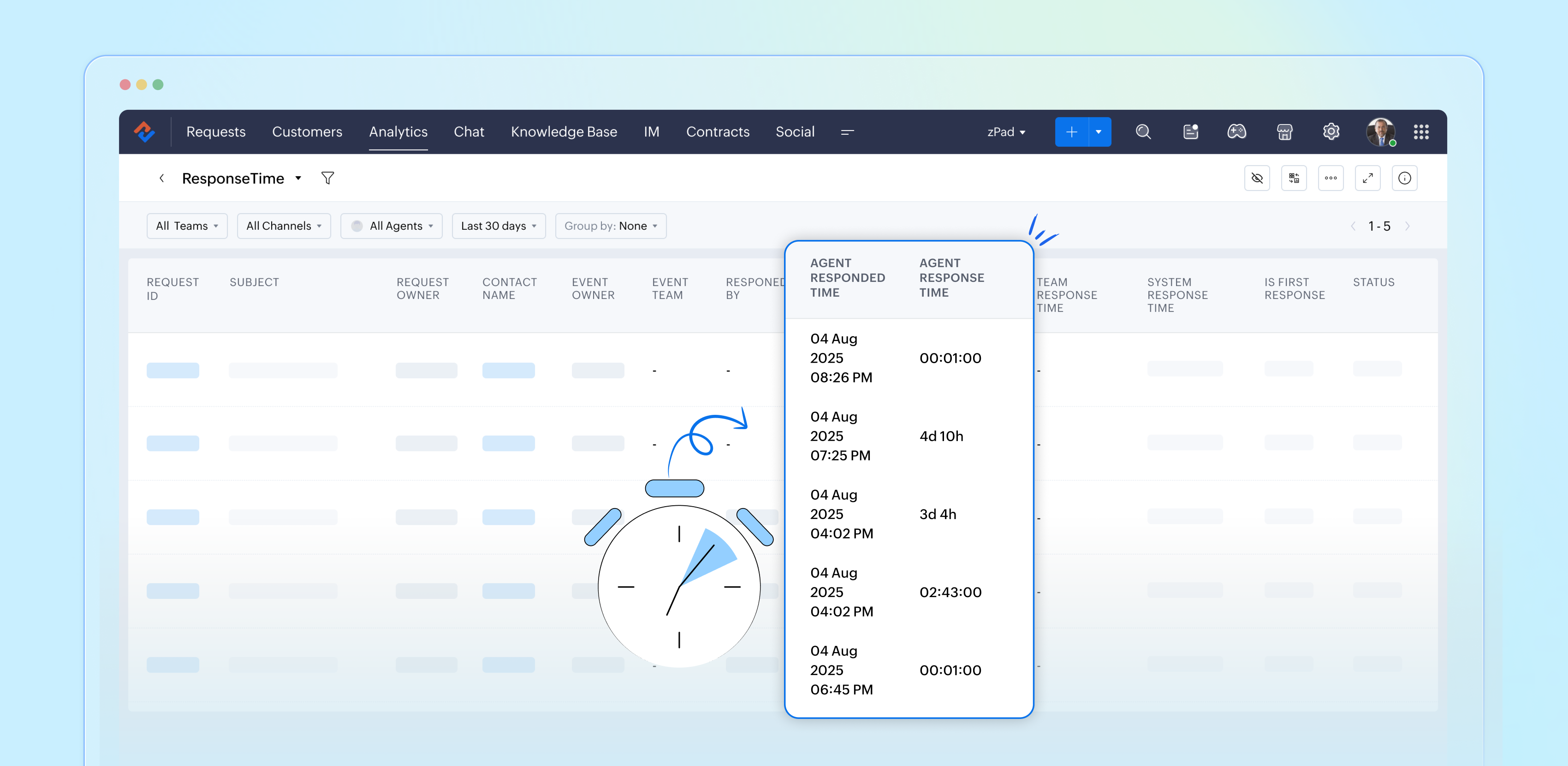
Importance of response time reports
Response time reports are important for support systems. They measure how quickly agents reply to customer inquiries.
- Enhance customer satisfaction
- Easily promote customer loyalty
- Enable performance tracking
- Drive operational efficiency
- Support data-driven decisions
- Reinforce brand reputation
Analyze and improve response times with reports
By closely examining both our first response times and the tickets that require more attention, the support team can gather valuable insights from every customer interaction. This continual analysis of response time reports allows us to identify patterns and areas for improvement, ultimately enhancing our overall performance and ensuring a superior experience for our customers.
Please stay tuned for more articles in our Desk Reports series.
Regards,
Kavya Rao
The Zoho Desk Team

Also read:
Time-based reports
Topic Participants
Kavya Rao Addepalli
Sticky Posts
Zoho Desk Partners with Microsoft's M365 Copilot for seamless customer service experiences
Hello Zoho Desk users, We are happy to announce that Zoho Desk has partnered with Microsoft's M365 to empower customer service teams with enhanced capabilities and seamless experiences for agents. Microsoft announced their partnership during their keynoteWhatsApp pricing changes: Pay per message starting July 1, 2025
Starting July 1, 2025, WhatsApp is shifting from conversation-based pricing to per-message billing. That means every business-initiated message you send will count. Not just the first one in a 24-hour window. Pricing updates on the WhatsApp Business PlatformLive Webinar - Work smarter with Zoho Desk and Zoho Workplace integration
Hello customers! Zoho Desk and Zoho Workplace are coming together for a webinar on 14th May, 2024. Zoho Workplace is a suite of productivity apps for email, chat, docs, calls, and more at one single place. Zoho Desk is closely integrated with a few toolsApple iOS 17 and iPadOS 17 updates for Zoho Desk users
Hello Zoho Desk users! Apple recently announced the release of iOS 17 and iPad OS 17. These latest OS updates will help you stay productive and efficient, through interactive and seamless user experiences. Zoho Desk has incorporated the updates to helpZoho Desk Cheat Sheet For The Year-End
Check out these Zoho Desk best practices to end this year on a high and have a great one ahead! #1 Set Business (Holiday) Hours - If you have limited working hours, please make sure you restrict your business hours or set them as holidays for the coming days. Let your customers know when you will, and won't, be available. #2 Update the Annual Holiday List - Check the holidays for the new year and update the holiday schedule. Usually, holidays from the current year will be carried over for the next
Recent Topics
How Zoho Desk contributes to the art of savings
Remember the first time your grandmother gave you cash for a birthday or New Year's gift, Christmas gift, or any special day? You probably tucked that money safely into a piggy bank, waiting for the day you could buy something precious or something youEstimate PDF Templates - logo too large
Hello, I cloned a standard estimate template, but my logo is showing up much larger than intended. This doesn’t happen with the standard invoice template, where the logo displays correctly. How can I adjust the logo size in the estimate template? ThankSelect CRM Custom Module in Zoho Creator
I have a custom module added in Zoho CRM that I would like to link in Zoho creator. When I add the Zoho CRM field it does not show the new module. Is this possible? Do i need to change something in CRM to make it accesible in Creator?Invoice emails not sending but reminders are
I am a new user. I have been creating some dummy invoices before I go live and have struck a block. Emails for the invoice are not being recieved by the recipient, however, when I send a reminder for the same invoice the email is sent. NOTE: I have checkedDeleted account recovery
I ended up accidentally deleting our Zoho invoice account while trying to work something out. Emailed support for recovery and restoration of the deleted account, if possible, but they responded by saying they can't find an account associated with thatDevis et factures multipage coupées
Bonjour, je suis sur Zoho invoice et je rencontre un problème sur mes devis et factures lorsqu'ils dépassent 1 page. je me retrouve souvent avec des lignes coupées ou le sous total page 1 et le total page 2. j'aimerai savoir s'il existe une possibilitéCustom Related List Inside Zoho Books
Hello, We can create the Related list inside the zoho books by the deluge code, I am sharing the reference code Please have a look may be it will help you. //..........Get Org Details organizationID = organization.get("organization_id"); Recordid = cm_g_a_data.get("module_record_id");Zoho Meeting - Feature Request - Introduce an option to use local date and time formating
Hi Zoho Meeting Team, My feature request is to add an option for dates to be displayed in the users local format. This is common practice across Zoho applications and particularly relevant to an application like Zoho Meeting which revolves around dateCRM Client Portal mobile App?
Hello Just checking back in on this... I was wondering if a mobile CRM client Portal app is on the develop pipeline? Some of the other Zoho apps have them (Creator and Connect), but we love the CRM and our clients and vendors use their phone almost exclusivelyCannot give public access to Html Snippet in Zoho Creator Page
Hi, I created a form in Zoho Creator and published it. The permalink works but I want to override the css of the form. (style based URL parameters is not good enough) So I created a page and added an Html snippet. I can now override the css, which isHow can Outlook 365 link back into Zoho Projects so meetings and events in Outlook calendar show in Zoho?
We use Outlook 365 for our emails and diaries and have integrated Zoho Projects with Office 365. One challenge we face is getting Zoho Projects to recognise when we have meetings and events in Outlook and not allow project managers to assign tasks over that period. Is there a way to resolve this? ThanksOn Edit Validation Blueprint
Hello, I have a notes field and a signature field. When the Approve button is clicked, the Signature field will appear and must be filled in. When the Reject button is clicked, the Notes field will appear and must be filled in. Question: Blueprint willZoho Invoice en Navarra (Spain)
Hola, ¿Alguien usa Zoho Invoice en la Comunidad Foral de Navarra? En Navarra tenemos un sistema tributario diferente y no aplica Verifactu (la Hacienda Foral de Navarra ha anunciado su alternativa, NaTicket, pero no ha informado cuándo entrará en vigor).Emails from Zoho are getting blocked due to Zoho IP address being blacklisted
This is the info I got from my hosting provider – please address this issue immediately. I don’t expect this from such a big household name. Every single invoice I have sernt it not being received by my clients, all being blocked. All of a sudden. Asagentid : Where to find?
I've been looking around for this agenId to check for the total ticket assigned on a specific agent url :"https://desk.zoho.com/api/v1/ticketsCountByFieldValues?departmentId=351081000000155331&agentId=35108xxxxxx132009&field=statusType,status" type :GETZoho DataPrep integration with OpenAI (beta)
We are thrilled to announce Zoho DataPrep's integration with OpenAI. The public beta roll-out opens up three features. Users who configure their OpenAI Organizational ID and ChatGPT API key (Find out how) will be able access the features. The featuresAI Bot and Advanced Automation for WhatsApp
Most small businesses "live" on WhatsApp, and while Bigin’s current integration is helpful, users need more automation to keep up with volume. We are requesting features based on our customer Feedbacks AI Bot: For auto-replying to FAQs. Keyword Triggers:Setting total budget hours for a specific project
Hi there, I work on a lot of projects that have fixed budget hours. Is there a way to enter the total budgeted hours so i can track progress and identify when hours have been exceeded. I see in the projects dashboard there is a greyed out text sayingClone entire dashboards
If users want to customize a dashboard that is used by other team members, they can't clone it in order to customize the copy. Instead they have to create the same dashboard again manually from scratch. Suggestion: Let users copy the entire dashboardIntroducing Formula Fields for performing dynamic calculations
Greetings, With the Formula Field, you can generate numerical calculations using provided functions and available fields, enabling you to derive dynamic data. You can utilize mathematical formulas to populate results based on the provided inputs. ThisGetting started with Zoho PDF Editor
Hello users, If you are new to Zoho PDF Editor or aren't sure of its full potential, then this article is for you. Zoho PDF Editor is a free online PDF editing tool, that allows you to upload and edit PDFs, insert text and images, add fillable and e-signatureMercury Bank Integration
Mercury Bank is a fintech company in the US that is quite popular with startups, e-com companies, and other businesses. https://docs.mercury.com/reference/welcome-to-mercury-api Unlike most traditional banks, they have a full-featured API that allowsZoho Projects - Cloning a task does not trigger task workflow when created
Hello! I have a Project where my team uses a set of tasks from a tasklist as templates, so we could simply clone it and drag it to another list in kanban view to avoid creating a new one from scratch. The process works well, but after cloning it the newPurchase Orders not in sequence
I am unable to sort by Purchase Order Numbers. I can only sort by date; however, the PO numbers aren't in the order they were entered. This was not the case prior to today.Date/time displayed in ZohoCRM does not match date/time of entries in ZohoForm
Hello there, we use a ZohoForm as a worksheet, i.e. users use it to track start time, break and stop time for every working day. The ZohoCRM org time zone is set on GM -4, so is the Time Zone in the Date&Time section in ZohoForm (see attachment). DespiteUpdate Existing Records greyed out in Free Version
Trying to update records from an Excel sheet, and not getting the option to update. Only option is to add as new accounts. All documentation I can see says update should be an option! Accounts, Leads, Contacts, all the same.Dynamically Populate Picklist Values from Another Module Using Client Script
I am working in Zoho CRM and trying to dynamically populate a picklist field in the Partners module using values stored in another custom module. I have two modules: 1. Partners Module Field: Partner_Type_Pick Field Type: Picklist 2. Partners_Type ModuleAdd zoho calendar to google calendar
Hi I keep seeing instructions on how to sync Zoho CRM calendar with google calendar but no instructions on how to view Zoho calendar in my google calendar.Zoho Community Digest : Jan 2026 | Part 1
Hello Everyone! Staying in the loop with Zoho's latest product updates and features across the vast Zoho Community Forums can be a real challenge. We get it. With over 50+ applications, each with its dedicated forum, it's easy to miss out on importantWorld date & time format
Hello, Is there a timeline to get the worldwide used date and time format ? I mean not the american one... I mean day month year, and 24 hours clock. RegardsConditional layouts - support for multi-select picklists
Hi, The documentation for conditional layouts says the following: "Layout Rules cannot be used on the following field types: Auto Number Lookup Multi Select Lookup User Lookup Formula File Upload Multi Line" I have a custom module with a multi-pick listClient Script Not Working When Field is Set by Workflow
Problem Context: I have implemented a client script in the Cases module that automatically assigns commands based on the value of the Priority field. The script functions correctly when the Priority field is manually set by a user through the form. ObservedIntegration of CRM and Recruit
hi team, Is it possible to sync deals <> job openings from only 1 pipeline? My configuration of CRM has pipeline for each business unit, so I will have all data in the CRM system. body leasing and recruitment is one BU (hence 1 pipeline) - can I syncintegrating Zoho CRM vendors with Zoho projects
In most of our projects we collaborate with our Vendors. Being able to integrate only Accounts and not Vendors from CRM, is a huge limitation for our perspective and needs. We would really love to see this feature in the CRM-Projects integration.Zoho Creator Workshops 2026—Europe & UK | Coming to a city near you!
Hello everyone! We're excited to announce the Zoho Creator Workshop Series 2026, coming to cities across Europe and the United Kingdom this year! Whether you're looking to explore the intermediate-to-advanced capabilities of Creator or you're a seasonedNumber 9 envelopes for invoice printing
I email and print invoices. Being new to Zoho and coming from QB, we did both as we have a more traditional So in Zoho i want to do the same using Number 9 envelopes. These have both a return window and mail to windoow see attached image. Im just looking for best suggestions on how to get a ZOHO invoice to work, so I can mail my invoices...Zoho Books/Square integration, using 2 Square 'locations' with new Books 'locations'?
Hello! I saw some old threads about this but wasn't sure if there were any updates. Is there a way to integrate the Square locations feature with the Books locations feature? As in, transactions from separate Books locations go to separate Square locationsOpen Sans Font in Zoho Books is not Open Sans.
Font choice in customising PDF Templates is very limited, we cannot upload custom fonts, and to make things worse, the font names are not accurate. I selected Open Sans, and thought the system was bugging, but no, Open Sans is not Open Sans. The realAdd Reporting feature to display variance/change columns when comparing periods
When running reports to compare periods (for example, Profit and Loss comparing current year to previous), I would like to be able to display variance columns in both (a) amount or (b) percentage.Payroll and BAS ( Australian tax report format )
Hello , I am evaluating Zoho Books and I find the interface very intuitive and straight forward. My company is currently using Quickbooks Premier the Australian version. Before we can consider moving the service we would need to have the following addressed : 1.Payroll 2.BAS ( business activity statement ) for tax purposes 3.Some form of local backup and possible export of data to a widely accepted format. Regards Codrin MitinNext Page