Upcoming Features for Zoho Subscriptions
Hello everyone,
Zoho Subscriptions is set to receive a massive update, with a bunch of new features and usability improvements. This update will also provide a shared user experience with other apps from the Zoho Finance suite, such as Zoho Books or Zoho Inventory.
Zoho Subscriptions is set to receive a massive update, with a bunch of new features and usability improvements. This update will also provide a shared user experience with other apps from the Zoho Finance suite, such as Zoho Books or Zoho Inventory.
Here's a quick peek at some of the features that will be available to you soon:
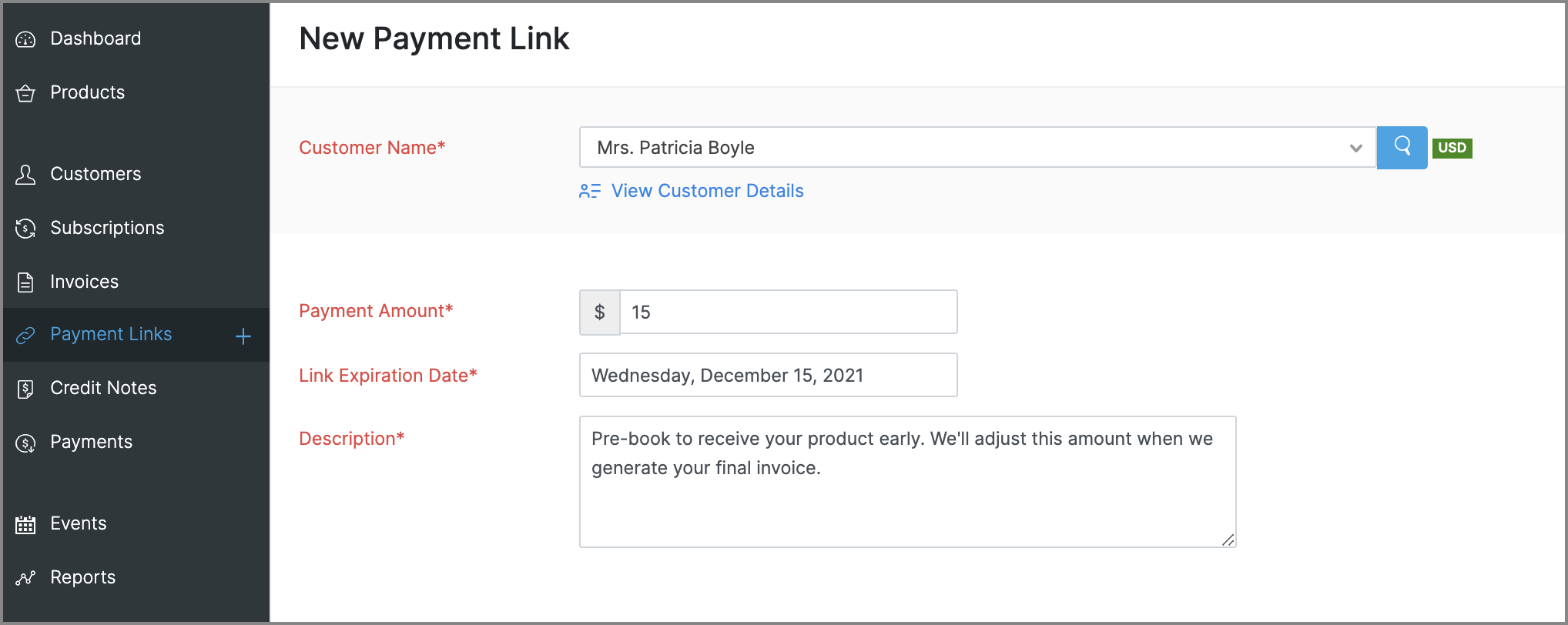
Payment Links for ad hoc payments
This is a new feature that will let you request and accept one-time payments from customers by sending them payment links, which they can use to make online payments to you. These payments can be for miscellaneous reasons that need not be related to any subscriptions, such as an advance payment or a convenience fee.
Enhancements to reports
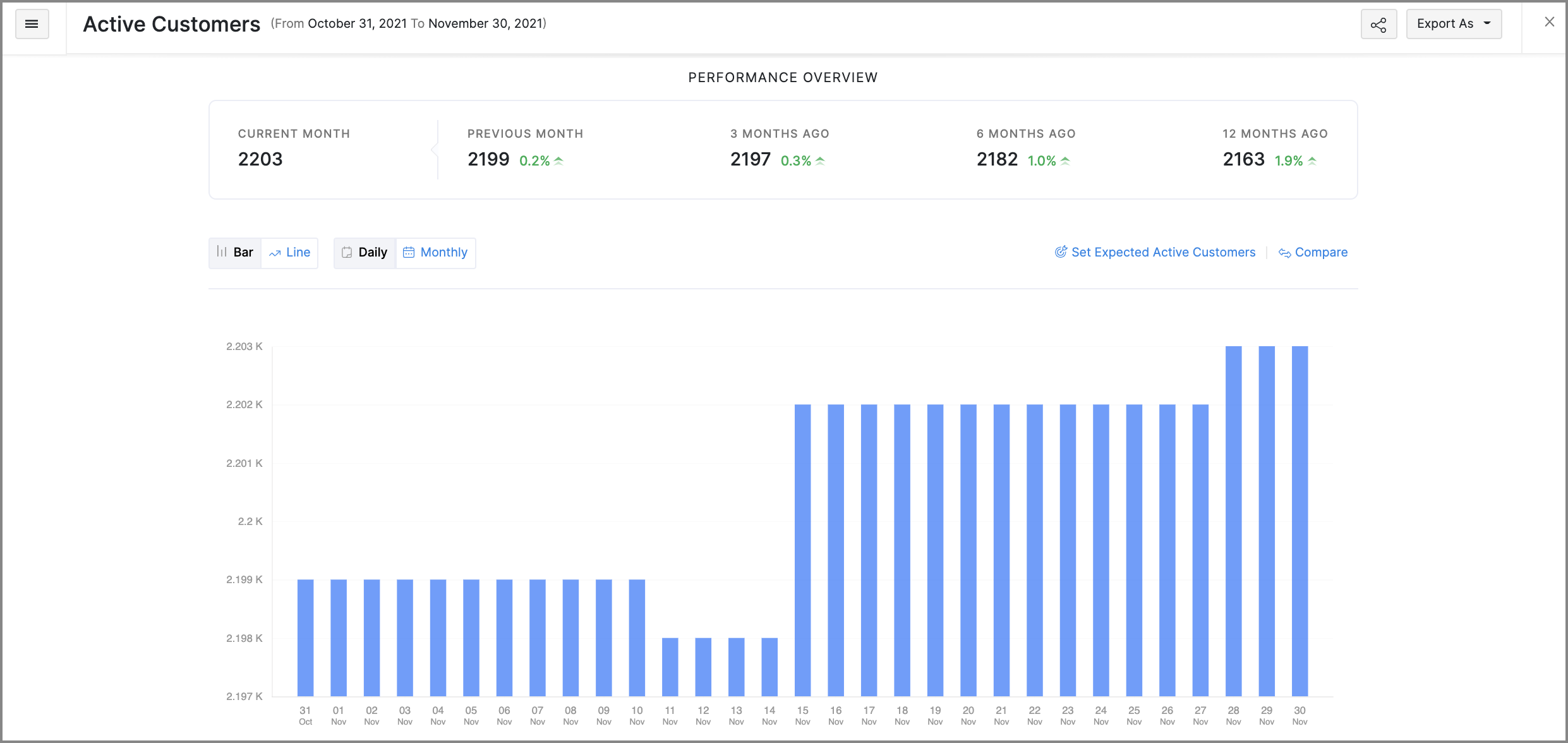
- Revamped UI: Most reports will get a slicker UI, that's more intuitive and puts commonly used customization features in places that are easier to access. Some reports will also get comparative percentage changes across different periods, along with the option to set expected figures as a benchmark. Here's a glimpse of what the new UI will look like:
- Favorites: Mark frequently visited reports as favorites to pin them at the top of the Reports module.
- Share reports: You can quickly share the reports that you've generated with other users and set the level of access they have for that report as well.
- Schedule reports: You can schedule some reports to be generated routinely and emailed to the recipients that you choose.
More control for emails
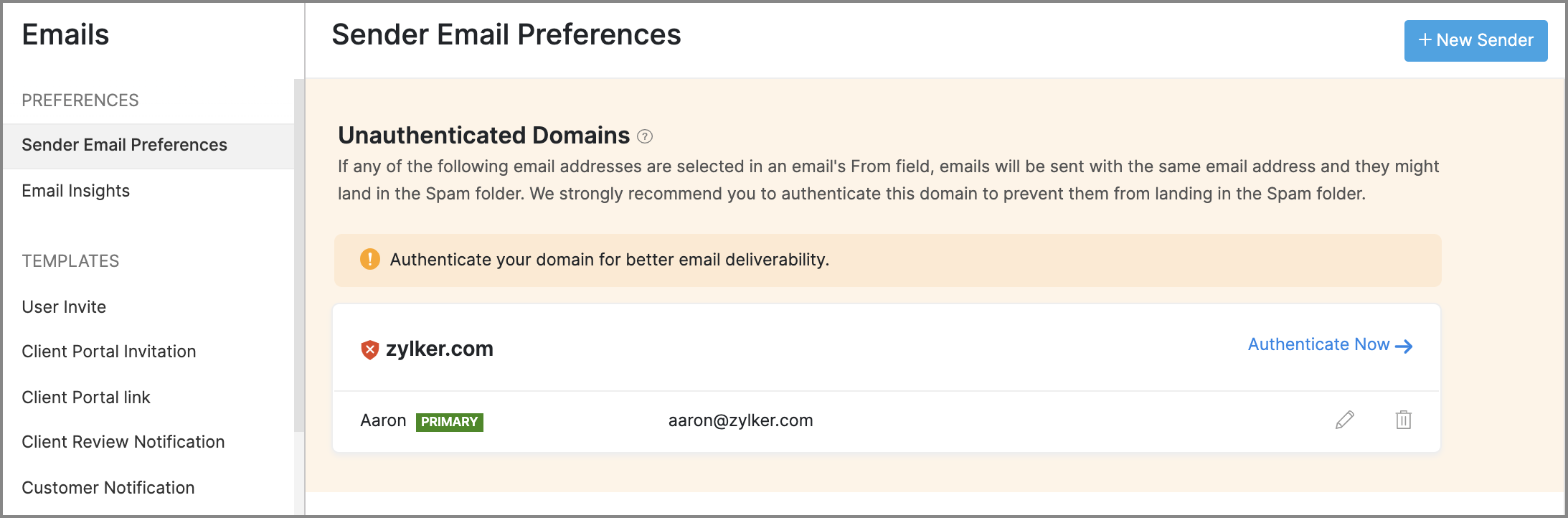
- Sender Email Preferences will allow you to manage the From address of emails that are sent from Zoho Subscriptions. It will also assist you in adding SPF and DKIM records for your domain, to prevent your emails from landing in a recipient's spam or trash folder.
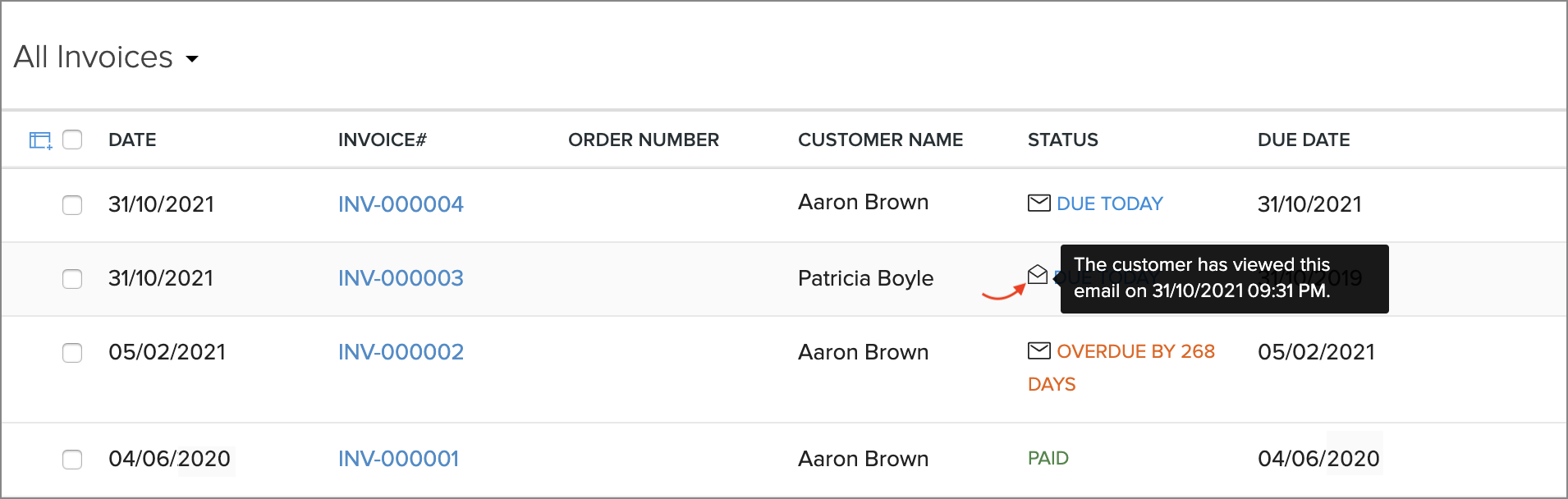
- Email Insights lets you keep track of the notification emails that have been sent to customers. You will be able to know if an email was opened, and exactly when it was opened, which can help in deciding when to initiate follow-up conversations with customers.
Revamped modules
The following modules will receive new features and improvements all-around:
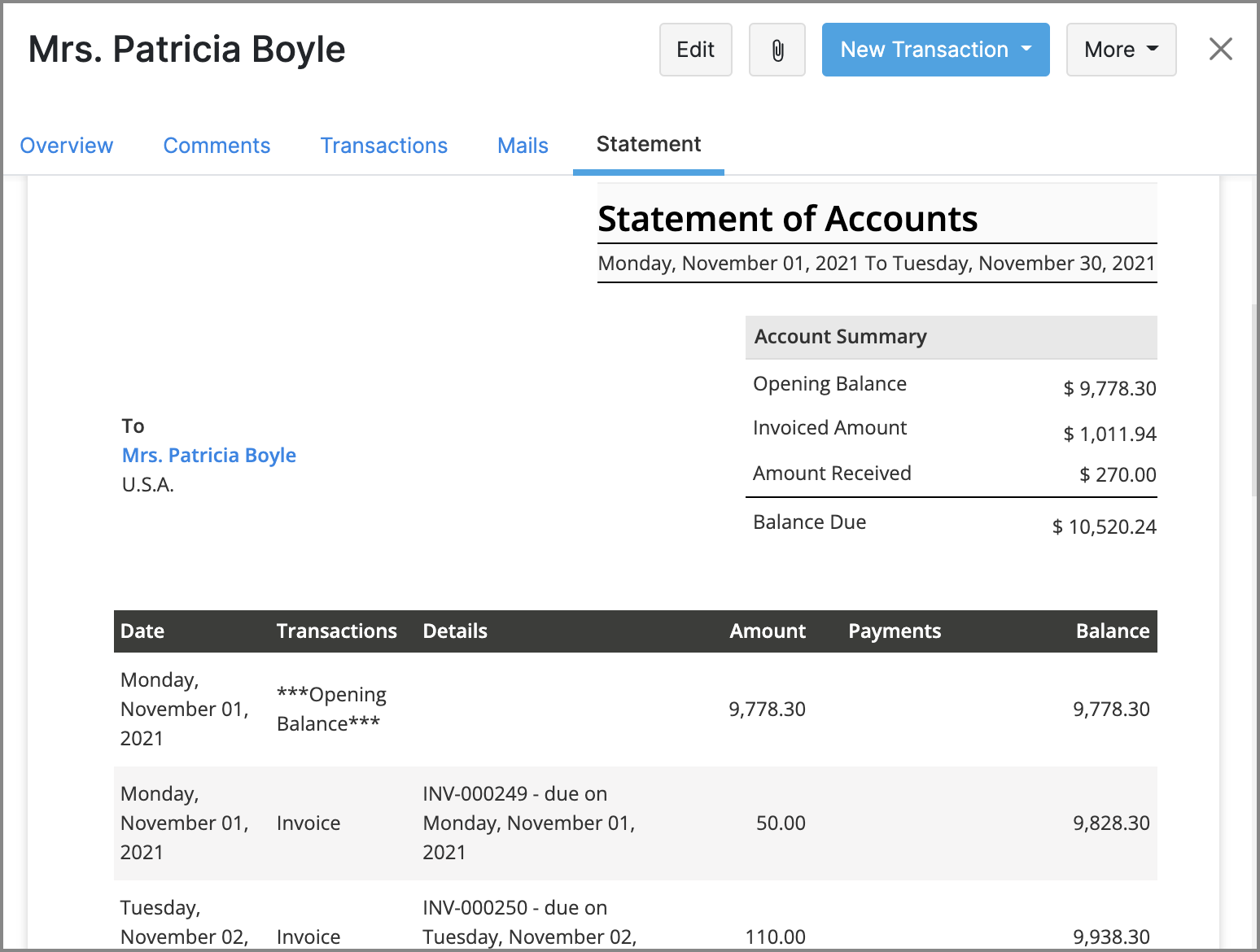
- Customers: You will be able to generate customer statements, send emails directly from Zoho Subscriptions, and find related transactions more easily with an improved Transactions tab.
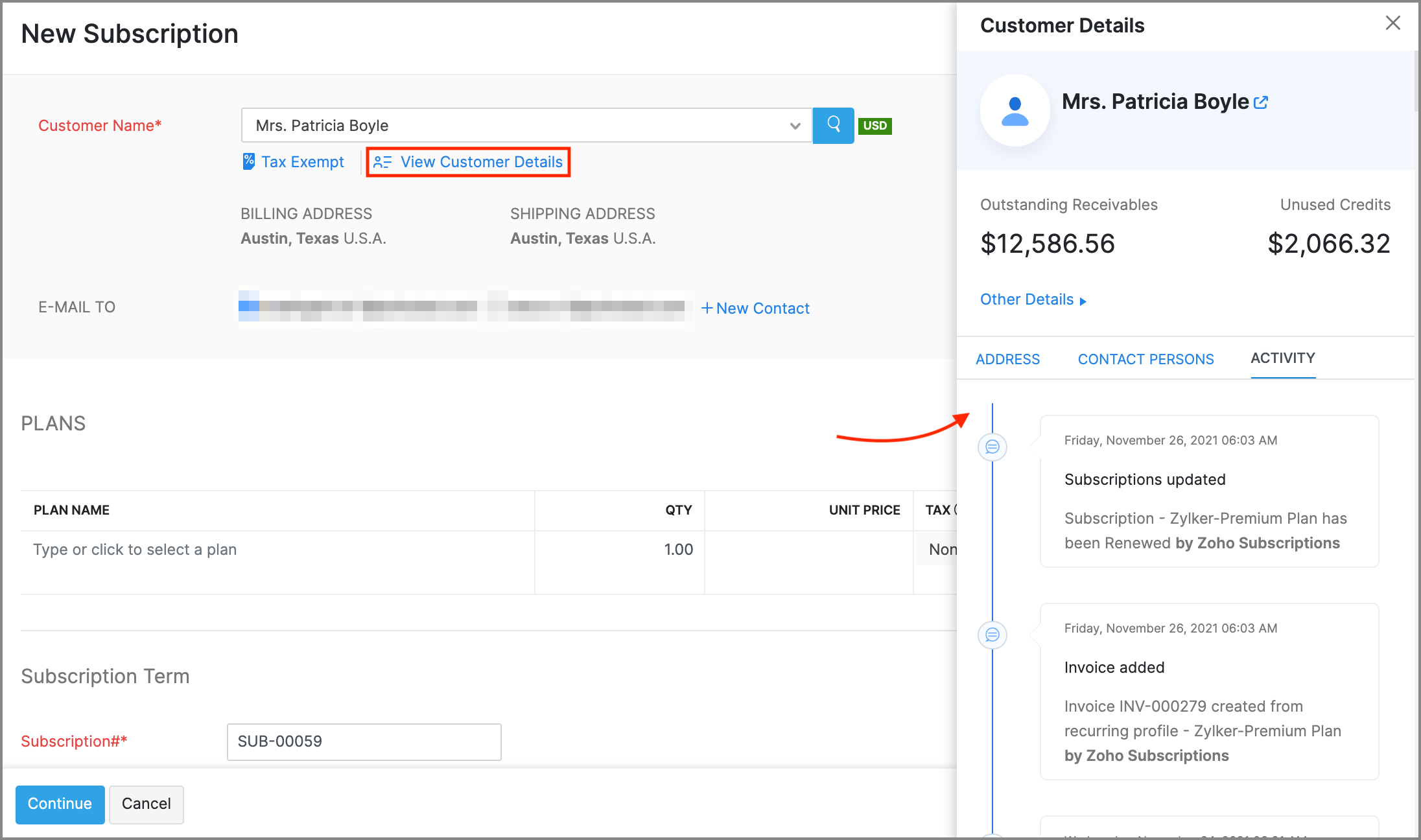
- Subscriptions: New features like creating customers on the fly, contextual customer details, and Advanced Search for customers will make it much faster to create new subscriptions.
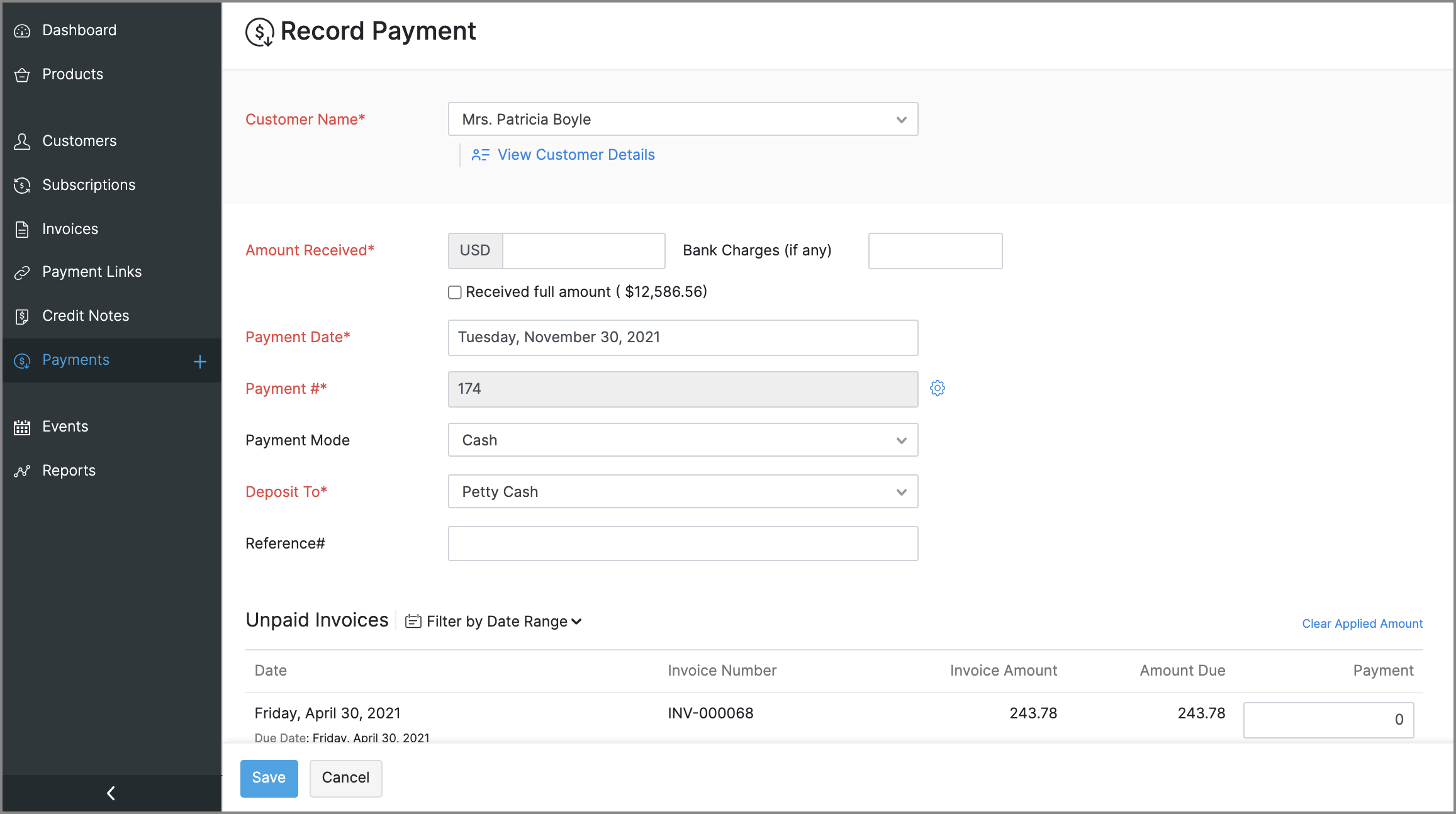
- Payments: The existing Transactions module will be renamed to Payments. You can use it to record or edit payments, view payment receipt PDFs, and perform an Advanced Search to find payments easily.
General usability improvements
Throughout the app, you will find changes that aid with usability and accessibility. Here are some that will be evidently visible:
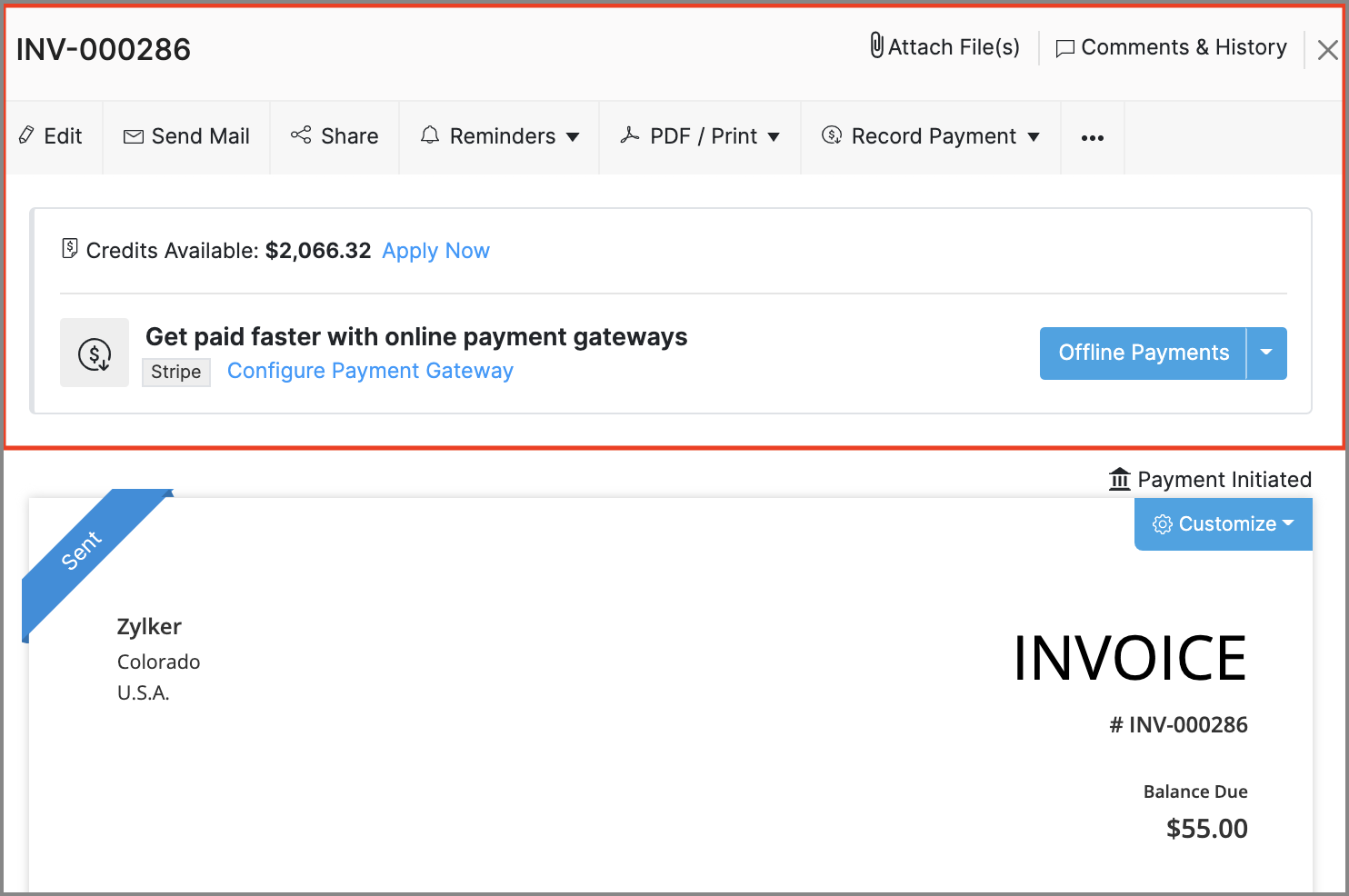
- Invoice Details: The action bar in the invoice details screen has been revamped. The new design adds text to previously standalone icons and also groups certain options to make them easier to find.
- Recent Activities: The recent activities dropdown, that's always present near the search bar will assist in navigation by listing any transactions or customers that have recently been updated, created or visited.
- Online Payments: The Online Payments section in Settings > Integrations, will be moved out to its own spot in Settings, and all the payment gateway integrations that are available will be grouped based on the type of payment methods that they support.
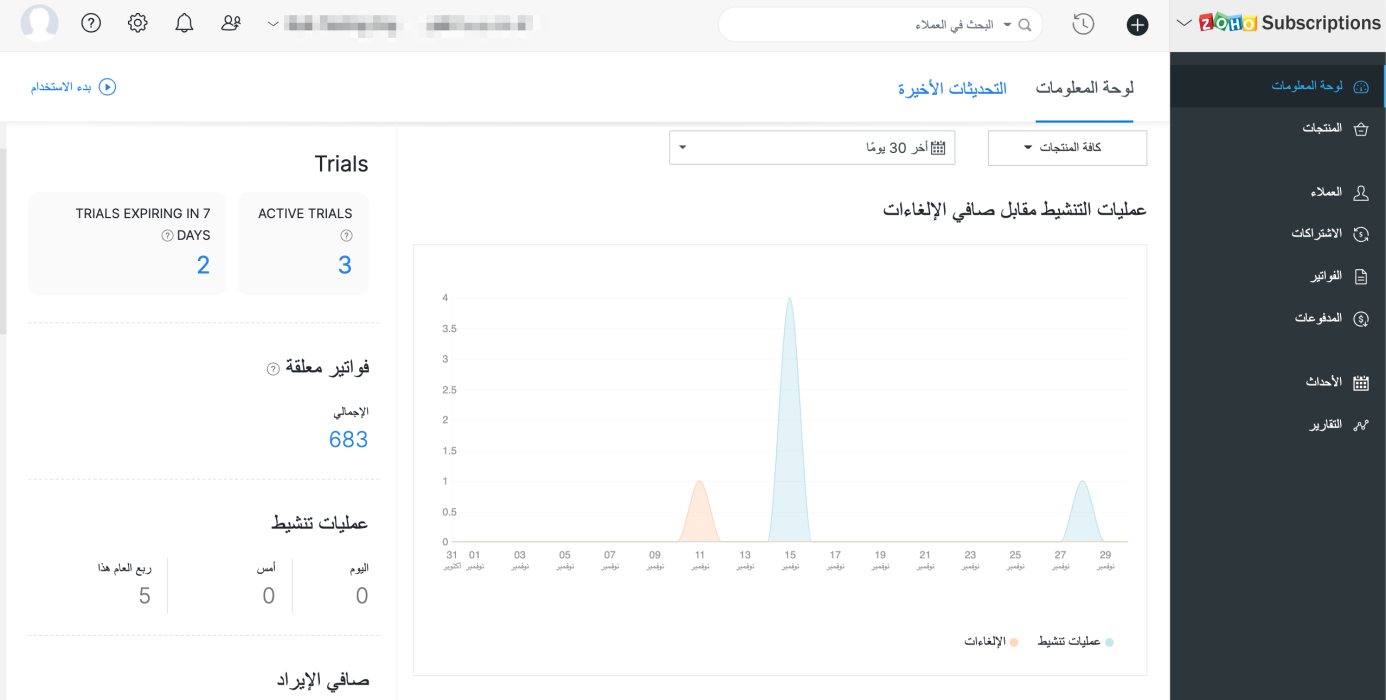
- Right-to-left interface: If your organization's language is set to Arabic, Zoho Subscriptions' entire interface, including navigation bars and other visual elements will be switched to a right-to-left style, so Arabic speakers will feel right at home.
New and improved settings
Apart from bolstering some existing modules with more preferences, there will also be new sections in Settings, to accommodate preferences for the newly added features.
Here's what will change in Settings:
- Users and Roles: You will be provided with an extensive range of configurations for how users can access reports.
- Templates: The existing Templates section will house templates for two new documents: Customer Statements & Payment Receipts. The template editor will also see improvements, such as the ability to add annexure content and adjust the width of individual rows in item tables.
- Reporting Tags: A new section to manage reporting tags will be added.
- Emails: The existing Email Notifications section will be renamed to Emails, and will direct towards Sender Email Preferences, Email Insights, and templates for email notifications.
The following changes will be made in Settings > Preferences.
- General: This is a new section that will contain common preferences, such as options for your organization's address format or PDF attachments in emails.
- Payments: The existing Payments section will be renamed to Payments Received, along with preferences fo custom fields and custom buttons.
- Delivery Notes & Packing Slips: These are two new sections, which will let you configure the layout and label names for delivery notes and packing slips.
- Users: This is a new section which will allow you to configure custom fields for the users of your organization.
These are some of the major features and improvements that will be available in Zoho Subscriptions. We'll reveal a full list of the new features and shed more light on the ones mentioned above soon.
We'll release these features in the weeks that follow. We can't wait for you to try them out! You can also write to us at support@zohosubscriptions.com if you'd like early access to these features. Your feedback is valuable to us, so make sure to let us know what you think about these updates in the comments below!
Best regards,
The Zoho Subscriptions Team
Topic Participants
Varun Steven
OfficeServ Accounts
Jim Kubicek
Trey Shadwick
pmc
Sticky Posts
What's New in Zoho Billing - February 2024
Hello everyone, We are excited to share the first set of updates for Zoho Billing in 2024. Read along to know more about a wide range of updates, from the Aging Summary in customer statements to Apple Pay support in Stripe. One-Time Invoice with PlansZoho Finance Workshop 2023 is coming to the USA. Get exclusive training on Zoho Finance apps, one-on-ones, and more.
Hello all, We'd like to invite you to our biggest Zoho Finance workshop in the United States. After a brief break, we are excited to be back. This year, we're bringing together our customers and community members for two days of curated hands-on sessions,Zoho Subscriptions wins IDC's 2020 SaaS CSAT Award for Subscription Billing
Dear customers, We're excited to share that Zoho Subscriptions has won IDC's 2020 SaaS Customer Satisfaction Award! As a team, we cherish each and every milestone with our customer community. And this particular award, focusing on customer satisfaction,Introducing: SMS notifications via Zoho Subscriptions
Dear customers, We hope you are doing well! We are happy to announce that you can now send SMS notifications to your customers right from Zoho Subscriptions. To facilitate this, we've integrated with Twilio, a leader in the business communication space.What's new this December in Zoho Subscriptions
The year is almost over and we here at Zoho Subscriptions have released new features and updates on the month of November. Let's take a look at the features we have worked on in the past month. Zendesk Integration The Zoho Subscriptions app for Zendesk allows your customer support executive to access customer details in an instant. You will be able to view the customer information from Zoho Subscriptions right from your ticket view. On enabling the integration, you will be able to: Get your customer
Recent Topics
Locked Notebook
Hi, I hadn't used my Notebook in some time and was refamiliarizing myself with it. I clicked a lock icon and now I can't unlock. When I hit the information or unlock icons I'm taken to a page with the notebook icon and a keyboard. When I type, nothingHide fields only for creation
Hello, I'd like to hide some fields only during the creation of a contact in Zoho CRM. In fact I have some fields that are automatically calculated thanks to an automation, so when my users create a contact I don't want them to fill those fields. I knowIssues with Zoho Sheet in Mac
I have downloaded the Zoho App from App Store but It is failing to Save As, Open & Download Operations. App StoreWeekly Sales Summary
Is it possible to generate a weekly report in Zoho Books to show -$$ amount of estimates generated -# of estimates generated by Salesperson -$$ amount of Sales Orders created -$$ amount of Invoices generatedOpenAPI Specs are just plain wrong
The provided yml files for generating the OpenAPI specs are absolutely riddled with errors and inconsistencies. From missing fields on the objects, to just incorrectly named resource objects. I'm having to go through and manually changing the spec toAdd Account column to Invoice screen
Please show the account column on Invoice creation screen. It is an unnecessary step to have to click add additional info and then select the account for line item. Example : on the bill creation screen when entering description we can easily code it against an account. On the invoice screen it requires additional click. Adding the column on the Invoice screen will make it faster to enter transactions. We currently have 5-6 different accounts that we code line items against, You can imagine the extraCustom Footer – Zoho Writer Document
Hello everyone, I’m having an issue adding a custom footer in a Zoho Writer document. I would like to insert my company information (including a logo + address) in the footer. The problem is that when I add these elements, the main content of my pagesReport grouping
I have added a grouping in a report but it is not working how i had expected. I wanted to group a summary on a field named Size but when i add the grouping the report is still showing me each record and making a summary at the bottom of the report. WhatSocial Media Simplified with Zoho Social: Preview your Instagram grid before posting
For a platform like Instagram that relies on visual appeal, it's important that you plan your image and video content in a way that holds your audience's attention. Planning your grid ahead of time gives you the benefit of understanding how your postsError code 1000
Can you please tell me why the following, occasionally causes this error via the api, not every time ?... zoho.books.updateRecord("salesorders",organizationID,salesorderID,{"template_id":"#################069","custom_fields":[{"label":"DelDate","value":"Tuesday,VAT rates - exempt and out of scope
Good Evening, UK based company here. I am a bit confused in respect of setting up VAT rates for exempt goods and services; at present I am simply leaving the VAT rate blank in the transactions in order to prevent any VAT appearing in the VAT return. WhenHow to loop through Multiple Upload and Display Actual File Name
I have been reading the help on the File Upload Control and reviewed the Deluge help on files and I can not figure out how to loop through the uploaded files and do anything but get the automatically created file names. The code below will run but eachabou arattai
I want to use the Arattai app for business purposes, so please convert my account to a business account.I have my own invoice app, and I want to link it with the Arattai app for direct messaging.Configurable Zoho Cliq Notifications for Zoho People Alerts
Hello Zoho People Product Team, Greetings and hope you are doing well. We would like to request an enhancement to Zoho People notifications, enabling a native delivery via Zoho Cliq with admin-level control, similar to the notification settings availableLooking back at Zoho Calendar in 2025
Hello Zoho Calendar Community, As we step into a brand-new year, we’d like to take a moment to thank you for being an active and valued part of the Zoho Calendar community. Your trust, feedback, and continued engagement motivate us to keep evolving andThere was an error while connecting to GSTN
I am trying to file GSTR1. Everything flows smoothly until I reach the final step of filing the return. After I enter the PAN and OTP for filing it raises the error "There was an error while connecting to GSTN"Zoho Books Extension: What Happens If Custom Fields Already Exist?
When developing Zoho Books extensions, what happens if the target Zoho Books organization already has a custom field with the same API name as one defined in the extension? I’m asking because we originally created an on-Books version of this functionality,Internal Server Error (500) When Attempting to View Banking Transactions
I am experiencing an Internal Server Error (500) when attempting to view transactions across all of my banking accounts. Despite multiple attempts to resolve this, I have received little more than runaround from support, and the issue remains unresolved.How do I add a blank line to the Organisation Address Format?
I'd like to have my VAT number, for example, shown prominently by having a clear gap between it and the address block above, but any blank lines in the address format get ignored in PDF outputs.Automatic Invoice Number generation for createRecord
Hello, while testing some custom Buttons in my Zoho Books application, I noticed that I get an error that previously did not occur. After some further digging I found that the automatic transaction numbering of invoices no longer work in my organization.Adding number of days to an estimate.
I need both QTY of item and "number of days hire" in my estimates at the line item level. Any clues as to how this is done would be greatly appreciated. It needs to calculate. Thanks JBooks Api: listing expenses created after certain dates
Is there any parameter I can add to the List Expenses endpoint that will let me look up expenses by when they were created?Why can't we change the Account type from an Expense to an Asset?
Like the question. Why in QuickBooks for example if I mistakenly created an account as an expenses and I already captured information in those accounts, I can just change the account type from expense to assetIs it possible to do validation for the Actions added to Reports?
We have an all-around On Validate function that checks all the possibilities before the Created/Edited form submissions. We want to have a button in the report view, so we can change records without entering. We are able to add this button, and it does[Free Webinar] Environments in Zoho Creator - Creator Tech Connect
Hello Everyone, We’re delighted to kick off the 2026 edition of the Zoho Creator Tech Connect Series and are excited to continue this learning journey with you. The Creator Tech Connect series is a free monthly webinar featuring deep-dive technical sessionsZoho Voice API SMS
I made a post request in Zapier to try to send an SMS. Authentication appears to be configured correctly. I followed the documentation and I'm getting a 400 Error "Internal Server Error". Not helpful at all. Anyways, I could not find any information onHow do I change (error) display messages
Hi! I would like to edit display messages like "invalid entries" and "enter a value for Nome" and so on into Italian language messages. How can I do that? Already tried on Validate on form submit. Where I am failing? Thanks in advance.Record Overseas Transactions Along with CC charges
Hi All, We receive payments via stripe in multiple currencies and stripe takes around 2.5% fees. The amount is settled in INR into our local bank. What should be the currency of the income account used for Stripe payments? Here is a sample flow that weEasier onboarding for new users with stage descriptions
Greetings, I hope all of you are doing well. We're happy to announce a recent enhancement we've made to Bigin. You can now add descriptions to the stages in your pipeline. Previously, when creating a pipeline, you could only add stages. With this update,Pieds de page personnalisé - Document Zoho Writer
Bonjour à tous, Je rencontre un souci avec l’ajout d’un pied de page personnalisé dans un document Zoho Writer. Je souhaite insérer les informations de mon entreprise (notamment un logo + adresse) dans le pied de page. Le problème, c’est que lorsque j’ajouteCredit card transactions are backwards after importing statements
I am new to Zoho Books so I'm importing my firm's bank and credit card statements in. My credit card statements have a single column with negative numbers so that is the option I chose. But when I went to categorize the credit card transactions, I canPermissions on Views
Having the option of any agent creating custom views is firing back and got a situation where there are a hundred different views across the team and tickets are not being dealt in the most efficient of ways. Tickets seems to be missed by some agents,Function #8: Add additional charges to invoices
Here goes one of the highly sought-after custom functions in Zoho Books. If you find yourself needing to apply additional charges to customers on their invoices (say credit card surcharges, or fuel charges applicable to customers from a certain region,VIsual maindmaps in Zoho notebook Ai
Can I create and export VIsual maindmaps in Zoho notebook Ai1stDibs Integration to Zoho Inventory
Hello is it possible to integrate my Zoho inventory and 1stDibs?Community Question: Renewal vs Invoicing
This is a question for the community. Does anyone else consider there to be a difference between a subscription renewal event and sending out a recurring invoice for a subscription? For example, let's say customer XYZ purchases a 1-year subscription tocloud console support for music websites
Hi Friends, I am not from a very technical background.. So need support from the Zoho family. I want to build a e-commerce website which is in Musical Niche. It will help people learn music & play instruments of all types. There are a few players in the market like Chordify , Guitaa, Guitar Dashboard, ChordU & few others. But I all these websites allow only a few instruments to play. So I want to build a better website than the one I mentioned. So wnated to know what UI & AI should I use so thatScheduled Reports - Do not send empty report
Hello, We are intensively using reports in the CRM, especially for sales managers. When data is empty, they still receive an email. Can you add an option to avoid sending the report when data is empty?Is Zoho One Desktop more secure than Zoho One Web SaaS?
Is Zoho One Desktop more secure than using Zoho One in browser? Inherently, it seems desktop would be unless you don't do things like share your pw or leave pc on. I am concerned about data being on the cloud or someone else's server and database.Reminder Settings - Time Tracker
On the time tracker in Reminder Settings I created a reminder according to the Zoho manual. But a manager asked me to change the message that goes in the email. Is it possible to change the message? I didn't find that in the Zoho manual. Another question: I configured to receive the reminder everyone who logged in less than 40 hours. Does Zoho consider less than 40 hours of the current week or the whole month? Another situation, I put it so that I and another specific user would receive the notification,Next Page