What’s New in Zoho Expense: August - October 2024
Hello users,
We are thrilled to share some exciting product updates and enhancements in Zoho Expense that will help you streamline and improve your travel and expense management experience. Our latest additions include the ability for users to view their budgets, petty cash management, a feature to track your rides automatically from the mobile apps, a new edition of Zoho Expense, and much more. Let's dive in to explore all the updates!
User Budgets in My View
Users can now view their budgets from the Budgets tab in My Settings. By default, the current fiscal year's budget will be displayed. However, users can also view their previous years' budgets by selecting the desired year from the Budget Period filter. The Budgets tab will be available to all users with default roles. Users in custom roles can access their budgets when admins configure the necessary permissions for them to view their budgets.

 Note: Only the particular user's budget will be displayed here, not the organization's budget.
Petty Cash Management
Petty cash management, commonly referred to as the imprest system, involves overseeing and controlling a small fund of cash set aside by a business to cover minor, everyday expenses, typically for branch operations. We've added the Petty Cash Accounts module in Zoho Expense to help businesses manage their petty cash.
In the Admin View, users can view all pending funds and unsubmitted expenses. Admins can also perform actions such as creating funds and fund withdrawals, as well as activating or deactivating petty cash accounts. In My View, users can perform actions such as creating expenses, requesting funds, and generating reports.
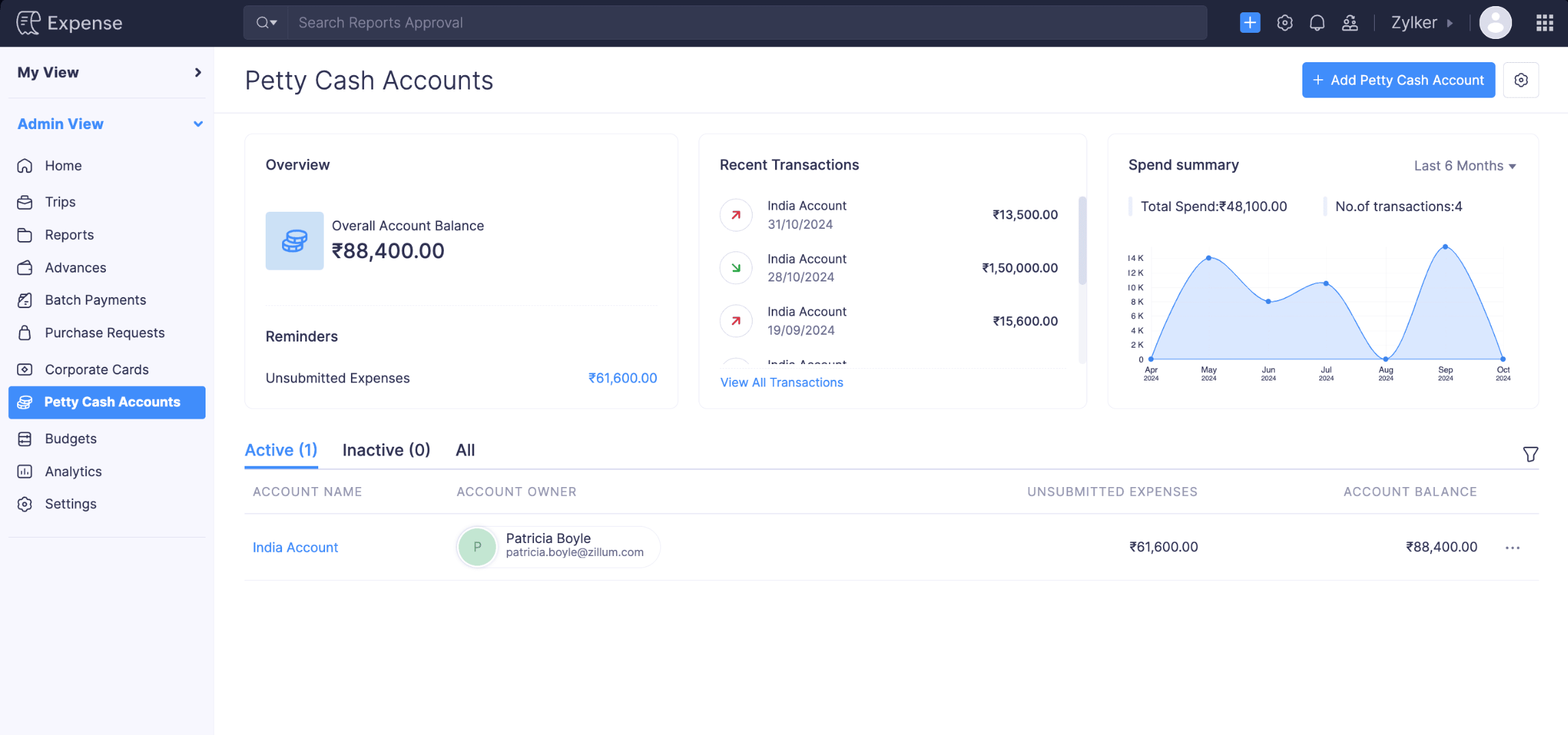 Note: This feature is currently available for early access. Write to us at support@zohoexpense.com to enable it for your organization.
Audit Trail Backup [India Edition]
We’ve introduced the Audit Trail Backup feature, allowing users to back up their audit trails. Users can export the data in ZIP format, which they can download on the same page or from an email sent to them once the backup is completed.
To back up your audit trial, go to Admin View > Settings > Data Administration > Backups > Audit Trial Backup > Backup Your Audit Trial.

SBI Bank Integration [India Edition]
Integrate Zoho Expense with SBI Bank to reimburse your employees' expense reports directly from Zoho Expense. For an employee to receive reimbursements, you need to add their bank account through which they'll receive the reimbursement.
To reimburse your employees' expenses, go to Admin View > Reports > Awaiting Reimbursement > Select the report to be reimbursed > Reimburse > Via SBI.
 Note: This feature is currently available for early access. Write to us at support@zohoexpense.com to enable it for your organization.
Traveler Details Under Trips
We've included the traveler's information on the Details page of trips in Admin View. This allows admins to access all traveler information in one place while booking itineraries, including their travel profile, travel documents, and loyalty programs.

Introducing the South Africa Edition of Zoho Expense
We're expanding Zoho Expense's presence in the MEA region with the VAT-ready South Africa edition of Zoho Expense.
Businesses in South Africa can use the Zoho Expense South Africa edition to configure VAT, which allows users to associate VAT with expenses recorded in Zoho Expense. Once you record expenses, you can gain insights into your taxable expenses by generating a tax report.

Automatic Mileage Tracking
We are thrilled to announce a major update to our mobile apps that will make tracking your rides easier than ever! With our new Automatic Mileage Tracking feature, tracking your rides happens seamlessly in the background, saving you time and effort!
How it works:
- Enable Automatic Mileage Tracking: Turn on Automatic Mileage Tracking in your app under the Mileage Log Preferences in My Settings.
- Permissions: Grant the necessary permissions.
- Set Ride Classification Rules: Set your usual work hours in the app, and your rides during this period will be added as unexpensed rides which you can convert to an expense later. The rides tracked outside your work schedule will be automatically excluded.
- Manage Mileage Logs: Use the Mileage Logs module to view all your mileage logs with the ability to search, filter, and convert them to expenses.
- Track and Review: Drive as usual, and the app will automatically capture and record your rides. You can merge multiple rides to a single expense and exclude rides which do not need to be expensed.
Note:
- This feature is available only in the Zoho Expense iOS and Android apps.
- This feature is currently available for early access. Write to us at support@zohoexpense.com to enable it for your organization.
Assets and liabilities in Budgets
We’ve added two new groups, Assets and Liabilities, in the Budgets module of Zoho Expense. This enhancement enables you to create and manage budgets specifically for your assets and liabilities, giving you greater control and visibility over your financial planning.
Note: For organizations integrated with Zoho Books or other accounting software, assets and liability accounts retrieved will be listed under the Categories module.
Real-Time Feeds [Canada Edition]
We've now introduced Real-Time Feeds for the Canada edition of Zoho Expense. Real-time feeds are card transactions that are received directly from card networks without relying on the bank, as soon as transactions occur. Read our help document on Real-Time Feeds to learn more.
Note: Currently, Real-Time Feeds is supported only for users using the Canada edition of Zoho Expense using Mastercards issued in the Canada region.Other Updates and Enhancements
- We've added a new filter in the Advanced Search feature for users. Admins can now easily identify users who have added their bank account information and those who have not. This new filter will help admins ensure all users have provided bank account information to receive reimbursements.
- Updates for the Zoho CRM Integration in Zoho Expense:
- We've introduced new preferences for duplicate contact persons in Zoho CRM. You can Overwrite or Skip duplicates.
- We've included a new field, Potential, on the Bulk Add Expenses page and the Bulk Field Update pop-up. Potentials are prospective business opportunities or deals identified with your customers, representing the possibility of converting leads into customers and including details about the estimated deal value and stage of conversion in the sales process.
- We've provided an option to display terms and conditions in the advance creation page. This enables admins to communicate the organization's terms and conditions to all employees, ensuring they are informed when requesting advance requests.
- We now support the option to include car rental loyalty programs in addition to frequent flyer and hotel loyalty programs. To include car rental loyalty program details, go to My View > My Settings > Travel Details > Loyalty Programs > Add New Program > Car Rental Loyalty Program.
- We’ve introduced filters in Notifications to help users easily find specific types of notifications. Unread will be the default filter to help users focus on notifications they haven’t viewed yet. You can also view All and Mentioned notifications.
- Users can now store details of their emergency contacts in case they encounter any emergency during trips. Users can add up to two emergency contacts, which will be synced with online booking tools like GetThere. To add an emergency contact, go to My View > My Settings > Travel Details > Emergency Contacts > + Add Emergency Contact.
That's a wrap for now! We hope you found these updates useful. If you have any inquiries or feature requests, please write to us at support@zohoexpense.com.
Until the next update!
Cheers,
The Zoho Expense Team
Topic Participants
Jessica Sharon W
Recent Topics
Zoho Forms - Improve the CRM integration field to query data from more than one module
Hi Forms team, Something I get stuck on regularly is pre-populating a form with data when that data is spread across 2 or 3 modules. For example Contacts, Accounts and Deals. I don't want to duplicate the information in CRM so I end up writing a functiondesbloquear cuenta
Buenos dias Cordial saludo Tengo una cuenta libre en zoho mail asociado a un dominio, pero uno de los usuarios se bloquea el correo porque dice que ha excedido el límite de correo, por favor podrian desbloquearla y como hago para que esta persona debe enviar sus correos sin ningun probleama. Gracias de antemanoNot Receiving Incoming Mail
I can send emails from my account but I do not receive any. I originally set up forwarding and it worked for a while and then stopped. I turned off forwarding and now do not receive any emails. Could you please check what is causing this issue? Thank youMaking preview pane "stick"
Hello, Is it possible to fix/dock the preview pane so that it's always there? The modern monitors are all very wide so there's plenty of space horizontally. Having the preview pane disappearing and appearing again when you click on an email message inReason:554 5.1.8 Email Outgoing Blocked
I have been struggling to set up my email address for some time now; it's difficult to locate what I need. Additionally, I cannot send or receive any emails. I keep receiving the "Reason: 554 5.1.8 Email Outgoing Blocked" error. There doesn't seem toTrouble Connecting Zoho Mail via IMAP in n8n – Need Help
Hi everyone 👋, I'm trying to connect my Zoho Mail account to n8n using the IMAP Email Trigger node, but I'm facing issues getting it to work fully. ✅ Here's what I’ve done so far: ✅ IMAP access is enabled in my Zoho Mail settings ✅ I’m using the correctUnable to send message; Reason:554 5.1.8 Email Outgoing Blocked
Hi, I sent few emails and got this: Unable to send message; Reason:554 5.1.8 Email Outgoing Blocked And now I have few days since I cant send any email. Is there something wrong I did? Also can someone fix this pleaseChanges to the send mail Deluge task in Zoho CRM
Hello everyone, At Zoho, we continuously enhance our security measures to ensure a safer experience for all users. As part of our ongoing security enhancements, we're making an important update on using the send mail Deluge task in Zoho CRM. What's changing?Page Rules in Forms
🚀 Dynamic Page Navigation Implementation I successfully implemented dynamic page navigation based on a user's radio button selection. The goal was to direct users to a specific, corresponding page while ensuring they only interact with the flow determinedCancellation of written-off invoice
Hi, Can I know when we cancel the write off (write back), in which FY, the reversal is recorded. It doesn't ask as to when the write off should be cancelled to reflect!. It shouldn't reflect in the year in which the invoice was written off since the YearCreate Invoice automated with Package
Does anyone knows how to create an invoice from a SO when we have created the package? We do these manually. and validate that the product packed is the product invoiced (if the order is partially packed) Regards, JSI want to create a mailing list, NOT a group.
Can I create a mailing list in Zoho mail? I just want to be able to make a list of email addresses and give the list a name. Then when I type the list name, the list of email addresses will be automatically listed. When I create a group it sends an emailERROR CODE :554 - Your access to this mail system has been rejected due to poor reputation of a domain used in message transfer
This message was created automatically by mail delivery software. A message that you sent could not be delivered to one or more of its recipients. This is a permanent error. *****, ERROR CODE :554 - Your access to this mail system has been rejected dueno me llegan los correos a Zoho mail
No puedo recibir correos pero sí enviarlos, ya hice la modificación de MX y la verificación de teléfonos, qué es lo que ocurre? graciasGroup Calendar as Default for adding new events, etc?
Hi, I want to make the group calendar (that I created, if that makes a difference) the default for anything new I add to the calendar. How can I do that? thanks.Bookmark Loading is Buffering
Hi, i clicked on the bookmark tab, around yesterday and since then it's been constantly buffering and doesn't allow me to access the mail's i have tried login in and out but of no help also trying to share a screenshot of the issue around 232 kb size,Zoho Webinar custom registration fields into Zoho CRM
I am pushing webinar registrations into zoho crm as leads and this is working fine. I have added a few custom fields to my webinar registration and I wish for these fields values to get mapped into the resulting CRM lead record. I am not seeing anywhereGitLab Extension for Zoho Desk: Connecting support and development for faster resolutions
Hello everyone! We’re excited to introduce the GitLab Extension for Zoho Desk, an integration that bridges the gap between support and development teams. This allows tickets to be converted into actionable GitLab issues for faster resolutions, betterDownload Google Drive Shared Image/File Using Deluge – Complete Guide
Download Google Drive Shared Image/File Using Deluge – Complete Guide When working with Google Drive share links inside Deluge, many developers face a common challenge: 👉 How can we download a Google Drive file directly using Deluge? This article explainsHow to update Acuity appointment fields from Zoho Flow?
Hi, I need help with Zoho Flow → Acuity Scheduling integration. What I’m doing Appointment created in Acuity Zoho Flow creates a Zoho Calendar event I want to send the Zoho Calendar Event UID back into Acuity (into a custom form field) This is so thatNo horizontal scroll bar in reports
Hi support team, I created a pivot table report which contains many columns (in my application about 15). The problem is that there is no bottom scroll bar to display colums that does not fit within the browser page. I saw that it was possible to resize colums, but colums sizes are not saved within the session. So could you add scroll bar, and eventually make colums sizes stored in the user session ? Best regards,Zoho Map integration tasks have changed - you need to "Locate all instances of Zoho Map integration tasks in your Deluge scripts by searching for the v1 marker... before 16 January 2026"
Details of an issue specific to Zoho CRM + Deluge Functions (originally posted in this forum) can be found here: https://help.zoho.com/portal/en/community/topic/zoho-map-integration-tasks-have-changed-you-need-to-locate-all-instances-of-zoho-map-integration-tasks-in-your-deluge-scripts-by-searching-for-the-v1-markerfilter broke my data
I uploaded a file recently from Sheets and it has top 2 rows frozen, with table headers in second row and each one is filterable. somehow my first 2 columns became unfiltered and no matter what I do I cannot reapply the filter?? also didn't realize theyRequest to remove domain "greentechcoatings.vn" from previous Zoho account
Hello Zoho Support, I would like to register the domain "greentechcoatings.vn" in my new Zoho Mail account, but I receive the message "This domain is already associated with another account". Please remove the domain from any previous/unknown accountTrigger actions in third-party apps using Zoho Flow
Greetings, I hope you're all doing well. We're excited to share an enhancement to Bigin's workflow capabilities. Zoho Flow Actions are now available in Bigin, enabling you to automate tasks across third-party applications directly from your workflow andEnroll, Script, Win: Hackathon 2025!
Hello CRM Developers! Are you ready to create some magic with Client Script, Widgets and Functions in Zoho CRM? Let’s make Hackathon 2025 an unforgettable adventure! The Zoho Developer Community Hackathon 2025 is here, and it’s your time to shine! REGISTERZoho Help Desk - Not receiving emails
Hello… I am on your trial version of help desk… and I am having trouble getting emails from Zoho Help Desk to my MS Outlook Exchange Server… So when a customer sends ticket request I am not getting an email with a notification? I have read your articlesAlmost all Flows are being queued
A few days ago I saw one of my Flows status was Queued. This was the first time this had ever happened. Now, almost every Flow that triggers is Queued for at least a few minutes. If I re-trigger the Flow (which causes separate problems) they sometimesEmployment Contract / HRMS Documents - Zoho People
How do I create customized HR documents for disbursal from Zoho People ? Example, say offer letters ? appointment letters ? Memos ? We want to be able to preset these in one or ther other form and issue them to employees who are in Zoho People.Live webinar: Craft and deliver impactful slides with Show’s desktop apps
If you love the comfort of working on your desktop and want a setup that keeps you focused and uninterrupted, this session is made for you. We’re excited to invite you to our upcoming live webinar: "Craft and deliver impactful slides with Show's desktopEnhancements to Bigin's forms
Greetings, I hope all of you are doing well. We're happy to announce a few recent enhancements we've made to Bigin's forms. We'll go over each one in detail. Merge field support in auto-filled forms The auto-fill option in Bigin's forms lets you predefineTable dimensions
I try changing the dimensions of the table on my computer but it doesn't change. Do I have to be a premium member or does it only work on the app?Direct link to Record Summary
Hi everyone, In one of my reports, I have built a Record Summary template to display the details of one record. I would like to be able to link directly to this Record Summary once I submit a new record, without having to go to the list of records first and click on View. Is there a possibility to do so ? Should I use the URL by passing some parameters ? Thank you very much for your help ! GuillaumeAmendment effective date
Hi everyone, I noticed that the amendment effective date mentionned in my amendment is not right. Indeed, when a contract is amended several times, it states the previous amendment and their effective date. However, the effective date stated is alwaysShow both Vendor and Customers in contact statement
Dear Sir, some companies like us working with companies as Vendor and Customers too !!! it mean we send invoice and also receive bill from them , so we need our all amount in one place , but in contact statement , is separate it as Vendor and Customer,STOCK history in zohosheets
is it possible to get historical stock value using stock function in zoho sheets? i could not see from and to period in the helper document.Auto sync Photo storage
Hello I am new to Zoho Workdrive and was wondering if the is a way of automatically syncing photos on my Android phone to my workdrive as want to move away from Google? ThanksAgent password reset
Hi Zoho support, I would like to ask if there is a way the admin can reset a password of an agent? RegardsCan receive but not send messages in Zoho Mail
Hello! I was able to configure my email client successfully in that I can receive messages just fine. However, when I send messages out, they seem to go out fine (I don't receive any errors or anything), but the recipient does NOT receive those messages.Mail is sent twice!
Been using Zoho for a while now. Installed Zoho for someone else and some weird things are happening. Mails are being sent twice. He is using Thunderbird as an email client. I already read about email being duplicated in the sent folder. But in my caseNext Page