Zoho Creator | Introducing Augmented Reality
We're delighted to announce augmented reality (AR) in Zoho Creator! Now, you can set up your own immersive 3D experiences—combining a glimpse of the real world with computer-generated graphics. AR technology augments what you see, by superimposing digital data (3D models) on real-life objects, captured by your device camera. This real-time digital interaction provides better data visualization and enhances end-user experiences, providing you with exciting new business opportunities.
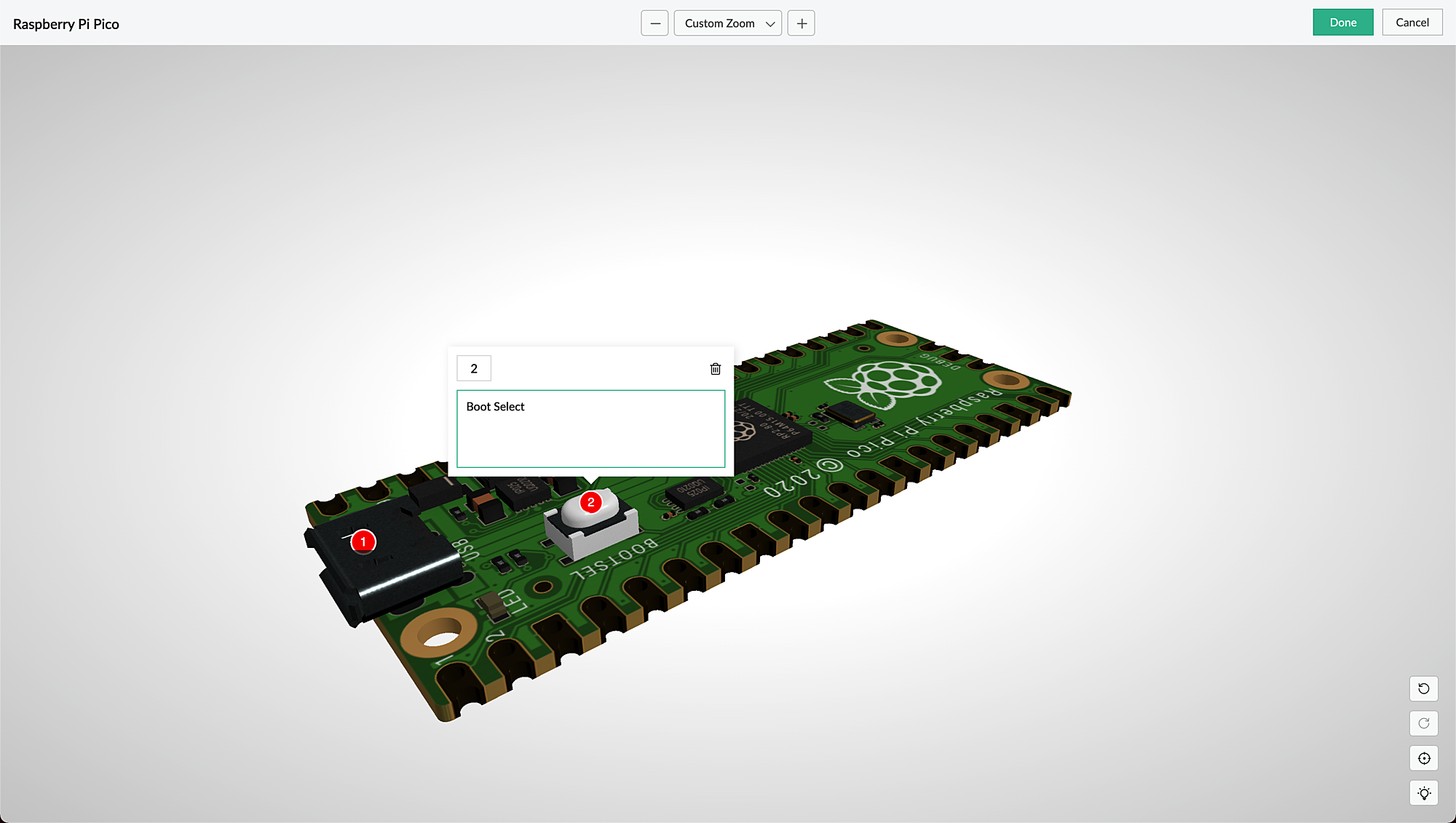
AR is seamlessly accessible via web browsers, smartphones, and tablets, which facilitates the growing interest in multi-experience development platforms (MXDPs). Using AR, your businesses can provide unique approaches to key business challenges in real-world applications.
AR can enhance user experience in many ways:
Organizations can use AR to promote their products or services and launch innovative marketing campaigns.
A rich feedback loop can be created using AR in product customization and quality, where users can select the defective products and also annotate the 3D models by describing the defects.
Users can try out different products virtually, check if a product fits well in their rooms (in the case of furniture products) by either partial or full replacement of the original view of a product with an augmented view of the same product, and make informed choices, all within the comfort of their homes.
AR types in Creator
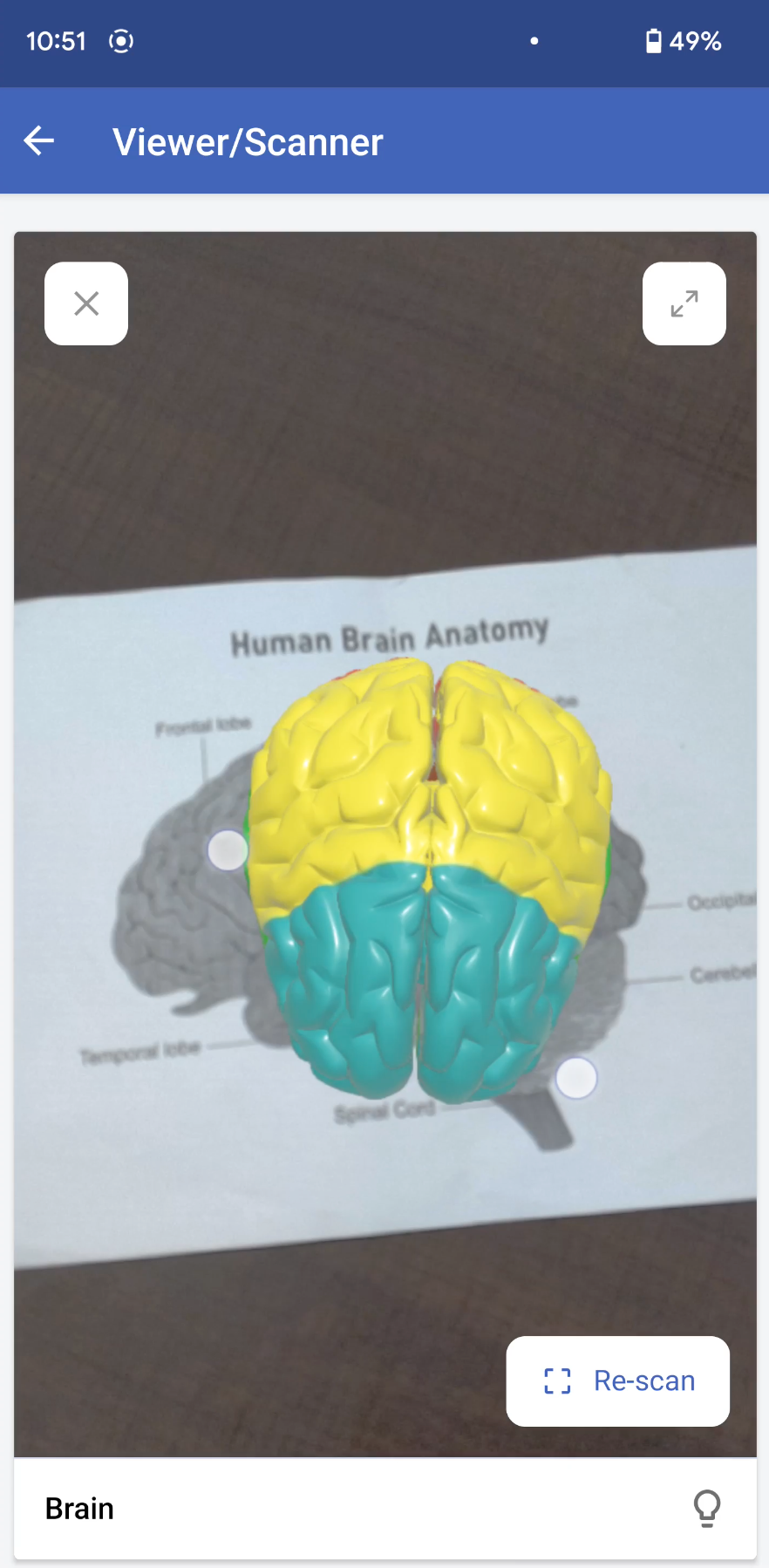
Marker-based AR: This AR-type relies on the recognition of images (referred to as markers). Markers are unique, visual patterns that your device cameras can easily recognize and process. For example, you can point your devices at markers such as scan codes or logos to seamlessly activate the AR experience. Marker-based AR works by scanning a marker, which triggers the content to be overlaid on the camera upon visuals matching the marker image For example, students can scan a diagram in their textbook and view its 3D model (projected on the diagram) through their digital devices.
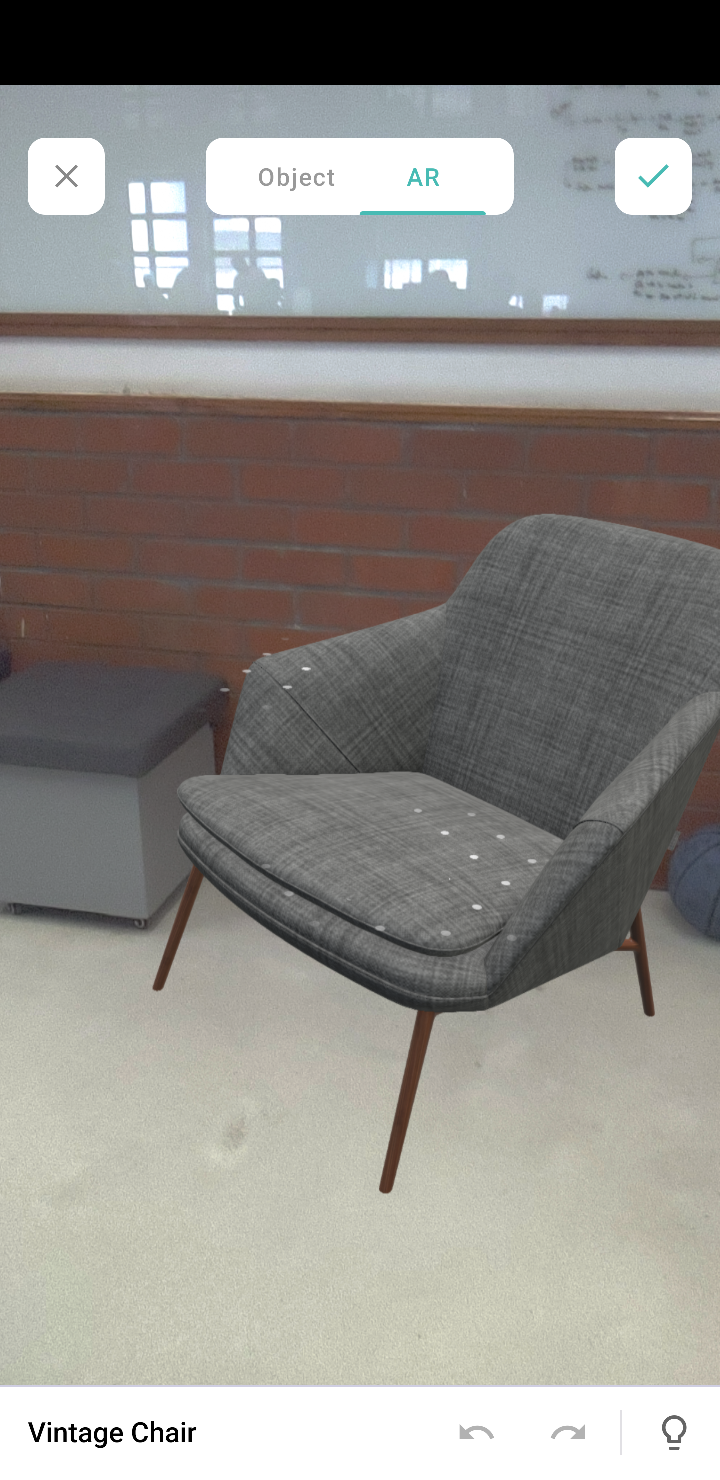
Markerless AR: This AR type does not use a marker. Instead, it allows you to scan the real environment and place digital elements on the recognized (flat) surface. This offers more control to users, as it allows them to choose where they would like to place the virtual object (including real-life placement of virtual augmented objects). For example, furniture companies can enable customers to virtually place their furniture in their homes to check if it would fit well.
In the markerless AR type, users can preview the models in the following two modes:
AR mode: This mode displays the 3D model as superimposed on its environment. Users can rotate/move their devices to view the plotted model.
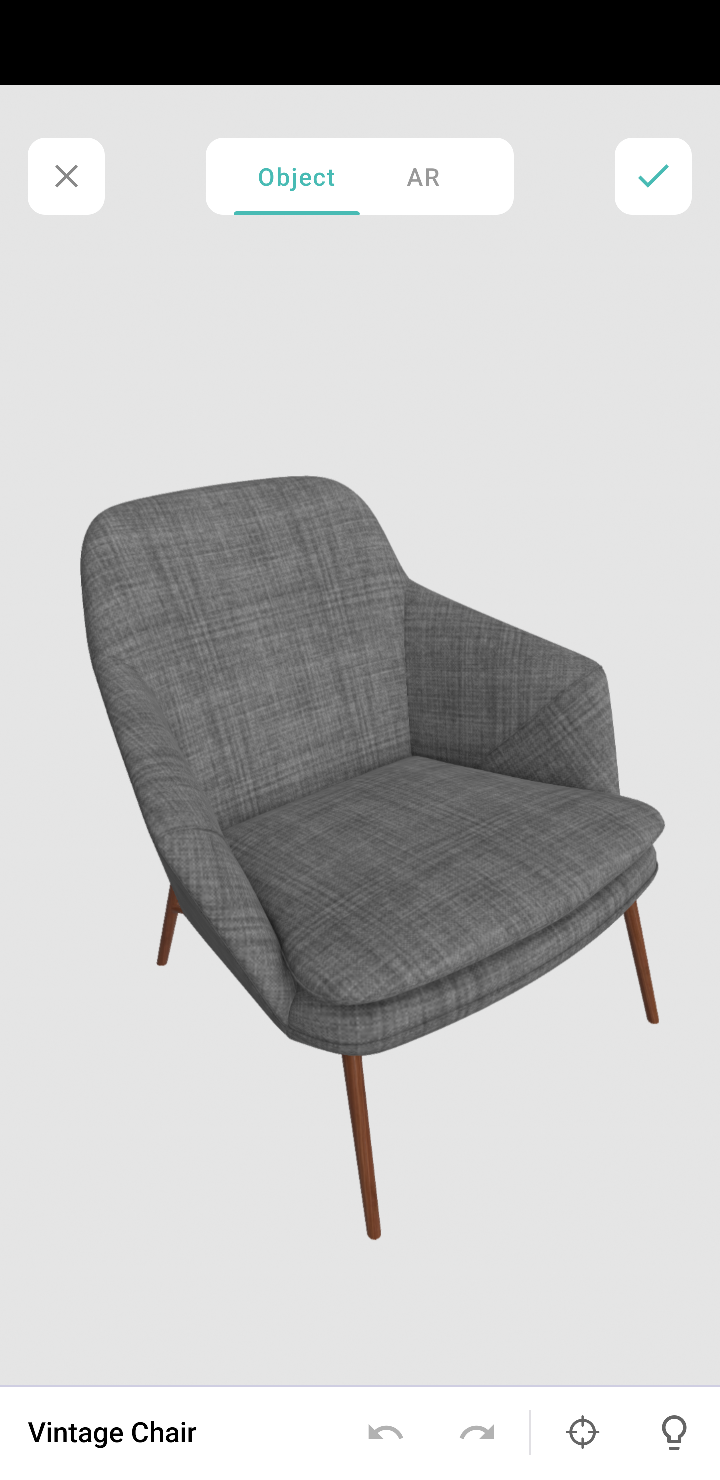
Object mode: This mode displays only the 3D model. It allows you to view the selected/scanned model in a 360˚ rotation. You can also zoom in and zoom out the model, as per your convenience.
Note: These modes are available in the AR field and AR viewer (only for markerless inputs).
AR in Creator
In Creator, AR has been introduced across three modules:
Microservices - AR Library
Form fields - AR field
Pages - AR Viewer
AR Library
AR library stores AR sets of all the apps in your Creator account. You can add and manage AR sets from here. An AR set consists of AR elements such as 3D models and their markers.
AR field
The AR field in a form displays the AR sets (3D models) from the AR library as a dropdown. You can add the AR sets in the AR Inputs field property. When you access your app in live, you can choose a model from either marker-based or markerless AR sets, and you can annotate it.
AR Viewer
The AR Viewer acts as an interface for your device's camera. This interface is used to invoke the camera (only in mobile) to scan a marker for your marker-based AR sets. In your app's page, you can configure the AR Viewer's input in two ways:
Marker-based AR Sets: To scan the marker and plot the respective 3D model.
Passing the 3D model's name through page parameters to load a 3D model directly.
Illustration
1. Imagine you've created an app named Zylker Jewelry. The following flowchart shows how AR is used across this app.
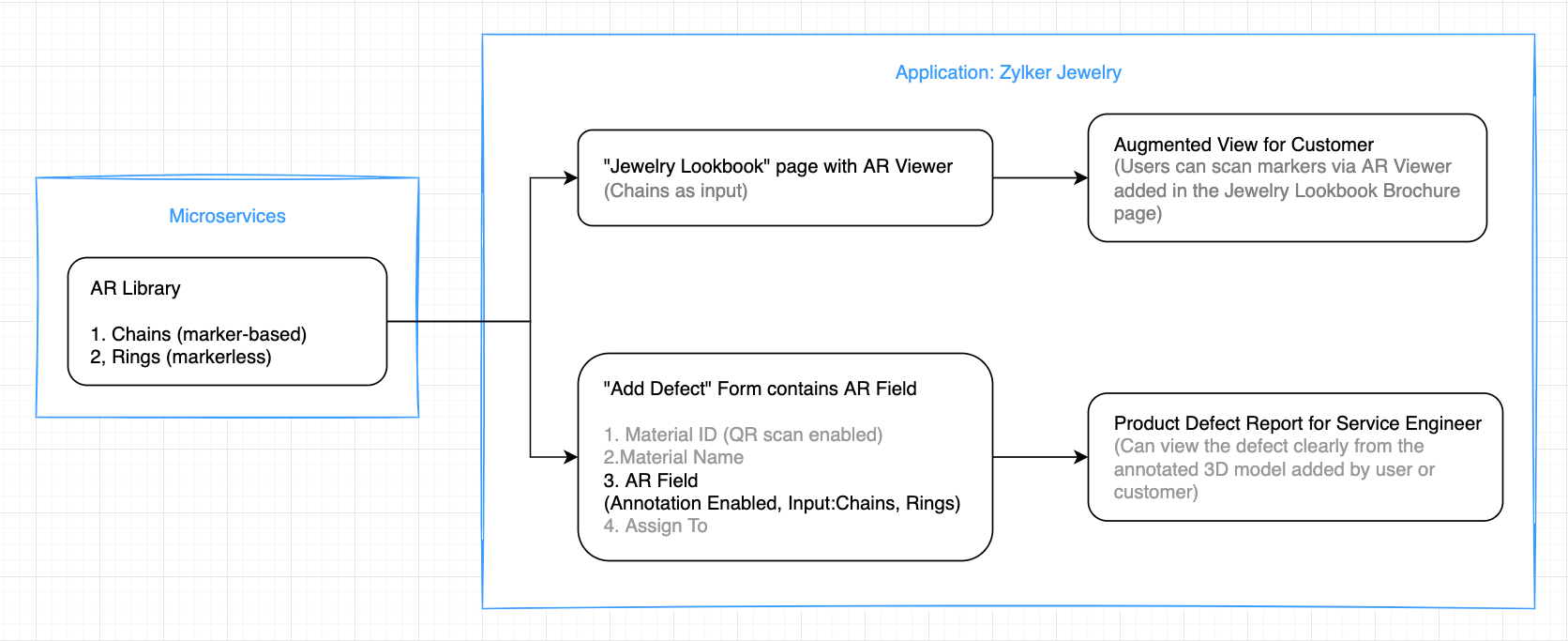
This app enables you to perform the following actions:
(i) Users can use the scanner (AR viewer) on the app's Jewelry Lookbook page to scan the various designs available on your brochure and view them as popup models. They can rotate, zoom in and zoom out, and view the models in full-screen as well.
(ii) Quality assurance engineers can select 3D models of the defective jewels and also annotate them by describing the defects.
Let's take a look at how the above actions can be configured in the Zylker Jewelry app.
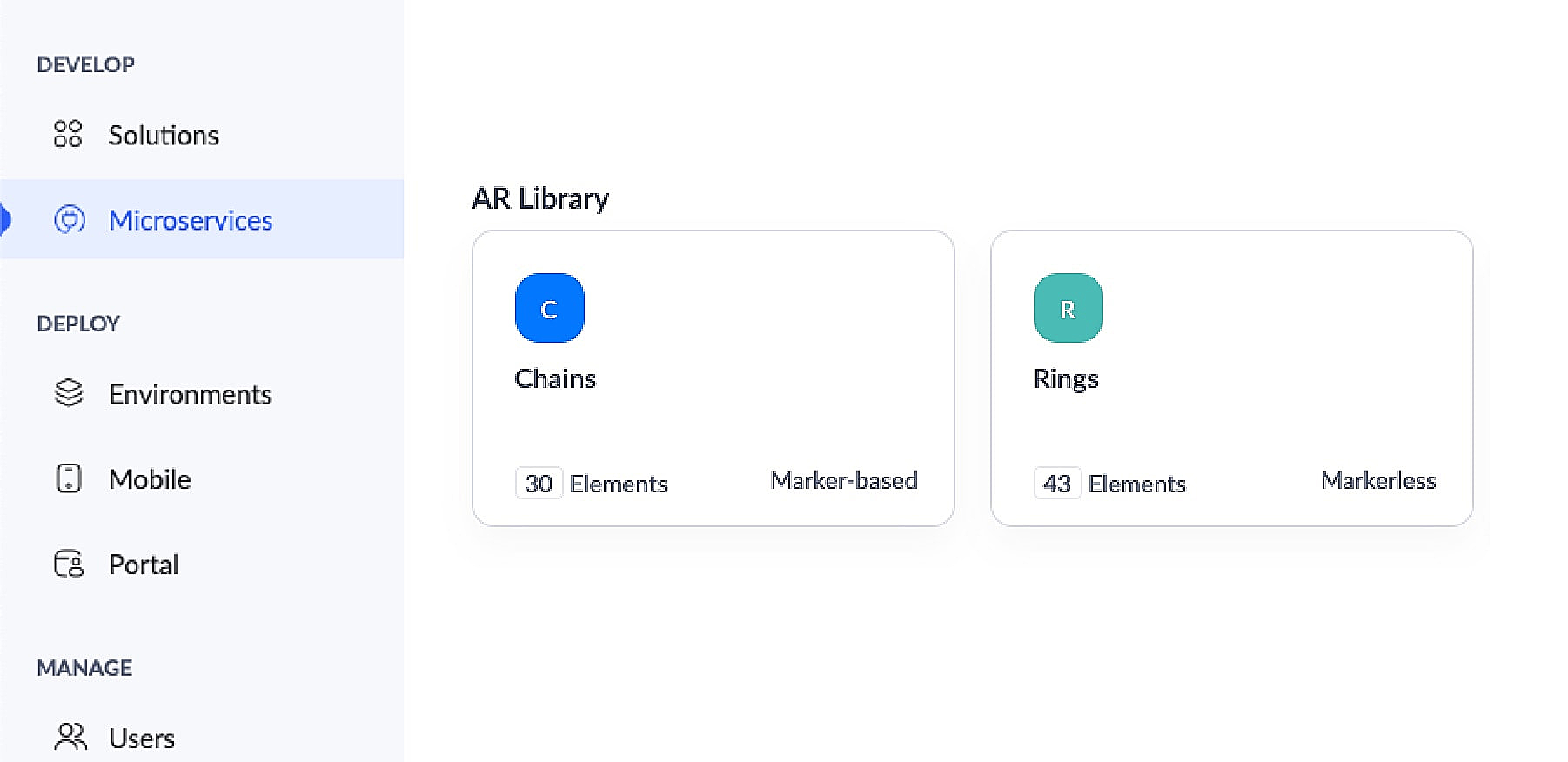
This app has an AR library that contains 3D models of chains (marker-based) and rings (markerless).
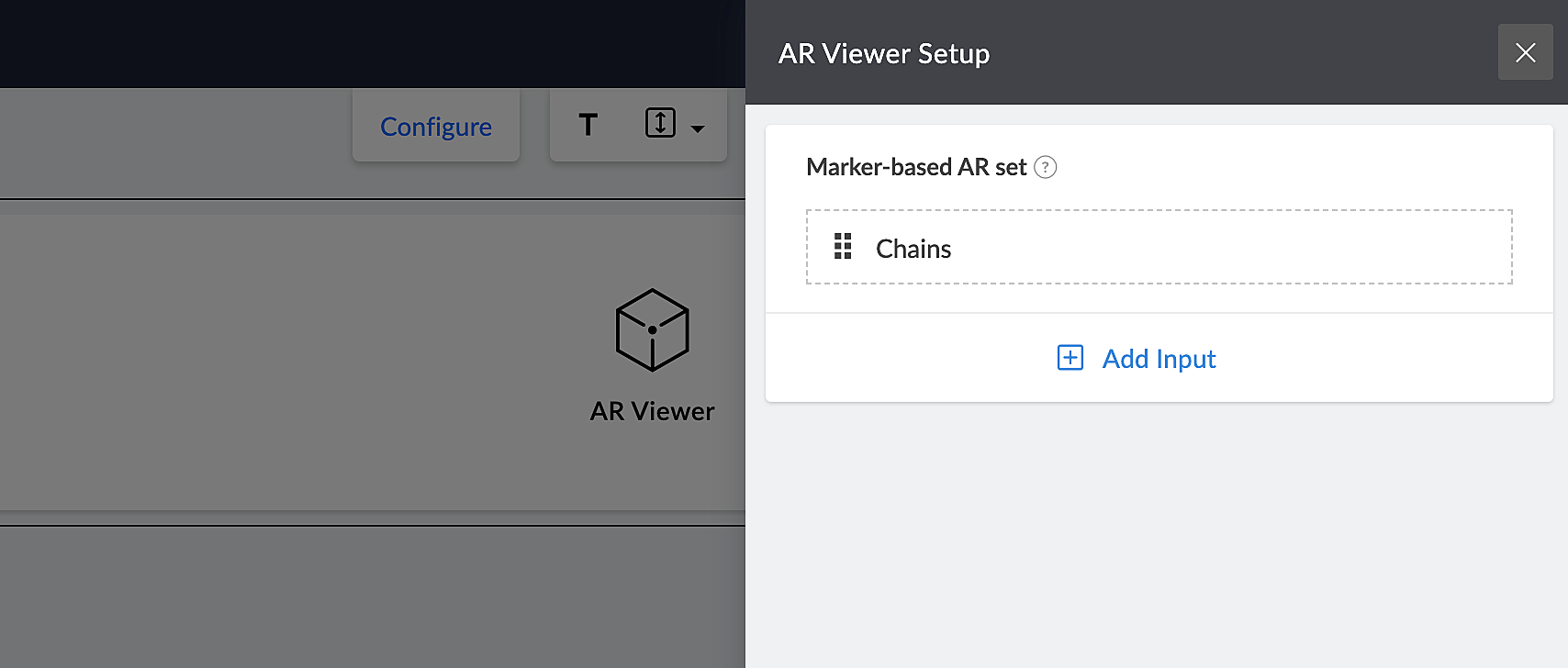
The app's Jewelry Lookbook page has an AR Viewer element with the 3D models of chains as its input. When users access this page, they'll be able to scan the brochure and view the available chain designs on their devices.
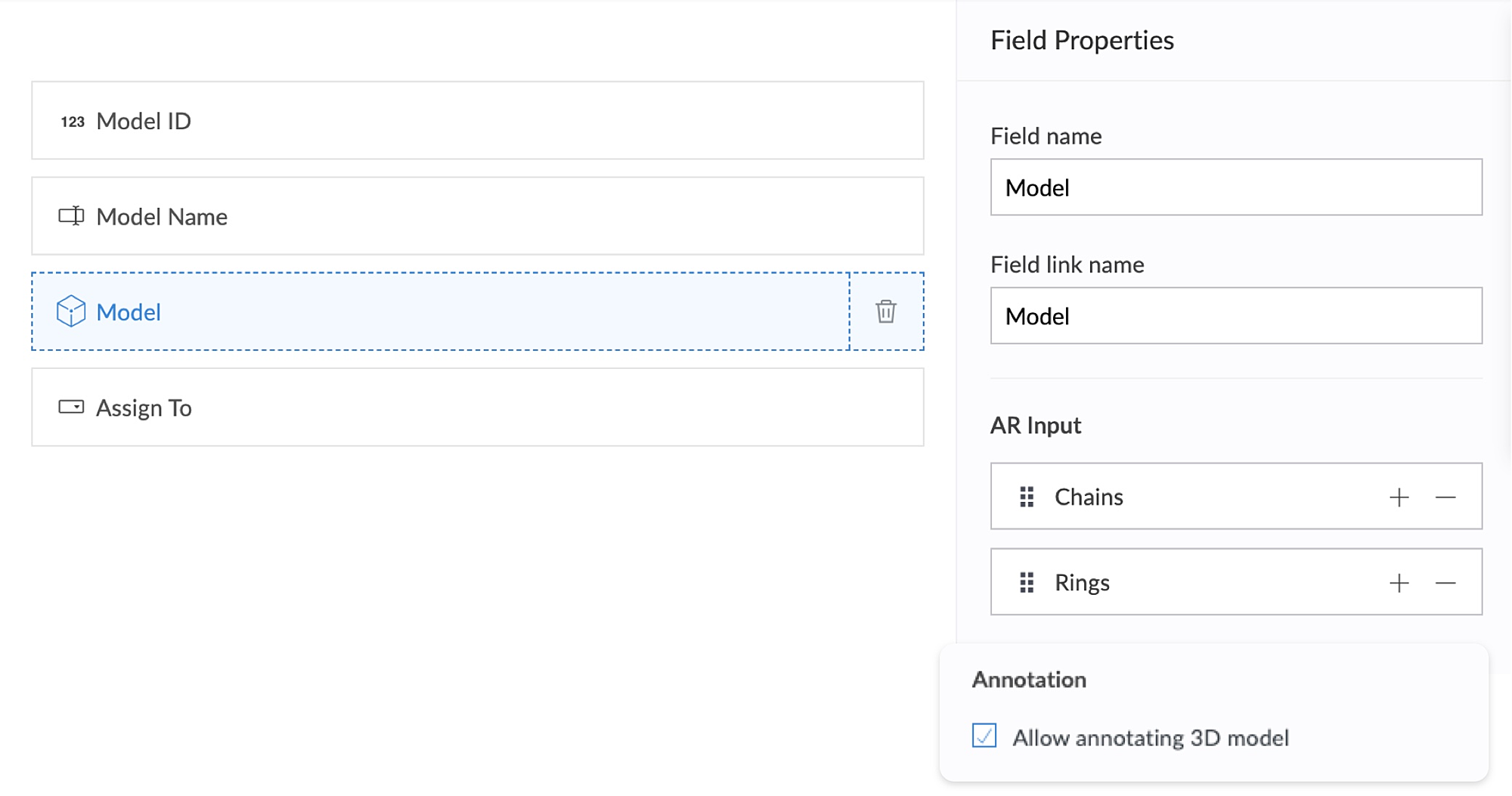
The app's Add Defect form has an AR field containing the 3D models of chains and rings as its AR input. Quality assurance engineers can select the 3D models of defective jewelry from the dropdown and annotate the models by describing the defects. This form also has an Assign To field, that assigns the defect to the designated Service engineer, who can view and take appropriate action.
2. Using AR, classroom education can become all the more intuitive and interactive, as it enables teaching staff to demonstrate virtual examples of textbook concepts. This, in turn, will enable students to engage more actively, learn faster, and memorize information more easily.
Let's take a look at Zylker Schools of Learning, a learning app created for teachers and students. This app facilitates interactive learning through AR technology used across the following components. Apart from these, AR functionality can also be accessed via your mobile applications.
AR Viewer
AR field
AR Viewer:
This app has an AR library that contains textbook diagrams as markers, along with their 3D models. The app's Virtual Book page has an AR Viewer element with the 3D models as its input.
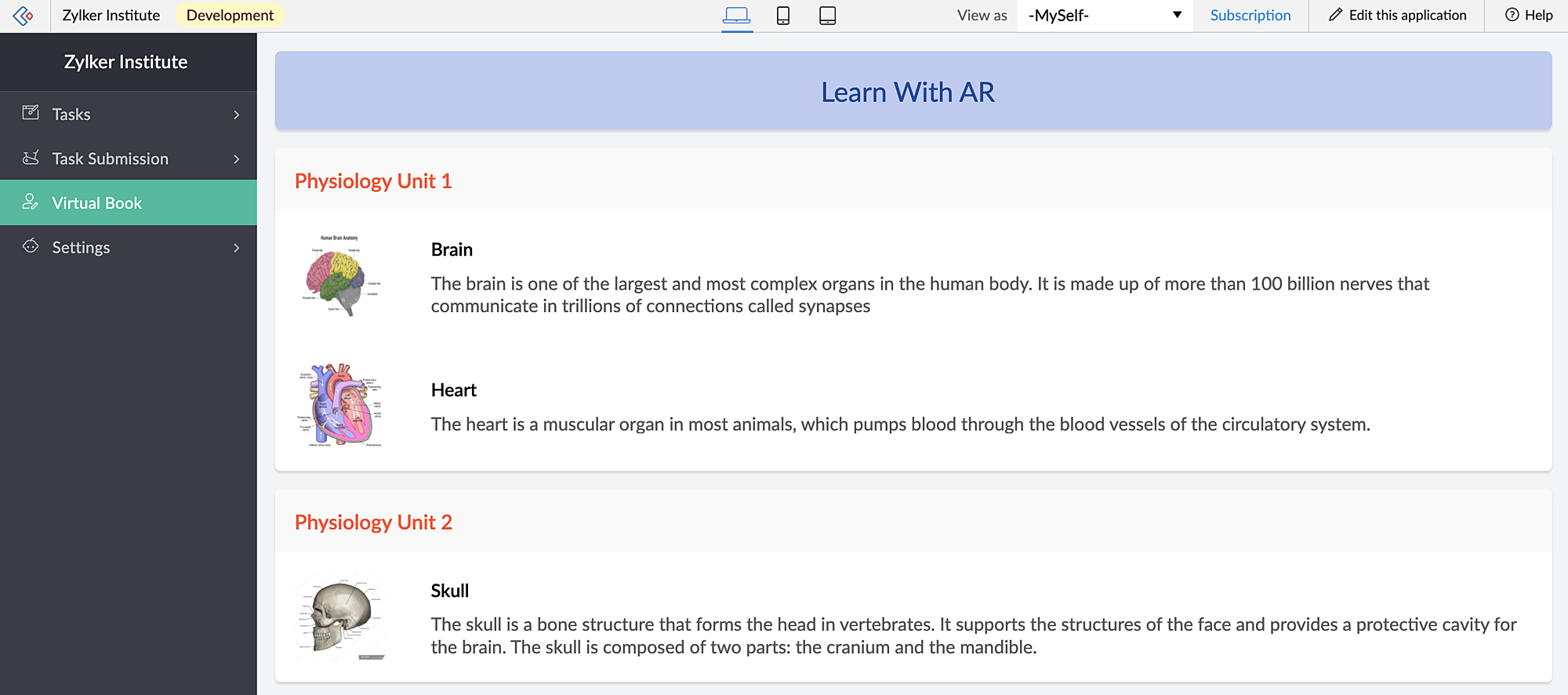
When students access this page, they can click the diagrams and view them in both AR mode and Object mode — rotate, zoom in and zoom out and view in full-screen as well.
When you access the app via mobile, apart from viewing the diagrams in AR Viewer (similar to web), students can also open their device scanner, scan their textbook diagrams and view them as plotted (popup) models on top of their textbook.
AR field:
This app has a New Task form that contains an AR field. This field has 3D diagrams as its input. You can assign tasks to your students, asking them to annotate the 3D models and also view the submitted tasks.
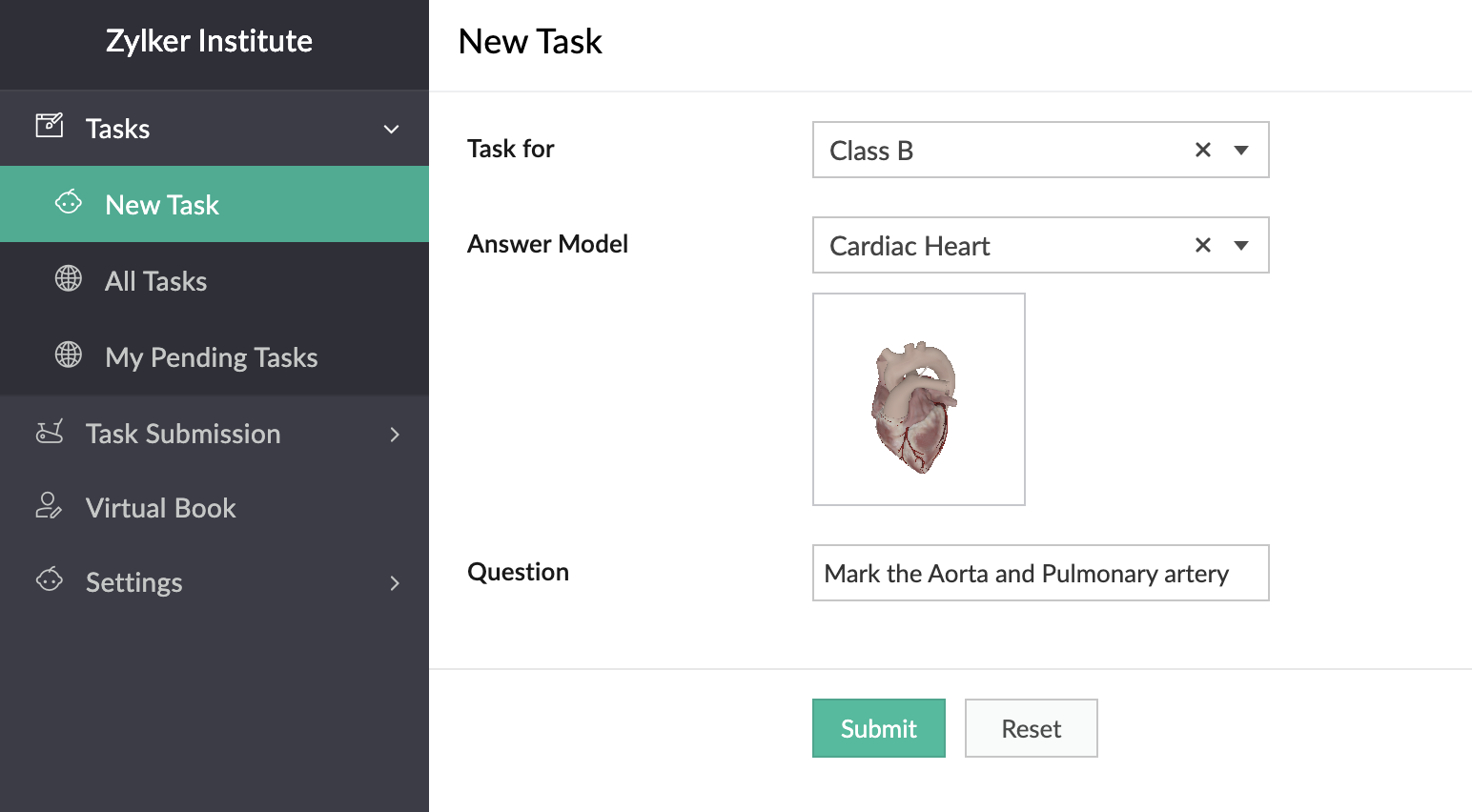
In the below GIF, the demo user Demo 3 is the Teacher profile and Demo 1 is the student profile.
You can also place stickers of the textbook diagrams on your classroom walls, which can be scanned by your students through the provided devices. Upon scanning the sticker, they can view, rotate, and annotate the 3D model of the scanned image which is mapped in the AR Library.
Thus, AR helps in explaining otherwise plain textbook concepts in a visually-appealing manner.
Feature release plan
AR in Creator will be available in C6 for Paid plan users only.
If you have any questions related to AR, please feel free to contact us at support@zohocreator.com.
Regards,
The Zoho Creator Team
Topic Participants
Meghaa Pradyumnan
Catherine
Damien Cregan
PARTHIBAN VALLAVAN
Sriram U
Sticky Posts
Introducing Zoho Creator's 2025 Release Projection 2
Hello Creators! I'm Prakash, from the Creator product management team, and today I'm delighted to unveil our next set of features as part of Release Projection 2 for 2025. With thoughtful analysis and planning, we've curated powerful new capabilitiesZoho Creator - 2023 Release Projection 1
Hello everyone! A very Happy New Year to you and your family. Hope you're all good and having a great time using Zoho Creator to make your lives easier and your businesses prosper. 2022 was an action-packed year for us at Creator, and we hope to continueZoho Creator User Group meetups in a city near you! - Oct - Nov, 2023
Greetings from the Zoho Creator team! We're hosting a series of Zoho Creator meetups in various cities across the globe, and we'd love to meet you there! Our meetups are a great opportunity to network with industry peers, exchange ideas and best practices,Zoho Creator - 2023 Release Projection 2
Hello everyone! Time truly flies when you're having an incredible journey, and today we mark the completion of an eventful and action-packed six months. It feels like just yesterday when we embarked on this adventure together with the launch of our newUpcoming Updates - August 2022
Hi all, Greetings from the Zoho Creator team! Today we've got news for you on some exciting updates. And rest assured— there’s more to come! In this post, we'll be going over the upcoming features and improvements for this month as mentioned below. A
Recent Topics
Edit QR code with redirect to form
Guten morgen, wir haben ein Formular Reklamation_erstellen. Dort soll ein QR Code erstellt werden, der im Lieferschein angezeigt wird. Beim Scannen auf dem soll das jeweilige Formular zum BEARBEITEN geöffnet werden. Leider bekomme ich es nur so hin, dassGetting all the ingredients together for baking an app
Good day everyone. After reading a lot of the help docs and watching videos, I now started on my app. To prevent hours and hours wasted on going down the wrong track, I would like some clarification on the following. But first some background: I haveHelp Needed with Configuring ZC Microservice
I'm attempting to create a simple microservice, but am running into problems with scope and auth. Using Custom API Builder, here's my setup: 1. Method: GET 2. Auth: OAuth2 3. User Scope: All users 4. Response: Standard 5. Function: A function that returnsCreator Simplified #10: Predefine Form Field Values and Make Them Read-Only for Users
Hey Creators, Ready for this week's tip in the Creator Simplified series? Today, we will explore how to have read only fields in a form. Use Case: Assume a scenario where the default value for a Department field needs to be English Literature, but youZoho Mail : Email Outgoing Blocked
I suddenly received the following message yesterday. I cannot send any mail. Please resolve as soon as possible, I cannot work without sending email. Dear User, We regret to inform you that your email outgoing has been blocked and you will not be ableCreator and Tables
Good day. I am trying to create my first application. I have imported my data into Tables and am creating my app in Creator. I do not see my tables and cannot see how to write forms data to a table. Even the Workflow just uses the form. In one of thecustomer Name and address details
i created one application there is no customer details in that . how to add customer details andRecalculate every row in the subform
Hello, Can anyone help me with a script, please? I have an issue. Sometimes it happens, that in a multi row subform one of the rows show an incorrect row total value. Not really understand how it can happen, if I have a 20 row subform, 19 rows show correctCreating Repeat Forms that remove redundancies
I wanted to understand if you can make multi-layer forms that reduce the need for users to input information in again and again. We want a form that our suppliers fill out per ingredient they sell, and the end result should have the Ingredient (SectionWhat is the difference between the free plan and the mail lite plan?
What is the difference between the free plan and the mail lite plan? How many emails can I send per day?Unblock email
Hi The outgoing mail from a client of me is blocked. I already made tickets and tickets are send to the EU desk but nobody is responding. The problem is already 4 days! There is absolutely no help from the support. I am really not satisfied at all! CanDomain verification failure
Hello Zoho Support, I purchased my domain directly through Zoho Mail, but the domain verification keeps failing with the message “TXT verification failed.” I’ve already waited and retried several times, but it still won’t verify. Could you please manuallyUnable to send message;Reason:554 5.1.8 Email Outgoing Blocked.
My email account is unable to send emails, and I urgently need to use it. How can I resolve this?If there is anything we have done wrong, please let us know in advance so we can actively cooperate to improve. User ID: 850482493URGENT: Email stopped workin - can't access admin panel
For some reason email sending stopped working. When I try to send an email it fails with "Unable to send message;Reason:451 4.7.1 Temporary system error" I can receive email just fine I see in my notifications some errors about the MX records, howeverCan I associate an invoice to a Project after the fact?
We have generated an invoice but would like to assoicate it to a Zoho Project after the fact. Is there any way to accomplish that? Thanks, ScottEmails I send as a cc or bcc NEVER GO THROUGH TO THA RECEIVER !!
every time i send a cc or bcc copy of an email to anyone when I’m using my zohomail.com email - no one ever gets the cc of bcc copy if the email: why???? And i triple check that the email addresses are correct; then i get back an email message (EVERYTIME)Cannot see correct DNS config for mail after moving domain to another provider
I have moved my domain from one provider to another and after that zoho mail stopped working (expected). Problem is, zoho mail admin panel still shows (10 hours after move) that all records are correct while I haven't changed anything in my domain DNSAdd Support for Authenticator App MFA in Zoho Desk Help Center
Hello Zoho Desk Team, We hope you are doing well. We would like to request an enhancement related to security for the Zoho Desk Help Center (customer portal). Currently, the Help Center supports MFA for portal users via SAML, JWT, SMS authentication,Auto-fill Contacts in Zoho Mail not working for me
We just switched to Zoho Mail for our company, and I am noticing that the "auto fill" feature when composing an email -- where the "to" field is autofilled (like in the attachment) from Contatcts works for everyone except me. Any way I might have madeHow to unlink a SAML user from the existing Zoho Desk user (domain change case)
Hi everyone, I’m trying to understand how to handle a situation where a customer changes their company domain. In our setup, users authenticate via SAML, so when the domain changes, the SAML system treats them as a new user. However, in Zoho Desk, I’dPrice Managment
I have been in discussions with Zoho for some time and not getting what I need. Maybe someone can help explain the logic behind this for me as I fail to understand. When creating an item, you input a sales rate and purchase rate. These rates are justRelated to zoho survey
Hi team. I want to know something regarding zoho survey question builder. I have two questions each of dropdown (One answer) - question type. In the first question, there are 16 answer choices and in the second question, there are 3 answer choices. ForText Message
When trying to sent a text message, it says its an error i should contact a zoho agentZoho POS is now available for Canadian retailers
Hey everyone, We're excited to introduce the all-new Canadian edition of Zoho POS, which helps retail businesses simplify and manage their end-to-end business operations. Start by signing up and exploring the 15-day free trial. Sign up now How does ZohoPayroll In Canada
Hi, When can we expect to have payroll in Canada with booksMass update to change or shift all project dates and keep project structure + shift all sub-tasks dates with main tasks
Most users would expect that if they change the start date of their project then that will be reflected inside the actual project and any project structure would be retained. Additionally if a task list with associated sub-tasks is moved, most users would expect that those sub-tasks would also be moved along with their parent task. This is not the case. For a total Project shift of dates: * the start and end date from > "Edit Project" page can have a radio button added to "shift all project tasksClosing Accounting Periods - Invoice/Posting dates
Hi, I have seen in another thread but I'm unsure on how the 'transaction locking' works with regards to new and old transactions. When producing monthly accounts if I close December 24 accounts on 8th Jan 25 will transaction locking prevent me from postingIn-person ZUG Meetups for Real Estate Professionals - US Q1 2026
The Real Estate Zoho User Group is going on a multi-city, in-person meetup tour across the US, and we’d love to see you there! These meetups are a great opportunity to: Connect with fellow real estate professionals using Zoho Share challenges and discoverZoho CRM custom fields not showing in zoho creator
Hi Team, I have created a Products form with Zoho CRM integration and connected it to Products module of CRM. But when I see the reports of Products in Zoho creator then I am not able to see custom fields of Products module. Only standard fields of ProductsSending email notifications based on language
Hello. I would like to know how we can bypass the default notifications (which are just in English) for when a ticket is created/replied to/closed, to be in other languages, based on the language field in the ticket? I can create other email templates,Zoho Error: This Operation has been restricted. Please contact support-as@zohocorp.com for further details
Hello There, l tried to verify my domain (florindagoreti.com.br) and its shows this error: This Operation has been restricted. Please contact support-as@zohocorp.com for further details. Screenshot Given Below - please check what went wrong. ThanksDownload a file from within a zoho creator widget
I have a widget running in Zoho Creator , it displays uploaded documents in a table file, and I have added a download link in the view. ( The widget is created with html, css and javascript). I do not succeed in getting the download working. Do I haveZoho / Outlook Calendar sync
The current Marketplace -> Microsoft -> Meetings integration needs 2 changes. 1. The current language for the Two-Way sync option should be changed. It currently states, "Sync both your Zoho CRM Calendar and Office 365 Calendar meetings with each other."Email content just contain 'OK' ,not what we expect
create campaign API URL: https://campaigns.zoho.com/api/v1.1/createCampaign req params: {'campaignname': 'General_Outreach_d0cfc415-43aa-4b96-bb09-558e76a3dda3_50_20251117_214806_660', 'from_email': 'admin@allinmedia.ai', 'subject': 'ALL IN MEDIA', 'list_details':Reopen ticket
Hello! Can I reopen a ticket just using the API ticket/sendReply ? What's the rules to do it? I'm trying but it doesn't reopen the ticket, it just send the replyAllow Admins to Transfer Ownership of Their Own Files & Folders
Hi Zoho WorkDrive Team, Hope you are doing well. We would like to request an important enhancement to the ownership-transfer functionality in Zoho WorkDrive, specifically regarding administrator capabilities. As administrators, we have the ability toTip#46: Capture accurate log hours
Hello everyone, Use the newly introduced timer settings that will streamline the usage of timers and help admins or workspace owners to manage the time entries of the workspace users better. Check out the below mentioned timer settings added to the TimesheetMoving to app-specific authentication for Google integrations
Hello everyone, We’re making an important change to how Google integrations work in our platform. Until now, we used a common Google project across Zoho to enable integrations like Google Drive, Calendar, and more. Going forward, we’ll be moving to anLost the ability to sort by ticket owner
Hi all, in the last week or so, we have lost the ability to sort tickets by Ticket Owner. Unlike the other columns which we can hover over and click on to sort, Ticket Owner is no longer clickable. Is it just us, or are other customers seeing this too?How Can i put a form in Zobot
Hi,how can i integrate a form which has a multiple options to choose from.the form should be opened or displayed by zobot after it meets a requirement in the conversation. Thanks in advance !Next Page