User Tips: Adding Multiple Products (Package) to a Quote v2.0 (with Client Script)

User Tips: Adding Multiple Products (Package) to a Quote v2.0 (with Client Script)

This solution is an improvement on the original idea which used deluge. My solution was posted in the comments are: https://help.zoho.com/portal/en/community/topic/adding-multiple-products-package-to-a-quote

The updated version uses client script instead of deluge.

Hopefully this might help a few people. It helps our reps speed up the process of creating quotes and quoting accurately.

Details below:


Problem:

We run numerous manufacturer promotions with various bundled items and discounts. Reps struggle to remember all details, leading to incorrect discounts on quotes.


Solution

I created a custom module for Product Packages. For each promotion, we create a "Package" including all products, discounts, and start/end dates. A quote lookup field allows users to select a package, automatically adding the related products with accurate pricing and information.

When a user selects a package, a client script retrieves all related products and discounts, adding them to the quote. The lookup field is then reset for additional product entries.

Some fields on the package layout include:

  1. Promotion type
  2. Status
  3. Start / End dates for the promotion. 
  4. Pop-up message field if we want to show the rep a message when quoting the package

I also have a workflow that sets the package to “Expired” when the record expiration date hits. The lookup is filtered in the quotes module to only show “Active” packages.

In Action (with lookup field to the package module):
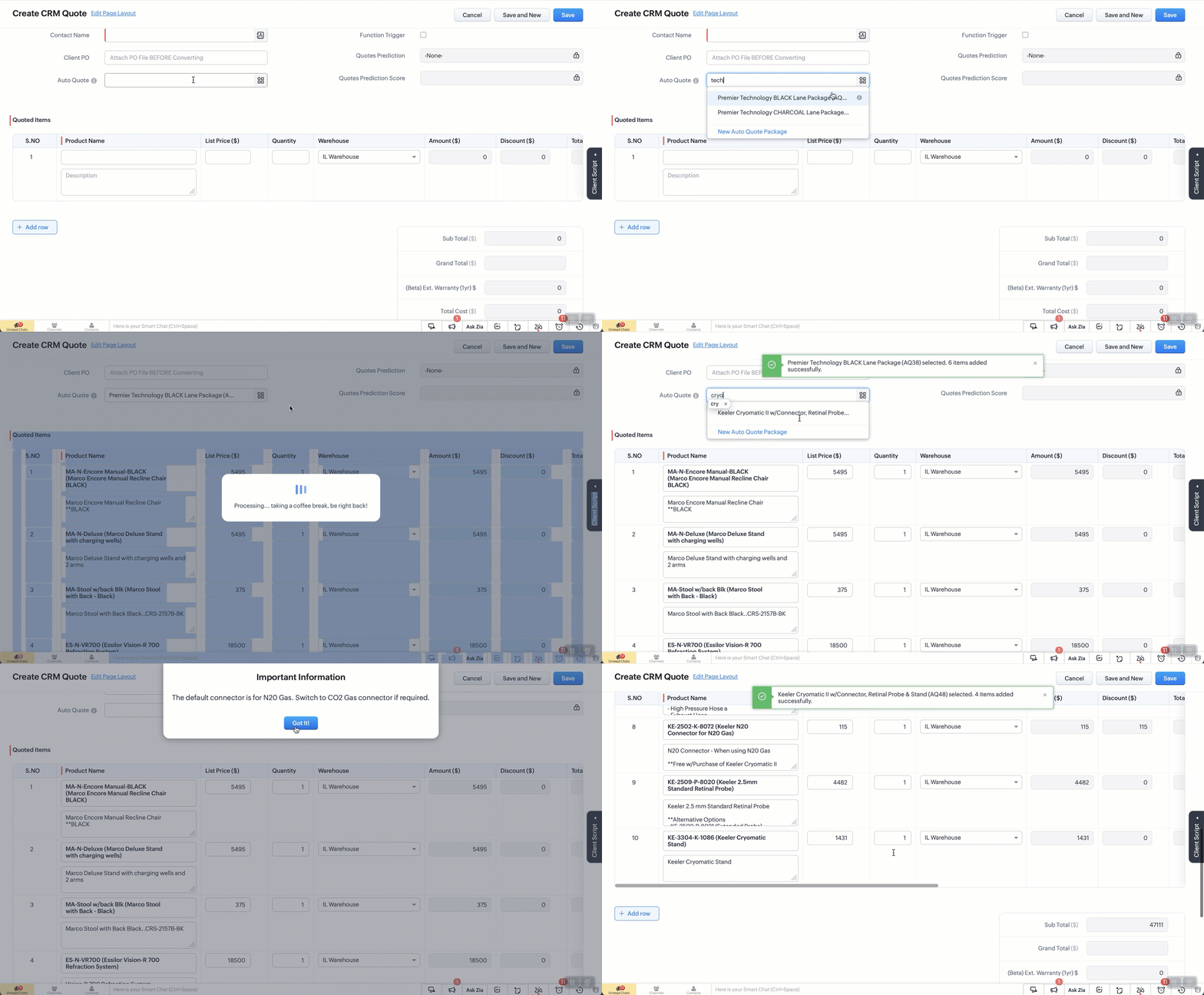


The Setup:
Create a custom module “Package Items”. Add the fields as below. 
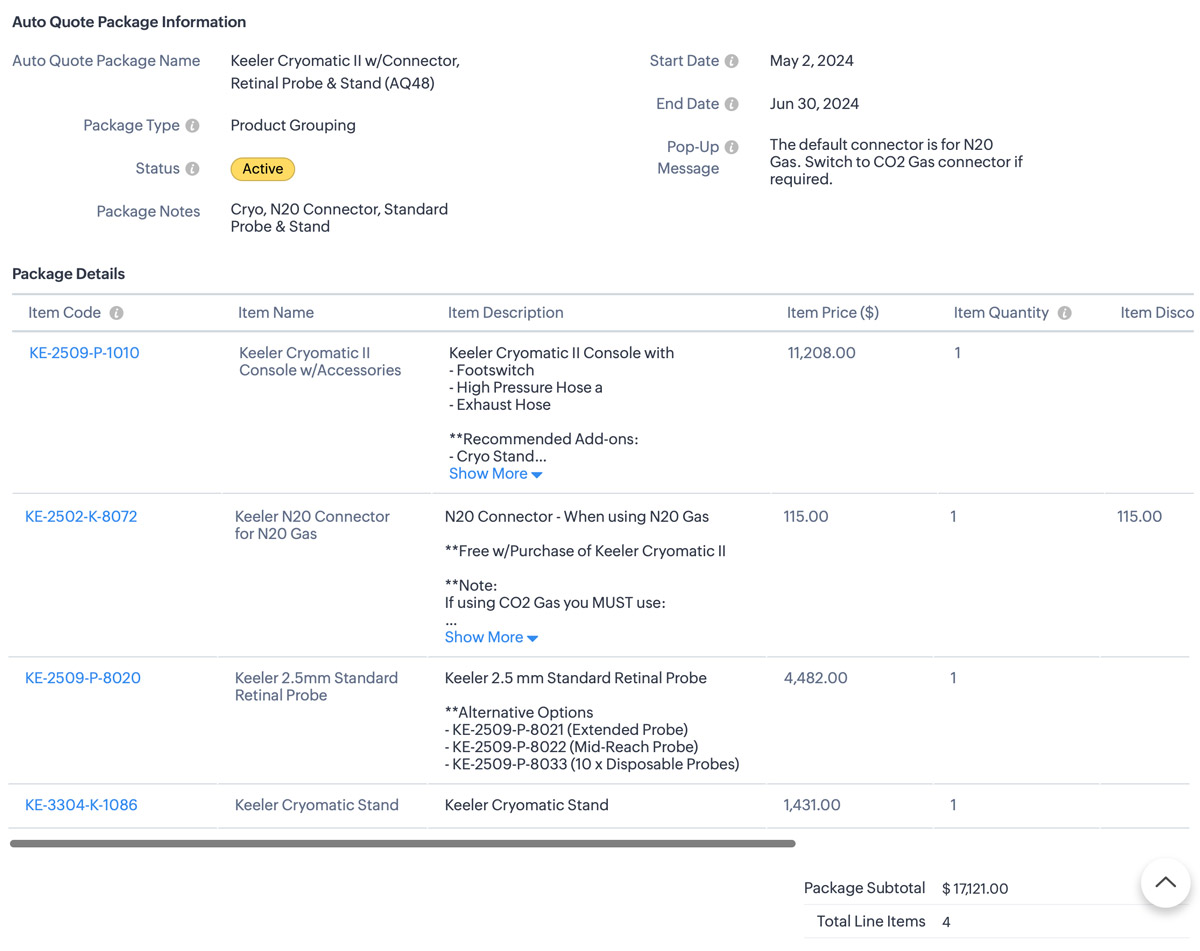


Additional Info
1. I also use client script to hide the “Auto-Quote” field when in a standard view page
2. When I name a package, a deluge script runs to append the Package ID number which is an auto-number field.


The Code: 

  1. try {
    // List of funny loading messages
    var loadingMessages = [
    "Cranking up the quote machine...",
    "One sec... just stepped out for coffee.",
    "Hold tight! The hamsters are running the wheels.",
    "Almost there... giving it a little extra attention.",
    "Loading... probably faster than your internet speed.",
    "Please hold while we make magic happen.",
    "Just a moment... our servers are stretching their legs.",
    "Your patience is appreciated... and rewarded!",
    "Brewing up your quote right now...",
    "Give us a second... we're flexing our technical muscles.",
    "Our system is doing some yoga... stay calm!",
    "Loading... don't worry, it's not stuck!",
    "Fetching your data... hopefully with no detours!",
    "Keep calm and let us handle the rest.",
    "Processing... taking a coffee break, be right back!",
    "Stay tuned... greatness is loading.",
    "Our system is running... faster than a cheetah!",
    "Looks like you're going all in on this quote!",
    "Getting things ready... just need a moment.",
    "Hold on... we're aligning some stars for you.",
    "Please wait... we're feeding the server squirrels.",
    "One moment... your quote is coming fresh out of the oven.",
    "Loading... just making sure everything is perfect!",
    "Generating your quote... thanks for your patience!",
    "Almost there... your quote is worth the wait!"
    ];

    // Select a random message from the list
    var randomMessage = loadingMessages[Math.floor(Math.random() * loadingMessages.length)];

    // Log the entire value object to see its structure
    log("Full value object: " + JSON.stringify(value));

    // Ensure value.id is defined before proceeding
    if (!value || !value.id) {
    log("No product selected or value.id is undefined");
    return; // Exit the script quietly since no valid product was selected
    }

    // Show loader
    ZDK.Client.showLoader({ type: 'page', template: 'vertical-bar', message: randomMessage });

    // Extract the product ID and name from the value passed in
    var packageId = value.id;
    var packageName = value.name;
    log("Product ID: " + packageId);
    log("Package Name: " + packageName);

    // Get the subform field from Quotes module
    var quotedItemsSubform = ZDK.Page.getField("Quoted_Items");

    // Fetch product information for the package ID
    var packageDetails = ZDK.Apps.CRM.Auto_Quote_Packages.fetchById(packageId);


    var packageStatus = packageDetails.Status; // Active or Expired.
    var popUpMessage = packageDetails.Pop_Up_Message; // Check the package for any Pop-up message we want to show
    log("Package Details: " + JSON.stringify(packageDetails));
    log("Package Status: " + packageStatus);
    log("Pop-Up Message: " + popUpMessage);

    // Initialize array for existing line items.
    var existingLineItems = quotedItemsSubform.getValue() || [];
    log("Existing line items: " + JSON.stringify(existingLineItems));
    //
    // Only include rows with products. Excude any blank rows from the quote
    var filteredExistingLineItems = existingLineItems.filter(function(item) {
    return item.Product_Name && item.Product_Name.id;
    }).map(function(item) {
    return {
    id: item.Product_Name.id // Include only the item ID
    };
    });
    log("Filtered existing line items: " + JSON.stringify(filteredExistingLineItems));

    // Array to hold new line items we are adding
    var newLineItemArray = [];

    // Check if package is active and populate new line items
    if (packageStatus === "Active") {
    var packageItems = packageDetails.Package_Details;
    packageItems.forEach(function(item) {
    var productLineItem = {
    Product_Name: {
    id: item.Item_Code.id,
    name: `${item.Item_Code.name} (${item.Item_Name})`
    },
    Product_List_Price: item.Item_Price,
    Description: item.Item_Description,
    List_Price: item.Item_Price,
    Quantity: item.Item_Quantity ?? 1, // Default to 1 if Qty is null or undefined
    Discount: Math.abs(item.Item_Discount ?? 0) // Get the discount or default to 0 if null
    };
    log("New product line item: " + JSON.stringify(productLineItem));
    newLineItemArray.push(productLineItem);
    });
    } else {
    // Show error message if the package is not active
    // My layout to only show Active items but if you don't do that this solves it.
    ZDK.Client.showMessage('This package / promo is no longer active. Please contact the admin for details.', { type: 'error' });
    ZDK.Client.hideLoader();
    return; // Exit the script since the package is not active
    }

    // Combine existing line items with new line items
    var updatedLineItemArray = filteredExistingLineItems.concat(newLineItemArray);
    log("Updated line items array: " + JSON.stringify(updatedLineItemArray));

    // Add all updated items to the Quotes page
    quotedItemsSubform.setValue(updatedLineItemArray);

    // Reset the pick list field so user can re-use
    ZDK.Page.getField("Auto_Quote").setValue(null);

    // Hide loader
    ZDK.Client.hideLoader();

    log("Final updated line items: " + JSON.stringify(updatedLineItemArray));

    // Function to show confirmation and number of items added back to the user
    var showSuccessMessage = function() {
    ZDK.Client.showMessage(`${value.name} selected. ${newLineItemArray.length} items added successfully.`, { type: 'success' });
    };

    // Function to show popup message and then success message
    var showAlertAndSuccess = function(message, heading, buttonText) {
    ZDK.Client.showAlert(message, heading, buttonText);
    showSuccessMessage();
    };

    // Check for pop-up message and show alert if it exists
    if (popUpMessage) {
    showAlertAndSuccess(popUpMessage, "Important Information", "Got It!");
    } else {
    // No pop-up message, show the success message
    showSuccessMessage();
    }
    } catch (error) {
    // Log the error
    log('Error: ' + error.message);

    // Show error message
    ZDK.Client.showMessage('An error occurred while adding items. Please try again.', { type: 'error' });

    // Hide loader
    ZDK.Client.hideLoader();
    }


      Zoho Campaigns Resources


        • Desk Community Learning Series


        • Digest


        • Functions


        • Meetups


        • Kbase


        • Resources


        • Glossary


        • Desk Marketplace


        • MVP Corner


        • Word of the Day


        • Ask the Experts


          Zoho CRM Plus Resources

            Zoho Books Resources


              Zoho Subscriptions Resources

                Zoho Projects Resources


                  Zoho Sprints Resources


                    Zoho Orchestly Resources


                      Zoho Creator Resources


                        Zoho WorkDrive Resources


                          Zoho CRM Resources

                          • CRM Community Learning Series

                            CRM Community Learning Series


                          • Tips

                            Tips

                          • Functions

                            Functions

                          • Meetups

                            Meetups

                          • Kbase

                            Kbase

                          • Resources

                            Resources

                          • Digest

                            Digest

                          • CRM Marketplace

                            CRM Marketplace

                          • MVP Corner

                            MVP Corner


                            Zoho Writer Writer

                            Get Started. Write Away!

                            Writer is a powerful online word processor, designed for collaborative work.

                              Zoho CRM コンテンツ


                                ご検討中の方

                                  • Recent Topics

                                  • Manage customer access across multi-brand help centers

                                    Hello everyone! Managing customer's access across multiple brands has been streamlined with the ability to invite, reinvite, approve, reject, and deactivate contacts individually for each help center brand . This enhancement gives administrators precise
                                  • White Label certificate

                                    Hi all, About 72 hours ago, we fulfilled all steps for white labeling (CNAME to point to mail.cs.zohohost.eu), but since then the configuration page is now stuck at "generating certificate" since 3 days. When I execute an NSLOOKUP mail.webfoundry.be it
                                  • Unusual activity detected from this IP. Please try again after some time

                                    When i try to create new addresses on my account i am getting this error, it has been 24 hours now and i am still getting this error can anyone help
                                  • How to add a new domain in my account?

                                    Probably zoho has the worst UI in the market. Cannot add a new domain to manage a new email address.
                                  • Territory Assignment Issues (Lead to Account + Contact)

                                    1. Lead → Account & Contact Territory Assignment on Conversion A Lead is automatically assigned one or more territories using a workflow and Lead Assignment Rules. This works as expected, and we are able to assign multiple territories to a Lead automatically.
                                  • Create static subforms in Zoho CRM: streamline data entry with pre-defined values

                                    Last modified on (9 July, 2025): This feature was available in early access and is currently being rolled out to customers in phases. Currently available for users in the the AU, CA, and SA DCs. It will be enabled for the remaining DCs in the next couple
                                  • Ability for admin to access or make changes in zoho form without asking for ownership

                                    Currently in zoho form only form owner can make the changes in the form and if someone else has to make changes then we have to transfer the ownership to them and even admin also cant access it . So i think admin must have the ability or option to access
                                  • Why does Zoho’s diff viewer highlight parts of unchanged lines?

                                    Hi everyone, I’ve noticed something odd in the Zoho editor’s diff view. When I delete a single line, the diff doesn’t just mark that line as removed. Instead, it highlights parts of the next line as if they changed, even though they are identical. Example:
                                  • Report sorting not working

                                    I make extensive use of Summary reports and Pivot Tables. Most of these reports are structured such that I have several columns of "information" data that I want displayed, followed by one or more "Data" summarizations. For example, I have the following
                                  • How to convert MBOX to PDF

                                    I have a my zoho mail data stored in MBOX format how can i convert it into PDF?
                                  • Good news! Calendar in Zoho CRM gets a face lift

                                    Dear Customers, We are delighted to unveil the revamped calendar UI in Zoho CRM. With a complete visual overhaul aligned with CRM for Everyone, the calendar now offers a more intuitive and flexible scheduling experience. What’s new? Distinguish activities
                                  • New Enhancements in Wizards

                                    Dear All, Wizards help you break a long form into a series of smaller forms on different screens, making it less overwhelming. We are thrilled to introduce a couple of enhancements to wizards in Zoho CRM: Enhancements for conditional rules in Wizards
                                  • Microsoft Teams now available as an online meeting provider

                                    Hello everyone, We're pleased to announce that Zoho CRM now supports Microsoft Teams as an online meeting provider—alongside the other providers already available. Admins can enable Microsoft Teams directly from the Preferences tab under the Meetings
                                  • Find and Merge Duplicates to trigger webhook

                                    My sales team uses the Find and Merge Duplicates feature often to cleanup records in the CRM. We use webhooks to signal to our internal tools database when new Contacts are created, updated, or deleted, in order to keep our DB in sync with Zoho CRM. However,
                                  • Charting the 2025 Voyage: Zoho Invoice's Year in Review

                                    2025 has been a year of progress, productivity, and purposeful growth for Zoho Invoice. From expanding into new regions to refining everyday workflows, each update was designed to help businesses stay compliant, get paid faster, and work with confidence.
                                  • How to Hide System-DefinedTemplates in Service Report

                                    Is there any option available to hide system-defined templates? these templates are causing confusion for field users.
                                  • WhatsApp Report in Bigin CRM

                                    Reporting feature for Bigin CRM’s integrated WhatsApp that provides insights such as: Number of WhatsApp conversations closed Number of messages sent and received Number of conversations replied to Response and closure metrics for WhatsApp chats More
                                  • Auto tracking URL generation based on Carrier

                                    Hi, While creating a shipment order for a package in Zoho Books, I have a requirement that for example, if the carrier is Delhivery and tracking number is 1234, then can automatically the tracking link/URL be generated as www.delhivery.com/1234. Similary,
                                  • Issue with Azure DevOps Integration in Zoho Flow

                                    Hello, All workflows between Zoho Flow and Azure DevOps have stopped working for several days now. Upon further investigation, it seems that the connection to Azure DevOps is no longer directly supported. Indeed, Microsoft has deprecated the Azure DevOps
                                  • Contacts per department

                                    Hello, Is it possible to limit Contacts to a Department? Thanks
                                  • How to install Widget in inventory module

                                    Hi, I am trying to install a app into Sales Order Module related list, however there is no button allow me to do that. May I ask how to install widget to inventory module related list?
                                  • Narrative 16: Simplify with workflows

                                    Behind the scenes of a successful ticketing system: BTS Series Narrative 16: Simplify with workflows What is a workflow? A workflow organizes business tasks in a defined sequence that makes each step clear to all participants. This ensures work is completed
                                  • Zoho Invoice Customer Login Portal

                                    Are there any plans for a customer portal to Zoho Invoice, ala Freshbooks?  I would like customers that I invoice to be able to login to review invoices and invoice history.  I have not switched from Freshbooks for this very reason.
                                  • Random Leads are being created

                                    Hi, Every few days I am getting random leads that are being created with no form interactions at all. The email addresses are from obvious spam, such as 'Easymerchantsx'. When I look at the timeline, there is a Visit record and then a Lead Created record,
                                  • Print a price list or price book

                                    Hi Community. Am I right in concluding that Zoho has no functionality to print a price list from either Zoho CRM, Zoho Inventory or Zoho Books? I won't get stuck on the fact that Zoho doesn't sync price books between Zoho CRM and Books/Inventory (more
                                  • Bar Chart -- sort X-axis

                                    Hi! I created a bar chart ("Top 10 Products by Revenue") X-axis: Product Name Y-axis: Revenue Filter: Revenue - Top 10 Here's a picture: http://screencast.com/t/ZTJlZTdkNz The x-axis is sorted alphabetically by Product Name. How can I force it to sort numerically by Revenue?
                                  • Syncing with Google calendar, Tasks and Events

                                    Is it possible to sync Zoho CRM calendar, task and events with Google Calendar's tasks and events. With the increasing adoption by many major tool suppliers to sync seamlessly with Google's offerings (for instance I use the excellent Any.do task planning
                                  • ZoHo Flow Custom Function not Processing JSON

                                    JSON is being escaped and converting all the quotes in the JSON to '"' Here's the Code: void InsertRowInE123EligibitySheet(map input) { rawData = get("data",""); decodedData = rawData.htmlDecode(); data = decodedData.toMap(); sheet_id = "ID GOES
                                  • Managing functions

                                    Can someone let me know if there are any plans to improve the features for managing functions in CRM? I have lots of functions and finding them is hard. The search only works on the function name and the filter only works on function type. I have created
                                  • Zoho FSM - Service Appointment Trouble Adding Field Agent

                                    Hello, I just started using Zoho FSM and I'm currently adding older work orders from prior Field Service application I use. The work order that im trying to add is from an earlier date, and when I try to add a field agent to a service appointment it does
                                  • Shifts in Zoho People vs Zoho Shifts?

                                    Hello Zoho People Team, We hope you are doing well. We are evaluating the Shifts functionality within Zoho People and comparing it to the standalone Zoho Shifts product. We’ve encountered comments and discussions suggesting that the Shifts feature inside
                                  • 年内最後のユーザー向けイベント:5名限定! 課題解決型ワークショップイベント Zoho ワークアウト開催のお知らせ (12/18)

                                    ユーザーの皆さま、こんにちは。コミュニティチームの中野です。 12月開催のZoho ワークアウトについてお知らせします。 今回はZoomにて、オンライン開催します。 参加登録はこちら(無料) https://us02web.zoom.us/meeting/register/QHn6kJAcRs-znJ1l5jk0ww ━━━━━━━━━━━━━━━━━━━━━━━━ Zoho ワークアウトとは? Zoho ユーザー同士で交流しながら、サービスに関する疑問や不明点の解消を目的とした「Zoho ワークアウト」を開催します。
                                  • How do I get my account id?

                                    Hello, I followed the instructions to get a list of accounts of the currently authenticated user (which is me, and I am logged in). But when I follow the below instructions I get the following error: ERROR: {"data":{"errorCode":"INVALID_TICKET","moreInfo":"Invalid ticket"},"status":{"code":400,"description":"Invalid Input"}} Instructions that I am following: GET - User account details Purpose The API retrieves the list of accounts of the currently authenticated user.  Request URL  http://mail.zoho.com/api/accounts
                                  • This domain is not allowed to add. Please contact support-as@zohocorp.com for further details

                                    I am trying to setup the free version of Zoho Mail. When I tried to add my domain, theselfreunion.com I got the error message that is the subject of this Topic. I've read your other community forum topics, and this is NOT a free domain. So what is the
                                  • Zoho Quartz Screen Recording

                                    Hello, can we get access to Quartz, please, as a standalone solution? It would be great for creating training videos for current and future staff on how to use Zoho software according to our company requirements. Thank you
                                  • auto close automated alert tickets which are similar

                                    Hello ZOHO Community, we are using ZOHO Desk to process automated monitoring alerts. Scenario: Our monitoring system creates a ticket when a threshold is exceeded, e.g. Subject: Computer 1 – CPU usage 100% – Error A few minutes later, once the issue resolves
                                  • Maintain knowledge base integrity by moderating article comments

                                    Hello everyone, A knowledge base provides a self-service platform where customers can refer to articles, user manuals, and other resources to learn about the company's products or services and troubleshoot problems. Often, readers leave a comment on the
                                  • Making another calendar your default calendar

                                    I am trying to make another calendar my default calendar when I add events to it. It keep going to a single calendar, I need it to go to my google calendar by default, as this is linked to other services / websites. I cannot find an option to make it
                                  • Customer ticket creation via Microsoft Teams

                                    Hi all, I'm looking to see if someone could point me in the right direction. I'd love to make it so my customers/ end users can make tickets, see responses and respond within microsoft teams. As Admin and an Agent i've installed the zoho assist app within
                                  • Option to Delete Chats in IM

                                    Currently, there is no option to delete any chats in IM, regardless of their source.
                                  • Next Page