Conditional branching in Zoho Desk with Automation Studio

Conditional branching in Zoho Desk with Automation Studio

Hello everyone,

We are introducing conditional branching that will allow businesses to manage complex, multi-condition workflows for customer service processes using Automation Studio.
The primary goal is to create multi-branched logic in a single rule.

Alert
We are opening Automation Studio on a request basis for Professional and Enterprise edition users across all DCs.

Kindly raise a request through this Early Access Form.

What is conditional branching?

Branched logic or conditional branching allows an automation rule to follow different execution paths according to data, events, business rules, or earlier outcomes. In branched logic the system evaluates a condition - such as amount > 10,000, country = "India", or approval_status = "rejected" and when either both or one of the conditions are met, it routes the work to the appropriate sequence of actions.

Businesses that require multi-step workflows with stricter logic-based rules to govern their processes would benefit from Zoho Desk's Automation Studio.

What is Automation Studio?

Automation Studio helps organizations build and manage complex workflows by connecting multiple conditions and actions in a single rule. Instead of creating several standalone rules, a single workflow can be triggered by an event and move ticket to subsequent steps such as assigning it, updating its status, automating notifications, and follow-ups at specific intervals.

Components in the Automation Studio Builder

An easy-to-use drag and drop builder makes the interface intuitive and user friendly. Building and customizing the rule requires the following components:

1. Triggers
Defines the event that initiates a workflow, such as ticket creation, task created, field updated, calls created, accounts created, or comments updated based on the module selected.


On selecting Field Updated, a criteria must be provided on when the rule must be triggered. For example, the rule must be triggered only when the Ticket Status is updated from Open to Escalated, this will prevent action from triggering whenever the status is updated. It will happen only when the status changes from open to escalated.


2. Criteria
Controls the flow and determines when specific actions should be executed. For example, when the trigger is set to Ticket Created, the rule is triggered every time a ticket is created.

However, if the rule must be triggered only when the Priority is High or Classification is Problem, these conditions can be specified as criteria. This ensures that the rule is not triggered for every ticket that is created, but only when either of the specified conditions is met.


3. Blocks
Defines conditional logic using one or a combination of pre-built blocks.
  1. Action block: Performs a specific action such as updating a field, assigning a ticket, sending an alert, sending an email, generate content using Zia, adding tags and followers, or notifying via IM. For example, when a ticket is created, the Assign ticket action will assign it to a team or a support representative based on the product type and send a WhatsApp message to the customer that the ticket is assigned to person 'X'
  2. If block: Defines conditions to determine which path the workflow should follow. Actions are executed only when the specified condition is met. For example, a ticket related to zPad is assigned to the zPad support team.
  3. Fork block: Creates multiple paths in a workflow to handle different conditions or outcomes. For example, when the customer requests for onboarding, they are assigned to the respective team based on their subscription plan: Standard, Advanced or Ultimate. Using the Fork block, separate paths with specific actions and conditions can be created for each plan.
  4. Delay block: Pauses the workflow for a specified duration before proceeding to the next step. For example, a support representative sends an email to the customer for additional information. But if there is no response for 3 days, a Delay block can automatically send a reminder email to follow-up with the customer on the 4th day. If there is no response for another 3 days, another reminder along with a WhatsApp message can be sent. Finally the ticket can be closed without manual decision-making, if there is no response from the customer after the 3rd reminder email.
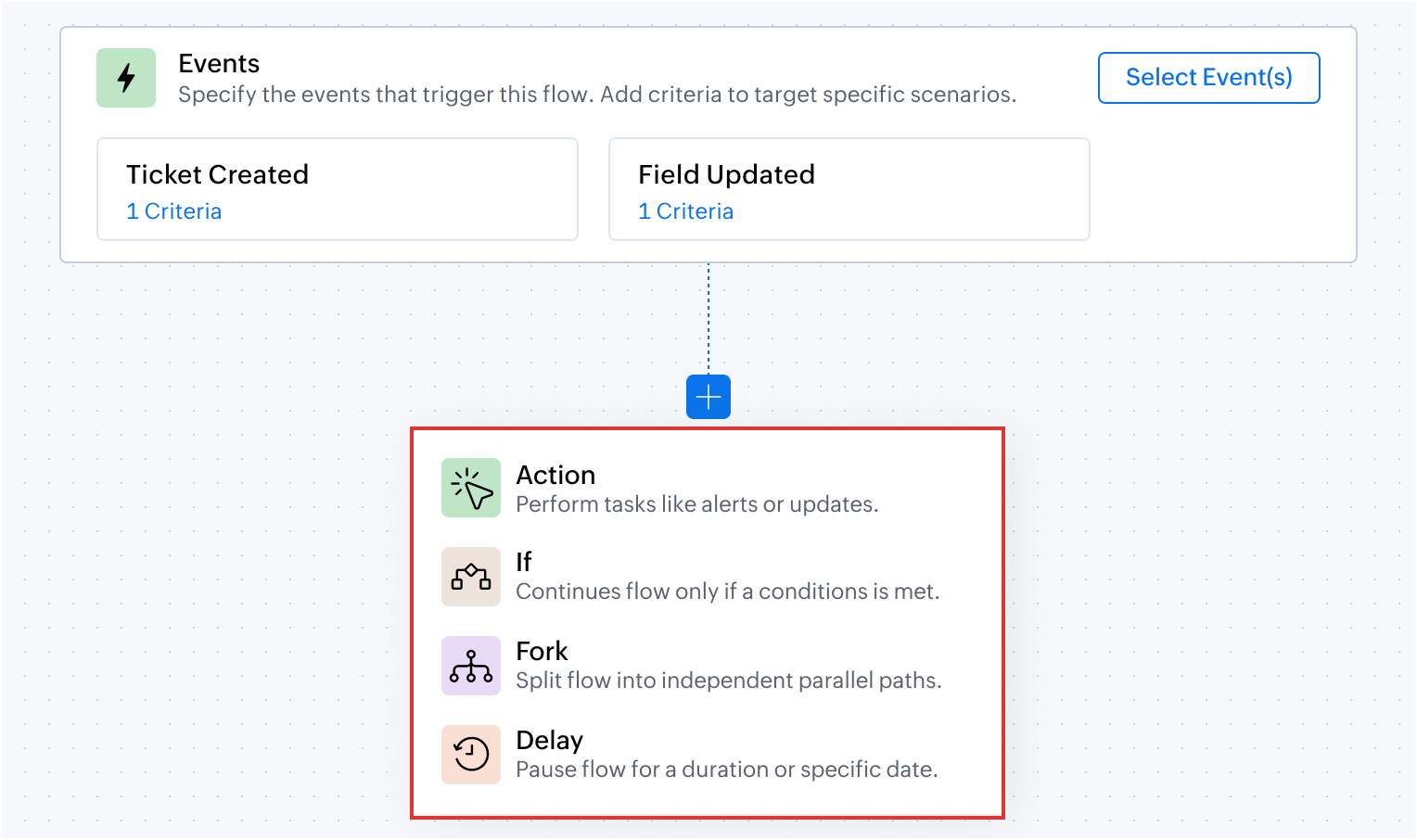

4. Action chaining

Action chaining is the process of using one action's output as the next action's input. For example, if the first action generates a summary of a ticket conversation. The next Action can then use this generated summary (input) and add it as a comment to the ticket (output).


Output:


5. Dot walking

Dot walking allows to access and fetch fields from related modules while creating a rule, without requiring additional custom functions or actions.
For example, from a Ticket record, contact details such as the email address can be accessed during the configuration. This makes it easier to use related data in conditions, actions, and notifications without manually fetching records from another module.


Automation Studio in action: Use cases

Managing conditional requests in order returns and refunds

An e-commerce platform manages order returns through a dedicated Returns and Refunds module. Upon receiving a customer's email request for a return, a ticket is generated in the tickets module. If the email's subject or description includes an Order ID, the system automatically links this ticket to the relevant existing record in the Returns and Refunds module.

In the Returns and Refunds module, each request type is categorized differently for each ticket. For example, after validating the return request, the quality assurance team may approve the refund, reject it after inspection, or may need additional information from the customer on why they want to return the product.
Also, for the approved return requests, the organization waits for 3 days before closing the ticket, giving the customer time to respond if there are any issues with the refund.
The entire process of what happens next after approving or rejecting the return requests can be configured in Automation Studio.

Flow configuration


Dot walking: Using the Dot walking method, the associated record from the Tickets module is accessed and updated when changes occur in the Return Requests custom module, without using any custom function or query.

Action chaining: Using the Action Chaining method, once when the ticket status is changed to Refund Processing, the delay is added for three days.

Deliver personalized campaigns and onboarding plan based on Contact attributes

Businesses can send relevant campaigns and onboarding materials based on a contact's subscription plan, business vertical, and number of user licenses. For example, free and paid users can receive different communications, while larger teams can receive onboarding resources and session reminders based on their requirements. A prospect from financial institution can be sent specific use cases and case studies to impact lead conversion.

Another advantage of setting up multiple conditions in a single workflow, is that the system will pick the criteria and dynamically change the operation to suit the existing contact property. For example, if the free plan user moves to a paid plan the marketing collaterals sent henceforth will automatically pitch for the paid user without manual decision-making.

Likewise, onboarding journey for a team of 20 user licenses can be sent implementation guidelines and supporting materials along with weekly remote session reminders pre-designed to suit their business use case.

Flow configuration


AI-driven summarization and automated ticket routing based on product type

An e-commerce company can use Zia's Generate Content to summarize customer requests, send an acknowledgement based on the generated summary, and automatically route tickets to the appropriate support team based on the product involved.

Flow configuration


Prevent SLA breach with time sensitive escalations

An IT helpdesk team can identify unresolved tickets that are closer to the SLA due time and automatically escalate them by updating the ticket priority and notifying the appropriate team.

Flow configuration


The above use cases are some of the possibilities that you can get started with. We encourage you to try Automation Studio and share your use cases with us.

Here are the resources you would need to setup and understand the use cases where Automation Studio would be useful.
  1. Automation Studio - An Overview
  2. Building Blocks Using Automation Studio
  3. Creating a Rule using Automation Studio
To try the feature kindly raise a request using the Early Access form.

PM: @Akhil Vijayakumar 

Thanks and regards,
B. Akshaya | Zoho Desk - User Education

      Zoho Campaigns Resources


        • Desk Community Learning Series


        • Digest


        • Functions


        • Meetups


        • Kbase


        • Resources


        • Glossary


        • Desk Marketplace


        • MVP Corner


        • Word of the Day


        • Ask the Experts


          • Sticky Posts

          • 2024 Email Authentication Standards: Elevating Security with Google and Yahoo

            In contemporary email communication, email authentication plays a pivotal role in mitigating email fraud, spam, and phishing attacks. Brace yourself for a new level of security. Starting February 2024, Gmail and Yahoo will be implementing robust email
          • Using Agent Email Address as From Address

            Currently, while replying to a ticket, it is possible for agents to choose their own email addresses as 'from' addresses. Although we built this just for that little extra flexibility, in hindsight, it hasn't figured much in conventional usage.  Almost all businesses prefer that responses to their customers' tickets be sent from the common support/service email address and NOT from those of individual agents. During personal interactions at events, some of you have even made passing mentions about
          • Edit and Delete options in Comments

            A lot of teams have been using ticket comments extensively to collaborate everyday. Notification Center further improved this experience by bringing real-time updates. As we continue to build more improvements to this experience, we've shipped a small-yet-important
          • Webinar 2: Supercharged customer support for growing business

            Join us for this webinar and learn how to step up your support game using a real-time communication platform to generate happier, more successful customers. In this live webinar, we will will discuss the importance of SalesIQ for your support team and how it can help you:  Understand your customers better and their journeys to proactively support and engage them even before they ask for help.  Integrating real time conversations into Zoho Desk’s Support, providing a conversational customer service
          • Customize Colors of your Customer Self Service Portal

            You asked for it. We heard you. We're happy to roll out the most sought after feature request, Customizing the Colors of your Customer Self-service Portal. Now you can set the color of your customer portal to mimic your company's web site, so that your customers visiting the portal will not feel alienated by the default theme.  Go ahead and configure the color of the header, tabs, fonts and background according to your needs. You can either choose between default color themes like Blue, Grey, Green

          Zoho CRM Plus Resources

            Zoho Books Resources


              Zoho Subscriptions Resources

                Zoho Projects Resources


                  Zoho Sprints Resources


                    Zoho Orchestly Resources


                      Zoho Creator Resources


                        Zoho WorkDrive Resources


                          Zoho CRM Resources

                          • CRM Community Learning Series

                            CRM Community Learning Series


                          • Tips

                            Tips

                          • Functions

                            Functions

                          • Meetups

                            Meetups

                          • Kbase

                            Kbase

                          • Resources

                            Resources

                          • Digest

                            Digest

                          • CRM Marketplace

                            CRM Marketplace

                          • MVP Corner

                            MVP Corner


                            Zoho Writer Writer

                            Get Started. Write Away!

                            Writer is a powerful online word processor, designed for collaborative work.

                              Zoho CRM コンテンツ


                                ご検討中の方

                                  • Recent Topics

                                  • How to setup noreply@ example.com

                                    How do I setup noreply@example.com so the mail never gets delivered. I currently have a catchall setup aswell.
                                  • Pleas unblock E-Mail-Adress service@montana-energie.de / kontakt@montana-energie.de

                                    Dear Zoho Support, Could you please unblock service@montana-energie.de / kontakt@montana-energie.de which belongs to a regular customer with whom we are having frequent business-related conversations. Thank you very much in advance, Erdem Kar homewise
                                  • Unable to change alias in the from field on the ZOHO mac app

                                    I have 1 main mail address, and 3 alias's. on the web mailbox when I create a new email, I can select the alias's from the dropdown in the from field. On the app no dropdown is available.
                                  • Zmail mobile application

                                    ho do i remove people from this app
                                  • My allies email (info@xxxx.com) was been deleted by system, and I can not build the same info allies email now

                                    Dear Zoho Mail Support Team, I am the super administrator of the Zoho organization 【Organization Name, as shown in Admin Console】. I am writing to report an urgent issue with two of our custom-domain email addresses and to request your help restoring
                                  • Cannot create mail account

                                    Hi, i have a problem, i can't create a mail account every time i try the error massage like this Oops! Something went wrong during mailbox creation. Please try again please help
                                  • Amazon.it always ends up in spam

                                    Emails from amazon.it always end up in the spam folder, even though I have added the domain and the various individual Amazon addresses for shipping, payments, and other matters to the trusted lists at the user administrator level. What should I che
                                  • Your Authenticate email domain (SPF, DKIM, DMARC) is bad to say the least

                                    How about actual instructions rather than vague generalities? There is no way to complete this with what is provided. Please provide specific verifiable steps.
                                  • Generate a Zoho Sign link

                                    From time to time I get a response "I never received your you e-document for electronic signature" is there a way to generate a Zoho Sign link to share.
                                  • ChatGPT Plugin / MCP Server auth error

                                    Hi all I'm trying to connect the ChatGPT plugin for Zoho CRM but after username stage of the auth process, I get this error from the URL https://mcp.zoho.eu/mcp-client/ {"error_description":"Invalid request url, Request is not as per defined in oauth
                                  • Zeptomail in the blacklists

                                    Hello, I noticed some hard bounces while sending emails, and upon checking the details, I see that we have been added to the blacklists of certain spam lists: Bounce category: Policy failure Reason: ip-issues Message: 5.7.1 Service unavailable; client
                                  • Zoho Desk training for administrators in EU and US region

                                    Hello Everyone, Get ready for the certified Virtual Classroom training for our Zoho Desk users in Europe and the US. Our in-house Zoho Desk expert, @Dheeraj | Zoho Desk, will conduct the virtual classroom training. This training focuses on simplifying
                                  • Possible to reorder Pipelines position?

                                    I have multiple Pipelines and want to reorder their positions, so that in the Deals module record for the Pipeline field, I have them ordered in a certain way. Is there a way to reorder the position of the Pipelines without deleting existing Pipelines
                                  • Categorize Items with Item Headers

                                    Hello customers, Did you ever want to classify items based on specific categories to help your customers understand your invoice better? With the new Item Header feature, you can easily categorize items in your invoices and estimates and give them a common title.  Item Headers are available in the Invoices, the Recurring Invoices and the Estimates module. It can be carried forward from estimates to invoices at the time of converting the estimates.  To add an item header: Go to the Estimates, Invoices
                                  • Gettting "You are Offline" Messages all the time

                                    Al of a sudden, a few days ago, I suddenly began getting a message on the bottom left side of the Mail App saying "You are Offline". Why? Does it mean I'm not getting incoming mails now? why is has started?
                                  • Zoho Books | Product updates | October 2026

                                    Hello users, October brings a range of new features and enhancements to Zoho Books, designed to simplify compliance, streamline accounting workflows, and improve inventory management. From the launch of the Nigeria Edition and France’s e-invoicing capabilities
                                  • Zoho CRM Quotes – Subform and PDF/Writer Limitations

                                    Hello, I am encountering the following limitations in Zoho CRM Quotes: Custom product images cannot be uploaded in the subform – the image upload field cannot be added; only the file upload field is available. File upload placeholders cannot be used in
                                  • Invoice Only Shipped Items

                                    Dear Zoho, We are a company that deals with sales orders with 600-1000 lines We need to be able to do partial invoicing based on shipped items Right now when we click convert to invoice we can not only select items that have een shipped It takes hours
                                  • Alias Email Id already exists

                                    Hi, I just verified my domain sesque (dot) com and now I am trying to create the admin account using admin (at) sesque (dot) com, but I am getting an error saying "Alias Email Id already exists". I used to have another Zoho account with this email address,
                                  • Allow widgets to be placed between native sections in the Ticket Properties panel

                                    One of our biggest frustrations with the Tickets module is how rigid the Ticket Properties panel is. Every section there is built only from native Zoho Desk fields. We can add sections, rearrange fields, and pick layouts, but we can’t put anything custom
                                  • Show backordered items on packing slip

                                    We send out a lot of large orders, and often there are one or two things backordered. How can I fix the packing slips to show quantity ordered  & quantity packed There should also be the ability to "ship" 0 of an item so the receiver knows that things
                                  • Deleted Module

                                    I accidentally deleted a module and its fields. Im trying to get it back. Thanks to Youtubers flooding the internet with out of date videos I can't find how to get deleted modules back. The Recycle Bin doesn't have modules. Anyone know how to do thi
                                  • Set department automatically for incoming calls

                                    Is it possible, when receiving an incoming call through Zoho Desk (using Twilio integration), for the department to be auto-selected based on the phone line being called? Currently, we have to manually select the department from the dropdown menu when
                                  • Make better hiring decisions with Compare Applications and Zia Insights (Beta)

                                    When multiple candidates apply for different job openings, evaluating each application against the right job requirements can take time. Reviewing resumes, candidate details, and interview feedback separately can make it harder to assess role fit and
                                  • Support Plan: Recuring Issue

                                    Hi Zoho Team, Could you please look into this recurring alert and provide clarification on why this restriction is still in place? This issue has become a bottleneck in our workflow, significantly limiting our automation capabilities. We are unable to
                                  • Multiple criteria in searchRecords

                                    Hi, is it possible to search with multiple criteria in zoho.crm.searchRecords? I have tried several variations of the following without much success. CustomerRecord = zoho.crm.searchRecords("Contacts", "(First Name|=| lee)" && "(Last Name|=| spencer)"); Thanks. Chris
                                  • Creating packages according to actual shipping processes

                                    Hi community. I would like to ask a question to see if there's a better method or workflow for the creation of packages in Zoho Inventory. There is a little confusion in some of Zoho's language relating to the use of term Packing Slip when connected to
                                  • Zoho Webinar - Sharing System Audio (NOT AVAILABLE)

                                    Hi, We are having a serious problem with Zoho Webinar. In the webinars we run, we very often share the audio from a video we are streaming directly from YouTube or other applications. Until recently we were using Zoom, but as we use other Zoho applications
                                  • Ad-hoc approvals are now available in CRM approval processes

                                    Released for all DCs. Hello everyone, We've introduced ad-hoc approvals in CRM approval processes. This enhancement lets approvers add additional approvers when needed, without changing the configured approval workflow. How the approval process works
                                  • Introducing PRM: Build, manage, and scale your partner ecosystem

                                    Growing a partner ecosystem is a good problem to have. What starts as a handful of partners can quickly turn into a maze of spreadsheets, emails, and disconnected processes. More partners mean more opportunities, greater reach, and new ways to grow
                                  • Data Subject Requests in Zoho Mail: Retrieve and export email data for legal and compliance needs

                                    Organizations are often required to retrieve specific email communication data in response to legal investigations or compliance audits. The Data Subject Requests (DSR) feature in the Zoho Mail Admin Console allows administrators to search for all email
                                  • Introducing live chat for Zoho CommunitySpaces

                                    Hello everyone, We’re happy to announce that your community members now have a direct line to you. Zoho CommunitySpaces now has a live chat widget, powered by Zoho SalesIQ, so a member can open a chat from your community and get a quick one-to-one answer
                                  • Moving software

                                    I need someone to customize zoho for my moving business I need to do the following . 1. Quote comes in from ezemove website or we enter customer details into the system 2. Email quote to customer based on hourly rate 3. Customer accepts quote deposit is taken 4. We convert the quote into a confirmation email and add job to the diary and assign resources to the job 5. Job gets completed and we enter invoice amount into the system and email the invoice Budget : neg | Duration : 1 month To leave a private
                                  • How To Create a Report with Subforms from Two Modules

                                    I want to create a report based on data in subforms over 2 separate modules. Can this be done? I tried to do it in Analytics, but one is a date field that needs to be grouped by month, and it doesn't look like Analytics can do this.
                                  • Introducing Zoho Commerce 2.0 — It's more than just selling!

                                    Hello! We are proud to launch Zoho Commerce 2.0, a reimagination of how online businesses look, feel, and function. This launch is both timely and symbolic, as we reaffirm our commitment to empowering small and medium enterprises with powerful, yet simple-to-use
                                  • Domain sparkylab.co.kr still linked to an old Zoho account after ownership verification - release pending 2+ days

                                    Hello Zoho team, I own the domain sparkylab.co.kr (registered and managed through Gabia, a Korean registrar) and I am trying to add it to my own Zoho organization (SparkyLab) on the Forever Free plan. When I add the domain at mailadmin.zoho.com/hosting?plan=free,
                                  • Vendor payment unexpectedly routed through Prepaid Expenses instead of Accounts Payable

                                    Hello, We are investigating an unexpected accounting behavior in Zoho Books. We created vendor bills and vendor payments for two suppliers using what appears to be the same workflow, but the journal entries are different. Vendor 1 – UZ Store (works correctly)
                                  • What's New in Zoho Billing | September 2026

                                    September brings new capabilities to Zoho Billing across subscriptions, payments, reports, and the product catalog. From managing subscriptions through the Play Store and App Store to setting usage limits for Hosted Payment Page links and configuring
                                  • Columns in Reports Showing Count instead of Amounts

                                    I have a table in a modular where we can add our bill claims. I want to show these in the attached table. The dates are right, but they are grouped by Row Count. I want the amounts showing where the row count numbers are. Anyone know how to do this? I
                                  • Widget Height were destroyed

                                    All widget heights in the Details Canvas view are broken. Moderation Update: This issue with widget heights in Client Script popups and flyouts has been resolved. Widgets should now display at their expected heights.
                                  • Next Page