Enhancements to the formula field in Zoho CRM: Auto-refresh formulas with the "Now" function, stop formula executions based on criteria, and include formulas within formulas

Enhancements to the formula field in Zoho CRM: Auto-refresh formulas with the "Now" function, stop formula executions based on criteria, and include formulas within formulas

Dear Customers,

We hope you're well!

By their nature, modern businesses rely every day on computations, whether it's to calculate the price of a product, assess ROI, evaluate the lifetime value of a customer, or even determine the age of a record.
With Zoho CRM, you can include such calculations within records using the formula field. Today, we're introducing some new enhancements that aim to improve the accuracy and usability of formulas in your business processes.


Let's look at them!

Enhancement 1: Auto-refresh time-based formulas to view real-time values.

Businesses rely on time-based computations to conduct various analyses. Some computations measure time like a stopwatch. For example:
  • To ascertain the possibility a customer might churn, you would compute the age of their deals.
  • To validate an applicant's eligibility for an insurance policy, you would calculate the age of the applicant as of the current date.

The above examples are ongoing calculations that show the age of the record or of the customers. For these types of computations, you might expect that the formula is constantly ticking and rendering an accurate time measurement whenever you view the record. However, formula fields in fact compute and render the latest result only when the record is edited manually or updated via automation. By simply viewing a record, an agent may not be seeing accurate results. This enhancement addresses this.
Though formulas that provide the latest values include a "now" function in their syntax, computing all of these formulas continually and concurrently across all records poses a significant technical constraint. To address this constraint, we've introduced a checkbox to the formula field property labeled, Automatically refresh formula fields containing the Now function in real time.

If checked, the auto-refresh checkbox makes the relevant formula run every time the user visits or edits the record. This means users will always see the correct time measurements.

Info
Limitation:
  • You can apply the auto-refresh only for two fields with the Now function per module.
  • Formulas with date/ date time return types cannot be used in workflows that are based on date/time -based triggers.
  • Fields enabled with auto-refresh will have updated values every time you view them. But, this doesn't qualify for record edit. If you have automations based on edit of a record, this record will not be used unless the record is really "edited".
  • Also, creating custom views and filters using these fields cannot be done.

Enhancement 2: Stop formula executions based on criteria

In contrast to the case above—where you'd expect the formula to run constantly—there are scenarios wherein you may want to stop a computation from executing. Let's say a customer has churned, and you want to calculate the time it took them to churn. In that case, you might want the formula to stop computing under certain conditions.

Accordingly, you can use this new function to:
  • Calculate the number of days the deal was under negotiation
  • Calculate the number of days spent in trial before conversion
  • Calculate the number of days taken to ship a product
You may want to stop ongoing computations whenever there are events acting upon a given record. By doing so, you can determine the amount of time the record spent in a particular stage.

Previously, there hasn't been any functionality in Zoho CRM that effectively stops a formula from computing. Even when a cutoff date has passed, formulas continued to compute durations. With this enhancement, you can stop computations or freeze values based on specific criteria.
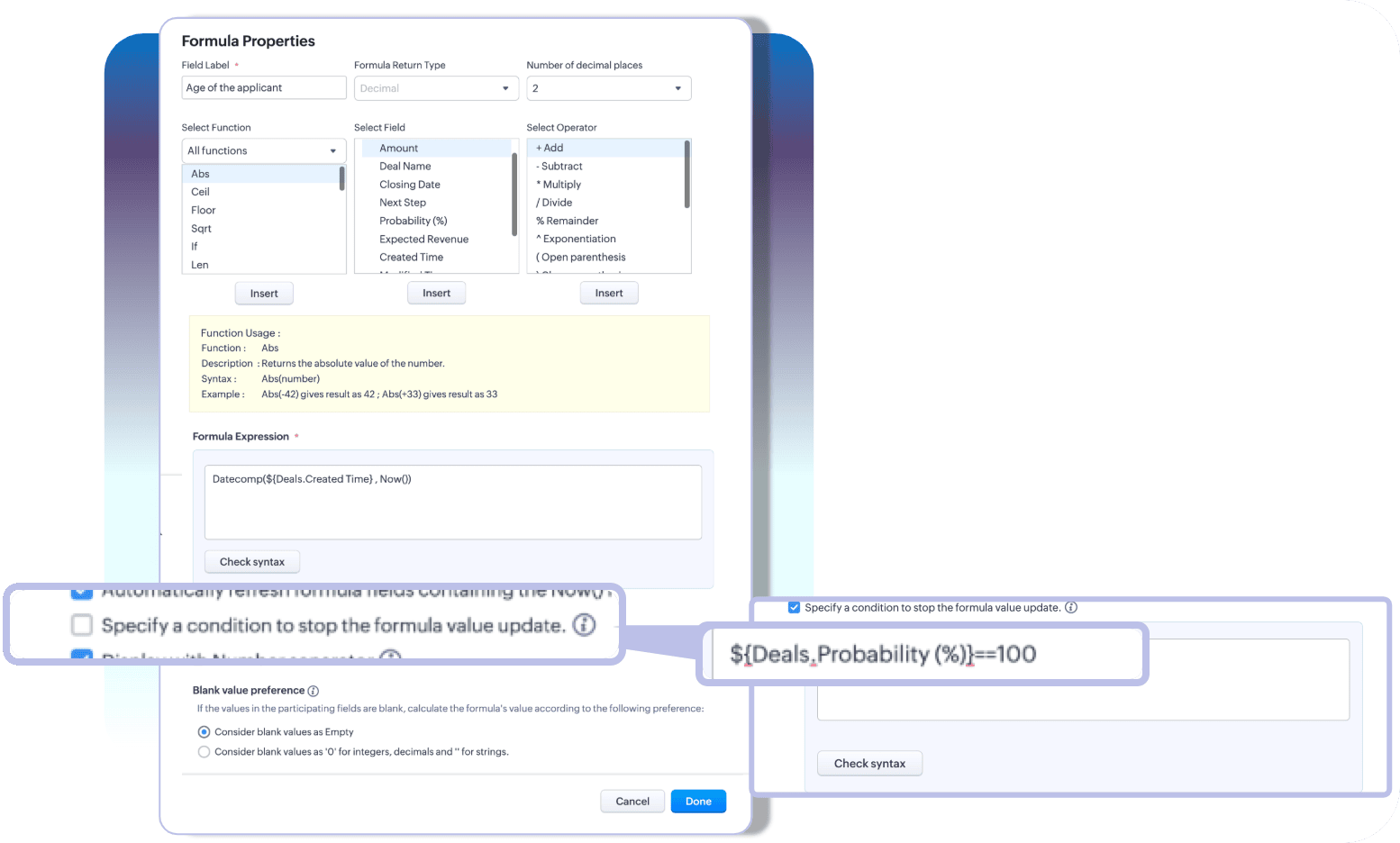
With these two enhancements, you can choose how you want your time-based formulas to be computed—to keep them running or to stop at a given time.

Info
Limitation:
A formula field that has auto-refresh and stop criteria enabled, then those fields cannot have multiline fields, picklists, and lookup fields as participating fields.

Enhancement 3: Include an existing formula as part of another formula's component

A formula is only as powerful as its components. Zoho CRM enables you to construct various complex formulas, but one missing piece has been the inability to include an existing formula field to construct a new one.

Thus far, you could do this by building a long and linear syntax.

For example, let's say you want to determine the discounted value and overall discount percentage for your finalized quotes. Firstly, to determine the discount value, you'd write a formula.

Next, to find the discount percentage, you'd write another formula that looks something like this:

As you can see, the structure of the formula involves an existing computation. In Zoho CRM, to achieve this, you'd first formulate the discount value, and then—to find the percentage—you have to repeat the discount formula to get the percentage.

For a simple formula like this, the syntax is fairly easy to understand. But imagine calculating commissions, which would involve several smaller formulas—in which case, you have to repeat the entire formula structure even if you already have them computed in your record layout.

This is complex, redundant, and time-consuming—problems that this latest enhancement addresses.

A formula field looks like any other field in Zoho CRM. Thus, in addition to the list of fields available under the fields part of the formula configuration, all the existing formula fields will also be listed. Admins can construct new formulas using the existing formulas without having to repeat syntax.

That's all for the updates. If you have any feedback or questions, please drop them in the comments section. Let's connect!

QuoteRelease plan: These enhancements are lined up for release DC by DC, gradually. We will keep you posted on the comments accordingly.

Thanks and have a good one!
Kind regards,
Saranya Balasubramanian

      Zoho Campaigns Resources


        • Desk Community Learning Series


        • Digest


        • Functions


        • Meetups


        • Kbase


        • Resources


        • Glossary


        • Desk Marketplace


        • MVP Corner


        • Word of the Day


        • Ask the Experts


          Zoho CRM Plus Resources

            Zoho Books Resources


              Zoho Subscriptions Resources

                Zoho Projects Resources


                  Zoho Sprints Resources


                    Zoho Orchestly Resources


                      Zoho Creator Resources


                        Zoho WorkDrive Resources


                          Zoho CRM Resources

                          • CRM Community Learning Series

                            CRM Community Learning Series


                          • Tips

                            Tips

                          • Functions

                            Functions

                          • Meetups

                            Meetups

                          • Kbase

                            Kbase

                          • Resources

                            Resources

                          • Digest

                            Digest

                          • CRM Marketplace

                            CRM Marketplace

                          • MVP Corner

                            MVP Corner


                            Zoho Writer Writer

                            Get Started. Write Away!

                            Writer is a powerful online word processor, designed for collaborative work.

                              Zoho CRM コンテンツ


                                ご検討中の方

                                  • Recent Topics

                                  • Default Font Size in Desk

                                    How do I set my default font size in Desk? It takes me about 45 minutes to find the place to set it, then, when I sign out of Zoho and log back in, it's back to font 10 again. Seems like this would be simple, but like everything with Zoho, it's buried
                                  • Tip #19 - Create checkbox tracker in your spreadsheet

                                    Hello Sheet users! We are here with yet another tip to help you get the most out of Zoho Sheet. Spreadsheets can be used to handle a variety of tasks, but ever tried using checkboxes to track the progress of your action items dynamically? Here's a sample
                                  • Tip #20 - Three things you probably didn't know you can do with picklists

                                    Hello Zoho Sheet users! We’re back with another quick tip to help you make your spreadsheets smarter. Picklists are a great tool to maintain consistency in your spreadsheet. Manually entering data is time-consuming and often leaves typos and irregular
                                  • Per Level Approval for admins

                                    We need Process admins like Zoho CRM in Zoho Books for per stage approval Currently in books, admins only have the option for Final Approval But for example, in cases like when an employee is on leave, we can't just approval one level we only have option
                                  • CUSTOM FUNCTION GIVE ERROR #EVAL!

                                    CUSTEM FUNCTION CREATE KYA ZOHOSHEET ME US FUNCTION KO USE KIYA LEKIN DATA TO SAHI HAI LAKIN DATA SHEET ME NAHI LAG LAHA HAI KRUPYA SOLVE KARE MY CODE IS float ADDTWO_TWO(float NO1, float NO2) { ADD = NO1 + NO2; return ADD; }
                                  • Need to set workflow or journey wait time (time delay) in minutes, not hours

                                    Minimum wait time for both Campaigns workflows and Marketing Automation journeys is one hour. I need one or the other to be set to several minutes (fraction of the hour). I tried to solve this by entering a fraction but the wait time data type is an integer
                                  • Integrate Projects for Desk KB article release tasks

                                    Could you please look into the possibility of integrating project tasks for Zoho Desk article release processes? We are looking for an internal integration between Zoho Projects and Zoho Desk's KB article drafting, reviewing and releasing tasks. We could
                                  • Feature enhancement: Highlight rows based on a cell value

                                    Hello Sheet users, We're excited to announce a new feature enhacement, shaped directly by your valuable feedback! As you might know, conditional formatting is a great tool for anyone dealing with large data sets. Previously, if you’ve ever wanted to draw
                                  • Mind mapping in Zoho Projects

                                    Good morning,   I would like to congratulate the Zoho team for building such an inovative and responsive application that fits in the daily challenges of so many work groups. I would like suggest you another functionality that helps a lot in project planning and development: mind mapping. Mind mapping would be of great help for brianstorming, knowledge management and other needs in online collaboration.   Thanks and wish you all the best! George Maha Empresa Júnior Multidisciplinar do Instituto de
                                  • Shortcut to fill a range of cells

                                    Good evening: I'm writing because I haven't been able to find a feature that allows you to select a range of cells, type in one of them, and then use a key combination to type in all of them. In Excel, the keyboard shortcut is Ctrl+Enter. I haven't found
                                  • Detect and ignore bots in visitors

                                    The SalesIQ visitor numbers are basically useless to us because there is no bot detection. We get the same bots coming in from the same countries looking at the same pages every day. It can't be that difficult to tell the difference between an actual
                                  • Updating custom fields in Zoho Projects

                                    Hi I am wondering if anyone has experience with custom fields in Zoho Projects. I am struggling to update the field using either deluge or the api endpoint. My code is: //custom_Map = map(); custom_Map = {"UDF_DOUBLE_1":"0.27"}; update_Map = map(); update_Map.put("custom_fields",custom_Map.toList());
                                  • Markdown for Desk?

                                    Hi, my company wants to use markdown for formatting text in Desk (in all modules there, especially Tickets and Helpcenter). Zoho already offers use of markdown in several products (see https://help.zoho.com/portal/en/kb/backstage/microsite-guide/formatting-with-markdown/articles/formatting-with-markdo)
                                  • Change Currency symbol

                                    I would like to change the way our currency displays when printed on quotes, invoices and purchase orders. Currently, we have Australian Dollars AUD as our Home Currency. The only two symbol choices available for this currency are "AU $" or "AUD". I would
                                  • Calendar not working

                                    Are we the only ones. On any browser we cannot click on any of our calendar appointments and get them to open. They just make the browser loop. WE have reached out and have been told they are working on it. The office staff are really stuck. The point
                                  • Good news! Calendar in Zoho CRM gets a face lift

                                    Dear Customers, We are delighted to unveil the revamped calendar UI in Zoho CRM. With a complete visual overhaul aligned with CRM for Everyone, the calendar now offers a more intuitive and flexible scheduling experience. What’s new? Distinguish activities
                                  • Tip of the week #16 - Search and filter threads based on criteria

                                    Zoho TeamInbox lets you search and filter threads with any information that you have about the thread. You just have to input the criteria and Zoho TeamInbox will list all the threads that match the condition.   Firstly, there is a global search you can
                                  • WhatsApp Message Template Quick Reply Buttons

                                    Hello, I created my first Message Template to overcome the 24-hr messaging window and it was approved by WhatsApp/Meta. When I go to Meta, I also see that template brought from Zoho Desk, and used it via Zoho Desk IM. However, I notice that when in Meta's
                                  • Account in Quick View Filter

                                    I have a report that I often run against a specific Account. Every time, I have to go into the edit menu and change the Advanced Filter. I would prefer to use the Quick View Filter, but it does not allow me to use the one and only field that makes any
                                  • All new Address Field in Zoho CRM: maintain structured and accurate address inputs

                                    The address field will be available exclusively for IN DC users. We'll keep you updated on the DC-specific rollout soon. It's currently available for all new sign-ups and for existing Zoho CRM orgs which are in the Professional edition. Latest update
                                  • Collapsible Sections & Section Navigation Needed

                                    The flexibility of Zoho CRM has expanded greatly in the last few years, to the point that a leads module is now permissible to contain up to 350 fields. We don't use that many, but we are using 168 fields which are broken apart into 18 different sections.
                                  • Set Display for Numbers/Currency/etc with Client Script/Customization in Canvas List Page

                                    Is it possible to set a display mask for a number/currency field using Client Script or customization? I have custom fields that I would like to keep the decimal places for calculation purposes, but do not need them displayed to the user. So 101.3568
                                  • 136.143.188.51 blocked by spamcop

                                    Zoho mailserver seems to be blocked by spamcop. Cant send mail to my customer. Not sure what to do.
                                  • 🚀 WorkDrive 5.0: Evolving from a file sharing app to an intelligent content management platform: Phase 2

                                    Hello everyone, WorkDrive's primary focus has always been to provide an intelligent and secure content management platform, simplify collaboration, and be the central repository of files for all Zoho apps. In our previous announcement, we unveiled the
                                  • Sync desktop folders instantly with WorkDrive TrueSync (Beta)

                                    Keeping your important files backed up and accessible has never been easier! With WorkDrive desktop app (TrueSync), you can now automatically sync specific desktop folders to WorkDrive Web, ensuring seamless, real-time updates across devices. Important:
                                  • i keep see there is a connetion issue connecting 3rd party api on zoho when using zia

                                    hi there , i have set up open ai api to zoho zia (copied and pasted to zoho zia) but I keep getting notificaiton "there is a connetion issue connecting 3rd party api on zoho" when using zia on top when click zia and try to type in word there
                                  • Time Entries in Analytics

                                    I am trying to import a zoho sheet into zoho analytics. In my sheets one of the columns has "time Entries" in this "format HH:MM am/pm" example 11:00 PM. After import, i noticed that analytics converted the time to "00 Jan 1900 23:00:00".. how do i maintain
                                  • Deleting Fields in CRM Deletes Views in Analytics

                                    Hey friends! I'm having some issues when we modify some fields within ZohoCRM. There are times where we need to sunset a field and eventually completely remove it. In these instances, it seems like a lot of views are removed in Analytics. This ranges
                                  • Booking outside of scheduled availability

                                    Is there a way for staff (such as the secretary) to book appointments outside of the scheduled availability? Right now to do this special hours must be set each time. There should be a quicker way. Am I missing something?
                                  • Automatic Matching from Bank Statements / Feeds

                                    Is it possible to have transactions from a feed or bank statement automatically match when certain criteria are met? My use case, which is pretty broadly applicable, is e-commerce transactions for merchant services accounts (clearing accounts). In these
                                  • Zoho Desk Android and iOS app update: Access multilingual templates on the IM module

                                    Hello everyone! We have introduced multilingual templates on the IM module of the Zoho Desk mobile app allowing you to send IM template messages in translated versions. iOS: Android: Please update the app to the latest version directly from the App Store/
                                  • Can't login IMAP suddenly

                                    Since this evening I'm getting the error: You are yet to enable IMAP for your account. Please contact your administrator... IMAP always been enabled in my account and was workign fine for the past 7 years. Already tried turning IMAP off and on again.
                                  • Zia Profile Summary now supports six languages and responds faster

                                    After numerous customer requests, we’ve expanded Zia Profile Summary to do more than just summarize resumes quickly. It can now summarize them in six different languages and deliver results even faster. What’s New 1. Extended language support Zia can
                                  • Nimble enhancements to WhatsApp for Business integration in Zoho CRM: Enjoy context and clarity in business messaging

                                    Dear Customers, We hope you're well! WhatsApp for business is a renowned business messaging platform that takes your business closer to your customers; it gives your business the power of personalized outreach. Using the WhatsApp for Business integration
                                  • Does Zoho offer a full WhatsApp Marketing Platform (like WATI / GallaBox)?

                                    lm exploring WhatsApp marketing and I’d like to understand what options are available within the Zoho ecosystem. Currently, I see: Zoho SalesIQ has a broadcast option, but it seems very limited — for example, it doesn’t support uploading contacts via
                                  • Custom buttons

                                    Getting Error "You can only create 10 custom buttons per module" ! I already have more than 10 for 1 module before trying to create another. Is this a new restriction brought about by the all knowing what's best for businesses Zoho guru ? It would be
                                  • The Social Wall: October 2025

                                    Hello everyone, As we head toward the end of the year, we’re bringing you a few updates to help give your social media efforts a strong finish. This month, we’re rolling out new enhancements across both the web and mobile app. Post Preview Have you ever
                                  • Client Script | Update - Support for List Page (Canvas) and Notes

                                    Hello everyone! We are glad to announce two exciting updates in Client Script. Client Script support for List Page (Canvas) Client Script support for Notes These open the door to more dynamic and interactive customizations! 1. Client Script support for
                                  • Pincode based Product Restriction

                                    we have different types of products. 1) Very bulky items like plywood. 2) Too delicate items like glass These type of products we want to sell to local customers. Other products we want to supply all over India. There should be an option to restrict products
                                  • Pincode Based Pricing

                                    We want to give extra discount to customers within city limits because our shipping and packing costs are less. My proposal is assign list of pincodes to price list and assign the price list to customers whenever they sign up with pincodes. Also show
                                  • Next Page