Kaizen 215 - Workflow APIs - Part 3

Kaizen 215 - Workflow APIs - Part 3


Welcome back to another week of Kaizen!

Over the last couple of weeks, we’ve joined Zylker Cloud Services as they review and improve their workflows. In Part 1, we discovered and audited their sprawling workflow landscape. In Part 2, we learned how to use the Configuration API to understand valid triggers and actions, preventing errors before they happen.

Now, it is time to take action. Zylker has identified the "VP Alert - High Value Deal" workflow as a prime candidate for an update. It is old, has never run, and its logic might be too narrow. We will also explore how to create a new workflow from scratch to handle a new business requirement.

 STEP 5: Update an Existing Workflow 

From our audit in Step 2, we know that the existing ‘VP Alert - High Value Deal’ workflow (id: 4876876000016390024) hadn’t triggered even once. The original $50,000 threshold missed many valuable deals. Most winning opportunities actually land above $30,000. It has never executed, suggesting the criteria are too strict.

Let us use the Update Workflow Rule API to fix it. We'll change the criteria to trigger for deals greater than or equal to $30,000 and add an additional email notification.

 What you can and cannot update 

When working with the Update Workflow Rule API, not every field in a workflow is open for modification. Think of it like editing an existing automation blueprint. Some foundations are fixed, while others are flexible.

You can update:

  • Name and Description

  • Trigger : You can update triggers, but only within the same trigger type. For example, you can change a Record Action trigger from create to edit, but not from a Record Action trigger to a Score-based trigger. For more details on this, please refer to our detailed help documentation here.

  • Conditions and Criteria : add, remove, or refine them.

  • Actions : add new ones, remove existing ones, or update their configuration.

  • Status : activate or deactivate a workflow rule. 

What cannot be updated

There are a few key restrictions to remember:

  • You cannot change the module associated with the workflow.

  • You cannot switch trigger categories (e.g., from Record Action to Email Trigger).

  • You cannot retain unsupported actions when changing to a trigger that doesn’t support them. For instance, if you change a trigger from Edit to Delete, but keep an Assign Owner action, the update will fail, because “Assign Owner” isn’t valid for Delete triggers.

Updating an existing workflow is not about replacing everything. it is about editing precisely what needs to change.

Here is how to do it:

  • Fetch the workflow details using the Get Workflow Rule API. This gives the full structure,  including condition IDs, action IDs, and trigger details.

  • Identify what needs to change.

In this case, to fix the  “VP Alert - High Value Deal” workflow, we can update the Workflow rule to:

  • lower the threshold to $300,000

  • change the comparator to greater_than. 

To make the workflow more useful, Zylker has also decided to add a few new actions.

But before doing that, the developers needed to confirm which actions are supported for this workflow’s trigger type. That is where last week’s Configuration API comes in handy. Since we already know this is a Record Action trigger (create_or_edit), we can refer to the configuration response we explored in Part 2 to see which actions are valid. 

  {

                "api_name": "create_or_edit",

                "deprecated": false,

                "name": "CreateorEdit",

                "scheduled_actions_supported": true,

                "actions": [

                    "field_updates",

                    "assign_owner",

                    "add_tags",

                    "remove_tags",

                    "email_notifications",

                    "tasks",

                    "create_record",

                    "create_connected_record",

                    "add_meeting",

                    "webhooks",

                    "functions",

                    "circuits",

                    "flow"

                ]

},


The response clearly shows that email notifications, field updates, and tags are all supported for this trigger type. With that confidence, in addition to updating the condition, we can also add a 'Priority' tag to those records that trigger the Workflow. This makes the workflow more visible and actionable across the sales hierarchy.

Sample Request:

PUT {{api-domain}}/crm/v8/settings/automation/workflow_rules/4876876000016390024

{

    "workflow_rules": [

        {

            "description": "Notify sales leadership and track strategic opportunities",

            "name": "VP Alert - High Value Deal.",

            "conditions": [

                {

                    "sequence_number": 1,

                    "criteria_details": {

                        "criteria": {

                            "group_operator": "AND",

                            "group": [

                                {

                                    "comparator": "greater_than", // change in comparator operator

                                    "field": {

                                        "api_name": "Amount"

                                    },

                                    "value": "300000"   // Lowered threshold

                                },

                                {

                                    "comparator": "equal",

                                    "field": {

                                        "api_name": "Stage"

                                    },

                                    "value": "Negotiation/Review"

                                }

                            ]

                        }

                    },

                    "instant_actions": {

                        "actions": [

                            {

                                "type": "add_tags",

                                "module": "Deals",

                                "details": {

                                    "tags": [

                                        {

                                            "name": "Priority"

                                        }

                                    ],

                                    "overwrite": true

                                }

                            }

                        ]

                    },

                    "id": "4876876000016390025" // id of the condition to be updated

                }

            ]

        }

    ]

}


After this update, the workflow now triggers for any deal worth more than $300,000 in the Negotiation/Review stage. Apart from sending the email notifications and adding the follow up task, it also tags these deals as Priority.

 Edit vs Add: 

To edit an existing condition or action, include its existing id in your update payload. Zoho CRM will recognize it as an update to that object.

To add a new condition or action, simply omit the id. CRM treats any object without an ID as a new addition.

 STEP 6: Create a new Workflow Rule 

With the “VP Alert - High Value Deal” workflow now fixed and performing as expected, Zylker’s sales team quickly began to see results.
But their sales team noticed that deals often stall after proposals are sent, with no systematic follow-up. Zylker has hence refined the requirements for a new Workflow.

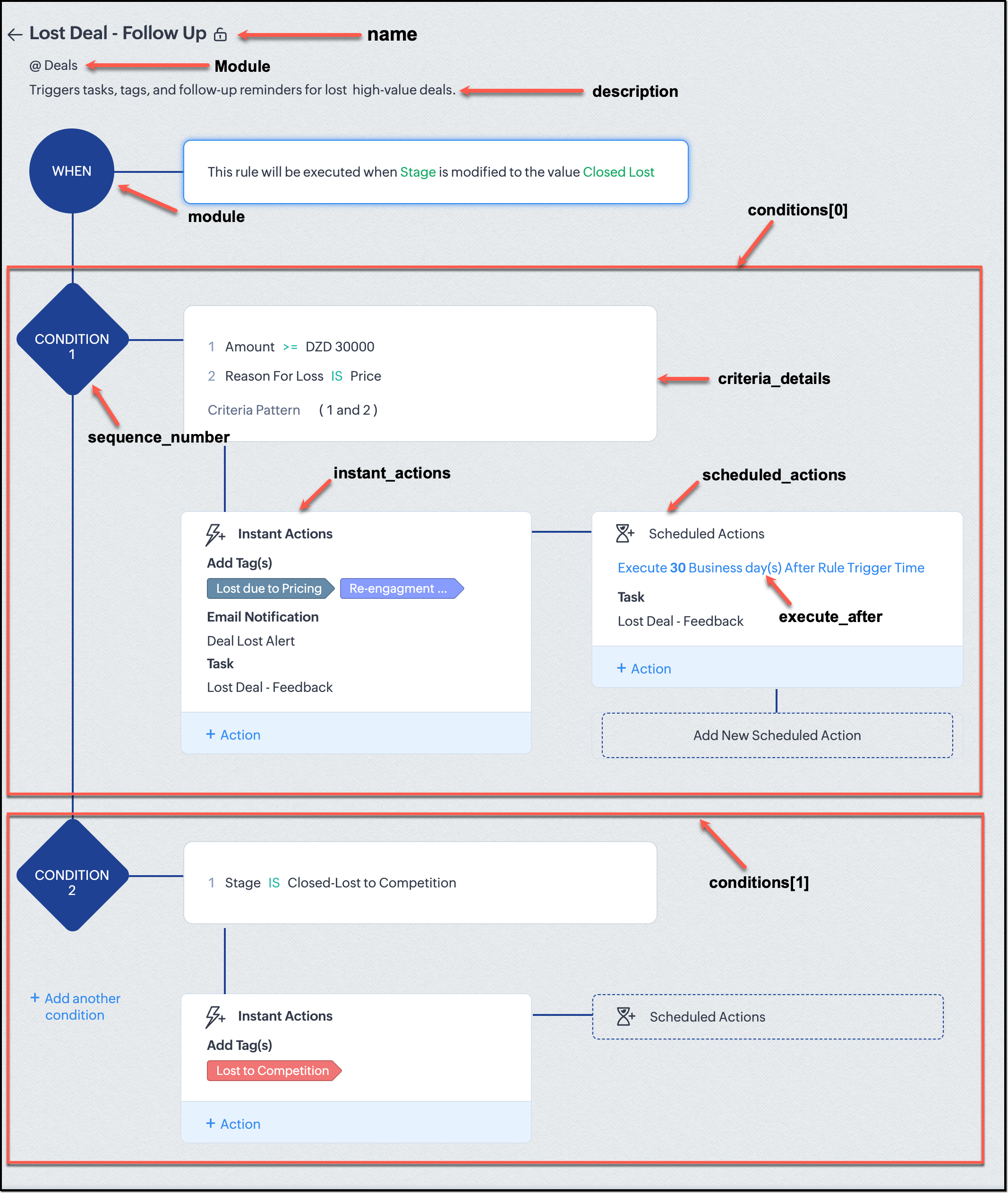
They want to automatically trigger follow-up actions when a high-value deal (above ₹30,000) is marked “Closed Lost” due to pricing reasons. This workflow must ensure that every lost opportunity is reviewed, tagged, and re-engaged after a cooling-off period. To achieve this, they want to create a workflow to be triggered whenever a deal’s Stage is updated to Closed Lost. It must perform the following actions:

  • Add tags Lost due to Pricing and Re-engagement Pending.

  • Send an email alert to the Sales team, with the details of the failed Deal, so they can look into the reasons.

  • After 30 business days, automatically create another “Lost Deal - Feedback” task to remind the owner to re-contact the customer for feedback, and for future opportunities. 

Before proceeding, Zylker makes an API call to the Workflow Configuration endpoint. This ensures that their chosen trigger type and actions are supported. From the response snippet below, it is clear that a field_update trigger supports scheduled actions and the required action types.

  {

                "api_name": "field_update",

                "deprecated": false,

                "name": "FieldUpdate",

                "scheduled_actions_supported": true,

                "actions": [

                    "field_updates",

                    "assign_owner",

                    "add_tags",

                    "remove_tags",

                    "email_notifications",

                    "tasks",

                    "create_record",

                    "create_connected_record",

                    "add_meeting",

                    "webhooks",

                    "functions",

                    "circuits",

                    "flow"

                ]

}


With these details validated, we can now move on to adding a new workflow for Zylker using the Create Workflow Rule API request.

Understanding the input JSON structure 

Every workflow definition follows the same hierarchy - defining when the rule runs, what conditions it checks, and which actions it performs.

The top-level input object contains a workflow_rules array. You must include just one workflow rule object per request. Each workflow rule defines its name, trigger type, and one or more condition blocks, each with its own criteria and actions.

Here is a breakdown of what is inside a single workflow rule:

{

  "workflow_rules": [

    {

      "name": "VP Alert - High Value Deal.",   //name of the workflow rule

      "description": "Notify leadership when high-value deals are lost due to pricing.",

      "module": { "api_name": "Deals" },   //module to which the workflow applies

      "execute_when": { ... },         //trigger configuration (e.g., on record edit, field update, etc.)

      "conditions": [

        {

          "sequence_number": 1,          // order of execution. this is the first condition

          "criteria_details": { ... },           // condition logic (criteria group)

          "instant_actions": { "actions": [ ... ] },  //instant actions executed instantly

          cheduled_actions": [              // schedules actions executed after a delay

            {

                      "execute_after": { ... },              // delay period for the scheduled action

                        "actions": [ ... ]

            }

          ]

        },

        {

          "sequence_number": 2,                      // second condition

          "criteria_details": { ... },

          "instant_actions": { "actions": [ ... ] }

        }

      ]

    }

  ]

}


Associative vs. Non-Associative Actions 

Every workflow rule performs one or more actions like sending an email, creating a task, or updating a field, etc. These actions fall into two broad categories: associative and non-associative.

Type

Description

Example Actions

Non- Associative Actions

These are defined inside the workflow rule itself. They do not need to exist beforehand. You can configure their details directly within the workflow payload.

Create record, schedule a call, add a meeting, convert records, social actions, create record on email received, assign owner,

Associative Actions

These are reusable actions created separately in CRM and referenced by their IDs. They can be used across multiple workflows and other automation tools.

Field updates, Email notifications, tasks, Webhooks, Add/Remove tags


When you create or update a workflow via API, the associative actions require you to pass their existing action IDs. These IDs can be fetched using the corresponding Actions APIs : Field Updates, Email Notifications, Webhooks, and Tasks. In the coming weeks of Kaizen, we will take a closer look at each of these Actions APIs. We will see how to create, manage, and delete them within your workflow automation strategy.

Sample Request:

POST {{api-domain}}/crm/v8/settings/automation/workflow_rules

{

    "workflow_rules": [

        {

            "execute_when": {

                "details": {

                    "trigger_module": {

                        "api_name": "Deals",

                        "id": "4876876000000002181"

                    },

                    "criteria": {

                        "comparator": "equal",

                        "field": {

                            "api_name": "Stage",

                            "id": "4876876000000002565"

                        },

                        "type": "value",

                        "value": "Closed Lost"

                    },

                    "repeat": false,

                    "match_all": false

                },

                "type": "field_update"

            },

            "module": {

                "api_name": "Deals",

                "id": "4876876000000002181"

            },

            "description": "Triggers tasks, tags, and follow-up reminders for high-value deals lost due to pricing",

            "name": "Lost Deal due to Pricing - Follow Up",

            "conditions": [

                {

                    "sequence_number": 1,

                    "instant_actions": {

                        "actions": [

                            {

                                "name": "Lost Deal - Feedback",

                                "id": "4876876000016794047",

                                "type": "tasks"

                            },

                            {

                                "details": {

                                    "module": {

                                        "api_name": "Deals",

                                        "id": "4876876000000002181"

                                    },

                                    "over_write": false,

                                    "tags": [

                                        {

                                            "name": "Lost due to Pricing",

                                            "id": "4876876000016794071",

                                            "color_code": "#658BA8"

                                        },

                                        {

                                            "name": "Re-engagement pending",

                                            "id": "4876876000016794075",

                                            "color_code": "#879BFC"

                                        }

                                    ]

                                },

                                "type": "add_tags"

                            },

                            {

                                "name": "Deal Lost Alert",

                                "id": "4876876000016794062",

                                "type": "email_notifications"

                            }

                        ]

                    },

                    "scheduled_actions": [

                        {

                            "execute_after": {

                                "period": "business_days",

                                "unit": 30

                            },

                            "actions": [

                                {

                                    "name": "Lost Deal - Feedback",

                                    "id": "4876876000016794047",

                                    "type": "tasks"

                                }

                            ]

                        }

                    ],

                    "criteria_details": {

                        "criteria": {

                            "group_operator": "AND",

                            "group": [

                                {

                                    "comparator": "greater_equal",

                                    "field": {

                                        "api_name": "Amount",

                                        "id": "4876876000000002557"

                                    },

                                    "type": "value",

                                    "value": "30000"

                                },

                                {

                                    "comparator": "equal",

                                    "field": {

                                        "api_name": "Reason_For_Loss__s",

                                        "id": "4876876000002440001"

                                    },

                                    "type": "value",

                                    "value": "Price"

                                }

                            ]

                        }

                    }

                }

            ]

        }

    ]

}


The execute_when defines when the workflow should fire.

  • type = field_update means this rule runs when a field’s value changes.

  • criteria : Stage = Closed Lost so the rule triggers whenever the Stage field is updated to Closed Lost.

  • repeat = false ensures it will not trigger multiple times for the same record. 

In simple terms: “Whenever a deal is marked as Closed Lost, run this workflow.” The criteria_details section refines the trigger. The workflow only runs when the Amount ≥ ₹30,000 AND Reason for Loss = Price.

The instant_actions section inside the conditions array has the actions to be executed immediately when the criteria are met.

  • Add Tags : labels the record for easy filtering and reporting.

  • Send Email Alert : notifies the sales team instantly about the lost deal.

The scheduled_actions defines what happens after some time has passed. In this case, after 30 business days. Here, the workflow automatically creates a “Lost Deal - Feedback” task, reminding the deal owner to follow up with the customer to get feedback, and for future opportunities.

The criteria_details defines which records the workflow applies to. In this case, the rule applies to the records that satisfy the following conditions:
  1. The Amount is greater than or equal to ₹30,000, and  

  2. The Reason for Loss is “Price.”  

By combining these elements, this workflow achieves a full closed-loop follow-up system.

Conclusion:  

Zylker’s updated and new workflows make their automation smarter and more responsive. They are now able to spot key deals and ensure lost opportunities are revisited.  

And this is just the beginning. There are countless use cases you can build with workflows. We have included many examples in our Postman collection. Please check them out to get more out of the Workflow APIs. If you have a unique scenario you would like us to address, or a specific automation challenge you are facing, please let us know! We will address them in the upcoming weeks.


We hope you are now well on your way to mastering Workflow APIs. Share your thoughts in the comments or write to us at support@zohocrm.com.

Additional Reading:

  1. Workflow APIs - Part 1 - Auditing Workflows
  2. Workflow APIs - Part 2 - Find out what actions and triggers are supported for each module


      Zoho Campaigns Resources


        • Desk Community Learning Series


        • Digest


        • Functions


        • Meetups


        • Kbase


        • Resources


        • Glossary


        • Desk Marketplace


        • MVP Corner


        • Word of the Day


        • Ask the Experts


          • Sticky Posts

          • Announcing the new SKILL.md for Zoho CRM and the updated OAS repository!

            We are introducing a new zoho-crm skill to make working with Zoho CRM Developer tools (like APIs, functions, widgets, client scripts, queries etc) easier and faster, with the help of AI in your preferred AI harness like Claude Code, Codex, Cursor, VSCode
          • Kaizen #261 : Using Zoho CRM Skill to generate complex COQL queries

            Hello everyone, In the previous Kaizen posts, we introduced the zoho-crm SKILL.md and discussed how it can help you when you are working with Zoho CRM APIs and Client Script. In this Kaizen, we will focus on using the Zoho CRM `SKILL.md` with GitHub Copilot
          • Kaizen #256 - Build an Arrival Readiness Web Tab in Zoho CRM

            Hi everyone! Welcome back to the Kaizen series! In the post, we discuss a use case in hospitality industry: how an Arrival Readiness web tab widget can be used to let reception staff identify and resolve issues before arrival of guests. Use case In the
          • Kaizen #198: Using Client Script for Custom Validation in Blueprint

            Nearing 200th Kaizen Post – 1 More to the Big Two-Oh-Oh! Do you have any questions, suggestions, or topics you would like us to cover in future posts? Your insights and suggestions help us shape future content and make this series better for everyone.
          • Kaizen #226: Using ZRC in Client Script

            Hello everyone! Welcome to another week of Kaizen. In today's post, lets see what is ZRC (Zoho Request Client) and how we can use ZRC methods in Client Script to get inputs from a Salesperson and update the Lead status with a single button click. In this

          Zoho CRM Plus Resources

            Zoho Books Resources


              Zoho Subscriptions Resources

                Zoho Projects Resources


                  Zoho Sprints Resources


                    Zoho Orchestly Resources


                      Zoho Creator Resources


                        Zoho WorkDrive Resources


                          Zoho CRM Resources

                          • CRM Community Learning Series

                            CRM Community Learning Series


                          • Tips

                            Tips

                          • Functions

                            Functions

                          • Meetups

                            Meetups

                          • Kbase

                            Kbase

                          • Resources

                            Resources

                          • Digest

                            Digest

                          • CRM Marketplace

                            CRM Marketplace

                          • MVP Corner

                            MVP Corner


                            Zoho Writer Writer

                            Get Started. Write Away!

                            Writer is a powerful online word processor, designed for collaborative work.

                              Zoho CRM コンテンツ


                                ご検討中の方

                                  • Recent Topics

                                  • Zoho Calendar integration for Bigin

                                    Hello everyone, We're excited to introduce Zoho Calendar's integration in Bigin! For a while now, users have been able to sync events in Bigin with Google Calendar and Outlook Calendar - but with this new topping, it syncs with Zoho Calendar as well.
                                  • Does Updating Employee Names and Profile Pictures in Zoho One Automatically Sync Across All Zoho Applications?

                                    Hi Zoho Team, We are currently using Zoho One in our organization and want to centrally manage employee profile information. As a Zoho One Super Admin, if I update the employee name and profile picture for all users from the Zoho One Admin Panel, will
                                  • Enhanced shared mailboxes: Dedicated Sent folders, Run-through filters & fresh UI

                                    Hi everyone, Collaborative communication is the backbone of smooth operations; whether you are handling customer support queries, managing vendor requests, or tracking sales leads. Shared mailboxes in Zoho Mail ensure your team stays on the same page
                                  • How to Manage Two GST Numbers / Two Companies in a Single Zoho Inventory Organization?

                                    Hi Team, We currently have two separate legal entities: A Proprietorship Firm with its own GSTIN A Private Limited Company with a different GSTIN However, operationally, both companies deal with the same products, and we would like to manage the physical
                                  • 10/22 15時〜 オンラインもくもく会のお知らせ | Zoho ワークアウト

                                    ユーザーの皆さま、こんにちは。コミュニティグループの中野です。 10月22日(木)開催の「Zoho ワークアウト」をご案内します。 Zoho ワークアウトは、参加者それぞれが取り組みたいテーマを持ち寄り、ユーザー同士で交流しながら、 設定・検証・運用改善を進めるオンラインの「もくもく会」です。 「試してみたい設定があるけれど、なかなか時間を取れない」 「一人で進めていると、途中で手が止まってしまう」 「他のユーザーの活用方法や工夫を聞いてみたい」 そんな方は、Zoho ワークアウトで一緒に取り組んでみませんか?
                                  • Reporting tags associated to Project in Zoho books?

                                    Hi, I know you can add reporting tags to contact, articles and transactions. Is it possible to add reporting tags to Project. We Zoho reports I would be able to generate reports by tags. Sometimes tags for a contact is different for projects (ie Projects
                                  • Reporting Tags in Profit and Loss Reports Analysis

                                    Hello Community and Zoho Books Product Team, I would like to highlight a limitation I encountered with Reporting Tags in Zoho Books. Reporting Tags Not Applying to Automated Inventory Journal Postings from Product Invoices. For inventory product invoices,
                                  • Spam Quarantine: Manage suspicious emails in Zoho Mail

                                    When an email is quarantined by spam processing, it need not always be blocked right away. Some emails may be marked incorrectly, or may need to be reviewed before a final decision is made. The Spam Quarantine feature in the Zoho Mail Admin Console gives
                                  • What is the difference between "Reply" and "Public Comment" in a ticket?

                                    Hey, my company is thinking about switching to Zoho Desk but we do not understand the difference between the "Reply" and the "Public Comment" feature. When should we use which? And why? What is the difference between them? Thank you for your help! Kindest
                                  • Comments Vs. Replies

                                    I'm curious as to the difference between a "Reply" and a "Comment" on a ticket. It appears that "Replies" are what's used to determine response time SLA's and there are also used to automatically re-open tickets. I'm just trying to understand the key differences so I can educate both our clientele and our back-end users on which function/feature to use to better improve the ticket lifecycle. If anyone has any insight it would be appreciated. Thanks!
                                  • What's New in Zoho Inventory | July & August 2026

                                    Hello users, The July and August 2026 releases bring a range of new features and improvements across the product. From the Nigeria Edition and Super Admin enhancements to Sri Lanka IRD-compliant invoicing, Loyalty Program Management, and improvements
                                  • Forms data export bug

                                    The export csv with a password has changed for the worst. It is less secure by not allowing complex passwords. Just last week and the last year (at least) I was able to use a complex, secure password. Export CSV moreover doesn't even work if I use a simple
                                  • Fax and email questions

                                    Does Zoho offer faxing capability? If so, how to do it? And, why is has my email inbox stopped in 2019? There are no more emails since then. Also if I delete all of those emails, will they delete it from my gmail account (I'm linked to a gmail email address).
                                  • Create a single record from multiple images with ICR

                                    Hello all, Zia's Intelligent Character Recognition can now create a single record from multiple images based on the configured ICR rule. Users can upload up to three images at once, such as an ID, a passport, and a business card, and Zia will extract
                                  • How to present an Analytic on a CRM dashboard and filter it on loginuser id

                                    How to present an Analytic on a CRM dashboard and filter it on loginuser id? I want to display an Analytics pivot table (as a widget) on a CRM dashboard and have the pivot filtered on the loginuser. I want additional user-filters available, such as date,
                                  • CNIL - Suivi de Pixel

                                    Bonjour à tous, À la suite de la nouvelle recommandation de la CNIL sur les pixels de suivi dans les e-mails, savez-vous si Zoho Campaigns permet : de conditionner le suivi des ouvertures au consentement de chaque contact ; de proposer un lien permettant
                                  • Setting default From address when replying to request

                                    At the moment, if I want to reply to a request, the From field has three options, company@zohosupport.com, support@company.zohosupport.com, and support@company.com. The first two are really internal address that should never be seen by the customer and
                                  • Zoho Payroll: Product Updates - Q3, FY2026

                                    Over the past quarter, Zoho Payroll has added several updates to make payroll easier to process, configure, and manage. The most notable improvements cover bank integrations, reimbursement support, payslip enhancements, employee exit documentation, payroll
                                  • Convert OLM to PST on Mac and Windows Using Free Methods

                                    When your Outlook for Mac data is stored in an OLM file and you want to use it with Outlook for Windows, the simplest approach to transfer your emails and other mailbox information is to convert the OLM file to a PST file. OLM is primarily associated
                                  • Add Payment Information (like Bank details)

                                    I am using the Free plan of Zoho Books. I need to add the bank details/ UPI details on the invoice. How can I do that. I have added the details in the Bank Section.
                                  • Placeholders for Multi-Level Discount

                                    I am using custom templates for Invoices and all other modules. Since i have activated multi-level discount (an early-access feature from zoho) "discount at line-item and transaction level", I need placeholders for using them in my custom templates. With
                                  • Running Balance

                                    Please add automatically Running balance in ledger view. Taking lot of time, every time to add manually
                                  • Accounting on the Go Series-47: Effortless GSTIN Management- Auto Populate TaxPayer Details in Zoho Books Mobile App

                                    Hello everyone, Welcome back! Today, we're focusing on a feature specifically designed for our Indian users in the Zoho Books-Indian edition, particularly those who deal with GST compliance regularly. We understand the importance of accurate and efficient
                                  • URGENT: Stalled DC Migration >72 Hours - Records Locked [Ticket #: 167813877

                                    The DC migration was started on 1st October at 6 pm and we were informed migration period as 48 hours but even after more than 72 hours, the migration seems still in progress. We sent two emails to check the status but no responses. We need the migration
                                  • Zoho Webinar - Sharing System Audio (NOT AVAILABLE)

                                    Hi, We are having a serious problem with Zoho Webinar. In the webinars we run, we very often share the audio from a video we are streaming directly from YouTube or other applications. Until recently we were using Zoom, but as we use other Zoho applications
                                  • Cash Recipt

                                    You can not receive cash more than 10000 from one party in a day and two lakh in a year. In statement you can't differentiate cash or bank receipt. zoho does not support this
                                  • Need to set workflow or journey wait time (time delay) in minutes, not hours

                                    Minimum wait time for both Campaigns workflows and Marketing Automation journeys is one hour. I need one or the other to be set to several minutes (fraction of the hour). I tried to solve this by entering a fraction but the wait time data type is an integer
                                  • Concern Regarding Stock Validation in Inventory Management

                                    Hi Zoho Team, We would like to highlight a concern regarding stock validation in the inventory system. As per standard inventory management practices, if the stock level is zero, the system should not allow users to create a shipment, packing slip, or
                                  • Change from OST to PST on Windows 10/11 Using Free Method

                                    There is an advantage in converting OST files to PST format if you need to access your Outlook data on a different computer, want to keep a local copy, or are trying to recover items from an old Outlook profile. The good point is that users of Windows
                                  • Important: Whitelist new proxy outgoing IPs for IN, SA, and UAE data centers

                                    Hello everyone, We're expanding the pool of proxy outgoing IP addresses for our IN, SA, and UAE data centers by introducing new IPs alongside the existing ones. This helps ensure high availability, optimal load distribution, and redundancy for outgoing
                                  • Zoho Flow Custom Function Issue

                                    I have a use case where I will be needing to post data to a wordpress site. Specifically to a custom post type with a bunch of ACF fields. I have setup trigger event correctly for Tookan and can receive data from the webhook. In order to post the data
                                  • How to Open .mbox file in Gmail with Attachments?

                                    Gmail offer users to backup INBOX folder in .mbox file format via Google Takeout Feature. Howver there is no such option to Restore Gmail MBOX. Thus I would like to suggest you to choose an alternate approach i.e. MBOX to Gmail Wizard. This utility will open .mbox file in Gmail with attachments.  Steps to open MBOX file in Gmail are; Run MBOX to Gmail Wizard Click Add File and add .mbox file. Enter your Gmail login credentials. Click Convert button. Finished! This is how you can open MBOX file in
                                  • Custom Validation for On Duty

                                    Hi Team, We would like to have custom validation support for the On Duty form in the Attendance module. We need to apply some restrictions, such as: Limit the number of On Duty requests per month. Restrict On Duty requests on selected days. Allow employees
                                  • Integrating FaceBook Ads into MarketingHub

                                    I would like to track the clicks from a FB Ad campaign into my website via marketinghub.  I cannot currently add a MH form directly to my FB page, as I receive an error telling me I need at least 2000 subscribers on FB to be allows to do that (yikes!) What is the best way to set up MH so I can track which FB are converting well?  I know I can reach the FB reports directly, but these do not track conversions from the MH forms on my website. Best regards, Joe
                                  • Migration from GoDaddy to Zohomail

                                    Hi All, I am trying to migrate all the emails from Go Daddy to zohomail account using the migration tool. i tried with imap method, its not working. when i try it with pop method, then only the emails from the go daddy account inbox ( not other folders), is getting transferred, how can i transfer all the folders in the email account from go daddy to zoho. and also the emails which are coming from go daddy are like new unread emails ( is there any where i can differentiate from read and unread emails)
                                  • How do I migrate from Office 365 to Zoho Mail?

                                    Check out Advik Email Migration Wizard, this software is specially developed to move mailboxes from Office 365 to Zoho Webmail. In addition you can migrate from Gmail, Yahoo, Rediffmail and 80+ webmail servers to ZOHO MAIL. Isn't it amazing? This is an all in one email migration solution. Steps to export emails from Office 365 to Zoho Webmail are as follows; Run Advik Email Migration Tool in your system. Select Office 365 as source and enter its login credentials. Select mailbox folders and choose
                                  • How to Backup Zoho to PST?

                                    I'm looking for a simple way to backup Zoho Mail emails to PST format. I tried the IMAP method with Outlook, but it seems slow and complicated for large mailboxes. I need a solution that can: Export Zoho emails to PST Preserve attachments and folder hierarchy
                                  • Shopify connector – product cost ("Cost per item") not synced, so COGS/gross margin can't be calculated

                                    Hi Zoho Analytics team, I use the native Shopify connector in Zoho Analytics (cloud) to build reporting dashboards for Shopify stores. As far as I can tell, the connector does not sync product cost, so there's no way to calculate Cost of Goods Sold (COGS),
                                  • Zoho Sprints - Q3 Updates for 2026

                                    Another quarter, another set of productive features. This time our focus was mainly to simplify in-app navigations and control all your work related activities within Zoho Sprints. We delivered 7 major features and 9 enhancements, which include Zoho Sprints
                                  • The Social Wall: August 2024

                                    Hi everyone, We're thrilled to bring you the latest updates, features, and improvements to help you get the most out of Zoho Social. Let's see what was new for us at Social in August. Post documents on LinkedIn You can now reach a lot more people and
                                  • Next Page