Kaizen 224 - Quote-driven Deal Reconciliation Using Zoho CRM Functions and Automation

Kaizen 224 - Quote-driven Deal Reconciliation Using Zoho CRM Functions and Automation


Hello everyone!
Welcome back to another instalment in the Kaizen series.

This post covers quote-driven deal reconciliation, emphasizing Functions and Automation to address practical sales challenges.

Business Challenge

Sales organizations often mark deals as Closed Won before commercial transactions fully conclude. Quotes generate promptly upon closure, yet businesses typically provide a brief window such as one week for renegotiation or payment. During this period, currency fluctuations, payment delays, and risk thresholds can significantly alter the final deal value.

This Kaizen demonstrates how Zoho CRM Functions and Automation work together to reconcile deal financials with quote activity over time. Sales, finance, and operations teams can thus access accurate, policy-compliant values.
Here is a typical sequence:
  1. Deal closes with Closed Won status
  2. Quote generates immediately
  3. Customer receives grace period (e.g., one week) for payment or adjustments
Key factors during this window:
  1. Exchange rates fluctuate
  2. Payments may succeed or fail
  3. Business absorbs limited losses(up to 10%, for example)
  4. Major variances trigger renegotiation
CRM must reflect actual outcomes rather than initial closure assumptions. Quotes serve as the authoritative commercial record, with final deal values depending on execution timing. This approach captures intermediate and final financial states to enable automated decisions and audits.

Key business scenarios covered

Scenario 1: Payment is made during the grace period

  1. Quote is generated on day 0
  2. Customer completes payment on day 7
  3. Exchange rate has changed since quote generation

Business Requirement

The business wants to calculate the actual payable amount using the exchange rate on the payment day and store it explicitly in CRM.

Outcome

The realized value is captured and stored, ensuring that reports and downstream systems reflect the true commercial result.

Scenario 2: Acceptable loss threshold (10%)

  1. Exchange rate movement results in a loss
  2. The business is willing to absorb losses up to 10%
  3. Loss exceeds the acceptable threshold

Business requirement

If the loss exceeds the defined tolerance, the quote should move to renegotiation instead of being accepted automatically.

Outcome

CRM enforces pricing policy consistently, without manual intervention or subjective judgment.

Scenario 3: Significant currency fluctuations

  1. Exchange rate volatility is unusually high
  2. Even if loss is within limits, risk exposure is significant

Business requirement

Large fluctuations should trigger renegotiation, regardless of absolute loss percentage.

Outcome

Financial risk is handled proactively based on measurable criteria.

Scenario 4: No payment after the grace period

  1. Customer does not pay within the allowed window
  2. Updated exchange rate is favorable to the business

Business Requirement

If the updated rate is profitable, the quote can be revised and reissued with the new amount.

Outcome

CRM reflects market-aligned pricing while maintaining transparency around why the amount changed.

Why Zoho CRM Functions is the best fit?

This reconciliation pattern requires the following capabilities beyond static configuration.
  1. Reading and reconciling data across Deals and Quotes
  2. Applying time-based and threshold-based business rules
  3. Writing calculated values into dedicated fields
  4. Supporting multiple decision paths(accept, renegotiate, revise)
  5. Running logic at specific business moments
Zoho CRM Functions provide the flexibility and control required to implement this logic cleanly, while automation ensures it runs consistently and reliably.

Custom fields used in this post

Deals

  1. Final Accepted Amount - Currency - Amount finally agreed and accepted
  2. FX Impact Percentage - Percent - Gain or loss due to exchange movement
  3. Reconciliation Status - Picklist - Accepted or Renegotiate
  4. Reconciled On - DateTime- Timestamp of final reconciliation

Quotes

  1. Quote Reference Amount - Currency - Amount at quote generation
  2. Quote Exchange Rate - Decimal - Exchange rate used in quote
  3. Payment Due Date - Date - End of grace period
  4. Potential Payable Amount - Currency - Recalculated amount at evaluation time
  5. FX Variance Percentage - Decimal - Difference vs quoted amount
  6. FX Evaluation Status - Picklist - Pending or Evaluated
  7. Recalculate FX - Checkbox - Explicit recalculation trigger
These fields capture commercial intent and outcome, not just static numbers.

High level automation flow

  1. Deal is marked Closed Won
    1. Workflow triggers a function to generate a Quote
  2. Business updates evaluation inputs when needed
  3. User explicitly triggers FX recalculation
  4. Function
    1. Calculates financial impact
    2. Updates quote and deal
    3. Applies business decisions
  5. CRM reflects finalized commercial reality

Function 1: Generate a Quote from the Deal

This function creates a Quote automatically when a Deal is closed, ensuring downstream processes start immediately and consistently.
void automation.generateQuoteFromDeal(int dealId)
{
deal = zoho.crm.getRecordById("Deals", dealId);
if(deal == null) return;

amount = deal.get("Amount");
exchangeRate = deal.get("Exchange_Rate");
account = deal.get("Account_Name");

productItem = Map();
productItem.put("product", {"id":"<PRODUCT_ID>"});
productItem.put("quantity", 1);
productItem.put("list_price", amount);

productList = List();
productList.add(productItem);

quoteMap = Map();
quoteMap.put("Subject", "Quote for Deal");
quoteMap.put("Deal_Name", dealId);
quoteMap.put("Account_Name", account.get("id"));
quoteMap.put("Product_Details", productList);
quoteMap.put("Quote_Stage", "Draft");
quoteMap.put("Valid_Till", zoho.currentdate.addDay(7));
quoteMap.put("Quote_Reference_Amount", amount);
quoteMap.put("Quote_Exchange_Rate", exchangeRate);

zoho.crm.createRecord("Quotes", quoteMap);
}

Function 2: Reconcile Deal from Quote

This function calculates payable values, evaluates financial impact, and updates the Deal with finalized financial information.
void automation.reconcileDealFromQuote(Int quoteId)
{
info "Starting FX reconciliation for Quote ID: " + quoteId;

// -------------------------------------------------
// Fetch Quote
// -------------------------------------------------
quote = zoho.crm.getRecordById("Quotes", quoteId);
if(quote == null)
{
info "Quote not found";
return;
}

dealInfo = quote.get("Deal_Name");
if(dealInfo == null)
{
info "Quote not linked to Deal";
return;
}

dealId = dealInfo.get("id");

deal = zoho.crm.getRecordById("Deals", dealId);
if(deal == null)
{
info "Deal not found";
return;
}

// -------------------------------------------------
// Mark FX Evaluation as PENDING
// -------------------------------------------------
zoho.crm.updateRecord(
"Quotes",
quoteId,
{"FX_Evaluation_Status" : "Pending"}
);

// -------------------------------------------------
// Read required FX inputs
// -------------------------------------------------
quotedAmount = quote.get("Quote_Reference_Amount");
quoteRate = quote.get("Quote_Exchange_Rate");
evaluationRate = quote.get("Evaluation_Exchange_Rate");

info "Quoted Amount: " + quotedAmount;
info "Quote Rate: " + quoteRate;
info "Evaluation Rate: " + evaluationRate;

if(quotedAmount == null || quoteRate == null || evaluationRate == null)
{
info "Missing required FX inputs";
return;
}

// -------------------------------------------------
// FX Calculations(rounded)
// -------------------------------------------------
payableAmount = (quotedAmount * evaluationRate / quoteRate).round(2);
fxVariance = (((payableAmount - quotedAmount) / quotedAmount) * 100).round(2);

info "Payable Amount: " + payableAmount;
info "FX Variance %: " + fxVariance;

// -------------------------------------------------
// Decide Quote Stage(Business decision here)
// -------------------------------------------------
quoteStage = "";
reconciliationStatus = "";

if(fxVariance <= 10)
{
quoteStage = "Acceptable FX Impact";
reconciliationStatus = "Accepted";
}
else
{
quoteStage = "FX Impact Exceeds Threshold";
reconciliationStatus = "Renegotiate";
}

// -------------------------------------------------
// Update Quote(Final state)
// -------------------------------------------------
quoteUpdate = Map();
quoteUpdate.put("Potential_Payable_Amount", payableAmount);
quoteUpdate.put("FX_Variance_Percentage", fxVariance);
quoteUpdate.put("FX_Evaluation_Status", "Evaluated");
quoteUpdate.put("Quote_Stage", quoteStage);
quoteUpdate.put("Recalculate_FX", false);

quoteResp = zoho.crm.updateRecord("Quotes", quoteId, quoteUpdate);
info "Quote update response:";
info quoteResp;

// -------------------------------------------------
// Update Deal
// -------------------------------------------------
dealUpdate = Map();
dealUpdate.put("Final_Accepted_Amount", payableAmount);
dealUpdate.put("FX_Impact_Percentage", fxVariance);
dealUpdate.put("Reconciliation_Status", reconciliationStatus);
dealUpdate.put(
"Reconciled_On",
zoho.currenttime.toString("yyyy-MM-dd'T'HH:mm:ssXXX")
);

dealResp = zoho.crm.updateRecord("Deals", dealId, dealUpdate);
info "Deal update response:";
info dealResp;

info "FX reconciliation completed successfully";
}

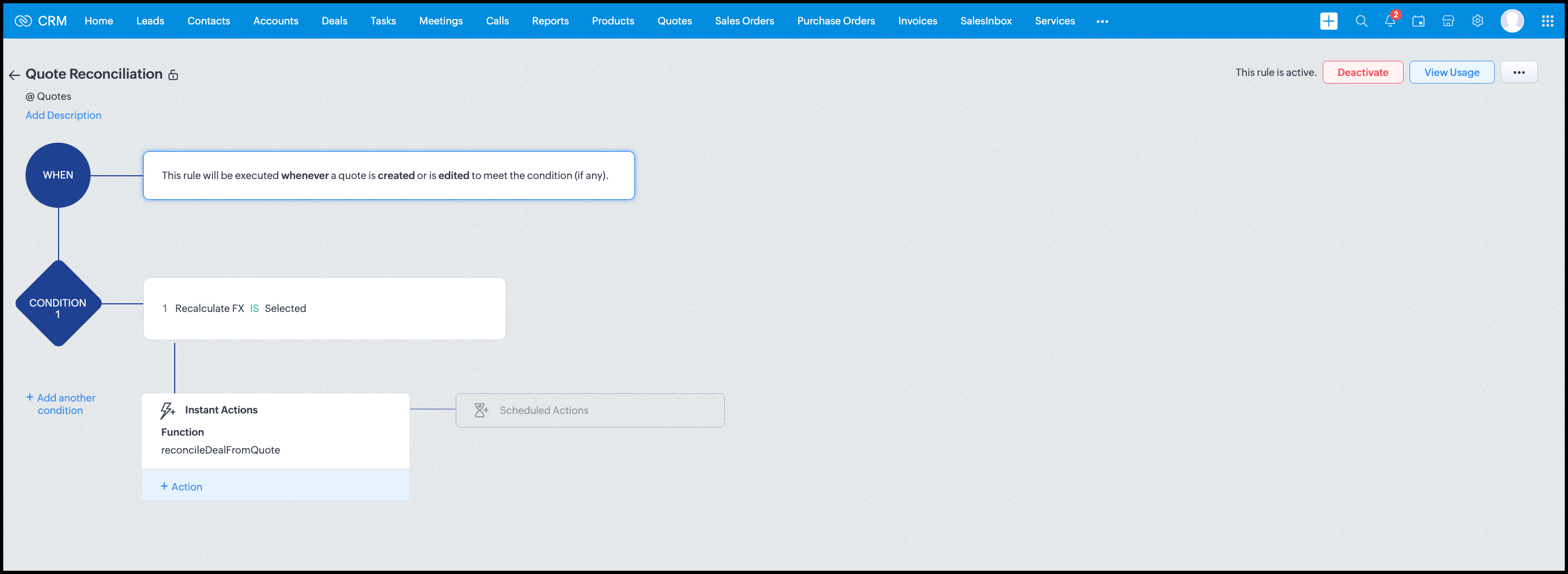
Workflow


Module: Quotes
Trigger: On create or edit
Condition: Recalculate FX = true
Action: Execute reconcileDealFromQuote
Argument: quoteId -> ${Quotes.id}

All decision logic lives inside the function.

Business Outcome

After implementing this pattern,
  1. Deals and quotes stay aligned with real-world behavior
  2. FX risk is measurable and auditable
  3. Renegotiation is policy-driven
  4. Reports reflect finalized values, not assumptions
  5. Sales and finance operate on the same truth.

Summary

Zoho CRM extends beyond static closures by reconciling deals against quote behavior. Functions plus Automation enforce pricing, limit exposure, and capture true outcomes reliably at scale.
The true value of this implementation is not the calculation itself, but the fact that it produces stable, auditable financial states that can be reused across reporting, approvals, integrations, and policy enforcement.

Further extensions

Executive reporting and dashboards

You can build Dashboards that answer questions like
  1. Total revenue before vs after FX reconciliation
  2. Total FX gain or loss by
    1. Region
    2. Currency
    3. Quarter
  3. Sales owner
  4. Percentage of deals renegotiated due to FX risk
Without the function,
  1. FX impact is implicit
  2. Numbers keep changing
  3. Finance does not trust reports
With the function,
  1. Final Accepted Amount is stable
  2. FX Impact % is explicit
  3. Reconciled On gives a time anchor

Policy enforcement and compliance

Examples
  1. Automatically flag deals where FX loss > 10% but status = Accepted
  2. Audit trail for
    1. Who recalculated FX
    2. When renegotiation was triggered
  3. SLA checks when Deals are not reconciled within 'X' days of quote creation
For many companies, FX policy violations are discovered at a later point in time, but you now enforce them at the moment of decision.

Sales coaching and deal hygiene

Unlock insights such as
  1. Which sales reps close deals with high FX volatility or frequently trigger renegotiation?
  2. Which regions or currencies produce unstable deals?
  3. Which deals are consistently over-optimistic at closure?

Other scenarios

  1. Approval and exception workflows
  2. Integration with ERP or accounting systems
  3. Predictive insights to forecast FX risk
  4. Historical snapshots for audit and analytics

We hope you found this post useful. Let us know your feedback in the comments or write to us at support@zohocrm.com.

Thanks!


=============================================================================


      Zoho Campaigns Resources


        • Desk Community Learning Series


        • Digest


        • Functions


        • Meetups


        • Kbase


        • Resources


        • Glossary


        • Desk Marketplace


        • MVP Corner


        • Word of the Day


        • Ask the Experts


          • Sticky Posts

          • Kaizen #198: Using Client Script for Custom Validation in Blueprint

            Nearing 200th Kaizen Post – 1 More to the Big Two-Oh-Oh! Do you have any questions, suggestions, or topics you would like us to cover in future posts? Your insights and suggestions help us shape future content and make this series better for everyone.
          • Kaizen #226: Using ZRC in Client Script

            Hello everyone! Welcome to another week of Kaizen. In today's post, lets see what is ZRC (Zoho Request Client) and how we can use ZRC methods in Client Script to get inputs from a Salesperson and update the Lead status with a single button click. In this
          • Kaizen #222 - Client Script Support for Notes Related List

            Hello everyone! Welcome to another week of Kaizen. The final Kaizen post of the year 2025 is here! With the new Client Script support for the Notes Related List, you can validate, enrich, and manage notes across modules. In this post, we’ll explore how
          • Kaizen #217 - Actions APIs : Tasks

            Welcome to another week of Kaizen! In last week's post we discussed Email Notifications APIs which act as the link between your Workflow automations and you. We have discussed how Zylker Cloud Services uses Email Notifications API in their custom dashboard.
          • Kaizen #216 - Actions APIs : Email Notifications

            Welcome to another week of Kaizen! For the last three weeks, we have been discussing Zylker's workflows. We successfully updated a dormant workflow, built a new one from the ground up and more. But our work is not finished—these automated processes are

          Zoho CRM Plus Resources

            Zoho Books Resources


              Zoho Subscriptions Resources

                Zoho Projects Resources


                  Zoho Sprints Resources


                    Zoho Orchestly Resources


                      Zoho Creator Resources


                        Zoho WorkDrive Resources


                          Zoho CRM Resources

                          • CRM Community Learning Series

                            CRM Community Learning Series


                          • Tips

                            Tips

                          • Functions

                            Functions

                          • Meetups

                            Meetups

                          • Kbase

                            Kbase

                          • Resources

                            Resources

                          • Digest

                            Digest

                          • CRM Marketplace

                            CRM Marketplace

                          • MVP Corner

                            MVP Corner


                            Zoho Writer Writer

                            Get Started. Write Away!

                            Writer is a powerful online word processor, designed for collaborative work.

                              Zoho CRM コンテンツ


                                ご検討中の方

                                  • Recent Topics

                                  • How to filter subform report based upon main form report in dashboard

                                    Hi Team, I am creating a dashboard in Zoho Analytics. I want to have a main form report and below I want to show subform report of main form. If I filter the main form with date then I want to show subform records based upon main form. how can I achieve
                                  • Search mails in shared mailbox

                                    Hi everyone, is there a way to search mails in shared mailbox's? Search in streams or mail doesn't return anything from mails in shared mailboxes. Thanks! Rafal
                                  • Zoho CRM for Everyone's NextGen UI Gets an Upgrade

                                    Hello Everyone We've made improvements to Zoho CRM for Everyone's Nextgen UI. These changes are the result of valuable feedback from you where we’ve focused on improving usability, providing wider screen space, and making navigation smoother so everything
                                  • Kaizen #186 : Client Script Support for Subforms

                                    Hello everyone! Welcome back to another exciting Kaizen post on Client Script! In this edition, we’re taking a closer look at Client Script Support for Subforms with the help of the following scenario. " Zylker, a manufacturing company, uses the "Orders"
                                  • Change eMail Template for Event-Invitations

                                    Hello ZOHO-CRM Team How I can change the eMail Template for Event-Invitations? I work with the German Version of the Free Version. I know how I can modify eMail alerts or Signature Templates, but where I can other eMails modify you send out? Thank you for your answer. Regards, Juerg
                                  • Changes to the send mail Deluge task in Zoho CRM

                                    Hello everyone, At Zoho, we continuously enhance our security measures to ensure a safer experience for all users. As part of our ongoing security enhancements, we're making an important update on using the send mail Deluge task in Zoho CRM. What's changing?
                                  • Fail to send Email by deluge

                                    Hi, today I gonna update some email include details in deluge, while this msg pops up and restrict me to save but my rules has run for one year. can you tell me how to use one of our admin account or super admin account to send the email? I tried to update
                                  • Writing SQL Queries - After Comma Auto Suggesting Column

                                    When writing SQL Queries, does anyone else get super annoyed that after you type a comma and try to return to a new line it is automatically suggest a new column, so hitting return just inputs this suggested column instead of going to a new line? Anyone
                                  • Introducing Multiple Sandbox Types and Support for Module's Data Population

                                    Register here for the upcoming Focus Group webinar on Multiple Sandbox | Help documentation to learn more about the new enhancements Hello everyone,  Sandbox in CRM is a testing environment for users to create and test new configurations like workflow
                                  • Is It Possible to Convert a Custom Module to a Quote?

                                    I recently created a custom module in our CRM environment for RFQs so that our sales team can submit quote requests directly in Zoho rather than by email/phone. This allows for a cleaner overall process, minimizing potential errors and potentially encouraging
                                  • Convert invoice from zoho to xml with all details

                                    How to convert an Invoice to XML format with all details
                                  • Importing into the 'file upload' field

                                    Can you import attachments into the file upload field. I would expect it to work the same way as attachments do, But can't seem to get it to work.
                                  • Sync your Products Module for better context.

                                    In customer support, context is everything. The integration between Zoho Desk and Zoho CRM helps your sales and support teams function as one, delivering better customer experiences. With the latest update to this integration, you can now sync the Product module in your Zoho CRM with your Zoho Desk portal. This feature enables products from Zoho CRM to reflect in the "product" field in Zoho Desk. This can save your support team valuable time and effort.    Some things to note when syncing the two:
                                  • CRM verify details pop-up

                                    Was there a UI change recently that involves the Verify Details pop-up when changing the Stage of a Deal to certain things? I can't for the life of me find a workflow or function, blueprint, validation rule, layout rule ect that would randomly make it
                                  • Does Zoho Writer have Dropdowns

                                    I want to add a drop down field in Zoho writer. Is this possible?
                                  • How can Data Enrichment be automatically triggered when a new Lead is created in Zoho CRM?

                                    Hi, I have a pipeline where a Lead is created automatically through the Zoho API and I've been trying to look for a way to automatically apply Data Enrichment on this created lead. 1) I did not find any way to do this through the Zoho API; it seems like
                                  • Transitions do not update fields until the record moves to next stage

                                    We have a blueprint where a couple of stages have multiple transitions. If only some of the transitions are completed, but not all, Zoho does not update any of the fields impacted by the completed transitions. Is there any way Zoho can udate the fields
                                  • Blueprint enhancements - Parallel and multiple transitions, and more

                                    Last modified on Sep 4, 2023: All Zoho CRM users can now access these enhancements. Initially, these features were available only on an early access basis and by request. However, as of August 2, 2023, they have been made available to all users in all
                                  • Optimum CRM setup for new B2B business

                                    Can some advise the most common way to setup Zoho CRM to handle sales for a B2B company? Specifically in how to handle inbound/outbound emails. I have spent hours researching online and can't seem to find an accepted approach, or even a tutorial. I have
                                  • using the Client script on the load of the form if service no is empty means then i want to make issue relate to is Service

                                    using the Client script on the load of the form if service no is empty means then i want to make issue relate to field is Service if Purchae no is empty means then i want to make issue relate to is Purchase
                                  • Multiple header in the quote table???

                                    Hello, Is it possible in Zoho CRM to add multiple headers or sections within the Quote product table, so that when the quote is printed it shows separate sections (for example “Products” and “Services”)? To clarify, I’m asking because: This does not appear
                                  • using the Client script I want to Hide Show the Fields

                                    if Related to service means some of the field like service no want to shoe and hide Amc no , purchase no how i achive this let issu = ZDK.Page.getField('Issue_Related_To').getValue(); if (issu == 'Service') { var field_obj = ZDK.Page.getField('Warranty_Cases');
                                  • openUrl in blueprints

                                    My customer wants to open a URL at the end of a blueprint transition. Seems this isn't possible right now but it would be very useful. In this thread, https://help.zoho.com/portal/en/community/topic/openurl-not-working the Zoho agent said that it's logically
                                  • Dropshipping Address - Does Not Show on Invoice Correctly

                                    When a dropshipping address is used for a customer, the correct ship-to address does not seem to show on the Invoice. It shows correctly on the Sales Order, Shipment Order, and Package, just not the Invoice. This is a problem, because the company being
                                  • Prepayment of a sales order

                                    How does everyone handle this common (at least it is common for us!) situation? We require all our orders to be fully prepaid before shipment since we manufacture made to order, custom products. Since ZOHO does not allow a sales order to be prepaid, we are forced to create an invoice at the time an order is placed to allow the customer to pay it. Our sales category is therefore skewed, since the sale was actually booked at the time an order was placed, rather then at the time it is shipped, which
                                  • Access to Specific Zoho Desk layout for external parties

                                    Hi, We have a partner who handles for us sales requests from specific markets. He is not a Zoho Desk user. But we want him to b part of a specific Zoho Desk layout to handle inquiries.  How to achieve it in the easiest way possible?
                                  • Deposit on a Sales Order

                                    Good day, 100% of my business is preorders, no inventory. I am trying to run away from QB for one of my businesses, but I require two options that I don't seem to find with Zoho Books. 1 - If there is a way to apply a deposit on a sales order, as with
                                  • How Does Knowledge Base Search and Article Recommendation Work?

                                    Hello, I would like to understand how the Knowledge Base search engine works. Specifically, does it search based on: The article title only? The full article content? Both, the article and the content? Keywords? Tags? Also, how does the system determine
                                  • validation rules doesn't work in Blueprint when it is validated using function?

                                    I have tried to create a validation rule in the deal module. it works if I try to create a deal manually or if I try to update the empty field inside a deal. but when I try to update the field via the blueprint mandatory field, it seems the validation
                                  • Bulk Delete Attachments

                                    Is there a way to bulk delete attachments on the form entries? our storage is full and deleting files one by one is pain taking process.
                                  • How do I sync multiple Google calendars?

                                    I'm brand new to Zoho and I figured out how to sync my business Google calendar but I would also like to sync my personal Google calendar. How can I do this so that, at the very least, when I have personal engagements like doctor's appointments, I can
                                  • Zoho CRM || Unable to Bulk Assignment of Territories for Contacts

                                    Dear Zoho CRM Support Team, I hope this email finds you well. We recently performed a bulk upload of Contacts into Zoho CRM using the official sample Excel template downloaded from the CRM. The upload itself was completed successfully; however, we encountered
                                  • Cannot get code to work with v2.mergeAndStore!

                                    Please can someone help me pass subform items into a repeating mail merge table row using v2.mergeAndStore? I have a mail merge template created in Writer and stored in Workdrive. This template is referenced by a custom CRM function which merges all of
                                  • Ability to CC on a mass email

                                    Ability to CC someone on a mass email.
                                  • Ability to Disable System Banner Messages in Chat Flow Control

                                    Dear Zoho SalesIQ Team, Greetings, We would like to request an enhancement related to the system banner messages in Zoho SalesIQ chat flow control. Current Behavior: SalesIQ allows configuring various automatic banner/system messages such as: Waiting
                                  • How do you do ticket add ons in Backstage?

                                    Hi Everyone, If you wanted to have general admin tickets and allow for add ons, like camping, or car or Carbon offset. What would you do? Peace Robin
                                  • Sort Legend & stacked bar chart by value

                                    I'd love to see an option added to sort the legend of graphs by the value that is being represented. This way the items with the largest value in the graph are displayed top down in the legend. For example, let's say I have a large sales team and I create
                                  • Idle Chat Reminders for Agent-Handled Conversations

                                    Dear Zoho SalesIQ Team, Greetings, We would like to request an enhancement to the Idle Chat Handling functionality in Zoho SalesIQ—specifically for chats that are handled by human agents after a bot-to-agent transfer. Current Behavior: In Zobot settings,
                                  • Layout Adjustment.

                                    Hello Latha, Hope you are doing well. I wanted to check with you about adjusting the layout columns in the Service Report from the backend, as currently there is no capability for us to customize the layout from our end. Below is the output that I am
                                  • Snapchat

                                    Are there any plans to add Snapchat to Zoho Social or is there any API that we can use to integrate into Zoho.
                                  • Next Page