Kaizen #71 - Client Script ZDKs for Detail (Canvas) Page

Kaizen #71 - Client Script ZDKs for Detail (Canvas) Page

Hello everyone! 
Welcome back to another interesting Kaizen post. In this post, we can discuss Client Script ZDKs support for Detail (Canvas) Page.

What is Detail (Canvas) Page?
A Detail(Canvas) Page allows you to customize the record detail page to your preference by letting you add background color to each field, arrange them in a different order, use custom buttons instead of field names, use different font styles, and a lot more. This view is available in all the modules, including the custom modules.
Canvas is a powerful design platform that aims to transform your Zoho CRM user experience, from a visual as well as functional perspective. To customize a record detail page using Canvas, you can select any pre-designed template from the gallery and customize them according to your requirements, or create your design template from scratch with the help of design tools. 
The following are the ZDK Functions related to the Detail(Canvas) Page in Client Script.

  • getBlueprintTransitionByID() - To get blueprint transition by id
  • getBlueprintTransitions()  - To get blueprint transitions in page
  • addTag() - To add a tag to the page
  • removeTag() - To remove a tag from the page
  • getTags()  - To get the list of tags in the Page as array of objects
  • openMailer() - To open Mailer component
  • scrollTo(element_id) - To scroll the page to the given element's location
  • highlight(config) - Using this ZDK you can highlight an element
  • getElementByID(element_id) - To get the UIElement object.
  • mask() - To mask the field value
  • initiate() - To initiate a transition in Blueprint
  • click() - To initiate link click event
  • disable() - To disable the link
  • enable() - To enable a link
  • setVisibility() - To show or hide an element
  • addToolTip(config) - Use this ZDK to add tooltip for an element
  • removeToolTip() - Use this ZDK to remove tooltip for an element
  • addStyle(config) - To apply CSS styles for an element
  • freeze(value) - To freeze a particular element
  • setImage(value) - To set image for the image element
  • setActive() - To set active tab in a container
  • setContent(value) - To set text content for the text element

Note: Apart from these ZDKs, you can use all the other ZDK functions which are not tagged.

Use Case
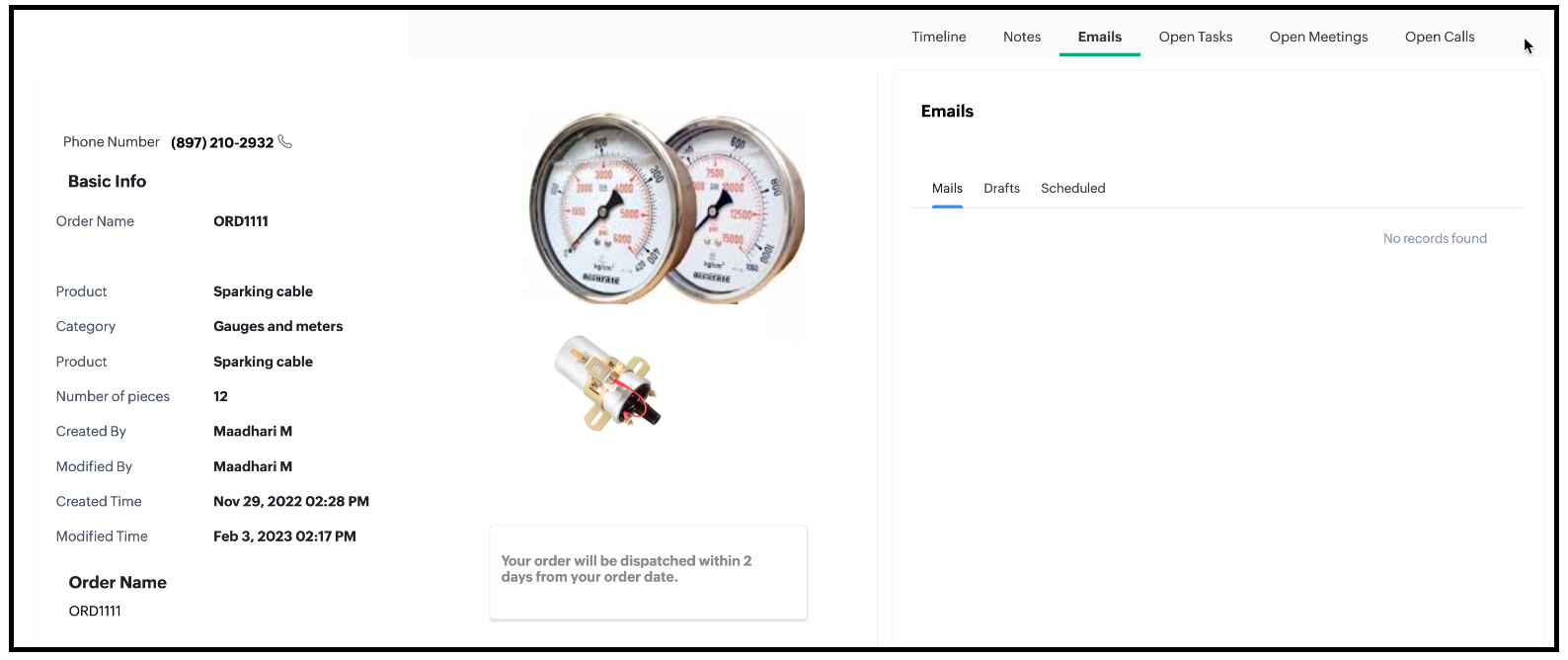
ABC is a hardware manufacturing company. Let us consider that you want to achieve the following using Client Script. The Detail (Canvas) Page has the fields Category, Products, Phone Number and there are two images added to the Detail (Canvas) page currently. One corresponds to Ignition System and the other corresponds to Gauges and Meters. The following is the Detail (Canvas) Page of Orders Module.


1. Based on the Category of the order, display the image.
  • If the Category is Ignition System then the image corresponding to Ignition System should be displayed.
  • If the Category is "Gauges and Meters" then the image corresponding to "Gauges and Meters" should be displayed.
2. The image should have a tooltip.
  • The Ignition System image should have the tooltip as "Ignition System".
  • Gauges and Meters image should have the tooltip as "Gauges and Meters".
3. The Detail (Canvas) page has a text element. The background colour of the text box should be blue and the text should be grey.
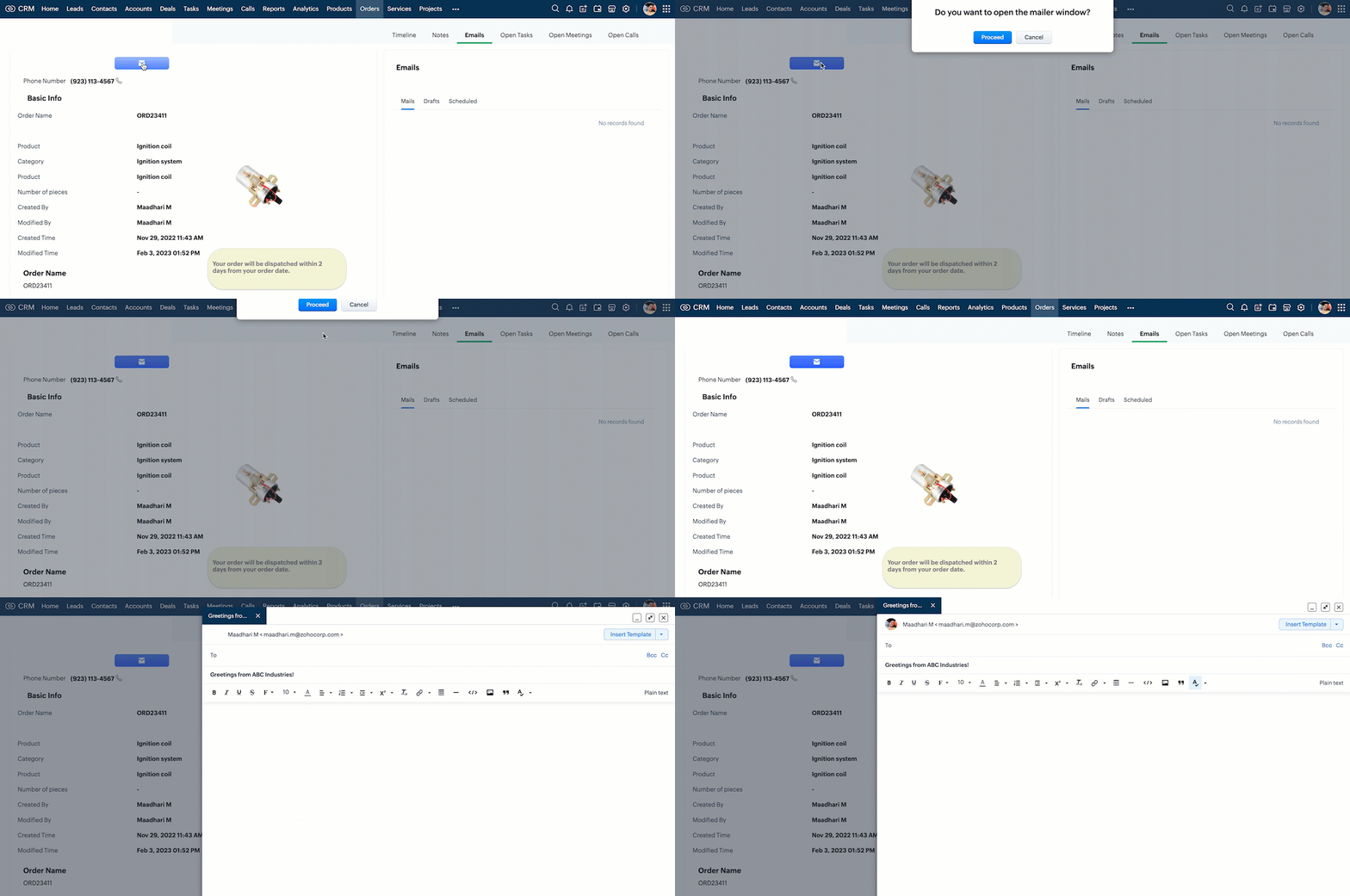
4. Create a custom button in the Detail (Canvas) Page. When the user clicks this, ask for confirmation, and open the mailer box.
5. Mask the last 5 digits of the phone number for all profiles other than the administrator.

Solution using Client Script
All the requirements are for the Detail (Canvas) page of Orders module. For the requirements 1, 2, 3  and 5, you need to create a Client Script with onLoad page Event.
For requirement 4, you need to create a Client Script with Canvas Button Event type and onClick Event. So create two scripts as follows.

1. Client script 1 for requirements 1,2,3 and 5.
2. Client script 2 for requirement 4.
1. Client script 1 for requirements 1,2,3 and 5.
  • Go to Setup > Developer Space > Client Script. Click +New Script.
  • Specify the details to create a script and click Next.
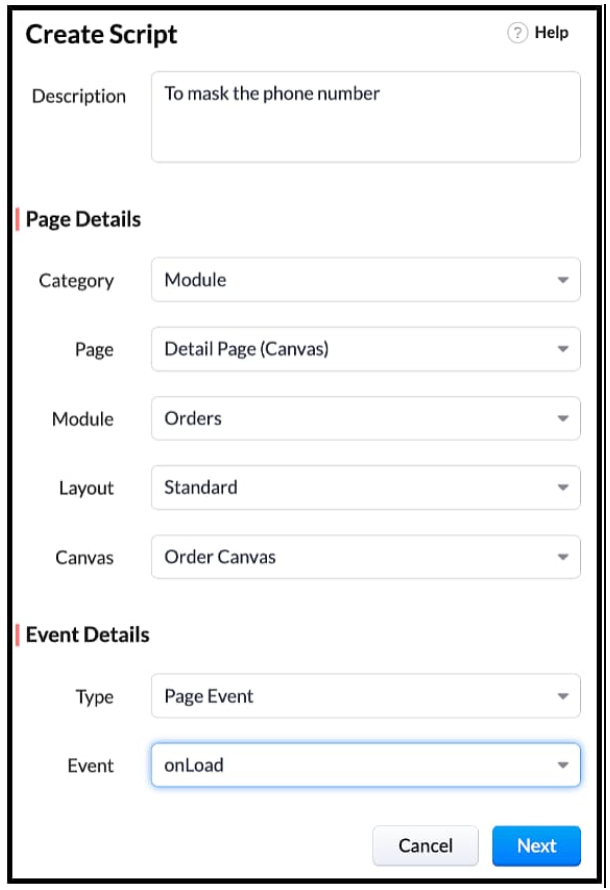
  • Enter the following script and click Save.


 // Tooltip for images
var ignitionImage = ZDK.UI.getElementByID('iImage')
ignitionImage.addToolTip({ text: 'Ignition System' });

var guageImage = ZDK.UI.getElementByID('gImage')
guageImage.addToolTip({ text: 'Guages and Meters' });
log(category_name);
// Visibility of Images
if (category_name == "Gauges and meters")
{
    ignitionImage.setVisibility(false);
}
else if (category_name == "Ignition system") {
    guageImage.setVisibility(false);
}
// Style textbox
var elem = ZDK.UI.getElementByID('Section')
elem.addStyle({ 'background-color': 'blue', color: 'white', 'border-radius': '40px' })
//Mask phone Number
var user = ZDK.Apps.CRM.Users.fetchById($Crm.user.id);
log(user);
var field_obj = ZDK.Page.getField('Phone_Number');
log(field_obj.getValue());
log("Profile name of the user is "+ user.profile.name);
if(user.profile.name != 'Administrator')
{
    field_obj.mask({ character: '*', length: 5, reverse: true });
}
var category_name = ZDK.Page.getField('Category').getValue();


  • $Crm is a constant supported by Client Script, using which you can get the org related information and use it in your script. 
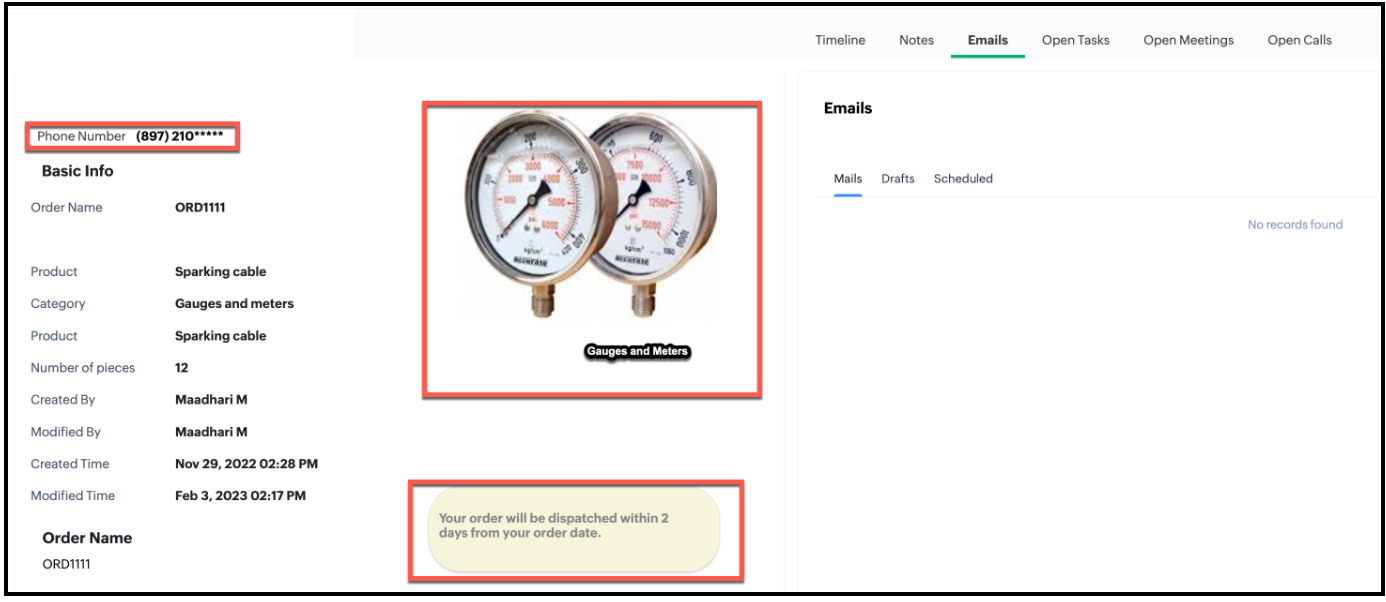
  • Here is the impact of Client Script in Detail (Canvas) page for a Standard user.
  • Here is the impact of Client Script in Detail (Canvas) page for Administrator.
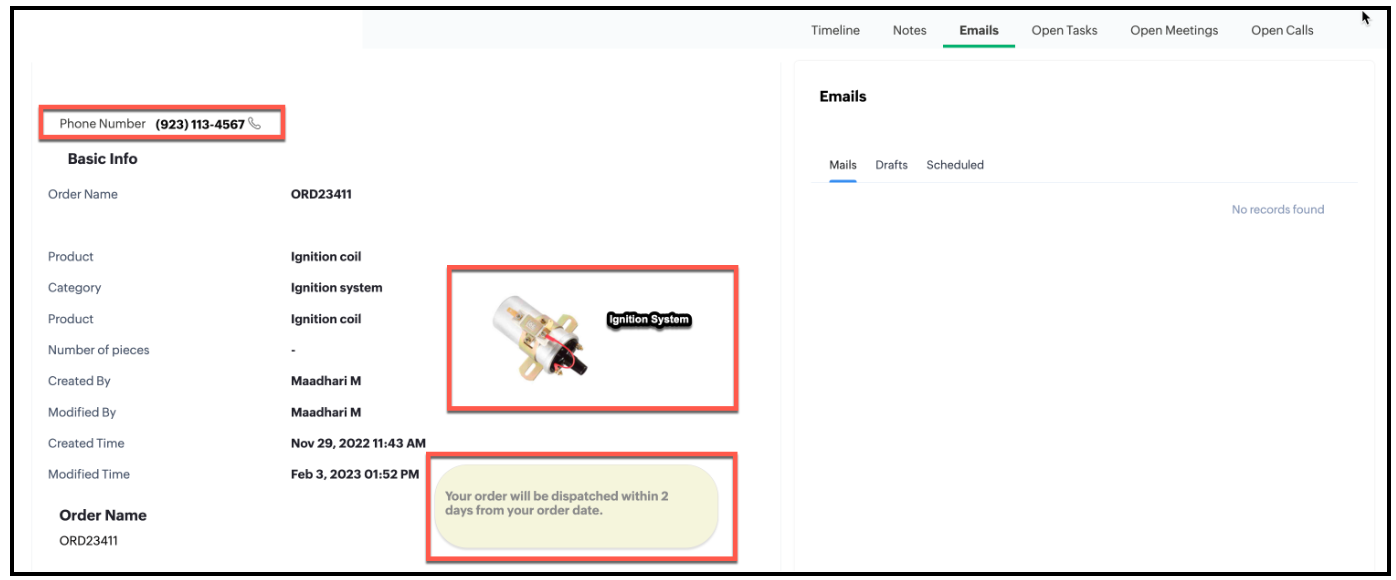

  • You can see that the Phone Number is partially masked when you view the order canvas page as a Standard User and not masked when you view the order canvas page as an Administrator.
2. Client Script 2 for requirement 4
  • First, you need to add the button to the Detail(Canvas) page.
  • Go to Setup > Customization > Canvas.
  • Right click  the Canvas page for Accounts module and click Edit.
  • Click Elements, drag and drop the button wherever required and specify a label for the button.
  • Right click on the button, select Add Element ID and enter the ID of the button in the pop up that appears.
  • Once the button is created, you can configure Client Script in two ways:
  • Right click on the button--> Add Client Script--> onClick. The Client Script IDE appears with the event type as Canvas Button Event.                                                (or)
  • Go to Setup > Developer Space > Client Script. Click +New Script.
  • Specify the details to create a script and click Next.
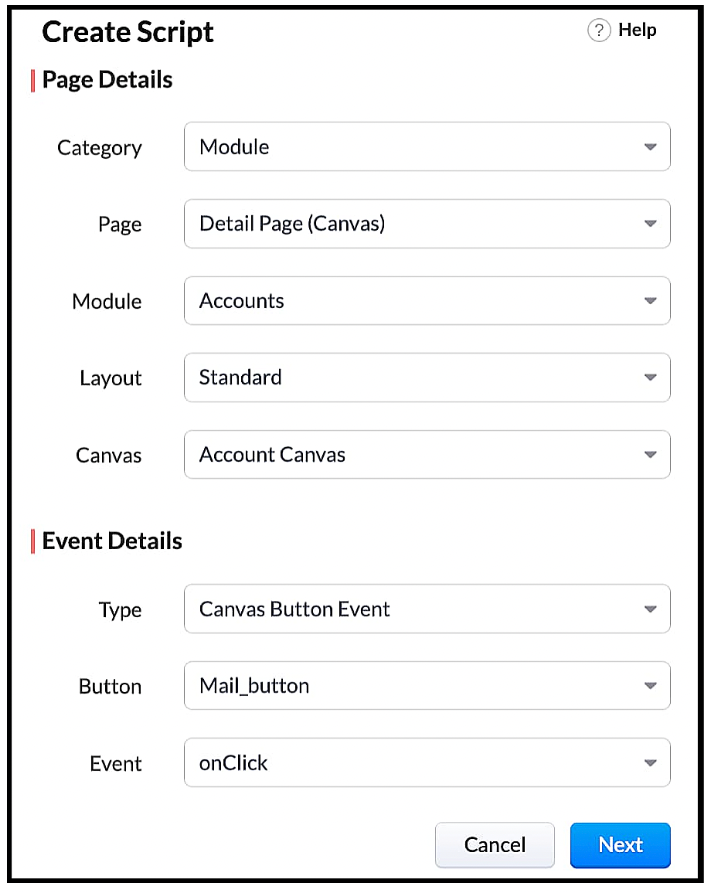
  • Enter the following script and click Save.
var isProceed = ZDK.Client.showConfirmation('Do you want to open the mailer window?','Proceed','Cancel');
if (isProceed) {
ZDK.Client.openMailer({ from: '', to: [{ email: '', label: 'ABC Industries' }], cc: [{ email: '', label: 'ABC Industries' }], subject: 'Greetings from ABC Industries!', body: ' ' });
}

  • The showConfirmation() function will return a Boolean value based on the user selection. You should get this Boolean value using a variable and write the actions based on the Boolean value returned. Here the variable isProceed will capture the user response and based on that Boolean value, the mailer box will get displayed.

  • Here is how the Client Script works.


We hope you found this post useful. We will meet you next week with another interesting topic!  If you have any questions or if you want a Kaizen post on a particular topic let us know in the comments.

Click here for more details on Client Script in Zoho CRM.

Related Links

Cheers!


      Zoho Campaigns Resources


        • Desk Community Learning Series


        • Digest


        • Functions


        • Meetups


        • Kbase


        • Resources


        • Glossary


        • Desk Marketplace


        • MVP Corner


        • Word of the Day


        • Ask the Experts


          • Sticky Posts

          • Kaizen #198: Using Client Script for Custom Validation in Blueprint

            Nearing 200th Kaizen Post – 1 More to the Big Two-Oh-Oh! Do you have any questions, suggestions, or topics you would like us to cover in future posts? Your insights and suggestions help us shape future content and make this series better for everyone.
          • Kaizen #226: Using ZRC in Client Script

            Hello everyone! Welcome to another week of Kaizen. In today's post, lets see what is ZRC (Zoho Request Client) and how we can use ZRC methods in Client Script to get inputs from a Salesperson and update the Lead status with a single button click. In this
          • Kaizen #222 - Client Script Support for Notes Related List

            Hello everyone! Welcome to another week of Kaizen. The final Kaizen post of the year 2025 is here! With the new Client Script support for the Notes Related List, you can validate, enrich, and manage notes across modules. In this post, we’ll explore how
          • Kaizen #217 - Actions APIs : Tasks

            Welcome to another week of Kaizen! In last week's post we discussed Email Notifications APIs which act as the link between your Workflow automations and you. We have discussed how Zylker Cloud Services uses Email Notifications API in their custom dashboard.
          • Kaizen #216 - Actions APIs : Email Notifications

            Welcome to another week of Kaizen! For the last three weeks, we have been discussing Zylker's workflows. We successfully updated a dormant workflow, built a new one from the ground up and more. But our work is not finished—these automated processes are

          Zoho CRM Plus Resources

            Zoho Books Resources


              Zoho Subscriptions Resources

                Zoho Projects Resources


                  Zoho Sprints Resources


                    Zoho Orchestly Resources


                      Zoho Creator Resources


                        Zoho WorkDrive Resources


                          Zoho CRM Resources

                          • CRM Community Learning Series

                            CRM Community Learning Series


                          • Tips

                            Tips

                          • Functions

                            Functions

                          • Meetups

                            Meetups

                          • Kbase

                            Kbase

                          • Resources

                            Resources

                          • Digest

                            Digest

                          • CRM Marketplace

                            CRM Marketplace

                          • MVP Corner

                            MVP Corner


                            Zoho Writer Writer

                            Get Started. Write Away!

                            Writer is a powerful online word processor, designed for collaborative work.

                              Zoho CRM コンテンツ


                                ご検討中の方

                                  • Recent Topics

                                  • Prevent tracking users from specific countries

                                    Currently, I’m receiving many bot visits from the United States and Malaysia. I would like these visits not to be recorded in SalesIQ. I already enabled the option to exclude traffic from cloud service providers, but I’m still receiving bot visits. Ideally,
                                  • Print a document from Zoho Writer via Zoho Creator

                                    If i use the code below i can get writer to create a new document or email it to me but i want to be able to print it directly from the browser and not have to send it via email and then print. Below is the code im using. Attached options form zoho writer
                                  • Es posible cambiar el lenguaje de los modulos del ASAP?

                                    Es posible cambiar el lenguaje de estos textos? Tengo Zoho configurado en español pero aun así me muestra estos textos en ingles:
                                  • System Components menu not available for Tablet to select language

                                    I have attached a screenshot of my desktop, mobile, and tablet menu builder options. I am using 2 languages in my application. Language Selection is an option under the System Components part of the menu, but only for my desktop and phone(mobile). My
                                  • Using workflows to automatically set classification of new tickets

                                    Hello, I am trying to use a workflow to set a classification for a new ticket that is created via an email coming into my desk department. The workflow is working fine if I create a ticket from within desk, however if a ticket is emailed in then this
                                  • Text/SMS With Zoho Desk

                                    Hi Guys- Considering using SMS to get faster responses from customers that we are helping.  Have a bunch of questions; 1) Which provider is better ClickaTell or Screen Magic.  Screen Magic seems easier to setup, but appears to be 2x as expensive for United States.  I cannot find the sender id for Clickatell to even complete the configuration. 2) Can customer's reply to text messages?  If so are responses linked back to the zoho ticket?  If not, how are you handling this, a simple "DO NOT REPLY" as
                                  • Default/Private Departments in Zoho Desk

                                    1) How does one configure a department to be private? 2) Also, how does one change the default department? 1) On the list of my company's Zoho Departments, I see that we have a default department, but I am unable to choose which department should be default. 2) From the Zoho documentation I see that in order to create a private department, one should uncheck "Display in customer portal" on the Add Department screen. However, is there a way to change this setting after the department has been created?
                                  • Show unsubscribed contacts ?

                                    Hello, I would like to display the unsubscribed contacts. Unfortunately, I do not have this subscription type as described in the documentation (https://help.zoho.com/portal/en/kb/marketing-automation-2-0/user-guide/contacts/contact-management/articles/subscription-type-24-1-2024#Subscription_Type_field.)
                                  • Can Zoho Marketing Automation send OTP codes via WhatsApp during user registration?

                                    The flow I would like to implement is: A user signs up in the mobile app and enters their phone number. The system generates a one-time verification code (OTP). The OTP is sent to the user via WhatsApp message. The user enters the code in the app to confirm
                                  • What's New in Zoho Inventory | Q2 2025

                                    Hello Customers, The second quarter have been exciting months for Zoho Inventory! We’ve introduced impactful new features and enhancements to help you manage inventory operations with even greater precision and control. While we have many more exciting
                                  • "Spreadsheet Mode" for Fast Bulk Edits

                                    One of the challenges with using Zoho Inventory is when bulk edits need to be done via the UI, and each value that needs to be changed is different. A very common use case here is price changes. Often, a price increase will need to be implemented, and
                                  • Cloning Item With Images Or The Option With Images

                                    Hello, when I clone an item, I expect the images to carry over to the cloned item, however this is not the case in Inventory. Please make it possible for the images to get cloned or at least can we get a pop up asking if we want to clone the images as
                                  • ZOHO BOOKS - RECEIVING MORE ITEMS THAN ORDERED

                                    Hello, When trying to enter a vendor's bill that contains items with bigger quantity than ordered in the PO (it happens quite often) - The system would not let us save the bill and show this error: "Quantity recorded cannot be more than quantity ordered." 
                                  • Stock count by bin location

                                    Is there a configuration to make a stock count by bin or area and not by product. these is useful to manage count by area Regards
                                  • Server-based Appication API access for Social, Sites, Flow, Pages.

                                    Hello, I am trying to hook up API access for a number of apps and I have hit a wall trying to add these scopes to the API feed. We cannot find the correct way to list the scope for these Zoho apps; Social, Sites, Flow, Writer. Error on web-page comes
                                  • Feature Request: "Send Invitation" Toggle for Events

                                    I am writing to request a critical "Quality of Life" update for the Activities module. Currently, adding people to the Participants field in an Event triggers an automatic email invitation/acceptance tracking with no way to opt-out. For general events
                                  • Zoho Survey: Bulk Exporting Raw Data (CSV/Excel) from 100+ Individual Survey Projects

                                    Hi Zoho Community, I am currently managing a 360-degree evaluation process that involves 100+ individual survey projects (one separate survey for each employee being evaluated). I need to download the raw response data (CSV or Excel) for all 100 surveys.
                                  • Zoho Survey – Page Skip Logic Not Working

                                    Hi everyone, I'm experiencing an issue with the page skip logic in Zoho Survey. Last week, it was working fine, and I haven’t changed anything in the settings. However, today the skip logic is not working at all. I also tried testing it with different
                                  • Update P_Leave: code: 7052 "Employee_ID": "Enter Employee ID"

                                    Hi, Zoho People - Update Leaves Can someone assist? ------------------------------------------------------------------------------------------ col = Collection(); col.insert("recordid":id); col.insert("Date_Check_Approval":zoho.currentdate); info zoho.people.update("P_Leave",col.toMap());
                                  • CRM x WorkDrive: File storage for new CRM signups is now powered by WorkDrive

                                    Availability Editions: All DCs: All Release plan: Released for new signups in all DCs. It will be enabled for existing users in a phased manner in the upcoming months. Help documentation: Documents in Zoho CRM Manage folders in Documents tab Manage files
                                  • Anyone worked out how to export or screengrab a full heatmap?

                                    I'd love to be able to include a copy of a heatmap in a report but can't work out how to grab the whole thing as there doesn't appear to be an export function? Thanks in advance.
                                  • Introducing Built-in Telephony in Zoho Recruit

                                    We’re excited to introduce Built-in Telephony in Zoho Recruit, designed to make recruiter–candidate communication faster, simpler, and fully traceable. These capabilities help you reduce app switching, handle inbound calls efficiently, and keep every
                                  • Sender Email Configuration Error.

                                    Hello Team, Hope you are all doing well. We are in the process of creating the Zoho FSM environment in the UAE. When we try to add the sender email address “techsupportuae@stryker.com”, we receive the error message: “Error occurred while sending mail
                                  • Auto-publish job openings on my Zoho Recruit Careers Website

                                    I have developed a script using the Zoho Recruit API that successfully inserts new jobOpening records to my Zoho Recruit website, but my goal is to auto-publish to the Careers Website. The jobOpening field data shows two possible candidates to make this
                                  • [Free webinar] Custom domains for portals in Zoho Creator - Creator Tech Connect

                                    Hello everyone, We’re excited to invite you to another edition of the Creator Tech Connect webinar. About Creator Tech Connect The Creator Tech Connect series is a free monthly webinar featuring in-depth technical sessions designed for developers, administrators,
                                  • Remove my video

                                    Hi, How can I remove my video so that I don't have to see myself. It's weird so I always remove my own video from what I see but cannot find this feature here. Thanks!
                                  • Marking a meeting 'done'.

                                    I would like to somehow mark a meeting 'done' and placed under the contact's page rather than deleting it and having no record of it. Am I missing a button that does this?
                                  • Add Lookup Field in Tasks Module

                                    Hello, I have a need to add a Lookup field in addition to the ones that are already there in the Tasks module. I've seen this thread and so understand that the reason lookup fields may not be part of it is that there are already links to the tables (
                                  • Super Admin Logging in as another User

                                    How can a Super Admin login as another user. For example, I have a sales rep that is having issues with their Accounts and I want to view their Zoho Account with out having to do a GTM and sharing screens. Moderation Update (8th Aug 2025): We are working
                                  • Cannot find zpuid for Zoho Projects user

                                    I'm using the Zoho Projects v3 API to create a task. The task is created successfully, but in order to assign the task owner, the "Create a Task" API also requires the zpuid of the task owner. Unfortunately I cannot find any user-related API calls that
                                  • Allocating inventory to specific SO's

                                    Is there a way that allocate inventory to a specific sales order? For example, let's say we have 90 items in stock. Customer 1 orders 100 items. This allocates all 90 items to their order, and they have a back order for the remaining 10 items which could
                                  • Incorrect Functioning of Time Logs API (Version 3)

                                    We need to fetch the list of time logs for each task for our company internal usage. We are trying to achieve it by using the next endpoint: https://projects.zoho.com/api-docs#bulk-time-logs#get-all-project-time-logs Firstly, in the documentation the
                                  • Partial payments for retainer invoices

                                    When a customer does not pay the entire retainer invoice there is no way to apply a partial payment. PLEASE add this function.
                                  • Can I export to PDF in Zoho Learn

                                    I have seen help pages where export to pdf options are available but I do not see that option available from the application. I see that exprt is available in my free trial version but that is only to html pages. I need to be able to export my manuals
                                  • Service line items

                                    Hello Latha, Could you please let me know the maximum number of service line items that can be added to a single work order? Thanks, Chethiya.
                                  • Sending emails via Books

                                    Anyone else getting similar problems recently ??..... Hi, Your message to the following recipient was not delivered. Please find the details below.  Bounce Details: Bounced Address : someone@google.com Bounce Reason : other ; Status : 5.0.0 (undefined status) ; Daignostic-Code : smtp;542 someone@google.com Rejected ; Bounced Time : Sep 05, 2017 06:37 PM BST Regards, Zoho Team The email addresses were fine only a few days ago but are now being rejected ?
                                  • PDF Generator Upgrade

                                    Hi Team, What will happen if I don't make any changes for existing template. Zoho just ask us upgrade but haven't tell the benefit. Zoho Corporation
                                  • No Need To Fix Something That Is Working

                                    Zoho Books is a great financial tool which helps businesses to become more efficient and productive with day-to-day operations. As such, every change, upgrade, improvement needs to be carefully thought before implemented in the software and I'm sure Zoho
                                  • Total Cost in reports showing zero

                                    The image below shows my issue. The column Total Cost should show the cost to our company based on hours logged and the employee's rate. For instance, if the person working on Subtask 1 is paid 20/hr, then Total Cost should display $160 ($20x8 logged
                                  • Zoho Books (and other finance suite apps) - Retrospective Linking of Invoice and Sales Orders to Quotes.

                                    In some cases, Quotes and Invoies may be created sperately instead of using the convert feature. In this feature request I am asking for the Finance Suite team to consider adding a lookup field to reference the quote on Invoices and Sales Orders, or some
                                  • Next Page