Power up your Kiosk Studio with Real-Time Data Capture, Client Scripts & More!

Power up your Kiosk Studio with Real-Time Data Capture, Client Scripts & More!

Hello Everyone,

We’re thrilled to announce a powerful set of enhancements to Kiosk Studio in Zoho CRM. These new updates give you more flexibility, faster record handling, and real-time data capture, making your Kiosk flows smarter and more efficient than ever.

What's New? 

  1. Launch Kiosks Anywhere with Client Script Support (Phase 1) 
  2. Capture data live during Kiosk execution
  3. GetRecords Screen Enhancements :
    1. Fetch all records from a module 
    2. View more records with pagination
    3. Find records faster with the new Search & Filters
    4. Select more records at a time with increased selection limits
    5. GetRecords first screen loads Instantly with no refresh needed 
  4. Kiosk Studio now available in the Standard Edition 
 
Let's dive into the details below:

Launch Kiosks anywhere with Client Script Support 

The first phase of Client Script support for Kiosk is here.

Now users can open a Kiosk directly through scripts anywhere within Zoho CRM.

As part of this update, there’s an important change to note. We’ve introduced a Unified API Name which is a unique identifier that stays consistent across all versions of the Kiosk. While creating Kiosks, users must now also add this API name so it will be easier to manage and track Kiosks while ensuring smooth integration with scripts.

To use client scripts :
First create the command to open kiosks from anywhere in the CRM by navigating to Settings < Developer hub < Client Script < Command. Next you can open the command from the Command Palette or use keyboard shortcuts to from any module in your CRM account to open Kiosks.


This is just the beginning! Phase 1 lays the foundation for deeper client script integrations coming soon.

Some of the upcoming client script support enhancements include :
  1. Allow users to add clients scripts for a screen from both a screen in Kiosk or from a command in Client Script.
  2. Add multiple client scripts for a Kiosk screen,
  3. Invoke responses from a Kiosk for a call back function from Client Script.
Notes
Note :
  1. Learn more about Client Scripts from our developer guides.
  2. Learn how to create commands in Client Scripts.

Capture data live during Kiosk Execution with new create record actions  

1 - Predefined Configuration (Existing Action)

The current create record action will be retained and renamed as 'Predefined Configuration'.

Records will be created automatically during the execution of a Kiosk. They require you to add pre-defined values either as static values or data from previous screens. This is ideal for predefined updates or recurring tasks where information is known in advance.

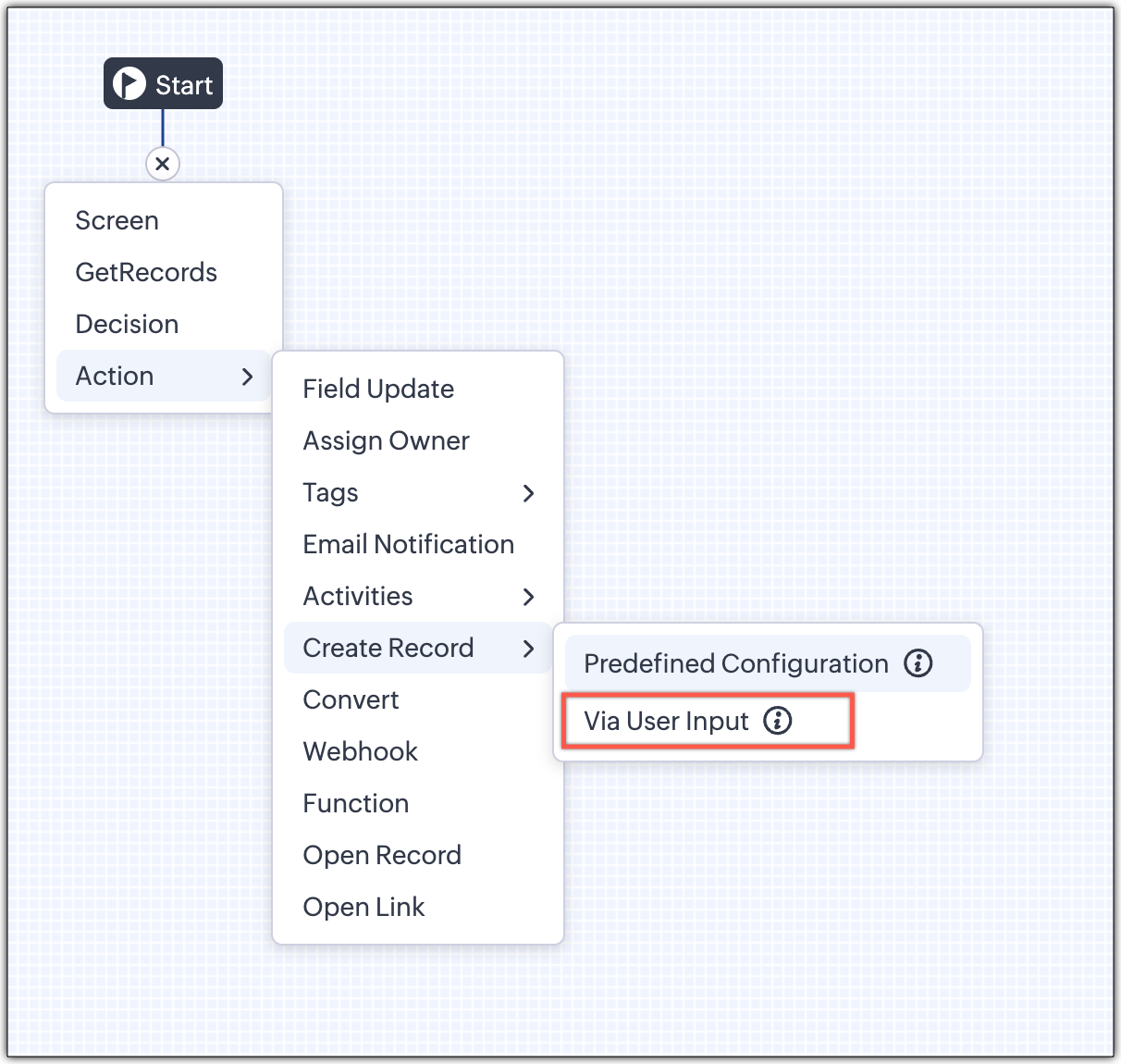
2 - Via User Input (New Action)

The key advantage of this update is that it simplifies how admins configure record creation in Kiosk Studio. Earlier, admins had to manually create a separate screen replicating all the fields of a module and then map them in the Create Record action. Moreover, if there were changes made to the fields in the module, the admin would have to edit the Kiosk and add/map the new field. All this was time-consuming and complex to setup.

Now, admins can choose to allow records to be created during the Kiosk's execution and eliminate the need to replicate, map and merge fields to save time and effort through the use of Quick Create pop-up.

Through this enhancement, real-time record creation is possible during live Kiosk execution. Users can input values in the Quick create layout that would pop-up during execution to create new records in a module. Perfect for real-world scenarios, the exact information needed to create a record only becomes available during the live execution of the Kiosk.   
Real-time scenarios

Let's say you run a Kiosk for your sales team. During a call, a customer requests a product demo and shares their availability Or, your support team receives a call and has to log the customer’s issue details or updated contact info.

With this enhancement, the sales rep or support executive can create records instantly while the Kiosk is running, to input the information they get during their call to provide a smooth customer experience.

How does it work?

  1. While setting up the Kiosk, select Create Record > Via User Input.
  2. Enter Action Name, then choose the Module and Layout.
  3. During execution, the Quick Create layout for the selected module appears.
  4. There is an option to pre-fill frequently used field values during configuration.
  5. Now, users can enter details directly while the Kiosk is being executed.
  6. Note: If a user lacks Create permission for a module, this step is skipped, and related values will show as null.

Take a look at the GIF below to understand how this action can be setup and executed.
 

GetRecords just got smarter with these new enhancements

Fetch All Records from a module to your GetRecords Screen

You can now choose to fetch all records from a module to be displayed in your GetRecords Screen.

Previously, you could select a single record or multiple records based on the limit set for record preferences. Now, we've given you a choice to be able to select Some Records or All records. This is useful in scenarios when users need to view or act on a complete set of records in a module rather than on a limited number of them.

New pagination making easier to navigate records

We’ve added pagination to the GetRecords screen, making it easier to navigate and locate specific records quickly, even when dealing with large data sets.

Search or filter records in GetRecord screen s

Quickly find records in GetRecords screens with this new addition to Kiosk.

Increased selection limit to select more records

We have increased the GetRecord selection limit from 10 to 100.

GetRecords First-Screen Loads Instantly - No Refresh Needed

Currently, only Kiosks opened through user actions (like Blueprint or Custom Buttons) loaded records directly, while others showed a 'Refresh to load' button. 


Now, every Kiosk auto-loads the first-screen of GetRecords without the need to manually refresh. When a Kiosk opens with GetRecords on the first screen, records now load instantly, regardless of whether it’s on the Home Page, Canvas, Record Detail View, Blueprint, or a Custom Button.

Kiosk Studio Added to the Standard Edition

We have extended the ability to create Kiosks to all paid editions in Zoho CRM including the Standard Edition. We aim to allow more users to create and manage Kiosks for their business processes. Take a look at the table below to know Kiosk creation limits for each Zoho CRM edition.


Standard
Professional
Enterprise
Ultimate / CRMPlus / ZohoOne
Number of Kiosks
2
7
25
50


Info
Release Plan :

- These enhancements is available for all users in all data centers


Start exploring these new features today and experience a faster, smarter, and easier way to capture data with Kiosk Studio.

Stay tuned for even more exciting enhancements coming your way!


Regards,
Serena Woolridge


      Zoho Campaigns Resources


        • Desk Community Learning Series


        • Digest


        • Functions


        • Meetups


        • Kbase


        • Resources


        • Glossary


        • Desk Marketplace


        • MVP Corner


        • Word of the Day


        • Ask the Experts


          Zoho CRM Plus Resources

            Zoho Books Resources


              Zoho Subscriptions Resources

                Zoho Projects Resources


                  Zoho Sprints Resources


                    Zoho Orchestly Resources


                      Zoho Creator Resources


                        Zoho WorkDrive Resources


                          Zoho CRM Resources

                          • CRM Community Learning Series

                            CRM Community Learning Series


                          • Tips

                            Tips

                          • Functions

                            Functions

                          • Meetups

                            Meetups

                          • Kbase

                            Kbase

                          • Resources

                            Resources

                          • Digest

                            Digest

                          • CRM Marketplace

                            CRM Marketplace

                          • MVP Corner

                            MVP Corner


                            Zoho Writer Writer

                            Get Started. Write Away!

                            Writer is a powerful online word processor, designed for collaborative work.

                              Zoho CRM コンテンツ


                                ご検討中の方

                                  • Recent Topics

                                  • Is Zoho Sites still actively being developed?

                                    Hello, Is Zoho Sites still actively being developed as part of the Zoho ecosystem? I noticed that the What's New page (https://www.zoho.com/sites/whats-new.html) does not show any updates since Q1 2025. We were considering migrating our website from Squarespace
                                  • Zoho CRM WooCommerce Integrtation

                                    Looking for a solution for my 50 client to show detailed analytics on source of traffic that led to events, leads, conversions. Hi all, I have not been able to find a workable guide or solution to how exactly step by step integrate the Zoho CRM with WooCommerce
                                  • web to lead

                                    Can anyone help me how to create web to lead from zoho marketing automation
                                  • Introducing Workqueue: your all-in-one view to manage daily work

                                    Hello all, We’re excited to introduce a major productivity boost to your CRM experience: Workqueue, a dynamic, all-in-one workspace that brings every important sales activity, approval, and follow-up right to your fingertips. What is Workqueue? Sales
                                  • UI issue with Organize Tabs

                                    When looking at the organize Tabs window (bellow) you can see that some tabs are grayed out. there is also a "Add Module/Web Tab" button. When looking at this screen it's clear that the grayed out tabs can not be removed from the portal user's screen
                                  • I created a signup form in Zoho Marketing Automation with the correct field mapping, but the data is not being reflected under Leads in Zoho CRM.

                                    web to lead from zoho marketing automation
                                  • Pasted Images not being embedded in custom mail

                                    Hi, I'm making a custom report by email based on commentaries. I have the email ready, all working great except for images that are being pasted in the commentaries. Zoho deals with them as temp images and so it requires authentication to view them, something
                                  • Kaizen #232 - Building a Ticket Escalation Mechanism from Zoho CRM

                                    Howdy, Tech Wizards! Picking up the thread from last week, we will continue our Zoho CRM and Zoho Desk integration. In Kaizen #231 - Embedding Zoho Desk Tickets in Zoho CRM, we built a Related List widget that displays open Zoho Desk tickets within the
                                  • Inactive License for free account.

                                    I recently upgraded my Cliq subscription not my team (on the free version), are unable to login to their accounts. The error message received is Inactive License Looks like you have not been covered under the current free plan of users. Please contact
                                  • Is there a way to show contact emails in the Account?

                                    I know I can see the emails I have sent and received on a Contact detail view, but I want to be able to see all the emails that have been sent and received between all an Accounts Contacts on the Account Detail view. That way when I see the Account detail
                                  • Deluge scripts

                                    Why is there not a search function to make it easier to find the script of interest when modifications are required.
                                  • Zoho Sheet for Desktop

                                    Does Zoho plans to develop a Desktop version of Sheet that installs on the computer like was done with Writer?
                                  • Zoho Books (and other Finance Suite Apps) - Clickable Item Name on Invoices and Reports

                                    Hi Zoho Books team, It would be really helpful if the Item Name on Reports were clicable to take me to the item. The same on Invoices, often I am looking at an invoice and I want to look at the deails of a product. A link here would be helpful to jump
                                  • Zoho Books - Payment Gateway - Revolut

                                    Hi Books Team, My feature request if to include the popular platform Revolut as a payment collection option on invoices in Zoho Books. Please upvote if you are also looking for this option.
                                  • Searching for an item from within an invoice should show any item containing the string, not just those that begin with the string.

                                    Hello, I've found myself becoming increasingly frustrated with the limited line-item seach when adding new items to an invoice. The problem is that the characters being typed are only being matched from the beginning of the item name.  This might be usable
                                  • How to Rank Tables by Row Count in Descending Order

                                    I am trying to understand the consume of lines that grow up so fast in the last week. Is there any way to create a pivot table or query to get TABLE NAME LINES in descending order?
                                  • Dealing With One-Time Customers on Zoho Books

                                    Hello there! I am trying to figure out a way to handle One-Time customers without having to create multiple accounts for every single one on Zoho Books. I understand that I can create a placeholder account called "Walk-In Customer", for example, but I
                                  • Marking a meeting 'done'.

                                    I would like to somehow mark a meeting 'done' and placed under the contact's page rather than deleting it and having no record of it. Am I missing a button that does this?
                                  • Feature Request: Render Markdown (.md) files in Zoho Cliq

                                    Hi, We regularly share Markdown (.md) files in Zoho Cliq. However, when we open these files in Cliq, the content does not render as Markdown—it displays as plain text. This forces us to copy/paste the content into an external Markdown viewer to read it
                                  • CRM Percent custom fields: When will it show the % symbol and behave like %?

                                    1. Actually Percent custom fields fail to show the % symbol. 2. When in formulas Percent fields work like number: 100 x 5% = 5 ideal world 100 x 5% = 500 what happens actually 3. When importing Percent fields the % symbol has to be removed and the data
                                  • Subforms and automation

                                    If a user updates a field how do we create an automation etc. We have a field for returned parts and i want to get an email when that field is ticked. How please as Zoho tells me no automation on subforms. The Reason- Why having waited for ever for FSM
                                  • Xero Billing Data (22 instances) - Zoho (CRM) - Single Source of Truth For Client Data & Notes

                                    Hi - I’m trying to build out a CRM for a Single Source of Truth Currently I have 22 Instances of Xero (for legal entity purposes - can’t consolidate to one) How would I be best placed to do this? Is it possible to have all the Xero instances (22) → Consolidated
                                  • Select CRM Custom Module in Zoho Creator

                                    I have a custom module added in Zoho CRM that I would like to link in Zoho creator.  When I add the Zoho CRM field it does not show the new module.  Is this possible?  Do i need to change something in CRM to make it accesible in Creator?
                                  • New 2026 Application Themes

                                    Love the new themes - shame you can't get a little more granular with the colours, ie 3 different colours so one for the dropdown menu background. Also, I did have our logo above the application name but it appears you can't change logo placement position
                                  • Zoho Expense - Bi-Weekly Report Automation

                                    Hi Zoho Expense Team, My feature request is to please include an option to automate creation of reports bi-weekly (every 2 weeks)
                                  • PDF Generator Upgrade

                                    Hi Team, What will happen if I don't make any changes for existing template. Zoho just ask us upgrade but haven't tell the benefit. Zoho Corporation
                                  • 500 internal server error on opening an iframe through a deluge script

                                    Hi Team I am trying to open an external url in an iframe through my deluge script which is associated to a custom button . By doing this i am getting an "Internal Server Error" . Please can you help me with this.
                                  • Zoho CRM Quotes – Subform and PDF/Writer Limitations

                                    Hello, I am encountering the following limitations in Zoho CRM Quotes: Custom product images cannot be uploaded in the subform – the image upload field cannot be added; only the file upload field is available. File upload placeholders cannot be used in
                                  • Strange behavior in CRM Number Field – Characters allowed but not "e"?

                                    Hi everyone, Has anyone faced this strange issue in Zoho CRM? In a Number field, it is possible to type some characters, but the character "e" cannot be entered. This was really surprising to me. Normally, a number field should restrict all characters
                                  • No background for video recordings, no playback speed, can't even playback longer recordings - have to download…

                                    Hi. We utilize heavily video messages on Slack, but wanted to migrate to Cliq with Zoho One, however very basic yet very frequently used feature is missing: backgrounds for video recordings and playback speed. We were not happy with Slack's 5 minute limits
                                  • Support inefficiency

                                    We have been asking for support for a minor adjustment for 12 days now and we haven't got a single viable resolution from support team despite there are 19 emails going between our HR team and various support emails from Zoho. 1. they do not understand
                                  • Can I export to PDF in Zoho Learn

                                    I have seen help pages where export to pdf options are available but I do not see that option available from the application. I see that exprt is available in my free trial version but that is only to html pages. I need to be able to export my manuals
                                  • Kaizen #225 - Making Query-based Custom Related Lists Actionable with Lookups and Links

                                    Hello everyone! Welcome back to another post in the Kaizen series! This week, we will discuss an exciting enhancement in Queries in Zoho CRM. In Kaizen #190, we discussed how Queries bridge gaps where native related lists fall short and power custom related
                                  • Zia capabilities now available in the Professional edition announcement

                                    Hello all! The Professional edition now supports a broader set of Zia capabilities, enabling teams to bring AI into more of their everyday CRM work. From writing assistance and summaries to setup support, predictions, and recommendations, Zia can now
                                  • Where Do I set 24h time format in Cliq?

                                    Where Do I set 24h time format? Thanks
                                  • This will be long, Please bear with me - Next Gen Layout - Search

                                    In general, I think that Zoho are going in the right direction with the Next Gen UI. The latest update brings some nice improvements and all-in-all from a user's perspective I think the improvements are generally very good. However, there are some areas
                                  • Selecting all notes in a notebook

                                    In Windows11, I select a notebook and I get a list of notes, but only 30 notes. If I scroll down to the end, I get an additional 30 notes (and at the top it now shows 60 notes). I can keep doing this to eventually see all my notes but this is a real pain.
                                  • Update latitude & longitude address field API

                                    How do I update the coordinates of an address field from a widget? I can't modify the latitude and longitude of the address field. I think the problem is how I'm writing formdata variable. zoho_init.then(function (data) { var queryParams = ZOHO.CREATOR.UTIL.getQueryParams();
                                  • Filter Records in CRM API

                                    Hi Team, I’m currently working on a task to retrieve expired deals from the CRM. By “expired deals,” I mean deals where the closing date has already passed and the stage is not “Closed Won” or “Closed Lost” (i.e., all other stages). I tried using both
                                  • User Name in Zoho Cliq Not Updating Across Apps?

                                    We updated the name of a user in Zoho. (From Sue to Taylor) Her name has not been updated in Cliq on all apps. When in Zoho One, if I go to Cliq directly, it is correct, but if I am in another app, and the Cliq bar pops up on the bottom, it will be the
                                  • Next Page