Tip 52: Practical uses of Zia Search in Zoho Sprints | Zoho Sprints

If your agile team uses multiple Zoho apps, your team members might often find themselves switching between those apps looking for related information. When the data you're looking for is spread across different workspaces within Zoho environment, rely on Zia Search to find specific details across those varied workspaces.
Zia Search eliminates the overhead of scrambling across different tabs. This unified search center acts like a search engine that retrieves results from across Zoho apps using a single input. For agile teams inside Zoho Sprints, this implies quick access to relevant data.

How can the search be carried out?
Zia Search indexes the following entities mapped against the corresponding search parameters:
|
Entity |
Search Criteria |
|
Work Items |
Item name/title, Item number |
|
Sprints |
Sprint name |
|
Epics |
Epic name |
|
Releases |
Release name |
|
Users |
Name of the assignee, creator, or person adding a comment |
|
Comments |
The text of the added comment |
Let us observe a few practical, day-to-day scenarios in which Zia Search helps expedite the work of Zoho Sprints users.
Use Case 1: Find information related to an item name
Let's assume your Q1 sprint has an item called "Reminder notification" and multiple subitems for the same. Your sprint team uses Zoho Cliq for chat-based collaboration and Zoho Mail for email collaboration. Each work item will have its own Cliq conversations and mail threads.
Requirement: You want to find all the communication activities related to the reminder notification feature.
Zia Search: Open Zia Search and select the All apps option to search across Zoho Apps. Enter the item name in the search bar.
Result: All the data related to that item name will be listed along with the emails under Zoho Mail section and chat conversations under Zoho Cliq within the Zia Search result window.
Use Case 2: Find information using item number
Let's assume your agile team uses Zoho Sprints to manage development activities and Zoho Desk to manage customer support tickets. You have a work item BVM-I18 which is a high priority bug that multiple customers have reported. The work item is associated with customer tickets on Zoho Desk.
Requirement: You want to find all the Zoho Desk tickets for this work item.
Zia Search: Open Zia Search and select the All Apps option to search across Zoho Apps. Enter the copied item number in the search bar.
Result: All the Zoho Desk tickets that refer to the work item number VM-I18 are listed on the search window under Desk section.
Use Case 3: Search for details in a specific workspace
Because your organization has several projects catering to different verticals, you might have multiple workspaces. Let's assume you want to find work items that are related to payments across projects in the insurance vertical. You need not switch to that workspace to find those work items.
Zia Search (Advanced Filter):
- Open Zia Search window in your Zoho Sprints application.
- Click the filter icon to open advanced filters.
- Select Zoho Sprints app, select the Insurance vertical workspace, select All projects, and provide the criteria to find matching work items.
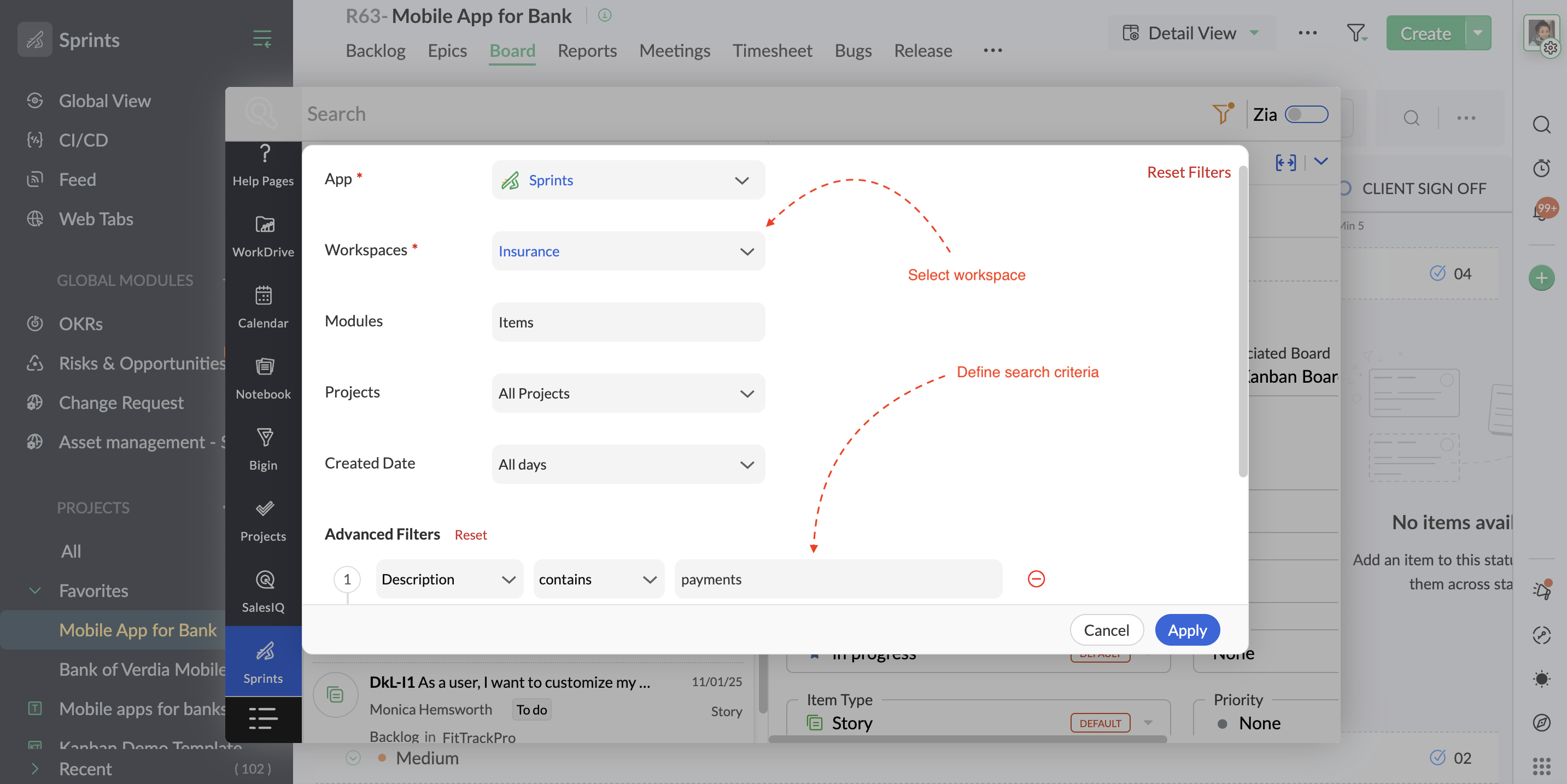
Result: The results display all the work items that specify payments across projects within that workspace.
Use Case 4: Find all items assigned to a user across projects
If you are a technical lead doing a quick item reallocation for a developer who is overloaded, you might want to see everything currently on that specific developer's plate across all active projects.
Zia Search: Open the Zia Search and select Sprints. In the search bar, @ mention the user's name.

Result: All the items assigned to that user (along with the items created by that user and items in which the user has added comments) will be displayed in the search window, providing a comprehensive view of your search. Alternatively, narrow down your search using advanced filter criteria parameters to sift out specific work items of that user.
Zia Search is available as an in-built capability on all Zoho Sprints plans. Visit the Zia Search help page for more details or reach us at support@zohosprints.com.
Thanks,
Zoho Sprints Team