Tip#67: 3 easy ways to add drop-down options
Adding drop-down fields to a form makes it easier to select a value from a predefined list of values. There are 3 easy ways to add the drop-down options to fields.
To add a drop-down field to a form, navigate to
 and select
Orchestration
from the menu. Choose the
Orchestration
in which you would like to add the dropdown field. You'll land in
Step 1: Create Form. Drag and drop the Drop-down field from the
New Fields tray
onto the right panel.
and select
Orchestration
from the menu. Choose the
Orchestration
in which you would like to add the dropdown field. You'll land in
Step 1: Create Form. Drag and drop the Drop-down field from the
New Fields tray
onto the right panel.
and select
Orchestration
from the menu. Choose the
Orchestration
in which you would like to add the dropdown field. You'll land in
Step 1: Create Form. Drag and drop the Drop-down field from the
New Fields tray
onto the right panel.
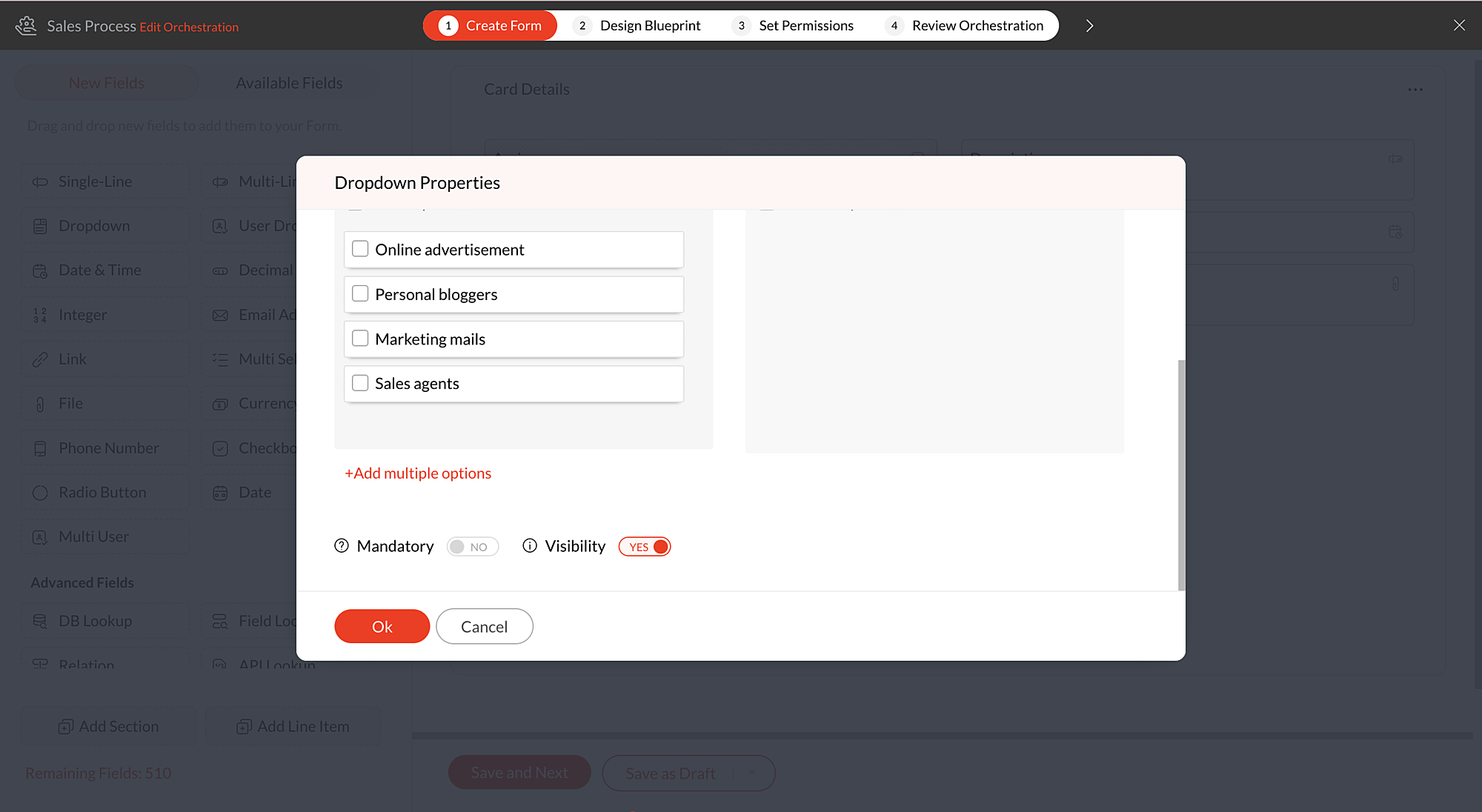
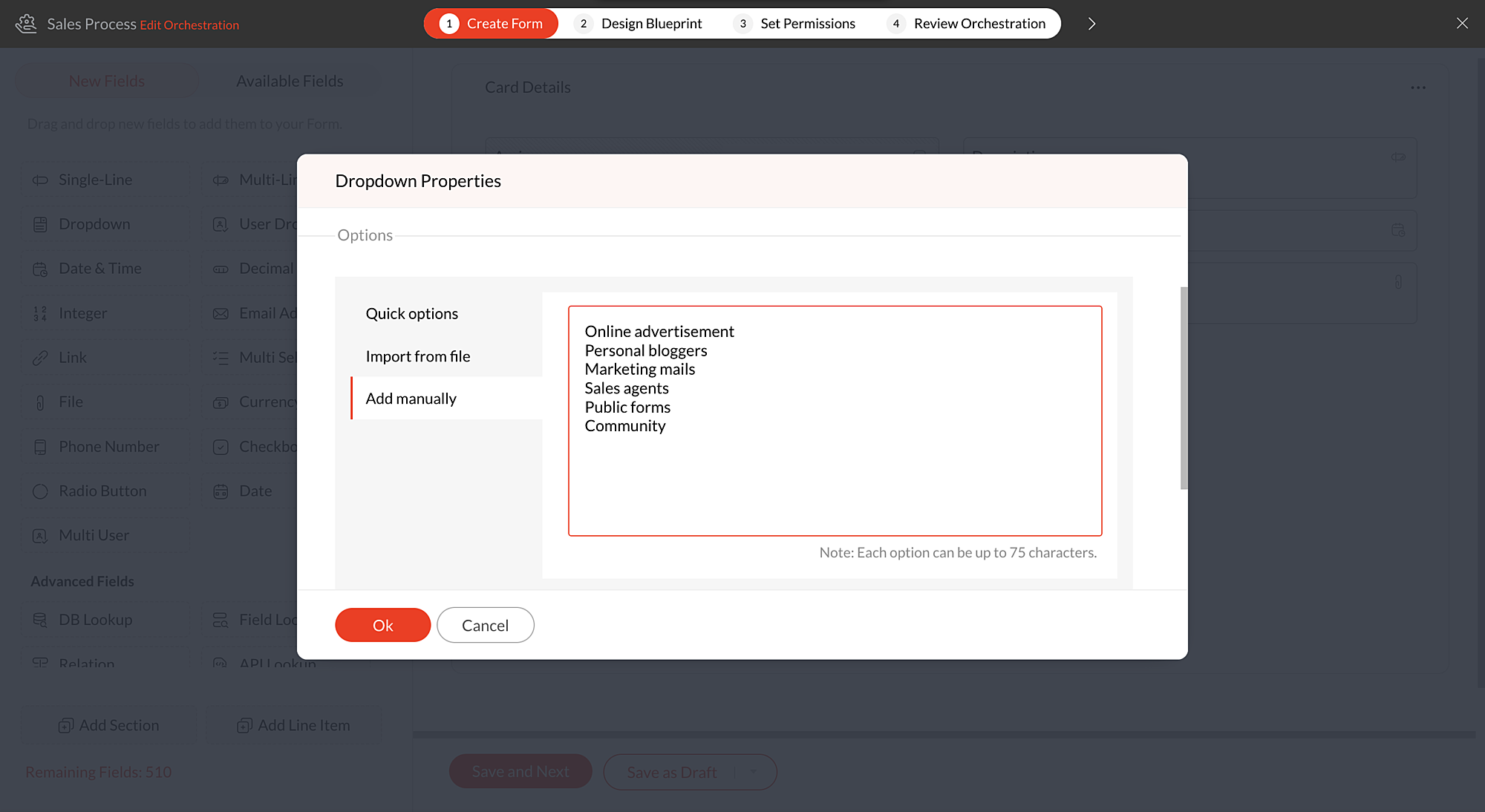
You'll now be in Drop-down Properties pop-up. Scroll down and click
+Add multiple options
to view the below options:
-
Quick options
-
Import from file
-
Add manually
Quick options
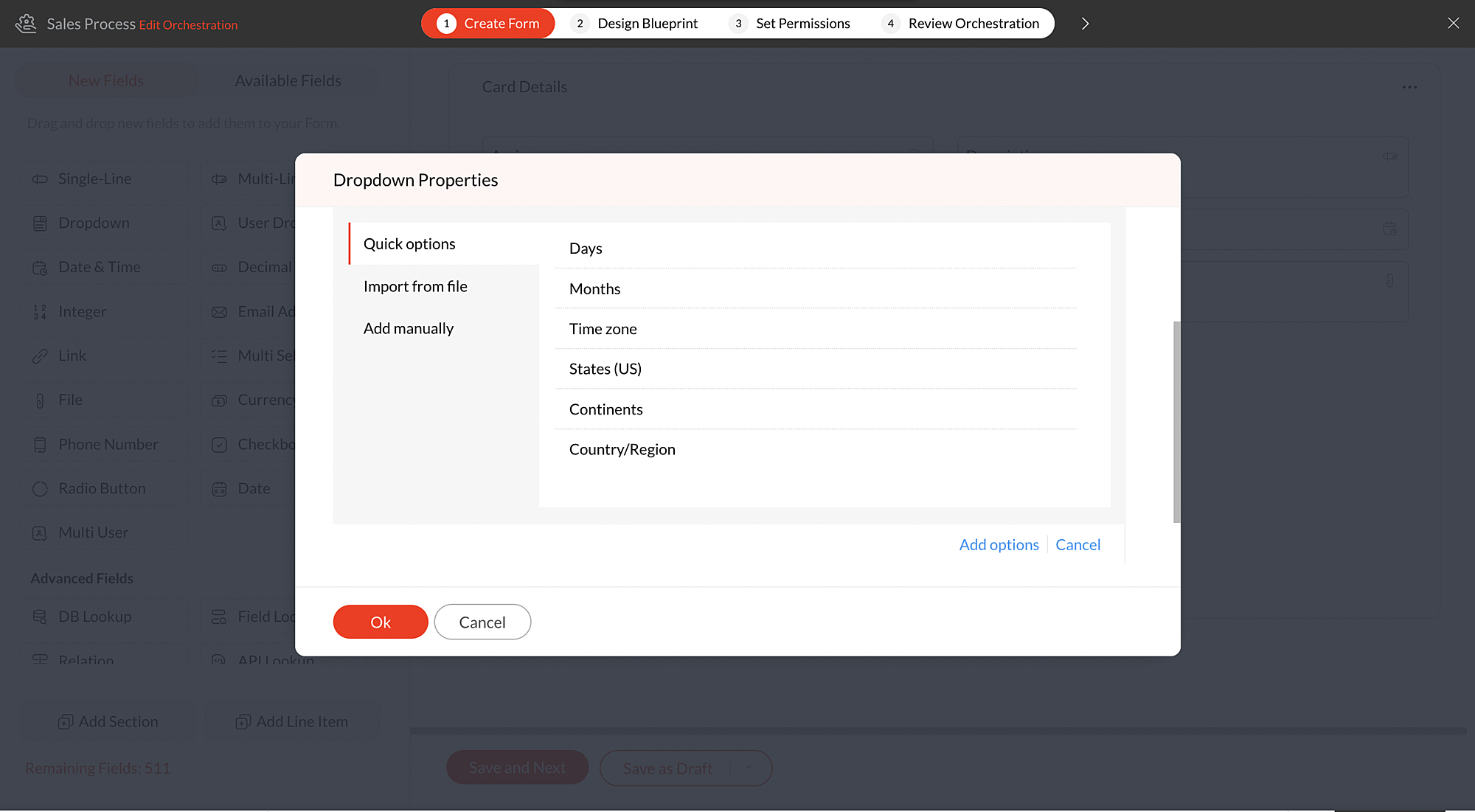
There are a certain set of default dropdown options available in Qntrl. Using these default choices like Days, Months, Time zone, States (US), Continents, and Countries, you can quickly add the required options to the dropdown fields.
For instance, if you would like to add drop-down options as Countries, click
+Add Multiple options
and choose
Countries, under
Quick options. Select the
Countries
that need to be listed and click
Add options.
All the countries selected by the user will be added to the drop-down list. After adding the default options, you can also add more options manually if required by clicking the
+
icon under
Options
in the Drop-down Properties pop-up.
Import from file
You can also import a .txt or .csv file to populate the drop-down list.The options must be typed line by line, and the file must be less than 2 MB in size.
For example, you have maintained a list of local hub offices of your organization in a file and you would like them to be added as drop-down options in a form. You can simply import the file containing the list and update the drop-down.
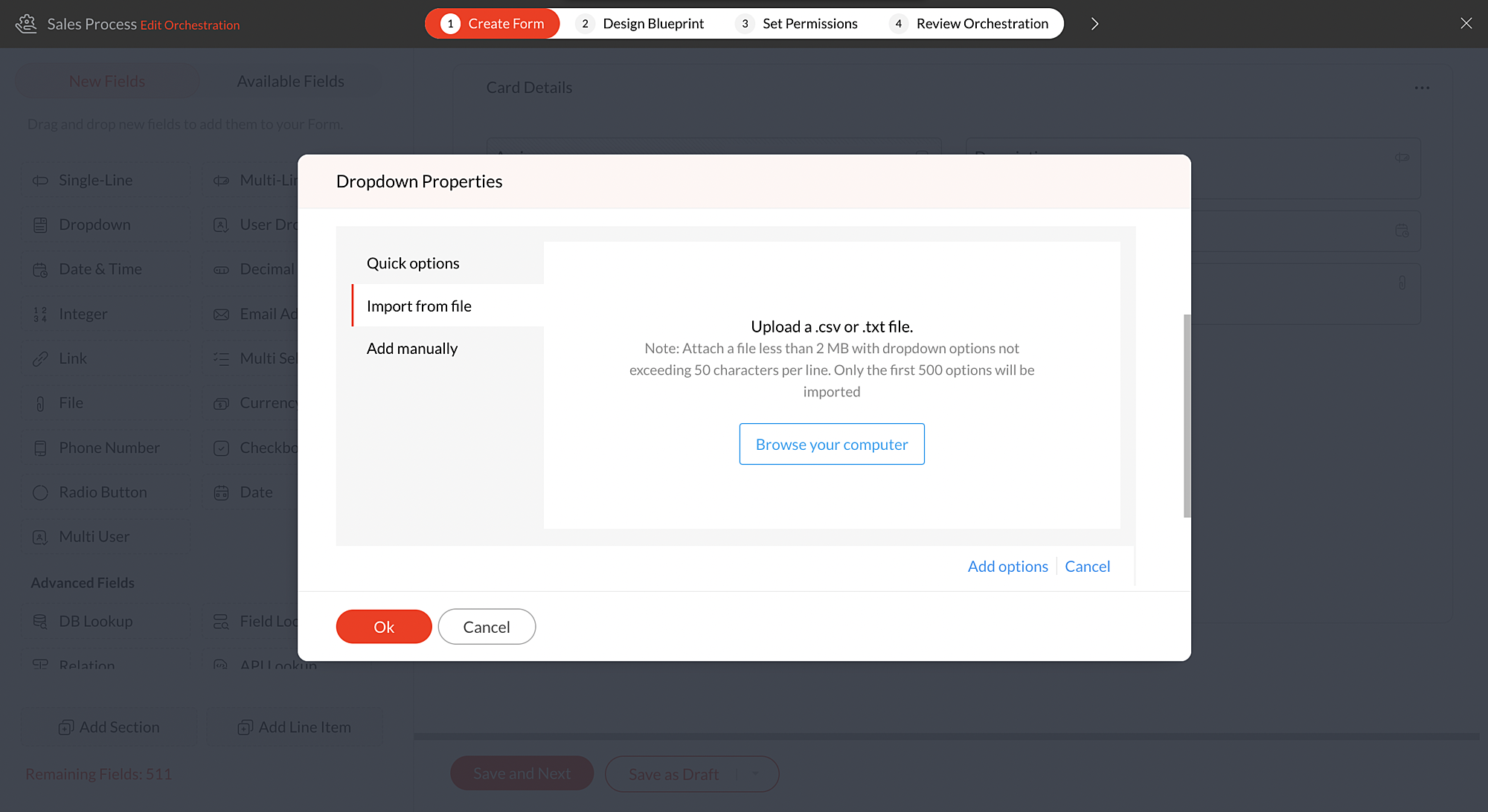
Note: You can add up to 500 options in the drop-down. To add more than 500 options, please drop an email to
support@qntrl.com.
Add manually
With this option, you can write all the options at once instead of adding them one by one.
List down all the options to be added in drop-down one by one and click
Add options
and they will be added to the drop-down.
For instance, if you have more number of drop-down options to be added to the field, clicking the green tick after adding each option will be time-consuming. In such cases, you can write the options one by one and add them all at once.
Know more about drop-down fields from this
help document.
We hope this update is helpful to you. If you have any questions or suggestions, please leave a comment below or email us at
support@qntrl.com.
Help resources:
Qntrl KB
|
Tutorials
|
Short Help Videos
|
How-to videos
Topic Participants
Sri Priya RK
Sticky Posts
Tip #21: Increase user engagement using dynamic email content and attachments in Orchestly
Businesses often send out bulk emails like weekly newsletters, monthly event updates, promotional emails, surveys, beta access emails, product reviews, seasonal greetings, and so on. Even as the gist of these emails remain constant for all recipients, personalizations capture the audience’s attention and help brands connect with them. Orchestly’s email templates allows you to draft and send dynamic emails with personalized content and attachments to internal and external users. Email templatesQntrl's 2023 year in review
This year has been all about analyzing our customer feedback and building a resilient and solution-driven product from it. As a result of this work, we're happy to announce that a whole new version of Qntrl is getting ready for release soon. This newTip #61: 5 different ways to create Cards in Qntrl
Qntrl supports an array of features that covers everything required for business orchestration, from process automation to business advancement. Cards, being the elemental feature of Qntrl, record all the details of a particular task from the beginningTip #17: Stay informed of significant business impact using Orchestly
With remote working becoming the new norm, leaders across sectors need to stay updated of their business performance in the market to aid business decisions. Instead of awaiting virtual meetings from sales and finance heads to put forth the business status, organization leaders can themselves dig into the system to keep an eye on their revenue generating customers or set up notifications to monitor major updates. Orchestly recognizes such requirements and provides adaptable solutions for all businessOnboard faster with Orchestly's Tutorials
We are actively rolling out new learning materials to assist our customers onboard at ease and automate their processes effortlessly. On that front, we recently launched Tutorials for Orchestly. Tutorial is a step-by-step guide to help users familiarize the concepts of Orchestly and automate simple processes right from scratch. We’ve documented 3 such business processes viz. Order Manufacturing, Product Implementation, and Change Management. We're looking forward to document more customer-centric
Nederlandse Hulpbronnen

Recent Topics
Adding non-Indian billing address for my Zoho subscription
Hey Need help with adding a non-Indian billing address for my Zoho subscription, trying to edit the address to my Singapore registered company. Won't let me change the country. Would appreciate the help. Regards, RishabhMove record from one custom module to another custom module
Is it possible to create a button or custom field that will transfer a record from one custom module to another? I already have the 'Leads' module used for the Sr. Sales department, once the deal is closed they convert it to the 'Accounts' module. I would like to create a 'Convert' button for a custom module ('Locations') for the department that finds locations for each account. Once the location is secured, I want to move the record to another custom module called 'Secured Locations'. It's basicallyConvert Lead Automation Trigger
Currently, there is only a convert lead action available in workflow rules and blueprints. Also, there is a Convert Lead button available but it doesn't trigger any automations. Once the lead is converted to a Contact/Account the dataset that can be fetchedNotes Not Saving
Hello, My notes are continuously not saving. I make sure to save them, I know the process to save them. It is not operator error. I go back into a Leads profile a while later and do not see the previous notes that I have made. I then have to go back and do unnecessary research that would have been in the notes in the first place. Not a good experience and it is frustrating. Slows me down and makes me do unnecessary work. Please resolve. As a quick heads up, deleting cookies is not a fixIntegration between "Zoho Sprints Stories" and "Zoho Projects Tasks/Subtasks"
We have two separate teams in our organization using Zoho for project management: The Development team uses Zoho Sprints and follows Agile/Scrum methodology. The Infrastructure team uses Zoho Projects for traditional task-based project management. InPrefill form with CRM/Campaigns
I created a form in zForms and created prefill fields. I added this to the CRM and selected the fields so when sending from the CRM, the form works great. However, I want to use the same form in Campaigns and I want it to pull the data from CRM (whichTriggering a campaign automation from a Form
I used Forms to create a lead form that is accessed by a button on my website. The field information flows into the CRM. However, I am trying to figure out how to use Campaign automations to start a workflow (series of campaign emails) that is triggeredName changed in settings for mailbox but still not changed when typed in To field
In the email account secretary@ i have updaetd the new staff members details but the old members name still appears when I type secretary@ in the To field. I cant work out where Zoho is finding the old name from. I have deleted the browser cache. If IEmployee Appraisal Applicability - Why is Date of Joining Hard-Coded?
In the new (to me, at least) Performance Appraisal Cycle wizard, it's possible to set criteria to determine for whom the appraisal process should apply. This makes sense on its face. However, one MUST use the Date of Joining criterion as a filter. WhyFormula fields
Zoho People now supports formula fields. This post illustrates it. Formula fields are fields whose value is calculated instead of being entered by the user. Using this, number, decimal and date manipulations can be done. The value of this field could be numeric or date depending on the output of the formula. In date manipulations, the result will be given in milliseconds, which you can format as per you need. The operators we support are +, - , *, /. Formula fields get recalculated automaticallyCopy paste from word document deletes random spaces
Hello Dear Zoho Team, When copying from a word document into Notebook, often I face a problem of the program deleting random spaces between words, the document become terribly faulty, eventhough it is perfect in its original source document (and withoutIs it possible to use module field filters via URL parameters?
It would be really convenient if I could quickly link to a filter. For reference, this is the filter functionality I'm referring to: https://help.zoho.com/portal/en/kb/crm/customize-crm-account/advanced-filters/articles/advanced-filters For example: MyTransitioning FESCO Bill Project to Zoho Sheets and Integration Options
Hello Zoho Support, I'm considering transitioning my FESCO bill project from Google Sheets to Zoho Sheets and wanted to know if there are integration options to seamlessly migrate our existing work. You can view our platform here, any guidance would beSupport for Custom Fonts in Zoho Recruit Career Site and Candidate Portal
Dear Zoho Recruit Team, I hope you're doing well. We would like to request the ability to use custom fonts in the Zoho Recruit Career Site and Candidate Portal. Currently only the default fonts (Roboto, Lato, and Montserrat) are available. While theseLightbox Pop-up form
I would like to embed my form using the lightbox pop up. I don't want it to load automatically. I want it to load when some clicks the button. I can see this option, however when I use the "show pop-up launch button" on the website, the button automaticallyData Processing Basis
Hi, Is there a way to automate the data processing for a candidate every time an application arrives from job boards, without requiring manual intervention? That is, to automatically acquire consent for data processing. I've seen a workflow that allowsLightbox Pop-up form
I would like to embed my form using the lightbox pop up. I don't want it to load automatically. I want it to load when some clicks the button. I can see this option, however when I use the "show pop-up launch button" on the website, the button automaticallyZoho CRM for Everyone's NextGen UI Gets an Upgrade
Hello Everyone We've made improvements to Zoho CRM for Everyone's Nextgen UI. These changes are the result of valuable feedback from you where we’ve focused on improving usability, providing wider screen space, and making navigation smoother so everythingCustomer Management: #5 Never Let the Customer Slip
When Rahul started Knight's Watch Consulting, his focus was simple: deliver good work and keep clients happy. He offered one-time consulting projects, monthly advisory retainers and usage-based support for growing clients. Business was steady, and customers10GB Email Storage Limits in Zoho CRM
We’ve had Zoho One for almost 5 years and have always synced our emails from Gmail via IMAP… As of late, we’ve run into issues with our emails not syncing, due to being over the 10GB storage cap… What’s very odd is that we haven’t changed a thing? I knowZoho Projects Android and iOS app update: Mobile device permission based on user profiles
Hello everyone! We have brought in support for mobile device permissions based on the user profiles which are configured in organization level. Administrators can now configure the permissions on the web app(projects.zoho.com) by following the steps mentionedZoho Projects Android and iOS app update: Timesheet module is now renamed as 'Time Logs', delete option has been renamed to 'Trash'.
Hello everyone! We have now renamed the Timesheet module as Time Logs and the delete option as 'Trash' on the Zoho Projects Android and iOS app. Time Logs Android: Time Logs iOS: Trash option Android: Trash option iOS: Please update the app to the latestZoho Mail app update: Manage profile picture, Chinese (Traditional) language support
Hello everyone! In the latest version (v3.1.9) of the Zoho Mail app update, we have brought in support to manage profile picture. You can now set/ modify the profile picture within the app. To add a new profile picture, please follow the below steps:Reminders for Article Approval
Is there a way to send reminders for approvers to review articles and approve/deny them? I'm not seeing that option anywhere.To print Multiple delivery notes in batches
In Zoho Books, we can print a Delivery Note from an Invoice using the Print Delivery Note option, but it is non-editable and always prints all line items from the invoice. Our requirement is to deliver invoiced items in batches and print delivery notesAdd Full-Screen Viewing for Quartz Recordings in the Client Interface
Hi Zoho Team, We would like to request an enhancement to the Zoho Quartz client interface when viewing submitted recordings. Current Limitation: When viewing a Quartz recording from the client (user) interface, there is currently no option to switch the2025 Recap: A Year to Remember | Zoho Inventory
Important Update : Pipedrive deprecated fields no longer supported in Zoho Analytics
Dear Pipedrive users, We would like to inform you about a recent update related to your Pipedrive integration with Zoho Analytics. The Pipedrive team has deprecated certain fields from their application. You can find more details in the official PipedriveProduct Updates in Zoho Workplace applications | November 2025
Hello Workplace Community, Let’s take a look at the new features and enhancements that went live across all Workplace applications this November. Zoho Mail Format comments easily using Slash Commands With Slash commands, you can easily format text, insertRight-Click Pipeline to Open in New Tab
Please add the ability to right-click on a pipeline to open it in a new tabAdjusting Physical Inventory
Not getting very far with support on this one, they say they are going to fix it but nothings happened since November. Please give this a thumbs up if you would like to see this feature or comment if you have some insight. Use Case: Inventory set to beDeluge date time issue
The deluge function info zoho.currentdate.toString("MMM/YYYY") returns Dec 2026 instead of 2025Sending automated messages that appear in the ticket's conversation thread
Good morning, esteemed Zoho Desk community, warm greetings Today I am here to raise the following problem, seeking a solution that I can implement: I need to implement an automation that allows me to send reminder messages to customers when I am waitingIssue with Zoho Creator Form Full-Screen View in CRM Related List Integration
Hi Team, We have created a custom application in Zoho Creator and integrated it into Zoho CRM as a related list under the Vendor module, which we have renamed as Consignors. Within the Creator application, there is a form named “Pickup Request.” Insidesync views to sheet
Im looking to sync my views aka reports in analytics to zoho sheets, when data is updated in analytics it also should be updated in sheets, till now zoho sheets only offer raw data connection and it is not enough as these reports are difficult to re-doHow to update the Status in a custom module?
Hi, I have a custom module "cm_payment_registry" in Billing, I am trying to change the status which is "Draft" with: array = {"custom_status":"Approved"}; zoho.billing.update("cm_payment_registry",organization.get("organization_id"), XXXXXXXXXXXXXX, array,"connectionname");how to add email to existing organization i w
I am already registered my organization and i have an email id. I need one more email id but i can't find anywhere .i want the cheapest email id . how to add ?is it possible to add more than one Whatsapp Phone Number to be integrated to Zoho CRM?
so I have successfully added one Whatsapp number like this from this User Interface it seems I can't add a new Whatsapp Number. I need to add a new Whatsapp Number so I can control the lead assignment if a chat sent to Whatsapp Phone Number 1 then assignReplace Zoho Invoice with QuickBooks
We are implementing Zoho FSM for a cleaning business in the US with 50+ field workers. This business has been using Quickbooks for accounting for decades and will not migrate to Zoho Books. A major issue in the integration is the US sales tax calculation.2025 Highlights: A Year of Steady Progress and Significant Developments
As we come to the end of 2025, let's take a moment to reflect on the significant progress and developments we've made to improve your travel and expense management. In the Spotlight Introducing Online Booking (US edition only - Early access) Enable onlineNext Page