Automation#34 : Automate Email threading for Ticket notification

Hello Everyone,
It's been a while since we've presented an automation. However, our community has been buzzing with ideas, use cases, and discussions with our community experts and Ask the Experts session.
So, here we are again, presenting an automation focused on threading ticket notification emails.
Let's see how this automation helped our folks at Zylker Techfix.
Zylker Techfix, a gadget service company, has grown significantly and now serves a large customer base. The support team receives tickets from various customers, some of whom send multiple emails regarding servicing multiple gadgets. With their expanding customer base, Zylker Techfix wanted to effectively track notification emails sent to customers for each respective ticket.
Additionally, Zylker Techfix aimed to inform customers about the engineer assigned to support them with their submitted gadget, helping establish a stronger connection with their customers.
In this post, let's explore how we can adopt Zylker Techfix's customization.
Notify Customers when a ticket is created
The notification rule has an option to notify your customers when a ticket is created.
You can add the details of the ticket owner within the Email template so customers will know the support executive who will be handling the ticket.
How to include Ticket Owner details within the Email template?
You could create a New Email template or use the Existing email template.
Create an Email template
You can either create a New Email template or edit an existing Email template.
To Add a New Template : Go to Setup (S) >> Customization >> Email Templates >> Select the required Department >> Click on Add >> New Template >> Select the Tickets module >> Enter Name > Select Folder, From Address, Enter Reply to address if required, Add Subject and desired description.
To add Ticket owner's name, insert the placeholders First Name and Last Name (if required) ${Case Owner.First Name}${Case Owner.Last Name}, under Ticket Owner.
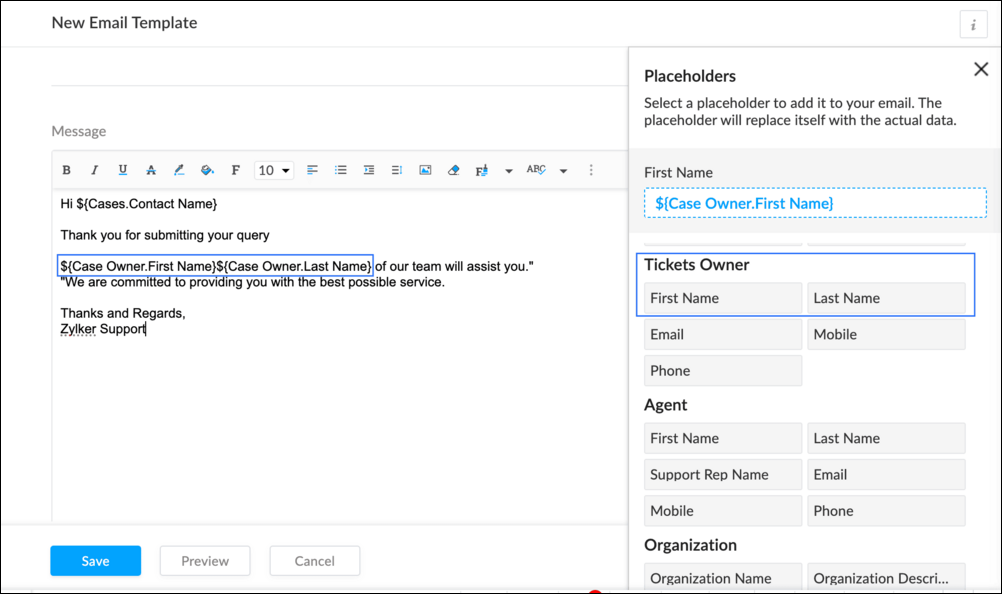
To Edit an Existing Email
To edit an existing Email, Go to Setup (S) >> Customization >> Email Templates >> Select the required Department >> Click on the Edit icon for the existing template or select the existing Template >> Edit description. To insert Ticket owner's name, insert the placeholders for first name and last name (if required) ${Case Owner.First Name}${Case Owner.Last Name}, under Ticket Owner.
Create a connection
1.1 Go to Setup(S) and choose Connections under Developer Space.
1.2 Click Create Connection.
1.3 Select Zoho Desk under Default Services.
1.4 Set the connection name as zohodeskconnection.
1.5 Under Choose Scopes, choose the below scope values:
1.5 Under Choose Scopes, choose the below scope values:
Desk.settings.ALLDesk.tickets.UPDATE
1.6 Click Create and Connect.
1.7 Click Connect.
1.8 Choose the Desk's organization to connect with Deluge, and click Submit.
1.9 Click Accept.
Connection is created successfully.
Configure Custom Function within the Workflow Rule
1. Go to Setup, choose Workflows under Automation.
2. Under Workflows, click Create Rule.
3. Under Basic Information, choose Tickets under Module, give a Rule Name and Description.
4. Click on the Active checkbox to activate the rule once created. Click Next.
5. Under Execute on, select Create.
6. Add Criteria, if required.
7. Under Actions, click on the drop-down in the + icon and select Custom Functions >> New.
7.1 Under Basic Information, enter Name and Description. Choose Tickets under Module.
7.2 Under Argument Mapping, give a desired Method Name. Map the arguments as below:
7.2.1 In the Argument Name field, type ticketId and select Ticket Id in the Tickets Section.
7.2.2 In the Argument Name field, type contactEmail and select Email in the Contacts Section.
7.2.3 In the Argument Name field, type fromEmailAddress, click on Specify Custom Value and type the verified From Address of your department.

7.3 In the script window, insert the Custom Function given below:
- //<<<< User Inputs Section >>>>----
- // Replace ".com" with appropriate domain extension based on customer's location/DC
- deskURL = "https://desk.zoho.com";
- templateId = "xxxxxxtemplateIdxxxxx";
- //<<<< Initial Configs >>>>----
- logs = Map();
- template = invokeurl
- [
- url :deskURL + "/api/v1/templates/" + templateId + "/render?entityId=" + ticketId
- type :POST
- connection:"deskconnection"
- ];
- if(template != null && template.containsKey("body"))
- {
- logs.put("template",template);
- emailContent = template.get("body");
- emailReplyParams = {"channel":"EMAIL","to":contactEmail,"fromEmailAddress":fromEmailAddress,"content":emailContent,"contentType":"html"};
- logs.put("emailReplyParams",emailReplyParams);
- sendReply = invokeurl
- [
- url :deskURL + "/api/v1/tickets/" + ticketId + "/sendReply"
- type :POST
- parameters:emailReplyParams + ""
- connection:"deskconnection"
- ];
- logs.put("sendReply",sendReply);
- }
- info logs;

Note
a. In Line 3, replace .com in the address with .in/.eu/.ca based on your DC.
b.In Line 4, enter the template id within " " of the Email template you created or edited.
To fetch Template id, go to Setup (S) >> select Email Templates under Customization >> click on the Email template and on the Address bar, copy the numeric value at the end of the URL.
8. Click Save to save the custom function.
9. Click Save again to save the workflow.
Now, along with your ticket conversations, you can also track the emails sent as notifications within your ticket conversations.
Until the next post,
Lydia | Zoho Desk
Topic Participants
Lydia | Zoho Desk
Sticky Posts
Register for Zoho Desk Beta Community
With the start of the year, we have decided to take a small step in making the life of our customers a little easier. We now have easy access to all our upcoming features and a faster way to request for beta access. We open betas for some of our featuresShare your Zoho Desk story with us!
Tell us how you use Zoho Desk for your business and inspire others with your story. Be it a simple workflow rule that helps you navigate complex processes or a macro that saves your team a lot of time; share it here and help the community learn and grow with shared knowledge.Tip #1: Learn to pick the right channels
Mail, live chat, telephony, social media, web forms—there are so many support channels out there. Trying to pick the right channels to offer your customers can get pretty confusing. Emails are most useful when the customer wants to put things on record. However, escalated or complicated issues should not be resolved over email because it's slow and impersonal. When you need immediate responses, live chat is more suitable. It's also quick and convenient, so it's the go-to channel for small issues.Welcome to Zoho Desk Community - Say hello here!
Hello everyone! Though we have been here for a while, it’s time to formally establish the Zoho Desk Community; we’re really happy to have you all here! This can be the place where you take a moment to introduce yourself to the rest of the community. We’d love to hear all about you, what you do, what company or industry you work for, how you use Zoho Desk and anything else that you will like to share! Here’s a little about me. I am Chinmayee. I have been associated with Zoho since 2014. I joined hereWebinar 1: Blueprint for Customer Service
With the launch of a host of new features in Zoho Desk, we thought it’ll be great to have a few webinars to help our customers make the most of them. We’re starting off with our most talked about feature, Blueprint in Zoho Desk. You can register for the Blueprint webinar here: The webinar will be delivered by our in-house product experts. This is a good opportunity to ask questions to our experts and understand how Blueprint can help you automate your service processes. We look forward to seeing
Nederlandse Hulpbronnen

Recent Topics
Create Invoice and Invoice Items from Sales Order via API
Currently, when creating an Invoice associated with a Sales Order via the API, it appears that I must manually include all of the items (line_items) even though they are already part of the Sales Order. My question is this: is it possible to raise an Invoice via the API based on all of the information associated with a Sales Order--such as the items? In other words, do I always have to manually include the items (line_items) when raising an Invoice via the API when the Invoice is associated withOutlook 2013 Calendar Syncs but "Related To" Field in Zoho is blank
Outlook 2013 Calendar Syncs but Related To Field in Zoho is blank I expect the "Realted To" field to be populated with the calendar participantsExport a Course
Is it possible to export a course from Zoho Learn to a SCORM file?Add and Remove Agents from Departments and Groups in Zoho One
Hi Zoho Flow Team, We hope you're doing well. Currently, Zoho Flow provides an action to add an agent to a group in zoho one, but there is no action to remove an agent from a group or a department. Another action that we find missing is the option toConsumer Financing
Does Zoho currently have a payment gateway (such as Stripe, Square, etc) which offers financing for customers? So, let's say the estimate we give the customer is greater than what they can afford at the time, but we can sell the service now, letting themIntégration de la gestion des Passkeys dans Zoho Vault
Zoho Vault est depuis plus d’une décennie une solution fiable pour les entreprises : pour la gestion, le partage et le stockage des mots de passe. En 2018, nous avons fait un pas en avant en proposant la connexion unique (SSO). Nous sommes fiers de franchirScan & Fill with double quote key/value pairs
Hi, An old Ticket moved to a Topic/Idea: I love the idea of the new Scan & Fill as it nearly covers my previous request for a QR Scanner to read a multi-part QR Code. My QR Codes are hard-coded as below: {"key1":"value1","key2":"value2","key3":"value3"}Analytics SQL Queries should allow # as comment
# and // are very common for commenting in SQL. Not sure why analytics only allows /* and */ for commenting. Especially when # grays the line as if it's being commented out. This should be added for sure.SalesIQ Operator Activity Reports in Zoho Analytics
I'm busy building a dashboard in Zoho Analytics and I want to include SalesIQ stats in the dashboard, but I'm unable to get the statistics mentioned in the attached image. Any idea where I can get the stats for Operator Activity?No longer can indent
Hey there! Is it just me or were we used to be allowed to used tab or indent when writing. It’s not working right now, has this always been the case?Free webinar alert! Seamless Transition with Lossless Migration: Zoho One + Zoho Mail
Hello Zoho Mail Community! 🚀 Attention IT Admins and Email Administrators! Are you planning to migrate your organization's email to Zoho Mail within the Zoho One ecosystem? 📧 Join our exclusive webinar, Seamless Transition with Lossless Migration: ZohoAdd Resource to Export
The Export Data feature does not include a column for the Resource field. Without this column, Zoho Bookings cannot be used by any business for resource-based services or event types e.g. room bookings, equipment bookings. It seems to be an oversight,Mandatory field via deluge code
I would like to ask you if it is possible to make a field mandatory via deluge script. For example, if I have a decision box and I click on it then I want a single line field to be mandatory. If uncheck the decision box then to do the single line as optional. I think it is not possible to do that and I have to do it via validation in 'on validate' field.Revenue Management: #1 What does it mean to "recognize" revenue?
Earning revenue isn't just about collecting cash from your customers. It's about recording the income correctly and consistently. Revenue recognition is the process of deciding when and how to record revenue in financial statements so that they reflectPower of Automation :: Auto-Populate Integration Field in Projects with CRM Account Data
Hello Everyone, A custom function is a software code that can be used to automate a process and this allows you to automate a notification, call a webhook, or perform logic immediately after a workflow rule is triggered. This feature helps to automateZoho Forms and ChatGPT - populating a field using AI.
I have a form where I would like the user to enter a response or query, and have another field populated using AI. For example, user enters Field 1, AI populates Field 2 in response. I want to be able to wrap some additional instruction text around thecampo tag para api
debo conectarme a una api de zoho inventory y ocupo tomar el campo tag para poder asi jalar el articulo que cuente con el campo correcto en tag ejemplo que tag existen carro y avion que cuando busque los articulo con tag carro arroje solo estos por masUploading file as attachment to Zoho CRM
Hi, I am trying to attach a file to a Zoho CRM contact using Zoho Flow. Right now, I try to do it through the “Upload File” field in Zoho CRM (In my screenshots, it’s called Téléchargement du fichier 1). Here is what I tried: Case 1: Webmerge document The Flow is called “Custom Function” (see screenshot 101). Step 1: Creating a Webmerge document (screenshot 99) Step 2: I use “Update module entry” to upload the created file. I upload Webmerge’s “Document” in my “Téléchargemet duZia Answer Bot - Create Ticket
Surprisingly, the current iteration of Zia will try to answer a question and unless you have "transfer to SalesIQ chat" enabled, it won't create a ticket for the user or offer them a method to create a ticket. We don't want it to create chats for us,meassure leads phases
Hi, I need to create a table to meassure the time that a lead stay in blueprint phases. the phases are first contact, second contact, lead spam, contacted, appointment. any idea? I have attached an exampleIn the Custom Module I have 500 Records , this 500 record only want to view to the specific user only example user A ,
In the Custom Module, I have 500 Old records that should only be visible to a specific user, for example, User A. Any new records created from today onwards should be visible to Record owner in the Custom Module. Pls help how i achive this .How to reply to thread via API
We have built a webapp for our customers that uses the Zoho Desk API to enable each customer to view their full list of tickets, view individual tickets and raise new tickets. The Zoho Desk API doesn't have the ability to reply to a ticket/thread. RepliesSending merged mail templates for signatures fail since today
We have ZOHO one, we use merge templates in CRM to edit in ZOHO Writer, and from there send it for signature through zoho sign. This all worked up until today, suddenly we read in the log that the merge is succesfull but the sending for signature failed.Feature Request - Make Lead List Larger and Adjustable
Hi LandingPage team, I recently started using LandingPage and I am happy to share my feedback to help improve the app. I've noticed on the Leads page, there is no option to make the columns wider. It would be great if the comlumns expanded to fit theZoho Projects - Pin Recent Projects
Hi Projects Team, It would be great if I could "pin" projects on the Recent Projects list in Zoho Projects. We have some internal projects which we regularly have to add time and some regular client projects. It would be great if I could pin those projectsZDK Error
I get this error when trying to trigger a CRM Function from Client Script: Uncaught (in promise) ZDKError: {"code":"NOT_ACTIVE","details":{"api_name":"activate_client_from_prospect"},"message":"api is inactive for the given custom function","status":"error"}"Disbursing product components in phases, monitoring them, and displaying only the final product."
i have a product composed of multiple components, and these components will be delivered to the customer in batches. However, the final invoice should only show the finished product. How can I issue (or release) the components and track their deliveFollowed Subtasks doesn't show up in the Subtasks Section
I have a task assigned to me now in the same task, there's a subtask and I am added as the follower on that task Even though I am a follower I still don't see that in the subtasks section The view permission for the profile is Related It's supposed toTip #39- Strengthen account security with Multi-factor Authentication (MFA) – ‘Insider Insights’
Securing your organization's data begins with verifying that only the correct individuals have access to it. One of the simplest yet most effective ways to accomplish this is to enable Multi-factor Authentication (MFA) within Zoho Assist. MFA introducesAutomate timeout chat tracking with Workflows in SalesIQ
With our feature-packed Nova release, Workflows has become one of the most powerful tools in Zoho SalesIQ. They let you automate follow-up actions when key events occur, such as when a chat ends, a visitor leaves a bad/good rating, or a lead is updated.Mass edit / Mass update products
Hi, Is there any way to mass update or bulk edit product fields in Zoho Inventory?Automatic Verification of IMAP Integration Status
Our sales staff have their O365 email integrated with CRM, over time this integration requires re-authentication via the UI. I can manually check the integration status by accessing Settings -> Channels -> Email -> Email Sharing -> "Configuration Type"Tip of the Week #68– Share and access files faster with Zoho WorkDrive extension.
Have you ever wasted time searching for the right file to attach to your emails—or worried whether the right people could access it? Without proper sharing settings, files might end up inaccessible to teammates or, worse, visible to people who shouldn’tCV-Library: The Newest Source Booster in Zoho Recruit!
We’ve expanded your sourcing toolkit — CV-Library, one of the UK’s largest and most trusted online job boards, is now available as a Source Booster in Zoho Recruit. This gives recruiters instant access to millions of UK-based candidate profiles, all withoutIs there the possibility to book less than 250 customer portal users?
If you use the Creator, which is included in Zoho ONe, you can create a customer portal and give access to a maximum of 3 external people / customers, right? On the Creator website I saw that you can add 250 users for 100€/month. However, we don't needDisplay Parts custom fields in the Work Order
Hello, I see that is it possible to add custom fields in the Parts module. Would it be possible to also add those custom fields in the Work Order Module under Parts? This would be very useful for customer who want to showcase more information about parts.Unable to edit Saved Estimates
We are facing issue with editing the price or discount for a saved estimate for nearly 1 week.Translation Blueprint & Picklists with Custom Values
Hello everyone, I downloaded the translation file and I'm not finding the blueprint transitions. Does this means that the transitions cannot be translated? Also, the picklist values to be translated in the document are not the same that are actually used the in module. For exemple, for my lead module, the picklist values for Lead Status are : Not-contacted, contacted, junk and lost lead. In the translation document (English to French), this is what I see: PicklistValues.Leads.Lead_Status.ContactHow to create a custom sales signal?
I want to create a custom sales signal for a custom module. is it possible to create one? If anyone know please let me knowOnly show products in offers based on lead source
We work with several lead sources, each with their own products and different pricing. For example, one product might have two or three different prices. Sometimes, when creating a quote, the wrong product is accidentally selected. Is there a way to onlyNext Page