Automation Series: Auto-update Phase Status
Hello Folks!
You can auto-update your phase's status based on status of underlying tasks using custom functions.
In this series, we will showcase how to create and run custom functions, using Deluge, with ease. Follow the steps below and automate your project management process.
Use-case
Consider a scenario where a sales representative manages all his customers conversations as tasks in Zoho Projects. To stay organised, he divides the year into four quarters and sets up one milestone for each.
He wants the milestone status to be updated automatically once all the tasks in a milestone are updated.
So, if every task in Q1 is marked In Progress, the milestone status should automatically be updated to In Progress. When all tasks are Completed, the milestone should also be completed.
Configuration Flow
To automate this process, the sales representative should
- Create custom status for tasks and milestones.
- Establish a connection.
- Create a custom function using Deluge.
- Define a Workflow Rule to set a trigger.
Create Custom Status:
Create a custom status by double-clicking the Status column name in the milestone and task list view.
Establish a connection:
A Connection is a secure and reusable authentication layer that lets your custom functions and integrations communicate with external services or other Zoho apps.
Users can select the relevant scopes to create a connection. Scopes for this particular use case are,
Zohoprojects.portals.all,
Zohoprojects.projects.all,
Zohoprojects.tasks.all,
Zohoprojects.milestones.all
Click here to learn how to establish a connection.
Create a custom function:
You don't need development expertise to execute this custom function. Zoho Projects manages the underlying execution. Simply add the function code, map the required inputs, and the system will run it automatically whenever the workflow is triggered.
Sample connection name - milestonestatus
Sample status name - In Review
Arguments required:
Arguments are variables or parameters that pass an input value to execute a custom function.
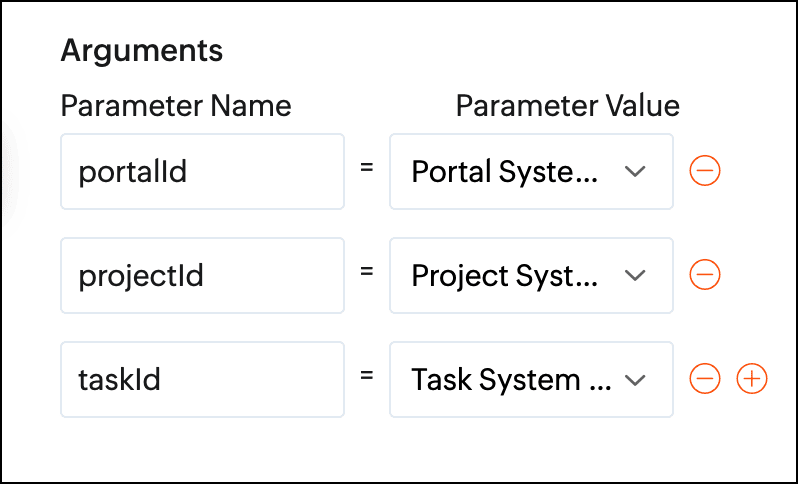
- //scopes: Zohoprojects.portals.all, Zohoprojects.projects.all, Zohoprojects.tasks.all, Zohoprojects.milestones.all
- endPointV3 = "https://projects.zoho.in/api/v3/portal/";
- endPoint = "https://projects.zoho.in/restapi/portal/";
- milestoneStatusIds = List();
- milestoneStatusNames = List();
- milestoneParameter = Map();
- statusName = "In Review";
- indexValue = 0;
- rangeValue = 100;
- taskStatusId = "";
- state = true;
- // Get task layout details
- taskLayoutDetailsResponse = invokeurl
- [
- url :endPoint + portalId + "/projects/" + projectId + "/tasklayouts"
- type :GET
- connection:"milestonestatus"
- ];
- statusDetails = taskLayoutDetailsResponse.get("status_details");
- for each status in statusDetails
- {
- if(status.get("name").notContains(statusName))
- {
- taskStatusId = taskStatusId + status.get("id") + ",";
- }
- }
- taskStatusId = taskStatusId.removeLastOccurence(",");
- taskResponse = zoho.projects.getRecordById(portalId,projectId,"Tasks",taskId,"milestonestatus");
- milestoneId = taskResponse.get("tasks").get(0).get("milestone_id");
- id_list = taskStatusId.toList(",");
- chunk_size = 4;
- count = 0;
- chunk = List();
- all_chunks = List();
- for each id in id_list
- {
- count = count + 1;
- chunk.add(id);
- if(count == chunk_size)
- {
- all_chunks.add(chunk);
- chunk = List();
- count = 0;
- }
- }
- if(chunk.size() > 0)
- {
- all_chunks.add(chunk);
- }
- for each sub_chunk in all_chunks
- {
- param = sub_chunk;
- // Get All Tasks
- taskParameter = Map();
- taskParameter.put("custom_status",param.toString());
- taskParameter.put("index",indexValue);
- taskParameter.put("range",rangeValue);
- taskParameter.put("milestone_id",milestoneId);
- tasks = zoho.projects.getRecords(portalId,projectId,"tasks",taskParameter,0,"milestonestatus");
- if(tasks.containKey("tasks"))
- {
- state = false;
- break;
- }
- }
- if(state)
- {
- // Get milestone layout details
- info "in";
- milestoneLayoutDetails = invokeurl
- [
- url :endPointV3 + portalId + "/projects/" + projectId + "/milestones/layouts"
- type :GET
- connection:"milestonestatus"
- ];
- milestoneCustomFieldDetails = milestoneLayoutDetails.get("section_details").get(0).get("customfield_details");
- for each milestoneCustomFieldDetail in milestoneCustomFieldDetails
- {
- if(milestoneCustomFieldDetail.get("api_name").equalsIgnoreCase("status"))
- {
- milestoneStatusIds = milestoneCustomFieldDetail.getJSON("picklist_details");
- milestoneStatusNames = milestoneCustomFieldDetail.getJSON("picklist_valuemap");
- }
- }
- // Milestone re-open status id
- indexOfReopen = milestoneStatusNames.indexOf(statusName);
- // Get milestone details
- milestoneResponse = zoho.projects.getRecordById(portalId,projectId,"milestones",milestoneId,"milestonestatus");
- if(milestoneResponse.containKey("milestones"))
- {
- milestoneStatusId = milestoneResponse.get("milestones").get(0).get("status_det").get("id");
- }
- else
- {
- return "Couldn't update status of none milestone";
- }
- if(milestoneStatusId != milestoneStatusIds.get(indexOfReopen))
- {
- milestoneParameter = Map();
- milestoneParameter.put("milestone_ids",{"" + milestoneId + ""});
- milestoneParameter.put("update_fields",{"CUSTOM_STATUSID":"" + milestoneStatusIds.get(indexOfReopen) + ""});
- updateMilestoneDetails = invokeurl
- [
- url :endPointV3 + portalId + "/projects/" + projectId + "/milestones/" + milestoneId + "/updatefieldvalue"
- type :POST
- parameters:toString(milestoneParameter)
- connection:"milestonestatus"
- ];
- info updateMilestoneDetails;
- }
- }
- return "success";
Define a Workflow Rule:
After creating the custom function, define a task-based workflow rule. Set the trigger as "when task is updated" and associate the custom function under Add Action.
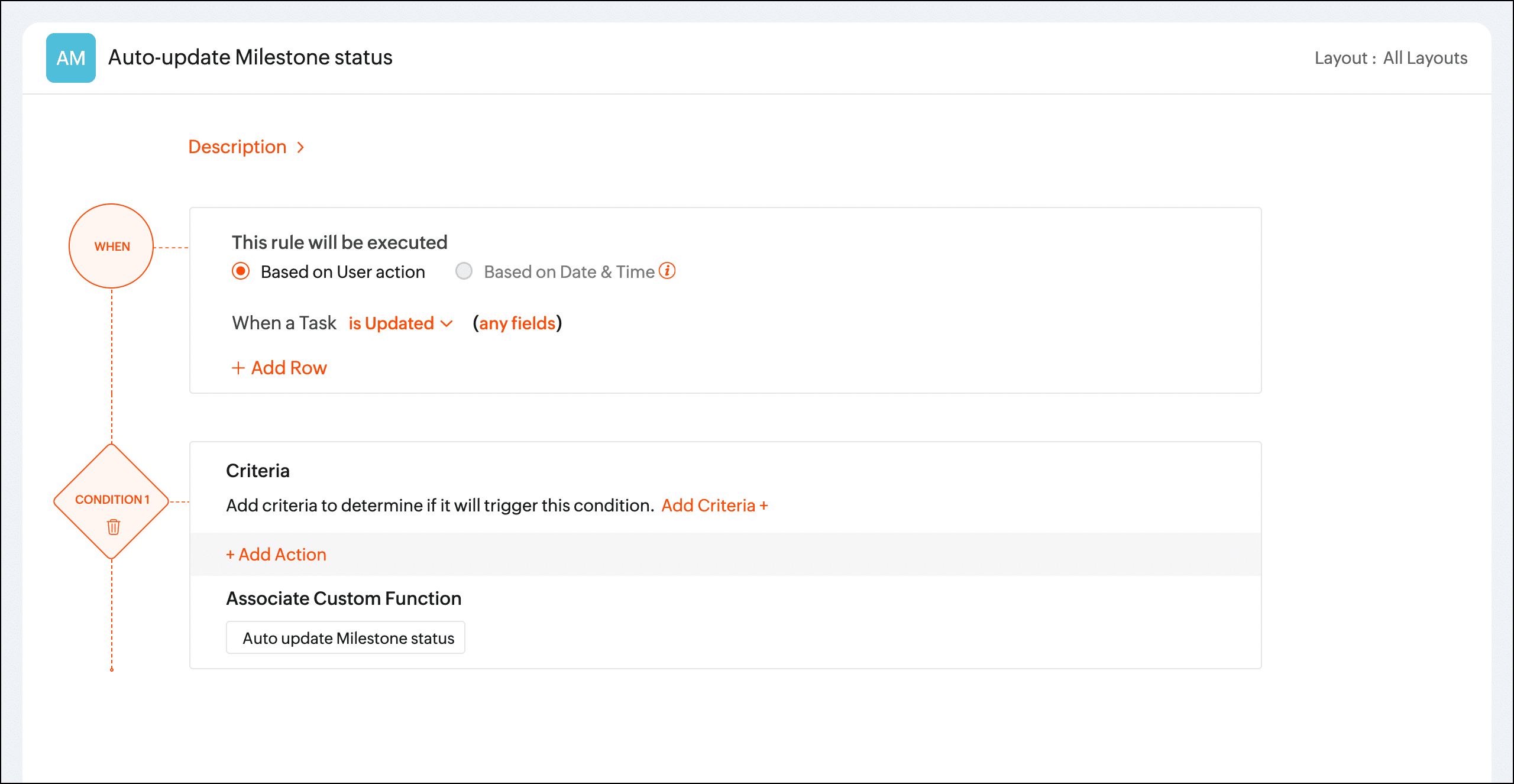
Once the workflow rule is triggered, the custom function will update the phase status automatically.
We hope you found this post to be helpful. If you have any questions, please leave a comment below or email us at support@zohoprojects.com.
Topic Participants
Priyadharshini J
Sticky Posts
Update on Using Extensions in Custom Modules
Extensions in Zoho Projects now support custom modules. You can add extensions to custom module records and configure where each extension appears and who can access it during installation. Supported Extensions: Checklist, Google Drive, SharePoint ConfigureAutomation Series: Automate Project File Uploads from Zoho WorkDrive
Project documents are often prepared before development begins. When files such as product requirements, design files, guidelines, or plans are stored in a shared folder in Zoho WorkDrive, teams can automate copying them to the corresponding project teamNew Updates in Zoho Projects
Creating projects and keeping reports up to date are part of everyday project management. With the latest updates to Zoho Projects, you can now create projects from requirement documents or prompts using an AI agent and sync project data with Zoho AnalyticsAutomation Series: Restrict Task Updates Outside Planned Dates
When a project follows the waterfall methodology, it is important to execute the tasks in a sequential order in which they are planned. Deviating from the initial plan may cause disparity between the project scope and the outcome. Codex Script in ZohoDYK 14: Create Tasks with AI
Did you know AI can suggest tasks within your Zoho Projects portal? Breaking a project into clear, actionable work items takes time and manual effort. Especially when the same team handles both planning and execution. AI task suggestions in Zoho Projects
Nederlandse Hulpbronnen

Recent Topics
Breaking Change Announcement: Users API Response Restricted for Client Portal Users
Hi all, We are introducing a breaking change to the Users API when it is accessed by Client Portal users. Status: Live This change is now live in production. Please review your integrations and make the necessary updates. Affected endpoints: GET /usersautomatic email reminder
in need of an email reminder to participants having trained for a course but have not paidSharedmail box access via an api
Hi, I am trying to access a sharedmailbox via an API. I am the moderator and creator of this shared mailbox. I have created a self client but when when i try to get list of all emails, it does not list the sharedmailbox. Help me to resolve this or provideDuplicate Record Creation
Hello Team, I would like to check whether there are any options available in Zoho FSM to prevent duplicate record creation in the following modules: Assets Companies Contacts Ideally, we would like the system to check for existing records before allowingCC'd User Receiving Both Regular Email Chain Response & Reply Notification
Hi, I am trying to set up the notifications for users and I'm a bit confused. I'm testing with personal accounts and my Desk agent, and I'm noticing that CC'd users are receiving both the regular email chain that the requester (contact) receives, butDefault View for Email Sent
Hi, can the default view for email sent to candidates be "ALL" instead of the current user? I have to click the dropdown menu every time so that I can see if other recruiters have already sent an email to a candidate. Thanks!KB Articles - Can't See Content or Trigger Immediate Sync
Once a file has been submitted to the KB, there's no way to check what it actually contains. There's also no way to force an immediate sync with the source document. These are issues when one is developing and testing an agent. It makes troubleshootingEnable Screen Recording in Zoho WorkDrive Mobile Apps (Android & iOS)
Hi Zoho WorkDrive Team, How are you? We are enthusiastic Zoho One users and rely heavily on Zoho WorkDrive for internal collaboration and content sharing. The screen-recording feature in the WorkDrive web app (similar to Loom) is extremely useful- however,Add Comprehensive Accessibility Features to Zoho Writer
Hello Zoho Writer Team, We hope you are doing well. We would like to submit a feature request to enhance Zoho Writer with a full set of accessibility tools, similar to the accessibility options already available in the Zoho Desk agent interface. 🚧 CurrentProblem with currency field in Zoho CRM
Hi Guys Zoho Books has a feature in currency fields that automatically converts decimal numbers with commas ( , ) to period format ( . ) when pasting them. For example: R$ 2,50 --> R$ 2.50 Is this behavior available in Zoho CRM? I couldn't find any configurationAbility to Attach Images When Reporting Issues to Zoho Projects from Zoho Desk
Hi Zoho Desk Team, Hope you’re doing well. We’re using the Zoho Desk–Zoho Projects integration to report bugs directly from support tickets into the Zoho Projects issue tracker. This integration is extremely useful and helps us maintain smooth coordinationIs it possible to convert regular pick-list to multi-select pick list?
I have a regular drop-down pick-list and we realized that we need this info as a multi-select pick-list. I don't think there is a way to convert from one type to the other, but what is the simplest way of moving the data over? Meaning, whatever valueMake Camera Overlay & Recording Controls Visible in All Screen-Sharing Options
Hi Zoho WorkDrive Team, Hope you are doing well. We would like to request an improvement to the screen-recording experience in Zoho WorkDrive. Current Limitation: At the moment the recording controls are visible only inside the Zoho WorkDrive tab. WhenVENDORS ARE NOT SYNCHED WITH CONTACTS IN CRM
Hello, While the ACCOUNTS and CONTACTS (Including the primary contact) are synced with the CONTACTS module in CRM, the vendor's CONTACTS are not synced with CRM - which basically forces the users to re-enter all vendor's contacts twice and then updateProperly Capture Dropdowns & Hover Elements When Recording a Window/Tab
Hi Zoho WorkDrive Team, Hope you are doing great. We encountered a limitation when recording a selected window or browser tab: Certain UI elements, such as dropdown lists, hover menus, and overlays, are not captured unless we record the entire screen.Add Camera Background Blur During Recording
Hi Zoho WorkDrive Team, Hope everything is well. We would like to request an enhancement to the video recording feature in Zoho WorkDrive. Currently, the camera preview displayed during a recording does not support background blur. This is an essentialWorkDrive Desktop Sync Is Being Deprecated: Move to WorkDrive TrueSync for a Smarter Experience
Hi everyone, We are excited to share a better, smarter way to access and manage your files directly from your computer! We’re transitioning from our legacy Desktop Sync app to WorkDrive TrueSync, designed to give you faster performance,greater flexibility,Support Uploading YouTube Videos Longer Than 60 Minutes
Hi Zoho Social Team, How are you? We would like to request support for uploading YouTube videos longer than 60 minutes directly through Zoho Social. Your support team informed us that Zoho Social currently cannot upload videos over 60 minutes due to “APICaso de Éxito: ACKstorm transforma la gestión de personas con Zoho People
"Con Zoho People hemos centralizado la gestión de personas y facilitado la autonomía de la plantilla." Equipo de ACKstorm ACKstorm es una empresa especializada en consultoría y servicios cloud que trabaja con el ecosistema de Zoho para optimizar sus procesosZoho Books Sandbox environment
Hello. Is there a free sandbox environment for the developers using Zoho Books API? I am working on the Zoho Books add-on and currently not ready to buy a premium service - maybe later when my add-on will start to bring money. Right now I just need aAction required: Authenticate your sender domain in Zoho Marketing Automation before December 14, 2026
Starting December 14, 2026, Zoho Marketing Automation will enforce a daily sending cap for unauthenticated custom sender domains. If you're sending email campaigns from your own domain but haven't authenticated it yet, you'll only be able to send up toAsk the Expert: Unlock the Power of AI and Zia Agents in Zoho CRM
Are you using Zoho CRM to manage your sales processes and customer relationships, and wondering how AI can help you work smarter, automate more, and take your CRM capabilities to the next level? We have great news: the “Ask the Expert” session is comingWhat's new in Zoho Desk 2026 - A decade of ideas brought to life
Hello everyone, 2026 marks a special milestone for us as we celebrate 10 years of Zoho Desk. A decade into business, there is always something new to keep up with, new expectations to meet, and new ways to make customer support better. Zoho Desk continuesManual categorisation of bank transactions
Good Day I am hoping someone here can assist me. I have a lot of catching up to do with some bank transactions. I imported all my bank statements manually. Where possible i created a rule to have the transactions auto categorised. However there are someIdea: Upload your own letterhead and design PDF templates freely (like Lexware Office and sevDesk)
Your own letterhead on every invoice and quote, uploaded in two clicks, no HTML, no public image links. Tools like Lexware Office (formerly lexoffice) and sevDesk already offer this. Zoho Books is more powerful in almost every other way, so let's closeSorting of invoices keeps changing
Hi there, I log into Zoho invoice around 2-3 times a week. Usually I sort my invoice list by "Date created". Every now and again when I log in, this sorting criteria has changed. It's not clear to what criteria it is changing and how/why, but I find it a little annoying not seeing the latest invoices at the top. Can you please look into this and make sure the sorting function is stored in a cookie or on the server? Thanks, KaiFeature Request: Add Sort by Cell Color and Text Color functionality
Hello Zoho Sheet Development Team, I am writing to suggest a feature enhancement for Zoho Sheet. Currently, the platform supports "Filter by Color," which is incredibly useful. However, there is no native option to "Sort by Color" (by cell fill or textMulti-Day Installations
We schedule technicians on multi-day installations. A single appointment from Monday 8 AM through Friday 5 PM counts as 105 working hours, causing false overbooking. We need one appointment spanning five days but only 40 hours counted toward technicianRebrand your CRM with the all-new custom domain mapping setup
UPDATES TO THIS FEATURE! 19th Jan, 2024 — Custom domain mapping has been made available for portal users in Zoho One and CRM Plus. 23rd June, 2023 — Custom domain mapping has been made available for all users, in all DCs. Hello everyone! We are elatedHow to manage additional required address information for Customers and Vendors.
Has anybody figured out a way to incorporate relevant delivery information in the limited address fields for customers and vendors? For example, most carriers have an additional 'delivery instructions' field to add important information like deliveryAction required: Authenticate your sender domain before December 14, 2026
Starting December 14, 2026, Zoho Campaigns will enforce a daily sending cap for unauthenticated custom sender domains. If you're sending email campaigns from your own domain but haven't authenticated it yet, you'll only be able to send up to 5,000 emailsChange default "Sort by"
Is there a way to change the default "sort by" when searching across modules?" in Zoho CRM? Currently the default sort method is "Modified time" but i would like to utilize the second option of "relevance" as the sort by default and not have to changeEnhanced access controls and smoother authentication for organization emails
Available to customers in all DCs. Hello everyone, We've improved how organization emails work in Zoho CRM, which are used when multiple users need to send emails from a common address, like sales@company.com or support@company.com. Admins can set upError AS101 when adding new email alias
Hi, I am trying to add apple@(mydomain).com The error AS101 is shown while I try to add the alias.Transaction rules for "Owner's Contribution" ?
I have a bank account where a lot of the deposits are "Owner's Contributions" (i.e., the business owner investing money in the company). Is it possible to create a Transaction Rule to automatically recognize these? They all have the same verbiage fromPrint a price list or price book
Hi Community. Am I right in concluding that Zoho has no functionality to print a price list from either Zoho CRM, Zoho Inventory or Zoho Books? I won't get stuck on the fact that Zoho doesn't sync price books between Zoho CRM and Books/Inventory (moreThe Social Wall: October 2026
Hello everyone This month, we're making it easier to organize your monitoring workspace with Monitor Groups in Zoho Social. Organize your monitor columns into groups You can now organize your monitor columns into custom groups based on your preferences.Field of Lookup - 5 Field Association Limit.
This query relates to the post at: https://help.zoho.com/portal/en/community/topic/introducing-the-field-of-lookup-in-crm-public-early-access-2023 My simple (and common) scenario: I select an account / customer lookup and want their address pulled intoFeature Request - Electronic submission of tax returns in Canada
Allow the user to submit Canada Revenue Agency GST/HST returns with NETFILE. Provide the same functionality for provincial revenue agencies for PST/RST remittances. Today Zoho Books only provides the math required to calculate each line, requiring theAbility to translate Zoho CRM Kiosks
Hi team, Is support for translating kiosk text and screen names in the Zoho CRM translation tool planned on the roadmap? Thanks,Next Page