Batch Tracking Enhancements In Zoho Inventory
Hello users,
We’re excited to announce that we’ve taken batch tracking to a whole new level in Zoho Inventory! We’ve made it more accessible and easier to use than ever. Here’s a quick look at the improvements:
1) A New Way To Create or Modify Batches
With this enhancement, you can create new batches and modify existing ones directly in the item details page. You can specify details like batch number, manufacturer batch number, manufacturing date, and expiry date.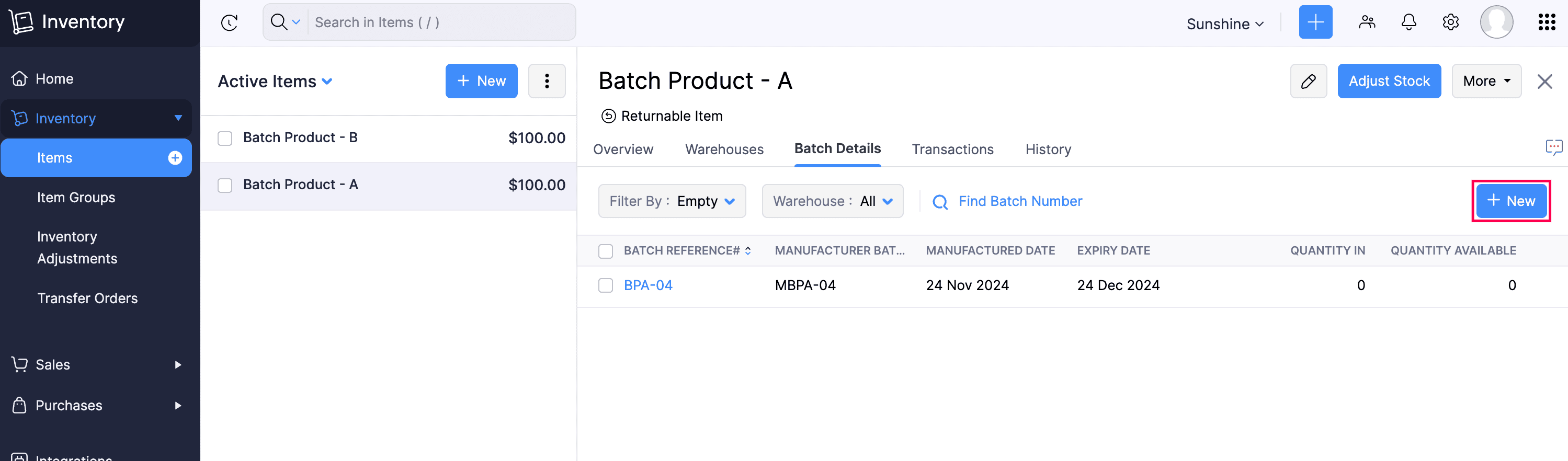
2) Restocking Made Effortless
Restocking through a bill: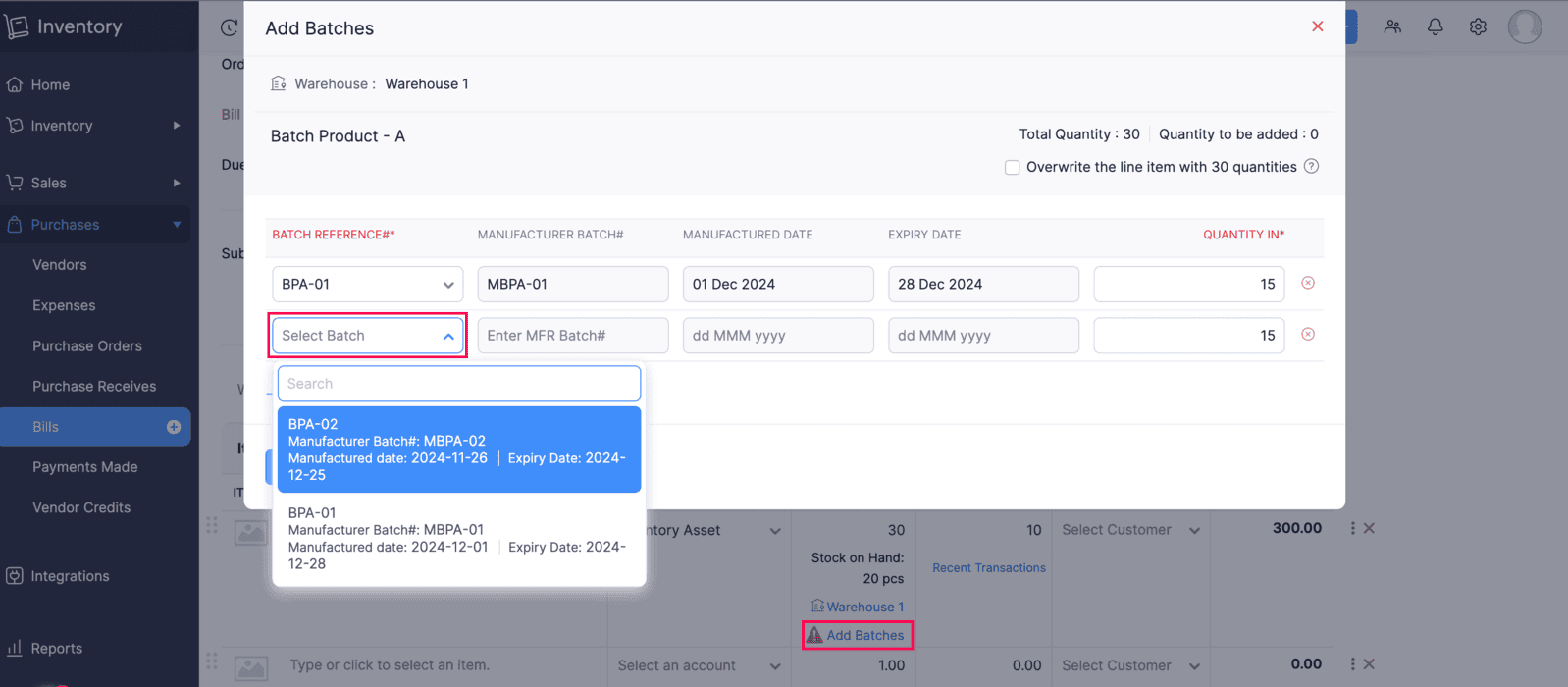
3) Same Batch Return
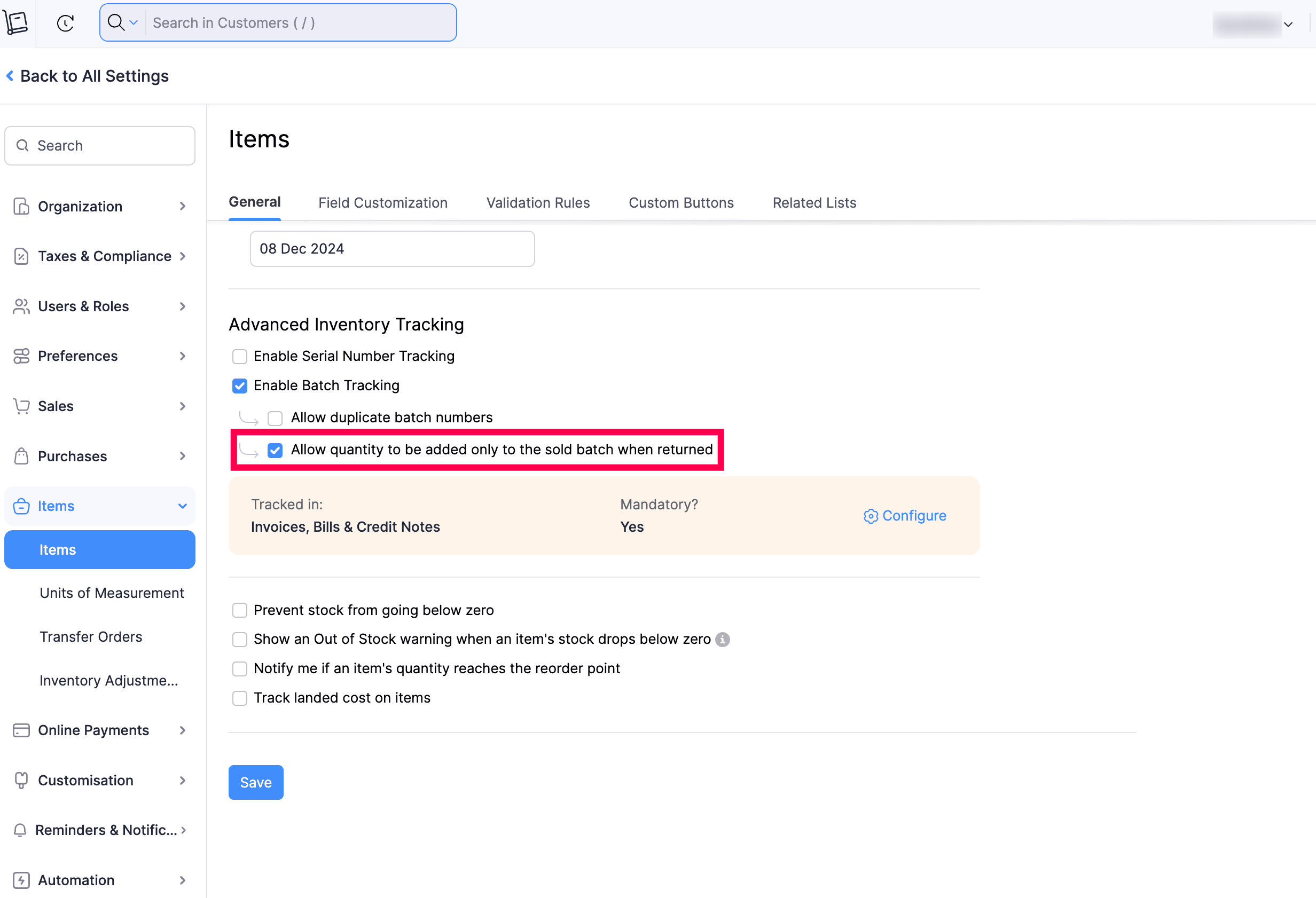
To enable this setting, navigate to Settings, then go to Items and check the Allow quantity to be added only to the sold batch when returned option, and click Save.
This option will be useful if you want to update the quantity within the same batch, when handling returns through credit notes or sales returns.
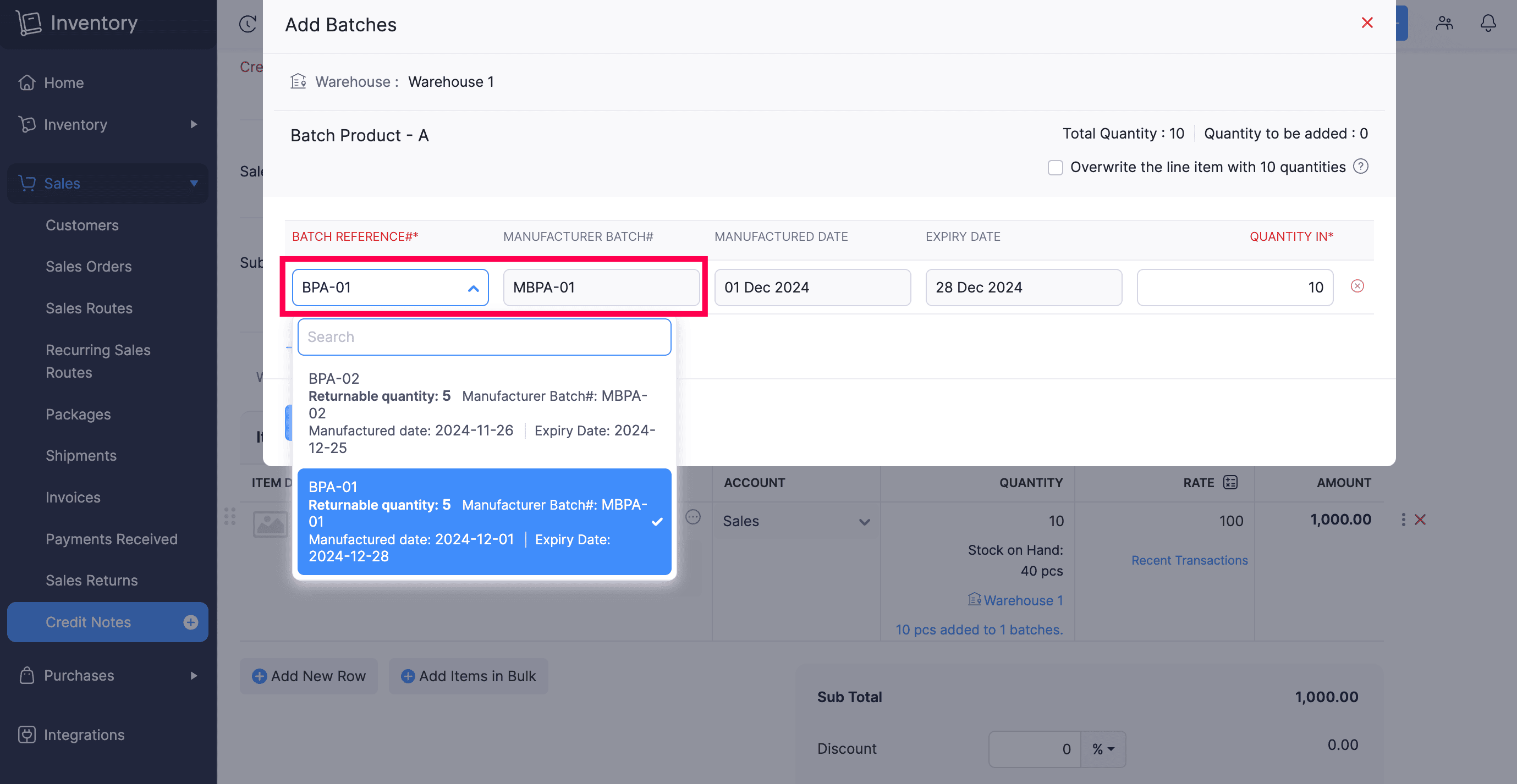
 Note: The return quantity of the item should be lesser or equal to the quantity in the batch that was sold.
- Create a new batch whenever an item is returned.
- Associate returns with any existing batches.
4) Same Batch Transfer with Transfer Orders
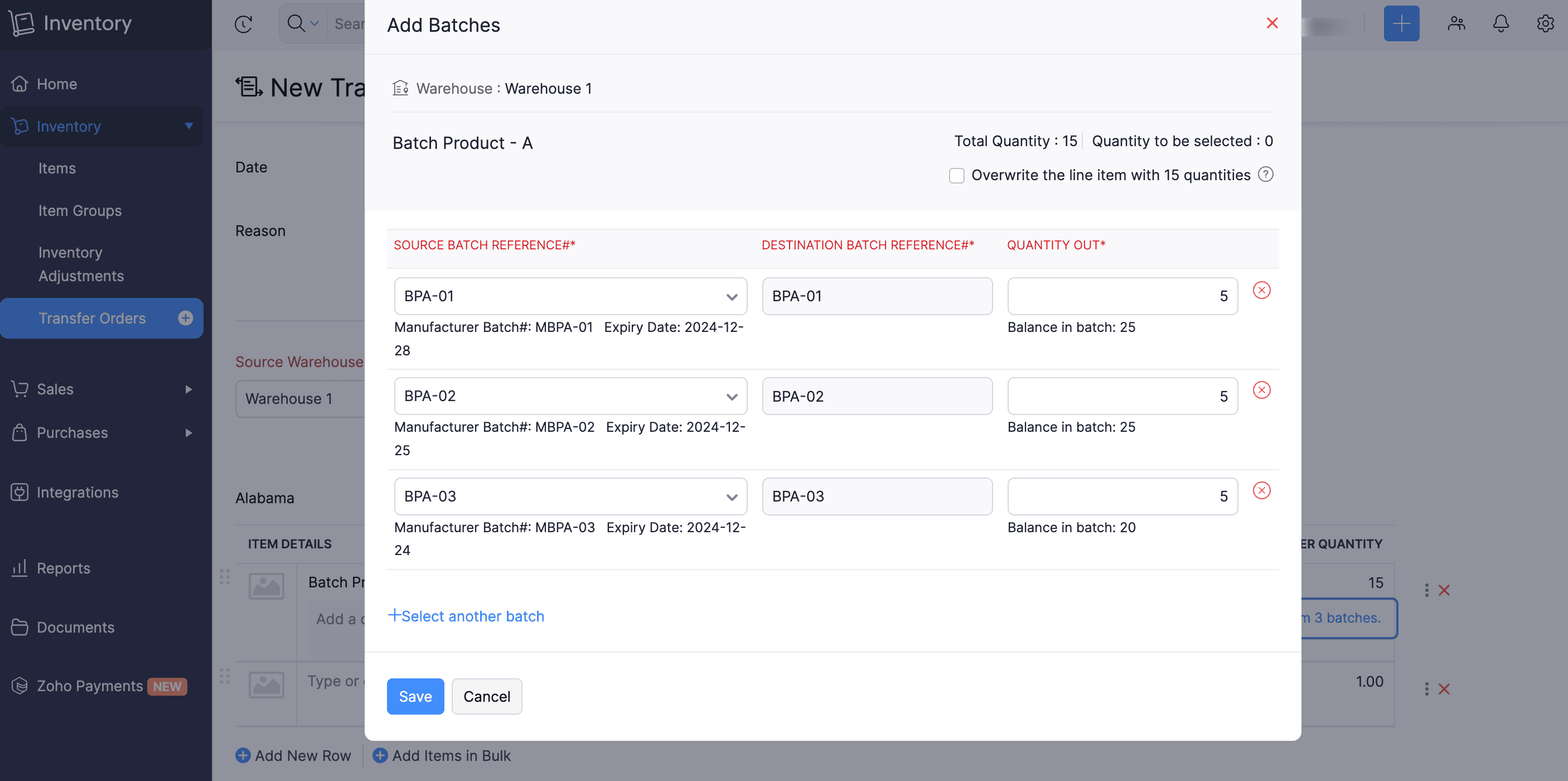 Note: Batches listed in transfer orders created before this update will retain their previously updated destination batch.
5) Same Batch in Different Line Items
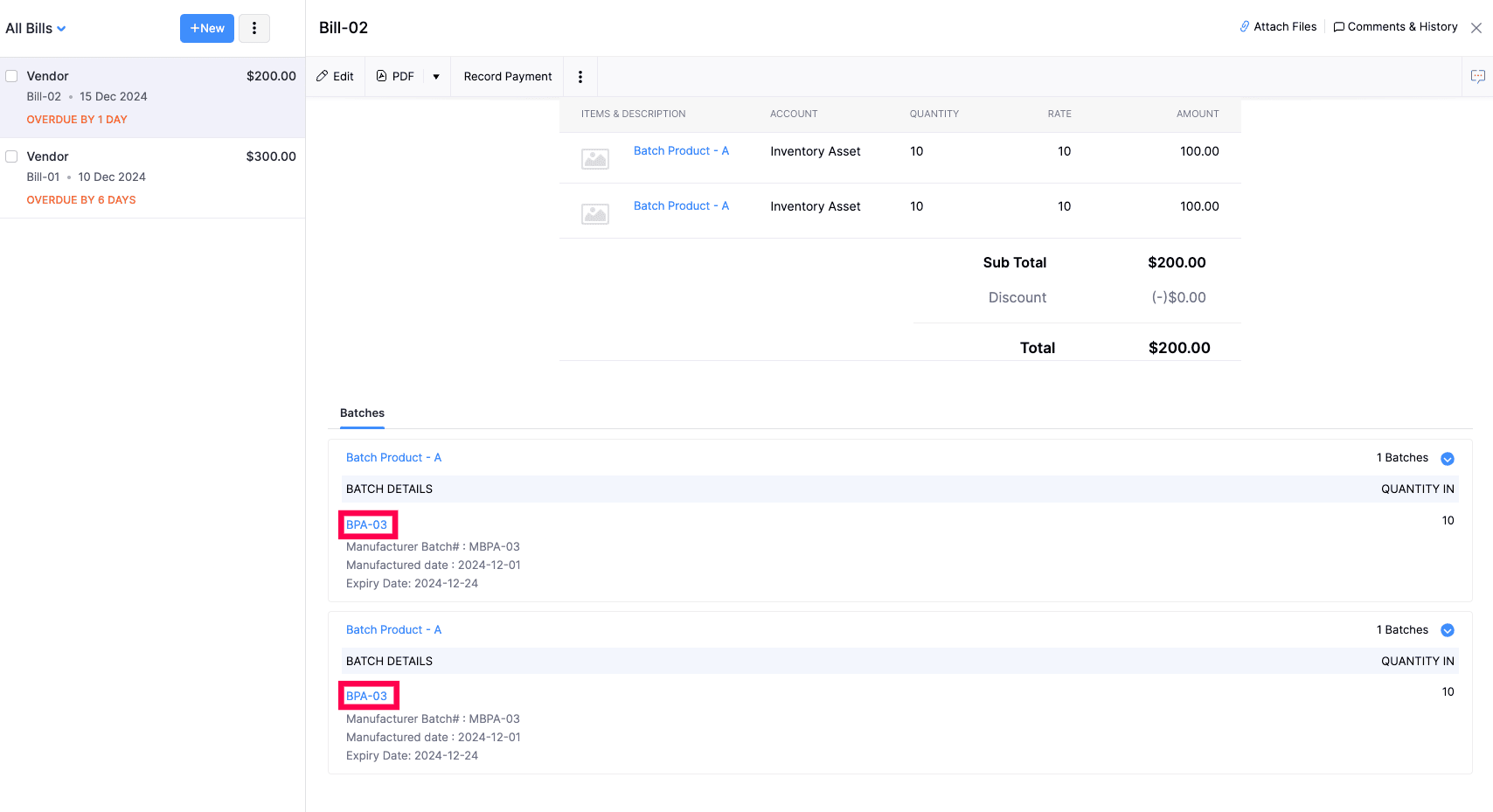 6) New Status for Batches
There might be times when you may not need a batch temporarily, but you would want them for reporting purposes. In such cases, you can use the new Inactive status. Just mark the batch as inactive so the users in your organisation cannot add them to future transactions.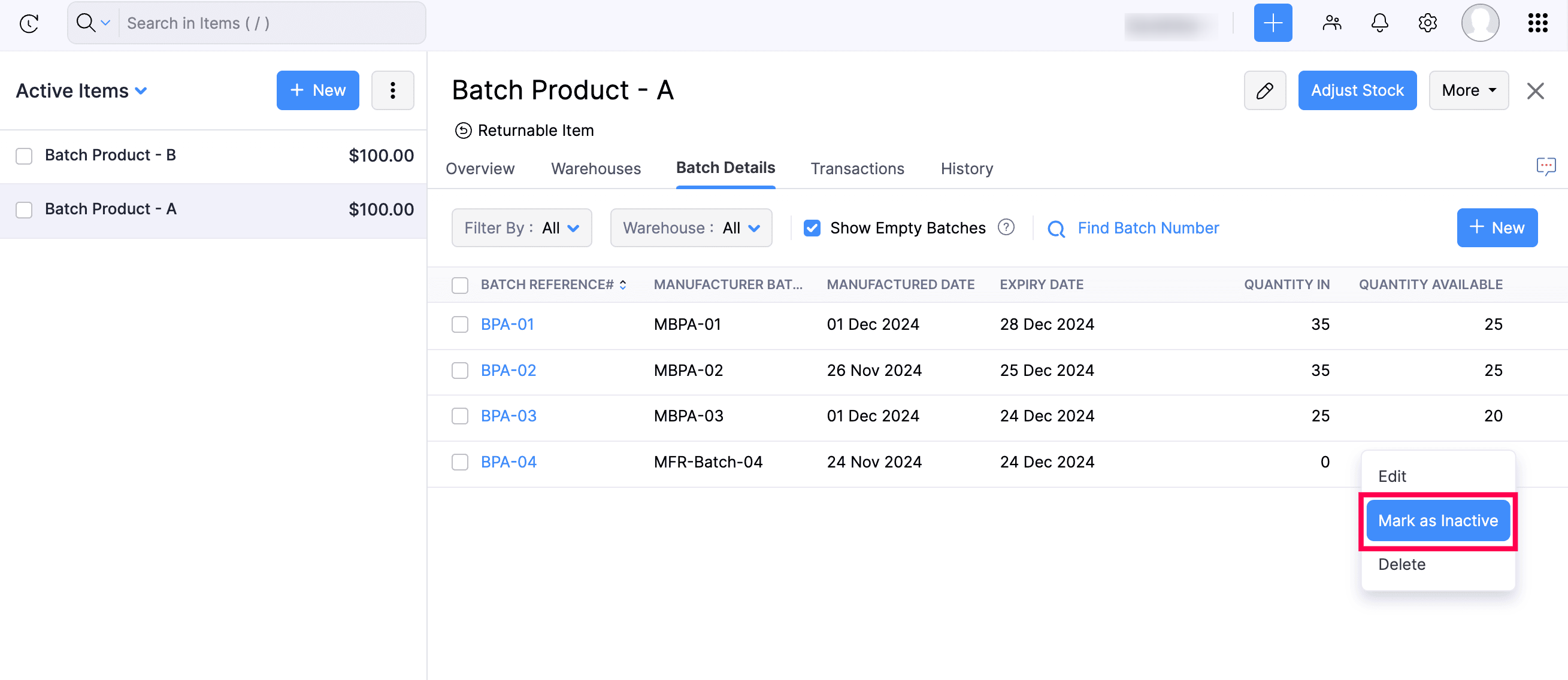
7) Audit Trail Support in Batches
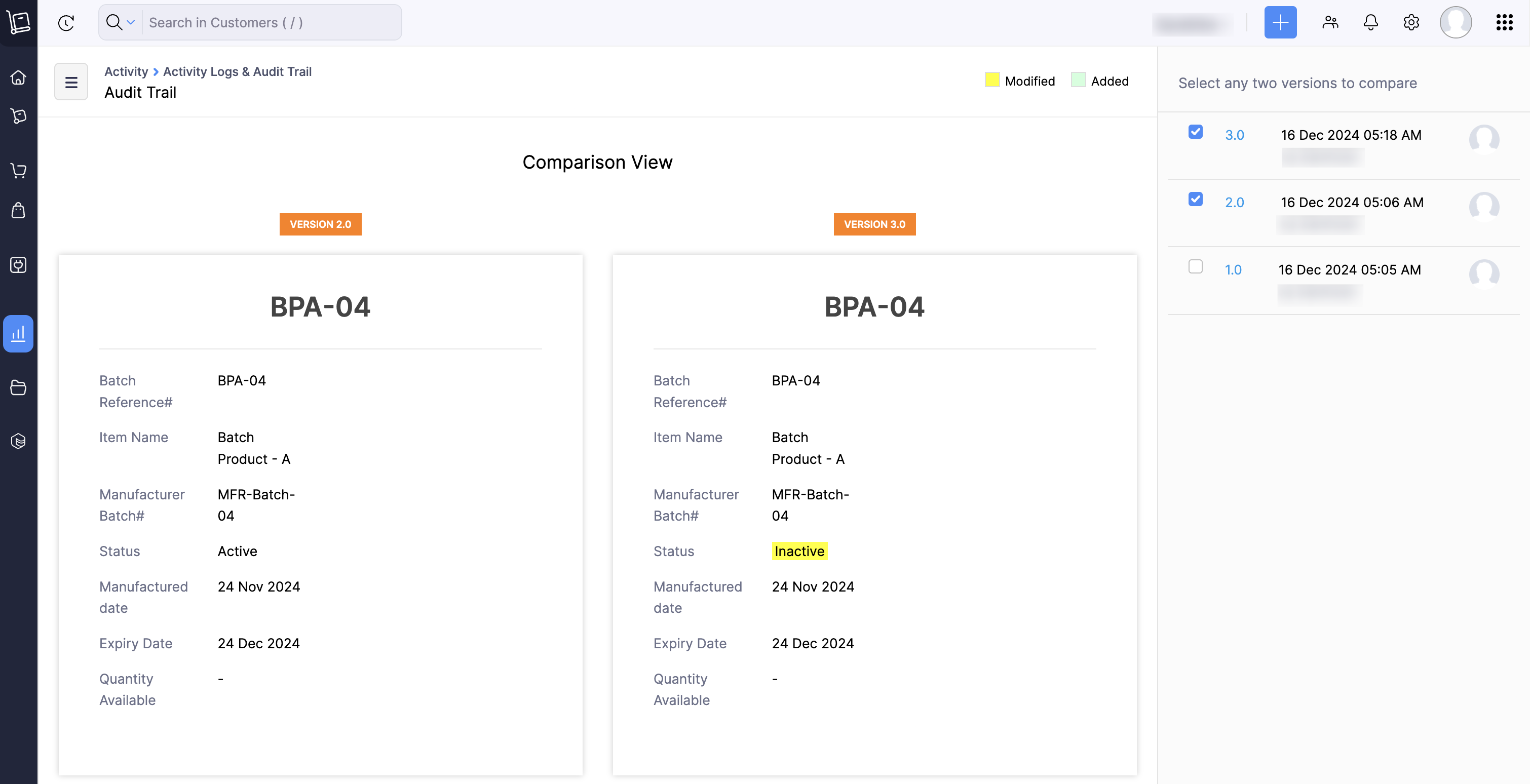
For improved accountability and traceability, we have now added batches to the audit trail report. You can see who has created, modified, restocked, or transferred batches in your Zoho Inventory organization.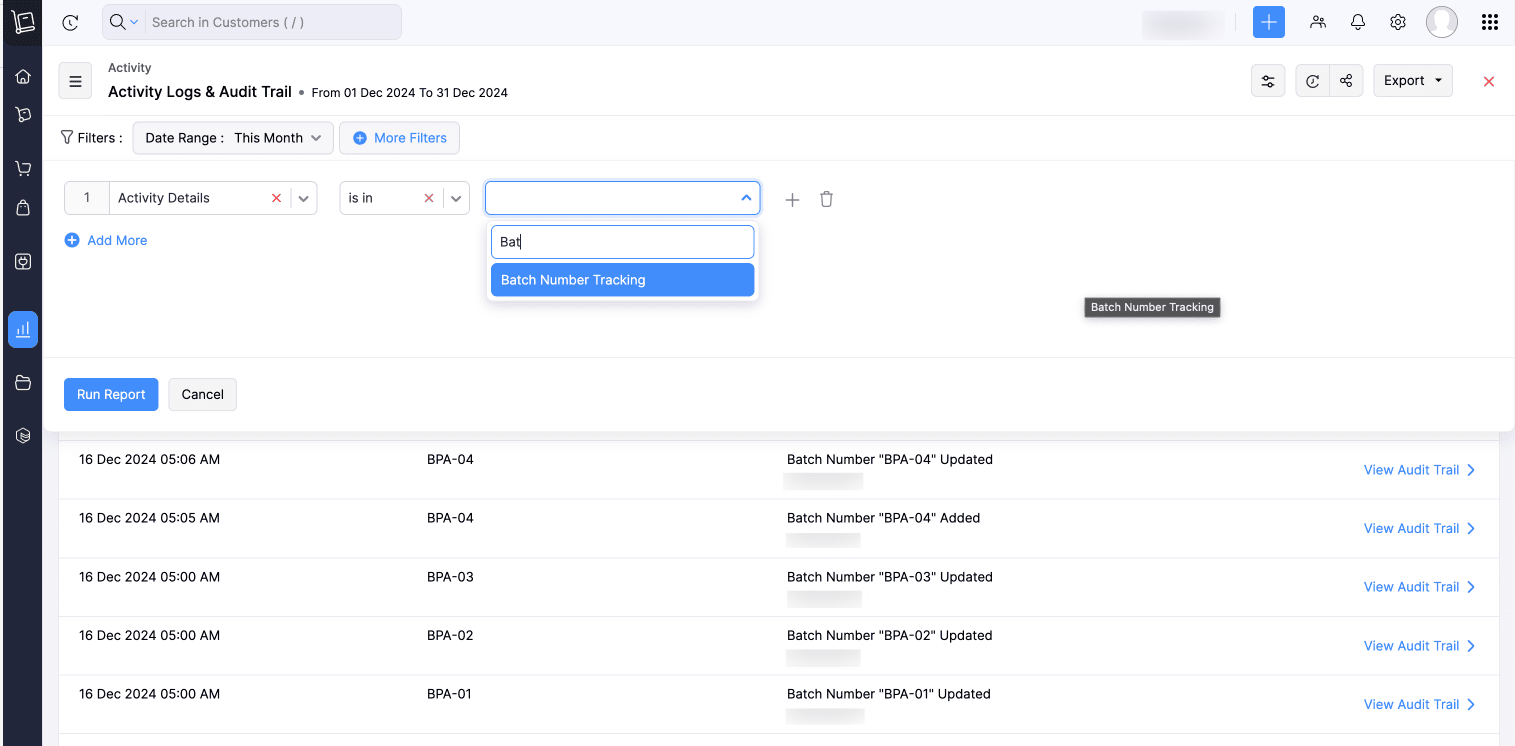
8) Filter Batches
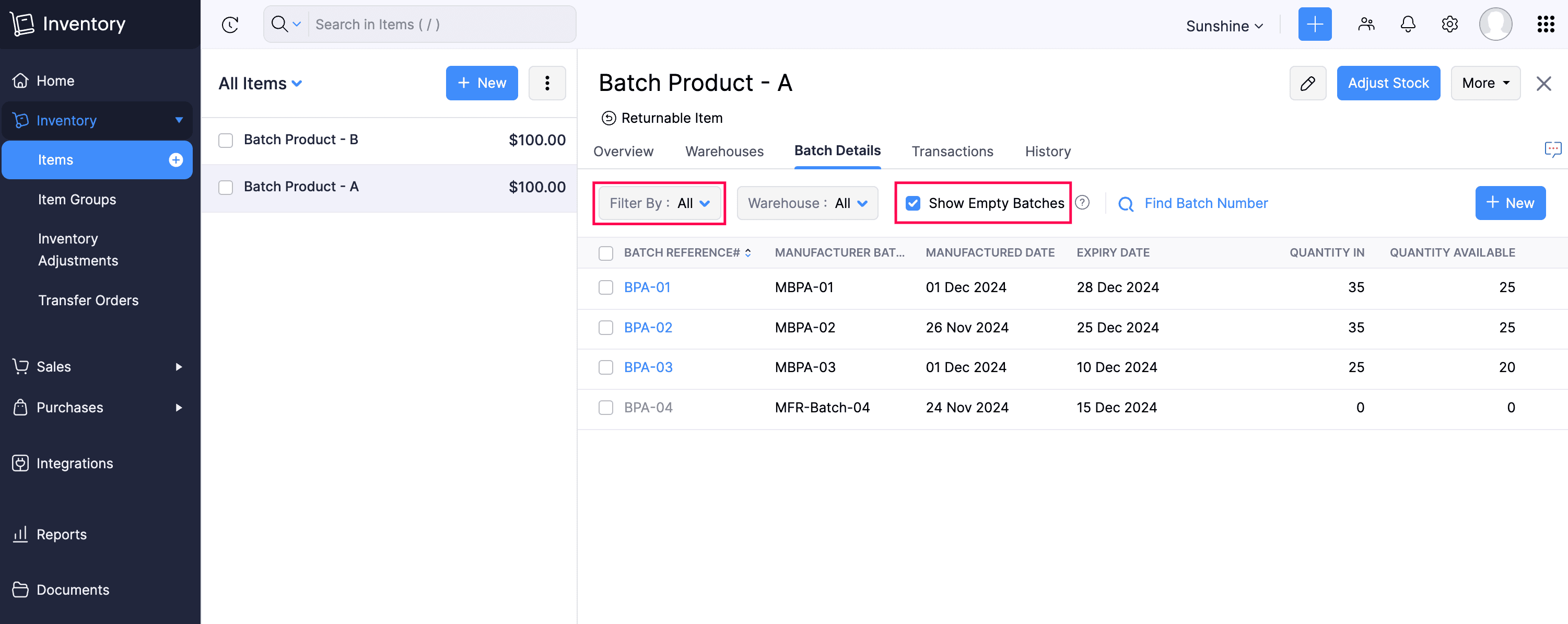
9) Batches Are Now Sorted
Give these features a try and let us know your thoughts in the comments section below. If you have any queries, send an email to support@zohoinventory.com We'll be happy to help.
Regards,
The Zoho Inventory Team
Topic Participants
Thanga
Tirumala Reddy Avuthu
Kingslin Abraham
Andrea Roebuck
Gowtham Kanna M
Nederlandse Hulpbronnen

Recent Topics
How to add employee and not invite them to log in?
I want to add 50 employees, but invite them only when everything will be configured and ready. Is it possible? Should we create employee profiles and then convert them later? Thank you,How is Your eCommerce Experience w/Zoho Inventory?
First off, I'm SUPER grateful for the advent of Zoho Inventory and now the Zoho Commerce Suite. Overall, Inventory is a great product, especially for customers without an eCommerce presence. For eCommerce companies (especially those shipping more than ~10 packages/day), however, there are certain drawbacks that keep my clients from moving over to Zoho Inventory: Cons: 1. Invoice + Package Creation from Shopify/Other eCommerce Integrations: Zoho Inventory makes the somewhat perplexing decision toAbility to Use Both AND and OR When Creating Rules (Advanced Conditions)
I'd like to be able to use more complicated logic when setting up rules. E.g. in Zoho Mail, I can choose "Advanced conditions (AND/OR) to create a rule that can be applied to multiple subject lines from the same sender. But in Zoho TeamInbox, I will haveZoho Desktop App- Unable to Minimize/Freezes
I'm having issues with my Zoho Mail desktop app (PC). When go on my desktop and open the app this is what happens: - Unable to minimize and close app (in the screenshot attached you can see at the top right there is no option to minimize/close) - UnableZoho Invoice Zapier Integration
Is there still a way to use Zapier with Zoho Invoice? I've read online that that migrated to Zoho Books or Billing but since I am just using Invoice I can not find a Zapier Connection anymore.Conect chat of salesiq with zoho cliq
Is there any way to answer from zoho cliq the chat of salesiq initiated by customers?Bug: OAuth 2.0 State Parameter fails with Pipe Delimiters (RFC 6749 Non-Compliance)
I've discovered a bug in how Zoho's API Console handles the OAuth 2.0 authorization flow when the state parameter contains pipe characters (|), and I'm hoping the Zoho team can address this in a future update. The Issue Zoho's OAuth 2.0 implementationZobot with Plugs
Hello, I am having a problem with Zobot using Plugs. Here is my current flow: When I run the flow, I should immediately see the messages from the initial cards (Send Message cards), then after running the plug, and finally, see the messages after thePrint a document from Zoho Writer via Zoho Creator
If i use the code below i can get writer to create a new document or email it to me but i want to be able to print it directly from the browser and not have to send it via email and then print. Below is the code im using. Attached options form zoho writerIs it possible to use HTML formatting in SMS messages sent from Zoho?
Hi everyone, I have a question regarding sending SMS from Zoho When we send emails from Zoho, we can include HTML code to format the message (like adding links, styling, etc.). Is it possible to do something similar when sending SMS messages through ZohoZoho Sign 2025–2026: What's new and what's next
Hello! Every year at Zoho Sign, we work hard to make document signing and agreement execution easy for all users. This year we sat down with our head of product, Mr. Subramanian Thayumanasamy, to discuss what we delivered in 2025 and our goals for 2026.Training for How can i Operate the Software Features
need to Help for Training of the ZOHO Billing SoftwareAutomating Vendor Contract Management between Zoho Contracts and Zoho Books using Zoho Flow
Managing vendor agreements across procurement and finance systems often requires manually downloading executed contracts and attaching them to vendor records. This can become time-consuming and difficult to manage when dealing with a large number of contracts.Problem applying batch operation error keeps looping that error
Problem applying batch operation error keeps looping that error an wont loginShared Email Sending Duplicate Copies of Emails
Hi there, We recently have moved our info@ email to Team Inbox to trial. We set this channel up using the Microsoft setup which works fine and have 3 users. I am wanting to know: 1. When I send a new email, it will create a copy of that email and sendmerhaba
merhaba sosyal medya paketimiz mevcut ama yorumları göremiyoruz ve o yüzden cevap veremiyoruz destek rica ediyoruz.Teaminbox not working
We couldn't send or receive any mail within the team inbox. Displaying error 'Unable to process this request.'Related lists New option in missing
hi I have created quite a few modules and added as related lists to my main module. Some have new, some dont I can not see why?Detailed list of scoring rules in Zoho CRM
Good morning Zoho community, warm greetings The reason for my message today is that I have a problem with my CRM, which I will explain below: Our organization has scoring rules designed to rate our potential customers or leads in the application basedCliq and ToDo integrations?
I'm a bit surprised not to find any way to open a Cliq chat for the current thread, or to create a Zoho Mail ToDo from a thread. Are these on the roadmap?Reply-to names are mangled
Hello, I'm seeing an odd behavior in replies. Steps to reproduce: 1. Click reply to an email from "John Doe <doe.john@example.com> in TeamInbox Expected outcome: TO field pre-filled with "John Doe <doe.john@example.com>" Actual outcome: TO field pre-filledI CANT UPGRADE MY FREE ACCOUNT
I TRY TO UPGRADE MY FREE ACCOUNT AND I COULD NOT UPGRADE IT CAN SOMEBODY TELL ME WHY? AND I HAVE THE MONEY SO.Level up your ASO game with tags & categories in store reviews
Introducing tags and categories in Apptics' store reviews Dear Apptics community, If your app is listed on the Play Store or App Store, you already know how important store reviews and ratings are. They’re one of the most direct signals of user sentimentIncluding attachments with estimates
How can attachments be included when an estimate is sent/emailed and when downloaded as a .pdf? Generally speaking, attachments should be included as part of an estimate package. Ultimately, this is also true for work orders and invoices.Adding VENDOR SKU to PURCHASE ORDERS
how can we add the Vendor SKU when issuing a Purchase Order , so the PO shows the Supplier SKU and our own Internal SKU , which is what we want to receive into the system .Possible to freely prompt/query CRM data using Zia?
Is it possible to prompt Zia to query on any information stored in the CRM, especially on the data stored in custom text fields? My use case is the people in my organisation have entered lots of text in custom text fields to capture information from anRestrict employees to take only one day holiday from a multi-day festival holiday
Hi everyone, I have a requirement related to Optional/Festival Holidays in Zoho People. For example, in the month of May there are three optional holiday dates: May 11, May 12, and May 13. Employees can choose one of these days as their optional holiday.Cannot modify colours in invoice email template
I have tried switching browsers... but I cannot change the (pretty horrible) default colours in the preset email when sending an invoice... the blue banner, red outstanding total and the bright green button... I can change other things but not the colours?Cannot find zpuid for Zoho Projects user
I'm using the Zoho Projects v3 API to create a task. The task is created successfully, but in order to assign the task owner, the "Create a Task" API also requires the zpuid of the task owner. Unfortunately I cannot find any user-related API calls thatPrint a document from Zoho Writer via Zoho Creator
If i use the code below i can get writer to create a new document or email it to me but i want to be able to print it directly from the browser and not have to send it via email and then print. Below is the code im using. Attached options form zoho writerAllow styling for specific Subform fields in Zoho Creator
Sometimes in forms we need to visually highlight a specific field inside a Subform (for example Sanctioned Amount, Approved Value, Critical Fields, etc.) so that users immediately notice it while entering data. Currently there is no direct UI option toCareer site URL - Suggestion to modify URL of non-english job posting
Hi, I would like to suggest making a few modification to career sites that are not in english. Currently, the URL are a mix of different languages and are very long. It makes for very unprofessional looking URLs... Here is an example of one of our URL3/18 オンライン勉強会のお知らせ Zoho ワークアウト (無料)
ユーザーの皆さま、こんにちは。コミュニティチームの中野です。 3月開催のZoho ワークアウトの開催が決定しましたのでご案内します。 今回はZoomにて、オンライン開催します。 ▶︎参加登録はこちら(無料) https://us02web.zoom.us/meeting/register/BoNTN7zYR8OvOPGShqBY0A ━━━━━━━━━━━━━━━━━━━━━━━━ Zoho ワークアウトとは? Zoho ユーザー同士で交流しながら、サービスに関する疑問や不明点の解消を目指すイベントです。New 2026 Application Themes
Love the new themes - shame you can't get a little more granular with the colours, ie 3 different colours so one for the dropdown menu background. Also, I did have our logo above the application name but it appears you can't change logo placement positionPlaceholder format in Number field does not reflect Max Digits configuration
When the Max Digits (Maximum digits of number) property is set to a smaller value (for example, 2 digits), the placeholder in the input field still displays a 7-digit format (#######). The same behavior can also be observed in Decimal and Currency fieldHow does SKU work when selling products in parts in Zoho Inventory
Hello everyone, Zoho Inventory does not understand the physical cutting of the piece.. It only tracks quantities of the unit (like feet ). So when you sell part of an item, the system simply reduces quantity for that SKU. Assume that i have a 50 ft longAbility to Attach Record-Specific Files Automatically in Workflow Email Templates
Currently in Zoho CRM, email templates allow attachments to be added, but these attachments are static and remain the same for every recipient. There is no straightforward option to automatically attach a file that is stored within the specific CRM recordCRM Cadences - working timesThe Friday afternoon? The next Monday morning? Not at all?
I think I’m writing saying that cadence emails are only sent during the organisations set working hours in CRM. So if a particular email is set to send for example in three days and that lands on a Sunday (when working hours are not operational) whenCRM Cadences - working times
I think I’m right in saying that cadence emails are only sent during the organisations set working hours in CRM. So if a particular email is set to send for example in three days and that lands on a Sunday (when working hours are not operational) whenPush Notification for New Bookings in Zoho Bookings App
when a someone schedules an appointment through the booking page, is there any option to receive a push notification in the mobile app?Next Page