Connect - Messages et flux
Zoho Connect vous permet de créer des messages à deux niveaux : celui de l'organisation et celui du groupe.
Le mur de l'entreprise ou du réseau est un endroit idéal pour découvrir toutes les activités pertinentes qui se font. Tenez tous les membres de votre réseau au courant de ce qui se passe dans l'entreprise en partageant des mises à jour sur le mur du réseau. Tous les messages publiés sont accessibles à tous les membres du réseau. Les messages peuvent également être consultés sur la page Mon fil d'actualité de chaque membre.
Le mur du groupe est un espace de communication au sein du groupe. Le mur du groupe est réservé aux membres des groupes privés, alors que dans un groupe public, les personnes extérieures au groupe peuvent également consulter le mur du groupe et y publier des messages.
Mon Flux
La page Mon flux vous donne un aperçu de toutes les conversations et mises à jour qui vous concernent. Cette page vous permet de voir les mises à jour des groupes auxquels vous appartenez, des membres que vous suivez, des messages et des commentaires qui vous @mentionnent et des messages publiés sur le mur du réseau.
Publier une annonce
Les annonces sur le mur de l'entreprise ou du groupe de Zoho Connect permettent aux équipes de ne rater aucune mise à jour importante. Vous pouvez fixer une date jusqu'à laquelle l'annonce s'affichera au-dessus de tous les autres messages sur le mur en question. Dès qu'une annonce est faite, une notification par e-mail est envoyée à tous les membres du réseau (pour les annonces sur le mur de l'entreprise) ou aux membres du groupe (pour les annonces sur le mur du groupe).
À partir de l'onglet "Permissions" sous la page paramètres, les administrateurs du réseau et du groupe peuvent décider qui peut publier des annonces sur leurs murs respectifs.
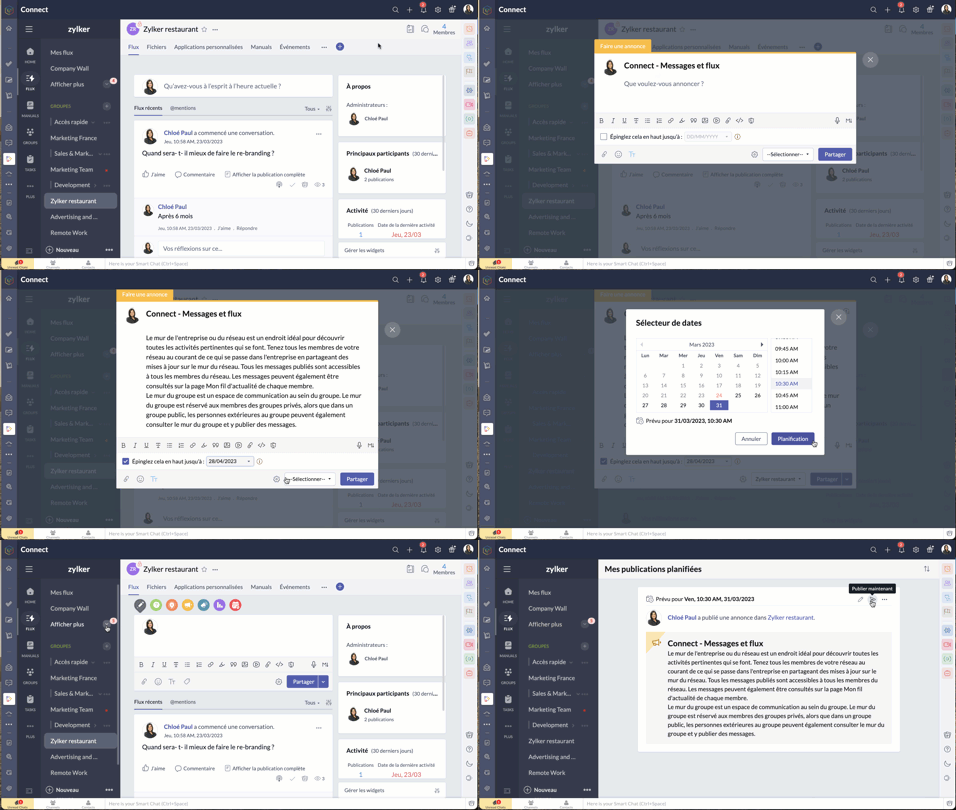
- Passez par l'icone "+" en haut à droite de votre portail Zoho Connect.
- À partir de la liste déroulante, sélectionnez "Faire une annonce".
- Saisissez votre annonce, joindre des documents si nécessaire à partir de l'icône du trombone. La limite de taille par fichier est de 30 Mo.
- Vous pouvez épingler l'annonce en haut jusqu'à une date précise. Après avoir défini la date, l'annonce s'affichera en haut de tous les autres messages publiés sur ce mur particulier jusqu'à la date définie. Cela permet de s'assurer que personne ne rate les annonces.
- Sélectionnez le mur du groupe ou de l'entreprise sur lequel vous souhaitez publier.
- Cliquez sur la flèche à côté du bouton de partage pour programmer une publication à un moment précis et partagez.
- Pour connaître la liste des membres qui ont consulté votre annonce, cliquez sur l'icône en forme d'œil dans le coin en bas à droite de l'annonce.
Poser votre question dans Zoho Connect
Pour trouver des réponses à vos questions, il vous suffit de les poster dans votre réseau. Les réponses sont ajoutées sous forme de commentaires et vous pouvez choisir la meilleure réponse à votre question.
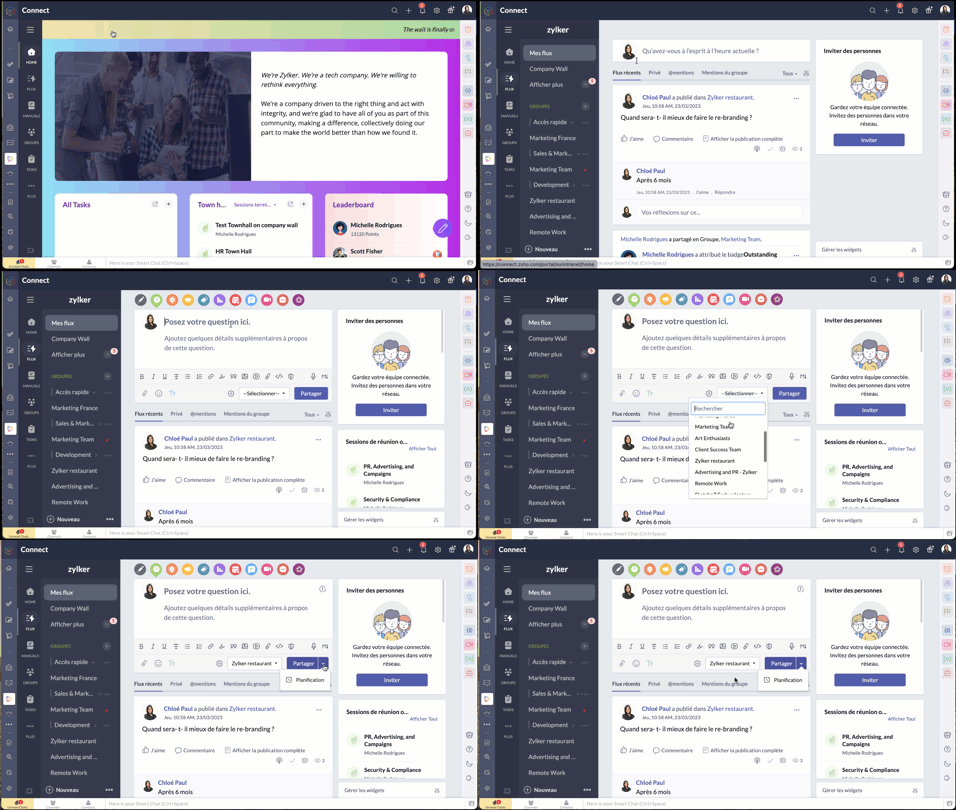
- Passez par l'onglet "flux" depuis le panneau à gauche.
- Cliquez sur l'icône de question dans l'éditeur de message en haut de la page. Les réponses partagées sont ajoutées en tant que commentaires.
Démarrer un sondage
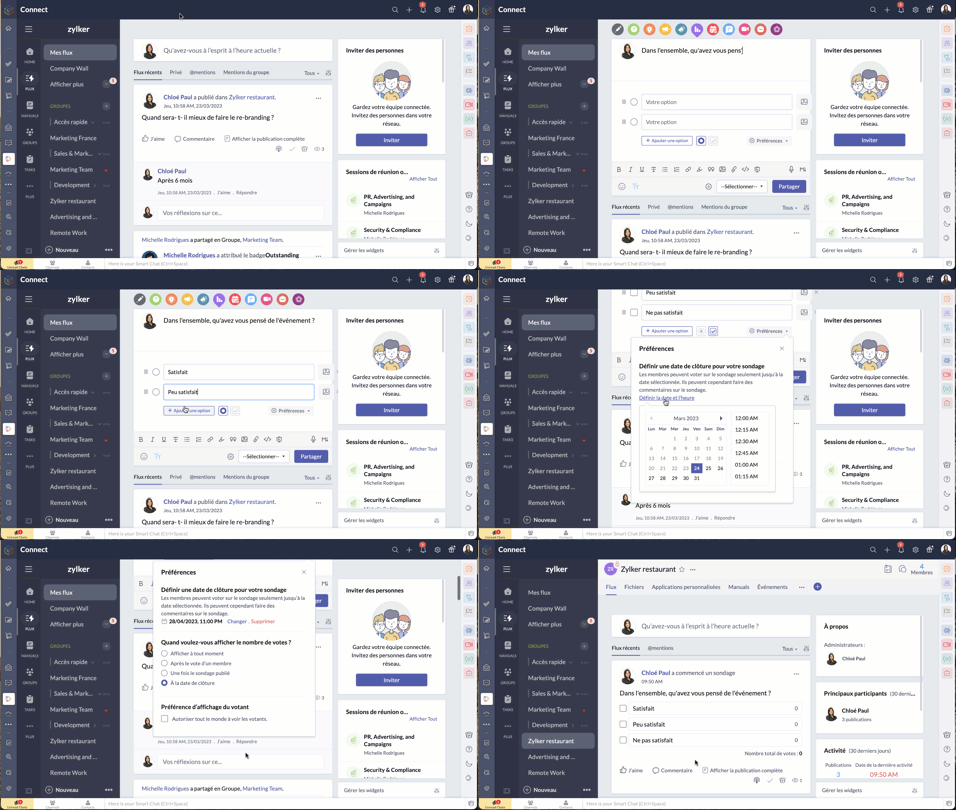
- Organisez un sondage et demandez aux membres de votre réseau de voter pour la meilleure idée ou solution.
- Comme expliqué ci-dessus, à partir de l'éditeur de message, sélectionnez l'icône de sondage.
- Saisissez la question et les options.
- Le bouton "Preferences" vous permet de définir la date et l'heure de la clôture, préférences d'affichage du votant et plus encore.
- Choisissez le groupe à qui s'adresser, et partagez.
Bon à savoir
- La limite de caractères pour la question du sondage est de 10 000, et celle pour les options du sondage est de 200. Il est possible d'ajouter jusqu'à 25 options à un sondage.
- Si vous n'avez pas fixé de date de clôture pour le sondage, vous pouvez le cesser à tout moment.
- Zoho Connect vous permet de prolonger la date de clôture du sondage.
- Vous pouvez choisir d'afficher en permanence le nombre de votes reçus pour chaque option ou de ne pas afficher le nombre de votes jusqu'à la clôture du sondage.
- Si vous souhaitez permettre aux membres de modifier leur choix après avoir voté pour une option, utilisez la case à cocher dans la section "Préférences" du sondage.
Partager des commentaires et des messages par e-mail
Les messages par e-mail
Vous pouvez ajouter des messages sur Zoho Connect par e-mail à l'adresse indiquée dans la page de configuration d'un groupe.
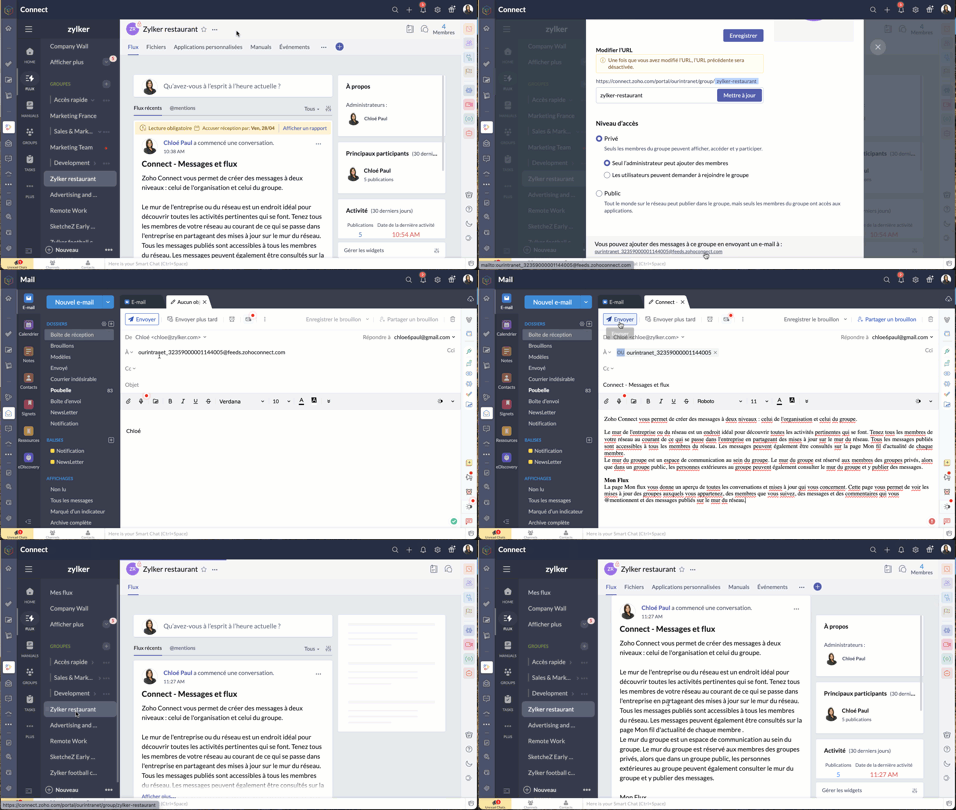
Les commentaires par e-mail
Vous pouvez ajouter des commentaires dans les messages et les forums en répondant à la notification par e-mail que vous avez reçue. Cette option est disponible par défaut si les notifications par e-mail est activée dans le réseau, si bien qu'il n'est pas nécessaire que les administrateurs la configurent séparément pour leur réseau.
Bien à savoir
- Bien que cette fonctionnalité soit disponible par défaut, les réseaux qui utilisent des adresses e-mail avec le domaine de leur entreprise (exemple : user@zylker.com) doivent ajouter un enregistrement SPF et un signe DKIM dans le gestionnaire de domaine pour s'assurer que cette fonctionnalité fonctionne.
- Cette option n'est pas prise en charge pour la réponse automatique et la redirection d'e-mail.
Messages à lire obligatoires
Comme son nom l'indique, un message marqué comme obligatoire doit être lu par les membres. Cela permet aux organisations de tenir leurs employés informés de certaines annonces essentielles. Il est également possible pour les administrateurs de savoir qui a lu ce message et d'envoyer des rappels aux membres qui ne l'ont pas encore lu.
Il n'y a que les administrateurs de réseau qui peuvent marquer un message comme lecture obligatoire dans le mur du réseau, tandis que les administrateurs de groupe peuvent marquer un message en lecture obligatoire dans leurs groupes respectifs.
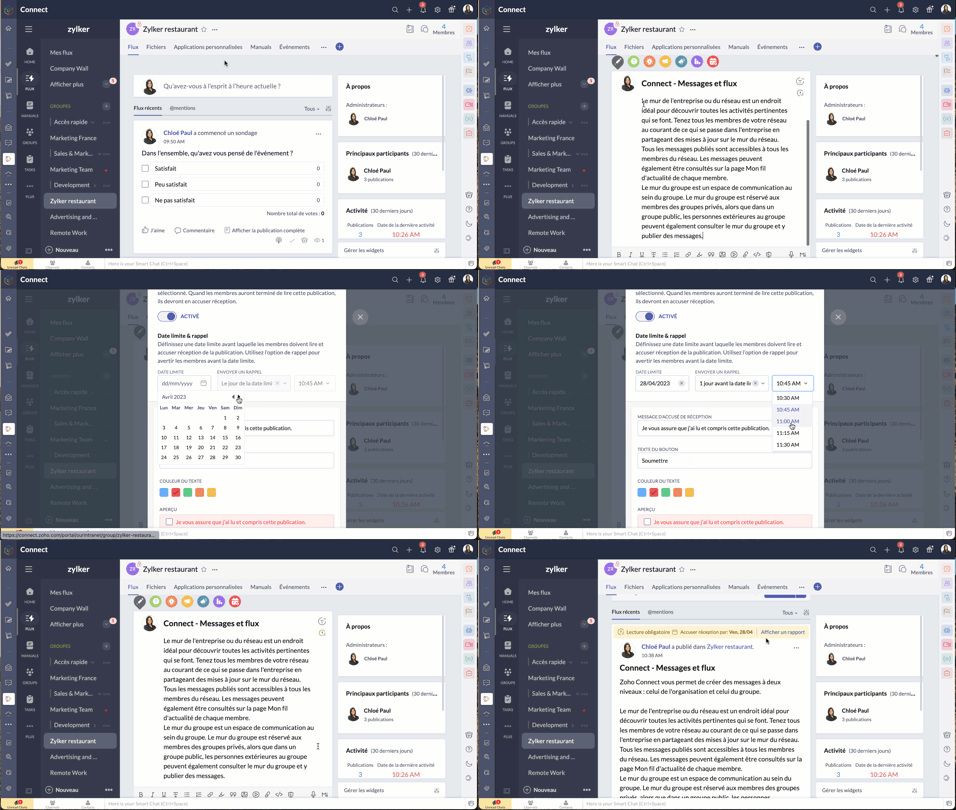
- À partir de l'éditeur de message, passez par le bouton "Lecture obligatoire", activez-le.
- Configurez la date limite et le message de rappel.
- Choisissez le thème de couleur que vous souhaitez utiliser pour les accusés de réception et enregistrez.
- Le message aura une étiquette obligatoire pour aider les utilisateurs à le distinguer des autres messages. Les membres recevront une notification concernant le message. Après avoir lu le message, ils devront compléter l'action d'accusé de réception. Celle-ci ne s'applique pas à l'utilisateur qui a créé ou marqué le message à lecture obligatoire.
N'hésitez pas à nous faire part de la fonctionnalité de Zoho Connect que vous utilisez le plus dans votre organisation et de quelle manière.
L'équipe Zoho France
Topic Participants
Kinjal Lodaya
Stéphanie
Sticky Posts
Collaboration sans faille avec Zoho One
Bonjour à tous, Dans cet article nous allons voir comment Zoho One permet une collaboration à différents niveaux . La façon dont nous travaillons évolue. À mesure que les entreprises se mondialisent, la plupart des activités sont menées en équipe.
Nederlandse Hulpbronnen

Recent Topics
Search Bar positioning
Why is the Search bar on the far right when everything is oriented towards the left?Basic Mass Update deluge schedule not working
I'm trying to create a schedule that will 'reset' a single field to 0 every morning - so that another schedule can repopulate with the day's calculation. I thought this would be fairly simple but I can't work out why this is failing : 1) I'm based inThe Social Playbook - January edition: Getting started with content creation
Social media isn’t just about posting some random content. It’s about why certain content works, how brands stand out, and what makes people pause mid-scroll. The Social Playbook is a monthly community series where we break all of that down. Through realImport Error: Empty values for mandatory fields - Closing Date
Hello, I've tried multiple times to import a CVS Potential list from another Zoho account. But the error message I get is: Empty values for mandatory fields - Closing Date There are valid dates in this field, so I don't understand why this error messagesAdding custom "lookup" fields in Zoho Customization
How can I add a second “lookup” field in Zoho? I’m trying to create another lookup that pulls from my Contacts, but the option doesn’t appear in the module customization sidebar. In many cases, a single work order involves multiple contacts. Ideally,Special characters (like â, â, æ) breaking when input in a field (encoding issue)
Hey everyone, We are currently dealing with a probably encoding issue when we populate a field (mostly but not exclusively, 'Last Name' for Leads and Contracts). If the user manually inputs special characters (like ä, â, á etc.) from Scandinavian languages,Feature Requests - Contact Coloured Picklist Visibility & Field Visibility During Ticket Creation
Hi Desk Team, I have 2 feature requests for you. Since Coloured Picklists are now available in Desk, It would be great if the colours were visible on the Related Details (Contact Information) when creating a ticket. In the screenshot below, I have 2 fieldsHow to integrate XML with Zoho CRM
Hi, I have an eCom service provider that gives me a dynamic XML that contains order information, clients, shipments... The XML link is the only thing I have. No Oath or key, No API get... I want to integrate it into Zoho CRM. I am not a developer norFeature Request - Ability to Customise Contact Info Card on Ticket Details View
Hi Desk Team, I've added a "Contact Priority" and "Account Prioirty" field and it would be very useful to agents if they could see that information in the Contact Info card on the Ticket Details view. It would be great if we could choose some fields toTax in Quote
Each row item in a quote has a tax value. At the total numbers at the bottom, there is also a Tax entry. If you select tax in both of the (line item, and the total), the tax doubles. My assumption is that the Tax total should be totalling the tax fromZoho Flow integration with Facebook Messenger and Whatsapp
Hi there, any plans of adding integrations with Facebook Messenger and Whatsapp into Zoho Flow? Seems that more and more business are delivering automated updates such as "your order is received", "your order has been shipped" and so on via these two platforms. Not sure if Whatsapp has the API access needed i am pretty sure that Facebook Messenger has... Kind regards Bo ThygesenReally want the field "Company" in the activities module!
Hi team! Something we are really missing is able to see the field Company when working in the activities module. We have a lot of tasks and need to see what company it's related to. It's really annoying to not be able to see it.🙈 Thx!Multi-currency and Products
One of the main reasons I have gone down the Zoho route is because I need multi-currency support. However, I find that products can only be priced in the home currency, We sell to the US and UK. However, we maintain different price lists for each.Campaigns unsubscribe/manage preferences links
Hi, Where can I edit the unscubscribe and manage preferences link in the footer of the email. I would like it so that when you click 'manage preferences' an form opens up that allows the person to choose what type of emails they do and don't wish toemail address somehow still not verified (?!)
L.S. After creating a new email template in CRM I was about to send a group email to my clients, then Zoho CRM announced that they would change the sender address to some kind of Zoho-e-ddress because my email address "has not been verified". Not onlyMarketing Tip #17: Add credibility to your online store with Review Widgets
One of the fastest ways to build trust in an online store is to show real customer feedback right where people are deciding to buy. Third-party widgets let you embed things like Google Reviews, Instagram feeds, or even a WhatsApp chat button. These addadding several team members to an Opportunity
How can we add several team members to one opportunity for collaboration? I have researched and only found something called Deal Team which I cannot find in my CRM to configure.PDF Annotation is here - Mark Up PDFs Your Way!
Reviewing PDFs just got a whole lot easier. You can now annotate PDFs directly in Zoho Notebook. Highlight important sections, add text, insert images, apply watermarks, and mark up documents in detail without leaving your notes. No app switching. NoBulk update Profile Permissions
Dears, What should we do if we add new forms or reports and need to update more than 20 permissions? Updating them one by one feels pretty harsh, doesn’t it?From Zoho CRM to Paper : Design & Print Data Directly using Canvas Print View
Hello Everyone, We are excited to announce a new addition to your Canvas in Zoho CRM - Print View. Canvas print view helps you transform your custom CRM layouts into print-ready documents, so you can bring your digital data to the physical world withUnify Overlapping Functionalities Across Zoho Products
Hi Zoho One Team, We would like to raise a concern about the current overlap of core functionalities across various Zoho applications. While Zoho offers a rich suite of tools, many applications include similar or identical features—such as shift management,Filter in fields from Jira extension
We have installed the Jira extension so we can maken Jira issues from Zoho desk. In Zoho desk I can also see the Jira issue status for example but I can not filter on this field. I would like to setup an filter showing me the closed Jira issues. How cantext length in list report mobile/tablet
Is there a way to make the full text of a text field appear in the list report on mobile and tablet? With custom layouts, the text is always truncated after a certain number of characters.Zoho Creator customer portal limitation | Zoho One
I'm asking you all for any feedback as to the logic or reasoning behind drastically limiting portal users when Zoho already meters based on number of records. I'm a single-seat, Zoho One Enterprise license holder. If my portal users are going to add records, wouldn't that increase revenue for Zoho as that is how Creator is monetized? Why limit my customer portal to only THREE external users when more users would equate to more records being entered into the database?!? (See help ticket reply below.)Link Contacts to Billed Accounts
Hello, I want to do a survey on all my customers of 2025. For that I want to select all contacts linked to accounts who where billed in 2025. How to I create this link to I can then use Zoho Survey with this database of contacts?Export all of our manuals from Zoho Learn in one go
Hi, I know there's a way to export manuals in Zoho Learn, but I want to export everything in one go so it won't take so long. I can't see a way to do this, can I get some assistance or is this a feature in the pipeline? Thanks, HannahBring Zoho Shifts Capabilities into Zoho People Shift Module
Hello Zoho People Product Team, After a deep review of the Zoho People Shift module and a direct comparison with Zoho Shifts, we would like to raise a feature request and serious concern regarding the current state of shift management in Zoho People.Historical Sales Info - Blend with Finance Invoice Line Items, Access in CRM and Desk
My company has been using Zoho One since 2021, with sales data going back through 2020. However, we have been in business much longer, and we have historical sales information that we want to have at our fingertips when talking with customers (usuallyPre-Zoho Sales Info - Best Way to Add to Desk / CRM
My company has been using Zoho One since 2021, with sales data going back through 2020. However, we have been in business much longer, and we have historical sales information that we want to have at our fingertips when talking with customers (usuallyShift-Centric View for Assigning and Managing Shifts in Zoho People
Hello Zoho People Product Team, Greetings and hope you are doing well. This feature request is related to Zoho People - please don't move it to zoho one! We would like to submit a feature request regarding the shift assignment and management view in ZohoCRM function REST API response format
Is there a way to control the JSON response returned by the CRM function REST API? If I call a function using either OAuth or an API key it returns a 200 OK response with a string in the format shown below. I am using a particular feature of an externalAdd Employee Availability Functionality to Zoho People Shift Module
Hello Zoho People Product Team, Greetings and hope you are doing well. We would like to submit a feature request to enhance the Zoho People Shift module by adding employee availability management, similar to the functionality available in Zoho Shifts.Using MPN across multiple SKUs and inventory tracking
I have several different SKU's that share a common MPN and would like to track inventory by MPN. SKU1 has MPN1 assigned SKU2 has MPN1 assigned Here is an example If I start with 5 of MPN 1 in stock I want each SKU1 and SKU2 to show as 5 in stock, If IUnable to Access Application:
Whenever I try to access my application from the desktop, say I am editing it and want to test something in the desktop environment I get: An error has occurred. An internal error has occurred. Please check the URL , or try refreshing the page I can editCannot see Application from Lookup field
Hi all, I am trying to access data for an application on our account via a lookup field; however, the application doesn't appear in the dropdown at all. Can anyone shed any light on this, please? I have asked Zoho support; however, they're just as confused,Cannot see correct DNS config for mail after moving domain to another provider
I have moved my domain from one provider to another and after that zoho mail stopped working (expected). Problem is, zoho mail admin panel still shows (10 hours after move) that all records are correct while I haven't changed anything in my domain DNSZoho CRM Meetings Module Issues
We have a use-case that is very common in today's world, but won't work in Zoho CRM. We have an SDR (Sales Development Rep) who makes many calls per day to Leads and Contacts, and schedules meetings for our primary Sales Reps. He does this by loggingZoho Books integration sync from Zoho CRM does not work
Hi Zoho Community & Zoho Support We just tried to get a sync some products into Zoho Books from CRM using the native sync and we're getting an error: "It looks like some mandatory fields you're trying to map are empty. Please provide valid field namesP & L Sub-categorized accounts
How can I show sub-categorized Income and Expense accounts on the P & L report?Report showing Bill Details with Project and Sales Invoice Number
Hi There, I am hoping that someone can help, I am looking for report that can show the bill and expense details along with project its as assigned to and the invoice number that the sales has been raised in. The goal is I can filter a customer/projectNext Page