CRM x WorkDrive: File storage for new CRM signups is now powered by WorkDrive

CRM x WorkDrive: File storage for new CRM signups is now powered by WorkDrive

Availability

Editions: All

DCs: All

Release plan: Released for new signups in all DCs. It will be enabled for existing users in a phased manner in the upcoming months.

Help documentation:


Hello everyone!

We're excited to announce the first cut of Zoho CRM's native integration with WorkDrive! This highly anticipated release marks the first step in bringing together two of our most popular apps. Now, WorkDrive powers file storage for new CRM signups in all DCs.
 
The initial release includes the following changes:
  • You have the option to connect your CRM org with a current or new WorkDrive account.
  • Access this connected WorkDrive account seamlessly through the Documents tab, which was previously powered by Zoho Docs.
  • Attachments added to a CRM record will be automatically placed in pre-defined folders in the record owner's My Folders section.
First things first. Let's see how new users can set this up quickly!

Setup

Configuring this integration is a one-time process that happens when you first login to your new CRM account.

If you do not have an existing WorkDrive account, a new WorkDrive account will be created and linked automatically.
 
If you have a WorkDrive account, a Set up WorkDrive popup will appear.


You have two options:

  • Map an existing WorkDrive account.

  • Create a new WorkDrive account.

After setup, it is not possible to unlink the WorkDrive account associated with your CRM organization. Please exercise caution as we are currently unable to reverse this connection even on our end.

Documents tab 
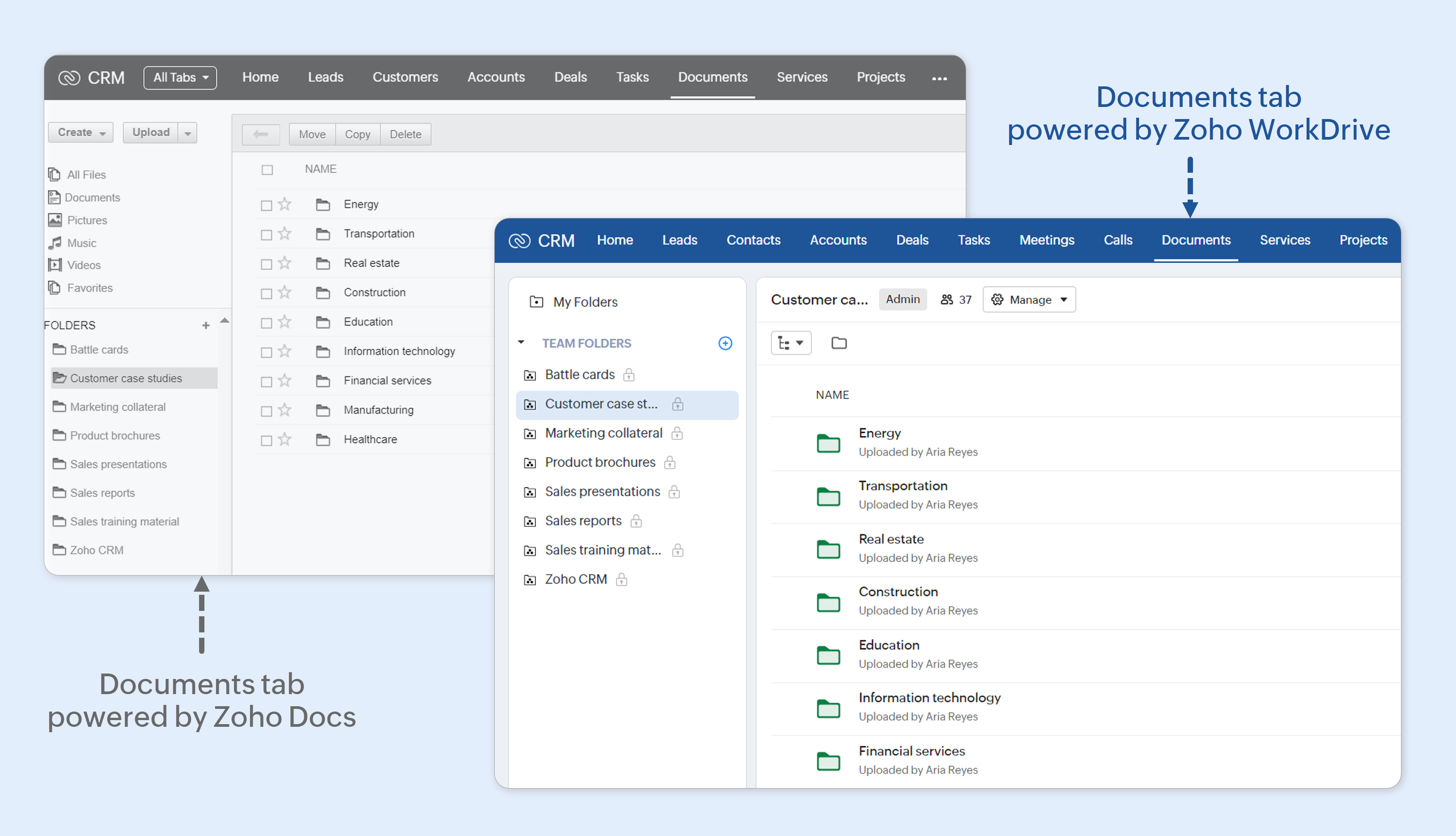
In Zoho CRM, the Documents tab is the central repository where all business-related documents are stored, organized, and shared across your organization. Examples of the kinds of documents that are stored in the Documents tab include brochures, request for information (RFIs), invoices, comparison docs, presentations, forms, contract templates, product manuals, internal handbooks, and so on. It was previously powered by Zoho Docs.


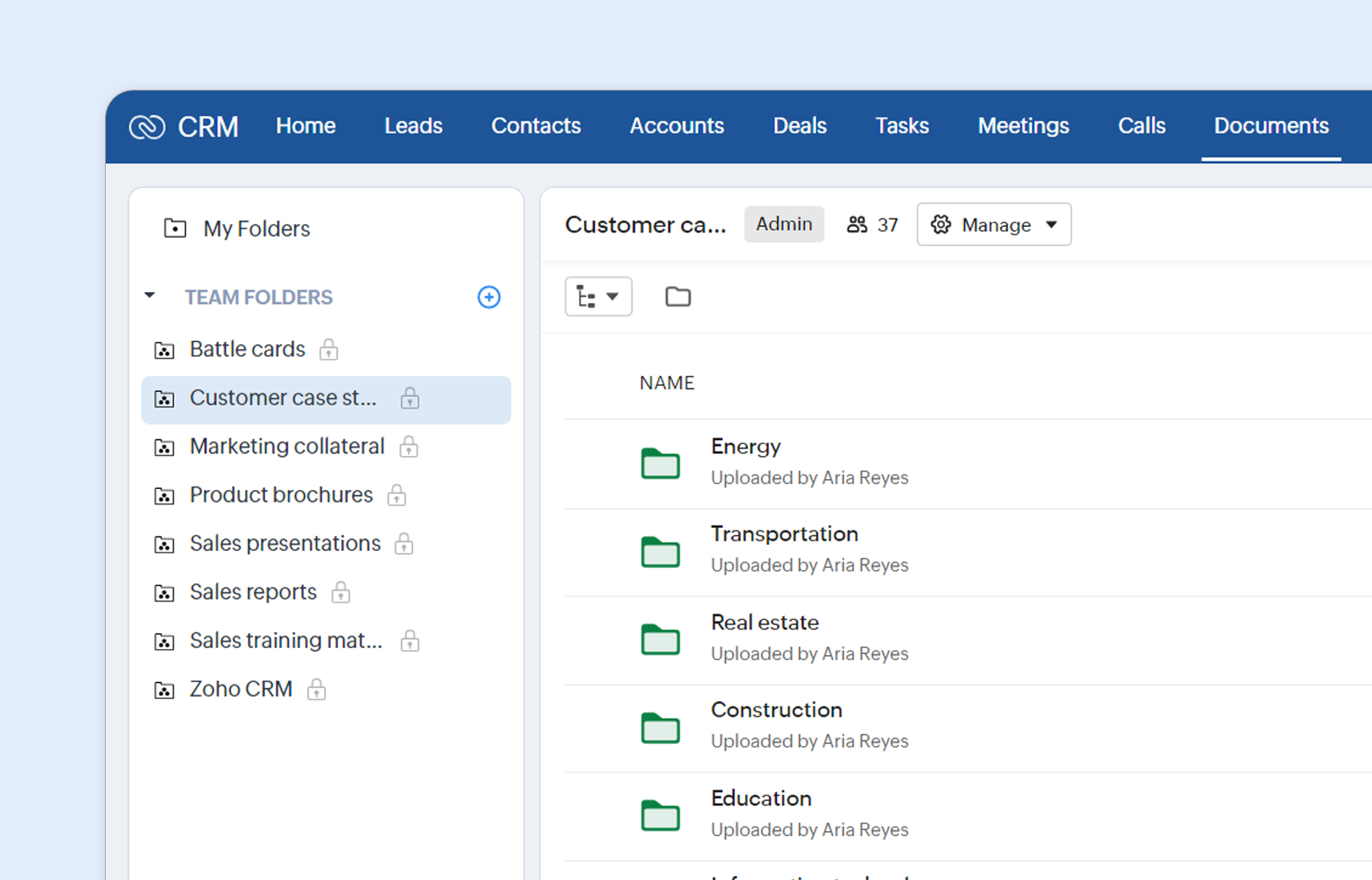
As mentioned before, for new signups, this tab is now powered by Zoho WorkDrive. Apart from a more modern UI, every CRM user will now have access to two kinds of folders: My Folders and Team Folders.

My Folders for viewing attachments


Attachments added to records in Zoho CRM will be automatically added to folders in this section of the Documents tab. These folders will follow a pre-defined structure (Apps > Zoho CRM > Module Name > Record Name > Attachments) and you can find them under My Folders. Please note that only the attachments of records owned by you will be visible to you. You will not be able to add, edit, or delete attachments in WorkDrive or in the Documents tab.

In this first cut, we have the following limitations when it comes to attachments:

  • You cannot share these attachments to external users via Documents tab or WorkDrive.

  • Sharing a record allows others to view its attachments on the record detail page, but not in the Documents tab or WorkDrive. This also applies to non-owners with access to the record, such as higher roles in the hierarchy.

  • Attachments to notes and emails will not be added to these folders.

Team folders for collaboration


The Team Folders section in the Document's tab provides full access to the power of WorkDrive within your CRM. Let's look at some examples.
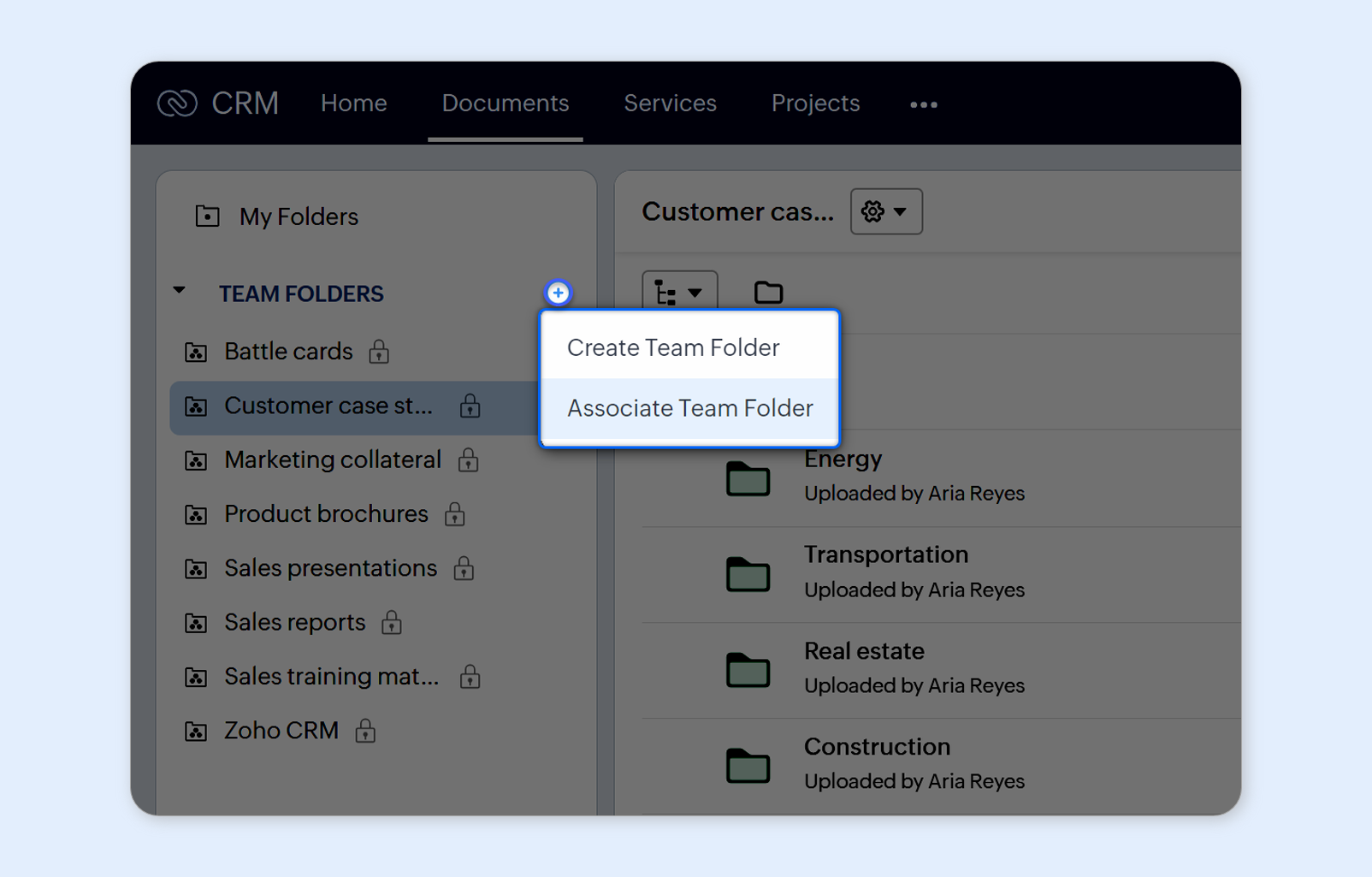
You can create team folders within the Documents tab. But if you are connecting an existing WorkDrive account, it is likely that you have a ton of team folders already created there. Simply connect these team folders to the Documents tab and begin accessing them in the CRM.


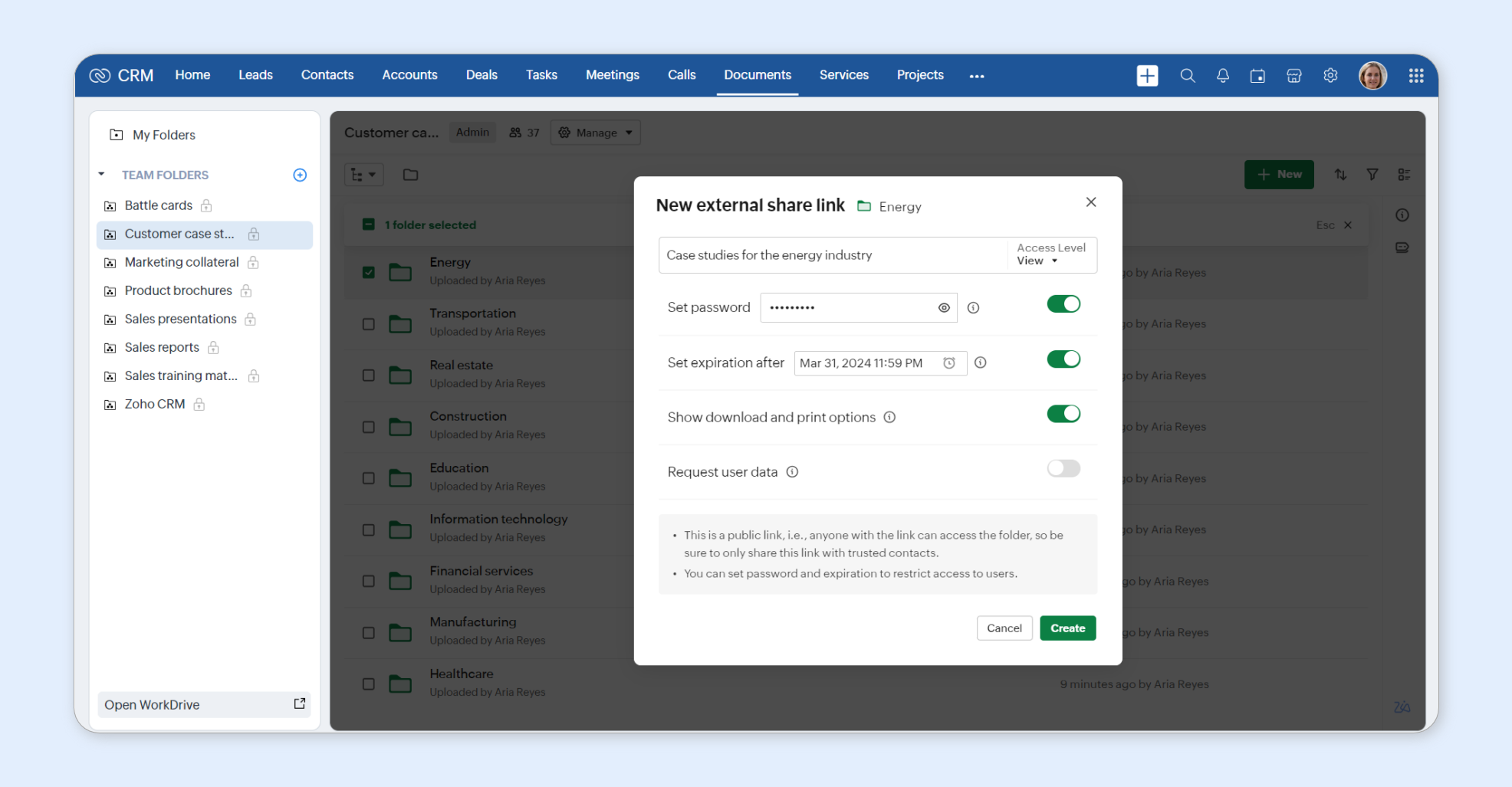
You can share a file with someone outside of your organization by creating an external share link in the Documents tab.


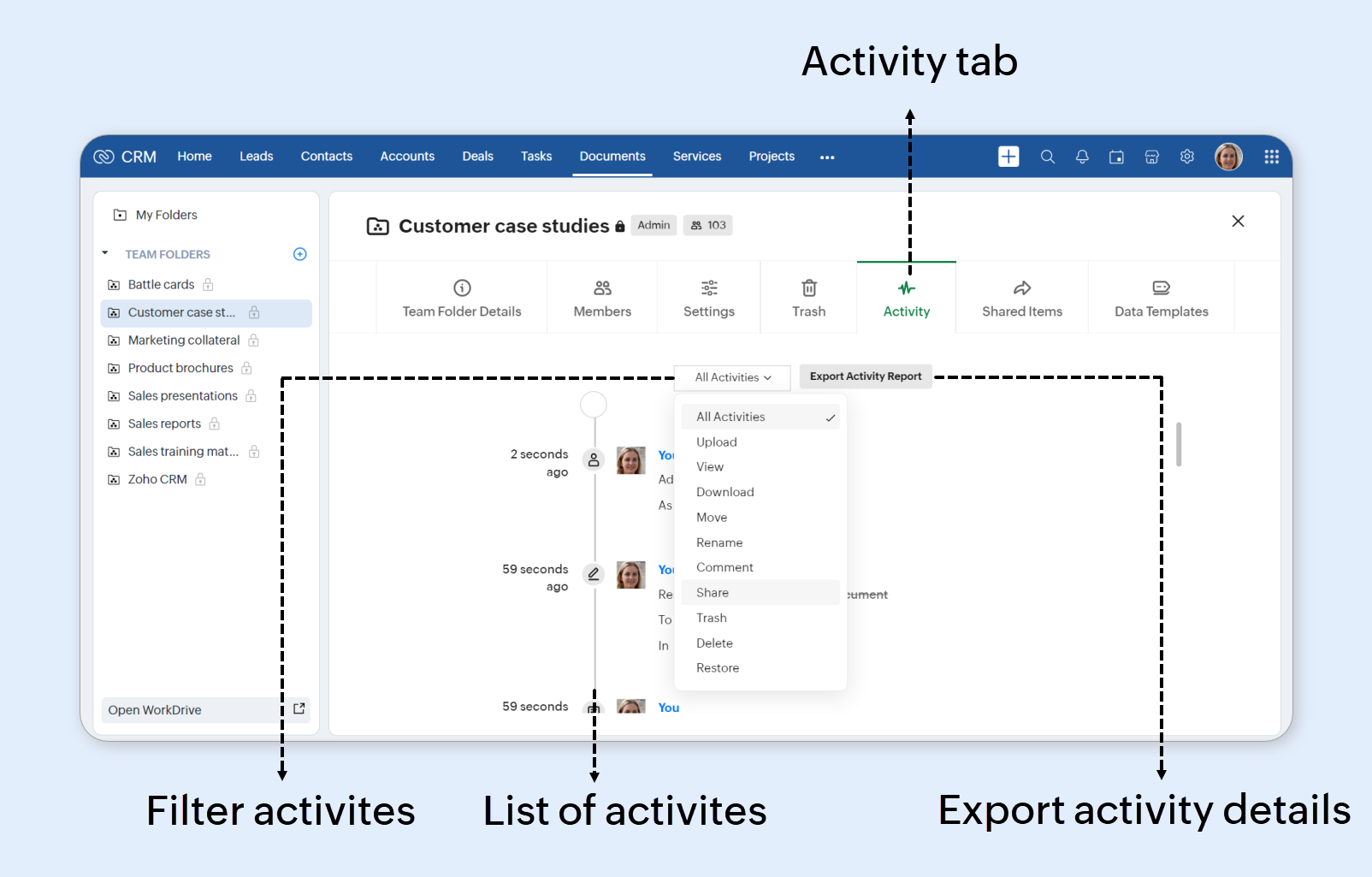
Activities carried out by various users in a team folder can also be monitored within CRM.


WorkDrive admin-related features like Admin Console can be accessed only from the WorkDrive side. You can click Open WorkDrive to quickly go there.


In short, the Documents tab will now function as a window into your WorkDrive account!


If you are on the free Essentials plan, you will not be able to access Team Folders from the WorkDrive side.

How does access to the Documents tab work?

CRM admins can regulate access to this tab using the Documents permission in a profile.


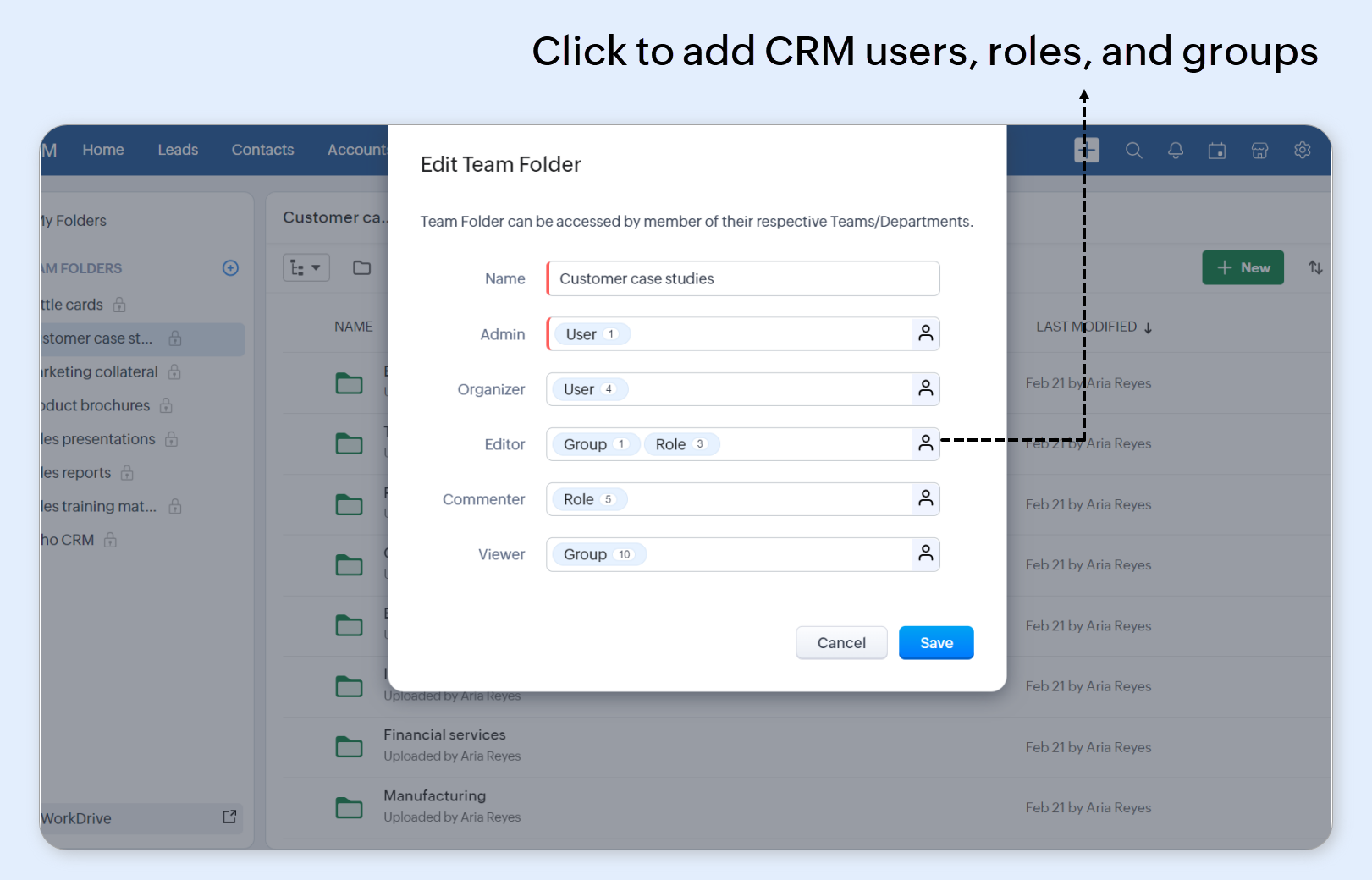
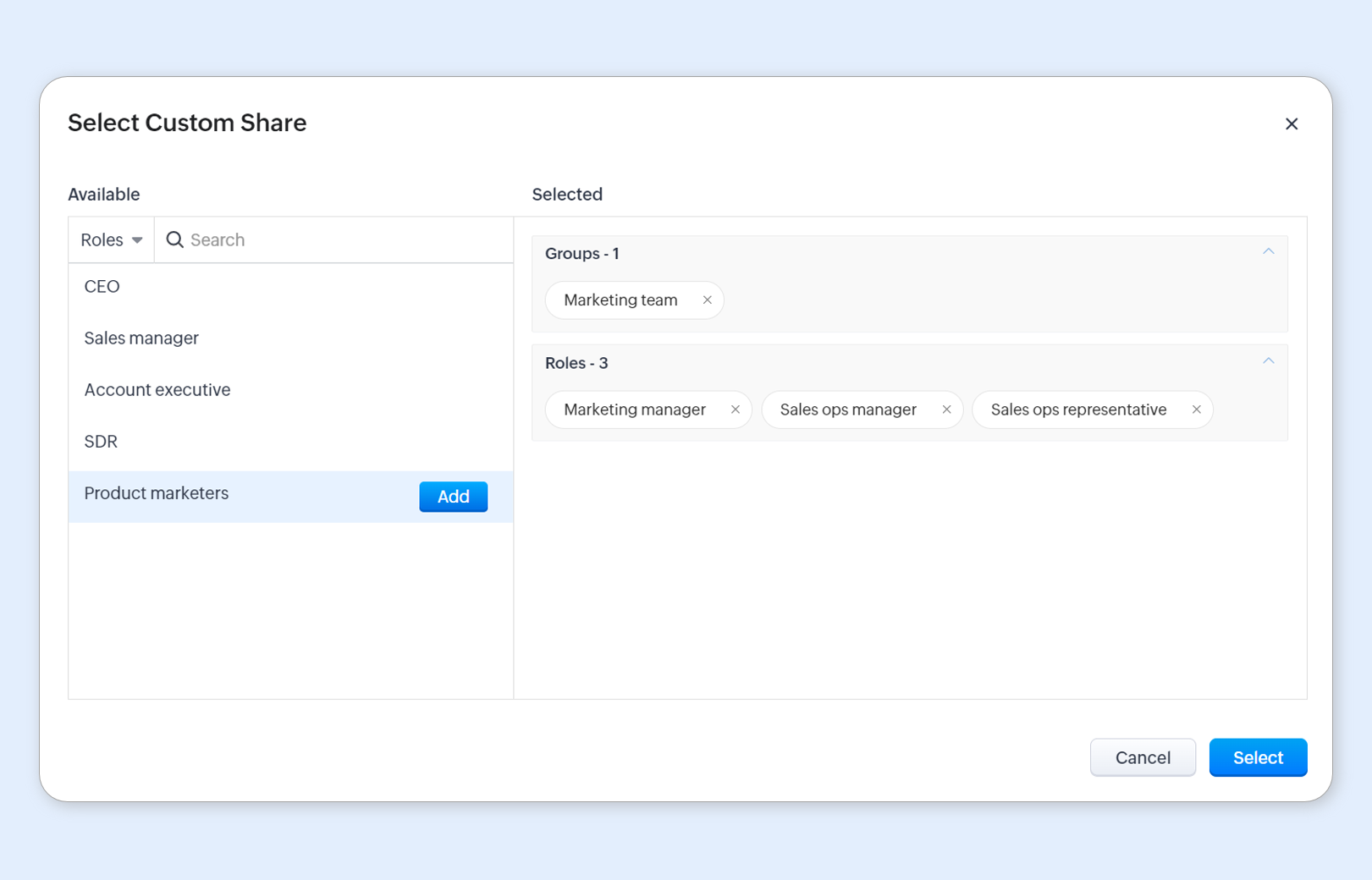
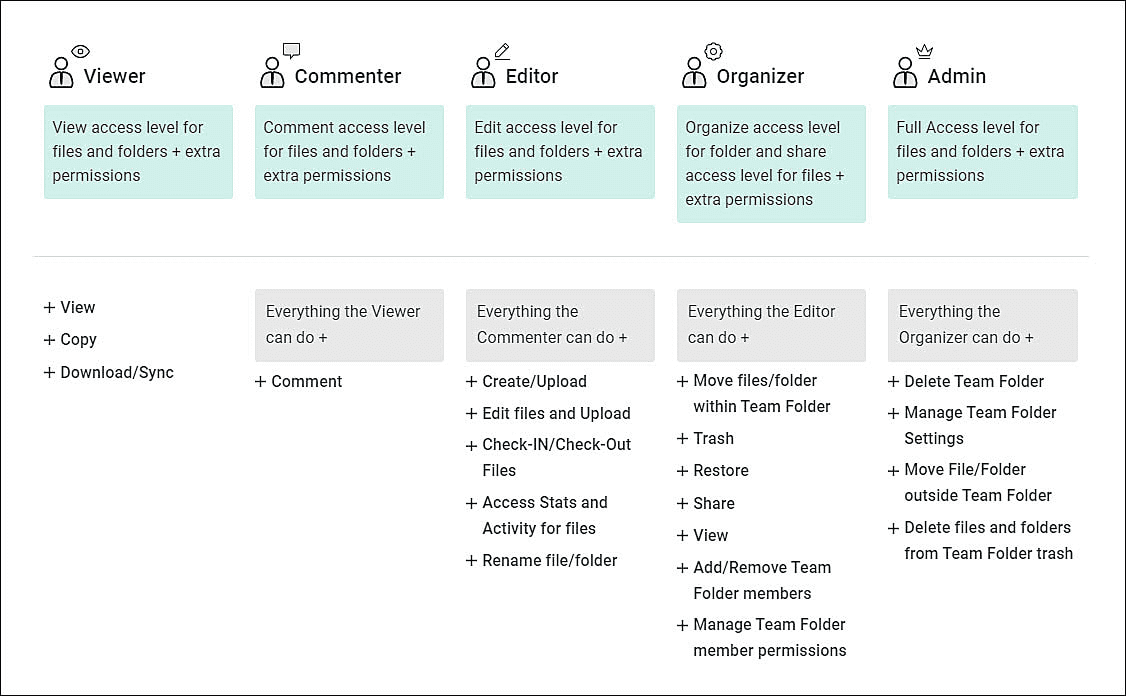
Individual team folders can have their access controlled by assigning CRM users, groups, and roles to specific folder roles.


The available actions for CRM users will vary based on the team folder roles they are assigned. See the image below for a list of actions corresponding to each role


Non-CRM users can be granted access to the same team folder from the WorkDrive side.


Cost and storage

Creating a new WorkDrive account automatically maps you to the Essentials plan, with 5 GB storage for the org and 1 GB per user license. This is free for all Zoho CRM editions. If your CRM account is linked to a paid WorkDrive plan, its storage limits will apply to file storage in CRM.


You can upgrade your plan or buy additional storage on the File Storage page in CRM.


In the File Storage page, non-inclusive storage details refer to files not currently included in your WorkDrive's storage plan. They will count towards storage soon. These are:

  • Templates

  • Files added to a record via the File Upload field

  • Images added to a record via the Image Upload field

  • Notes attachments

If you've integrated other Zoho apps to WorkDrive, their storage will be combined and displayed as the total storage in WorkDrive. No app-specific restrictions apply to this storage, as it is shared among all apps.

What's next?

Due to the extensive file storage and permissions involved, we are handling the migration work with great care. Access for existing customers will begin in the upcoming months in a phased manner. Please follow this post for updates related this enhancement.


Thanks and do share your feedback in the comments section below!

    Nederlandse Hulpbronnen


      • Recent Topics

      • zoho sheet stuck

        I Need help. ZOHO sheets stuck on the loading screen. I've already deleted the system cache and cookies of my browser (google chrome) but it's still not opening. 
      • bulk edit records and run internal logic

        hi there is few logics in manner "it this than that" logics work well when i edit entry openning it one by one (via workflow "on add/edit - on success" , for custom field "on update/on user input") but when i try bulk edit records - logic does not work.  how can i turn on logic to work as programmed - for mass editing records via bulk edit?
      • Duplicate Accounts

        Hi There, I am looking for a solution, script, workflow or anything to solve an issue we have - in our customers section we have a rule that doesn't allow duplicates, however Zoho will allow customers with xxxxx and xxxxx PLC or LTD so effectivley we
      • Invoice Ref. Field

        Hello Team, Currently, the Invoice Ref. field is set to a Number type with a maximum limit of 9 digits. However, we often receive customer invoices that contain up to 12 digits. In some cases, the invoice reference includes not only numbers but also letters
      • WebDAV / FTP / SFTP protocols for syncing

        I believe the Zoho for Desktop app is built using a proprietary protocol. For the growing number of people using services such as odrive to sync multiple accounts from various providers (Google, Dropbox, Box, OneDrive, etc.) it would be really helpful
      • Emails sent through Bigin are not posting in IMAP Sent folder

        I have set up my email to work from within Bigin using IMAP.  I am using IMAP so I can sync my email across multiple devices - phone / laptop / desktop / iPad / etc.  I want all my emails to populate my email client (outlook & iphone email) whether or
      • Possible for first Signer of Sign Form to specify the next signer in the sequence

        We have many use cases where multiple signers need sign the same document. We'd love to be able to use sign forms, where the a signer who uses the Sign Form link can specify the name and email address for the next person in the sequence.
      • BUG: Can't copy-paste data outside Sheet

        Currently I can't paste data copied from inside any of my Zoho Sheet files to any other app. Copy-paste works inside the sheet It does NOT work between two different sheets These sheets are built from automation templates Everything works fine if I create
      • Zoho CRM Community Digest November 2025 | Part 1

        Hello Everyone! Here’s what came through in the first half of November: new updates and a few helpful community discussions with real, notable solutions. Product Updates: Android App Update: Inctroducing Swipe Actions You can now swipe left or right on
      • Upload own Background Image and set Camera to 16:9

        Hi, in all known online meeting tools, I can set up a background image reflecting our corporate design. This doesn't work in Cliq. Additionally, Cliq detects our cameras as 4:3, showing black bars on the right and left sides during the meeting. Where
      • The Social Wall: November 2025

        We’re nearing the end of the year, and the holiday season is officially kicking in! It’s that time when sales peak and your social media game needs to be stronger than ever. We’re back with exciting new updates across AI, analytics, and the mobile app
      • Auto-Invite Users to Portals in Zoho CRM based on Conditions

        Hello Everyone, You can now automate portal invitations in Zoho CRM with the new Auto-Invite users feature in Portal management. No more manually enabling portal access one by one. With this enhancement, you can automatically send invites for users to
      • Truesync for Linux

        Is Truesync available on linux ?
      • Rich Text For Notes in Zoho CRM

        Hello everyone, As you know, notes are essential for recording information and ensuring smooth communication across your records. With our latest update, you can now use Rich Text formatting to organize and structure your notes more efficiently. By using
      • Hidding/excluding specific picklist options from filter

        Hi. Is it possible to hide/exclude specific picklist options from this filter? I don't want them to be shown when someone tries to filter in the leads module
      • Zoho DataPrep switching Date Format

        When using a pipeline that is importing Zoho Analytics data into Zoho DataPrep, the month and day of date fields are switched for some columns. For example, a Zoho Analytics record of "Nov. 8, 2025" will appear in Zoho DataPrep as "2025/08/11" in "yyyy/MM/dd"
      • Subforms to Capture Multi-Row Data in Job Sheets

        Subforms transform your job sheets from simple checklists to powerful, data-rich forms. In field service work — whether maintenance, inspection, installation, or repair — a single job can involve multiple repeatable entries: readings, parts used, activities
      • 年内最後のユーザー向けイベント:5名限定! 課題解決型ワークショップイベント Zoho ワークアウト開催のお知らせ (12/18)

        ANNOUNCEMENT 1 REPLY INSIGHTS ユーザーの皆さま、こんにちは。Zoho ユーザーコミュニティチームの中野です。 12月開催のZoho ワークアウトについてお知らせします。 今回はZoomにて、オンライン開催します。 参加登録はこちら(無料) https://us02web.zoom.us/meeting/register/QHn6kJAcRs-znJ1l5jk0ww ━━━━━━━━━━━━━━━━━━━━━━━━ Zoho ワークアウトとは? Zoho ユーザー同士で交流しながら、サービスに関する疑問や不明点の解消を目的とした「Zoho
      • Add "Fetch Composite Item" Action for Inventory

        I want to make a Flow that uses information returned in the GET call for Composite Items, and it's not currently available in Zoho Flow. Please consider adding this functionality.
      • Adress Labels for sending of the oder und barcode

        We want to print with my address labels to stick on the order of the ware can. there are these options?
      • printing individual labels - Dymo LabelWriter

        I am trying to print individual labels to my Dymo LabelWriter - has anyone done this? Latest Update (December 2025): The Canvas Print View is now available! We encourage you all to try it out and share your feedback with us. Learn more here: Zoho CRM
      • Zoho Creator for Agriculture

        Greetings, I am starting to work on  Zoho Creator specifically for the agricultural field, any recommendations, tips or ideas that might be helpful ? Also, if you are interested by any means in working on such project, kindly contact me. The project is
      • Custom Print Layout

        I would like to create a custom print layout of a Lead or Contact. Is there a way to do that? What I mean is that if I'm viewing a specific lead or contact I'd like to be able to print or export that lead/contact and only print and/or export certain information.
      • Print View

        Nothing happens when I'm in a module , ie; Contacts, and I hit the Print View Button. Even when it does come up and say "loading", nothing loads
      • Get Holiday ready with Zoho Mail's Offline mode

        With the holiday season right around the corner, this is the perfect time to get ready to unplug, relax, and enjoy a well-deserved break. In addition to preparing yourself, you can also make sure your organization members are set for their time away from
      • Zoho Flow Credits

        Hi , I would like to ask the reason why every time I added plus credit but few days later I will return back to default? (as below I add credit to 3000 but today It change back to 1000) Most important is, when the credit fully used, not any reminder to
      • Zoho CRM Kiosk issues

        Firstly this is for a system on the AU servers if that makes a difference. Issues are as follows (For Kiosk): 1. Re-ordering fields in the screen builder is broken. The fields seem to be re-ordering themselves, unless you order everything by moving the
      • Zoho Books emails suddenly going to Spam since 11 Nov 2025 (Gmail + now Outlook) — anyone else?

        Hi everyone, We migrated to Zoho Books in July 2025 and everything worked fine until 11 Nov 2025. Since then, Zoho Books system emails are landing in customers’ Spam (first Gmail, and now we’re seeing Outlook/Office 365 also starting to spam them). Impacted
      • Zoho Voice lance BYOC (Bring Your Own Carrier) : intégrez votre opérateur

        Pour accompagner sa croissance, une entreprise a besoin d’une infrastructure téléphonique flexible et évolutive. Les solutions de téléphonie s’adaptent aux exigences du centre de contact, tout en intégrant aisément les opérateurs locaux de votre choix.
      • Email Template Edits Not Saving

        I can make an edit, click save, and see the blue bar annimation at the top, but the edits don't actually save. Important, because my email templates are now broken and clients are receiving bad emails. Tried on Chrome, Firefox and IE.
      • Default Ticket View - Table?

        Guys, We mostly use the table view to queue tickets. Maybe I am missing it - but how can I set that view as 'default" for all our agents? Thanks JV
      • Duplicate customers being created in Desk

        Hi I've trying to work out why I've getting duplicated customers being created in my desk. I have an external booking system that generates an email when I get a customer booking a job. A booking email gets sent to Desk where I manage the booking and
      • Can I have different users see different pick list values for Potential Stage?

        We have some users focusing on new business and others focusing on existing business, and they follow different sales processes/cycles, so we would like them to see different pick list values for Stage (eventually leading up to Closed Won/Lost in both cases).   And just to keep it interesting - some of these users will of course do a combination, so would need to see one pick list for their New business potentials and a different pick list for their Existing business ones.   Salesforce does this
      • Links in Instagram

        Hi there, I have been using Later for a while now but keen to come back to Zoho Social as Later doesn't offer tagging of pages on Facebook but they offer something Zoho doesn't. You can add a link to your bio which opens up your profile feed where images
      • Tracking Snippet not working in Zoho Marketing Automation!

        First off, the fact that you have to wait about 12-24 hours for every response is terrible. How are we supposed to conduct business? Second, we have been trying for several days to get the Tracking Code Snippet in marketing automation to work, to no avail.
      • email moderation issue when email is sent in the name of a mail group

        Symptom: an email that is sent by a mail group moderator in the name of a moderated mail group is held back for approval. Reproduction: Create a moderated mail group with members and moderators. Allow that mails can be sent in the name of the group (extended
      • Is there any way to send an Excel received by email to Dataprep?

        Every day I receive an email alert with an Excel file that I want to process through a Dataprep pipeline. To do this, I need to: -Save the file to disk -Open the pipeline -Run the pipeline -Update the source -Several clicks to select and open the saved
      • Recruit paid support?

        Hi all, Could anyone who has paid support package advise if it provides value for money with regards to support response times? Exploring the idea as unfortunately when we have faced issues with Recruit it has been a 7+ day timescale from reporting to
      • Using IMAP configuration for shared email inboxes

        Our customer service team utilizes shared email boxes to allow multiple people to view and handle incoming customer requests. For example, the customer sends an email to info@xxxx.com and multiple people can view it and handle the request. How can I configure
      • Add Lookup Field in Tasks Module

        Hello, I have a need to add a Lookup field in addition to the ones that are already there in the Tasks module. I've seen this thread and so understand that the reason lookup fields may not be part of it is that there are already links to the tables (
      • Next Page