Wedding Industry: How to design appointment scheduling sites for businesses in this industry?

Wedding Industry: How to design appointment scheduling sites for businesses in this industry?

Today, we have put together a guide on designing an appointment scheduling site for businesses in the wedding industry. We hope that this guide will be useful to you and do not forget to share this with anyone who you know will benefit from this. So, let us begin!

If you are interested in reading more articles like these, click here.


Do I need an attractive appointment scheduling site for my organization?


If you work in the wedding industry, you will know that portraying the perfect image of your services to your customers can work wonders for your business. This is because establishments in this field work on getting the right feeling of a wedding in everything that they do for a customer. The more you can achieve this and induce that feeling to them, the better they will appreciate your services. Also, in this industry those who do this better than their competitors will attract more customers because for most people, their wedding is one of the most important moments of their life and they want the best that they can afford for their wedding without many compromises. In today’s world where wedding planners are a plenty, you need to stay at the top of your game to ensure that you make the most out of your business. In order to achieve this, you need to ensure that you have the right appointment scheduling site for your service as well.


Why follow certain rules and guidelines while designing a appointment scheduling site?

Our goal with this guide is to create the best appointment scheduling site that you can do for yourself. In order to achieve this, there are a couple of guidelines that you need to follow so that your appointment scheduling site resonates the quality of your service within your industry. Every industry has certain visual cues that you will notice which become characteristics of that industry when it comes to design. For example, travel agencies who specialize in offering holiday packages on tropical islands use colors like sea blue and light green, colors that you will find in almost every picture of a tropical beach. This gives of a very holiday like vibe to the customer who is looking at their web page for a booking. In most cases, the customers are likely to opt for such a service rather than another that has a sub-par online image because they are far more likely to trust the service of the former from what they have seen online. Therefore, it is essential that you follow certain guidelines that are commonly used in your industry to ensure that your online presence helps you stay over your competition.

Note: This guide will provide an overview of what you need to know while designing your appointment scheduling page in the education industry. If you need an in-depth guide covering every step of the process, we recommend that you go through this guide before continuing any further.


What do customers expect from your appointment scheduling site?
A simple yet beautiful appointment scheduling page.
Your appointment scheduling site should have an enchanting and appealing user interface besides the information that your customers need to know before booking an appointment. This, if done keeping in mind what we mentioned earlier, will result in a pleasing and complete user experience for your customers. Your page should not have too many things going on in it as well and the customer should find it easy to understand everything on the page with minimal time and effort. With the right color combination, background and text you can make a great appointment scheduling site that you can use to showcase your business. Be it Beauty, Wedding, Fitness or any other industry for that matter, having an attractive and good-looking appointment scheduling website can only work wonders for your business.


Designing your background image

Your background image is the element that takes the maximum amount of real estate on your appointment scheduling site. Needless to say, it is also one of the most important aspects of your page that you need to pay attention to. Now, let us go over how the image of your page should look like. The colors on your background image say a lot about the mood of the image. Imagine that you are in a classic wedding setting. What are the colors that you see the most when you look at the decorations? Many of the colors that you are likely to see are white, pink, light blue, pale yellow and other colors that look like these. These colors have been a staple of the wedding industry for so long that people almost immediately associate them with a wedding. From these, you can pick your color scheme that you want to use for your page. This will be applied to both your background image as well as other elements on your appointment scheduling site. If you have any pictures of weddings that you have conducted earlier, we would recommend that you go with the one which is the most suitable one for your page, in your opinion. Keep in mind that there will be other elements on top of your background image, so try to pick one that does not have too much going on in image. A simple and beautiful image is often the best pick for your background as it will compliment and accommodate everything else on your appointment scheduling site well.
If in case you have just started your business or if you really cannot find some professional images from a wedding photoshoot, fret not. There are many websites from which you can either buy an image or download one for free, for which the process is explained in detail on the guide which is mentioned at the beginning of this guide. Even though there is always an option of going with a solid color on your background, we would highly recommend that you go with an image as the latter is much more attractive than just a single color on your page. If you decide to go with an image, one more thing that you will need to keep in mind is that you need to pick an image where there are not many subjects along the border. This is because the logo of your company and the name will be appearing on the top left corner of your appointment scheduling site, which may not be visible if there is a lot going on behind it on the background image. If you are having trouble getting the color scheme of your choice, look at some websites of popular wedding planners to get some inspiration. Also, here are some of our recommendations for the same:
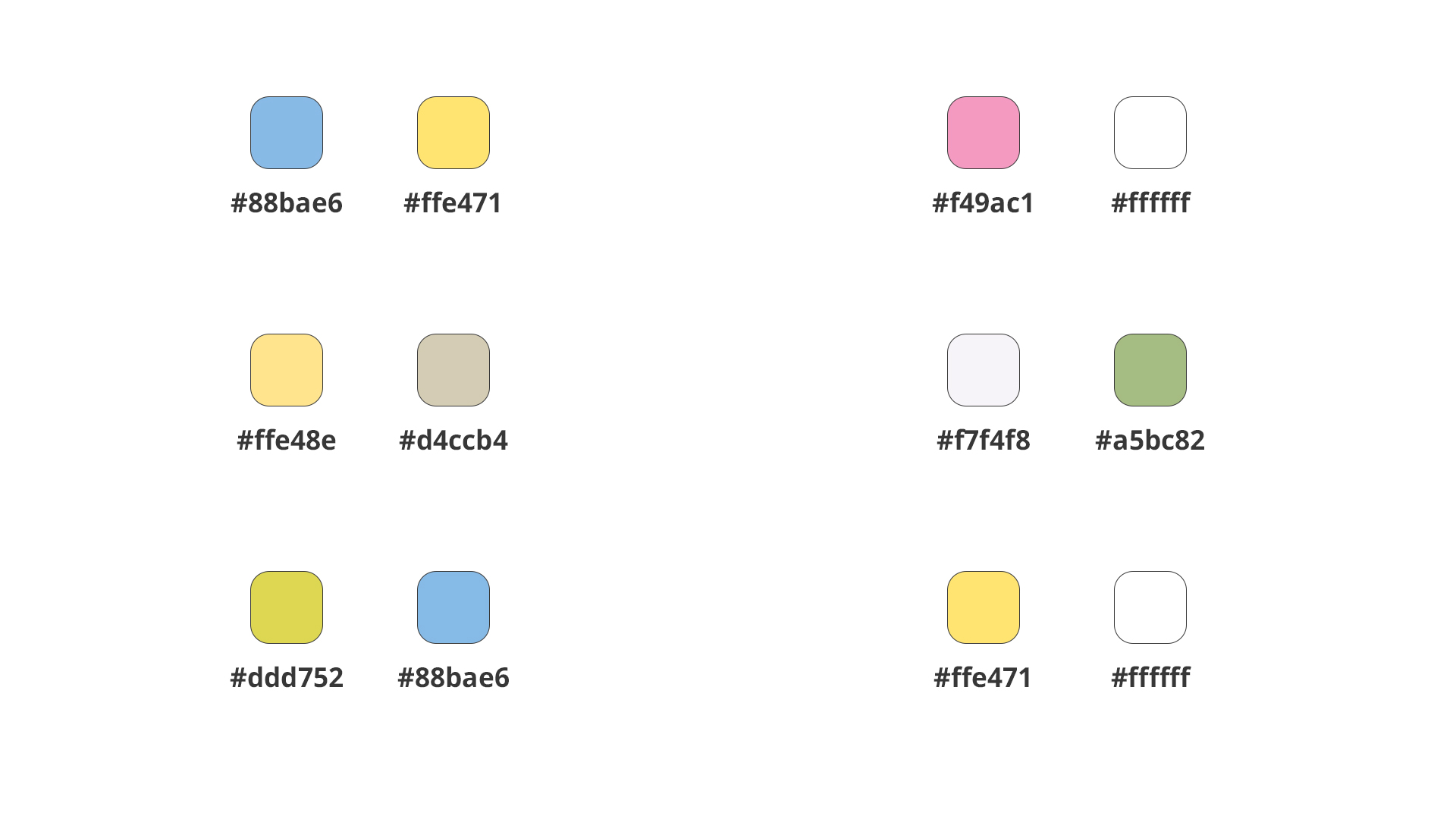
While picking colors from these recommendations, you can use the hex value given below to get the exact color from above.


Applying the color scheme on other elements

The color scheme that you had picked earlier while choosing your background image is the exact one that we would like to recommend you to use for the other elements on your appointment scheduling site as well. We do this so that your background image and the elements on your appointment scheduling site look like a part of one, singular design. This brings a complete and attractive look to your appointment scheduling site as well. As for which of the colors to apply for the elements, we would suggest you to pick the color other than white from your scheme. This is because most background images of weddings have the white or a variation of white, for which you must give the other color that you have to the buttons. In the case of the text, it is better to go with black or dark gray as it contrasts well with the background as well. This way, you can complete the color application with your color scheme and look for yourself at whether the appointment scheduling site is how you wanted it to be. For every edit that you make on your page, we recommend that you check out the live preview of your page with the changes implemented by clicking on the Go To button at the very bottom of the Workspace Settings page. In a nutshell, your appointment scheduling site should have a simple and beautiful background, a good color on your buttons with a black text on top of it. This will give a very wedding like vibe to your customers who will then want to book an appointment with your company.


Writing the text on your appointment scheduling site

There are two lines above the buttons where you can give any text that you want on your appointment scheduling site. While there are instances where giving some catchy phrases can work well, some have even put information that their customers should know about before going over the buttons on the page. This choice is yours and ensure that you utilize that space effectively. If you feel that the given space for text is not sufficient for you, you can always edit the space between the buttons and the footer of the page to write what you need. Just ensure that the text on the image is legible enough to be read easily by the customer.


The final thing to do

One of our finest recommendations in this guide is to get feedback after you have completed designing the appointment scheduling site. Opinions of others are essential in creating such a web page because they can sometimes point out things that you may have missed out in the process. They also sometimes provide suggestions about your work that you may have ignored. Ensure that you get different points of view from people that you trust such as colleagues, friends and family and incorporate the changes that you think will improve the appointment scheduling site. You can also start asking your customers for feedback on the same from which you can take in suggestions that can be used to improve your appointment scheduling site further.

We hope that this guide will help you! If you have any questions regarding this guide, let us know in the comments below.

    • Sticky Posts

    • Zoho Bookings know-how: A hands-on workshop series

      Hello! We’re conducting a hands-on workshop series to help simplify appointment scheduling for your business with Zoho Bookings. We’ll be covering various functionalities and showing how you can leverage them for your business across five different sessions.
    • Announcing: custom color palette + free workshop

      Hello everyone, We're excited to share new feature in Zoho Bookings—a color palette within booking page themes. You'll find this option under Manage Bookings > Workspaces > Booking Page Themes. You can customize the color of every element in your booking page and even alter the transparency of your background image. Please note that this is a paid feature included in the Basic and Premium plans. At the moment, it's available only under the Modern Web theme. This means you can create billions (7,
    • Complete walk-through of Zoho Bookings (video)

      Save time for both you and your customers. Use Zoho Bookings, the appointment scheduling app from Zoho, to free yourself from email and paper-based scheduling. Zoho Bookings can give you a common calendar by syncing multiple calendars, including yours and your staff's. Your customers can book a time convenient for them, and pay for services, through your website or the customizable webpage features available in Zoho Bookings. They'll also get emails reminding them about their appointments and any
    • New Features: Service Availability and staff booking page themes!

      Dear All,  Want a dedicated schedule for your one-on-one services? How would it feel to have one-on-one services open for consultations only during certain times? You need a superpower to make that happen and we give it to you - Service Availability is
    • Zoho Bookings has a new pricing - Pay per user

      Dear customers, Businesses around the world use Zoho Bookings. Customers have booked 1.5 million appointments and over 200K online meetings using Bookings. We are only set to cross more milestones, thanks to your support. We are excited to introduce to

    Nederlandse Hulpbronnen


      • Recent Topics

      • Marketing Automation

        L.S. Marketing Automation is and has always been part of the Zoho One bundle - according to the information provided on the Zoho Website. Why when I open Marketing Automation do I get the following message?: "Your trial has expired. We hope you enjoyed
      • What's New in Zoho Analytics - January 2026

        Hello Users! We are starting the year with a strong lineup of updates, marking the beginning of many improvements planned to enhance your analytics experience. Explore the latest improvements built to boost performance, simplify analysis, and help you
      • Can I convert multiple OLM files to Thunderbird at once?

        Yes, you can convert multiple OLM files to Thunderbird at once using the Aryson OLM file Converter. The tool supports bulk OLM file conversion, allowing users to select multiple OLM files in a single process. It preserves the original folder structure,
      • Translation from Chinese (Simplified) to Chinese (Traditional) is not working. It randomly translated. Google Translate accurately but zoho translate is not working at all

        Hi friends, The newly added language for translation. https://www.zoho.com/deluge/help/ai-tasks/translate.html "zh" - Chinese "zh-CN" - Chinese (Simplified) "zh-TW" - Chinese (Traditional) my original text: 郑这钻 (and it is zh-CN) translated traditional
      • The Social Playbook - January edition: Getting started with content creation

        Social media isn’t just about posting some random content. It’s about why certain content works, how brands stand out, and what makes people pause mid-scroll. The Social Playbook is a monthly community series where we break all of that down. Through real
      • I'm getting this error when I try to link an email to a deal inside the Zohomail Zoho CRM extension.

        When I click "Yes, associate," the system displays an "Oops!! Something went wrong" error message. I have attached a screenshot of the issue for reference.
      • Support for Custom Fonts in Zoho Recruit Career Site and Candidate Portal

        Dear Zoho Recruit Team, I hope you're doing well. We would like to request the ability to use custom fonts in the Zoho Recruit Career Site and Candidate Portal. Currently only the default fonts (Roboto, Lato, and Montserrat) are available. While these
      • Adding bank details to the contact through API

        How to add bank-related information to the contact while creating it using API? The account number needs to be encrypted before sending it through API but not sure how to encrypt and get those values. Please guide me in this.
      • Ticket Resolution - Add rich formatting, screenshots and attachments

        The resolution field only allows plain text at the moment. Many of our resolutions involve posting screenshots as evidence, it would be great for us to be able to have rich text formatting, be able to paste screenshots and add attachments in the solution
      • Ticket resolution field - can you add links, video, and images?

        Seems like the ticket resolution fields is just a text field. Any plans to add the ability to add links, images...the same functionality in the problem description box? I would like to send the customer a link to a KB article, a link to our Wiki, embed an image, or use HTML to pass on a short how to video from YouTube.  Is their plans to add this functionality? You should also be able to complete formate the response from the ticket and then save and add to KB.  Thanks
      • CRM x WorkDrive: We're rolling out the WorkDrive-powered file storage experience for existing users

        Release plan: Gradual rollout to customers without file storage add-ons, in this order: 1. Standalone CRM 2. CRM Plus and Zoho One DCs: All | Editions: All Available now for: - Standalone CRM accounts in Free and Standard editions without file storage
      • Font breakage in Zoho Mail Desktop Lite application for Mac

        Dear Zoho Mail and Workplace Community, With the latest update of macOS Sequoia and macOS Tahoe, there has been font breakages in the email preview of Zoho Mail Desktop Lite application for Mac. This breakage is due to the corruption of the System fonts
      • Feature request - image resizing on sales orders

        I need to be able to show the items on the sales orders, currently the item image shows really small and no way to resize it, need the ability to make the image larger to showcase the product on the pdfs
      • Mail Merge is not working properly as far as the AUTOMATE section is concerned

        Hi there, I created a Mail Merge template for the Deal module. I would like Deal owners to mail merge their Deal records, download the Mail Merge document as a Word doc and make a few changes before sending it to the customer. Thing is, neither the "Merge
      • What's new in Zoho Sheet: Simplify data entry and collaboration

        Hello, Zoho Sheet community! Last year, our team was focused on research and development so we could deliver updates that enhance your spreadsheet experience. This year, we’re excited to deliver those enhancements—but we'll be rolling them out incrementally
      • Nueva edición de "Ask The Expert" en Español Zoho Community

        ¡Hola Comunidad! ¿Te gustaría obtener respuestas en directo sobre Zoho CRM, Zoho Desk u otra solución dentro de nuestro paquete de CX (Experiencia del Cliente? Uno de nuestros expertos estará disponible para responder a todas tus preguntas durante nuestra
      • Automation Series: Auto-Notify External Users on Issue Closure

        Hello Folks! In Zoho Projects, you can notify external issue reporters via email when an issue is marked as Closed. This helps the users avoid manual follow-ups and keeps the reporter updated. In this post, we’ll walk through a simple setup using a Web
      • Issue with open-rate reporting in Zoho Campaigns

        Hello, Since yesterday I’ve been experiencing an issue with the open-rate reports in Zoho Campaigns. The campaigns I send appear in the reports as if none of the emails have been opened, even though I know they have. To verify this, I replicated the campaign
      • Turn chat conversations into real action with Integration Blocks in Guided Conversations

        When a Guided Conversation fails, it's usually not because the logic is wrong. They fail because the conversation stops moving. A customer starts a chat with a clear goal: report an issue, check a status, or confirm something. At first, the flow does
      • Basic Mass Update deluge schedule not working

        I'm trying to create a schedule that will 'reset' a single field to 0 every morning - so that another schedule can repopulate with the day's calculation. I thought this would be fairly simple but I can't work out why this is failing : 1) I'm based in
      • Special characters (like â, â, æ) breaking when input in a field (encoding issue)

        Hey everyone, We are currently dealing with a probably encoding issue when we populate a field (mostly but not exclusively, 'Last Name' for Leads and Contracts). If the user manually inputs special characters (like ä, â, á etc.) from Scandinavian languages,
      • click to call feature

        I've Zoho CRM and in that i want click to call feature.
      • We Asked, Zoho Delivered: The New Early Access Program is Here

        For years, the Zoho Creator community has requested a more transparent and participatory approach to beta testing and feature previews. Today, I'm thrilled to highlight that Zoho has delivered exactly what we asked for with the launch of the Early Access
      • From Zoho CRM to Paper : Design & Print Data Directly using Canvas Print View

        Hello Everyone, We are excited to announce a new addition to your Canvas in Zoho CRM - Print View. Canvas print view helps you transform your custom CRM layouts into print-ready documents, so you can bring your digital data to the physical world with
      • Can the Product Image on the Quote Template be enlarged

        Hello, I am editing the Quote Template and added ${Products.Product Image} to the line item and the image comes up but it is very tiny. Is there anyway that you can resize this to be larger? Any help would be great! Thanks
      • Analytics <-> Invoice Connection DELETED by Zoho

        Hi All, I am reaching out today because of a big issue we have at the moment with Zoho Analytics and Zoho Invoice. Our organization relies on Zoho Analytics for most of our reporting (operationnal teams). A few days ago we observed a sync issue with the
      • Creating Parent Child relationship in Accounts

        We have customers with multiple locations, I setup the HQ as an account, then I setup the different sites marking the HQ as the parent to that location. If I then do a Deal for one of the locations, is there a way to show by looking at the parent account
      • Learner transcript Challenges.

        Currently i am working on a Learner Transcript app for my employer using Zoho Creator. The app is expected to accept assessment inputs from tutors, go through an approval process and upon call up, displays all assessments associated with a learner in
      • Client and Vendor Portal

        Some clients like keeping tabs on the developments and hence would like to be notified of the progress. Continuous updates can be tedious and time-consuming. Zoho Sprints has now introduced a Client and Vendor Portal where you can add client users and
      • #7 Tip of the week: Delegating approvals in Zoho People

        With Zoho People, absences need not keep employees waiting with their approval requests. When you are not available at work, you can delegate approvals that come your way to your fellow workmate and let them take care of your approvals temporarily. Learn more!
      • Admin Tip: Manage sub-domain emails using sub-domain stripping

        As an admin, you may need separate domains for different departments such as sales, support, and marketing. While this approach offers flexibility, creating and managing multiple domains can quickly become overwhelming, especially since each domain requires
      • Bring Zoho Shifts Capabilities into Zoho People Shift Module

        Hello Zoho People Product Team, After a deep review of the Zoho People Shift module and a direct comparison with Zoho Shifts, we would like to raise a feature request and serious concern regarding the current state of shift management in Zoho People.
      • Quick Copy Column Name

        Please add the ability to quickly copy the name of a column in a Table or Query View. When you right-click the column there should be an option to copy the name, or if you left-click the column and use the Ctrl+C keyboard shortcut it should copy the
      • Ability to Edit YouTube Video Title, Description & Thumbnail After Publishing

        Hi Zoho Social Team, How are you? We would like to request an enhancement to Zoho Social that enables users to edit YouTube video details after the video has already been published. Your team confirmed that while Zoho Social currently allows editing the
      • How do I remove a data source from Zoho Analytics?

        I am unable to find a delte option on a datasource that i put in the system as an error. On teh web it refers to a setup icon but I do not see that on my interface?
      • Add Employee Availability Functionality to Zoho People Shift Module

        Hello Zoho People Product Team, Greetings and hope you are doing well. We would like to submit a feature request to enhance the Zoho People Shift module by adding employee availability management, similar to the functionality available in Zoho Shifts.
      • Bigin, more powerful than ever on iOS 26, iPadOS 26, macOS Tahoe, and watchOS 26.

        Hot on the heels of Apple’s latest OS updates, we’ve rolled out several enhancements and features designed to help you get the most from your Apple devices. Enjoy a refined user experience with smoother navigation and a more content-focused Liquid Glass
      • Really want the field "Company" in the activities module!

        Hi team! Something we are really missing is able to see the field Company when working in the activities module. We have a lot of tasks and need to see what company it's related to. It's really annoying to not be able to see it.🙈 Thx!
      • Delay in rendering Zoho Recruit - Careers in the ZappyWorks

        I click on the Careers link (https://zappyworks.zohorecruit.com/jobs/Careers) on the ZappyWorks website expecting to see the job openings. The site redirects me to Zoho Recruit, but after the redirect, the page just stays blank for several seconds. I'm
      • Is Desk Down?

        Across department - always an error. [Status Mode] - error [Table View and the rest] - working
      • Next Page