Identify, Qualify and Retarget Potential Leads Using Zoho SalesIQ & Campaigns

Identify, Qualify and Retarget Potential Leads Using Zoho SalesIQ & Campaigns

Finding the right leads can often feel like guesswork. Because not all your website visitors are worth targeting — some may just be browsing, while others may have landed in there by accident. So how do you filter out the noise and focus on those who actually matter?

While SalesIQ offers many ways to narrow down your best prospects, today let's explore the combined power of Zoho SalesIQ and Campaigns. With these two products working together, identifying and qualifying leads becomes a lot more structured and automated. If you're a SalesIQ user who also uses Campaigns to target leads, this post is for you!

Phase 1: Spotting potential leads

For any business, identifying a lead starts with understanding visitor behavior.
Let’s say someone visits your website more than 10 times and has also conversed with your operators a few times regarding certain offers and products you offer. That’s not just random browsing — it’s a sign of interest. Based on that visitor's behaviour, they are definitely interested in what you have to offer but hesitant to take action. With a little push, these visitors or potentials can be easily converted to customers. 
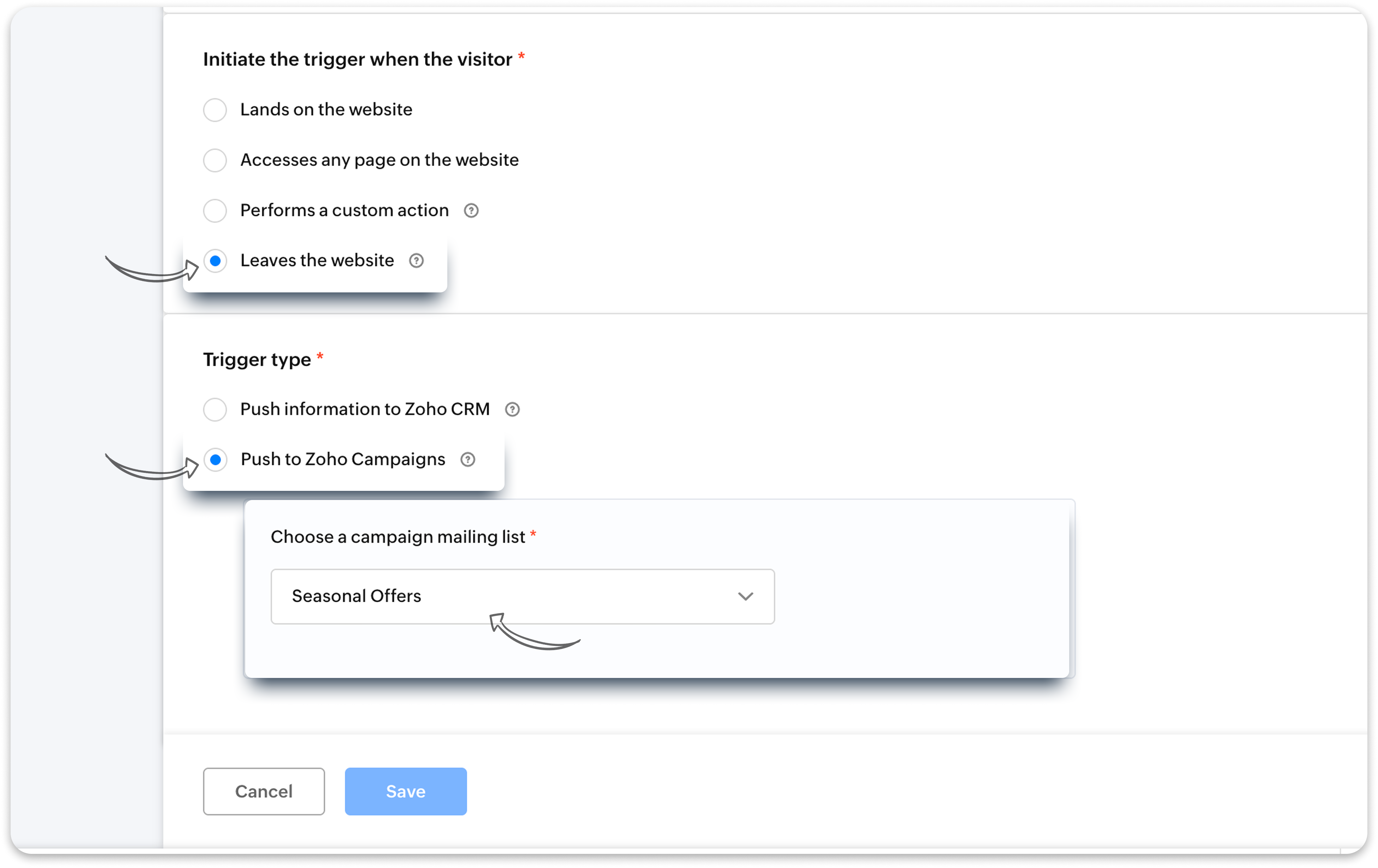
  • With SalesIQ Triggers, you can automatically identify these potentials. 
  • Set up a trigger with the Number of visits and Number of past chats criteria to identify these potentials.
  • You can set up in the trigger for the details (name and email) of these potentials to be directly added to your Zoho Campaigns mailing list.
Info
Note: This trigger will work only when the visitor's name and email is identified by SalesIQ using past chats, webforms, etc.

Phase 2: Moving from interested to qualified

Once you've added these potential leads to your Campaigns list, it’s time to target them to push sales.
  • Send a targeted campaign to these potentials with their interested products and services.
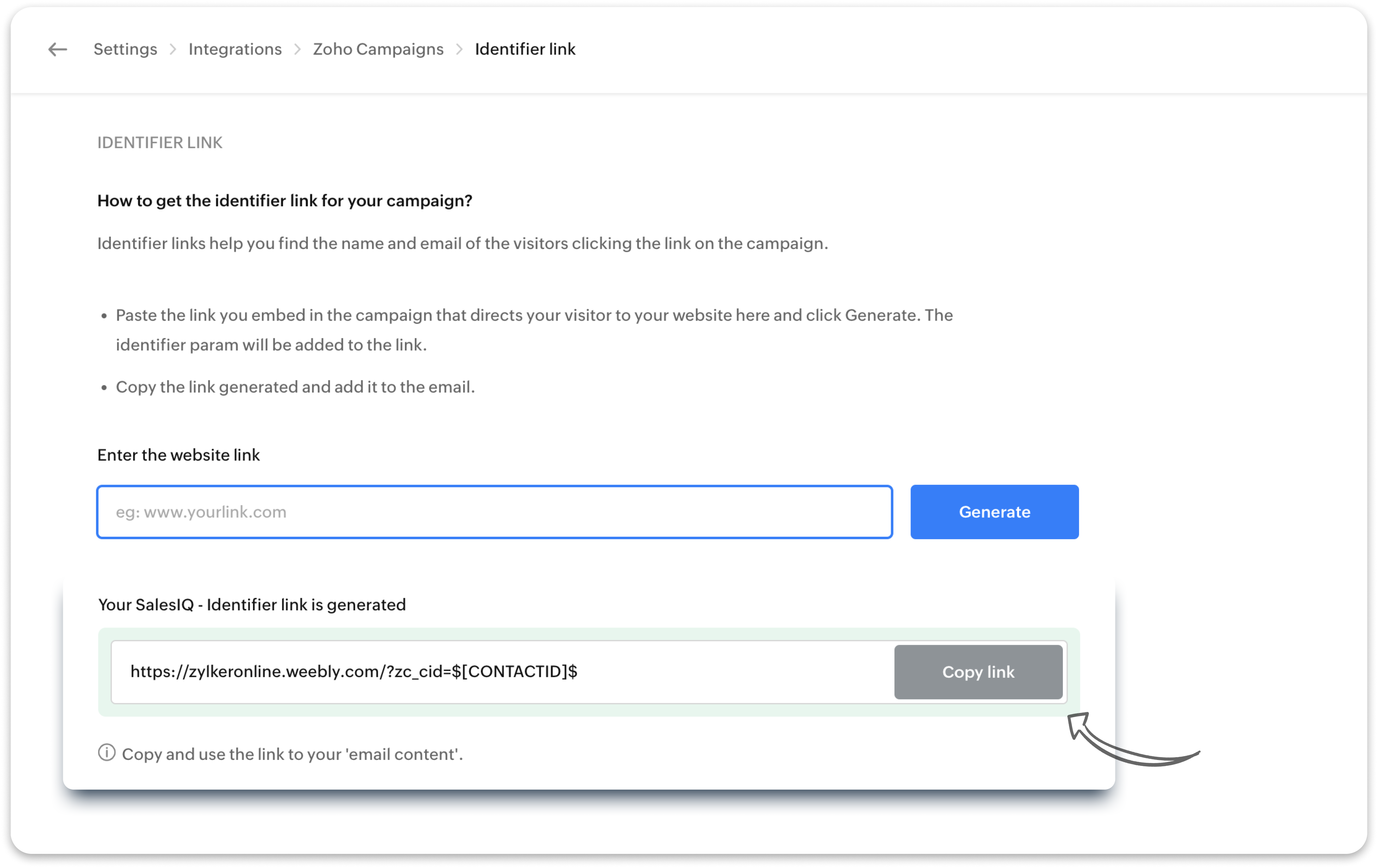
  • Here’s the trick: generate a unique tracking URL (identifier link) in SalesIQ with the campaigns integration and use that in your campaign mailer’s CTA button (for example: “Browse Now" or “Learn More”).
  • When they click through and land on your website via the campaign email, SalesIQ will recognize them — because now they’re a known visitor. 
At this point, you’re not just guessing anymore. These are leads who’ve shown consistent interest and responded to your outreach. That’s a qualified lead.

Phase 3 - Retarget qualified leads with another niche campaign

Now, you can send another niche campaign to only your qualified your leads i.e. only the leads who came back to your site from the previous campaign click. 
  • Set up another trigger with the previous Zoho Campaign name as the Audience criteria.
  • You can set up in the trigger for these leads to be added to another, separate Zoho Campaigns mailing list.
  • Send another focused email to your qualified leads alone using Zoho Campaigns.
Idea
Bonus: You can also choose to push the information of your qualified leads directly into Zoho CRM for follow-up and progress them through the sales pipeline.

What else can you do next? 

Apart from sending another niche campaign and pushing their details to CRM, you have other options too to reengage your qualified leads.
  • Set up another trigger: Route them to a live operator using another SalesIQ trigger to engage them instantly and help them with what they need.
  • Engage with a chatbot: Or, even use a SalesIQ chatbot to engage them, gather more context, and route the conversation accordingly — either to an operator or CRM.
These are just a few ways to bring automation and clarity to your lead generation process. 

Stay tuned for our next post where we’ll show you how to set up a SalesIQ bot specifically for campaign-driven leads. 

Warm regards,
Hameetha
Zoho SalesIQ

    Nederlandse Hulpbronnen


      • Recent Topics

      • Cash Basis VAT RETURN REPORT Required in Saudi Arabia

        Zoho Books in Saudi Arabia not showing TAX RETURNS report on CASH Basis.. It only showing accrual basis. Oforur requirement is both reports (Cash Basis and Accrual Basis ) , same like indian Edition of Zoho Books showing. CASH BASIS RETURN is our Basic
      • Tips & Tricks Series - #4 Customize your manual PDF before export

        Hello everyone! We’re back again with our Tips & Tricks series. Today, we’ll look at how you can customize your manual PDF before exporting it. With Zoho Learn, you can personalize the exported PDF with options such as headers, footers, colors, and custom
      • Digital Marketing Agency: Transforming Your Brand's Online Presence

        Imagine trying to build a house on your own without the necessary tools or expertise—it’s overwhelming, right? Digital marketing is the same.
      • Introducing Zoho Key Service, a simpler way to access LLMs without API keys

        Available in the Professional, Enterprise, and Ultimate editions in the US, IN, AU, JP, and CA DCs. Hello everyone, We are excited to bring Zoho Key Service (ZKS) in Zoho CRM, a simpler way for organizations to access and use third party LLMs. You can
      • Reach us through our official support channels

        Dear Customers, Thanks a lot for choosing Zoho! Our applications are built to help achieve your day-to-day business goals. We are committed to engaging with you, to understand and develop solutions that enhance your productivity. We are happy and ready
      • I cannot add user to my account

        I have an account, I deleted a user from the account and I have one unused licence which lasts for 23 days, I tried adding a new user and it said This user is not allowed to add in Zoho. Please contact support-as@zohocorp.com for further details, please
      • Domain Activation Issue

        I purchased a domain through Zoho, and as I understand it, you were supposed to send me a domain activation link. However, I never received it. As a result, I was unable to activate the domain, and it is now suspended. Because of this, I am not receiving
      • Grouping by Stage *type* in widgets

        Hi Can I ask for a new feature? I'd like to be able to group by stage type in a Deal widget. That is by whether the Deal is in an Open Stage, a Closed Won Stage, or a Lost stage. Currently I can group by Stage, but if we have 10 open stages and one Closed
      • Please release domain bravovietnam.com from an old account

        Hello Zoho Support, I am trying to set up Zoho Mail with my domain bravovietnam.com on my account office@bravovietnam.com. Every time I add the domain, I get: "This domain is already associated with this account" — pointing to a DIFFERENT, older account
      • ChatGPT Plugin / MCP Server auth error

        Hi all I'm trying to connect the ChatGPT plugin for Zoho CRM but after username stage of the auth process, I get this error from the URL https://mcp.zoho.eu/mcp-client/ {"error_description":"Invalid request url, Request is not as per defined in oauth
      • Creator -Dynamic addition of Customer Portal User Licenses

        Hi, We have a Creator App for B2C about to get released. We are experiencing the Portal User license challenge. Unable to predict the number of users who will download and Subscribe. When a User is about Subscribe and the portal licenses does not exists,
      • Need Multiple currency for Suppliers and Buyers

        Hello, We need multiple currency support for buyer and suppliers, We are doing international business and we often sell goods in foreign currency as well as local currency, However zoho does not support this, I am trying Free agent and xero they support all currencies for suppliers Bills & expenses as well as buyers invoices, Kindly work on this feature will be great help to decide using zoho books Thank you
      • 👍 Zoho CRM's Notes now gets Reactions and a new look

        Available in SA and JP DCs. Rolling out to other DCs in phases. Hello everyone, Notes help users capture important updates, collaborate with teammates, and maintain context for records. Now with Note Reactions, users can quickly acknowledge updates, express
      • Enhanced Zoho CRM and Office 365 calendar synchronization features!

        Dear customers, We're excited to share some significant improvements to our Office 365 calendar synchronization features, aimed at providing you with more control and a more personalized experience. What’s new Choose your Office 365 calendar: During the
      • Zoho Books Support

        Dear Team, Zoho Books offers a demo before you purchase zoho books. But after that when he actually purchases the product he has to rely on toll free number or help documents. But this might get frustrated in the initial period. Specially in initial period.
      • How to add a fee based on payment method

        I currently accept both ACH payments and credit card. I want to add a 3% fee to a number of my subscription plans if the customer chooses to use a credit card (and not ACH/checking). How do I do this? Is there an in-built feature, or would i have to create
      • What's New in Zoho Invoice | July – September 2026

        Hello everyone! We're back with the latest updates and enhancements we've rolled out in Zoho Invoice from July to September 2026. Here's what's new this quarter: Zoho Invoice is Now Available in Nigeria Introducing the Super Admin Privilege E-Invoicing
      • Notes - Reaction Buttons

        Using the native notes option within CRM is fine, it works and the RTF features are great, however, would it be possible - if there isnt already something in place, where we can add a reactions button, similar to teams/whatsapp to show that its been read
      • ZohoBooks - "Account transactions" report doesn't have any "Desciptions"

        Hi, I'd like to push for this to be included in ZohoBooks: In a "account transactions" report all the numbers are right, but I'd really like to see the "Description" as part of this report, i.e. the line-item-description as I would see it in the bank statement. Essentially all you see is a list of numbers adding up to the total. It is very difficult to see if things are right without being able to see what exactly each transaction refers to. Going into each transaction one-by-one is not a workable
      • Address limits per customer by edition

        I’m on the Standard edition and have reached a limit of 30 addresses under a single customer. Before I move to an annual Professional subscription, I need to confirm the following: What is the maximum number of addresses allowed under one contact, and
      • Export from List view

        I'm constantly having the issue where my users are building lists in ListView for various objects and then realising they cant export the data, then they have to go and build the data set in reports to export. I would like to see the ability to export to excel/csv from ListView.
      • Cannot apply tags to multiple items at once

        It is very frustrating needing to apply tags to notes individually. Even worse that it takes multiple clicks to do it. Can there please be an update to: 1.) Allow us to apply tags to batches of notes in one go. 2.) Make it less clicks to add a tag 3.)
      • Get all hiring updates via Zoho Cliq bot notifications

        We’re introducing a new way to stay updated on recruitment activities: Cliq Bot notifications. Now you can receive Zoho Recruit notifications directly in Zoho Cliq—alongside your existing in-app alerts and emails. Whether it’s a candidate status change,
      • Notes Acknowledgement

        It would be great to have emojis that can be used for Notes. Emojis such as Thumbs Up to let someone know you agree with them or a emoji for thanks. It's a simple way to acknowledge that you read someone's note. Moderation update: Emoji reactions for
      • Is it possible to log text messages from iphone into Zoho CRM

        My team is more and more utilizing text messaging to communicate with clients. Does Zoho have a solution for logging these text messages when clicking "Send Text Message" from the Zoho app. Much like when you call, you get prompted to log a call, can
      • Project Finances: Fully Accessible within Projects

        Project finances and work items are now on the same screen and it transforms the way you run your project. Managing your project finances is now much easier and in the same screen as your work items. Access quotes, invoices, bills, sales orders, and purchase
      • UI / UX Improvements

        Please consider changing the Dependency Details window from a column-based layout to a list-based layout, or allowing users to choose their preferred layout. The current column-based view uses screen space inefficiently and makes navigation difficult,
      • Zoho CRM and Desk sandboxes for testing native integration

        Hello team, We are evaluating the native integration between Zoho CRM and Zoho Desk, We have sandbox instances of both products and want to test the integration there, without any effect on our production CRM or production Desk data. While setting up
      • Function #24: Automatically display deal name from Zoho CRM on quotes in Zoho Books

        Deals allow businesses to organize and visualize their sales pipeline. This provides a clear overview of all potential opportunities and helps in making informed decisions. Zoho CRM empowers you to create deals or potentials for your clients and monitor
      • Auto-Sync Field of Lookup Values When Parent Record Changes

        Hi Zoho Team, Currently, when you use a "Field of Lookup" in Zoho CRM, the value is captured as a snapshot at the time the lookup is set. If the parent record is later updated, the Field of Lookup value on the child record does NOT update and stays stale.
      • [Request] Pivot filter date option : from set date to relative value ie from 01Jan to LastMonth

        I don't think I can currently do this... but it's worth asking if it's possible. My use case is concerning annual leave which is calculated from the beginning of the calendar year (01Jan) then each month I want to have details of leave taken etc... In
      • Customer Statement Showing Incorrect Negative Balance Due to Unused Advance

        Dear Zoho Support Team, We are facing an issue with the Customer Statement in Zoho Invoice related to customer advances/mobilization advances. The issue is that when a customer has made an advance payment that has not yet been fully utilized against invoices,
      • Mois de la sensibilisation à la cybersécurité 2026 : faites de la sécurité un réflexe avec Zoho

        Imaginez : vos systèmes informatiques répondent aux normes de sécurité en vigueur et votre entreprise est assurée contre les cyberattaques. Pourtant, un matin, tout bascule. Vos données sont chiffrées et un message glaçant s’affiche à l’écran : « Si vous
      • Specifying time increments on a Date/Time field

        Hi all, Im using a Date/Time field in my CRM module. At the moment the increments are 30 minutes. How can I change these to be 15 minutes? Thanks
      • What's new in Zoho Workplace | August 2026

        Hello Zoho Workplace community! Here's a roundup of all the new features and announcements that went live across Zoho Workplace applications in August. Zoho Mail Zoho Mail is now available in AWS Marketplace! AWS Marketplace users can access and subscribe
      • What's new in Zoho Social - Q3 recap

        Hello everyone, We've rolled out a bunch of exciting updates in Q3, and we're thrilled to walk you through them. Here's a quick look at everything we released in July, August, and September to help you experiment with content, automate engagement workflows,
      • Zoho Books | Product updates | October 2026

        Hello users, October brings a range of new features and enhancements to Zoho Books, designed to simplify compliance, streamline accounting workflows, and improve inventory management. From the launch of the Nigeria Edition and France’s e-invoicing capabilities
      • The Social Wall: September 2026

        Hello everyone! This month, we’re bringing Snapchat to Zoho Social. You can now connect your Snapchat account and manage your content alongside your other social channels. Whether you want to reach a wider audience through Spotlights or share quick updates
      • Turning off the recorded welcome in Zoho Webinar

        Is there a way to turn off the recorded voice that comes up at the beginning of every webinar session? It devalues the experience for attendees from feedback, interrupting their connection with our brand and delaying webinar start unnecessarily.
      • Option to Disable Knowledge Base Section in Feedback Widget Popup Hello Zoho Desk Team

        Hello Zoho Desk Team, How are you? We are actively using Zoho Desk and would like to make more use of the Feedback Widget. One of the ways we implement it is through the popup option. At the moment, the popup always displays the Knowledge Base section,
      • Next Page