Introducing the sandbox environment in Zoho Sign
Hey there!
Customer and partners across the globe have been requesting a testing environment—also called a sandbox—for quite some time. Sandboxes help you try out document workflows before using them in your production setup.
This new year, we are excited to introduce Zoho Sign Sandbox, an isolated environment where administrators can experiment with their workflows and automations risk-free.
How to get started
Available in the Enterprise edition and enabled on request
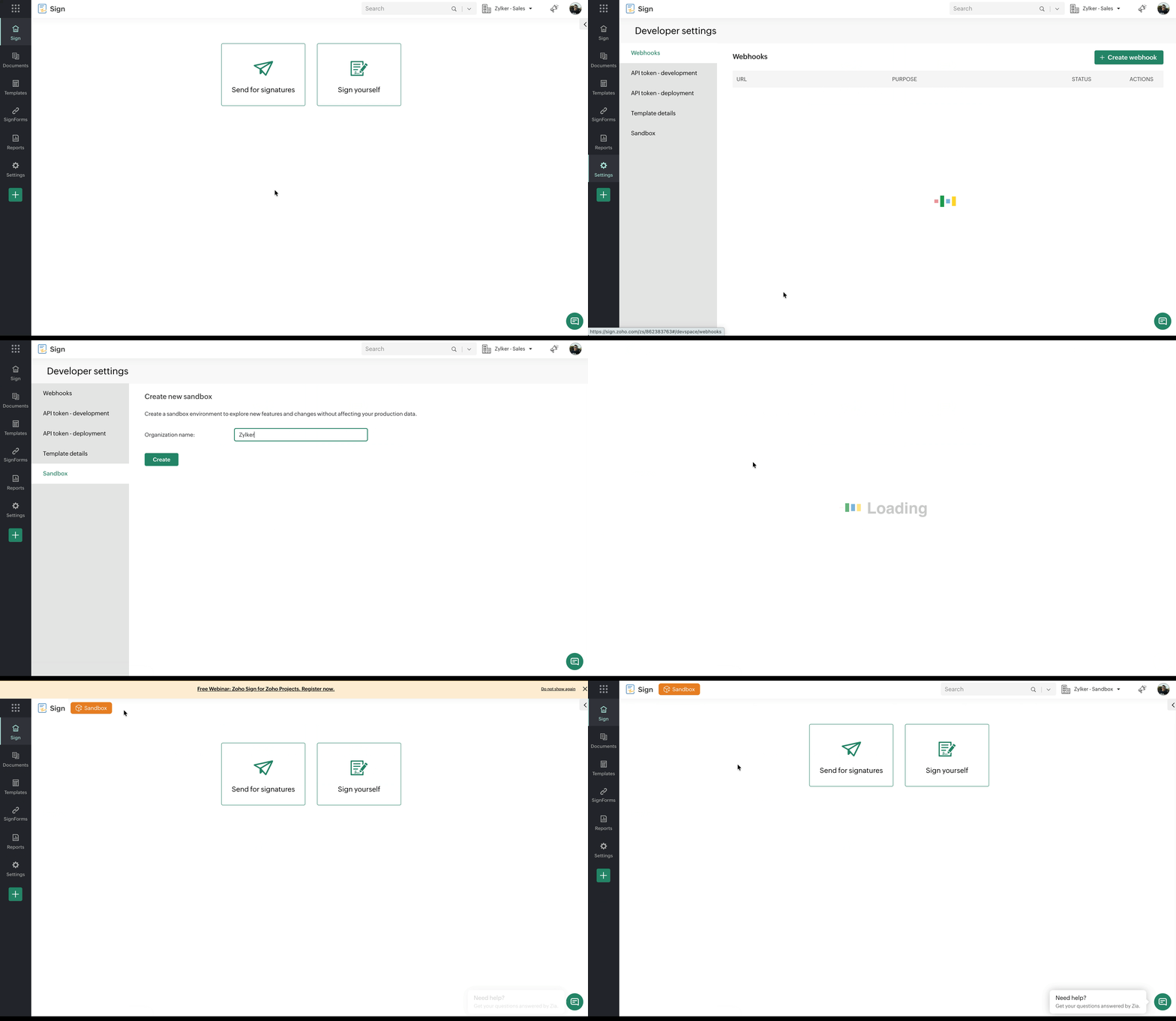
To create a new sandbox environment:
To create a new sandbox environment:
From your Zoho Sign dashboard, hover over Settings and select Developer settings.
Click Sandbox.
Enter the sandbox name and click Open Sandbox.
Here's the help documentation https://help.zoho.com/portal/en/kb/zoho-sign/admin-guide/developer-settings/articles/sandbox-in-zoho-sign with more details on how to get started.
Try it today and feel free to share your feedback in the comments!
Cheers,
Rajeev S
Lead - User Education
Zoho Sign