Kaizen #121 : Customize List Views using Client Script
Hello everyone!
Welcome back to another interesting Kaizen post. In this post, we can discuss how to customize List Views using Client Script. This post will answer the questions Ability to remove public views by the super admin in the Zoho CRM and Is it possible to restrict ZCRM user to see only custom views created by administrator?
In this post,
- What is a List View?
- Use Case - To hide all public views except one
- Solution using Client Script
- Other ZDKs available to customize List Views
- Summary
- Related Links
1. What is a List View?
A List View is grouping of records based on a defined set of criteria. List Views are beneficial for displaying customer specific data according to your business requirements. For example, you may be interested in following-up on the leads created during the last week or reviewing overdue tasks. The best way to handle these scenarios is to filter the records using the list views. Click here for more details on List Views.There are two types of List Views in Zoho CRM -
- Standard List Views : You can modify the standard views and sort the order of the columns in the list.
- Custom List Views : You can create, modify, and delete custom views, and you can also sort the order of the columns in the list.
Often, there are business requirements where you need to customize these views, like hiding a view from certain users or masking a particular column in the view. Let us see how to control the list views visible to a user, using Client Script.
2. Use Case - To hide all public views except one
Zylker is a manufacturing company that uses Zoho CRM. A Salesman creates records in the custom module named "Orders".The name of the profile assigned to a Salesman is "Sales". The Admin does not want the "Sales" profile users to view the standard public views except the "My Orders" public view.
3. Solution using Client Script
Admin should remove the visibility to all public views for the profile "Sales" and permit only the "My Orders" view. Here are the list of steps to be followed.
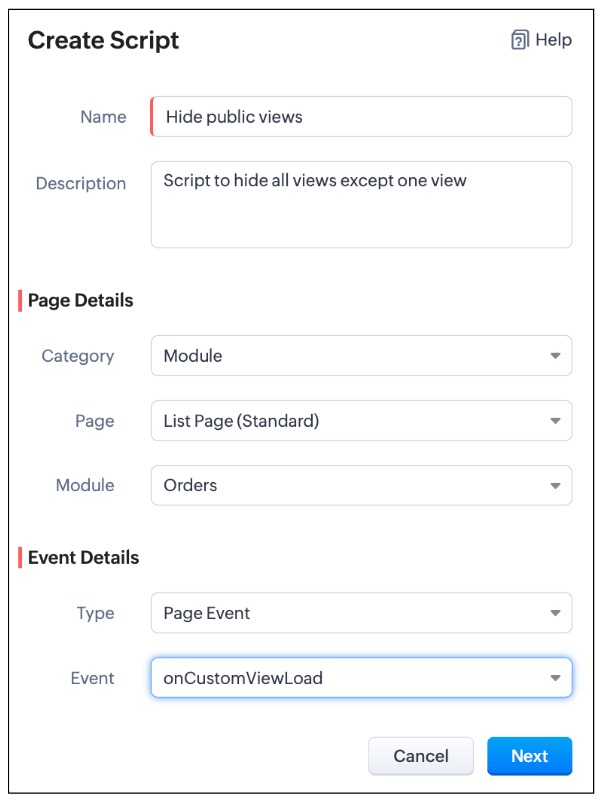
- Create a Client Script for List Page (Standard) of Orders module and specify the event as onCustomViewLoad. To know more about how to create a Client Script, click here.
- Now, using the getComponent.getOptions() , copy the id of My Orders view from the Messages panel in the "Run" component of Client Script IDE as shown below.
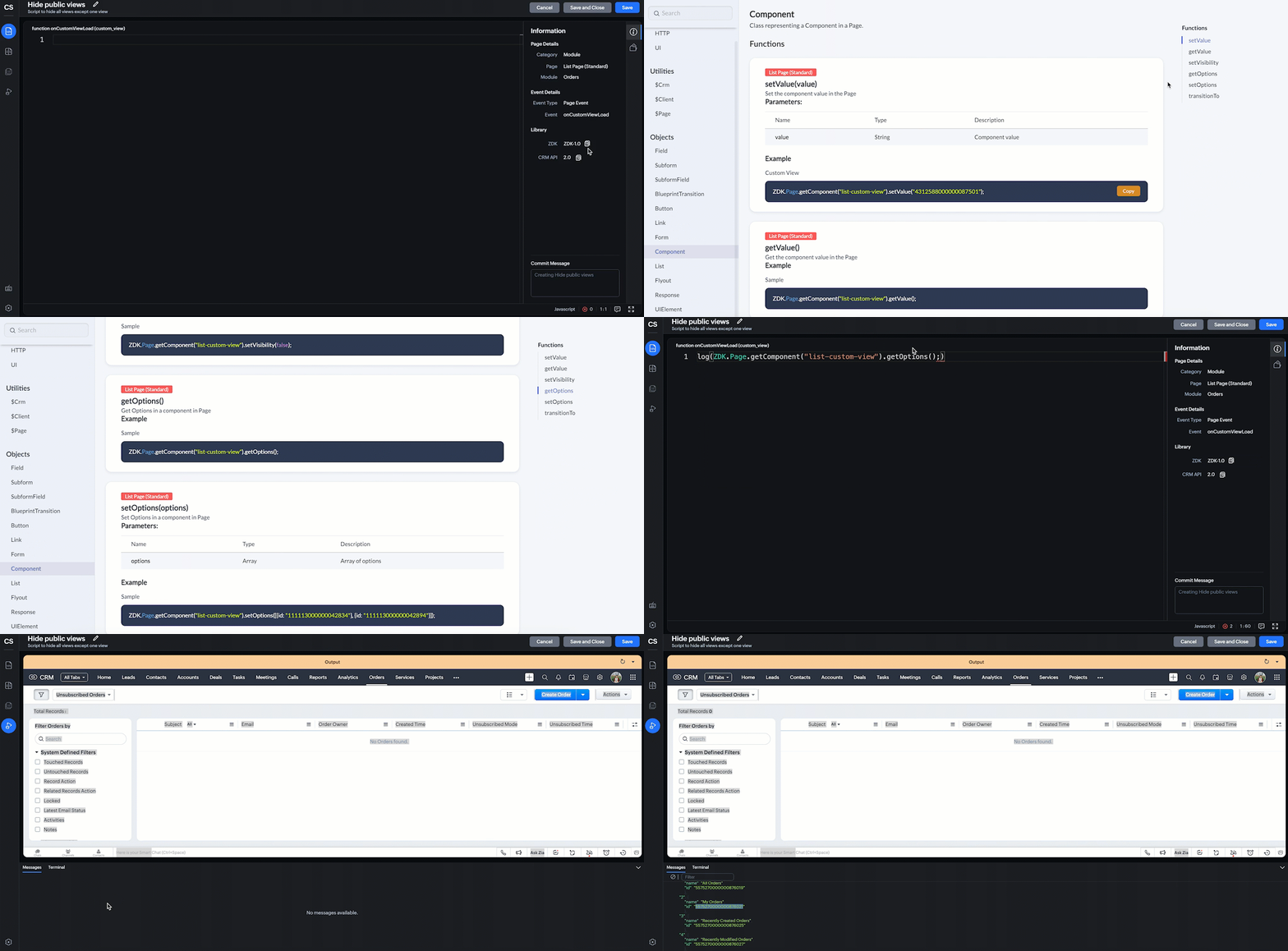
log(ZDK.Page.getComponent("list-custom-view").getOptions()); |
- In this script, ZDK.Page.getComponent("list-custom-view") will get the component that corresponds to the views drop down on the List Page.
- Then, getOptions() will return the options in the component of List Page. Here the component is 'list-custom-view'.
- Now with the copied id of "My Orders" view , use "getComponent.setOptions()" and add the only option on list-custom-view as "My Orders" view, if the profile is "Sales".
var user = ZDK.Apps.CRM.Users.fetchById($Crm.user.id); if (user.profile.name != 'Sales') { ZDK.Page.getComponent("list-custom-view").setOptions([{ id: "5575270000000876021" }]); } |
- Save the Script.
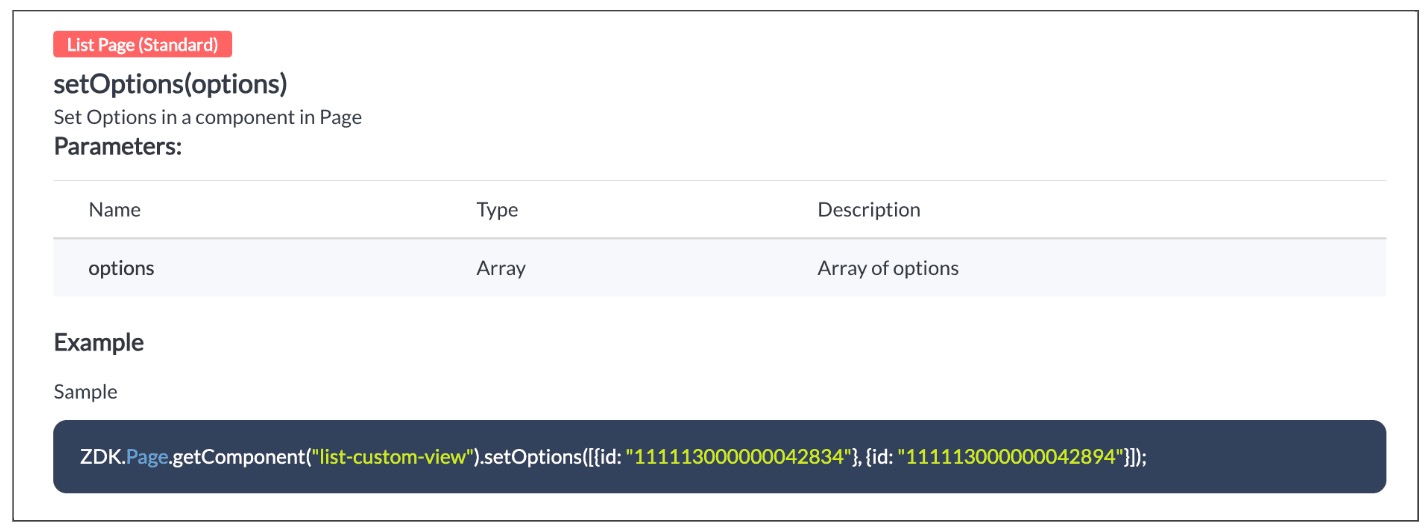
- Here is the syntax for setOptions(options).
- You can now see that only "My Orders" view is visible for the "Sales" profile, and all other public views are hidden.
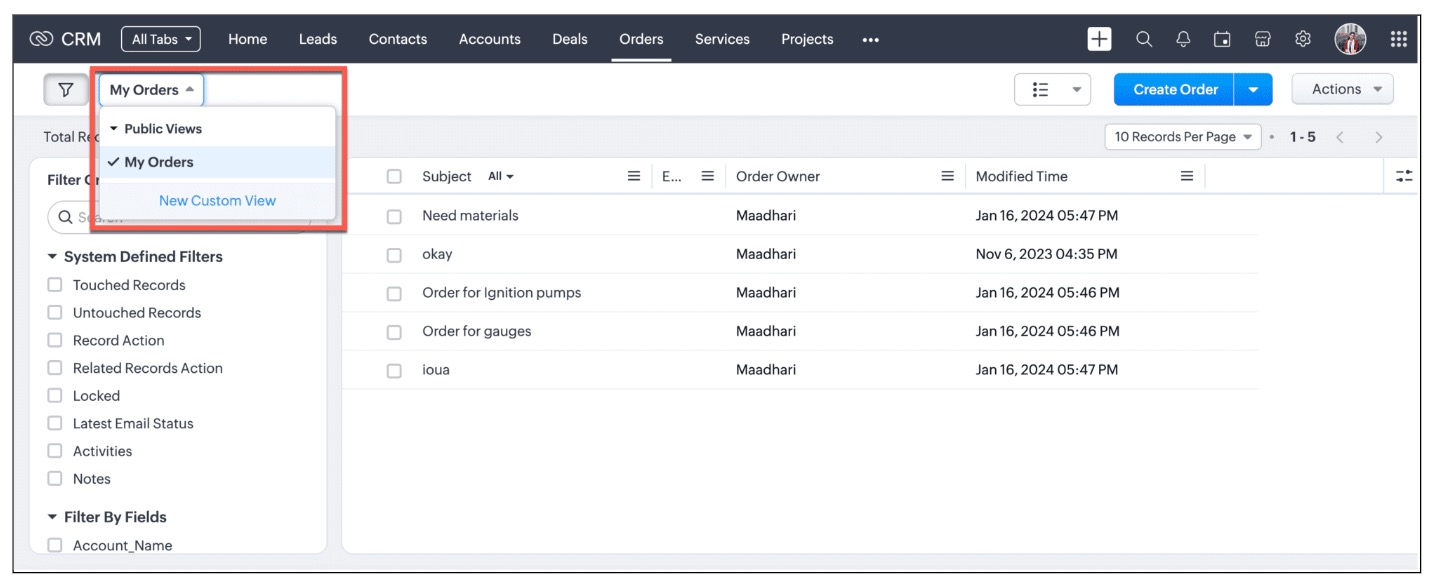
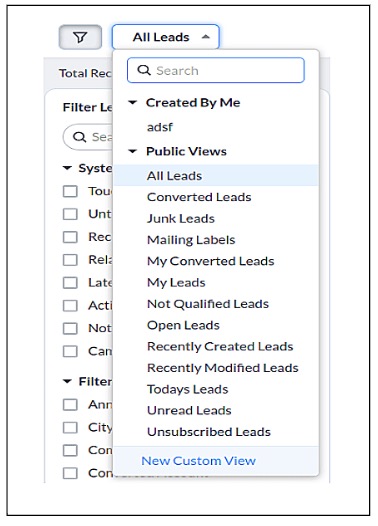
- For other profiles like Manager and Admin, all public views will be visible as shown below.
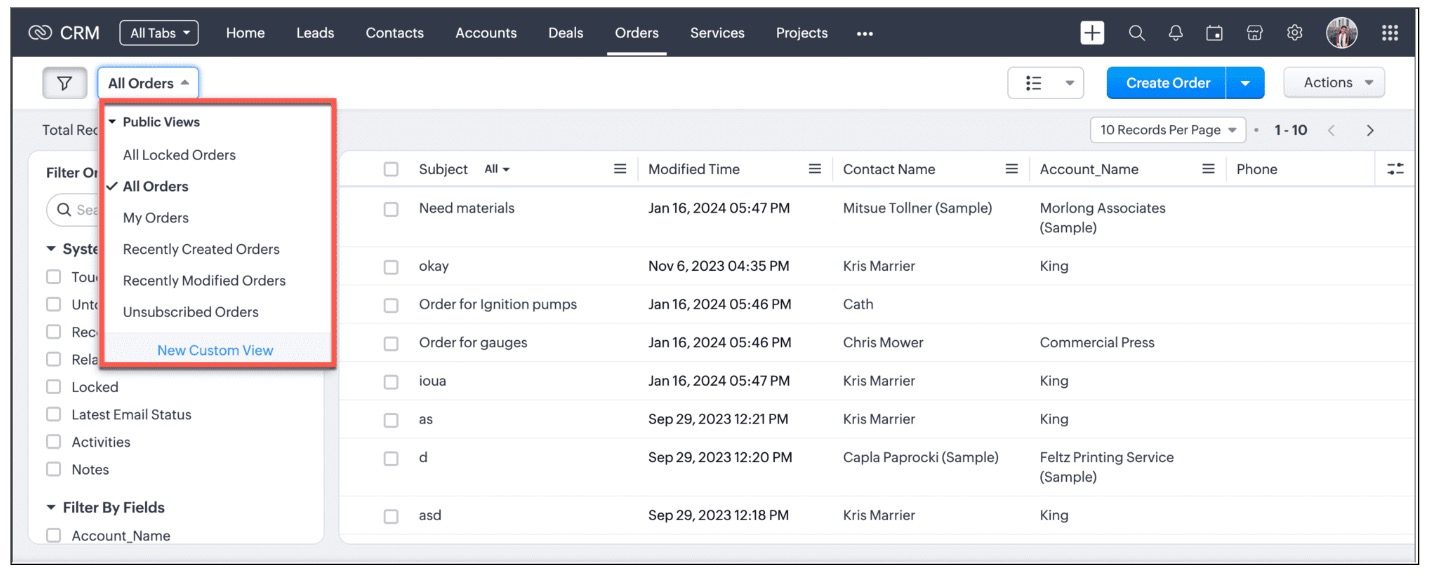
We are working on the other components in the List Page, and will let you know once they are live.
4. Other ZDKs available to customize List Views
Client Script enables you to customize List Views using the following list of ZDKs and Client Script functions.
- freezeColumns(option) - You can freeze list view and disable modifying columns.
- maskField(field_name, (length,character,reverse)) - You can mask fields in the List View
- sortByField(field_name, option) - You can sort field in the List View
- getRecords() - You can get Records in the List View
- selectRecords(criteria) - You can select Records in the List view by criteria
- selectRecordsByID(ids) - You can select Records in the List view by record ID
- clearSelection() - You can clear selected Records in the List view
- style(style_config, criteria) - You can style Records in the List View. Click here to view the related Kaizen post.
- setValue(value) - You can set the component value in the Page
- getValue() - You can Get the component value in the Page
- setVisibility(value) - You can set visibility of the component in the Page
5. Summary:
In this post, we have discussed,
- About standard and custom List Views.
- How to control the visibility of List Views using Client Script.
- How to fetch the list of views available for a module using Client Script.
- How to set your desired views for users using Client Script.
- ZDK methods available in Client Script to customize List views
6. Related Links
- Client Script Overview
- Creating a Client Script
- Client Script Events
- Client Script IDE
- Use cases of Client Script

Kaizen Collection :
Click here to view our Kaizen Collection.
Also, check our previous post - Kaizen #120 - A Guide to API Calls in Zoho CRM Sandboxes
We hope you found this post useful. We will meet you next week with another interesting topic!
If you have any questions, let us know in the comment section.
Cheers!
Topic Participants
Maadhari M
Irmyahou Azan
Ishwarya SG
Brandon
859953848@zohoclosedAccount.com
Sticky Posts
Kaizen #222 - Client Script Support for Notes Related List
Hello everyone! Welcome to another week of Kaizen. The final Kaizen post of the year 2025 is here! With the new Client Script support for the Notes Related List, you can validate, enrich, and manage notes across modules. In this post, we’ll explore howKaizen #217 - Actions APIs : Tasks
Welcome to another week of Kaizen! In last week's post we discussed Email Notifications APIs which act as the link between your Workflow automations and you. We have discussed how Zylker Cloud Services uses Email Notifications API in their custom dashboard.Kaizen #216 - Actions APIs : Email Notifications
Welcome to another week of Kaizen! For the last three weeks, we have been discussing Zylker's workflows. We successfully updated a dormant workflow, built a new one from the ground up and more. But our work is not finished—these automated processes areKaizen #152 - Client Script Support for the new Canvas Record Forms
Hello everyone! Have you ever wanted to trigger actions on click of a canvas button, icon, or text mandatory forms in Create/Edit and Clone Pages? Have you ever wanted to control how elements behave on the new Canvas Record Forms? This can be achievedKaizen #142: How to Navigate to Another Page in Zoho CRM using Client Script
Hello everyone! Welcome back to another exciting Kaizen post. In this post, let us see how you can you navigate to different Pages using Client Script. In this Kaizen post, Need to Navigate to different Pages Client Script ZDKs related to navigation A.
Nederlandse Hulpbronnen

Recent Topics
Trouble Connecting Zoho Mail via IMAP in n8n – Need Help
Hi everyone 👋, I'm trying to connect my Zoho Mail account to n8n using the IMAP Email Trigger node, but I'm facing issues getting it to work fully. ✅ Here's what I’ve done so far: ✅ IMAP access is enabled in my Zoho Mail settings ✅ I’m using the correctUnable to send message; Reason:554 5.1.8 Email Outgoing Blocked
Hi, I sent few emails and got this: Unable to send message; Reason:554 5.1.8 Email Outgoing Blocked And now I have few days since I cant send any email. Is there something wrong I did? Also can someone fix this pleaseChanges to the send mail Deluge task in Zoho CRM
Hello everyone, At Zoho, we continuously enhance our security measures to ensure a safer experience for all users. As part of our ongoing security enhancements, we're making an important update on using the send mail Deluge task in Zoho CRM. What's changing?Page Rules in Forms
🚀 Dynamic Page Navigation Implementation I successfully implemented dynamic page navigation based on a user's radio button selection. The goal was to direct users to a specific, corresponding page while ensuring they only interact with the flow determinedCancellation of written-off invoice
Hi, Can I know when we cancel the write off (write back), in which FY, the reversal is recorded. It doesn't ask as to when the write off should be cancelled to reflect!. It shouldn't reflect in the year in which the invoice was written off since the YearCreate Invoice automated with Package
Does anyone knows how to create an invoice from a SO when we have created the package? We do these manually. and validate that the product packed is the product invoiced (if the order is partially packed) Regards, JSI want to create a mailing list, NOT a group.
Can I create a mailing list in Zoho mail? I just want to be able to make a list of email addresses and give the list a name. Then when I type the list name, the list of email addresses will be automatically listed. When I create a group it sends an emailERROR CODE :554 - Your access to this mail system has been rejected due to poor reputation of a domain used in message transfer
This message was created automatically by mail delivery software. A message that you sent could not be delivered to one or more of its recipients. This is a permanent error. *****, ERROR CODE :554 - Your access to this mail system has been rejected dueno me llegan los correos a Zoho mail
No puedo recibir correos pero sí enviarlos, ya hice la modificación de MX y la verificación de teléfonos, qué es lo que ocurre? graciasGroup Calendar as Default for adding new events, etc?
Hi, I want to make the group calendar (that I created, if that makes a difference) the default for anything new I add to the calendar. How can I do that? thanks.Bookmark Loading is Buffering
Hi, i clicked on the bookmark tab, around yesterday and since then it's been constantly buffering and doesn't allow me to access the mail's i have tried login in and out but of no help also trying to share a screenshot of the issue around 232 kb size,Zoho Webinar custom registration fields into Zoho CRM
I am pushing webinar registrations into zoho crm as leads and this is working fine. I have added a few custom fields to my webinar registration and I wish for these fields values to get mapped into the resulting CRM lead record. I am not seeing anywhereGitLab Extension for Zoho Desk: Connecting support and development for faster resolutions
Hello everyone! We’re excited to introduce the GitLab Extension for Zoho Desk, an integration that bridges the gap between support and development teams. This allows tickets to be converted into actionable GitLab issues for faster resolutions, betterDownload Google Drive Shared Image/File Using Deluge – Complete Guide
Download Google Drive Shared Image/File Using Deluge – Complete Guide When working with Google Drive share links inside Deluge, many developers face a common challenge: 👉 How can we download a Google Drive file directly using Deluge? This article explainsHow to update Acuity appointment fields from Zoho Flow?
Hi, I need help with Zoho Flow → Acuity Scheduling integration. What I’m doing Appointment created in Acuity Zoho Flow creates a Zoho Calendar event I want to send the Zoho Calendar Event UID back into Acuity (into a custom form field) This is so thatNo horizontal scroll bar in reports
Hi support team, I created a pivot table report which contains many columns (in my application about 15). The problem is that there is no bottom scroll bar to display colums that does not fit within the browser page. I saw that it was possible to resize colums, but colums sizes are not saved within the session. So could you add scroll bar, and eventually make colums sizes stored in the user session ? Best regards,Zoho Map integration tasks have changed - you need to "Locate all instances of Zoho Map integration tasks in your Deluge scripts by searching for the v1 marker... before 16 January 2026"
Details of an issue specific to Zoho CRM + Deluge Functions (originally posted in this forum) can be found here: https://help.zoho.com/portal/en/community/topic/zoho-map-integration-tasks-have-changed-you-need-to-locate-all-instances-of-zoho-map-integration-tasks-in-your-deluge-scripts-by-searching-for-the-v1-markerfilter broke my data
I uploaded a file recently from Sheets and it has top 2 rows frozen, with table headers in second row and each one is filterable. somehow my first 2 columns became unfiltered and no matter what I do I cannot reapply the filter?? also didn't realize theyRequest to remove domain "greentechcoatings.vn" from previous Zoho account
Hello Zoho Support, I would like to register the domain "greentechcoatings.vn" in my new Zoho Mail account, but I receive the message "This domain is already associated with another account". Please remove the domain from any previous/unknown accountTrigger actions in third-party apps using Zoho Flow
Greetings, I hope you're all doing well. We're excited to share an enhancement to Bigin's workflow capabilities. Zoho Flow Actions are now available in Bigin, enabling you to automate tasks across third-party applications directly from your workflow andEnroll, Script, Win: Hackathon 2025!
Hello CRM Developers! Are you ready to create some magic with Client Script, Widgets and Functions in Zoho CRM? Let’s make Hackathon 2025 an unforgettable adventure! The Zoho Developer Community Hackathon 2025 is here, and it’s your time to shine! REGISTERZoho Help Desk - Not receiving emails
Hello… I am on your trial version of help desk… and I am having trouble getting emails from Zoho Help Desk to my MS Outlook Exchange Server… So when a customer sends ticket request I am not getting an email with a notification? I have read your articlesAlmost all Flows are being queued
A few days ago I saw one of my Flows status was Queued. This was the first time this had ever happened. Now, almost every Flow that triggers is Queued for at least a few minutes. If I re-trigger the Flow (which causes separate problems) they sometimesEmployment Contract / HRMS Documents - Zoho People
How do I create customized HR documents for disbursal from Zoho People ? Example, say offer letters ? appointment letters ? Memos ? We want to be able to preset these in one or ther other form and issue them to employees who are in Zoho People.Live webinar: Craft and deliver impactful slides with Show’s desktop apps
If you love the comfort of working on your desktop and want a setup that keeps you focused and uninterrupted, this session is made for you. We’re excited to invite you to our upcoming live webinar: "Craft and deliver impactful slides with Show's desktopEnhancements to Bigin's forms
Greetings, I hope all of you are doing well. We're happy to announce a few recent enhancements we've made to Bigin's forms. We'll go over each one in detail. Merge field support in auto-filled forms The auto-fill option in Bigin's forms lets you predefineTable dimensions
I try changing the dimensions of the table on my computer but it doesn't change. Do I have to be a premium member or does it only work on the app?Direct link to Record Summary
Hi everyone, In one of my reports, I have built a Record Summary template to display the details of one record. I would like to be able to link directly to this Record Summary once I submit a new record, without having to go to the list of records first and click on View. Is there a possibility to do so ? Should I use the URL by passing some parameters ? Thank you very much for your help ! GuillaumeAmendment effective date
Hi everyone, I noticed that the amendment effective date mentionned in my amendment is not right. Indeed, when a contract is amended several times, it states the previous amendment and their effective date. However, the effective date stated is alwaysShow both Vendor and Customers in contact statement
Dear Sir, some companies like us working with companies as Vendor and Customers too !!! it mean we send invoice and also receive bill from them , so we need our all amount in one place , but in contact statement , is separate it as Vendor and Customer,STOCK history in zohosheets
is it possible to get historical stock value using stock function in zoho sheets? i could not see from and to period in the helper document.Auto sync Photo storage
Hello I am new to Zoho Workdrive and was wondering if the is a way of automatically syncing photos on my Android phone to my workdrive as want to move away from Google? ThanksAgent password reset
Hi Zoho support, I would like to ask if there is a way the admin can reset a password of an agent? RegardsCan receive but not send messages in Zoho Mail
Hello! I was able to configure my email client successfully in that I can receive messages just fine. However, when I send messages out, they seem to go out fine (I don't receive any errors or anything), but the recipient does NOT receive those messages.Mail is sent twice!
Been using Zoho for a while now. Installed Zoho for someone else and some weird things are happening. Mails are being sent twice. He is using Thunderbird as an email client. I already read about email being duplicated in the sent folder. But in my caseCan't login IMAP suddenly
Since this evening I'm getting the error: You are yet to enable IMAP for your account. Please contact your administrator... IMAP always been enabled in my account and was workign fine for the past 7 years. Already tried turning IMAP off and on again.Sending of username did not succeed: Mail server pop.zoho.com responded: User already specified
I am having issues receiving emails from Zoho in Thunderbird. I am getting the above error. The first error tells me Authentication failed, and prompts me to enter in my password. Then I get the above error. I can receive emails when I log in online toBug tracking
Hi, does anyone know how to track errors during picking or packing? This way I can keep track and see how to improve and prevent errors in this area.Migration of corporate mail environment from Yandex 360 to Zoho mail
I have to migrate a corporate mail environment with an existing domain from Yandex 360 to Zoho mail. It is vital to migrate all users with all the data. I have read the article on this topic using MacMister Email Backup Software just now and have someI'm unable to send mail pthrough Zoho SMTP programmatically
This has been working for years, but today it's been offline all day long. I see nothing anywhere on your site about this. I'm not the only one experiencing this. Downdetector has a spike of reports todayNext Page