Kaizen #129 : Client Script Support for Blueprints

Kaizen #129 : Client Script Support for Blueprints

Hello everyone!

Welcome to another week of Kaizen. Today, let us discuss about how you can use Client Script during a Blueprint transtion to meet your requirements. This Kaizen post will provide solution for the post - Need non-mandatory fields in blueprint pop-up using Client Script.


In this Kaizen post,
  1. What is a Blueprint?
  2. Blueprint event in Client Script
  3. ZDKs and methods available in Client Script related to Blueprint
  4. Use Case - During a blueprint transition, show a pop up with fields that are not mandatory
  5. Solution
  6. Summary
  7. Related Links
  8. Kaizen Collection


1. What is a Blueprint?

Blueprint is an online replica of a business process. For instance, leads generation and follow-up, deals closure and order management. Each of these processes has several stages, and different teams may be responsible to complete each stage. At this point, one needs to take a moment to see if the CRM dictates how these processes should be executed. It captures every detail of your entire offline process within the software. Click here to know more about Blueprint in Zoho CRM.

Moving from one stage of a blueprint to the next stage  is called as Blueprint transition.

2. Blueprint event in Client Script

Whenever you want to meet your custom requirements in Zoho CRM before a Blueprint transition happens, you can use the beforeTransition event type available in Client Script. This event occurs before the transitions occur, as per the process flow designed in the Blueprint. You can add the "return false" statement at the end of the script to prevent the blueprint transition. Click here to know more about the events in Client Script.

3. ZDKs and methods available in Client Script related to Blueprint

Here is the list of ZDKs and methods using which you can code in Client Script.

ZDK.Page.getBlueprintTransitionByID()    -       You can get the blueprint transition by id.

ZDK.Page.getBlueprintTransitions().          -       You can get all the blueprint transitions in page.

getId()                                                            -       You can get the id of transition using Blueprint transition object.

getName()                                                     -        Get the name of transition using Blueprint transition object.

initiate()                                                         -        Initiate the transition using Blueprint transition object.


Click here to view the detailed documentation of ZDKs and methods related to Blueprint in Client Script.

4. Use Case

Zylker is a manufacturing organisation which uses Blueprint to manage the various updates in the status of Leads. Below is the blueprint configuration. For the transition "Gather details", the field  "Alternate Number" will be prompted as mandatory. Without entering this detail, the transition cannot proceed.
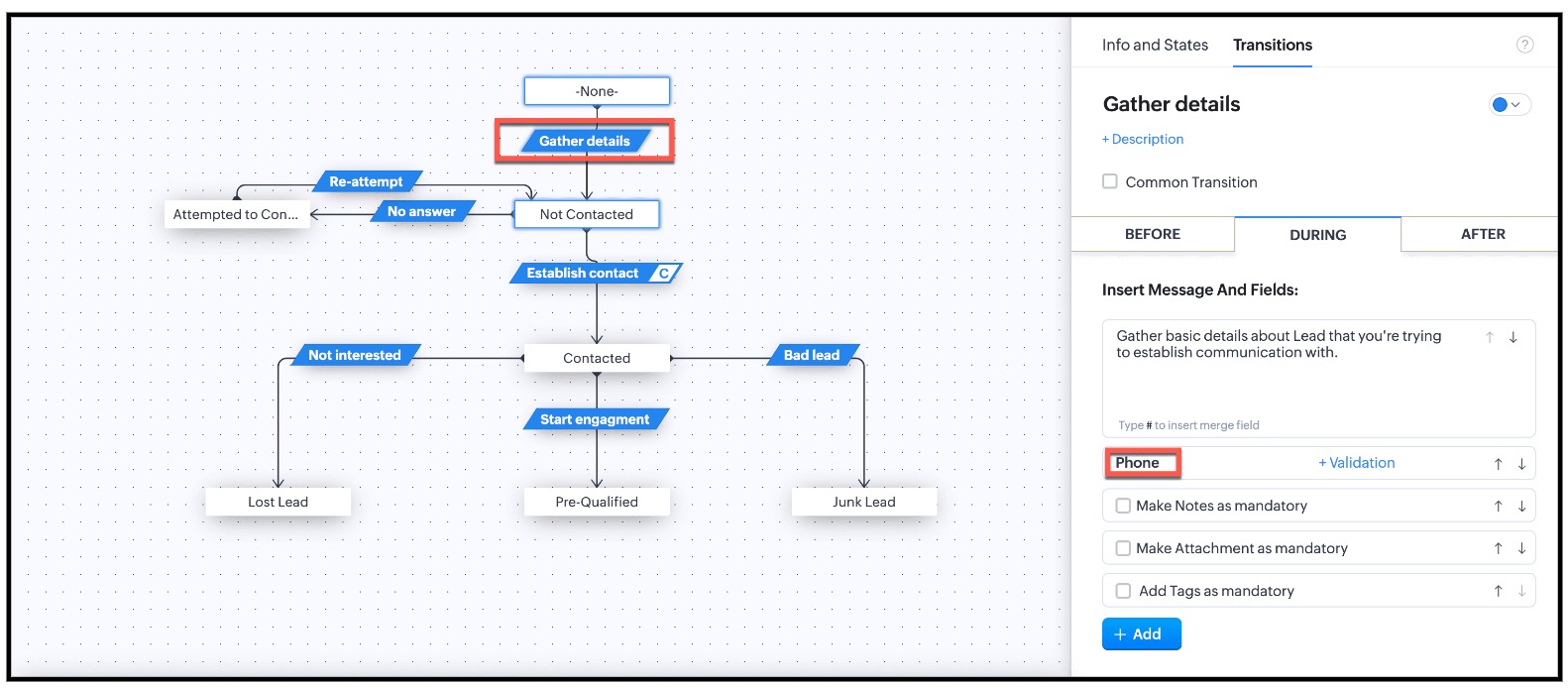


This is the existing Blueprint.
Now, the Admin wants to prompt the user to enter a value for the Alternate Number, but it should not be mandatory for the transition "Gather Details".

4. Solution

Currently in Blueprint the fields in the pop-up are mandatory. You can achieve non-mandatory fields in a pop-up using Client Script and update the values to that record. However you should not add the fields in the "During" phase of the "Gather Details" transition in Blueprint, to achieve this non-mandatory pop-up using Client Script. This solution will work for the requirement raised in this post.

For this,  you need to create a Client Script and use the "Before Transition" type of "Blueprint" Event.  
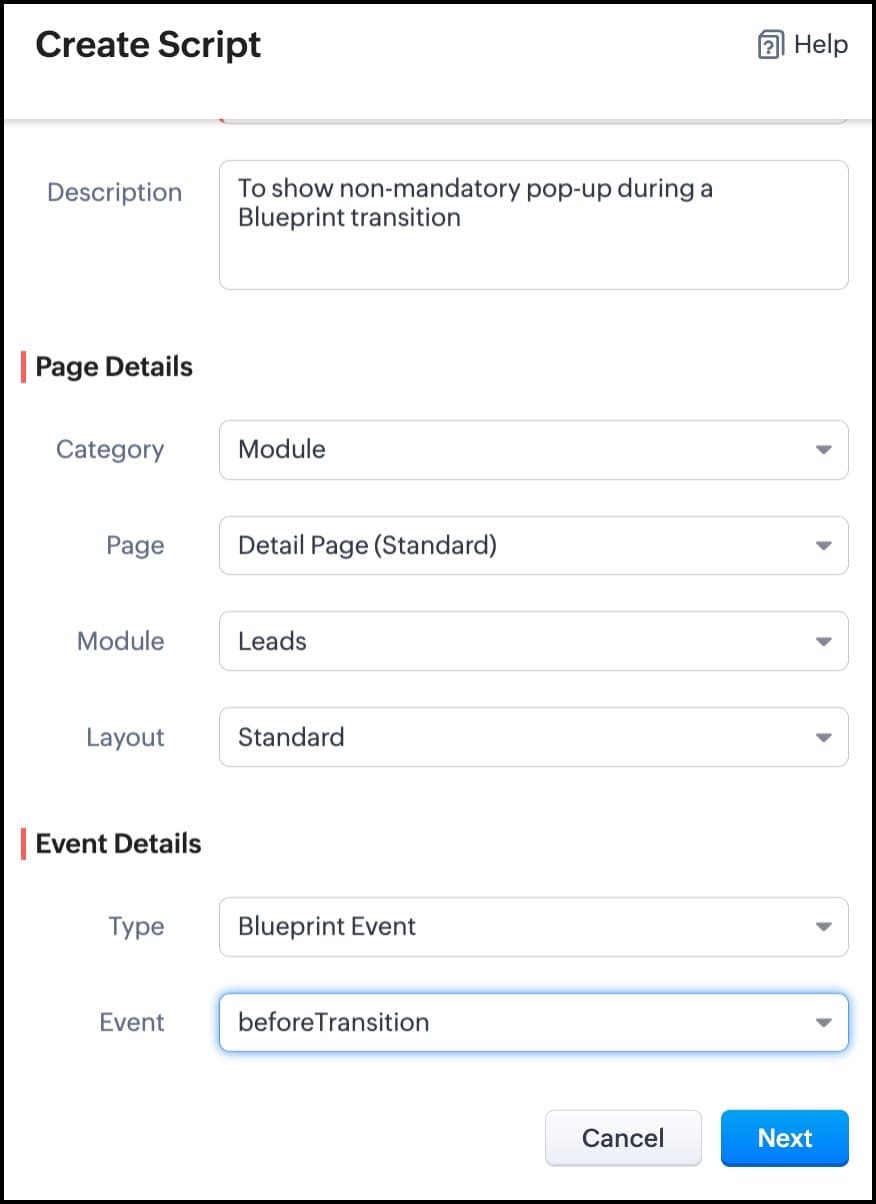


For more details on how to configure a Client Script, click here. Once you give the module and event details, you can see the Client Script IDE's Editor.
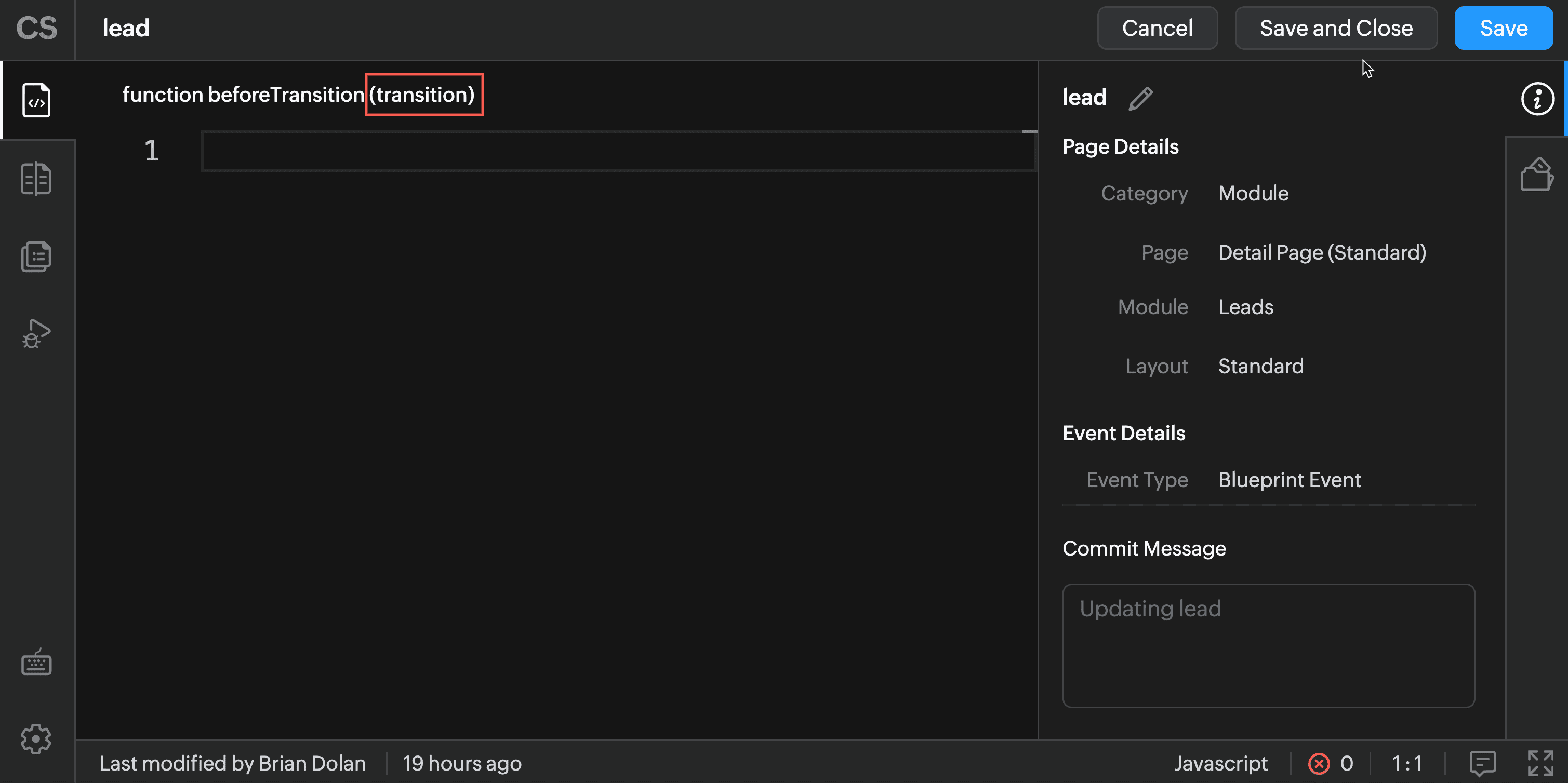


The argument "transition" will hold the the details of current Blueprint transition.

In the Client Script IDE, type the below script and click Save.

 if (transition.name == 'Gather details') {
// To show pop up and get the Alternate Number and update the 
//record's Alternate Number 
var var_alt = ZDK.Client.getInput([{ type: 'text', label: Alternate Number}], 'Give these details', 'OK', 'Cancel');

    if (var_alt != null) {

        var lead = ZDK.Apps.CRM.Leads.fetchById($Page.record_id);
        lead.alternate_number = var_phone.toString();
        var response = lead.__update();
    }

    else {

        ZDK.Client.showMessage('Details have been gathered successfully' });

    }

 
   $Client.refresh();// to refresh the page

}

The above script will get executed before every transition happens in the Blueprint. So, in the script, the code is added based on the transition name. As per the requirement, when the transition name is "Gather details" , you can show the pop-up through Client Script's getInput() function. Once you capture this value you can update the alternate number using the CRM API ZDKs. $Page.record_id will return the id of the current Lead record.

Here is how the Client Script works.
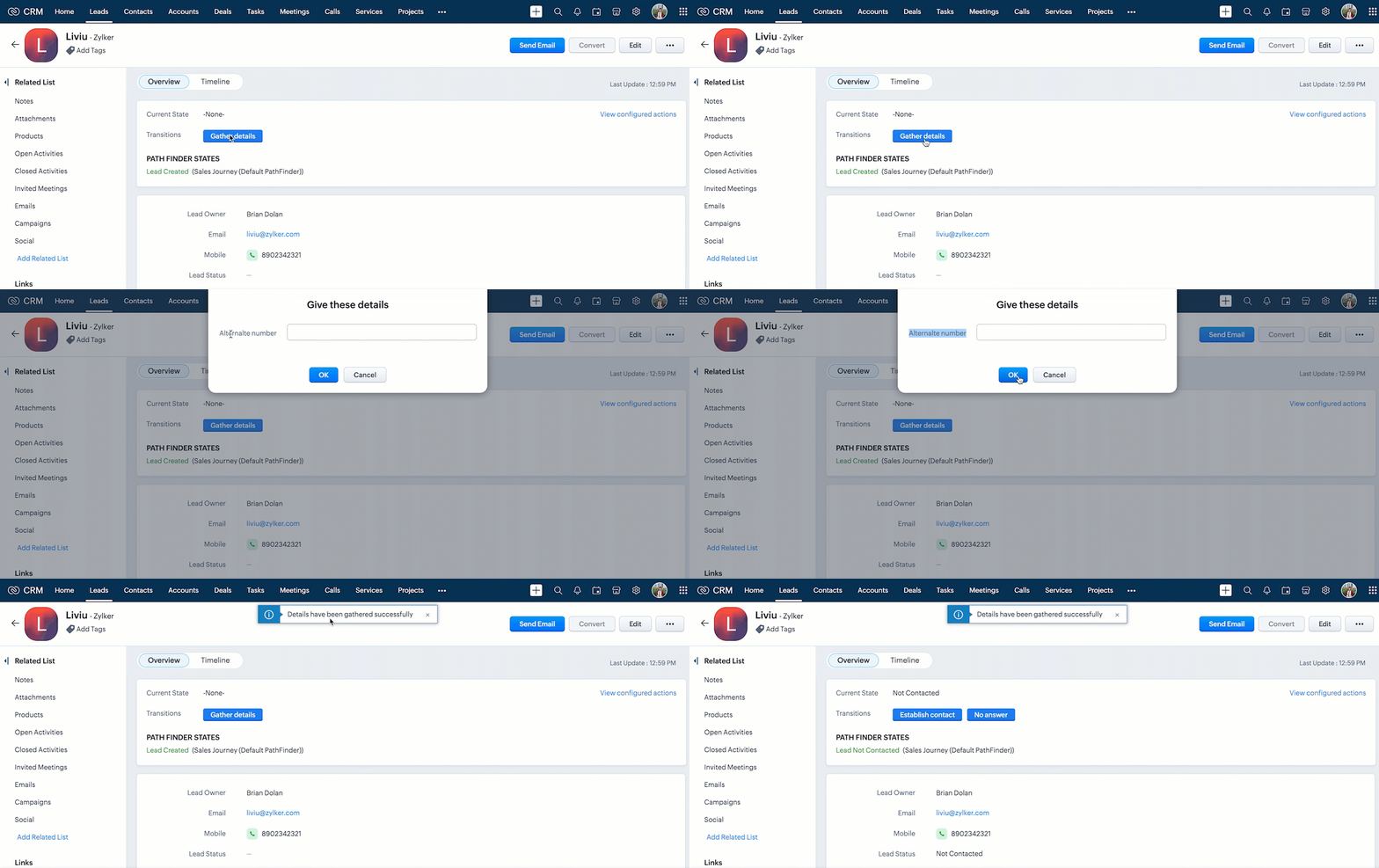


You can see that the transition happens even after the "Alternate Number" field is not filled by the user.


Note : 

1.  If you want to prevent a Blueprint Transition you need to add "return false" statement in the Script.      

2.  The blueprint event and the related ZDKs are  available only for Detail(Standard) Page and Detail(Canvas) Page
5. Summary

In this post, we have discussed,
  • About Blueprint events in Client Script.
  • The ZDKs and methods related to Blueprint.
  • How to configure a Client Script to trigger before a Blueprint transition
  • How to open a non - mandatory fields pop up before a blueprint transition
  • How to update current record using Update Records API through Client Script
  • How to refresh a page using Client Script
  • How to prevent a Blueprint Transition
6. Related Links
Kaizen Collection : 


Cheers!
Maadhari M


    • Sticky Posts

    • Announcing the new SKILL.md for Zoho CRM and the updated OAS repository!

      We are introducing a new zoho-crm skill to make working with Zoho CRM Developer tools (like APIs, functions, widgets, client scripts, queries etc) easier and faster, with the help of AI in your preferred AI harness like Claude Code, Codex, Cursor, VSCode
    • Kaizen #256 - Build an Arrival Readiness Web Tab in Zoho CRM

      Hi everyone! Welcome back to the Kaizen series! In the post, we discuss a use case in hospitality industry: how an Arrival Readiness web tab widget can be used to let reception staff identify and resolve issues before arrival of guests. Use case In the
    • Kaizen #198: Using Client Script for Custom Validation in Blueprint

      Nearing 200th Kaizen Post – 1 More to the Big Two-Oh-Oh! Do you have any questions, suggestions, or topics you would like us to cover in future posts? Your insights and suggestions help us shape future content and make this series better for everyone.
    • Kaizen #226: Using ZRC in Client Script

      Hello everyone! Welcome to another week of Kaizen. In today's post, lets see what is ZRC (Zoho Request Client) and how we can use ZRC methods in Client Script to get inputs from a Salesperson and update the Lead status with a single button click. In this
    • Kaizen #222 - Client Script Support for Notes Related List

      Hello everyone! Welcome to another week of Kaizen. The final Kaizen post of the year 2025 is here! With the new Client Script support for the Notes Related List, you can validate, enrich, and manage notes across modules. In this post, we’ll explore how

    Nederlandse Hulpbronnen


      • Recent Topics

      • 【初開催! オンライン】Zoho Campaigns メール配信の基礎・活用勉強会を開催します! 10/15 参加無料

        ユーザーの皆さま、こんにちは。 Zoho コミュニティグループの中野です。 Zoho ユーザーコミュニティ初となる、メールマーケティングをテーマにしたオンライン勉強会を開催します! ▶︎イベント詳細・参加登録はこちら 今回取り上げるサービスは「Zoho Campaigns」です。 「Zoho CRMとZoho Campaignsのどちらからメールを配信すればよいか分からない」 「一斉配信はできるようになったけれど、現在のリスト管理や設定が正しいか不安」 「メールを送るだけで終わり、配信後の改善につなげられていない」
      • Marketing Tip #46: Run flash sales the right way

        A flash sale can do a lot for your store. It can clear slow-moving inventory, spike revenue on a slow day, or reward your most loyal customers. But if done carelessly, flash sales can backfire. Customers start expecting discounts, stop buying at full
      • Introducing Smart Fields in Zoho Forms

        Hello form builders! We are excited to introduce Smart Fields in Zoho Forms - a faster way to add calculations to your forms without writing formulas. Instead of creating multiple fields and configuring complex calculations yourself, you can now drag
      • Checkbox not displaying correctly in subform

        Greetings: I have shared my app (wv) with support.  I am having problems with a checkbox field not displaying correctly in a subform.  The main form is called volunteers and the subform is called volunteers_subform.  The field in question is called roles. When you access the subform by itself the checkbox lookup displays as checkboxes.  But when you view it in the main volunteers form, it displays as a multi-select dropdown instead.   I have attached jpegs showing the difference.   Any thoughts?
      • Unbundle feature for composite items

        We receive composite items from our vendors and sell them either individually or create other composite items out of them. So, there is a lot of bundling and unbundling involved with our composite items. Previously, this feature was supported in form
      • Valid characters for use in email addresses using Zoho's apps/APIs

        We have found an issue with the + sign character in zoho subs - we are allowed to create a customer with an email address that has a plus sign but the API doesn't allow the + so the billing portal is not created. We are going to prevent users from using
      • Expand Zoho Analytics Spatial Capabitlities

        Dear Analytics team Thanks for the great product - I'm a big fan on Analytics and the monthly release highlights is one of my favourite emails to receive. I'd like to request expansion and improvement of Zoho Analytics spatial data capabilities, namely:
      • Automate customer follow-ups with Sequences in Bigin

        Greetings, We hope you're all doing well! We're happy to announce a new feature that we've added to Bigin. Following up with every lead at the right time can be challenging, especially when your team is managing multiple conversations across emails, calls,
      • Displaying only unread tickets in ticket view

        Hello, I was wondering if someone might be able to help me with this one. We use filters to display our ticket list, typically using a saved filter which displays the tickets which are overdue or due today. What I'd really like is another filter that
      • Can we have an automated TDS Receivable Recon with Form 26AS of Income Tax Portal ?

        Can we have an automated TDS Receivable Recon with Form 26AS of Income Tax Portal ?
      • Customers would like to add tips when paying in Client Portal

        I am happy with the clean interface of the Client Portal. However, I am running into a challenge: my customers would like to be able to add tips/gratuities when making payments. Currently, this is very clunky because they have to 1) manually over-pay,
      • Tag Limi?

        is there any way to create more than 20 tags? 
      • prefill_data for Creator + Merge & Sign

        Hello, Is there an option to use prefill_data for signer fields from creator? I see the option for CRM but it will not work with creator? I have tried passing the value in the signer data, and that also does not work. Alternatively, is there a way to
      • Delug script

        I have been looking at auto-update a amount (home currency) field from another module. Zoho native multicurrency was used in the other module (we have 4 here). Custom script was input with no error, but the field was not updated on trigger. Script as
      • Can I Build a Gaming Website Using Zoho? Need a Quick Roadmap

        Hi Dear Members, I want to create a gaming website using Zoho. Is it possible? My goal is to build a sleek, unique, easy-to-navigate, and fast-loading website for a gaming project. I want the site to look professional, user-friendly, and optimized for
      • Remove Due Date from Statements

        Is it possible to remove the Due Date on the Invoice transation line on statements? I have figured work arounds to get the Invoice detail on the Statement but cannot work out haw to simplify the stament by removing the "- due on xx/xx/2026" - it really
      • What Should an Agent-Native Project Workspace Look Like

        AI is moving beyond assistants that simply answer questions. With tools like MCP, agents can now interact directly with project data and perform actions. That makes me wonder: what should an agent-native project workspace actually look like? For me, it
      • unable to join meeting due to speaker issue

        unable to join meeting due to speaker issue
      • How to add formatting in zoho.cliq.postToUser(...) message?

        In a CRM Deluge function, I'm trying to use the message formatting guidelines given here: https://www.zoho.com/deluge/help/cliq/posting-to-zoho-cliq.html#message-formats My message is: message: #Title text. The result in Cliq is: #Title text. (no large
      • Marketing Tip #50: Sell digital products and use them to grow your store

        Physical products need packaging, shipping, and stock management. Digital products need none of that. Once created, they can be sold an unlimited number of times, delivered instantly, and never go out of stock. What counts as a digital product? A digital
      • Turn off Mobile Optimize

        Hello is it possible to stop the automatic mobile optimization of my site as it looks much better on a mobile in full site format rather than mobile format. Thanks
      • How to select from pricebook when creating a salesorder or quote

        I am creating a sales order and when selecting the Products I do not see any where to select from pricebooks. How do i associate this to my orders?
      • API - Available Stock Definitions

        Okay, Zoho team... your copywriters fell down on the job for this one :) I think these warrant a bit more explanation as to what they include and what they don't.
      • Cross-application Deluge calls fail when application link name starts with a number

        I encountered an issue when calling a custom function in another Zoho Creator application within the same account. The target application’s URL/application link name began with a number, similar to: 27_example_application The following cross-application
      • Transformez vos webinaires en opérations automatisées

        Organiser un webinaire, c’est bien plus que passer en direct. Il faut gérer les inscriptions, suivre les participants, envoyer les enregistrements, mettre à jour le CRM… et s’assurer que chaque étape se déroule au bon moment. L’automatisation des workflows
      • Cash Basis VAT RETURN REPORT Required in Saudi Arabia

        Zoho Books in Saudi Arabia not showing TAX RETURNS report on CASH Basis.. It only showing accrual basis. Oforur requirement is both reports (Cash Basis and Accrual Basis ) , same like indian Edition of Zoho Books showing. CASH BASIS RETURN is our Basic
      • Marketing Tip #1: Optimize item titles for SEO

        Your item title is the first thing both Google and shoppers notice. Instead of a generic “Leather Bag,” go for something detailed like “Handcrafted Leather Laptop Bag – Durable & Stylish.” This helps your items rank better in search results and instantly
      • How can I filter inactive/disable agent tickets?

        Hello, We have an user-agent that left the company and we inactive/disabled his agent. So, now I can no longer filter or search tickets that he is the current owner, or even create a rule to reassign tickets to another person when the ticket is reopen.
      • How do i move multiple tickets to a different department?

        Hello, i have several tickets that have been assigned to the wrong department.  I am talking about hundreds of automatically generated ones that come from a separate system. How can i select them all at once to move them to another department in one go? I can select them in "unsassigned open tickets view" but i can't find a "move to another department" option. I also can't seem to assign multiple tickets to the same agent in that same view. Could somebody advice?
      • Add Reauthentication Option for Zoho Bug Tracker Integration in Zoho Desk

        Hello Zoho Desk Team, We hope you're doing well. We would like to request an enhancement to the Zoho Bug Tracker integration within Zoho Desk. Current Limitation: At the moment, there is no option to reauthenticate the Zoho Bug Tracker integration in
      • Create Package From A Picklist

        Dear Zoho, Can it be made possible to create a package from a picklist? The reason our company makes a picklist is for that to become a package Our sales orders have 600-1000 items I hope that makes it clear that it's hard to delete 990 items when we
      • Migrating from Zoho Checkout to Zoho Billing

        I have an active Zoho Checkout account where I'm charging customers for subscriptions. Now I'm looking to upgrade and only use Zoho BIlling, in which my account in on read only mode at the moment. I can see is also tracking the customers and its payments.
      • Step up your lead generation game with online forms

        Hello fellow form builders,   Generating leads for your sales team gets easier when you integrate your CRM with online forms. To help show you how to use forms as part of your lead generation strategy, we have exclusive tips and tricks on how to collect, update and prioritize lead information in Zoho CRM based on form responses.  1. Create new leads If CRM software is designed to help you handle your business easily, that means getting data into it should also be easy. Check out the article on how
      • API - Bank Accounts | Reconciliation Discrepancy

        Unless I'm reading it wrong, the documentation for the Bank Reconciliations API is inconsistent with itself. https://www.zoho.com/books/api/v3/bank-accounts/#create-a-bank-reconciliation The text definition says that the transaction_id should be a string,
      • another little issue

        So to get over showing prices with VAT we used the price lists and made the prices inclusive. The problem is now on the items it wants to show the orginal retail value which makes no sense. Ideas please
      • Request to update VAT registration date for Brikz And Bolt Technical Services L.L.C S.O.C

        Dear Zoho Books Support Team, I am writing to request assistance with updating the VAT registration date to 01 June 2026 in our Zoho Books account (Organization: Brikz And Bolt Technical Services L.L.C S.O.C, TRN: 105420963800003). Currently, the system
      • Handle Leading Zeros in a Number Field

        Hi, If I use a Number Field, set with Min 7 Digits and Max 7 Digits, and enter 0000001, it will result in 1 and an error as it removes the leading zeros, the same with entering 0012340 will result in 12340 and error. So I have to use a Text Field and
      • HTML PDF Templates / Build From Scratch option not visible for Custom Modules

        Hi everyone, I am working with Zoho Books Custom Modules and trying to create a custom 4x4 package label PDF template using HTML/CSS. According to the official Zoho Books documentation for HTML PDF Templates, there should be an option like: Settings →
      • Virtual Option for Fields

        Hi, I would like to be able to choose another option other than Read-Only or Disabled, such as Virtual. And with Virtual, the field is shown on the form and avilable in rules, but NOT saved to the Database. A use case is having multiple Large Lists of
      • Prefix & Suffix on Single Line, Number, etc.

        Hi, I would like to have the same Prefix and Suffix that was added to the Unique ID on Text and Number Fields. Use case could be as basic as temperature, as per another Idea I have to use Single Line (Text) for a number that might have leading zeros today,
      • Next Page