Kaizen #140 - Integrating Blog feed scraping service into Zoho CRM Dashboard

Howdy Tech Wizards! Welcome to a fresh week of kaizen.
This week, we will look at how to create a dashboard widget that displays the most recent blog post of your preferred products/services, updated daily at a specific time. We will leverage the potential of Zoho CRM's Function, Variables, and Automation Schedules to achieve this widget.
Overview
For the use case mentioned above,
- Build and deploy a web scraping service on a cloud.
- Create a Zoho CRM variable to store the response from this web scraping service.
- Write a custom schedule function to fetch the web scraping response and update the previously created CRM variable.
- Create a dashboard widget that makes a GET API call to that specific CRM variable on page load and displays the response.
1. Create a Web Scraping Service
Develop a web scraping script in your preferred language based on your products/services' blog sites. In this demo, we have used NodeJS and the blog sites of various Zoho products. Our data requirements in the dashboard widget are the title of the latest blog, its URL, and mapping these to their respective products. Since recent posts on these pages often appear first, we have applied the following logic to scrape the sites:
- Use the axios and cheerio libraries in NodeJS to fetch and load the HTML data of the blogs in the DOM format.
- Use a getLatestBlog function that fetches the HTML data and utilizes selectors to retrieve the required information (latest blog title and page URL). This data is then mapped to their respective products and fed into a table.
The sample code for web scrapping is provided as an attachment to this post.
Deploy this NodeJS web scraping script to a server or a cloud function. In our case, we have uploaded it to Catalyst Serverless Function.
Make a note of the Function URL for the NodeJS web scraping script provided by Catalyst after hosting it. We will invoke this URL from a Custom Schedule Function.
2. Create a Zoho CRM Variable
Step 1: In your Zoho CRM, go to Setup > Developer Hub > Variables.
Step 2: Click on the Create New Variable button and provide the necessary details.

Initially, set a dummy value. Make a note of this variable ID as the response from our web scraping script will be stored in it with the help of Custom Schedule Function.
For a step-by-step guide on creating a variable, check here.
3. Write a Custom Schedule Function
Step 1: Go to Setup > Automation > Schedules in your Zoho CRM.
Step 2: Click on the Create New Schedule button and provide a name to the schedule.
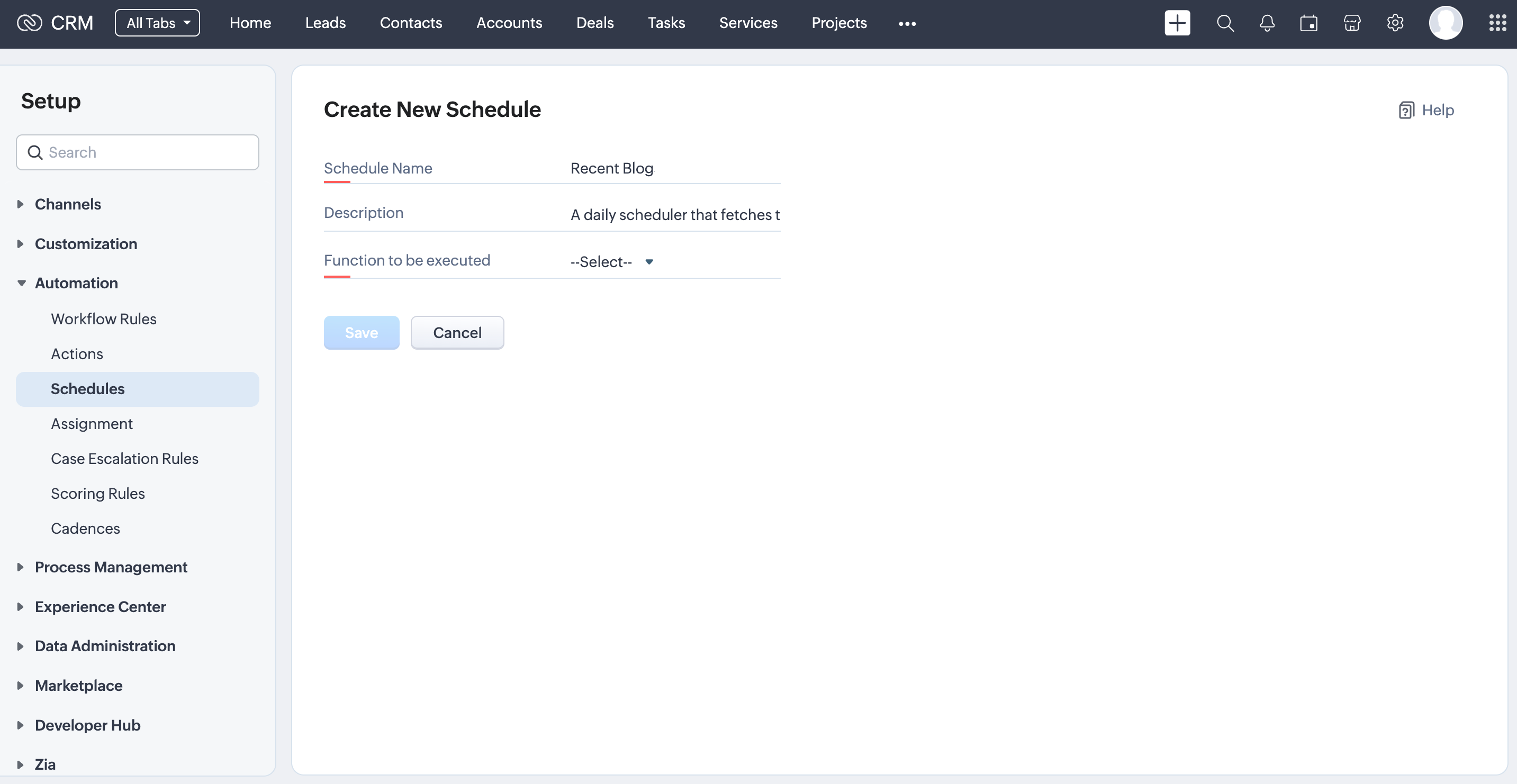
Step 3: In the Function To Be Executed field, choose Writing Function. A pop-up will appear with the necessary details to create a function.

Step 4: Once you hit the Create button, the deluge code editor appears within which you have to code the following requirements.
First, invoke the function URL of the web scraping script. This action will run the script and provide a response. Then, use this response to update the designated CRM variable that was previously set up for this task by using the Update Variable API.
You can also copy and paste the code from here.
response = invokeurl [ url :"https://blog-scrapper-789629878.development.catalystserverless.com/server/blog_scrapper_function/" type :GET ]; info response; scrape_response = response.toString(); variable = Map(); variable.put("id","5545974000007587001"); variable.put("value",scrape_response); variables_list = List(); variables_list.add(variable); param = Map(); param.put("variables",variables_list); response = invokeurl [ url :"https://www.zohoapis.com/crm/v6/settings/variables/5545974000007587001" type :PUT parameters:param.toString() connection:"crm_oauth_connection" ]; info response; |
For information on invoking API URLs, please refer to the connections help page. Note that the web scraping URL does not require any authentication, as it is a public URL.
Step 5: Click the Save button to associate the function with your schedule. Configure the frequency of the scheduler to run the function every day at a specific time.
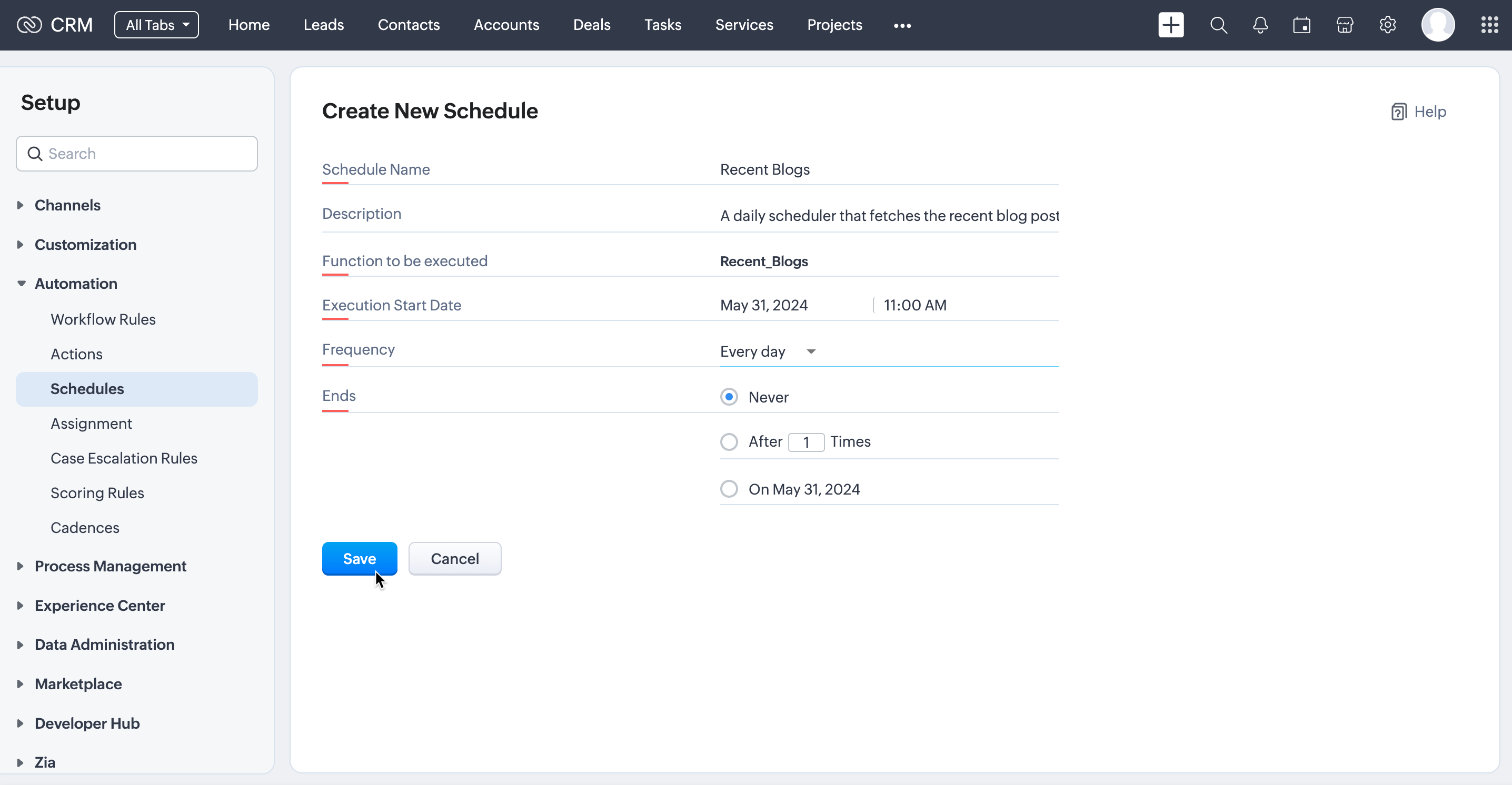
For more information about Schedules, check this help page.
Every day at 11:00 AM, the scheduler will invoke our web scraping script hosted in Catalyst and store its response in a variable. Next, we need to create a dashboard widget that displays the response stored in this variable.
4. Code your Widget
Step 1: Refer to this help page and initiate a widget project in your local environment using Zoho CLI.
Step 2: Everytime, the dashboard widget is loaded, the code in widget.html file executes an API call to the Zoho CRM Variable, which we updated in the Scheduled Function. It loads the response from the GET Variable API call into the widget.
Copy and paste the following code in your widget.html file.
<html> <head> </head> <body> <div id="blogs-table-container"></div> <script type="text/javascript"> ZOHO.embeddedApp.on("PageLoad", function () { var conn_name = "test_api_connection"; var req_data = { "method": "GET", "param_type": 1 }; ZOHO.CRM.CONNECTION.invoke(conn_name, req_data) .then(function (data) { console.log(data) const div = document.getElementById("blogs-table-container"); div.innerHTML = data.details.statusMessage.variables[0].value; }) }) ZOHO.embeddedApp.init(); </script> </body> </html> |
5. Upload the Widget and Check Your Results
Step 1: Execute the zet validate and zet pack commands to validate and pack the widget.
Step 2: Go to Zoho CRM > Setup > Developer Hub > Widgets and click the Create New Widget button.
Fill in the necessary details and upload the package.

Step 3: Let us now check the dashboard widget from the Zoho CRM Home page.

We have used the blog sites of a few Zoho products for this demo. You can replace them with your required products/services' sites.
Hope this post was insightful and help your interest.
If you have any queries, feel free to drop them in the comments section below or reach out to us directly at support@zohocrm.com. We eagerly await your thoughts and feedback on this!
Stay tuned until we circle back to you next Friday!
Cheers!
-------------------------------------------------------------------------------------------------------------------
Recommended Reads
- Variables - Overview, GET Variable API, UPDATE Variable API
- Scheduler - Create Schedules in Automation
- Functions - Overview, Deluge, Kaizen posts on Functions
- Widgets - Overview, Installation and Package, Use Cases
-------------------------------------------------------------------------------------------------------------------

Previous Kaizen: Kaizen #139: Using Functions in Client Script and Handling Timeouts | Kaizen: Home

Join us for our upcoming Zoho CRM Developer Series: Zoho CRM APIs, where you can explore more about Zoho CRM APIs. Register Now!
Topic Participants
Kiruthiga G
Max
Sticky Posts
Kaizen #198: Using Client Script for Custom Validation in Blueprint
Nearing 200th Kaizen Post – 1 More to the Big Two-Oh-Oh! Do you have any questions, suggestions, or topics you would like us to cover in future posts? Your insights and suggestions help us shape future content and make this series better for everyone.Kaizen #226: Using ZRC in Client Script
Hello everyone! Welcome to another week of Kaizen. In today's post, lets see what is ZRC (Zoho Request Client) and how we can use ZRC methods in Client Script to get inputs from a Salesperson and update the Lead status with a single button click. In thisKaizen #222 - Client Script Support for Notes Related List
Hello everyone! Welcome to another week of Kaizen. The final Kaizen post of the year 2025 is here! With the new Client Script support for the Notes Related List, you can validate, enrich, and manage notes across modules. In this post, we’ll explore howKaizen #217 - Actions APIs : Tasks
Welcome to another week of Kaizen! In last week's post we discussed Email Notifications APIs which act as the link between your Workflow automations and you. We have discussed how Zylker Cloud Services uses Email Notifications API in their custom dashboard.Kaizen #216 - Actions APIs : Email Notifications
Welcome to another week of Kaizen! For the last three weeks, we have been discussing Zylker's workflows. We successfully updated a dormant workflow, built a new one from the ground up and more. But our work is not finished—these automated processes are
Nederlandse Hulpbronnen

Recent Topics
I need to know the IP address of ZOHO CRM.
The link below is the IP address for Analytics, do you have CRM's? IP address for Analytics I would like to know the IP address of ZOHO CRM to allow communication as the API server I am developing is also run from CRM. Moderation Update: The post belowImportant Update: Google Ads & YouTube Ads API Migration
To maintain platform performance and align with Google's newest requirements, we are updating the Google Ads and YouTube Ads integrations by migrating from API v19 to the newer v22, before the official deprecation of v19 on February 11, 2026. Reference:Zoho recruit's blueprint configuration is not functioning as mapped
Current Status: Zoho Blueprint is not functioning as configured. Issue: We are moving a Candidate status in Zoho Recruit "for active file" but we encountered: "Status cannot be changed for records involved in Blueprint." This happens to various clientSuper Admin Logging in as another User
How can a Super Admin login as another user. For example, I have a sales rep that is having issues with their Accounts and I want to view their Zoho Account with out having to do a GTM and sharing screens. Moderation Update (8th Aug 2025): We are workingBlocklist candidates in Zoho Recruit
We’re introducing Block Candidate, which helps recruiters to permanently restrict a candidate from applying to current/future job openings. Once the candidate is blocked, they will no longer be able to participate in the recruitment process. This willAdmin asked me for Backend Details when I wanted to verify my ZeptoMail Account
Please provide the backend details where you will be adding the SMTP/API information of ZeptoMail Who knows what this means?Zoho Desk - Upsert Ticket
Hi Desk Team, It is common to request more information from end-users. Using forms is a great way to ensure all the required information is collected. It would be great if there were an "upsert" option on the Zoho Form -> Zoho Desk integration which wouldAll new Address Field in Zoho CRM: maintain structured and accurate address inputs
The address field will be available exclusively for IN DC users. We'll keep you updated on the DC-specific rollout soon. It's currently available for all new sign-ups and for existing Zoho CRM orgs which are in the Professional edition. Latest updateClient Side Scripts for Meetings Module
Will zoho please add client side scripting support to the meetings module? Our workflow requires most meeting details have a specific format to work with other software we have. So we rely on a custom function to auto fill certain things. We currentlyIntroducing Multiple Sandbox Types and Support for Module's Data Population
Register here for the upcoming Focus Group webinar on Multiple Sandbox | Help documentation to learn more about the new enhancements Hello everyone, Sandbox in CRM is a testing environment for users to create and test new configurations like workflowCreator Offline
We had online access setup and working on our iphones. We have just set it up on an 'Android Tablet' and it is not downloading all the images? We use it to show customers our catalogue. Any ideas. Offline components all setup on both devicesUpdated font library: New font styles and custom font options in Zoho Sheet
Zoho Sheet's font library now supports 500+ font styles in 60+ languages! The updated font library is stacked with new font styles, and some of the previously available font styles have been replaced with equivalent options. There are two ways you canEnable or disable any Field Rule!
Hello Zoho Forms Community, We are excited to announce a powerful new enhancement to Field Rules that gives you greater control and flexibility in managing your form logic! Previously, if you wanted to temporarily deactivate a field rule, you had twoMarketing Tip #20: Increase traffic with strong meta titles and descriptions
Meta titles and descriptions are what people see first on search results before they ever click through to your website. If your pages use generic titles or basic descriptions, you miss the chance to stand out, and search engines may not know which pageDifferent form submission results for submitter and internal users
I'm looking for suggestions on how to show an external submitter a few results while sending internal users all the results from the answers provided by the external user. The final page of our form has a section with detailed results and a section withKanban view on Zoho CRM mobile app!
What is Kanban? The name doesn't sound English, right? Yes, Kanban is a Japanese word which means 'Card you can see'. As per the meaning, Kanban in CRM is a type of list view in which the records will be displayed in cards and categorized under the givenNot able to delete a QC nor able to revert or create a cycle of manufacturing for QC failed Jobs
Not able to delete a QC nor able to revert or create a cycle of manufacturing for QC failed JobsDheeraj Sudan and Meenu Hinduja-How do I customize Zoho apps to suit my needs?
Hi Everyone, I'm Meenu Hinduja and my husband Dheeraj Sudan, run a business. I’m looking to tweak a few things to fit my needs, and I’d love to hear what customizations others have done. Any tips or examples would be super helpful! Regards Dheeraj Sudanis there any way to change the "chat with us now" to custom message?
is there any way to change the "chat with us now" to custom message? I want to change this textDeprecation Notice: OpenAI Assistants API will be shut down on August 26, 2026
I recieved this email from openAI what does it means for us that are using the integration and what should we do? Earlier this year, we shared our plan to deprecate the Assistants API once the Responses API reached feature parity. With the launch of Conversations,Capture Last check-in date & days since
I have two custom fields on my Account form, these are "Date of Last Check-In" and "Days Since Last Contact" Using a custom function how can I pull the date from the last check-in and display it in the field "Date of Last Check-In"? and then also display the number of days since last check-in in the "Days SInce Last Contact" field? I tried following a couple of examples but got myself into a bit of a muddle!Any recommendations for Australian Telephony Integration providers?
HI, I am looking for some advice on phone providers as we are looking to upgrade our phone system, does anybody have experience with any of the Australian providers that integrate with CRM Telephony? So far we are looking at RingCentral and Amazon Connect, and would love to hear feedback on any of the other providers you might have tried. Thank youCRM gets location smart with the all new Map View: visualize records, locate records within any radius, and more
Hello all, We've introduced a new way to work with location data in Zoho CRM: the Map View. Instead of scrolling through endless lists, your records now appear as pins on a map. Built on top of the all-new address field and powered by Mappls (MapMyIndia),Enhance Appointment Buffers in Zoho Bookings
There was previously a long-standing feature request related to enhancing the way appointment buffers work in Zoho Bookings, but it looks like the original post has been deleted. I am therefore adding a new request that Zoho Bookings adjust how appointmentSubscriptions for service call
So we install products and we want to offer a service contract for the customers yearly service calls to be billed monthly. So ideally at some point we want to email them a quote for their needs. WE will choice it our end based on the equipment. It wouldDelay in rendering Zoho Recruit - Careers in the ZappyWorks
I click on the Careers link (https://zappyworks.zohorecruit.com/jobs/Careers) on the ZappyWorks website expecting to see the job openings. The site redirects me to Zoho Recruit, but after the redirect, the page just stays blank for several seconds. I'mHow to add interviews through API
I'm trying to add an interview without much luck. The documentation gives examples of adding just about everything except an interview. However, the issue might be the way I'm formatting it, because the documentation is unclear to me. It seems as if the xml should be passed in the url, which seems unusual. I've tried the data as both plain and character escaped, but nothing seems to work, nor do I even get an error response. https://recruit.zoho.com/recruit/private/xml/Interviews/addRecords?authtoken=***&scope=recruitapi&version=2&xmlData=<Interviews> <rowConnection to other user
Zoho Cliq handles sharing of Custom OAuth Connections that require individual user logins.How to invite friends on other social media platforms to one of my group chats in arattai?
Hello, I have formed chat groups in arattai. I want to invite my friends on other social media platforms like WhatsApp/ FB to one of my groups. Different friends would be invited to different groups. How to share an invite link of one of my groups toCliq does not sync messages after Sleep on Mac
I'm using the mac app of Cliq. When I open my mac after it was in sleep mode, Cliq does not sync the messages that I received. I always have to reload using cmd + R, which is not what I want when using a chat application.Facing Issues with Sites Mobile font sizes
my page renediaz.com is facing issues mobile view, when i try to lower font sizes in home page, instead of changing the size, it changes the line spaceSet expiration date on document and send reminder
We have many company documents( for example business registration), work VISA documents. It will be nice if we can set a expiry date and set reminders ( for example 90 days, 60 days, 30 days etc.,) Does Zoho workdrive provide that option?Analytics : How to share to an external client ?
We have a use case where a client wants a portal so that several of his users can view dashboards that we have created for them in Zoho Analytics. They are not part of our company or Zoho One account. The clients want the ability to have user specific,Automatically Update Form Attachment Service with Newly added Fields
Hi, When I have a Form Setup and connected to a 3rd Party Service such as OneDrive for Form Attachments, when I later add a new Upload Field I have to remove and redo the entire 3rd Party Setup from scratch. This needs to be improved, such as when newPayroll and BAS ( Australian tax report format )
Hello , I am evaluating Zoho Books and I find the interface very intuitive and straight forward. My company is currently using Quickbooks Premier the Australian version. Before we can consider moving the service we would need to have the following addressed : 1.Payroll 2.BAS ( business activity statement ) for tax purposes 3.Some form of local backup and possible export of data to a widely accepted format. Regards Codrin MitinZoho Desk API - Send Reply to CUSTOMERPORTAL
Hello! I'll try to send a reply to Customer Portal, But the response is 500 (INTERNAL_SERVER_ERROR in service response). {"Error":"{\"errorCode\":\"INTERNAL_SERVER_ERROR\",\"message\":\"An internal server error occurred while performing this operation.\"}"}Python - code studio
Hi, I see the code studio is "coming soon". We have some files that will require some more complex transformation, is this feature far off? It appears to have been released in Zoho Analytics alreadyIssue with open-rate reporting in Zoho Campaigns
Hello, Since yesterday I’ve been experiencing an issue with the open-rate reports in Zoho Campaigns. The campaigns I send appear in the reports as if none of the emails have been opened, even though I know they have. To verify this, I replicated the campaignEmail was sent out without our permission
Hi there, One customer just reached out to us about this email that we were not aware was being sent to our customers. Can you please check on your end?Best practices for managing Project Charters, Business Case and RAID logs within Zoho?
Hello everyone, I’m currently refining our PMO setup within Zoho Projects and I’m curious how others are handling high-level governance documentation. We’ve been using the standardized Project Charter, Business Case and RAID frameworks from projectmanagertemplate.comNext Page