Kaizen #157: Flyouts in Client Script

Hello everyone!
Welcome back to another exciting edition of our Kaizen series, where we explore fresh insights and innovative ideas to help you discover more and expand your knowledge!In this post, we'll walk through how to display Flyouts in Client Script and break down the key differences between Flyouts and pop-ups in Client Script, including when to use each one.
In this Kaizen post,
1. What are Flyouts in Client Script?2. Flyout- ZDKs and functions in Client Script3. Use Case4. Solution4.a. Create a Widget for EMI Calculator.4.b. Create a Client Script to render the Widget as Flyout.5. Difference between flyout and popup in Client Script6. Summary7. Related links
1. What are Flyouts in Client Script?
Flyouts are floating User Interface that can be moved around and controlled using Client Script. Widgets can be used to render a flyout. The flyout can run independently, and any Client Script can communicate with it.
2. Flyout- ZDKs and functions in Client Script :
- createFlyout(name, config) - Creates a flyout. You can specify the heading, dimensions, and animation type using the config parameter.
- getFlyout(name) - To Fetch the details of a flyout.
- open(config, data) - Opens the created flyout.
- notify(data, options) - Notifies and waits for data in a flyout. The options can be wait: true (Client Script execution will wait for a response from the widget) or wait: false - (Client Script execution will not wait for a response from the widget)
- close() - Closes the active flyout.
Click here for more details about the ZDKs and functions related to flyouts.
3. Use Case :
Sales Advisors in a Finance Consulting Company regularly rely on an EMI calculator to help customers with loan queries. To improve their efficiency and eliminate the need to switch between different windows, the admin manager intends to integrate the calculator directly into CRM. The EMI calculator should appear on the Create Page of the Loans module and remain active until the user closes it.
4. Solution:
To achieve this in Zoho CRM, we can use Widgets to create an EMI calculator and render them using flyouts in client script whenever the create Page of Loan page loads.
4.a. Create a Widget for EMI Calculator
Install Zoho CLI, and follow the steps given in this document to create the Widget app folder. Then update the html, javascript, and css code as per your requirement.
index.html
- <!DOCTYPE html>
- <html lang="en">
- <head>
- <meta charset="UTF-8" />
- <meta http-equiv="X-UA-Compatible" content="IE=edge" />
- <meta name="viewport" content="width=device-width, initial-scale=1.0" />
- <title>Document</title>
- <link rel="stylesheet" href="style.css" />
- </head>
- <body>
- <div class="loan-calculator">
- <div class="top">
- <h2>EMI Calculator</h2>
- <form action="#">
- <div class="group">
- <div class="title">Amount</div>
- <input type="range" min="1000" value="30000" max="50000" step="500" class="loan-amount" id="loanAmount" />
- <div class="slider-label">$<span id="loanAmountValue"></span></div>
- </div>
- <div class="group">
- <div class="title">Interest Rate</div>
- <input type="range" min="5" value="6" max="100" step="1" class="interest-rate" id="interesRate" />
- <div class="slider-label"><span id="interesRateValue"></span></div>
- </div>
- <div class="group">
- <div class="title">Tenure (in months)</div>
- <input type="range" min="6" max="100" step="1" value="12" class="loan-tenure" id="tenureMonth" />
- <div class="slider-label"><span id="tenureMonthValue"></span></div>
- </div>
- </form>
- </div>
- <div class="result">
- <div class="left">
- <div class="loan-emi">
- <h3>Loan EMI</h3>
- <div class="value">123</div>
- </div>
- <div class="total-interest">
- <h3>Total Interest Payable</h3>
- <div class="value">1234</div>
- </div>
- <div class="total-amount">
- <h3>Total Amount</h3>
- <div class="value">12345</div>
- <div class="right">
- <canvas id="myChart" width="400" height="400"></canvas>
- </div>
- </div>
- </div>
- <script src="https://cdn.jsdelivr.net/npm/chart.js@3.6.2/dist/chart.min.js"></script>
- <script src="https://live.zwidgets.com/js-sdk/1.2/ZohoEmbededAppSDK.min.js"></script>
- <script src="main.js"></script>
- </body>
- </html>
- Click here to view the complete code.
- Once you have added the code, upload the zip file by following the below steps.
- Go to Setup > Developer Space > Widgets.
- Click Create New Widget and Fill in the details.
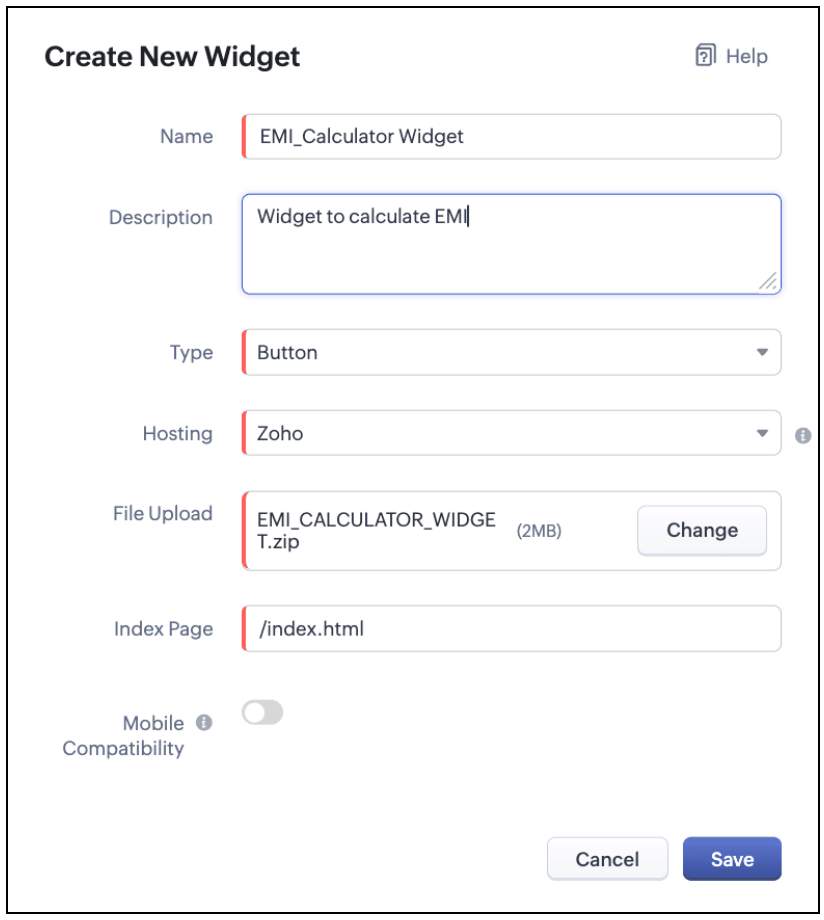
The Hosting should be "Zoho" and mention the html page of the app folder that you uploaded.

Note:
The widget should be of "button" type in order to render through a Client Script.
4.b. Create a Client Script to render the Widget as Flyout
Configure a Client Script for Create Page(Standard) Loans module, that triggers during onLoad event as shown below. Click Next. Click here to know how to configure a Client Script.

Enter the following script and click Save.
- ZDK.Client.createFlyout('EMIFlyout', {
- header: 'EMI Calculator',
- animation_type: 1,
- height: '400px',
- width: '450px',
- close_on_exit: false
- });
- ZDK.Client.getFlyout('EMIlyout').open(
- { api_name: 'EMI_CALCULATOR_WIDGET', type: 'widget' },
- { data: loanDetails }
- );
In the above script, createFlyout() will create a new flyout with header.
Below is the syntax and parameter detail.

Now Open the flyout and render the Widget in the flyout using open() method and specify the api_name of the widget.

Here is how the Client Script renders the flyout.
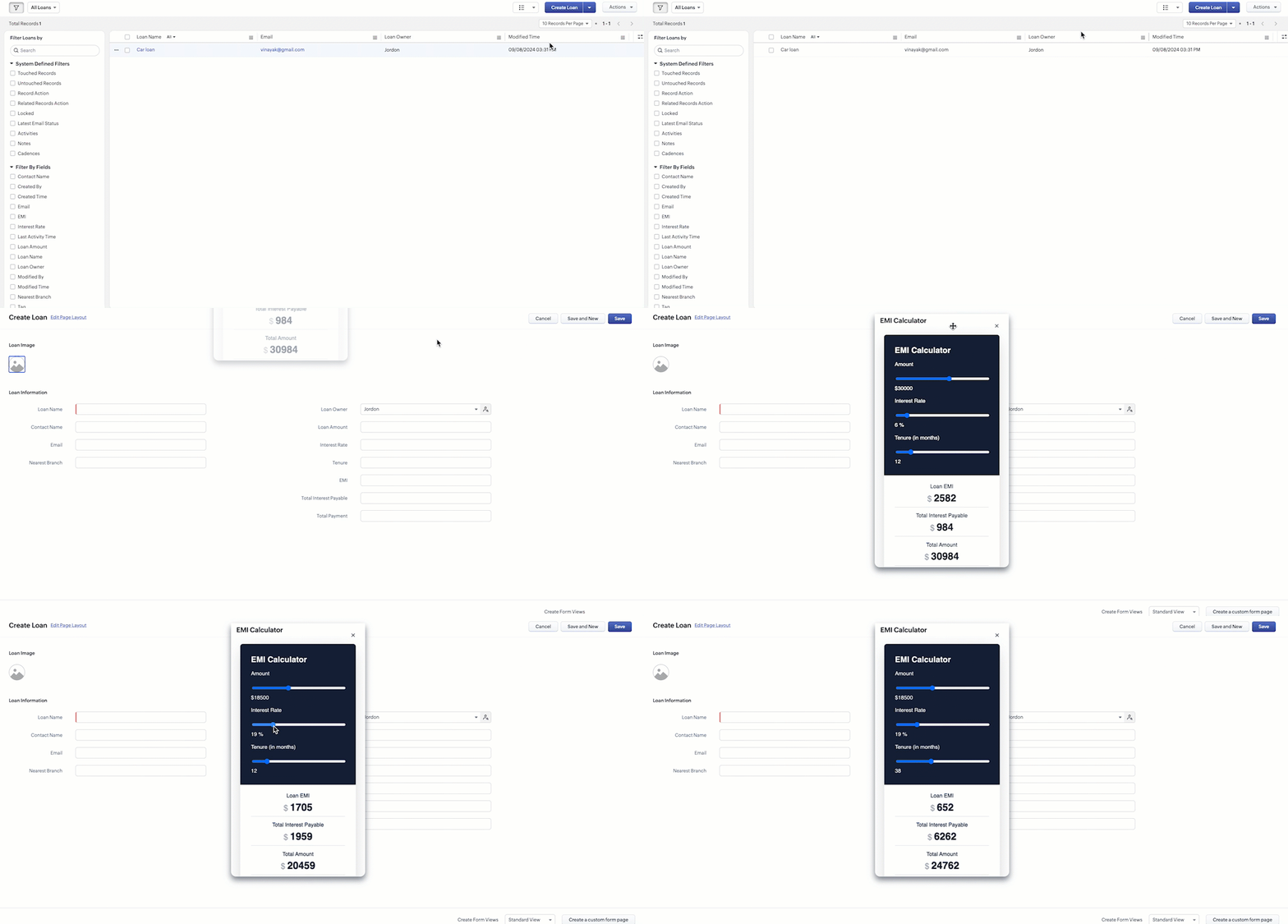
5. Difference between flyout and popup in Client Script
Flyout | Pop up |
A flyout can be moved around the page. | A pop-up cannot be moved anywhere on the page. |
It can run independently in a separate thread. The user can interact with the background interface without closing the flyout. | The user cannot interact with the background without closing the pop up. |
Use flyouts, when you need to exchange data to and fro between a Widget and Client Script. You can use ZDK.Client.sendResponse() to pass data from a widget rendered as a flyout to the Client Script. | Use popup, when you need to interrupt the screen to gather input from the user or display a message before proceeding. Use $Client.close() to pass data to the Client Script, which will also close the popup. |
In the scenario discussed in this post, if you want to make it mandatory for the user to read or interact with the EMI Calculator before entering any value in the create Page(Standard), then you can use pop-up instead of Flyout. Both pop up and flyout can be used to display widgets, and their dimensions can be altered.
Refer to this post to know how to render widgets as pop up using Client Script.
6. Summary
- In this post, we have seen,
- Flyouts in Zoho CRM.
- ZDKs and methods to render a Flyout(Widget) using Client Script.
- When to use a Flyout and when to use a pop up.
7. Related Links
 Previous Post: Kaizen #156 -Enhancing Mass Communication in Zoho CRM with a Custom Button Widget | Kaizen Collection: Home
Topic Participants
Maadhari M
Jeremy Nagel - www.smooth.tel
Kava Li
Jeganprabhu S
Ishwarya SG
Sticky Posts
Kaizen #198: Using Client Script for Custom Validation in Blueprint
Nearing 200th Kaizen Post – 1 More to the Big Two-Oh-Oh! Do you have any questions, suggestions, or topics you would like us to cover in future posts? Your insights and suggestions help us shape future content and make this series better for everyone.Kaizen #226: Using ZRC in Client Script
Hello everyone! Welcome to another week of Kaizen. In today's post, lets see what is ZRC (Zoho Request Client) and how we can use ZRC methods in Client Script to get inputs from a Salesperson and update the Lead status with a single button click. In thisKaizen #222 - Client Script Support for Notes Related List
Hello everyone! Welcome to another week of Kaizen. The final Kaizen post of the year 2025 is here! With the new Client Script support for the Notes Related List, you can validate, enrich, and manage notes across modules. In this post, we’ll explore howKaizen #217 - Actions APIs : Tasks
Welcome to another week of Kaizen! In last week's post we discussed Email Notifications APIs which act as the link between your Workflow automations and you. We have discussed how Zylker Cloud Services uses Email Notifications API in their custom dashboard.Kaizen #216 - Actions APIs : Email Notifications
Welcome to another week of Kaizen! For the last three weeks, we have been discussing Zylker's workflows. We successfully updated a dormant workflow, built a new one from the ground up and more. But our work is not finished—these automated processes are
Nederlandse Hulpbronnen

Recent Topics
Mapping a custom preferred date field in the estimate with the native field in the workorder
Hi Zoho, I created a field in the estimate : "Preferred Date 1", to give the ability to my support agent to add a preferred date while viewing the client's estimate. However, in the conversion mapping (Estimate to Workorder), I'm unable to map my customIs there a way to request a password?
We add customers info into the vaults and I wanted to see if we could do some sort of "file request" like how dropbox offers with files. It would be awesome if a customer could go to a link and input a "title, username, password, url" all securely and it then shows up in our team vault or something. Not sure if that is safe, but it's the best I can think of to be semi scalable and obviously better than sending emails. I am open to another idea, just thought this would be a great feature. Thanks,Single Task Report
I'd like a report or a way to print to PDF the task detail page. I'd like at least the Task Information section but I'd also like to see the Activity Stream, Status Timeline and Comments. I'd like to export the record and save it as a PDF. I'd like theAuto-response for closed tickets
Hi, We sometimes have users that (presumably) search their email inbox for the last correspondence with us and just hit reply - even if it's a 6 month old ticket... - this then re-opens the 6 month old ticket because of the ticket number in the email's subject. Yes, it's easy to 'Split as new Ticket', but I'd like something automated to respond to the user saying "this ticket has already been resolved and closed, please submit a new ticket". What's the best way to achieve this? Thanks, EdHow to Push Zoho Desk time logged to Zoho Projects?
I am on the last leg of my journey of finally automating time tracking, payments, and invoicing for my minutes based contact center company - I just have one final step to solve - I need time logged in zoho desk to add time a project which is associatedCannot access KB within Help Center
Im working with my boss to customize our knowledge base, but for some reason I can see the KB tab, and see the KB categories, but I cannot access the articles within the KB. We have been troubleshooting for weeks, and we have all permissions set up, customersExport to excel stored amounts as text instead of numbers or accounting
Good Afternoon, We have a quarterly billing report that we generate from our Requests. It exports to excel. However if we need to add a formula (something as simple as a sum of the column), it doesn't read the dollar amounts because the export storeswhy my account is private?
when i post on zohodesk see only agent onlyGetting ZOHO Invoice certified in Portugal?
Hello, We are ZOHO partners in Portugal and here, all the invoice software has to be certified by the government and ZOHO Invoice still isn´t certified. Any plans? Btw, we can help on this process, since we have a client that knows how to get the software certified. Thank you.500 Internal Server Error
I have been trying to create my first app in Creator, but have been getting the 500: Internal Server Error. When I used the Create New Application link, it gave me the error after naming the application. After logging out, and back in, the application that I created was in the list, but when I try to open it to start creating my app, it gives me the 500: Internal Server Error. Please help! Also, I tried making my named app public, but I even get the error when trying to do that.Client Script | Update - Client Script Support For Portals
Dear All! We are excited to announce the highly anticipated feature: Client Script support for Portals. We understand that many of you have been eagerly awaiting this enhancement, and we are pleased to inform you that this support is now live for allProfessional Plan not activated after payment
I purchased the Professional Plan for 11 users (Subscription ID: RPEU2000980748325) on 12 September 2025, and the payment has been successfully processed. However, even after more than 24 hours, my CRM account still shows “Upgrade” and behaves like aAuto Update Event Field Value on Create/Edit
Hi there, I know this question has been posted multiple times and I've been trying many of the proposed similar scripts for a while now but nothing seems to work... what might I do wrong? The error I receive is this: Value given for the variable 'meetingId'Problem with Email an invoice with multiple attachments using API
I have an invoice with 3 attachments. When I send an email manually using the UI, everything works correctly. I receive an email with three attachments. The problem occurs when I try to initiate sending an email using the API. The email comes with onlyPage Layouts for Standard Modules like CRM
For standard modules like quotes, invoices, purchase orders, etc, it would be a great feature to be able to create custom page layouts with custom fields in Zoho Books similar to how you can in Zoho CRM. For example, and my current use case, I have aNon-depreciating fixed asset
Hi! There are non-depreciable fixed assets (e.g. land). It would be very useful to be able to create a new type of fixed asset (within the fixed assets module) with a ‘No depreciation’ depreciation method. There is always the option of recording landFixed asset management
I want to know if there is any individual module for fixed assets managementOne time sale item in billing automatically detects as service
if i have some items which i don't want to add in my "item" list because its sold only for one time. but when i type item name in invoice, it (system) automatically takes it as a service and despite of HSN , it shows SAC code to be entered. if its selectable i.e. either item or service , it would be very helpful and a must have feature.Project template after project creation
How can I apply a project template AFTER the project has been created?convert the project to templet
i have some deployment ME product for different customer , i need to create a fixed template for use it rather then keeping creating this template every timeRelated Module in Sharing Rules
Zoho CRM team recently added the feature to filter records by Related Records It will be really beneficial if we can have this feature for Sharing Rules as wellAssignment Thresholds Resetting After Lead Conversion
Hello everyone, We're facing an issue with Zoho CRM's lead assignment thresholds that makes them unsuitable for our workflow. I'm hoping to find a potential workaround or solution from the community. Here’s our current process: A new lead is created automaticallyTerritory view for custom modules?
I have recently activated territories however I can't seem to find how to use territories for custom modules? These modules have territories: Contacts / Accounts / Opportunities These modules don't have territories: Buildings (custom module) andApproval Process Comments
Is it possible to view the comments entered during the approval or rejection of a record in the approval process? If not, is there a way to require a field to be completed upon approval or rejection?Login for test case
Had a few questions regarding authentication test cases and couldn't find an answer in the the docs. 1. If an app like Zoho Creator requires authentication before providing access, do I need to create a login function and add it to each test case? 2.Customer members area
Does FSM support a customer members area? If not what do you propose we use if we want the data used in FSM for customers to give them an area / login to see past orders, create new orders and general announcements.Notes created in mobile can no longer be accessed in desktop
Working with a 2013 Mac running OS 10.14.6; Desktop Notebook version 4.5.3. Using Motorola Moto G Power 5G - 2024; Android app version 6.7 I have been using Notebook for some years. Starting several weeks ago, the notes newly created ion the phone canFunction #49: Manage varying installment payments using Zoho Books
. Hello everyone, and welcome back to our series! Last week, we discussed automating the collection of fixed installment payments in Zoho Books. But what if your payment structure involves charging varying percentages of the invoice total as installments?Is it possible for contacts to "Re-enter" a workflow in Zoho Campaign?
We are currently working on a way to automatically add users to from one list to other lists based on specific criteria, but can't seem to find a native way of doing this so we are trying to use Workflows to do this. So, for example, if a user's status is set to "Active," then they should be added to the list "Active Users." If the same user's status is then set to "Paused," they should be added to the list "Paused Users" and removed from the list "Active Users." This works fine for the first goBulk upload images and specifications to products
Hi, Many users have asked this over the years and I am also asking the same. Is there any way in which we can bulk upload product (variant) images and product specifications. The current way to upload/select image for every variant is too cumbersome.Out of Office for Just One of My Alias Email
Can I set up the Out of Office Reply for Just One of my Alias Email Addresses?Can I map multiple Surveys into the CRM using the same fields?
Hello, We are a healthcare practice that offers two distinct services (Nutrition and Primary Care). We use Zoho Survey for our lead generation form (Get Started Survey), which allows people to express interest in one of the two services and even allowsDealing with API responses where integers have more than 16 digits
Hi there How do I deal with an api response contaning an int or float with more than 16 digits (before any decimal places for a float). I constantly receive the response "Unable to cast the 'BigInteger' value into a 'BIGINT' value because the input isAdd Zoho Mail for users who do not need Zoho One
We have licenses for ZOho One for teams that need to use the suite of products that Zoho One offers. We have 8 more people who only need email access and we would like to add just a Zoho Mail. They do not need the Zoho One license. We are currentlyZML vs HTML Snippet - which is better?
Are there certain use cases where one is better than the other?Load PO_Date field (Purchase Order) with current date in Deluge
Hi, I'm not a full time developer, just helping to customize our CRM, in the small company I work for. There must be something wrong with me, because I can't do something so simple as complete a field with the current date in a function using Deluge.Zoho CRM in Microsoft Power Automate Custom Connector
Hi everyone, I’m building a Power Automate flow that integrates Microsoft Bookings with Zoho CRM. The goal is to automatically create a meeting (event) in Zoho CRM whenever a new appointment is booked via Microsoft Bookings. To achieve this, I createdSpell check sucks
Come on guys, it's 2024 and your spell check is completely retarded. You gotta fix it.Zoho One Login Issue - Unable to receive OTP
Hi Support Team, I am experiencing a unique login issue with Zoho One. I am attempting to log in from India using Zoho Login credentials provided by a USA-based client. Their Zoho account is hosted on a US data center. After entering the username andIn the Zoho Creator Customer Payment form i Have customer field on select of the field Data want to fetch from the invoice from based on the customer name In the Customer Payment form i Have subf
In the Zoho Creator Customer Payment form i Have customer field on select of the field Data want to fetch from the invoice from based on the customer name In the Customer Payment form i Have subform update Invoice , there i have date field,Invoice numberNext Page