Kaizen #157: Flyouts in Client Script

Hello everyone!
Welcome back to another exciting edition of our Kaizen series, where we explore fresh insights and innovative ideas to help you discover more and expand your knowledge!In this post, we'll walk through how to display Flyouts in Client Script and break down the key differences between Flyouts and pop-ups in Client Script, including when to use each one.
In this Kaizen post,
1. What are Flyouts in Client Script?2. Flyout- ZDKs and functions in Client Script3. Use Case4. Solution4.a. Create a Widget for EMI Calculator.4.b. Create a Client Script to render the Widget as Flyout.5. Difference between flyout and popup in Client Script6. Summary7. Related links
1. What are Flyouts in Client Script?
Flyouts are floating User Interface that can be moved around and controlled using Client Script. Widgets can be used to render a flyout. The flyout can run independently, and any Client Script can communicate with it.
2. Flyout- ZDKs and functions in Client Script :
- createFlyout(name, config) - Creates a flyout. You can specify the heading, dimensions, and animation type using the config parameter.
- getFlyout(name) - To Fetch the details of a flyout.
- open(config, data) - Opens the created flyout.
- notify(data, options) - Notifies and waits for data in a flyout. The options can be wait: true (Client Script execution will wait for a response from the widget) or wait: false - (Client Script execution will not wait for a response from the widget)
- close() - Closes the active flyout.
Click here for more details about the ZDKs and functions related to flyouts.
3. Use Case :
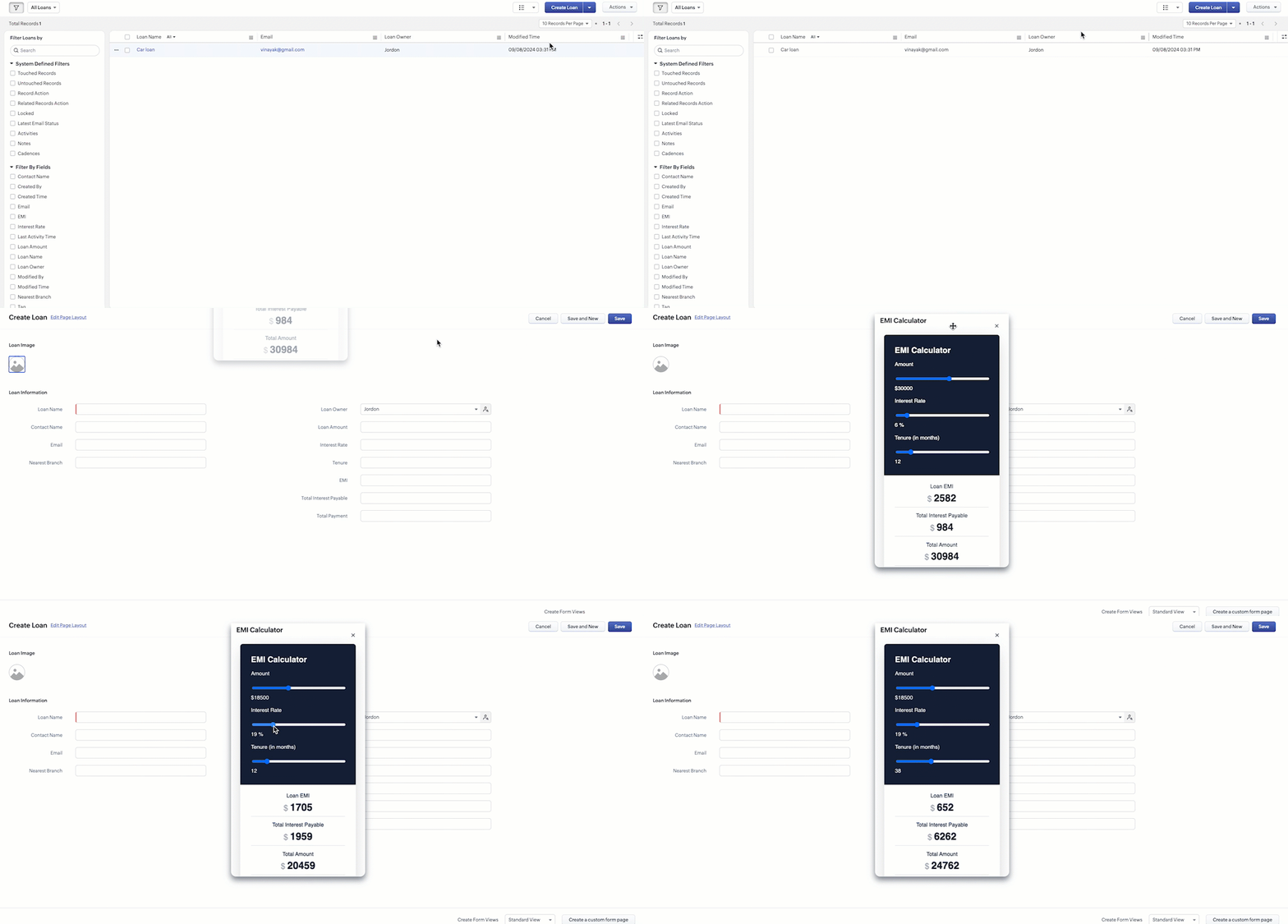
Sales Advisors in a Finance Consulting Company regularly rely on an EMI calculator to help customers with loan queries. To improve their efficiency and eliminate the need to switch between different windows, the admin manager intends to integrate the calculator directly into CRM. The EMI calculator should appear on the Create Page of the Loans module and remain active until the user closes it.
4. Solution:
To achieve this in Zoho CRM, we can use Widgets to create an EMI calculator and render them using flyouts in client script whenever the create Page of Loan page loads.
4.a. Create a Widget for EMI Calculator
Install Zoho CLI, and follow the steps given in this document to create the Widget app folder. Then update the html, javascript, and css code as per your requirement.
index.html
- <!DOCTYPE html>
- <html lang="en">
- <head>
- <meta charset="UTF-8" />
- <meta http-equiv="X-UA-Compatible" content="IE=edge" />
- <meta name="viewport" content="width=device-width, initial-scale=1.0" />
- <title>Document</title>
- <link rel="stylesheet" href="style.css" />
- </head>
- <body>
- <div class="loan-calculator">
- <div class="top">
- <h2>EMI Calculator</h2>
- <form action="#">
- <div class="group">
- <div class="title">Amount</div>
- <input type="range" min="1000" value="30000" max="50000" step="500" class="loan-amount" id="loanAmount" />
- <div class="slider-label">$<span id="loanAmountValue"></span></div>
- </div>
- <div class="group">
- <div class="title">Interest Rate</div>
- <input type="range" min="5" value="6" max="100" step="1" class="interest-rate" id="interesRate" />
- <div class="slider-label"><span id="interesRateValue"></span></div>
- </div>
- <div class="group">
- <div class="title">Tenure (in months)</div>
- <input type="range" min="6" max="100" step="1" value="12" class="loan-tenure" id="tenureMonth" />
- <div class="slider-label"><span id="tenureMonthValue"></span></div>
- </div>
- </form>
- </div>
- <div class="result">
- <div class="left">
- <div class="loan-emi">
- <h3>Loan EMI</h3>
- <div class="value">123</div>
- </div>
- <div class="total-interest">
- <h3>Total Interest Payable</h3>
- <div class="value">1234</div>
- </div>
- <div class="total-amount">
- <h3>Total Amount</h3>
- <div class="value">12345</div>
- <div class="right">
- <canvas id="myChart" width="400" height="400"></canvas>
- </div>
- </div>
- </div>
- <script src="https://cdn.jsdelivr.net/npm/chart.js@3.6.2/dist/chart.min.js"></script>
- <script src="https://live.zwidgets.com/js-sdk/1.2/ZohoEmbededAppSDK.min.js"></script>
- <script src="main.js"></script>
- </body>
- </html>
- Click here to view the complete code.
- Once you have added the code, upload the zip file by following the below steps.
- Go to Setup > Developer Space > Widgets.
- Click Create New Widget and Fill in the details.
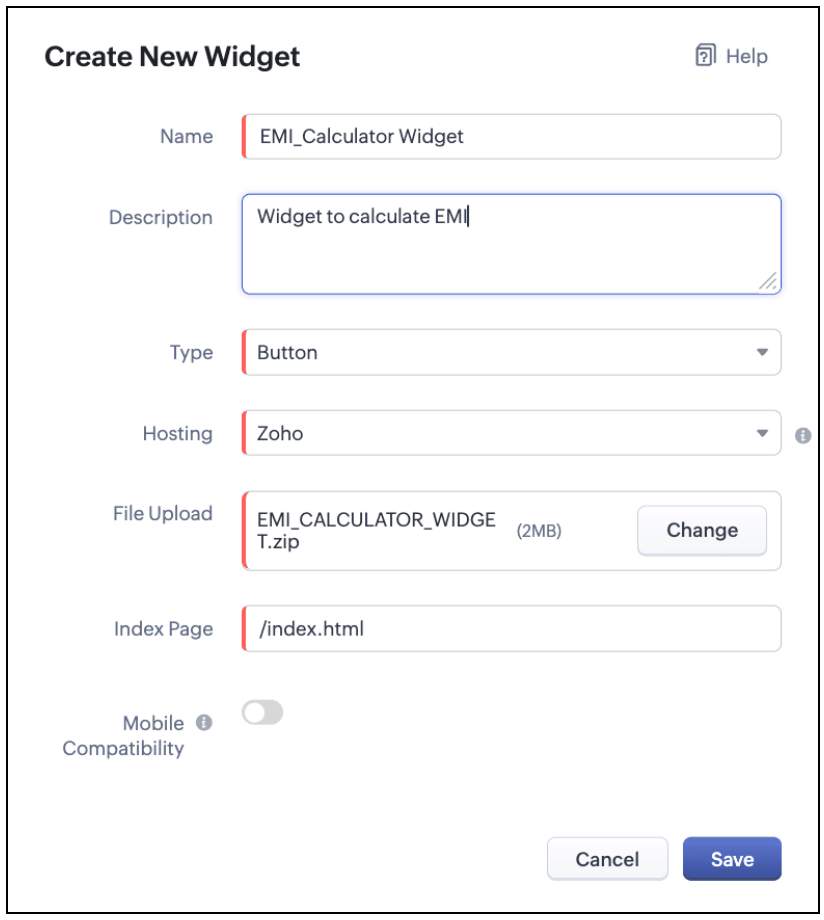
The Hosting should be "Zoho" and mention the html page of the app folder that you uploaded.

Note:
The widget should be of "button" type in order to render through a Client Script.
4.b. Create a Client Script to render the Widget as Flyout
Configure a Client Script for Create Page(Standard) Loans module, that triggers during onLoad event as shown below. Click Next. Click here to know how to configure a Client Script.

Enter the following script and click Save.
- ZDK.Client.createFlyout('EMIFlyout', {
- header: 'EMI Calculator',
- animation_type: 1,
- height: '400px',
- width: '450px',
- close_on_exit: false
- });
- ZDK.Client.getFlyout('EMIlyout').open(
- { api_name: 'EMI_CALCULATOR_WIDGET', type: 'widget' },
- { data: loanDetails }
- );
In the above script, createFlyout() will create a new flyout with header.
Below is the syntax and parameter detail.

Now Open the flyout and render the Widget in the flyout using open() method and specify the api_name of the widget.

Here is how the Client Script renders the flyout.
5. Difference between flyout and popup in Client Script
Flyout | Pop up |
A flyout can be moved around the page. | A pop-up cannot be moved anywhere on the page. |
It can run independently in a separate thread. The user can interact with the background interface without closing the flyout. | The user cannot interact with the background without closing the pop up. |
Use flyouts, when you need to exchange data to and fro between a Widget and Client Script. You can use ZDK.Client.sendResponse() to pass data from a widget rendered as a flyout to the Client Script. | Use popup, when you need to interrupt the screen to gather input from the user or display a message before proceeding. Use $Client.close() to pass data to the Client Script, which will also close the popup. |
In the scenario discussed in this post, if you want to make it mandatory for the user to read or interact with the EMI Calculator before entering any value in the create Page(Standard), then you can use pop-up instead of Flyout. Both pop up and flyout can be used to display widgets, and their dimensions can be altered.
Refer to this post to know how to render widgets as pop up using Client Script.
6. Summary
- In this post, we have seen,
- Flyouts in Zoho CRM.
- ZDKs and methods to render a Flyout(Widget) using Client Script.
- When to use a Flyout and when to use a pop up.
7. Related Links
 Previous Post: Kaizen #156 -Enhancing Mass Communication in Zoho CRM with a Custom Button Widget | Kaizen Collection: Home
Topic Participants
Maadhari M
Jeremy Nagel - www.smooth.tel
Kava Li
Jeganprabhu S
Ishwarya SG
Sticky Posts
Kaizen #198: Using Client Script for Custom Validation in Blueprint
Nearing 200th Kaizen Post – 1 More to the Big Two-Oh-Oh! Do you have any questions, suggestions, or topics you would like us to cover in future posts? Your insights and suggestions help us shape future content and make this series better for everyone.Kaizen #226: Using ZRC in Client Script
Hello everyone! Welcome to another week of Kaizen. In today's post, lets see what is ZRC (Zoho Request Client) and how we can use ZRC methods in Client Script to get inputs from a Salesperson and update the Lead status with a single button click. In thisKaizen #222 - Client Script Support for Notes Related List
Hello everyone! Welcome to another week of Kaizen. The final Kaizen post of the year 2025 is here! With the new Client Script support for the Notes Related List, you can validate, enrich, and manage notes across modules. In this post, we’ll explore howKaizen #217 - Actions APIs : Tasks
Welcome to another week of Kaizen! In last week's post we discussed Email Notifications APIs which act as the link between your Workflow automations and you. We have discussed how Zylker Cloud Services uses Email Notifications API in their custom dashboard.Kaizen #216 - Actions APIs : Email Notifications
Welcome to another week of Kaizen! For the last three weeks, we have been discussing Zylker's workflows. We successfully updated a dormant workflow, built a new one from the ground up and more. But our work is not finished—these automated processes are
Nederlandse Hulpbronnen

Recent Topics
Ability to configure a schedule/shift for each user and/or crew in Zoho FSM
Hello, In our team of Field Agents, we have different shifts. Some field agent always work from 7:00 AM to 4:00 PM while others work the evening shift like 4:00 PM to 11:00 PM. Sometime shift are on weekdays only or on weekend. It would be great to beFree webinar: Streamlining customer service paperwork with the Zoho Sign extension for Zoho Desk
Hello Everyone! Have you been wondering about bridging the gap between digitised customer service and business paperwork? Join our free webinar to learn how you can do this by connecting Zoho Sign, our digital signature app, with Zoho Desk, our onlineMail Search should allow grouping by conversation like Gmail.
Having switched from gmail I have found the search function hard to use. Mostly because mail is not grouped by conversation in search. If I search for a word when looking for a conversation had with someone then sometimes 10 emails will come up from theImprove Zoho Learn updated article notifications
I noticed today while updating an article, that the notification users get says "[User Name] has published article [Article Name]..." My feedback to the product team is that it would be really helpful for an end user, if the system notification differentiatedSafari Support
Safari, the world's second largest browser, zoho desk does not officially or fully support. That needs to change.Can I get images from an "Image Upload" field in a webhook?
I want to send images from 2 "image upload" fields via a webhook. Is this possible?Ticket closure notification - all contacts cc'd on email thread
Hello, If a client sends an email to our service desk and cc's in other people that work at the same company - so that they are in the loop of the service request. When the we close the ticket, only the ticket owner (person who emailed us - which createdInactive account cleanup policy for Zoho Sign
Zoho Sign reserves the right to delete accounts that are license free and inactive for more than 120 days. The account deletion will be initiated only after the user receives prior email notice about possible data deletion and how to backup the data.Missde API documentation for Sales Receipt
Hi! I noticed that the Sales Receipt endpoint is not currently listed in your API documentation (https://www.zoho.com/books/api/v3/introduction/). Could you please provide any available temporary documentation for this endpoint, along with a detailedMulti-currency in Zoho CRM Forecast and Reports
As a company we have branches in 4 different countries with as many different currencies. Our Sales Teams would like to work with their local currency as much as possible. The Forecast module using only 1 currency is practically usable only by the salesHow to select from pricebook when creating a salesorder or quote
I am creating a sales order and when selecting the Products I do not see any where to select from pricebooks. How do i associate this to my orders?I cannot find my older documents from 2024 and 2023
I cannot find my older documents from 2024 and 2023.Customising Help Center
Hi I don't think it is possible to add custom pages to help center? We'd like to use this as a customer portal with support tickets, FAQ/Guides, Billing and contracts. Is there any plans to add a feature like this or an alternative way to do it otherTicket Approvals - External Users
The ticket approval option - we need to be able to select external users (Contacts) for approvals. Sometimes we are working with an end user and their boss needs to approve a purchase. For example, working with a cashier on a broken cash register andForce Users to Ask Answer Bot a question... First
End users will always skip talking to a bot. It would be nice if Zoho adopted the standard and forced users to first ask a question to answer bot (or zia in some fashion) and then pass to the agent if it wasn't answered. Options to force the user to speakView Answer Bot conversations?
We are trialing Zia and are experimenting with Answer Bot on our knowledge base. So far so good! Management asks me if it is possible to view Answer Bot conversations, the purpose being to look over its shoulder and confirm that it is working as desMass Email an Account
It would be nice to mass email an account stating there is an outage at their business or something specific to an account is needed to be mass communicated. Even if it makes a ticket for every Email Out to every contact in the Account. Think: the customerMultiple Topics assigned to a single Campaign
Hello, is it possible to assign multiple Topics to a single Campaign? We frequently write a content to our subscribers that spans multiple Topics and we would like to send it to all Contacts that are subscribed to at least one of the Topics. But it looksZoho Projects Fonts and Accessibility missing
I cannot find any more the tab where I can change the font in Zoho Project. I also checked the knowledgebase and there they have accessibility tab which I am completely missing. Is there some setup I am missing or is it a problem with our account?Zoho Books Custom Widgets Deprecation Error
I created a simple sample widget with zet and published it using sigma Both in the Sandbox and Production the Widgets are showing this errorProblems with PDF files in notebook
I'm evaluating Zoho Notebook as an alternative to Evernote and imported my Evernote account to Zoho Notebook. First issue is that notes in Evernote that comprise a PDF are turned into a 'group' with a single note page (that has the text from the EvernoteAPI (v3) Tasks sorting issue
We are using the v3 API for Projects. When we gat all tasks, per page of 100 tasks, we get the task info alright. But when we try to sort based on DESC(last_modified_time) we don't get the correct sort order. It is roughly sorted by the last_modified_time,Assemblies make my stock go negative
I am sure this is just the way that we are using this feature, but we use assemblies, a lot. The issue for us is the way that the relive inventory and the fact that it makes our composite item stock go negative. I have added flows to auto assemble andUser Activity Reports
I'd like to get data related to user activity. For example, Login and logout times, emails sent/received, new records created , etc. Is that currently available. I just can't seem to find anything . Thanks, DaveHelp: Populate “Contact Owner” details into Customer custom fields (for email templates) in Zoho Books
We want to send invoices on behalf of our sales agents, and include the agent’s name, email, and phone in the email body using placeholders. Plan is to copy the Customer Owner details into three Customer custom fields, so they can be used as placeholdersUndocumented Books API error message - 1000 - The requested action could not be completed. Please try again. | Unexpected error
This code sometimes throws this error 1000 - The requested action could not be completed. Please try again. | Unexpected error What does it mean? result = zoho.books.updateRecord("salesorders",organization.get("organization_id"),salesorder_id,sales_Partial payments for retainer invoices
When a customer does not pay the entire retainer invoice there is no way to apply a partial payment. PLEASE add this function.Mass Update not trigger workflows
Hi, I have performed a mass update of all records in a custom module using a custom view. I have a dummy checkbox on my module that I turn on or off - hoping to trigger all the new workflows that have been created for that module. However, no workflowsMulti-Select lookup field has reached its maximum??
Hi there, I want to create a multi-select lookup field in a module but I can't select the model I want the relationship to be with from the list. From the help page on this I see that you can only create a max of 2 relationships per module? Is that true?Generating CRM reports based on date moved in staged history
Hi everyone, I'm trying to generate CRM reports of jobs (I think these are called usually deals) based on when they were moved to a particular stage, ie all jobs that were moved to Proposal/Quote in the previous financial year. I can see from other similarModules for missed calls, emails, texts etc
Hi there. Is there a way to create a module that would automatically show a list of all inbound calls that were missed by our users, as well as any inbound SMS's, emails & WhatsApp messages. That way, a user who is available, can work through that listGoogle Sheets New Row vs. Updated
I would like to have a flow that says update Zoho CRM is there is a new row OR an updated row in Google Sheets. I would rather not have two flows. Anyone know how I can accomplish this?Ability to Set a General Email Signature for the Organization in Zoho Recruit
Dear Zoho Recruit Team, I hope you're doing well. We would like to request a feature that would allow us to set a general email signature at the organizational level within Zoho Recruit. Currently it is only possible for individual users to create theirCustom Buttons & Links Now Supported in Portals
We’ve just made portals in Zoho Recruit more powerful and customizable than ever! You can now bring the power of Custom Buttons and Links to your Candidate, Client, Vendor, and Custom Portals, enabling portal users to take direct action without recruiterLive webinar: Transform data into impactful visuals with Zoho Show
Data is frequently a core part of a presentation, whether it’s a sales pitch, project update, research report, or performance review. But when it’s just numbers on a page, the message you’re trying to convey can get buried. The real magic happens whenFile attachments not working - web version
Since Notebook announced better file attachments, I have experienced file attachments failing. When uploaded from my pc to the web version, notebook just spins. Acting like the attachment is very large. When it's 30k. If I cancel out of this, the notecardAPI - Barebones Data for Send Doc For Signiture
I am learning how to use with Zoho Sign API. I am wondering if someone can give me a bare bones JSON data sample for "Send Document For Signature". Below is the blank data that is pre-populated in postman. Seems like there is more here than the bare minimumRevenue Management: #2 How to compute revenue?
In our previous post, we discussed the revenue recognition standards under IFRS 15 and ASC 606 and the five-step model. Now, let's examine three distinct business scenarios to see how the standards and model work in practice. This will help you understandExternal lookup in CRM (as in Books)
Hello Context: We have a CRM module, similar to Deals, but for Purchasing. Once the PO is created, a link to this PO should be updated in that "deal". In Books, you can add a custom 'external' field which can look up into CRM modules. I'm asked to have"Undo Send" Feature
Would love it if TeamInbox had an "Undo Send" feature, that gives you 10 seconds or so to "undo" the sending of an email. Many other email clients already have this feature, and my clients really miss it, as it has saved them many times in the past whenNext Page