Kaizen #157: Flyouts in Client Script

Hello everyone!
Welcome back to another exciting edition of our Kaizen series, where we explore fresh insights and innovative ideas to help you discover more and expand your knowledge!In this post, we'll walk through how to display Flyouts in Client Script and break down the key differences between Flyouts and pop-ups in Client Script, including when to use each one.
In this Kaizen post,
1. What are Flyouts in Client Script?2. Flyout- ZDKs and functions in Client Script3. Use Case4. Solution4.a. Create a Widget for EMI Calculator.4.b. Create a Client Script to render the Widget as Flyout.5. Difference between flyout and popup in Client Script6. Summary7. Related links
1. What are Flyouts in Client Script?
Flyouts are floating User Interface that can be moved around and controlled using Client Script. Widgets can be used to render a flyout. The flyout can run independently, and any Client Script can communicate with it.
2. Flyout- ZDKs and functions in Client Script :
- createFlyout(name, config) - Creates a flyout. You can specify the heading, dimensions, and animation type using the config parameter.
- getFlyout(name) - To Fetch the details of a flyout.
- open(config, data) - Opens the created flyout.
- notify(data, options) - Notifies and waits for data in a flyout. The options can be wait: true (Client Script execution will wait for a response from the widget) or wait: false - (Client Script execution will not wait for a response from the widget)
- close() - Closes the active flyout.
Click here for more details about the ZDKs and functions related to flyouts.
3. Use Case :
Sales Advisors in a Finance Consulting Company regularly rely on an EMI calculator to help customers with loan queries. To improve their efficiency and eliminate the need to switch between different windows, the admin manager intends to integrate the calculator directly into CRM. The EMI calculator should appear on the Create Page of the Loans module and remain active until the user closes it.
4. Solution:
To achieve this in Zoho CRM, we can use Widgets to create an EMI calculator and render them using flyouts in client script whenever the create Page of Loan page loads.
4.a. Create a Widget for EMI Calculator
Install Zoho CLI, and follow the steps given in this document to create the Widget app folder. Then update the html, javascript, and css code as per your requirement.
index.html
- <!DOCTYPE html>
- <html lang="en">
- <head>
- <meta charset="UTF-8" />
- <meta http-equiv="X-UA-Compatible" content="IE=edge" />
- <meta name="viewport" content="width=device-width, initial-scale=1.0" />
- <title>Document</title>
- <link rel="stylesheet" href="style.css" />
- </head>
- <body>
- <div class="loan-calculator">
- <div class="top">
- <h2>EMI Calculator</h2>
- <form action="#">
- <div class="group">
- <div class="title">Amount</div>
- <input type="range" min="1000" value="30000" max="50000" step="500" class="loan-amount" id="loanAmount" />
- <div class="slider-label">$<span id="loanAmountValue"></span></div>
- </div>
- <div class="group">
- <div class="title">Interest Rate</div>
- <input type="range" min="5" value="6" max="100" step="1" class="interest-rate" id="interesRate" />
- <div class="slider-label"><span id="interesRateValue"></span></div>
- </div>
- <div class="group">
- <div class="title">Tenure (in months)</div>
- <input type="range" min="6" max="100" step="1" value="12" class="loan-tenure" id="tenureMonth" />
- <div class="slider-label"><span id="tenureMonthValue"></span></div>
- </div>
- </form>
- </div>
- <div class="result">
- <div class="left">
- <div class="loan-emi">
- <h3>Loan EMI</h3>
- <div class="value">123</div>
- </div>
- <div class="total-interest">
- <h3>Total Interest Payable</h3>
- <div class="value">1234</div>
- </div>
- <div class="total-amount">
- <h3>Total Amount</h3>
- <div class="value">12345</div>
- <div class="right">
- <canvas id="myChart" width="400" height="400"></canvas>
- </div>
- </div>
- </div>
- <script src="https://cdn.jsdelivr.net/npm/chart.js@3.6.2/dist/chart.min.js"></script>
- <script src="https://live.zwidgets.com/js-sdk/1.2/ZohoEmbededAppSDK.min.js"></script>
- <script src="main.js"></script>
- </body>
- </html>
- Click here to view the complete code.
- Once you have added the code, upload the zip file by following the below steps.
- Go to Setup > Developer Space > Widgets.
- Click Create New Widget and Fill in the details.
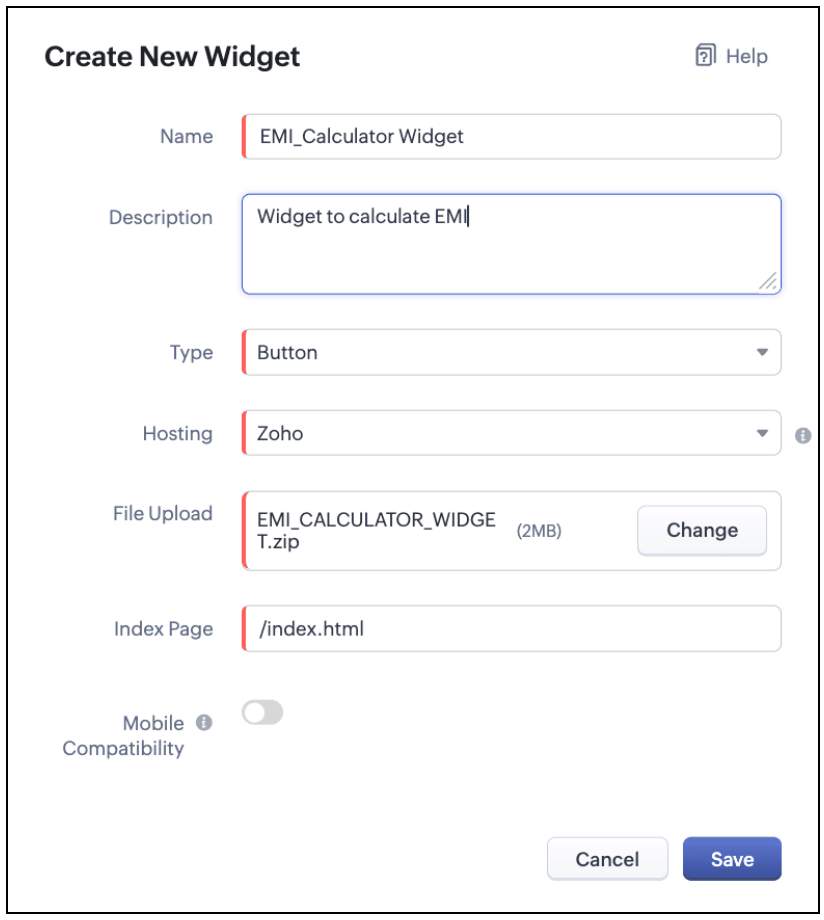
The Hosting should be "Zoho" and mention the html page of the app folder that you uploaded.

Note:
The widget should be of "button" type in order to render through a Client Script.
4.b. Create a Client Script to render the Widget as Flyout
Configure a Client Script for Create Page(Standard) Loans module, that triggers during onLoad event as shown below. Click Next. Click here to know how to configure a Client Script.

Enter the following script and click Save.
- ZDK.Client.createFlyout('EMIFlyout', {
- header: 'EMI Calculator',
- animation_type: 1,
- height: '400px',
- width: '450px',
- close_on_exit: false
- });
- ZDK.Client.getFlyout('EMIlyout').open(
- { api_name: 'EMI_CALCULATOR_WIDGET', type: 'widget' },
- { data: loanDetails }
- );
In the above script, createFlyout() will create a new flyout with header.
Below is the syntax and parameter detail.

Now Open the flyout and render the Widget in the flyout using open() method and specify the api_name of the widget.

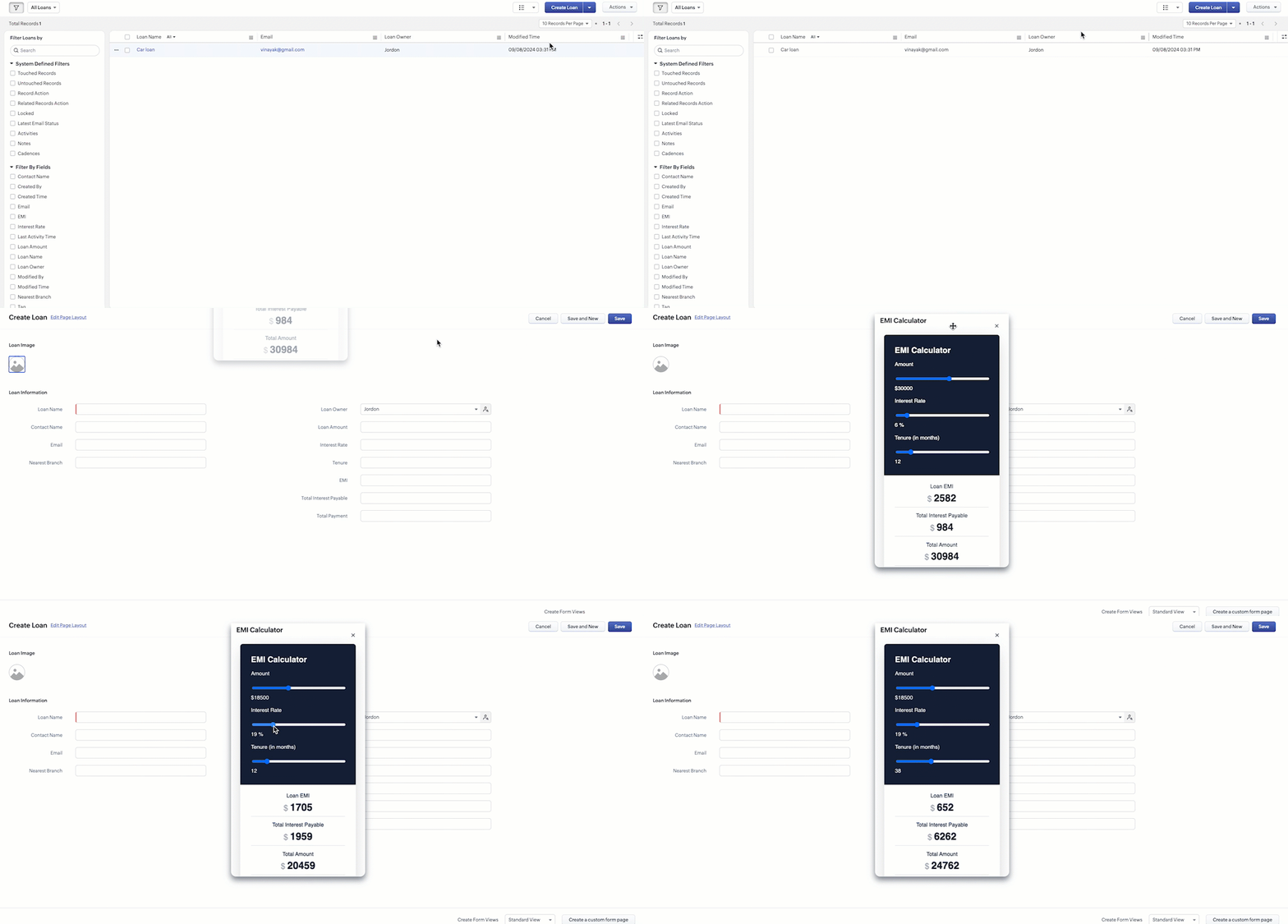
Here is how the Client Script renders the flyout.
5. Difference between flyout and popup in Client Script
Flyout | Pop up |
A flyout can be moved around the page. | A pop-up cannot be moved anywhere on the page. |
It can run independently in a separate thread. The user can interact with the background interface without closing the flyout. | The user cannot interact with the background without closing the pop up. |
Use flyouts, when you need to exchange data to and fro between a Widget and Client Script. You can use ZDK.Client.sendResponse() to pass data from a widget rendered as a flyout to the Client Script. | Use popup, when you need to interrupt the screen to gather input from the user or display a message before proceeding. Use $Client.close() to pass data to the Client Script, which will also close the popup. |
In the scenario discussed in this post, if you want to make it mandatory for the user to read or interact with the EMI Calculator before entering any value in the create Page(Standard), then you can use pop-up instead of Flyout. Both pop up and flyout can be used to display widgets, and their dimensions can be altered.
Refer to this post to know how to render widgets as pop up using Client Script.
6. Summary
- In this post, we have seen,
- Flyouts in Zoho CRM.
- ZDKs and methods to render a Flyout(Widget) using Client Script.
- When to use a Flyout and when to use a pop up.
7. Related Links
 Previous Post: Kaizen #156 -Enhancing Mass Communication in Zoho CRM with a Custom Button Widget | Kaizen Collection: Home
Topic Participants
Maadhari M
Jeremy Nagel - www.smooth.tel
Kava Li
Jeganprabhu S
Ishwarya SG
Sticky Posts
Kaizen #198: Using Client Script for Custom Validation in Blueprint
Nearing 200th Kaizen Post – 1 More to the Big Two-Oh-Oh! Do you have any questions, suggestions, or topics you would like us to cover in future posts? Your insights and suggestions help us shape future content and make this series better for everyone.Kaizen #226: Using ZRC in Client Script
Hello everyone! Welcome to another week of Kaizen. In today's post, lets see what is ZRC (Zoho Request Client) and how we can use ZRC methods in Client Script to get inputs from a Salesperson and update the Lead status with a single button click. In thisKaizen #222 - Client Script Support for Notes Related List
Hello everyone! Welcome to another week of Kaizen. The final Kaizen post of the year 2025 is here! With the new Client Script support for the Notes Related List, you can validate, enrich, and manage notes across modules. In this post, we’ll explore howKaizen #217 - Actions APIs : Tasks
Welcome to another week of Kaizen! In last week's post we discussed Email Notifications APIs which act as the link between your Workflow automations and you. We have discussed how Zylker Cloud Services uses Email Notifications API in their custom dashboard.Kaizen #216 - Actions APIs : Email Notifications
Welcome to another week of Kaizen! For the last three weeks, we have been discussing Zylker's workflows. We successfully updated a dormant workflow, built a new one from the ground up and more. But our work is not finished—these automated processes are
Nederlandse Hulpbronnen

Recent Topics
Duplicated Notebooks
Out of the blue, almost all of my notebooks got duplicated and the different copies contain different information. Some seem like older copies than the others. I use the linux desktop app and sometimes the Android app. I assume that the sync failed at some point and was unable to merge the two versions together. But I'm afraid to add anything else to my notebook because if it can't properly sync 5 notebooks with only a handful of notes each, what will happen when I have hundreds of notes and I loseMind mapping in Zoho Projects
Good morning, I would like to congratulate the Zoho team for building such an inovative and responsive application that fits in the daily challenges of so many work groups. I would like suggest you another functionality that helps a lot in project planning and development: mind mapping. Mind mapping would be of great help for brianstorming, knowledge management and other needs in online collaboration. Thanks and wish you all the best! George Maha Empresa Júnior Multidisciplinar do Instituto deRetainer invoice in Zoho Finance modlue
Hello, Is there a way of creating retainer invoices in the Zoho Finance module? If not can I request this is considered for future updates please.Documents don't sync properly
Hello, My team recently moved to Zoho workDrive, some of my team, work remotely so we believed Zoho would be the best way to share and edit files as well as access files withing the team. However we are experiencing sync issues, when a file is uploaded in the file explorer and shows sync complete, same file can be seen on the Zoho web app but other team members can't see the said file because it is not syncing properly. i figured out that if i were to go to preferences in settings and resync theWe are looking for an experienced Zoho Developer
Hi Everyone! We’re on the lookout for a skilled Zoho Developer with hands-on experience in the Zoho Developer Platform (The Vertical CRM Platform) and if you don't know what that is, then you are not the person we are looking for. You would also needInitiate approval workflow after "on edit --> on success"
Dear Community, currently I am working on a initiative tracker which should handle approval workflows based on different initiative status. As far as I understand, an approval workflow can be triggered (only?) when data is entered for the input form to the database. Example: A new initiative is created and submitted. --> Approval Workflow triggered Here comes my question: Is it also possible to trigger an approval workflow if the form was "simply" updated? (on edit --> on success) Imagine the initiativeTax Deductible Donations to a Charity Organisation
For Australia, what's the best/proper method for entering an expense that is a tax deductible donation to a charitable organisation. And thus is appears correctly in Accounts and BAS as a GST payable deduction?Simultaneous use of WhatsApp Account in SalesIQ and ZohoDesk
Hi, We have only one number registered in Meta, it's possible use same account for two apps? All times here we try is stopping in SalesIQ. Regards,External lookup fields to synchronise with Analytics
Hello. I suggest adding external lookup custom fields to the Zoho Analytics integration settings. Currently, these types of fields are not available for synchronisation, so they cannot be used to generate reports with related tables in Analytics. ThankWe should have an option to Toggle Off KB Article Links in AI Answer Bot Replies
Hi everyone, I'm creating this topic to share a feature idea that I think would improve the customer experience when using the AI Answer Bot for self-service. The Current Behavior (The Problem) Currently, when the AI Answer Bot generates a summary orBoot Loop After Removing Service from Client via Admin
We have multiple laptops experiencing a boot loop / unable to login after the Zoho Remote service was removed from their machine remotely via the desktop client. The Windows sign-in screen is not available, and users are unable to login. This seems likeRequest Backend Correction — Domains Mapped to Same Help Center (Multi-Brand Setup Failure)
Hello Zoho Desk Support Team, I need assistance correcting a domain-to-brand mapping issue in our Zoho Desk instance (The Blue Ribbon Project). Both of our verified domains currently point to the same Help Center instead of separate brand portals. Currentis there any option to enable the participants interact - can write on the screen, while the screen is shared by the host?
this is most expected features - for teaching children. is there any option to enable the participants interact - can write on the screen, while the screen is shared by the host?How to disable the Login button in Desk Helpcenter
Hey there, I'm testing out whether the help center within Zoho Desk could replace our existing Customer FAQ. I tried to customize the themes for the public help center frontend, but stumbled across the login button in the navigation bar. Is there anyFull Text Customization & Translation in SalesIQ Chat Widget Settings
Dear Zoho SalesIQ Team, Greetings, We would like to request an important enhancement to the chat widget customization options in Zoho SalesIQ. Current Limitation: At the moment, only some of the text shown in the chat widget is editable or translatableBest way to display complex Bookings Consultation Descriptions on Zoho Site?
I am a new user so apologies if this has been asked before. I couldn't find any answers in the forum. We offer 18 complex Consultations to our subscribers. Our current platform lets me put detail on these Consultations thoroughly (200-300 words) duringGmail is ramping up its email sender policy as of November 2025
Hello marketers, As you may be aware, Gmail introduced a guideline for bulk senders starting February 2024. If not, here's a quick refresher straight from Google: After this policy was announced first in 2023 and soft-implemented in February 2024, weModifying iframe data of Zoho booking iframe
Hello, I have integrated a Zoho Bookings embedded iframe into my website. Currently, I am pre-filling the booking form with default values as part of our process flow. However, I want to ensure that if an input field is already populated with a defaultZoho CRM Workflow and Function Backup Options
Hi everyone! I have been able to make several backups of my CRM data and noticed that the Workflows and Functions are not included in these backups. To my knowledge, there is no backup feature for workflows and functions, which is problematic in of itself.Is or will be possible to associate meeting transcription and summary, made by Zia, to meeting/contact/account record in CRM?
Would be useful to keep context and track jobs, better if it will be autoDesk Field Not Showing in Analytics
Hi there, I recently added a field to our Zoho Desk Ticket Information. I went and added the data retrospectively to the tickets. It is also marked as required, so all new tickets cannot be closed off without it being filled in. When I try to run a reportExport data using advanced export options and customizable settings
Hello everyone, The user interface for exporting data has been revamped with updates to make data exports more flexible and efficient for users. These updates not only enhance usability but also bring advanced capabilities to help users extract preciseMoving data from one pipeline to another
Hey all, I've got some complex pipelines to build and I'd like to seperate them into seperate pipelines rather than have one mammoth one. If I create 2 pipelines, is there any easy way to use the output of Pipeline1 to be the input into Pipeline2? OrHow to export/find all deluge code.
Hi, I have a large app wich contains several forms, reports, html views, I need to find thow my application if any contains specific word, I could find it manually by editing app and see on every section(field code, on succes, on load, etc) but I would like to do it faster. Is there a way to at least export it to a file the whole deluge code on my application?Have Some Bugs in Zoho CRM Ask Zia Assistant
Hi Support Team, I have found some bugs in Zoho CRM Ask Zia Feature Please Check below screenshot, insight option is showing twice i think its in early access that's why its have some bugs .COD with Partial payment
Two reasons why we need COD with partial payment option. 1) Since we deal heavy weight products our shipping costs are too high. If shipment is rejected by customer we incur huge loss. 2) Some competitors place fake orders with different names and returnSlicers are now available in Zoho Sheet—filter your data interactively
At Zoho Sheet, we diligently track user requests and feedback. In line with this, based on extensive user requests, we've integrated Slicers to pivot tables and are delighted to announce its release. Slicers are interactive visual filters that have add,Resizing a Record Template Background Inage
Hi everyone, I have an issue which I can't seem to resolve: Basically, I'm designing a record template in certificate form. I've specified A5 landscape. I've set my background image the same dimensions with total pixels at 443,520. Whatever I try, whenUpdated font library: New font styles and custom font options in Zoho Sheet
Zoho Sheet's font library now supports 500+ font styles in 60+ languages! The updated font library is stacked with new font styles, and some of the previously available font styles have been replaced with equivalent options. There are two ways you canIntroducing Data Bars: Graphically represent changes in data within the cells
Conditional formatting has helped millions of spreadsheet users analyze and highlight their data more efficiently. In addition to the classic rules, color scales, and icon sets available in Zoho Sheet, you can now apply Data Bars, a convenient methodDefault Font Size in Desk
How do I set my default font size in Desk? It takes me about 45 minutes to find the place to set it, then, when I sign out of Zoho and log back in, it's back to font 10 again. Seems like this would be simple, but like everything with Zoho, it's buriedTip #19 - Create checkbox tracker in your spreadsheet
Hello Sheet users! We are here with yet another tip to help you get the most out of Zoho Sheet. Spreadsheets can be used to handle a variety of tasks, but ever tried using checkboxes to track the progress of your action items dynamically? Here's a sampleTip #20 - Three things you probably didn't know you can do with picklists
Hello Zoho Sheet users! We’re back with another quick tip to help you make your spreadsheets smarter. Picklists are a great tool to maintain consistency in your spreadsheet. Manually entering data is time-consuming and often leaves typos and irregularPer Level Approval for admins
We need Process admins like Zoho CRM in Zoho Books for per stage approval Currently in books, admins only have the option for Final Approval But for example, in cases like when an employee is on leave, we can't just approval one level we only have optionFeature enhancement: Highlight rows based on a cell value
Hello Sheet users, We're excited to announce a new feature enhacement, shaped directly by your valuable feedback! As you might know, conditional formatting is a great tool for anyone dealing with large data sets. Previously, if you’ve ever wanted to drawUpdating custom fields in Zoho Projects
Hi I am wondering if anyone has experience with custom fields in Zoho Projects. I am struggling to update the field using either deluge or the api endpoint. My code is: //custom_Map = map(); custom_Map = {"UDF_DOUBLE_1":"0.27"}; update_Map = map(); update_Map.put("custom_fields",custom_Map.toList());Markdown for Desk?
Hi, my company wants to use markdown for formatting text in Desk (in all modules there, especially Tickets and Helpcenter). Zoho already offers use of markdown in several products (see https://help.zoho.com/portal/en/kb/backstage/microsite-guide/formatting-with-markdown/articles/formatting-with-markdo)Change Currency symbol
I would like to change the way our currency displays when printed on quotes, invoices and purchase orders. Currently, we have Australian Dollars AUD as our Home Currency. The only two symbol choices available for this currency are "AU $" or "AUD". I wouldCalendar not working
Are we the only ones. On any browser we cannot click on any of our calendar appointments and get them to open. They just make the browser loop. WE have reached out and have been told they are working on it. The office staff are really stuck. The pointWhatsApp Message Template Quick Reply Buttons
Hello, I created my first Message Template to overcome the 24-hr messaging window and it was approved by WhatsApp/Meta. When I go to Meta, I also see that template brought from Zoho Desk, and used it via Zoho Desk IM. However, I notice that when in Meta'sNext Page