Kaizen #177: Duplicate Check Preferences API vs. Upsert API

Kaizen #177: Duplicate Check Preferences API vs. Upsert API

Hello all!!!

Welcome back to another week of Kaizen. Last week, we discussed Optimizing the Use of Record ID Variables in Zoho CRM Queries.

This week, we will explore two important APIs for managing duplicate records in Zoho CRM - Duplicate Check Preferences API and Upsert Records API. While both of these APIs help manage duplicate records, they serve different purposes and are to be used in different scenarios. 


This post covers:
  • What is the Duplicate Check Preferences API?
    • Use Case
    • Duplicate Check Configurations
    • Updating Duplicate Check Configuration
    • How Duplicate Check Preferences Work During Record Creation/Update?
  • What is the Upsert API?
    • Use Case
  • Differences between Duplicate Check Preferences API and Upsert API

What is the Duplicate Check Preferences API

The Duplicate Check Preferences API is a configuration API that allows you to set up criteria using unique fields to manage duplicates across Leads module including Converted Leads and Contacts
in Zoho CRM. Based on the given criteria, the system will restrict the creation or update of duplicate records. For example, if the Phone field is marked as unique and set for duplicate checks, the system will make sure that no two records have the same phone number during records creation or update.

With the Duplicate Check Preferences API, you can define criteria to find duplicates, such as matching email addresses, phone numbers, or custom fields. During record creation or update, Zoho CRM checks the configured criteria against converted leads or contacts. If a match is found, it triggers a "DUPLICATE_DATA" error and blocks duplicates based on your configuration.

By default, the Insert Records API and Update Records API automatically check for this configuration. If a record matches the defined duplicate criteria, the system prevents its creation or update.

Use case

Zylker, a sales team managing customer contacts in Zoho CRM, often imports leads from various sources like website forms, events, and campaigns. However, the team noticed that many duplicate contacts are being created because the same phone number is associated with some of the contacts. This creates confusion and results in redundant work in their sales process.
By using the Duplicate Check Preferences API, Zylker can prevent the anymore duplicate contacts based on phone numbers (phone is used for an example).

Duplicate Check Configurations

In Zoho CRM, you can configure duplicate check preferences via API in two ways. 

i. Configuration in Leads module
The system checks for duplicates on all the Leads using the specified unique fields. By selecting this option, the duplicates will be checked on all the Converted Leads (custom view) as well. This configuration is applicable across all the layouts.
The following is the configuration for duplicate check in the Leads module via API. 

Request Method: POST

Note:
  • The "module" parameter is mandatory, and its supported value is Leads. 
  • The above URL applies to both Leads and Contacts module configurations.
  •  You must mark at least one field as mandatory. So, the system can check for duplicates based on the value in the unique field within the Leads module when creating a record.
Input JSON

{
    "duplicate_check_preference": {
        "type": "converted_records", //Converted Leads custom view in Leads module
    }
}


Response

{
    "duplicate_check_preference": {
        "code": "SUCCESS",
        "details": {},
        "message": "Duplicate check enabled for converted_records successfully.",
        "status": "success"
    }
}


ii. Configuration in Contacts module

By selecting this option, the system will check for duplicates in the Contacts module using mapped fields.

Input JSON

{
    "duplicate_check_preference": {
        "type": "mapped_module_records",
        "type_configurations": [
            {
                "field_mappings": [
                    {
                        "current_field": {
                            "api_name": "Email",
                            "id": "5725767000000002601"
                        },
                        "mapped_field": {
                            "api_name": "Email",
                            "id": "5725767000000002503"
                        }
                    }
                ],
                "mapped_module": {
                    "api_name": "Contacts",
                    "id": "5725767000000002179"
                }
            }
        ]
    }
}


The "Phone" field from both the Leads and Contacts modules is mapped to identify duplicate records.

How Duplicate Check Preferences Work During Record Creation/Update

Consider Zylker has configured the Contacts module ("type":"mapped_module_records") to check duplicate contacts.
For example, a sales representative at Zylker attempts to add a contact from the Cold Call lead source. However, the same contact already exists in the Contacts module, either from the same or a different lead source.
Since the Contacts module is configured for duplicate check preferences, the system will check for duplicates in the Contacts module using mapped fields. During the record insertion action, the system verifies the Contacts module for any matching records based on these unique identifiers. Based on the result, it either creates the record or throws an error.

Use the Insert Records API to create records in a module.

Request Method: POST

Input JSON

{
    "data": [
        {
            "Company": "Villa Margarita",
            "Last_Name": "Dolan",
            "First_Name": "Brian",
            "Email": "brian@villa.com",
            "Phone": "12345",
            "State": "Texas"
        }
    ]
}


Response


 {

    "data": [

        {

            "code": "DUPLICATE_DATA",

            "details": {

                "api_name": "Email",

                "duplicate_record": {

                    "Owner": {

                        "name": "Patricia Boyle",

                        "id": "5725767000000411001",

                        "zuid": "808233918"

                    },

                    "module": {

                        "api_name": "Contacts",

                        "id": "5725767000000002179"

                    },

                    "id": "5725767000000774010" //The record that already exists in the Contacts module.

                },

                "json_path": "$.data[0].Email",

                "more_records": false

            },

            "message": "duplicate data",

            "status": "error"

        }

    ]

}


Duplicates are also checked during record updates. If a record is updated with a value that already exists in a unique field, the system indicates it as a duplicate and returns a "DUPLICATE_DATA" error.

Update Duplicate Check Configuration

To update the previously enabled Duplicate Check option configured in your account, use the Update Duplicate Check Option API.


The Contacts ("type": "mapped_module_records") configuration is used in the below sample input. 


{
    "duplicate_check_preference": {
        "type": "mapped_module_records",
        "type_configurations": [
            {
                "field_mappings": [
                    {
                        "mapped_field": {
                            "api_name": "Phone", //The previously configured Email field as a unique identifier in Contacts has now been replaced with the Phone field.
                            "name": "Contacts",
                            "id": "5725767000000411001"
                        },
                        "current_field": {
                            "api_name": "Phone",
                            "name": "Leads", //The previously configured Email field as a unique identifier in Leads has now been replaced with the Phone field.
                            "id": "5725767000005381030"
                        }
                    }
                ],
                "mapped_module": {
                    "api_name": "Contacts",
                    "name": "Contacts",
                    "id": "5725767000000002179"
                }
            }
        ]
    }
}

You can also retrieve and delete duplicate configuration.

What is the Upsert API?

The Upsert API is a combination of "update" and "insert". 


How it works?

  • You provide a unique identifier (e.g., email, phone number, or a custom field) to check for existing records.

  • If a record with the same identifier exists, it updates that record.

  • If no matching record is found, it creates a new one.
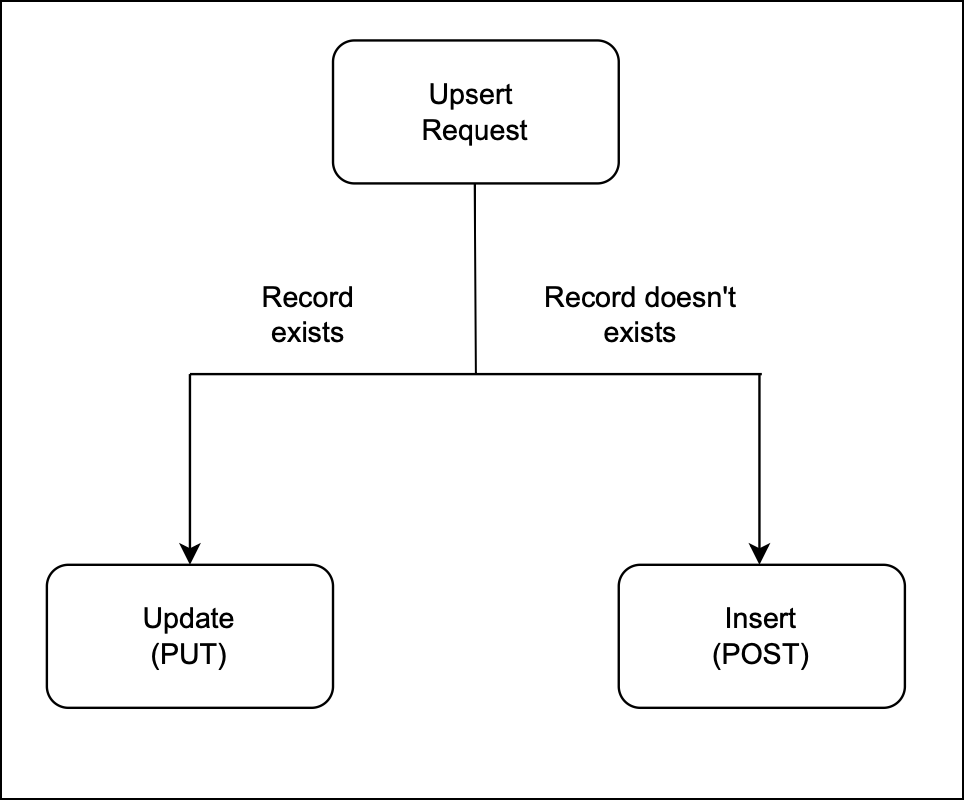
Flow diagram

Use Case 

Zylker, an e-commerce company, uses Zoho CRM to manage customer data. Customers sign up on Zylker’s online store, and their details are stored in the e-commerce platform like Shopify. Over time, customers may update their contact information, or new customers may sign up. To keep customer records in Zoho CRM accurate and avoid duplicates, Zylker uses the Upsert API to:
  • Update existing customer records details if the given unique identifier, such as email or phone number, matches an existing record in Zoho CRM.
  • Insert a new record if no match is found.  This way, Zylker ensures that new customers are added efficiently.

There are two types of duplicate check fields:

i. System-defined duplicate check fields.
ii. User-defined duplicate check fields.

i. System-defined duplicate check fields
The table below lists the system-defined unique fields. When you create a record using the Upsert API, the system checks these fields for duplicate entries. 

Leads

Email

Contacts

Email

Accounts

Account_Name

Deals

Deal_Name

Campaigns

Campaign_Name

Cases

Subject

Solutions

Solution_Title

Products

Product_Name

Vendors

Vendor_Name

PriceBooks

Price_Book_Name

Quotes

Subject

SalesOrders

Subject

PurchaseOrders

Subject

Invoices

Subject

Custom Module

Name


ii.
User-defined duplicate check fields
You can set a normal field as a duplicate check field by enabling "Do not allow duplicate values." Note that you can only set fields with the following field-types as unique— Single Line, Email, Phone, Number, Long Integer, and URL.


Request Method: POST

Sample Input JSON

Here, "Email," a system-defined field, has been used as a duplicate check field.
{
    "data": [
        {
            "Email": "alice@mail.com",
            "First_Name": "Alice",
            "Last_Name": "Brown",
            "Phone": "+1-555-222-3333",
            "Order_Date": "2024-01-10",
            "Order_Value": "$175.00"
        },
        {
            "Email": "pat@mail.com",
            "First_Name": "pat",
            "Last_Name": "Davis",
            "Phone": "+1-555-666-7777",
            "Order_Date": "2024-01-15",
            "Order_Value": "$300.00"
        }
    ],
    "duplicate_check_fields": [
        "Email" //You can set the order in which the system checks for duplicate records by specifying the duplicate_check_field array in the input. 
    ]
}

Response


{
    "data": [
        {
            "code": "SUCCESS",
            "duplicate_field": null,
            "action": "insert",
            "details": {
                "Modified_Time": "2025-02-08T09:43:08-08:00",
                "Modified_By": {
                    "name": "Patricia Boyle",
                    "id": "5725767000000411001"
                },
                "Created_Time": "2025-02-08T09:43:08-08:00",
                "id": "5725767000005425036",
                "Created_By": {
                    "name": "Patricia Boyle",
                    "id": "5725767000000411001"
                }
            },
            "message": "record added",
            "status": "success"
        },
        {
            "code": "SUCCESS",
            "duplicate_field": "Email",
            "action": "update",
            "details": {
                "Modified_Time": "2025-02-08T09:43:08-08:00",
                "Modified_By": {
                    "name": "Patricia Boyle",
                    "id": "5725767000000411001"
                },
                "Created_Time": "2025-02-08T08:52:22-08:00",
                "id": "5725767000005425002",
                "Created_By": {
                    "name": "Patricia Boyle",
                    "id": "5725767000000411001"
                }
            },
            "message": "record updated",
            "status": "success"
        }
    ]
}


For more details on how the Upsert API works, refer to the Kaizen #56 - Upsert Records #API.

Differences between Duplicate Check Preferences API and Upsert API


                Duplicate Check API

                           Upsert API

Duplicate Check Preferences can be enabled only in the Leads module.

Supports all modules.

Throws a "DUPLICATE_DATA" error if a duplicate is detected.

Updates the existing record with new field values if a match is found for the unique fields; otherwise, inserts a new record.


Use the above Zoho CRM APIs which fit your use cases.
---------------------------------------------------------------------------------------------------------------------

We trust that this post meets your needs and is helpful. Let us know your thoughts in the comment section or reach out to us at support@zohocrm.com 
Stay tuned for more insights in our upcoming Kaizen posts!

Info

    • Sticky Posts

    • Kaizen #198: Using Client Script for Custom Validation in Blueprint

      Nearing 200th Kaizen Post – 1 More to the Big Two-Oh-Oh! Do you have any questions, suggestions, or topics you would like us to cover in future posts? Your insights and suggestions help us shape future content and make this series better for everyone.
    • Kaizen #226: Using ZRC in Client Script

      Hello everyone! Welcome to another week of Kaizen. In today's post, lets see what is ZRC (Zoho Request Client) and how we can use ZRC methods in Client Script to get inputs from a Salesperson and update the Lead status with a single button click. In this
    • Kaizen #222 - Client Script Support for Notes Related List

      Hello everyone! Welcome to another week of Kaizen. The final Kaizen post of the year 2025 is here! With the new Client Script support for the Notes Related List, you can validate, enrich, and manage notes across modules. In this post, we’ll explore how
    • Kaizen #217 - Actions APIs : Tasks

      Welcome to another week of Kaizen! In last week's post we discussed Email Notifications APIs which act as the link between your Workflow automations and you. We have discussed how Zylker Cloud Services uses Email Notifications API in their custom dashboard.
    • Kaizen #216 - Actions APIs : Email Notifications

      Welcome to another week of Kaizen! For the last three weeks, we have been discussing Zylker's workflows. We successfully updated a dormant workflow, built a new one from the ground up and more. But our work is not finished—these automated processes are

    Nederlandse Hulpbronnen


      • Recent Topics

      • Clone entire dashboards

        If users want to customize a dashboard that is used by other team members, they can't clone it in order to customize the copy. Instead they have to create the same dashboard again manually from scratch. Suggestion: Let users copy the entire dashboard
      • Zoho Cliq REST APIs v3 : A complete guide to what's changed and why 

        APIs are not just consumed by a developer with numerous automations and a series of open browser tabs. They are parsed by LLMs, fed into agent pipelines, and auto-completed by AI coding assistants that have zero tolerance for inconsistency. A verb tucked
      • Allow native Webhooks to authenticate via Connections

        Allow native Webhooks to authenticate via Connections (Basic Auth) instead of plaintext custom headers Summary Please allow native Webhooks (Workflow Rules > Instant Actions > Webhooks) to authenticate against the destination endpoint using the existing
      • Zoho desk extension update custom field

        Hi all, I'm trying to update a custom field in my zohodesk extension. But the documentation is fairly unclear. The custom field is named "testveld". The api name is cf_testveld I'm trying to update it like this: ZOHODESK.set('ticketForm.cf_testveld',
      • Introducing Custom Columns in Forecasts in Zoho CRM

        Release Plan: Enabling in Phased Manner, Enabled for JP DC Hello all, Forecasts in Zoho CRM help sales representatives, managers, and business stakeholders evaluate performance and plan future sales activities. While standard metrics such as Target, Achieved
      • Zoho Expense Auto Tracking Sync Fails "Request Timed out"

        I am testing this feature to move away from MileIQ who significantly raised their prices. It seems to be tracking but it is not syncing unless I manually perform a resync under "Drives pending Sync". I am not sure what would be causing this, as some drives
      • How to show product cards in your chatbot

        Hey everyone, If you are using Guided Conversations to help customers find products, you have probably run into this problem: the bot gives customers a list of options, but they still have no idea which one to pick. There will be no images, no specs,
      • Zoho Team Inbox - roadmap

        Hi, would be good to understand the Teaminbox roadmap, in particular: 1. API / Zoho Deluge connections. We have a process where the each email needs to be either tagged or assigned daily. It would be great if we could automate a 5pm alert for any exemptions
      • Zoho Projects Coming to CRM Teamspaces

        Availability: The US DC Standard Edition is now available. It will be rolled out to customer accounts in all DCs in phased manner. Hello all, You are probably already familiar with Teamspaces, the dedicated workspaces where teams organize the CRM modules
      • Canva Integration

        Hello! As many marketing departments are streamlining their teams, many have begun utilizing Canva for all design mockups and approvals prior to its integration into Marketing automation software. While Zoho Social has this integration already accomplished,
      • Editing Draft Fixed assets

        I have a few Fixed Assets still currently in Draft Status that I need to edit. I need to edit the Fixed Asset Type, the Fixed Asset Account, the Accumulated Depreciation account and the Depreciation account. Once I have done it and attempt to "Save as
      • Zoho Status Pages: Our Domain Has Changed — Here's What You Need to Know

        We're making a change to how you access Zoho Status Pages. Our status page domains have been updated to provide a more consistent and region-specific experience across all locations. If you have the old domain bookmarked or referenced anywhere — emails,
      • Zoho Books and TRAINING SALES receipt label for eTims?

        Hi, Can Zoho Books implement TRAINING SALES receipts and push them to eTims for test? In other words how can we send to Zoho or even create in Zoho training mode invoices and TEST the workflow POS>Zoho Books>eTims and back without actually registering
      • The Social Wall: May 2026

        Hello everyone, This month, we're excited to introduce two powerful features designed to help you create more engaging content and streamline your team's communication workflow. Adding audio via Zoho Social Audio is one of the biggest drivers of engagement
      • SalesIQ : How to disable "Idle chat handling" ?

        Hello SalesIQ Team. SalesIQ, How to disable "Idle chat handling" ? I would like to disable the option “Automatically close chats that have been idle for a specified amount of time.”
      • Zoho Webinar - Sharing System Audio (NOT AVAILABLE)

        Hi, We are having a serious problem with Zoho Webinar. In the webinars we run, we very often share the audio from a video we are streaming directly from YouTube or other applications. Until recently we were using Zoom, but as we use other Zoho applications
      • Customising Outcome drop down

        Is it possible to customize the drop down list for appointment outcomes?
      • Automate Backups

        This is a feature request. Consider adding an auto backup feature. Where when you turn it on, it will auto backup on the 15-day schedule. For additional consideration, allow for the export of module data via API calls. Thank you for your consideration.
      • Mirror Component in Zoho CRM: Access real-time related data without leaving your record

        Hi everyone, This feature is now available for the JP, CA, SA, UAE, and AU DCs. We're excited to bring to you Zoho CRM's mirror component, which presents relevant data on a record's details page and keeps everything users need in one place without having
      • Partial payments for retainer invoices

        When a customer does not pay the entire retainer invoice there is no way to apply a partial payment. PLEASE add this function.
      • Custom Display Field for Lookup Dropdowns in Zoho CRM

        Could Zoho CRM support changing the display field in lookup dropdowns, like Zoho Creator does? This would make it much easier to select the right record by showing a more useful field instead of only the default one. It would improve speed, clarity, and
      • Create custom field in multiple modules

        I am trying to create some custom fields that will be in both leads and contacts module without having to create them separately and then mapping them. How is that performed? it is too time-consuming to create 20+ fields and then do the same thing in a different module when they carry the same info. The idea is that when we get a lead from web site, there are items that we capture and once that lead is a client and moved to Contacts, that info should come over. So trying to find an easy way to create
      • Add Specific Identification as an Inventory Costing Method

        --- Business Context We are a security systems distributor handling high-value, serialized products such as IP cameras, NVRs, and RAID storage systems. Each unit is uniquely identified by a serial number and arrives in separate shipments at varying purchase
      • Creator Portal Page Customization Issues

        I have been using Creator to make Portals recently. Yesterday, I created a new portal and noticed that the page customization editor ("Open Builder") was different. Using the new page builder, I was able to customize and add an image to the various sign
      • Zoho Books - Budget Creation and Reporting Tags

        Is there a way to create one budget for multiple reporting tags. For example, if my company has 4 different divisions I would like to be able to enter in what the budgeted revenue for each division is and view that information in 1 budget. I would then
      • Razorpay + Zoho Billing + Zoho Books Integration

        Please help us set up this integration.
      • Why is Approval Hierarchy Not Available for the Expenses Module in Zoho Books?

        Hello, I noticed that Zoho Books allows us to configure approval workflows and approval hierarchies for modules such as Bills, Vendor Credits, and Invoices. However, the same approval hierarchy option does not seem to be available for the Expenses module.
      • Zoho Mail Android app update - Traditional Chinese language and contact nickname support

        Hello everyone! The Zoho Mail Android app now includes support for the Traditional Chinese language. You can change the language to Chinese (Traditional) from the Settings module of the Zoho Mail app. You can also view the nickname of the contacts within
      • Get Cliq Meetings in my O365 calendar

        Hi, we are currently evaluating to replace the Teams Messaging and Meetings with Cliq. We currently still have all our email and calendars in O365. What i want to achieve is, to create a (ZOHO) meeting from Cliq and have this meeting added to my Outlook/O365
      • Latest update in Zoho Meeting | On-demand webinars

        Hello everyone, We’re excited to introduce our new on-demand webinar feature, you can now provide pre-recorded sessions that your audience can access immediately, no need to wait for scheduled sessions. Benefits of On-demand webinars : Scheduling flexibility
      • Replicating Zoho Books "Accounts" and "Accrual Transactions" in Analytics via API: Best Endpoint Strategy?

        Hi everyone, I am working on a custom integration where I need to programmatically replicate two specific tables in Zoho Analytics via API on an hourly schedule: Accounts and Accrual Transactions. Those two tables sync from Zoho Books. (Note: I am aware
      • Terms & Conditions

        I have defined Terms & Conditions in the invoice setting and have set %TermsAndCondition% where I want it to appear but nothing shows up in that area. Is this something we have to define per invoice or can we have a global variable?
      • BUG and HANGUP - Add Row with Fields DOUBLES the amount of rows instead of Adding Just 1 Row

        As it says in the title, there is a bug with forms generated with Zoho Writer where the Add Row With Fields ends up DOUBLING the amount of rows instead of Adding just 1 row.
      • Subform edits don't appear in parent record timeline?

        Is it possible to have subform edits (like add row/delete row) appear in the Timeline for parent records? A user can edit a record, only edit the subform, and it doesn't appear in the timeline. Is there a workaround or way that we can show when a user
      • From Zoho CRM to Paper : Design & Print Data Directly using Canvas Print View

        Hello Everyone, We are excited to announce a new addition to your Canvas in Zoho CRM - Print View. Canvas print view helps you transform your custom CRM layouts into print-ready documents, so you can bring your digital data to the physical world with
      • On-prem version of Zoho Desk

        Is there an on-prem version of Zoho Desk available for enterprise customers if we have additional aspects of security that aren't covered with current legal and data security terms?
      • SPAM Filter cleanup

        I was under the impression that the SPAM filter would automatically clear itself, however re-reading the message it says: What does this mean? How often does this get emptied automatically?
      • Hyphen in domain names

        I am facing problems while hard-coding an email address with a - in the domain name. I get the error Lexical error at line 4, column 24. Encountered: "@" (64), after : "" I recall that Zoho Domains also had an issue with hyphens and I think the issue with the sendmail api is the same. Could this be fixed?
      • Latest updates in Zoho Meeting | Breakout rooms and End to end encryption

        Hello everyone, We’re excited to share a few updates for Zoho Meeting. Here's what we've been working on lately: Introducing Breakout Rooms for enhanced collaboration in your online meetings and End-to-end encryption to ensure that the data is encrypted
      • Latest updates in Zoho Meeting | New End of session notification to remind everyone about the session end time

        Hello everyone, We’re excited to share a new feature for Zoho Meeting ; End of session notification. With this new setting, you can choose to remind all participants or only the host about the scheduled end time of a meeting. You can also choose when
      • Next Page