Kaizen #187 - Building a Timer and Worklog Widget (Part 1)

Howdy Tech Wizards!
Welcome back to a fresh week of Kaizen!
This time, we are diving into a two-part series where you will learn how to build a Timer and Worklog Widget for Zoho CRM. This widget helps track active work time and log multitasking sessions using Zoho CRM APIs, Client Script, Functions, and Workflows.
Why It Matters?
Zoho CRM effectively captures stage/status transitions, like tracking when a case moves from Open to In Progress or On Hold. However, in dynamic work environments, employees juggle multiple work items and engage in impromptu tasks or conversations.
Let’s take the On Hold status as an example.
While it can be used to indicate pauses in progress, it does not always align with real-world workflows. Consider these scenarios:
Not all interruptions justify a status change
Moving the case to On Hold for every minor detour (to clarify something with a colleague or respond to another emergency work item) would be impractical and could lead to under reporting actual work hours. Over time, this untracked effort adds up, creating a gap in visibility.
Frequent status changes may dilute their meaning
In many teams, On Hold signifies a legitimate blocker like waiting on customer input or an external dependency. Using it frequently to reflect quick shifts in attention could compromise that clarity.
A timer widget solves this by:
- Capturing hands-on work items.
- Logging context switches (unrelated tasks) with descriptive entries.
- Feeding structured entries into a custom module for reporting and subform sync.
Business Scenario: IT Service Desk & Ticket Resolution
A tech support team uses the Cases module to resolve customer issues. Some tickets are straightforward; others require follow-ups, escalations, or cross-team coordination. While CRM timestamps (like stage transitions or picklist tracking) track when changes happen, they do not reflect how long someone actively worked on a case.
This Timer Widget can be the ultimate solution to track down the active time spent on each case through out the day.
What are we Building?
By the end of this two-part guide, you will know how to:
- Build a timer widget to track time per task or any CRM record.
- Log work sessions into a custom module every time the timer is started/stopped.
- Automatically populate a subform in the corresponding record module using workflows and Deluge functions.
- Leverage the Reports module to analyze work patterns, SLA adherence, and productivity trends.
In Part I, we will focus on:
-> Building and configuring the Timer Widget.
-> Capturing each timed session as a record in a custom module.
Prerequisites
1. Create a Custom Module
Create a custom module named Timer Entries to log work details and generate reports from the Reports module. A new record will be added to this module each time a timer is started.
Set up the following custom fields in the Timer Entries module:
Custom Fields | Data Type |
Start Time | DateTime |
End Time | DateTime |
Total Duration (in mins.) | Formula DateBetween(${Timer Entries.Start Time},${Timer Entries.End Time},'Minutes') |
Related to Case | Lookup to Cases module |
Work Description | Multi Line |

2. Add a custom picklist option
Add a custom picklist option called In Progress to the Status picklist field in the Cases module for precisely identifying the status of the cases.
Follow this Add/Remove Picklist Values help section for more details.

3. Setup Custom Views for Contextual Filtering
To streamline the widget experience and ensure users only see relevant records to associate while tracking time, set up two smart custom views—one in the Cases module and another in the Timer Entries module.
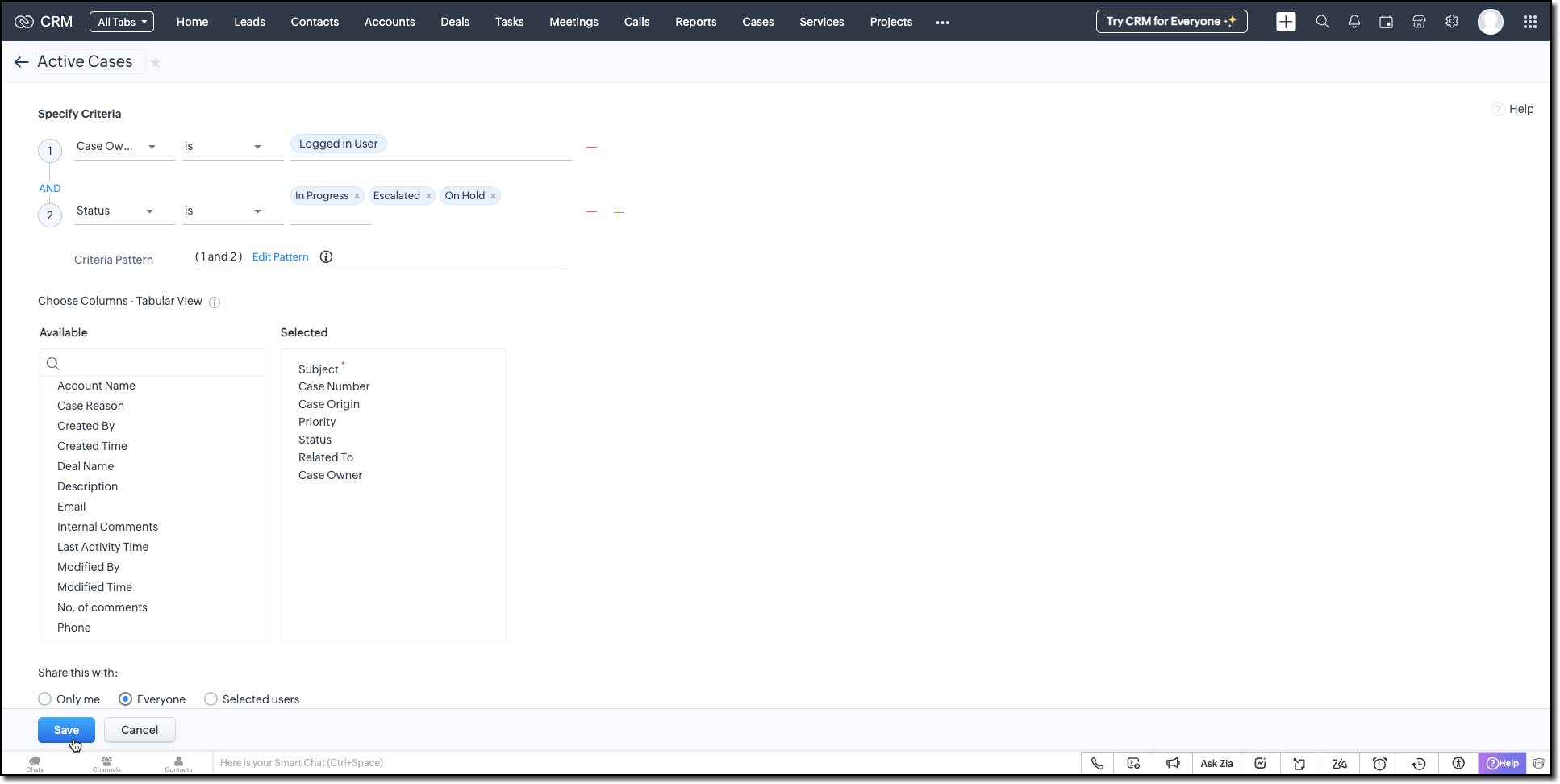
Active Cases View (Cases Module)
Create a custom view in the Cases module to list only the active tickets the logged-in user is working on. Use the following criteria tips:
- Use the Status field to filter records with values like In Progress, On Hold, or Escalated.
- Use the Case Owner field to show records that are assigned only to the currently logged-in user.
This view powers the drop-down inside the widget where users select the case they want to start the timer for.
Active Timers View (Timer Entries Module)
Set up a second custom view in the Timer Entries module to track entries where the timer has been started but not yet stopped. These represent active timers. Use the following logic for criteria:
- The End Time field is empty (i.e., timer still running).
- Timer Entry owner field matches the logged-in user.
This view is used internally by the widget to detect if a timer is already running and update the same entry once the timer is stopped.
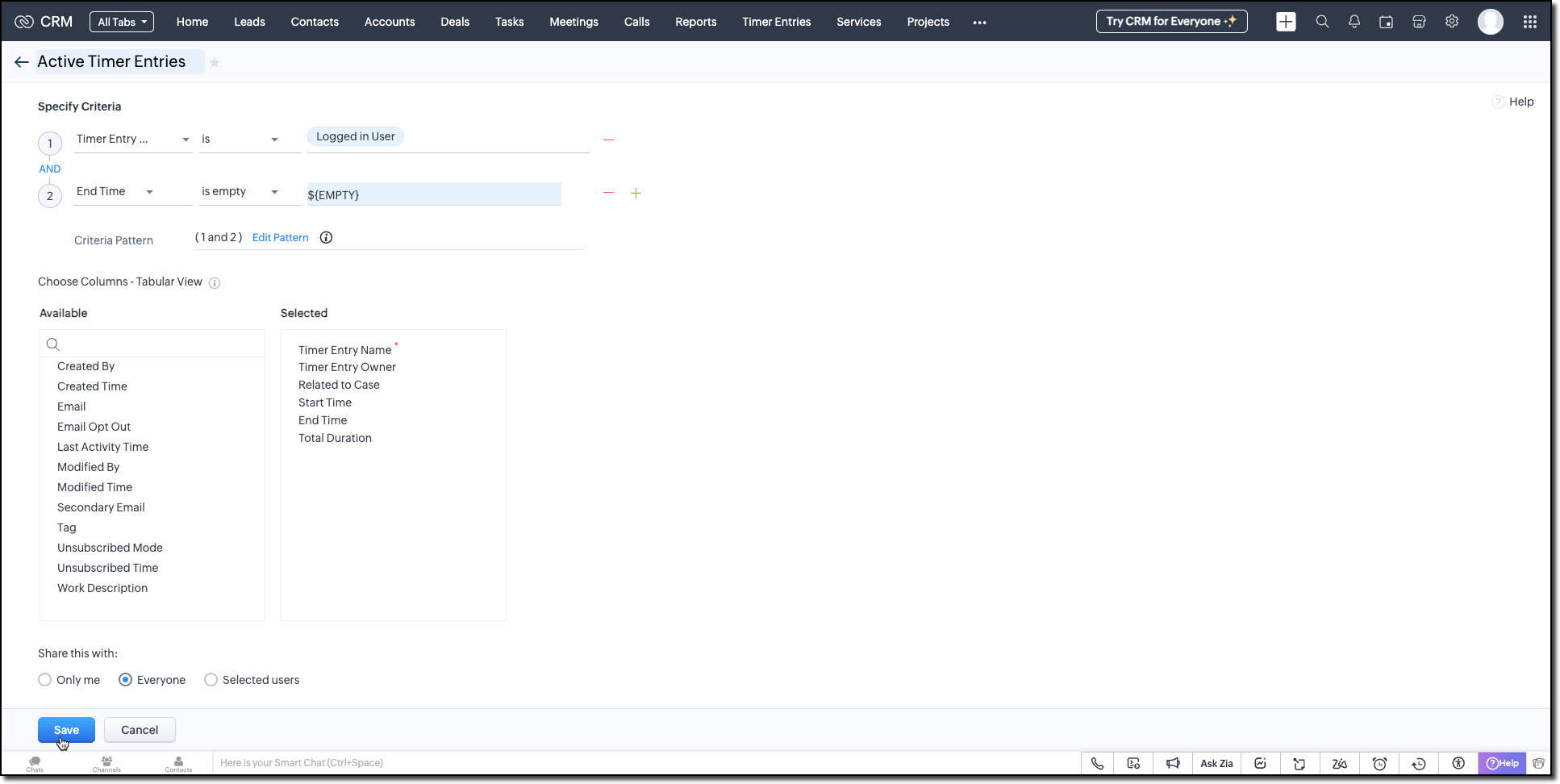
Follow the Managing List View help page and use the specifications shown in the following image.
Building the Timer Widget
Step -1: Review Basics
Refer to our earlier Kaizen on CLI Installation, Creating a Widget Project, and Internal hosting of the same.
Step 2 - Develop the Widget
After initializing your widget project using CLI, implement the timer logic:
Fetching Active Cases
On page load, the populateRecordsDropdown function initiates a Get Records API call to the Cases module, using the Active Cases custom view ID. This fetches all active case records assigned to the logged-in user.
These records are then listed in a dropdown, allowing users to quickly select the relevant case they are about to work on.
async function populateRecordsDropdown() { const recordsDropdown = document.getElementById("moduleRecords"); recordsDropdown.innerHTML = ""; try { const recordsResponse = await ZOHO.CRM.API.getAllRecords({ Entity: casesModule, cvid: casesCVID, per_page: 10 }); if (recordsResponse.data && recordsResponse.data.length > 0) { recordsResponse.data.forEach(record => { const option = document.createElement("option"); option.value = record.id; option.textContent = record.Subject || "Unnamed Record"; recordsDropdown.appendChild(option); }); } else { const placeholderOption = document.createElement("option"); placeholderOption.value = ""; placeholderOption.textContent = "No records found"; placeholderOption.disabled = true; placeholderOption.selected = true; recordsDropdown.appendChild(placeholderOption); } } catch (error) { console.error("Error fetching records:", error); } } |
Starting the Timer and Creating an Entry
Once the user starts the timer, The createRecord function triggers a Create Record API call to log the session in the Timer Entries custom module. The record captures the start time and the related case and description (if provided).
Even if no details are entered or case is selected, a timer entry is still created with the start time. This ensures that spontaneous work sessions are tracked and not lost.
async function createRecord(startTime) { try { const workDescription = document.getElementById("workDescription").value; const selectedRecordId = document.getElementById("moduleRecords").value; const selectedRecordText = document.getElementById("moduleRecords").options[ document.getElementById("moduleRecords").selectedIndex ].text; const data = { Start_Time: startTime, Owner: currentUserId, Work_Description: workDescription, Related_to_Case: selectedRecordId, Name: selectedRecordText }; const response = await ZOHO.CRM.API.insertRecord({ Entity: timerModule, APIData: data }); console.log("Start time recorded successfully"); } catch (error) { console.error("Error creating record:", error); } } |
Stopping the Timer and Updating the Entry
When the timer is stopped, the widget uses the Active Timer Entry custom view to locate the most recent Timer Entry record created by the logged-in user that does not have an end time.
The updateRecord is then triggered to update that active entry using the Update Record API call. It updates the End time of the session and the related case, descriptions, if it was not already provided when the timer was started.
async function updateRecord(endTime) { try { const workDescription = document.getElementById("workDescription").value; const selectedRecordId = document.getElementById("moduleRecords").value; const response = await ZOHO.CRM.API.getAllRecords({ Entity: timerModule, cvid: timerEntriesCVID, per_page: 1 }); const latestRecord = response.data[0]; if (latestRecord) { const recordId = latestRecord.id; const data = { id: recordId, End_Time: endTime, Work_Description: workDescription, Related_to_Case: selectedRecordId }; await ZOHO.CRM.API.updateRecord({ Entity: timerModule, APIData: data, RecordID: recordId }); console.log("End time updated successfully"); } } catch (error) { console.error("Error updating record:", error); } } |
Step 3 - Validate and Pack the Widget
- Follow the steps given in the Widget help page to validate and package the widget.
- Go to Zoho CRM > Setup > Developer Hub > Widgets and click Create New Widget.
- Fill in the required details as shown in this image and ensure to select Button as the widget type.

Step 4 - Associate it with Flyout
- Go to Setup > Developer Space > Client Script. Click New Script.
- Enter a name and description for the script. Choose Command type in Category.

- Create a Flyout and render a widget within it using its details like the API name of the widget, title, size, and animation type. You can get the Widget API name from the widget's detail page.
let allowedUserEmails = []; allowedUserEmails.push('user1_email_address'); allowedUserEmails.push('user2_email_address'); allowedUserEmails.push('user3_email_address'); let currentUserEmail = $Crm.user.email; if (allowedUserEmails.indexOf(currentUserEmail) == -1) { ZDK.Client.showMessage('Command access resticted', { type: 'error' }); return false; } ZDK.Client.createFlyout('myFlyout', {header: 'Timer', animation_type: 4, height: '600px', width: '500px', top: '10px', left: '10px', bottom: '10px', right: '10px' }); ZDK.Client.getFlyout('myFlyout').open({ api_name: 'Timer', type: 'widget' }); return true; |
Refer to Creating a Client Script help page for more details.
Try It Out!
A complete working code sample of this widget is attached to this post.
Now, let us see how this Timer widget works:
1. Start the Timer
Open the widget and select an active case from the dropdown. As soon as you start the timer, a new record will be automatically created in the Timer Entries module to capture the session.

2. Stop the Timer
When the task is complete, provide a description of the work you have done and stop the timer. The same Timer Entry record (created when the timer was started) will be updated automatically with the end time and your work description.
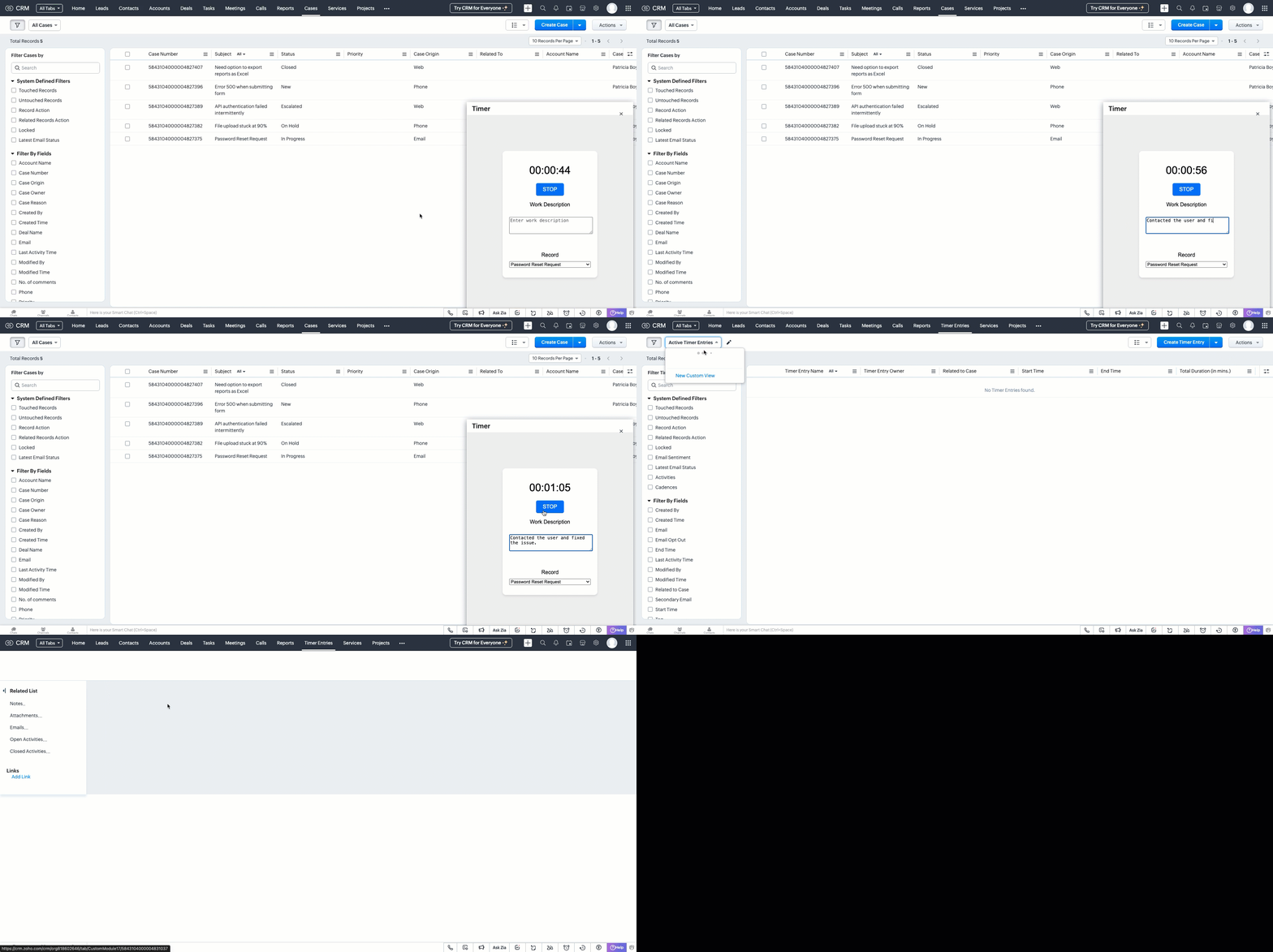
This forms the foundation for accurate time tracking at the record level.
In Part 2, we will show how to:
-> Use a workflow and Deluge function to transfer these entries into the Work Log subform inside the relevant Cases record.
-> Use CRM Reports to slice and dice work time for better SLA and productivity insights.
In the meantime, would you like us to address any of your pain-points or have a topic to discuss? Let us know in the comments or reach out to us via support@zohocrm.com.
Until next time, Happy Coding!
-----------------------------------------------------------------------------------------------------------------
Related Reading
- Custom Fields - Working with Custom Fields and Working with Picklist Field
- Widget - An Overview, CLI Installation, Working with Widgets, JS SDKs, Mobile Compatibility of Widgets and Kaizens
- Core APIs - GET Records, POST Records and UPDATE Records
- Client Script - An Overview, Creating a Client Script, Best Practices and Troubleshooting
-----------------------------------------------------------------------------------------------------------------

Previous Kaizen: Client Script Support for Subforms | Kaizen Collection: Directory
Topic Participants
Kiruthiga G
Sticky Posts
Kaizen #217 - Actions APIs : Tasks
Welcome to another week of Kaizen! In last week's post we discussed Email Notifications APIs which act as the link between your Workflow automations and you. We have discussed how Zylker Cloud Services uses Email Notifications API in their custom dashboard.Kaizen #216 - Actions APIs : Email Notifications
Welcome to another week of Kaizen! For the last three weeks, we have been discussing Zylker's workflows. We successfully updated a dormant workflow, built a new one from the ground up and more. But our work is not finished—these automated processes areKaizen #152 - Client Script Support for the new Canvas Record Forms
Hello everyone! Have you ever wanted to trigger actions on click of a canvas button, icon, or text mandatory forms in Create/Edit and Clone Pages? Have you ever wanted to control how elements behave on the new Canvas Record Forms? This can be achievedKaizen #142: How to Navigate to Another Page in Zoho CRM using Client Script
Hello everyone! Welcome back to another exciting Kaizen post. In this post, let us see how you can you navigate to different Pages using Client Script. In this Kaizen post, Need to Navigate to different Pages Client Script ZDKs related to navigation A.Kaizen #210 - Answering your Questions | Event Management System using ZDK CLI
Hello Everyone, Welcome back to yet another post in the Kaizen Series! As you already may know, for the Kaizen #200 milestone, we asked for your feedback and many of you suggested topics for us to discuss. We have been writing on these topics over the
Nederlandse Hulpbronnen

Recent Topics
Push Notification for New Bookings in Zoho Bookings App
when a someone schedules an appointment through the booking page, is there any option to receive a push notification in the mobile app?Automation in Zoho Sprints
Hi. I have a Sprints board with the following statuses: ToDo, InProgress, CodeReview, Testing, Preprod, Live When a ticket is moved from e.g. Testing to Preprod, the following tags should be modified: remove 'tested OK' remove 'ready for Preprod' addExport Purchase orders as Excel
Is it possible to export purchase orders as excel rather than PDF? Our suppliers don't want orders made in PDF, they need it to be excelDraft & Schedule Emails Directly in Bigin
Greetings, I hope all of you are doing well. We're happy to announce a few recent enhancements we've made to email in Bigin. We'll go over each one in detail, but here's a quick overview: Previously, you couldn't draft or schedule emails in Bigin, butCreate CRM Deal from Books Quote and Auto Update Deal Stage
I want to set up an automation where, whenever a Quote is created in Zoho Books, a Deal is automatically created in Zoho CRM with the Quote amount, customer details, and some custom fields from Zoho Books. Additionally, when the Sales Order is convertedSend email template "permission denied to access the api"
Hello, Per the title, I'm trying to send a Zoho CRM Email template based on the advice given here: https://help.zoho.com/portal/en/community/topic/specify-an-email-template-when-sending-emails-in-custom-functions (I'd prefer to send right from DelugeZia’s AI Assist now helps you write clearer notes — in seconds
After helping recruiters craft job descriptions, emails, and assessments, Zia’s AI Assist is now stepping in to make note-taking effortless too. Whether you’re recording feedback after an interview or sharing quick updates with your team, you can nowShortcut to fill a range of cells
Good evening: I'm writing because I haven't been able to find a feature that allows you to select a range of cells, type in one of them, and then use a key combination to type in all of them. In Excel, the keyboard shortcut is Ctrl+Enter. I haven't foundIntroducing Dark Mode / Light Mode : A New Look For Your CRM
Hello Users, We are excited to announce a highly anticipated feature - the launch of Day, Night and Auto Mode implementation in Zoho CRM's NextGen user interface! This feature is designed to provide a visually appealing and comfortable experience forObject required error
Hi, I am getting an 'Object required' error on the line Call HideColumnsOutsideRange(ws, startOfWeek, endOfWeek) when I run the ShowCurrentWeek macro but not when I run the ShowCurrentMonth macro. Any ideas? Regards, GW Option Explicit Sub HideColumnsOutsideRange(wsZoho CRM - Rename "Estimates" in CRM Finance Suite Integration to "Quotes"
I'm not sure if it's been 2 or 3 years now since Zoho Books renamed Estimates to Quotes. I still see "Estimates" in the Zoho CRM integration. Could this be added to Translation settings so that some customisation could be made on an account by accountIts 2022, can our customers log into CRM on their mobiles? Zoho Response: Maybe Later
I am a long time Zoho CRM user. I have just started using the client portal feature. On the plus side I have found it very fast and very easy (for someone used to the CRM config) to set up a subset of module views that make a potentially extremely usefulNew Series Announcement - Ecommerce Marketing Tips
Running an online business is more than just having a website. It’s about getting the right customers to discover you, trust you, and keep coming back. To support your growth journey, we’re launching a weekly Marketing Tips series right here on Zoho CommerceMarketing Tip #7: Add a blog to your online store
A blog is more than content. It’s a magnet for new customers. Sharing product guides, styling tips, or industry insights through blog posts builds trust and helps you rank higher on search engines. Try this today: Write one blog post answering a commonKanban view on Zoho CRM mobile app!
What is Kanban? The name doesn't sound English, right? Yes, Kanban is a Japanese word which means 'Card you can see'. As per the meaning, Kanban in CRM is a type of list view in which the records will be displayed in cards and categorized under the givenAllow Regular Users to Directly Transfer Ownership of Files & Folders
Hi Zoho WorkDrive Team, Hope you are doing well. We would like to request an important enhancement related to file and folder ownership management in Zoho WorkDrive. At the moment, a regular user cannot directly transfer ownership of their files or foldersTriggering rules on lead conversion
There is no field on the Rule list for rule conversion to trigger an alert on liead conversion to a potential. I assigned a rule to file on any creation or update of a lead. The lead was changed a lead to a potential but no rule was fired. Rajesh BhadraCustomised Funnel
We are running the standard plan for our ZOHO CRM. I have been asked if there is a way to combine data from the Calls module, Deals module and Contact Module into 1 funnel, similar to the view you can get when viewing Deals By Stages, you can see theTrigger Zapier on Deluge Insert Into Function?
Hello, To get around the limitation of not being able to trigger a Zapier Zap on Record Update(this would be extremely useful to be able to do btw), I have created a Deluge script to copy the data from Form A to a Trigger Form B using the Insert Into expression from a Custom Action button on a Report from Form A. This action does not trigger the Zapier Zap whereas manually adding a record or duplicating an existing record does trigger the Zap. Is Insert Into not the same as a manual Add in the contextCan you inject JS in an HML+CSS+Deluge Page?
I have an HTML + CSS + Deluge page and need just a little vanilla JS functionality. However, it seems like Zoho Creator does not allow that. I'm required to create a JS widget. Is this correct? If so: 1. Won't this quickly consume my API limit if thereDisplay Client Name in Zoho Creator Client Portal Dashboard
Hello Zoho Creator Team, We hope you are doing well. Zoho Creator recently introduced the option to set a client’s display name in the Client Portal settings, which is very helpful for providing a personalized portal experience. However, there is currentlyZoho unified inbox
The new changes have definitely improved things for switching between accounts. But zoho still desperately needs a unified inbox. It sucks to have to enter filters and folders for each and every inbox. This seems like such a simple thing, i wonder why Zoho hasn't done it?Marketer’s Space - Multi-Channel Campaigns for the Biggest Shopping Week with Zoho Marketing Automation
Hello marketers, Welcome back to another post in Marketers Space! The biggest shopping week of the year is almost here, and it’s your moment to shine without the stress. With Black Friday and Cyber Monday just around the corner, being present across email,Is there a problem with sharing workdrive files with links since last night?
As per title, we can't access folders/files through share links since last night. I created ticket but we need quick solution and didn't hear back from the support yet. The files are still accessible by the main account but all zoho files that we areEnable Screen Recording in Zoho WorkDrive Mobile Apps (Android & iOS)
Hi Zoho WorkDrive Team, How are you? We are enthusiastic Zoho One users and rely heavily on Zoho WorkDrive for internal collaboration and content sharing. The screen-recording feature in the WorkDrive web app (similar to Loom) is extremely useful- however,Production Management Tool (MRP / BOM)
Hi Guys, is there any recommended App available that works with zoho and covers the needed applications for a production? What we need is a system that covers the BOM (bill of materials), MRP (material ressources planning), MRP II (manufacturing ressourcesFunction #53: Transaction Level Profitability for Invoices
Hello everyone, and welcome back to our series! We have previously provided custom functions for calculating the profitability of a quote and a sales order. There may be instances where the invoice may differ from its corresponding quote or sales order.Bug in Zoho Cliq Signup Flow – "%s" Placeholder Visible Instead of Product Name
Hi Zoho Team, I would like to report a UI bug in the Zoho Cliq signup/enable flow. During the step where Cliq asks to enable the product for the company, the following text appears: Great! Your company is already available in Zoho, so you just have toExporting tickets
I went to Setup -> Organization -> Import/Export in order to export tickets but found 2 issues: 1. The email body never gets exported. 2. There are some large numbers (like 5.57E+16) under certain columns of the exported CSV file. I could not find any export options. Please can you help with this?Editing the Ticket Properties column
This is going to sound like a dumb question, but I cannot figure out how to configure/edit the sections (and their fields) in this column: For example, we have a custom "Resolution" field, which parked itself in the "Ticket Information" section of thisCopy field information to clipboard
I need to be able to transfer some field information in to the clipboard, so that I can then paste it in to our helpdesk system. Is there a way I could add a button to a detail report that does this?Issuing reconciling a bank statement
HELP! I'm trying to reconcile a bank statement. The prior month reconciled perfectly. Beginning balance is correct yet I'm off by the same amount each time. Both myself and my office manager, separately and together, have tried to complete this reconciliationUnknown table or alias 'A1'
I would like to create a subquery but i am getting the following error: Unknown table or alias 'A1' used in select query. This is the sql statement: SELECT A1.active_paying_customers, A1.active_trial_customers, A1.new_paying_signup, date(A1.date_active_customers),Detect and ignore bots in visitors
The SalesIQ visitor numbers are basically useless to us because there is no bot detection. We get the same bots coming in from the same countries looking at the same pages every day. It can't be that difficult to tell the difference between an actualAdd Real-Time Microphone Audio-Level Indicator During Screen Recording
Hi Zoho WorkDrive Team, Hope you are doing well. We would like to request an important enhancement to the Zoho WorkDrive screen-recording experience. Current Limitation: During a recording session, there is no visual indication that the microphone isZero Personalization of the File Sharing Experience
By now (2025) this is the maximum level of personalization available for a Zoho sharing link. We gently asked Zoho if we could modify at least the background, and they replied that it cannot be customized. We're truly disappointed – and surprised everyTwo factor authentication for helpdesk users
The company i work for wants use the helpdesk site in Zoho desk, as a place for their distribution partners to ask question and look for information about our product. The things there is suppose to go up there is somewhat confidential between my companyKiosk can't merge picklist or multiselect
There is no ability to load a multiselect or picklikst field into a kiosk with the values that have been previously selected. So, I essentially have 3 unacceptable options: 1.)Load the value into a text string and include instructions like this: "PicklistAGE field from DATE OF BIRTH Field.
HI! I have a field called date of birth in my CRM (LEADS, CONTACT etc…) How can I know the AGE today I would like to create a field AGE. I now how to create a field but I don´t which calculation (CUSTOM FUCTION) to make ¿ANY HELP?How to update/remove file in zoho creator widgets using javascript API
Hi Team, I have developed a widget which allows inserting and updating records I have file upload field with multiple file upload. Now while doing insert form record, I am using uploadFile API to upload files for that record. I am using updateRecord APINext Page