Event Management System using ZDK CLI

Hello Everyone,
Welcome back to yet another post in the Kaizen Series!
As you already may know, for the Kaizen #200 milestone, we asked for your feedback and many of you suggested topics for us to discuss. We have been writing on these topics over the past few weeks. One of the feedbacks asked us to cover "more on ZDK CLI". In this post, we will discuss building an Event Management System in Zoho CRM Using ZDK CLI.
Consider the case of Zenith, a Zoho CRM partner who is also partner for Zoho's competing products. Zenith is hosting a conference in which their representatives are inviting speakers from Zoho and also other competing products. The attendees of the conference will be either external attendees or leads or contacts of Zenith. For this purpose existing meetings module of Zoho CRM (previously called Events) can not be used as it is not a good fit for this case. Custom modules and fields are required for this. In this post, we’ll discuss how to create a Event Management System that is complimentary to Zoho CRM using ZDK CLI.
Why Use ZDK CLI?
ZDK CLI allows developers to:
- Create and edit CRM metadata (modules, fields, roles, profiles, and widgets)
- Define relationships between modules (lookups, multi-select lookups)
- Push and sync metadata changes to sandbox.
- Resolve conflicts when multiple users work on the same metadata.
This makes it ideal for building reusable CRM systems such as event management.
Initial Setup
As the initial setup, initialize the ZDK CLI project directory using zdk init command and create a new ZDK Project folder "Zenith".
zdk init |

Then, login to the sandbox environment for Zenith using zdk auth:login command.
| zdk auth:login |

When you execute zdk auth:login, you can either select any org that is already signed in or select NEW LOGIN to visit the login page and select the sandbox org you will be working on.

After logging in to Zoho select the sandbox environment and give required permissions.

For the current beta release, ZDK CLI is exclusively available for Sandbox environment and is not operational in Production environments.

You will be redirected to the terminal after successful login and you can start working on ZDK CLI.

Change the api_version to 8 in zdk-project.json file.
Step 1: Define the Modules
For an event management use case, we will need the following custom modules:
- Conference – Stores details of each event.
- Attendees – Tracks participants, whether leads, contacts, or external.
- ConferenceAttendees (Linking Module, not created) – Connects conferences and attendees with registration status.
- Venues – Captures details of event locations.
- Speakers – Stores details of invited speakers.
This has been visualized in the data model below.

To create a module, use the command
| zdk meta:create modules |

This creates the json file for module metadata : Conference.modules-meta.json in the path Zenith/crm/meta/modules/Conference
Conference.modules-meta.json content
{ "singular_label": "Conference", "plural_label": "Conferences", "api_name": "Conference", "profiles": [ { "api_name": "Administrator" } ], "display_field": { "api_name": "Conferences" }, "show_as_tab": true } |
Similarly create modules Attendees , Venues, and Speakers modules
Step 2: Customize Fields
To create a field, use the command
| zdk meta:create fields |
Conference module:
Conference modules's fields are:
- Attendees (multiselectlookup to Attendee module)
- Speakers (multiselectlookup to Speakers module)
- Venue (lookup to Venue module)
- Date (datetime)
- Duration(double)
- Description (textarea)
- Status (picklist: Planned, Ongoing, Completed)
Attendees field
Let us check how to create the field attendees of type multi-select lookup (to Attendee module)

The json file Attendees.fields-meta.json created in the path Zenith/crm/meta/modules/Conference/fields will look like this

To provide dependent details for the multi select lookup, add the multiselectlookup json object to the Attendees.fields-meta.json file as below:
{ "field_label": "Attendees", "display_name": "Attendees", "api_name": "Attendees", "type": "used", "data_type": "multiselectlookup", "multiselectlookup": { "connected_details": { "module": { "api_name": "Attendee" }, "field": { "field_label": "AttendingConference" } }, "linking_details": { "module": { "plural_label": "Conferences_X_attendees" } } } } |
Speakers (multi-select lookup to Speakers module)
Similar to Attendees field, create Speakers field and modify the json file Speaker.fields-meta.json created in the path Zenith/crm/meta/modules/Conference/fields:
{ "field_label": "Speaker", "display_name": "Speakers", "api_name": "Speakers", "type": "used", "data_type": "multiselectlookup", "multiselectlookup": { "connected_details": { "module": { "api_name": "Speaker" }, "field": { "field_label": "AttendingConference" } }, "linking_details": { "module": { "plural_label": "Speakers_X_attendees" } } } } |
Venue (lookup field to Venue module)
Similarly, create the Venue field with type as "lookup" The json file Venue.fields-meta.json created in the path Zenith/crm/meta/modules/Conference/fields will look like this

To provide dependent details for the lookup, add the lookup json object to the json as below.
{ "field_label": "Venue", "display_name": "Venue", "api_name": "Venue", "type": "used", "data_type": "lookup" "lookup": { "display_label": "Venue", "api_name": "Venue", "module": { "api_name": "Venue" } } } |
Description (textarea)
After create a textarea field Description using zdk meta:create fields command, add textarea json object to the field meta json file as below :
{ "field_label": "Description", "display_name": "Description", "api_name": "Description", "type": "used", "data_type": "textarea", "textarea": { "type": "rich_text" } } |
The possible values for text area are small, large and rich_text.
Status (picklist)
After create a picklist field Status using zdk meta:create fields command, add pick_list_values json array to the field meta json file as below:
After create a picklist field Status using zdk meta:create fields command, add pick_list_values json array to the field meta json file as below:
{ "field_label": "Status", "display_name": "Status", "api_name": "Status", "type": "used", "data_type": "picklist", "pick_list_values": [ { "display_value": "Planned", "actual_value": "Planned" }, { "display_value": "Ongoing", "actual_value": "Ongoing" }, { "display_value": "Completed", "actual_value": "Completed" } ] } |
Date and duration fields of type datetime and double does not require any edits to the created meta.json file.

Attendees Module
Similarly, add fields for attendees modules
- Phone (phone)
- Company (text)
- EventsAttended (multi-select lookup to Conference module)
- Attendee Type (picklist with options Lead, Contact, External)
- Leads (lookup to Lead module)
- Contacts (lookup to Contact module
Venue Module
- Location (text)
- Capacity (integer)
- Contact erson (text)
- ContactNumber(phone)
- Description(textarea)
Speakers Module
- Phone (phone)
- Company (text)
- SpeakerStatus (picklist with options Confirmed, Pending, Canceled)
Step 3: Create a Custom Role
To create a field, use the command
| zdk meta:create roles |

This ensures event managers have the right access without interfering with other CRM operations.
Pushing changes to the sandbox environment
Once all changes are done execute zdk org:push and zdk org:push result --{jobId} command to deploy the changes to the sandbox environment. Once the changes are verified in your sandbox environment you can deploy it to the production environment.

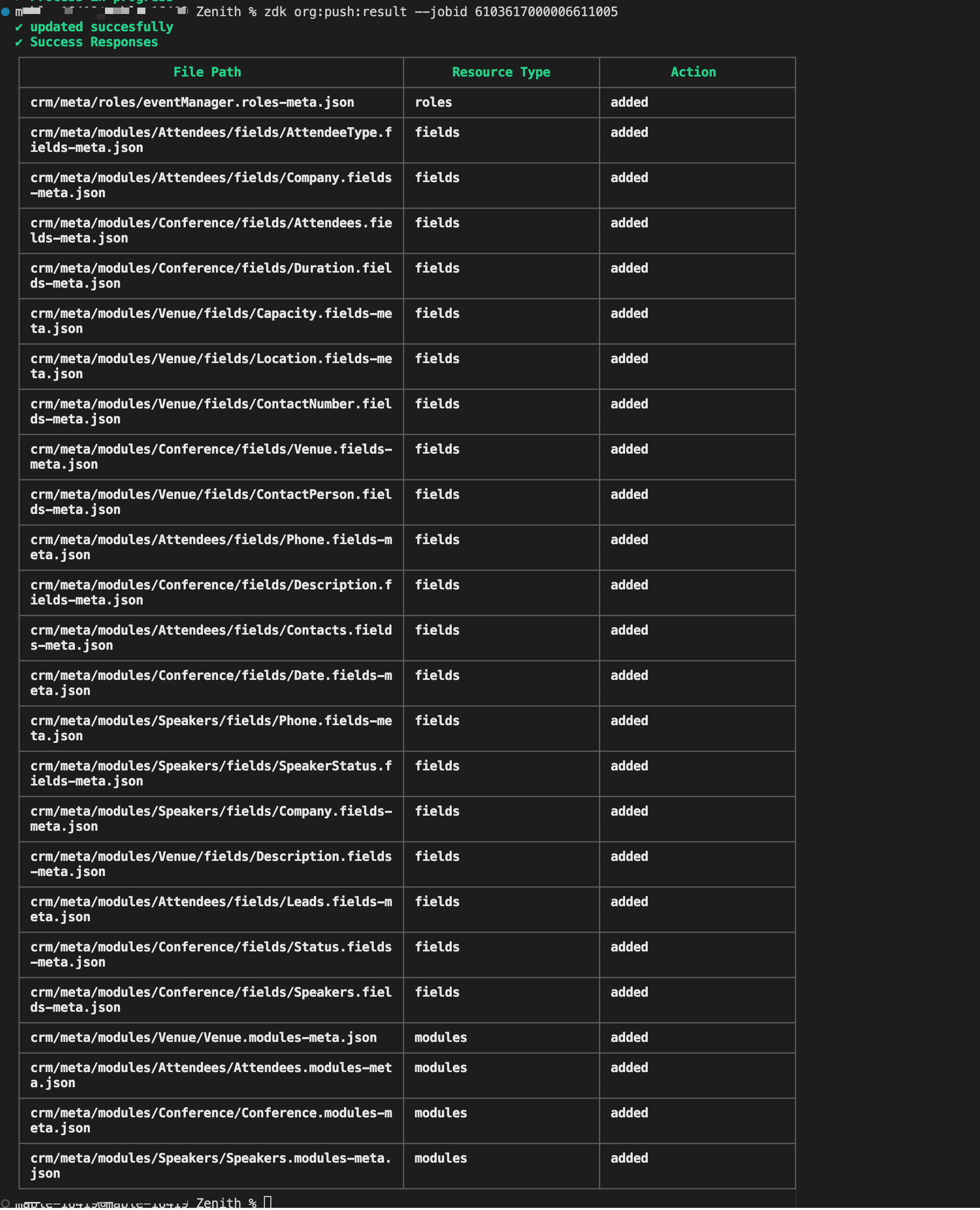
You can extract this metadata zip file, that is created using zdk org:export command to your own ZDK project directory and try pushing the changes to your sandbox environment.
Building the Event Management System for "Zenith" illustrates the core strength of ZDK CLI. It brings software engineering best practices to Zoho CRM customization. By defining modules/fields/roles as json files directly or creating them using the command, the source truth of the metadata is available in local system. The same can be tracked via version control systems like GIT for better collaboration among the team.

Topic Participants
Mable Mary M P
Sticky Posts
Kaizen #217 - Actions APIs : Tasks
Welcome to another week of Kaizen! In last week's post we discussed Email Notifications APIs which act as the link between your Workflow automations and you. We have discussed how Zylker Cloud Services uses Email Notifications API in their custom dashboard.Kaizen #216 - Actions APIs : Email Notifications
Welcome to another week of Kaizen! For the last three weeks, we have been discussing Zylker's workflows. We successfully updated a dormant workflow, built a new one from the ground up and more. But our work is not finished—these automated processes areKaizen #152 - Client Script Support for the new Canvas Record Forms
Hello everyone! Have you ever wanted to trigger actions on click of a canvas button, icon, or text mandatory forms in Create/Edit and Clone Pages? Have you ever wanted to control how elements behave on the new Canvas Record Forms? This can be achievedKaizen #142: How to Navigate to Another Page in Zoho CRM using Client Script
Hello everyone! Welcome back to another exciting Kaizen post. In this post, let us see how you can you navigate to different Pages using Client Script. In this Kaizen post, Need to Navigate to different Pages Client Script ZDKs related to navigation A.Kaizen #210 - Answering your Questions | Event Management System using ZDK CLI
Hello Everyone, Welcome back to yet another post in the Kaizen Series! As you already may know, for the Kaizen #200 milestone, we asked for your feedback and many of you suggested topics for us to discuss. We have been writing on these topics over the
Nederlandse Hulpbronnen

Recent Topics
Is there a way to automatically add Secondary Contacts (CCs) when creating a new ticket for specific customers?
Some of our customers want multiple contacts to receive all notifications from our support team. Is there a way to automatically add secondary contacts to a ticket when our support team opens a new ticket and associates it with an account? This wouldImproved RingCentral Integration
We’d like to request an enhancement to the current RingCentral integration with Zoho. RingCentral now automatically generates call transcripts and AI-based call summaries (AI Notes) for each call, which are extremely helpful for support and sales teams.Edit Pinned Comments in Zoho Desk
It's great that private comments can now be pinned to the top of the ticket but what would be extremely helpful would be to allow for the pinned comment to be edited vs. having to find the comment in the ticket to edit it.Updating Secondary Contact (CCs)
We use Zoho Forms to capture the user request and integrated with Zoho Desk to raise tickets. Active Microsoft login is captured in our Zoho forms and registered as Primary contact in Zoho desk ticket. We also an have an option to raise ticket on behalfblank page after login
blank page after logging into my email account Thanks youWriterTh
After every space Writer goes to capital letters mode in my Android tablet. The cap mode stays till the second letter is typed in the word then it comes to normal mode.Zoho writer unable to merge documents to PDF with basic fonts in Hebrew or fonts from my computer
I created several forms that will be merged into PDF files through Zoho Writer and I am unable to receive the PDF in the basic fonts of the Hebrew language or in the fonts I have on my computer. The writer exports to PDF an exchange font that looks veryI have already created some Bots, Commands, and Widgets in Cliq, but I am still not seeing the “Create Extension” option in my account. Could you please help me enable or access this option?
Infinite loop of account verification
Hi I can't do anything on my zoho account. I always get this message Hi Sheriffo Ceesay As a security measure, you need to link your phone number with this account and verify it to proceed further. When ever I supply the details, it displays that the number is associated with another account. I don't have any other account on zoho so this is really annoying.How we cut CRM updates from ~20 minutes down to 2, our real workflow
Updating the Zoho CRM after every call used to be one of the biggest time sucks for our team. By the time you write your notes, clean them up, fill in the fields, and log everything properly… you’ve easily lost 15–20 minutes per call. We started experimentingArattai App Features Update
1. Offline Messaging & Sync Enable users to compose messages without internet and deliver them automatically via peer-to-peer methods (Bluetooth/WiFi Direct) when nearby users are available. This would be a game-changer for rural India with unreliableZoho Books Sandbox environment
Hello. Is there a free sandbox environment for the developers using Zoho Books API? I am working on the Zoho Books add-on and currently not ready to buy a premium service - maybe later when my add-on will start to bring money. Right now I just need aHow to add Product Add-Ons, Mandatory Forms, and Auto-Save Address in Zoho Commerce
Hi all, I need help setting up several behaviors in Zoho Commerce. I can’t find the correct configuration options, so I want to confirm whether these are supported or if there is a workaround. 1. Product-Specific Add-Ons (Example: GWB Subscription) WhenZohomail
Im trying to setup email address zohoPROBLEMA
Salve, non riesco a inviare email, e mi esce una tabela errore temporaneo. come posso risolvere il problema ?Forever FREE Business Email with Zoho Mail
Forever FREE Business Email with Zoho Mail: is it available?Weekly Tips : Make collaboration effortless with Whiteboard in Zoho Mail
Working with your team often means switching between emails, notes, and other applications just to explain an idea. Maybe you are trying to sketch a layout, plan a workflow, or quickly brainstorm ideas—with text alone, things can get confusing. So howFormula field number of days between 2 dates
Hi, I want to have a formula field which calculates the following: IF EndDate < TODAY and Oproep is true (this is a checkbox field) than EndDate - StartDate, otherwise TODAY - StartDate It should calculate the number of days How can I write this for'email address already exists'
I deleted a user from my organization and want to use the same email address that user had, but the email address seems to still exist somewhere as I get 'email address already exists' when I try and create it. I have deleted the entire organization andZOHO reporting DKIM entries are not configured, when they have been configured and verified by 3rd parties
Why is ZOHO reporting to my organisation users the following: "The DKIM entries in your domain's DNS records are not configured. Please contact your administrator for configuring DKIM to ensure optimal RSVP invite delivery." When I have configured theManage Bookings directly from Zoho Mail
Greetings from the Zoho Bookings team! We’re introducing the new Zoho Bookings extension for Zoho Mail, designed to help you view appointments, copy time slots and share booking links without leaving your inbox. This integration brings scheduling rightMy notes from the past 2 months have disappeared
Hola, necesito ayuda urgente. Hoy, al iniciar sesión en mi Zoho Notebook como todos los días, me llevé una gran sorpresa al descubrir que todas mis notas de los últimos dos meses habían desaparecido. Estas notas son muy importantes para mí, ya que usoHow can I load a network into the cliq desktop app?
I have both the standard cliq log in for my org and I am part of a cliq network. In the browser I can choose which I log in to. However, in teh desktop app if I log in it will alwasy load my org's cliq. Can I switch this to the network I have createAbility to modify what displays in calendar invite?
I am a long time calendly user and want to make the switch to bookings. I understand that there is not currently a meets/hangouts integration, is one on the roadmap? Is there anyway I can modify the calendar invite to include the meet link? I can add it to the emails no problem, but I would also like it to display on their calendar. Is there some work around I can do to get it on the calendar? Also am I able to modify the calendar event title?Issue with Booking Confirmation Page Not Displaying, Leading to Customer Anxiety and Unnecessary Support Calls
I am writing to express my growing concern regarding the confirmation process in Zoho Bookings, particularly the inconsistent display of the confirmation page after a successful payment. As a mobile service provider, I rely on Zoho Bookings platform forIs it possible to turn off all capabilities for a customer to schedule, reschedule or cancel an appointment?
Is it possible to turn off all capabilities for a customer to schedule, reschedule or cancel an appointment? I would like to set it up so only staff can schedule appointments. Is this possible?Is there a way to generate a virtual meeting for a group service in Zoho Bookings?
Are virtual meetings not supported for group services/meetings? I have integrated Zoom with one-on-one services, but I need a way to create an online group meeting. ThanksWhere we can change the icon in social preview
Hi, we changed our logo, and the image that appear in preview (ex : when we post a appointment link somewhere) is still our old logo. I did change our logo in the org setting. https://bookings.zoho.com/app/#/home/dashboard/settings/basic-info?clview=falseZoho Bookings changes Lead Source
Hi. i would like to know if there's a way for Zoho Bookings to not change the lead source when booking a lead for an appointment as the lead source will be used in a report. Scenario: Lead source: Website after booking an appointment Lead source: Zoho Bookings Thanks. DanNeed to set workflow or journey wait time (time delay) in minutes, not hours
Minimum wait time for both Campaigns workflows and Marketing Automation journeys is one hour. I need one or the other to be set to several minutes (fraction of the hour). I tried to solve this by entering a fraction but the wait time data type is an integerSuggestion: Associating Assets with Company in Zoho FSM
Hello Team, I would like to share an idea based on practical experience. Currently, all assets in the Zoho FSM Asset module are linked to a specific contact person. I would like to know if it is possible to associate assets with a company instead. ThisZoho Inventory / Finance Suite - Extend Visibility of File Names on Attachment Fields
Hi Inventory / Finance Suite team, I noticed recently that when you add an attachment field to a module in Inventory, only the first 8 characters of the file name are visible on the details view. 8 characters is not a useful amount and there is plentyMany Notes Becoming Unusable
Hello. The Notebook app is becoming unusable. I'm getting odd-looking results from my searches. Some of the notes, after clicking on them, show an update button that does absolutely nothing. Not sure what has happened, but it would be nice to get thisKaizen #218: Actions APIs - Field Updates
Hello all!! Welcome back to a fresh Kaizen week. In the previous weeks, we covered Workflow Rules APIs, Actions APIs - Email Notification APIs, and Tasks Update APIs. This week, we will continue with another Actions API - the Field Update API in ZohoHow Contract Types and Templates Form the Backbone of Zoho Contracts
Every contract in Zoho Contracts starts with two essential elements: Contract Type and Template. These are not just administrative steps. They define how every contract in your organization is created, governed, and managed over time. Let us look at theZoho Books Finance Modules Not Accessible in Zoho CRM Mobile App
We have integrated Zoho CRM with Zoho Books using the Zoho Finance Suite integration. In the CRM web version, we can see the Finance modules (Estimates/Quotes, Invoices, Sales Orders, Items, Payments) and are able to create invoices and quotes directlyGreek character in Deluxe script
Hi, We have been using a script since 2022 which replaces characters in Greek contact names using replaceAll. Since this morning, all the Greek characters used in the script have turned to question marks. I tried retyping the characters, copy-pastingCRM Related list table in Zoho analytics
In Zoho Analytics, where can I view the tables created from zoho crm related lists? For example, in my Zoho CRM setup, I have added the Product module as a related list in the Lead module, and also the Lead module as a related list in the Product module.Zoho learn Custom portal - networkurl & CustomPortalId
I want to get my individual account’s networkurl and customportalId to use in this API: https://learn.zoho.com/learn/api/v1/portal/<networkurl>/customportal/<customportalId>/manual How can I retrieve the networkurl and customportalId using the API? IConnecting zoho creator to zoho writer to send prefilled documents
i will paste the worflow below // Get user's submitted data from the form userSalary = input.Current_Salary; userCIBIL = input.CIBIL_Score; userEmail = input.Email; userName = input.Name; // You need to get the Document ID from the URL of your Zoho WriterNext Page