Kaizen 214 - Workflow APIs - Part 2

Last week, we discussed how Zylker Cloud Services used the Workflow APIs to discover and audit all the automations in their CRM, listing every workflow, checking triggers, and understanding their automation limits. This week, we take the next step: understanding what configurations are valid before creating or updating workflows via APIs.
Step 4: Workflow Rule Configurations API
When you work in the CRM UI, creating workflows feels straightforward. The interface shows only valid triggers and actions. Try adding an unsupported action, and it simply will not appear. This is because the UI enforces hundreds of rules behind the scenes.
With APIs, these validations must be handled manually. That is where the Workflow Rule Configurations API comes in. It gives all the valid triggers and actions for a given module, preventing errors before they happen.
Why this API matters
Consider two examples:
You want to create a workflow for the Products module based on a Scoring Rule update. The UI hides this option because scoring rules are not supported for Products.
You try to add a Field Update action for a Record Delete trigger. This is invalid, as the record no longer exists. The UI prevents it, but via API, you would get an error if you try to create or update the workflow with this configuration.
The Configuration API removes this guesswork, allowing you to fetch and respect valid triggers and actions.
Sample Request:
GET {api-domain}/crm/v8/workflow_configurations?module=Deals
Sample Response:
{ "workflow_configurations": { "related_triggers_details": [ { "api_name": "Notes", // The API name of the related module that can trigger workflows "module": { // Details about the related module "singular_label": "Note", "plural_label": "Notes", "api_name": "Notes", "name": "Notes", "id": "4876876000000002197" }, "name": "Notes", // Module name "triggers": [ // Available triggers for this related module { "api_name": "create", "deprecated": false, "name": "Create", "scheduled_actions_supported": true, "actions": [ // List of supported actions for this trigger "add_tags", "remove_tags", "email_notifications", "tasks", "create_record", "create_connected_record", "add_meeting", "webhooks", "functions", "flow" ] }, // ... other triggers (create_or_edit, edit, delete) omitted for brevity ] } ], "triggers": [ // Primary triggers for the Deals module itself { "api_name": "score_increase", "deprecated": false, "name": "ScoreIncrease", "scheduled_actions_supported": false, // Indicates whether scheduled actions are allowed for this trigger "actions": [ // Only these instant actions are supported "field_updates", "assign_owner", "add_tags", "remove_tags", "email_notifications", "tasks", "webhooks", "functions", "circuits", "flow" ] }, // ... other triggers omitted for brevity ... ], "actions": [ // Details about available workflow actions { "is_clickable": true, "associate_action": false, "limit_per_action": null, "api_name": "schedule_call", "supported_in_scheduled_action": true, "name": "ScheduleCall", "limit": 1 // Maximum instances per workflow }, { "is_clickable": true, "associate_action": true, "limit_per_action": null, "api_name": "tasks", "supported_in_scheduled_action": true, "name": "Task", "limit": 5 }, // ... other actions omitted for brevity ... ] } } |
Interpreting and using the Workflow Configuration API
The configuration response might look complex, but it gives us all the information we need about configuring Workflow Rules in Zoho CRM, for the specific module.
4.1 "What can trigger my Workflow?"
The triggers array shows all the supported triggers for that specific module.
"triggers": [ { "api_name": "create", "deprecated": false, "name": "Create", "scheduled_actions_supported": true, "actions": [ "field_updates", "assign_owner", "add_tags", "remove_tags", "email_notifications", "tasks", "create_record", "create_connected_record", "add_meeting", "webhooks", "functions", "circuits", "flow" ] }, . . // ... other triggers omitted for brevity ... { "api_name": "score_increase", "deprecated": false, "name": "ScoreIncrease", "scheduled_actions_supported": false, "actions": [ "field_updates", "assign_owner", "add_tags", "remove_tags", "email_notifications", "tasks", "webhooks", "functions", "circuits", "flow" ] } ] |
The response lists all available triggers for the module. For each trigger type, you get:
Trigger conditions: When the workflow will be triggered (on create, edit, score change, etc.)
Action compatibility: Which actions can be used with each trigger type
Scheduled actions support: Whether scheduled actions are supported for that trigger or not.
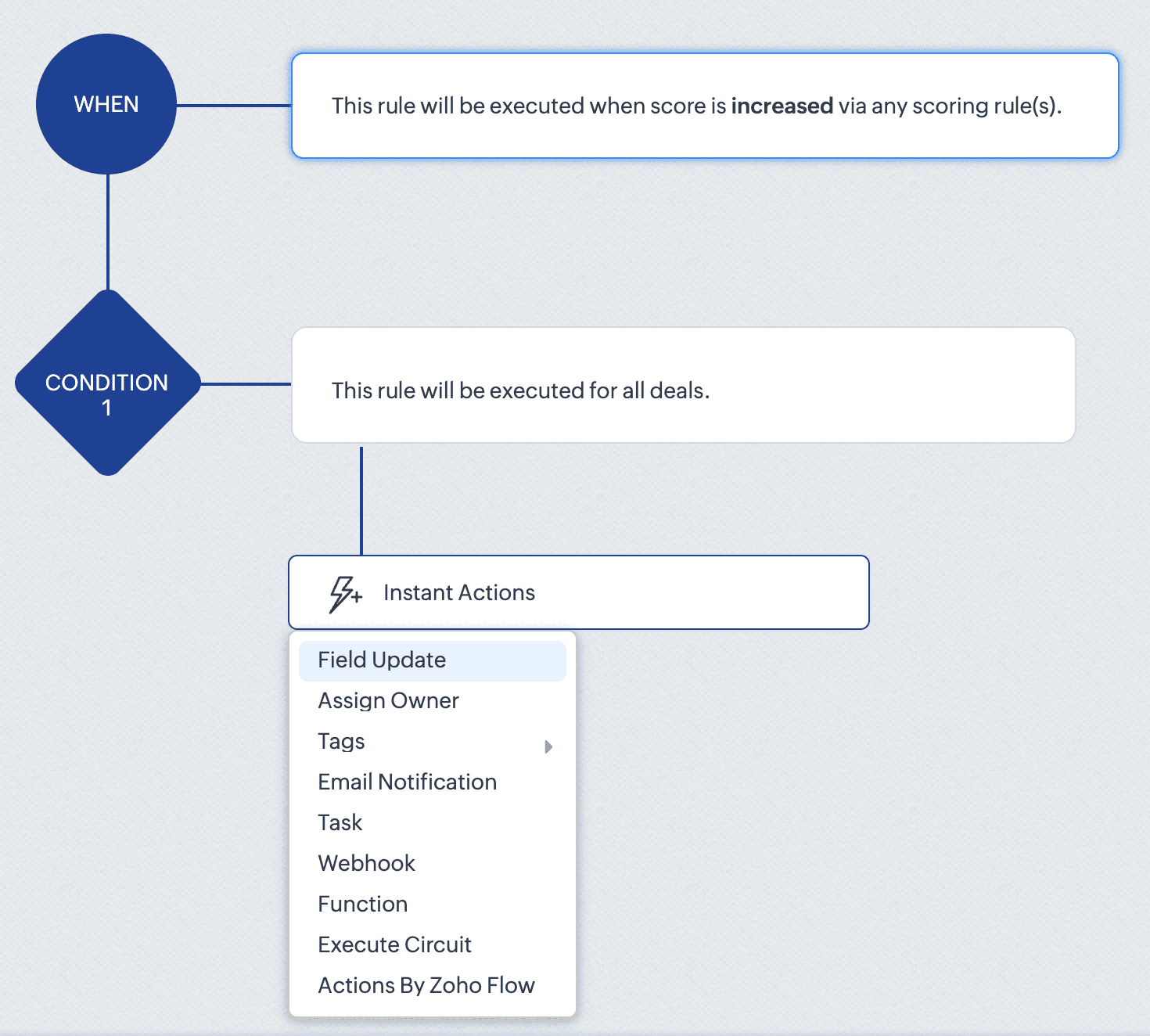
For instance, the score_increase trigger triggers the workflow when the score of a record is increased. The scheduled_actions_supported key is false for this trigger, which means that this specific trigger type doesn't support scheduled actions. This directly translates to API behaviour: attempting to configure a Workflow Rule via API with a scheduled action for the score_increase trigger will result in an error.
This API constraint is visibly enforced in the CRM interface. When configuring a score-based trigger in the UI:
4. 2. "What can my Workflow actually do?" - Understanding Actions
The actions array defines the execution capabilities of your workflows. For each action type, you get important information like:
Limits per action instance: Maximum number of items that can be processed within a single action instance
Instance limits: How many times this specific action can be added to a condition in the Workflow rule.
Scheduled action support: Whether the action can be added as a scheduled action.
For example, in the add_tags action:
{ "is_clickable": true, "associate_action": false, "limit_per_action": 10, // Maximum 10 tags per Add Tags action "api_name": "add_tags", "supported_in_scheduled_action": true, "name": "AddTags", "limit": 1 // Maximum one Add Tags action per workflow } |
From this data, it is clear that within a single Add Tags action, you can select up to 10 specific tags to add. Similarly, you can only include one Add Tags action instance in the entire workflow rule. Also, this action cannot be used as a scheduled action.
This has direct implications for API users:
Attempting to configure a workflow that adds more than 10 tags in one action will result in an error
Trying to add two separate Add Tags actions to the same workflow will fail
Adding a Add Tags action under scheduled actions section will also result in an error.
In the UI, these constraints are proactively taken care of. As seen in the GIF, if you add fewer than 10 tags, clicking Add Tags again only lets you edit the existing action. Also it lets you add only up to 10 tags in an action. And if you have already added an action with 10 tags, the Add Tags option will no longer be available. Either way, the system prevents any possibility of adding a second Add Tags action, regardless of tag count.
This UI experience is what the Workflow Rules Configuration API replicates for developers. By checking these limits before making API calls, you can build workflows using APIs with the same confidence and error-free experience that UI users have.
4.3. “What can trigger my Workflow from a related module?” – Understanding related triggers
The related_triggers_details array shows how changes in related records can trigger workflows in your primary module. For example, in the Deals module, for the Notes related trigger:
"related_triggers_details": [ { "api_name": "Notes", // The API name of the related module "module": { // Detailed information about the related module "singular_label": "Note", "plural_label": "Notes", "api_name": "Notes", "name": "Notes", "id": "4876876000000002197" }, "name": "Notes", // Module name "triggers": [ // Available triggers for this related module { "api_name": "create", // Trigger when related records are created "deprecated": false, "name": "Create", "scheduled_actions_supported": true, "actions": [ // Supported workflow actions for this trigger "add_tags", "remove_tags", "email_notifications", "tasks", "create_record", "create_connected_record", "add_meeting", "webhooks", "functions", "flow" ] }, // ... other triggers (create_or_edit, edit, delete) omitted for brevity ] } ] |
For each related module, you get:
Module information: Details about the related module that can trigger workflows.
Available triggers: The actions on the related record (create, edit, delete, etc) that can trigger the workflow.
Supported actions: For each trigger, the actions that are supported for that specific trigger.
For instance, the Notes related trigger allows you to create workflows that execute when notes are added to deals. The configuration shows that when a note is created, your workflow can perform actions like sending email notifications, creating tasks, triggering webhooks, and more.
If you try to include an unsupported trigger or unsupported action, the API call will fail. For example, adding a field_updates action for a Notes create trigger . The configuration API response clearly shows that field_updates is not among the supported actions for Notes-related triggers.
The API also gives us important differences between trigger-action configurations. For example, while field_updates action is supported for the create trigger for the main module (Deals), the same action is not supported for the related module (Notes) create trigger. These distinctions would otherwise only be discovered through API errors.
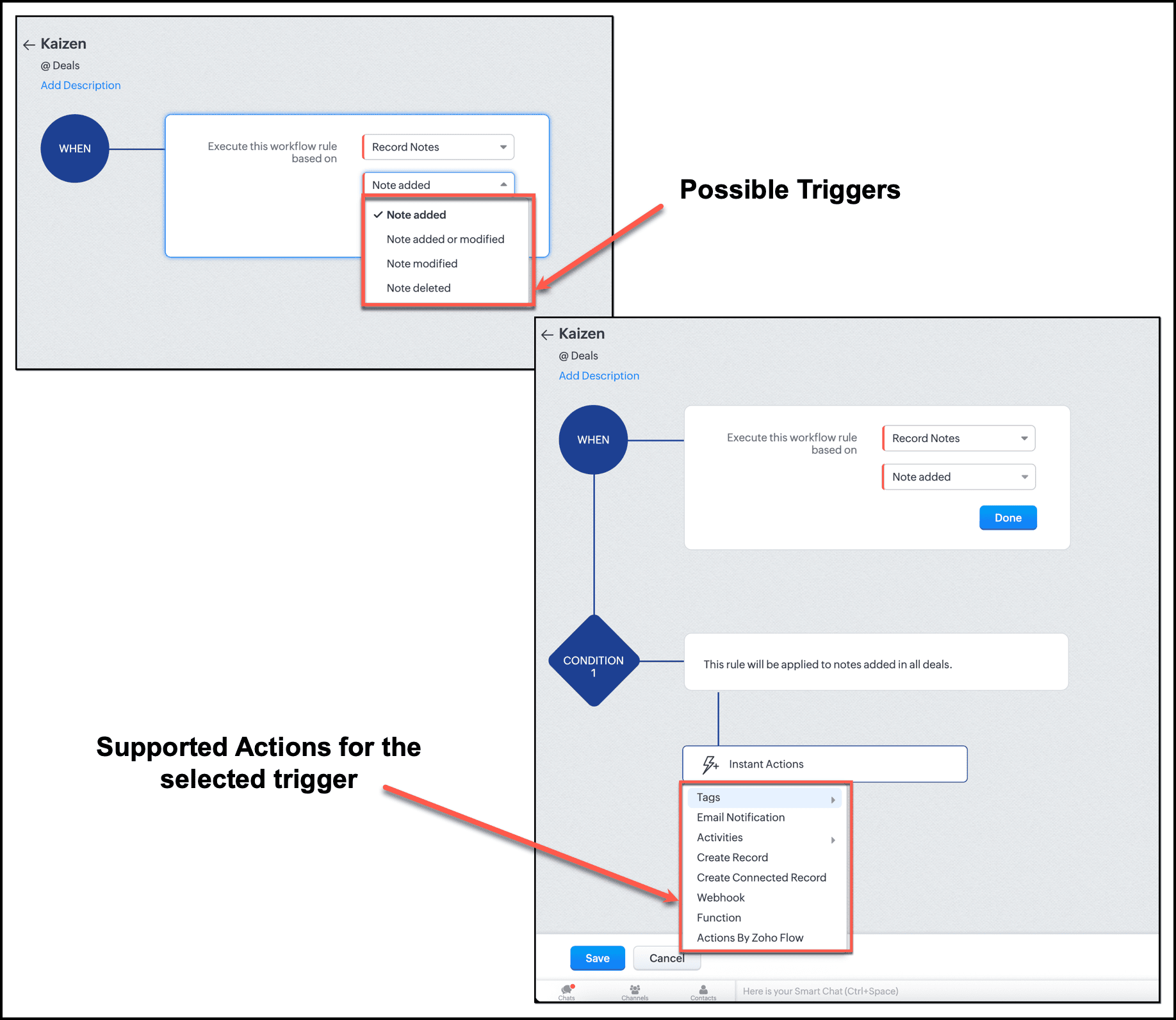
In the UI, this limitation is enforced. When setting up a workflow triggered by Notes, the "Field Updates" action does not appear in the available actions list.
By checking the related_triggers_details section before making API calls, you can discover exactly which actions are supported for each related module trigger, thus avoiding configuration errors while creating or updating Workflow rules.
Conclusion
The Workflow Configuration API transforms how we approach automation development through APIs. Instead of discovering constraints through failed API calls, we can now design workflows with the right configuration, without any trial-and-error methods. It gives us complete visibility into all valid trigger-action combinations before a single line of code is written, enough information to build automations triggered by related records, and limit awareness to respect action constraints before they become API errors.
For Zylker, this means we can now confidently proceed with updating the old Workflow rules and creating new ones. In our next post, we will put this knowledge into action.
We hope that you found this post useful. If you have any questions or feedback, let us know in the comments below, or write to us at support@zohocrm.com. We would love to hear from you!

Topic Participants
Anu Abraham
Sticky Posts
Kaizen #198: Using Client Script for Custom Validation in Blueprint
Nearing 200th Kaizen Post – 1 More to the Big Two-Oh-Oh! Do you have any questions, suggestions, or topics you would like us to cover in future posts? Your insights and suggestions help us shape future content and make this series better for everyone.Kaizen #226: Using ZRC in Client Script
Hello everyone! Welcome to another week of Kaizen. In today's post, lets see what is ZRC (Zoho Request Client) and how we can use ZRC methods in Client Script to get inputs from a Salesperson and update the Lead status with a single button click. In thisKaizen #222 - Client Script Support for Notes Related List
Hello everyone! Welcome to another week of Kaizen. The final Kaizen post of the year 2025 is here! With the new Client Script support for the Notes Related List, you can validate, enrich, and manage notes across modules. In this post, we’ll explore howKaizen #217 - Actions APIs : Tasks
Welcome to another week of Kaizen! In last week's post we discussed Email Notifications APIs which act as the link between your Workflow automations and you. We have discussed how Zylker Cloud Services uses Email Notifications API in their custom dashboard.Kaizen #216 - Actions APIs : Email Notifications
Welcome to another week of Kaizen! For the last three weeks, we have been discussing Zylker's workflows. We successfully updated a dormant workflow, built a new one from the ground up and more. But our work is not finished—these automated processes are
Nederlandse Hulpbronnen

Recent Topics
Introducing Workqueue: your all-in-one view to manage daily work
Hello all, We’re excited to introduce a major productivity boost to your CRM experience: Workqueue, a dynamic, all-in-one workspace that brings every important sales activity, approval, and follow-up right to your fingertips. What is Workqueue? SalesDelete button
Hi, The delete button were hide into the three dot button. Can I display outside? why Zoho make this update?Zoho Vault CLI for Developers and Automations
Hi everyone, If you're managing credentials in scripts, CI/CD pipelines, or automation workflows, Zoho Vault's Command Line Interface (CLI) can help you securely access and manage secrets directly from your terminal. Zoho Vault was launched in 2013 asZoho Subscriptions -- Zoho Commerce integration
Is there integration between Zoho Subscriptions and Zoho Commerce? I would like to create subscription plans in Zoho Subscritpions and list them for on my Zoho Commerce store.Synching changes to Stripe when changes are made in Zoho Billing
We have a situation where we have merged customers in Zoho BIlling and then found out later that the payment in Stripe was not updated and still associated with the old customer record. The card gets updated and billed, but that payment is still associatedHow can I link Products in a Deal Subform to the Products Module
Hello, I have a pricing subform on our Deals page and use a lookup field to associate a product with each line. I want to be able to look at a product page within the Products module and see a list of the deals connected to that product. I have this workingHelp Center and SEO: Any Benefit to My Domain-Mapped Website Ranking?
First of, I love the Help Center which I've just decided to integrate into my website to replace its old-fashioned FAQs. So much more to achieve there now! Lots of new benefits to the site visitors and to me in terms of organizing and delivering all theBusiness Hours with lunch break
Our business hours are: mon - fri 08:30 - 13:00, 15:00 - 18:30. How can I handle the lunch break? If I use 8:30 - 18:30 it obviously breaks SLA. ThanksAutomatically Update Ticket Status in Zoho Desk Based on Actions in Zoho Projects
Hi Zoho Desk Team, Hope you’re doing well. We’re using the Zoho Desk–Zoho Projects integration to manage tasks related to customer tickets, and it works well for linking and tracking progress. However, there are a few important automation capabilitiesEnable Free External Collaboration on Notecards in Zoho Notebook
Hi Zoho Notebook Team, I would like to suggest a feature enhancement regarding external collaboration in Zoho Notebook. Currently, we can share notes with external users, and they are able to view the content without any issue. However, when these externalZoho Commerce
Hi, I have zoho one and use Zoho Books. I am very interested in Zoho Commerce , especially with how all is integrated but have a question. I do not want my store to show prices for customers that are not log in. Is there a way to hide the prices if notMulti-currency in Zoho CRM Forecast and Reports
As a company we have branches in 4 different countries with as many different currencies. Our Sales Teams would like to work with their local currency as much as possible. The Forecast module using only 1 currency is practically usable only by the salesZoho Sprints iOS app update: Global view, screen capture control, file encryption, tags enhancement
Hello everyone! We are excited to introduce new features in the latest version(v2.1) of the Zoho Sprints iOS app update. Let’s take a quick look at what’s new. 1. Global view Global view brings all your project items into one centralised space. You canZoho Projects Android and iOS app update: Conditional layout rules for Tasks
Hello everyone! Task conditional layout rules configured on the web app(projects.zoho.com) are now applied on the Zoho Projects Android and iOS app. Conditional layout rules can be set for the Add/ edit task form and it allows you to change the propertyHow to account for vat with postponed VAT accounting
Hi everyone, looking for some help with postponed VAT accounting, I use DHL express for my imports and they used to pay the VAT for me and then invoice me. I could then log this as a bill and the VAT element from import was recorded as input VAT, allIs there a way to show contact emails in the Account?
I know I can see the emails I have sent and received on a Contact detail view, but I want to be able to see all the emails that have been sent and received between all an Accounts Contacts on the Account Detail view. That way when I see the Account detailGood news! Calendar in Zoho CRM gets a face lift
Dear Customers, We are delighted to unveil the revamped calendar UI in Zoho CRM. With a complete visual overhaul aligned with CRM for Everyone, the calendar now offers a more intuitive and flexible scheduling experience. What’s new? Distinguish activitiesZoho mail admin panel not opening
Zoho CRM WooCommerce Integrtation
Looking for a solution for my 50 client to show detailed analytics on source of traffic that led to events, leads, conversions. Hi all, I have not been able to find a workable guide or solution to how exactly step by step integrate the Zoho CRM with WooCommerce500 internal server error on opening an iframe through a deluge script
Hi Team I am trying to open an external url in an iframe through my deluge script which is associated to a custom button . By doing this i am getting an "Internal Server Error" . Please can you help me with this.Kaizen #225 - Making Query-based Custom Related Lists Actionable with Lookups and Links
Hello everyone! Welcome back to another post in the Kaizen series! This week, we will discuss an exciting enhancement in Queries in Zoho CRM. In Kaizen #190, we discussed how Queries bridge gaps where native related lists fall short and power custom relatedFilter button in the Zoho Sheet Android App doesn't toggle on
I am a new Zoho Sheets user and experiencing a specific issue with the filter functionality in the Android mobile application. Detailed Issue Description: The filter icon appears correctly in the toolbar. Upon tapping the filter icon/button, the toggleIs Zoho Sites still actively being developed?
Hello, Is Zoho Sites still actively being developed as part of the Zoho ecosystem? I noticed that the What's New page (https://www.zoho.com/sites/whats-new.html) does not show any updates since Q1 2025. We were considering migrating our website from SquarespaceProject Notifcatiion Emails - Milestone
Hello: I cannot get myself, or most importantly my portal client user to recieve an email upon completion of a milestone. I have set up our 1st project. I have set up a test client user. (accepted the invitation and is listed in the system as a clientZoho Forms - Feature Request - Year Field
Hi Zoho Forms Team, You currently have the following date and time fields: Date Time Date and Time Year and Month It would be useful if you could include a "Year" field For example a recent application I completed said "What year was your house built?"Integrate Excel or Zoho Sheet functions / calculations to CRM product module
Hello Community, I hope someone more experienced can help me with this question. Our price / payment plan calculations are in an Excel spreadsheet and I would like to use all those functions / calculations in my Products module. So when we send a quoteSync CRM Contacts to USER'S contacts on Office 365
I can see that the O365 sync is transferring contacts backwards and forwards between Zoho CRM and Office365. But it has created a separate address book in Office 365 called "Zoho CRM Contacts". This address book is not used by Office/Outlook's email functionManage Every Customer Conversation from Every Channel inside Zoho SalesIQ
Your customers message you from everywhere. But are you really able to track, manage, and follow through on every conversation, without missing anything? With interactions coming in from websites, mobile apps, and messaging platforms like WhatsApp andZoho Books | Product updates | February 2026
Hello users, We’ve rolled out new features and enhancements in Zoho Books. From Advanced Reporting Tags to the ability to mark projects as completed, explore the latest updates designed to improve your bookkeeping experience. Introducing Advanced ReportingThis project could not be synced because it is not associated with a primary client
When I go to ProjectName->Finance I receive a "This project could not be synced because it is not associated with a primary client" error. The project has been associated in ZohoCRM with the client. How can I set the primary client for this project. OtherUpdate latitude & longitude address field API
How do I update the coordinates of an address field from a widget? I can't modify the latitude and longitude of the address field. I think the problem is how I'm writing formdata variable. zoho_init.then(function (data) { var queryParams = ZOHO.CREATOR.UTIL.getQueryParams();Zoho Forms - Feature Request - Past Into Scanning/OCR Field
Hi Zoho Forms Team, You recently introduced the OCR/Scanning field which I have found great use for with one client who receives work orders as a screenshot from one customer. I want to raise a feature request here which would make that field even moreinability to use different primary address on invoice per location
my company operates in two different locations with different email address. The problems then is the inability to edit the primary to suite the invoice for the second location.Use Zoho Creator as a source for merge templates in Zoho Writer
Hello all! We're excited to share that we've enhanced Zoho Creator's integration with Zoho Writer to make this combination even more powerful. You can now use Zoho Creator as a data source for mail merge templates in Zoho Writer. Making more data fromAnyone in Australia using Zoho Books AND has their account with NAB?
Hi I have an account with both NAB and Suncorp. Suncorp transaction come in the next day however NAB transactions take 4-5 business days to appear. eg: A deposit made today in my Suncorp will be imported into Zoho tomorrow. A deposit made today to the NAB account will be imported maybe Saturday (Friday overnight). I have contacted both Zoho and NAB but noone seems to know why. I was just wondering if anyone else in Australia uses NAB and has this issue (or doesn't) maybe we could compare notes andDetailed Balance Sheet for tax preparer
I'm using the free edition of Zoho Books. My tax preparer is asking for "detailed" Profit & Loss and Balance Sheet reports which include all the activity and transactions within the various categories. The default reports do not include these details.Host Group Appointments Online in Zoho Bookings
Greetings from the Zoho Bookings team! We’re excited to announce a new enhancement to Group Booking that makes hosting online group events smoother and more professional than ever. You can now conduct online group events with auto-generated meeting linksCan't rename groups on Mac desktop app
I'm working on an up-to-date Mac with a freshly downloaded Notebook app. I'm trying to rename a group within a notebook. Here I have, left to right, a note, a group, and a note. I select the group. On the top left, I select Action. On the dropdown, "Rename"Workdrive Collaboration with an External User
I would like to know if I can setup a collaboration space with an external user in workdrive or do I need to add them as a user on my system? If I need to add them, can I add them on Workdrive only and give limit access to our space only?Marketing Tip #23: Help customers with how-to guides and usage tips
Customers don’t stop needing you after they place an order. Helping customers use your product correctly and confidently can improve satisfaction, reduce returns, and increase repeat purchases. Sharing simple how-to guides, usage tips, or care instructionsNext Page