Use Zoho Creator as a source for merge templates in Zoho Writer

Use Zoho Creator as a source for merge templates in Zoho Writer

Hello all!

We're excited to share that we've enhanced Zoho Creator's integration with Zoho Writer to make this combination even more powerful. You can now use Zoho Creator as a data source for mail merge templates in Zoho Writer.

Making more data from your favorite low-code development platform accessible in Writer will open new opportunities for users to create and send a wide variety of documents, manage business processes efficiently, and ensure security.

Features

Seamless integration with subform fields
Zoho Creator users can now seamlessly utilize subform fields in Zoho Writer with the merge task feature. This empowers businesses to create documents that are more data-driven and user-friendly, and reduces the manual effort required for document preparation.

Access more Creator fields
Access to comprehensive data from Creator empowers users to produce intricate and data-rich documents. With this enhanced integration, you can access data in subform fields, and lookup fields.
This seamless data integration streamlines the creation of complex business documents, which is particularly beneficial for organizations dependent on data-intensive documents like contracts, reports, and financial statements.

Uses and benefits

Unlock the power of signatures
One of the standout features of this integration is the ability to use the signature field in Zoho Writer. For instance, in contract management, you can use electronic signatures to streamline the approval and signing process while ensuring security.


Turn IDs or fields into barcodes
Another exciting feature is the ability to convert Creator IDs or fields into barcodes with help of the mail merge templates. Using barcodes enables efficient data tracking and retrieval, enhances accuracy and accessibility, and much more.

Assume a Vendor management app which contains contracts. The mail merge templates feature will facilitate the seamless extraction data from Creator to Writer, and help you create a document for contracts. Within the Writer document, the fields, Product IDs, Alphanumeric or numeric fields can be shown can be visually represented as barcodes.
   

How to get started

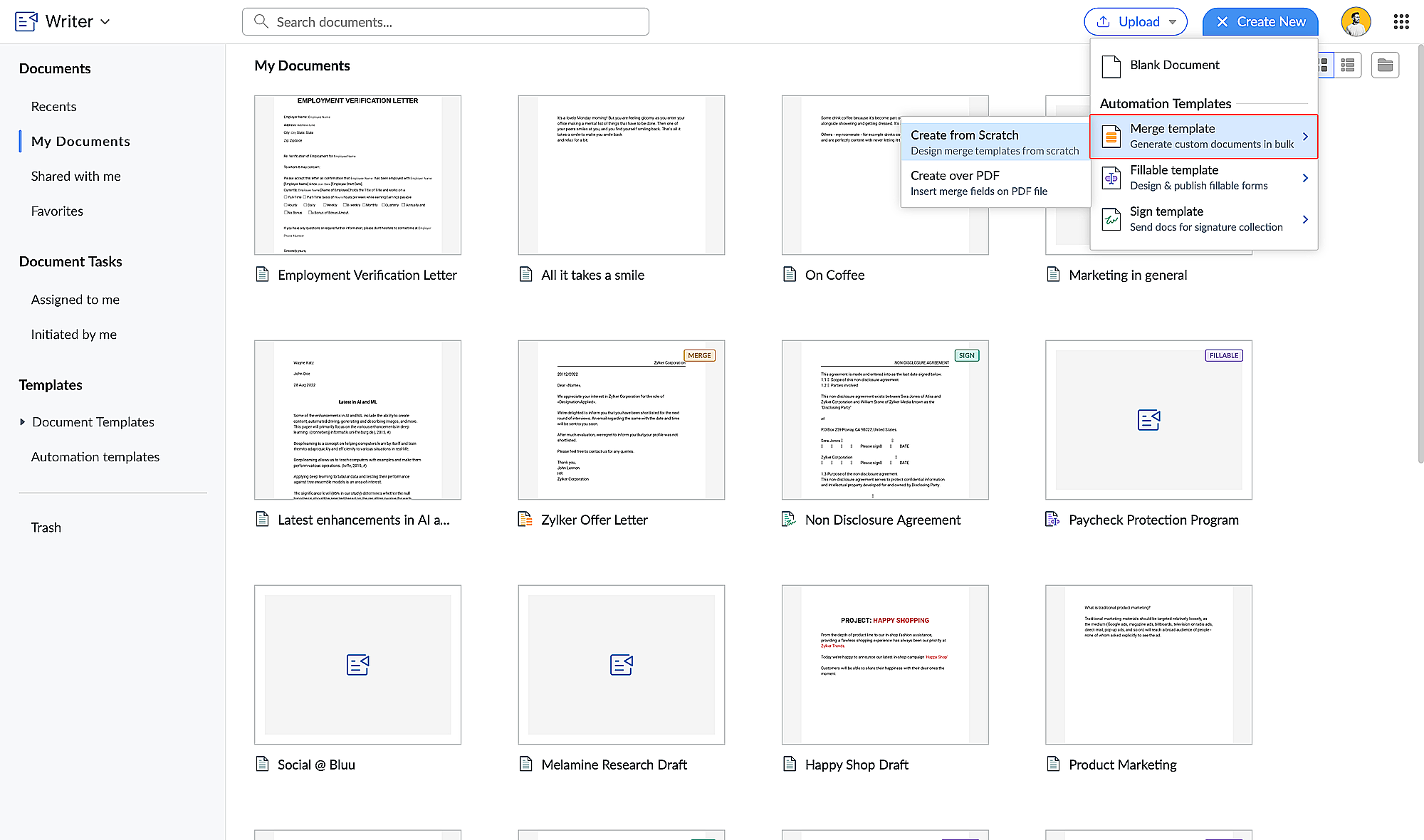
  1. Go to writer.zoho.com and click Create New.
  2. Choose Merge Template under Automation Templates and click Create from Scratch. Design your merge template using these steps.
  3. Click the hamburger menu on the left and click Automate.

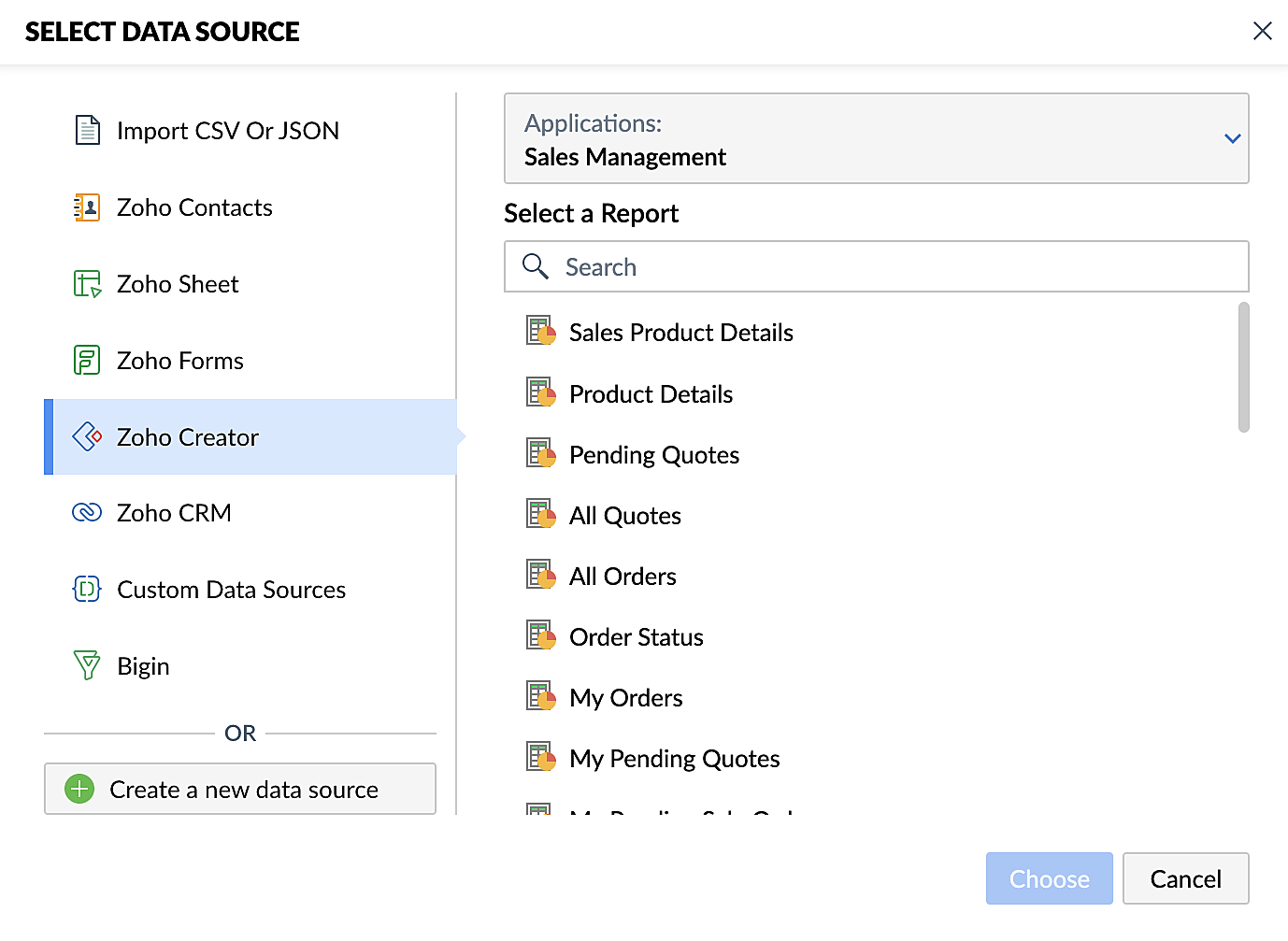
  4. Under Select the Data Source, choose Zoho Creator and select your application.
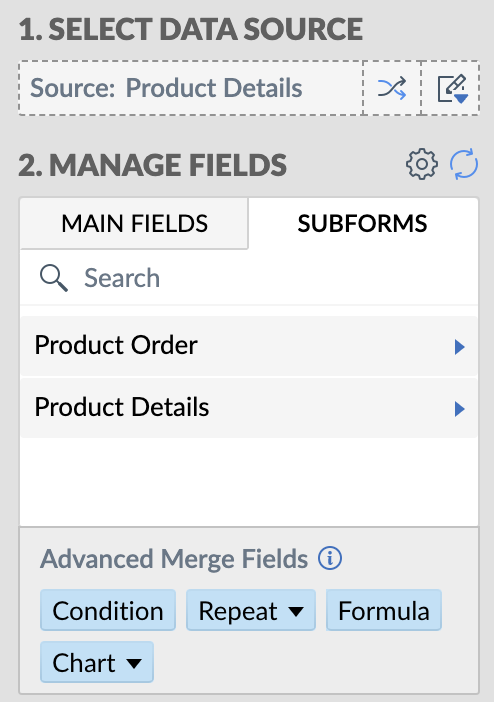
  5. Add the appropriate fields from your Creator application. Click here for a detailed guide to working with fields.

Steps for creating merge documents using a Zoho Creator workflow
  1. Create a form in Zoho Creator with the necessary fields.
  2. Create a merge template in Zoho Writer using these steps.
  3. Create a workflow for your Creator form and choose Deluge Script as the workflow action. This allows you to perform custom functions with Writer's mail merge.
  4. Use the name of the connection you've added in the Deluge script to perform the function you've configured. Connections enable you to integrate cloud services via Deluge.
These enhancements make Zoho Creator and Zoho Writer an even more valuable combination for businesses looking to simplify document management. By harnessing the capabilities of both platforms, businesses can look forward to a future where document creation and data management are more efficient, secure, and user-friendly than ever before.

Also, do take a look at Zoho Writer's post regarding mail merge templates.

Feel free to test out this integration and provide your feedback by reaching out to support@zohocreator.com or sharing your thoughts in the comments section below.

Regards,
The Zoho Creator Team
    • Sticky Posts

    • Introducing Zoho Creator's 2025 Release Projection 2

      Hello Creators! I'm Prakash, from the Creator product management team, and today I'm delighted to unveil our next set of features as part of Release Projection 2 for 2025. With thoughtful analysis and planning, we've curated powerful new capabilities
    • Zoho Creator - 2023 Release Projection 1

      Hello everyone! A very Happy New Year to you and your family. Hope you're all good and having a great time using Zoho Creator to make your lives easier and your businesses prosper. 2022 was an action-packed year for us at Creator, and we hope to continue
    • Zoho Creator User Group meetups in a city near you! - Oct - Nov, 2023

      Greetings from the Zoho Creator team! We're hosting a series of Zoho Creator meetups in various cities across the globe, and we'd love to meet you there! Our meetups are a great opportunity to network with industry peers, exchange ideas and best practices,
    • Zoho Creator - 2023 Release Projection 2

      Hello everyone! Time truly flies when you're having an incredible journey, and today we mark the completion of an eventful and action-packed six months. It feels like just yesterday when we embarked on this adventure together with the launch of our new
    • Upcoming Updates - August 2022

      Hi all, Greetings from the Zoho Creator team! Today we've got news for you on some exciting updates. And rest assured— there’s more to come! In this post, we'll be going over the upcoming features and improvements for this month as mentioned below. A

    Nederlandse Hulpbronnen


      • Recent Topics

      • Good news! Calendar in Zoho CRM gets a face lift

        Dear Customers, We are delighted to unveil the revamped calendar UI in Zoho CRM. With a complete visual overhaul aligned with CRM for Everyone, the calendar now offers a more intuitive and flexible scheduling experience. What’s new? Distinguish activities
      • Remembrance Day to Remember – Recalling Values

        The phrase “at the eleventh hour” refers to the 11th hour of the 11th day of the 11th month in 1918, when the hostilities of World War I came to an end—but it still holds meaning today. Remembrance Day (Veterans Day in the US) is observed on November
      • Gmail is ramping up its email sender policy as of November 2025

        Hello marketers, As you may be aware, Gmail introduced a guideline for bulk senders starting February 2024. If not, here's a quick refresher straight from Google: After this policy was announced first in 2023 and soft-implemented in February 2024, we
      • Tip of the week #16 - Search and filter threads based on criteria

        Zoho TeamInbox lets you search and filter threads with any information that you have about the thread. You just have to input the criteria and Zoho TeamInbox will list all the threads that match the condition.   Firstly, there is a global search you can
      • WhatsApp Message Template Quick Reply Buttons

        Hello, I created my first Message Template to overcome the 24-hr messaging window and it was approved by WhatsApp/Meta. When I go to Meta, I also see that template brought from Zoho Desk, and used it via Zoho Desk IM. However, I notice that when in Meta's
      • Account in Quick View Filter

        I have a report that I often run against a specific Account. Every time, I have to go into the edit menu and change the Advanced Filter. I would prefer to use the Quick View Filter, but it does not allow me to use the one and only field that makes any
      • All new Address Field in Zoho CRM: maintain structured and accurate address inputs

        The address field will be available exclusively for IN DC users. We'll keep you updated on the DC-specific rollout soon. It's currently available for all new sign-ups and for existing Zoho CRM orgs which are in the Professional edition. Latest update
      • Collapsible Sections & Section Navigation Needed

        The flexibility of Zoho CRM has expanded greatly in the last few years, to the point that a leads module is now permissible to contain up to 350 fields. We don't use that many, but we are using 168 fields which are broken apart into 18 different sections.
      • Set Display for Numbers/Currency/etc with Client Script/Customization in Canvas List Page

        Is it possible to set a display mask for a number/currency field using Client Script or customization? I have custom fields that I would like to keep the decimal places for calculation purposes, but do not need them displayed to the user. So 101.3568
      • 136.143.188.51 blocked by spamcop

        Zoho mailserver seems to be blocked by spamcop. Cant send mail to my customer. Not sure what to do.
      • 🚀 WorkDrive 5.0: Evolving from a file sharing app to an intelligent content management platform: Phase 2

        Hello everyone, WorkDrive's primary focus has always been to provide an intelligent and secure content management platform, simplify collaboration, and be the central repository of files for all Zoho apps. In our previous announcement, we unveiled the
      • Sync desktop folders instantly with WorkDrive TrueSync (Beta)

        Keeping your important files backed up and accessible has never been easier! With WorkDrive desktop app (TrueSync), you can now automatically sync specific desktop folders to WorkDrive Web, ensuring seamless, real-time updates across devices. Important:
      • i keep see there is a connetion issue connecting 3rd party api on zoho when using zia

        hi there , i have set up open ai api to zoho zia (copied and pasted to zoho zia) but I keep getting notificaiton "there is a connetion issue connecting 3rd party api on zoho" when using zia on top when click zia and try to type in word there
      • Introducing the locking option for CRM records

        Last modified on 06/04/2023: Record locking option in CRM is now available for all Zoho CRM users in all DCs. Note that it was an early access feature available only upon request. Hello All, Hope you're doing well! We're thrilled to introduce our latest
      • Updating custom fields in Zoho Projects

        Hi I am wondering if anyone has experience with custom fields in Zoho Projects. I am struggling to update the field using either deluge or the api endpoint. My code is: //custom_Map = map(); custom_Map = {"UDF_DOUBLE_1":"0.27"}; update_Map = map(); update_Map.put("custom_fields",custom_Map.toList());
      • Time Entries in Analytics

        I am trying to import a zoho sheet into zoho analytics. In my sheets one of the columns has "time Entries" in this "format HH:MM am/pm" example 11:00 PM. After import, i noticed that analytics converted the time to "00 Jan 1900 23:00:00".. how do i maintain
      • Deleting Fields in CRM Deletes Views in Analytics

        Hey friends! I'm having some issues when we modify some fields within ZohoCRM. There are times where we need to sunset a field and eventually completely remove it. In these instances, it seems like a lot of views are removed in Analytics. This ranges
      • Booking outside of scheduled availability

        Is there a way for staff (such as the secretary) to book appointments outside of the scheduled availability? Right now to do this special hours must be set each time. There should be a quicker way. Am I missing something?
      • Automatic Matching from Bank Statements / Feeds

        Is it possible to have transactions from a feed or bank statement automatically match when certain criteria are met? My use case, which is pretty broadly applicable, is e-commerce transactions for merchant services accounts (clearing accounts). In these
      • Zoho Desk Android and iOS app update: Access multilingual templates on the IM module

        Hello everyone! We have introduced multilingual templates on the IM module of the Zoho Desk mobile app allowing you to send IM template messages in translated versions. iOS: Android: Please update the app to the latest version directly from the App Store/
      • Can't login IMAP suddenly

        Since this evening I'm getting the error: You are yet to enable IMAP for your account. Please contact your administrator... IMAP always been enabled in my account and was workign fine for the past 7 years. Already tried turning IMAP off and on again.
      • Zia Profile Summary now supports six languages and responds faster

        After numerous customer requests, we’ve expanded Zia Profile Summary to do more than just summarize resumes quickly. It can now summarize them in six different languages and deliver results even faster. What’s New 1. Extended language support Zia can
      • Nimble enhancements to WhatsApp for Business integration in Zoho CRM: Enjoy context and clarity in business messaging

        Dear Customers, We hope you're well! WhatsApp for business is a renowned business messaging platform that takes your business closer to your customers; it gives your business the power of personalized outreach. Using the WhatsApp for Business integration
      • CRM x WorkDrive: File storage for new CRM signups is now powered by WorkDrive

        Availability Editions: All DCs: All Release plan: Released for new signups in all DCs. It will be enabled for existing users in a phased manner in the upcoming months. Help documentation: Documents in Zoho CRM Manage folders in Documents tab Manage files
      • Does Zoho offer a full WhatsApp Marketing Platform (like WATI / GallaBox)?

        lm exploring WhatsApp marketing and I’d like to understand what options are available within the Zoho ecosystem. Currently, I see: Zoho SalesIQ has a broadcast option, but it seems very limited — for example, it doesn’t support uploading contacts via
      • Custom buttons

        Getting Error "You can only create 10 custom buttons per module" ! I already have more than 10 for 1 module before trying to create another. Is this a new restriction brought about by the all knowing what's best for businesses Zoho guru ? It would be
      • Client Script | Update - Support for List Page (Canvas) and Notes

        Hello everyone! We are glad to announce two exciting updates in Client Script. Client Script support for List Page (Canvas) Client Script support for Notes These open the door to more dynamic and interactive customizations! 1. Client Script support for
      • Desk Field Not Showing in Analytics

        Hi there, I recently added a field to our Zoho Desk Ticket Information. I went and added the data retrospectively to the tickets. It is also marked as required, so all new tickets cannot be closed off without it being filled in. When I try to run a report
      • COD with Partial payment

        Two reasons why we need COD with partial payment option. 1) Since we deal heavy weight products our shipping costs are too high. If shipment is rejected by customer we incur huge loss. 2) Some competitors place fake orders with different names and return
      • Pincode based Product Restriction

        we have different types of products. 1) Very bulky items like plywood. 2) Too delicate items like glass These type of products we want to sell to local customers. Other products we want to supply all over India. There should be an option to restrict products
      • Pincode Based Pricing

        We want to give extra discount to customers within city limits because our shipping and packing costs are less. My proposal is assign list of pincodes to price list and assign the price list to customers whenever they sign up with pincodes. Also show
      • feature question: lookup field in Projects task layout

        Hello, Below we have interface to configure a custom task layout, however, we need a lookup field to let pickup data from other apps, such as Zoho CRM Products module, is that possible or already in your roadmap? or a workaround to achieve it? Thanks in advance.
      • Error AS101 when adding new email alias

        Hi, I am trying to add apple@(mydomain).com The error AS101 is shown while I try to add the alias.
      • Download a writer template as .docx instead of .pdf.

        I have been trying to implement a feature to download a writer template as a .docx and got it working partly but it isn't good. Earlier I checked our code and I saw openurl("https://crm.zoho.com/crm/org121314/specific/Template.do?action=print&step=pdfPreview&id="
      • Can we do Image swatches for color variants?

        We want to do something like the attached screenshot on our new zoho store. We need image swatches instead of normal text selection. We want to user to select an image as color option. Is this doable? I don't see any option on zoho backend. Please h
      • Paste issues in ZOHO crm notes

        Hi, since a week or so I have issues with the paste function in ZOHO CRM. I use "notes" to copy paste texts from Outlook emails and since a week or so, the pasting doesnt function as it should: some text just disappears and it gives a lot of empty lines/enters.....
      • Calendar not working

        Are we the only ones. On any browser we cannot click on any of our calendar appointments and get them to open. They just make the browser loop. WE have reached out and have been told they are working on it. The office staff are really stuck. The point
      • Resizing a Record Template Background Inage

        Hi everyone, I have an issue which I can't seem to resolve: Basically, I'm designing a record template in certificate form. I've specified A5 landscape. I've set my background image the same dimensions with total pixels at 443,520. Whatever I try, when
      • What's New in Zoho Analytics - October 2025

        Hello Users! We're are back with a fresh set of updates and enhancements to make data analysis faster and more insightful. Take a quick look at what’s new and see how these updates can power up your reports and dashboards. Explore What's New! Extreme
      • Zoho Analytics & SQL Server - Live connect

        Below are the steps I did Created a fresh database and table in my own virtual server Created a new data source connection with live connect I was able to select the tables and created the data source successfully I am getting the error when I try to
      • Next Page