Kaizen 224 - Quote-driven Deal Reconciliation Using Zoho CRM Functions and Automation

Kaizen 224 - Quote-driven Deal Reconciliation Using Zoho CRM Functions and Automation


Hello everyone!
Welcome back to another instalment in the Kaizen series.

This post covers quote-driven deal reconciliation, emphasizing Functions and Automation to address practical sales challenges.

Business Challenge

Sales organizations often mark deals as Closed Won before commercial transactions fully conclude. Quotes generate promptly upon closure, yet businesses typically provide a brief window such as one week for renegotiation or payment. During this period, currency fluctuations, payment delays, and risk thresholds can significantly alter the final deal value.

This Kaizen demonstrates how Zoho CRM Functions and Automation work together to reconcile deal financials with quote activity over time. Sales, finance, and operations teams can thus access accurate, policy-compliant values.
Here is a typical sequence:
  1. Deal closes with Closed Won status
  2. Quote generates immediately
  3. Customer receives grace period (e.g., one week) for payment or adjustments
Key factors during this window:
  1. Exchange rates fluctuate
  2. Payments may succeed or fail
  3. Business absorbs limited losses(up to 10%, for example)
  4. Major variances trigger renegotiation
CRM must reflect actual outcomes rather than initial closure assumptions. Quotes serve as the authoritative commercial record, with final deal values depending on execution timing. This approach captures intermediate and final financial states to enable automated decisions and audits.

Key business scenarios covered

Scenario 1: Payment is made during the grace period

  1. Quote is generated on day 0
  2. Customer completes payment on day 7
  3. Exchange rate has changed since quote generation

Business Requirement

The business wants to calculate the actual payable amount using the exchange rate on the payment day and store it explicitly in CRM.

Outcome

The realized value is captured and stored, ensuring that reports and downstream systems reflect the true commercial result.

Scenario 2: Acceptable loss threshold (10%)

  1. Exchange rate movement results in a loss
  2. The business is willing to absorb losses up to 10%
  3. Loss exceeds the acceptable threshold

Business requirement

If the loss exceeds the defined tolerance, the quote should move to renegotiation instead of being accepted automatically.

Outcome

CRM enforces pricing policy consistently, without manual intervention or subjective judgment.

Scenario 3: Significant currency fluctuations

  1. Exchange rate volatility is unusually high
  2. Even if loss is within limits, risk exposure is significant

Business requirement

Large fluctuations should trigger renegotiation, regardless of absolute loss percentage.

Outcome

Financial risk is handled proactively based on measurable criteria.

Scenario 4: No payment after the grace period

  1. Customer does not pay within the allowed window
  2. Updated exchange rate is favorable to the business

Business Requirement

If the updated rate is profitable, the quote can be revised and reissued with the new amount.

Outcome

CRM reflects market-aligned pricing while maintaining transparency around why the amount changed.

Why Zoho CRM Functions is the best fit?

This reconciliation pattern requires the following capabilities beyond static configuration.
  1. Reading and reconciling data across Deals and Quotes
  2. Applying time-based and threshold-based business rules
  3. Writing calculated values into dedicated fields
  4. Supporting multiple decision paths(accept, renegotiate, revise)
  5. Running logic at specific business moments
Zoho CRM Functions provide the flexibility and control required to implement this logic cleanly, while automation ensures it runs consistently and reliably.

Custom fields used in this post

Deals

  1. Final Accepted Amount - Currency - Amount finally agreed and accepted
  2. FX Impact Percentage - Percent - Gain or loss due to exchange movement
  3. Reconciliation Status - Picklist - Accepted or Renegotiate
  4. Reconciled On - DateTime- Timestamp of final reconciliation

Quotes

  1. Quote Reference Amount - Currency - Amount at quote generation
  2. Quote Exchange Rate - Decimal - Exchange rate used in quote
  3. Payment Due Date - Date - End of grace period
  4. Potential Payable Amount - Currency - Recalculated amount at evaluation time
  5. FX Variance Percentage - Decimal - Difference vs quoted amount
  6. FX Evaluation Status - Picklist - Pending or Evaluated
  7. Recalculate FX - Checkbox - Explicit recalculation trigger
These fields capture commercial intent and outcome, not just static numbers.

High level automation flow

  1. Deal is marked Closed Won
    1. Workflow triggers a function to generate a Quote
  2. Business updates evaluation inputs when needed
  3. User explicitly triggers FX recalculation
  4. Function
    1. Calculates financial impact
    2. Updates quote and deal
    3. Applies business decisions
  5. CRM reflects finalized commercial reality

Function 1: Generate a Quote from the Deal

This function creates a Quote automatically when a Deal is closed, ensuring downstream processes start immediately and consistently.
void automation.generateQuoteFromDeal(int dealId)
{
deal = zoho.crm.getRecordById("Deals", dealId);
if(deal == null) return;

amount = deal.get("Amount");
exchangeRate = deal.get("Exchange_Rate");
account = deal.get("Account_Name");

productItem = Map();
productItem.put("product", {"id":"<PRODUCT_ID>"});
productItem.put("quantity", 1);
productItem.put("list_price", amount);

productList = List();
productList.add(productItem);

quoteMap = Map();
quoteMap.put("Subject", "Quote for Deal");
quoteMap.put("Deal_Name", dealId);
quoteMap.put("Account_Name", account.get("id"));
quoteMap.put("Product_Details", productList);
quoteMap.put("Quote_Stage", "Draft");
quoteMap.put("Valid_Till", zoho.currentdate.addDay(7));
quoteMap.put("Quote_Reference_Amount", amount);
quoteMap.put("Quote_Exchange_Rate", exchangeRate);

zoho.crm.createRecord("Quotes", quoteMap);
}

Function 2: Reconcile Deal from Quote

This function calculates payable values, evaluates financial impact, and updates the Deal with finalized financial information.
void automation.reconcileDealFromQuote(Int quoteId)
{
info "Starting FX reconciliation for Quote ID: " + quoteId;

// -------------------------------------------------
// Fetch Quote
// -------------------------------------------------
quote = zoho.crm.getRecordById("Quotes", quoteId);
if(quote == null)
{
info "Quote not found";
return;
}

dealInfo = quote.get("Deal_Name");
if(dealInfo == null)
{
info "Quote not linked to Deal";
return;
}

dealId = dealInfo.get("id");

deal = zoho.crm.getRecordById("Deals", dealId);
if(deal == null)
{
info "Deal not found";
return;
}

// -------------------------------------------------
// Mark FX Evaluation as PENDING
// -------------------------------------------------
zoho.crm.updateRecord(
"Quotes",
quoteId,
{"FX_Evaluation_Status" : "Pending"}
);

// -------------------------------------------------
// Read required FX inputs
// -------------------------------------------------
quotedAmount = quote.get("Quote_Reference_Amount");
quoteRate = quote.get("Quote_Exchange_Rate");
evaluationRate = quote.get("Evaluation_Exchange_Rate");

info "Quoted Amount: " + quotedAmount;
info "Quote Rate: " + quoteRate;
info "Evaluation Rate: " + evaluationRate;

if(quotedAmount == null || quoteRate == null || evaluationRate == null)
{
info "Missing required FX inputs";
return;
}

// -------------------------------------------------
// FX Calculations(rounded)
// -------------------------------------------------
payableAmount = (quotedAmount * evaluationRate / quoteRate).round(2);
fxVariance = (((payableAmount - quotedAmount) / quotedAmount) * 100).round(2);

info "Payable Amount: " + payableAmount;
info "FX Variance %: " + fxVariance;

// -------------------------------------------------
// Decide Quote Stage(Business decision here)
// -------------------------------------------------
quoteStage = "";
reconciliationStatus = "";

if(fxVariance <= 10)
{
quoteStage = "Acceptable FX Impact";
reconciliationStatus = "Accepted";
}
else
{
quoteStage = "FX Impact Exceeds Threshold";
reconciliationStatus = "Renegotiate";
}

// -------------------------------------------------
// Update Quote(Final state)
// -------------------------------------------------
quoteUpdate = Map();
quoteUpdate.put("Potential_Payable_Amount", payableAmount);
quoteUpdate.put("FX_Variance_Percentage", fxVariance);
quoteUpdate.put("FX_Evaluation_Status", "Evaluated");
quoteUpdate.put("Quote_Stage", quoteStage);
quoteUpdate.put("Recalculate_FX", false);

quoteResp = zoho.crm.updateRecord("Quotes", quoteId, quoteUpdate);
info "Quote update response:";
info quoteResp;

// -------------------------------------------------
// Update Deal
// -------------------------------------------------
dealUpdate = Map();
dealUpdate.put("Final_Accepted_Amount", payableAmount);
dealUpdate.put("FX_Impact_Percentage", fxVariance);
dealUpdate.put("Reconciliation_Status", reconciliationStatus);
dealUpdate.put(
"Reconciled_On",
zoho.currenttime.toString("yyyy-MM-dd'T'HH:mm:ssXXX")
);

dealResp = zoho.crm.updateRecord("Deals", dealId, dealUpdate);
info "Deal update response:";
info dealResp;

info "FX reconciliation completed successfully";
}

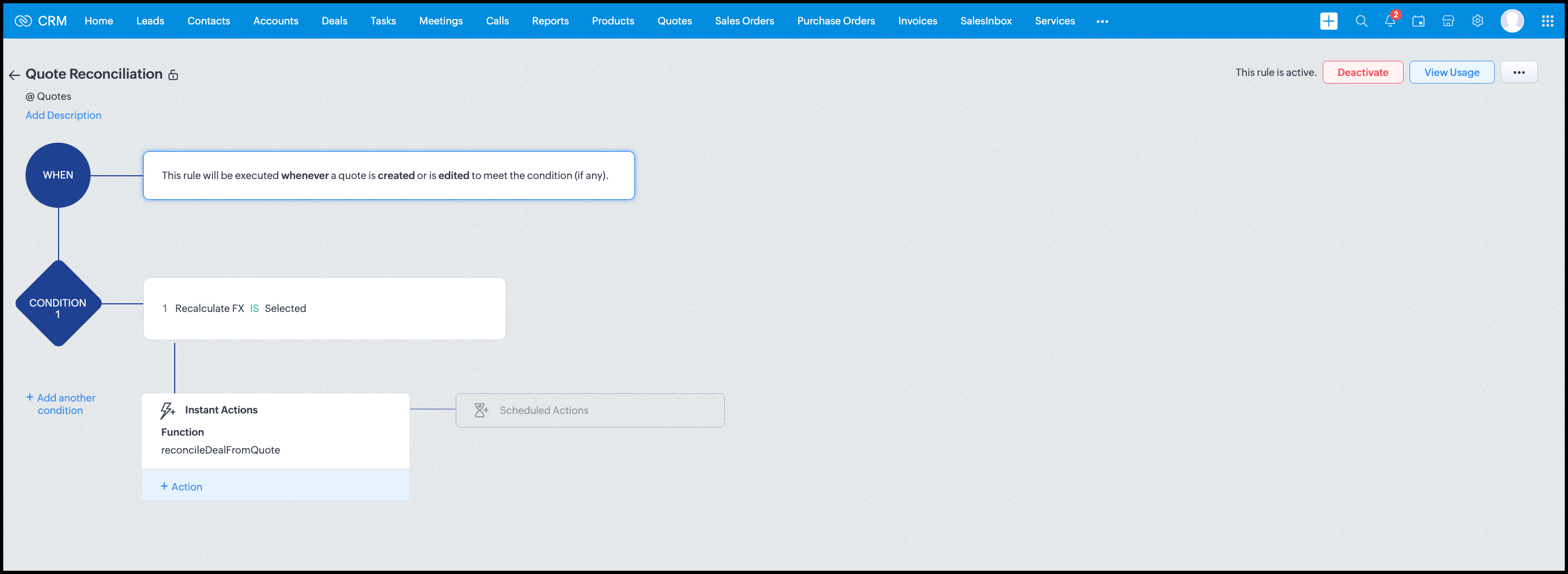
Workflow


Module: Quotes
Trigger: On create or edit
Condition: Recalculate FX = true
Action: Execute reconcileDealFromQuote
Argument: quoteId -> ${Quotes.id}

All decision logic lives inside the function.

Business Outcome

After implementing this pattern,
  1. Deals and quotes stay aligned with real-world behavior
  2. FX risk is measurable and auditable
  3. Renegotiation is policy-driven
  4. Reports reflect finalized values, not assumptions
  5. Sales and finance operate on the same truth.

Summary

Zoho CRM extends beyond static closures by reconciling deals against quote behavior. Functions plus Automation enforce pricing, limit exposure, and capture true outcomes reliably at scale.
The true value of this implementation is not the calculation itself, but the fact that it produces stable, auditable financial states that can be reused across reporting, approvals, integrations, and policy enforcement.

Further extensions

Executive reporting and dashboards

You can build Dashboards that answer questions like
  1. Total revenue before vs after FX reconciliation
  2. Total FX gain or loss by
    1. Region
    2. Currency
    3. Quarter
  3. Sales owner
  4. Percentage of deals renegotiated due to FX risk
Without the function,
  1. FX impact is implicit
  2. Numbers keep changing
  3. Finance does not trust reports
With the function,
  1. Final Accepted Amount is stable
  2. FX Impact % is explicit
  3. Reconciled On gives a time anchor

Policy enforcement and compliance

Examples
  1. Automatically flag deals where FX loss > 10% but status = Accepted
  2. Audit trail for
    1. Who recalculated FX
    2. When renegotiation was triggered
  3. SLA checks when Deals are not reconciled within 'X' days of quote creation
For many companies, FX policy violations are discovered at a later point in time, but you now enforce them at the moment of decision.

Sales coaching and deal hygiene

Unlock insights such as
  1. Which sales reps close deals with high FX volatility or frequently trigger renegotiation?
  2. Which regions or currencies produce unstable deals?
  3. Which deals are consistently over-optimistic at closure?

Other scenarios

  1. Approval and exception workflows
  2. Integration with ERP or accounting systems
  3. Predictive insights to forecast FX risk
  4. Historical snapshots for audit and analytics

We hope you found this post useful. Let us know your feedback in the comments or write to us at support@zohocrm.com.

Thanks!


=============================================================================


    • Sticky Posts

    • Kaizen #198: Using Client Script for Custom Validation in Blueprint

      Nearing 200th Kaizen Post – 1 More to the Big Two-Oh-Oh! Do you have any questions, suggestions, or topics you would like us to cover in future posts? Your insights and suggestions help us shape future content and make this series better for everyone.
    • Kaizen #226: Using ZRC in Client Script

      Hello everyone! Welcome to another week of Kaizen. In today's post, lets see what is ZRC (Zoho Request Client) and how we can use ZRC methods in Client Script to get inputs from a Salesperson and update the Lead status with a single button click. In this
    • Kaizen #222 - Client Script Support for Notes Related List

      Hello everyone! Welcome to another week of Kaizen. The final Kaizen post of the year 2025 is here! With the new Client Script support for the Notes Related List, you can validate, enrich, and manage notes across modules. In this post, we’ll explore how
    • Kaizen #217 - Actions APIs : Tasks

      Welcome to another week of Kaizen! In last week's post we discussed Email Notifications APIs which act as the link between your Workflow automations and you. We have discussed how Zylker Cloud Services uses Email Notifications API in their custom dashboard.
    • Kaizen #216 - Actions APIs : Email Notifications

      Welcome to another week of Kaizen! For the last three weeks, we have been discussing Zylker's workflows. We successfully updated a dormant workflow, built a new one from the ground up and more. But our work is not finished—these automated processes are

    Nederlandse Hulpbronnen


      • Recent Topics

      • How do I import Connected Records for a Deal?

        Can you point me to an example of the CSV file that would add related records to an existing CRM Deal? I imported a Deal, then tried importing a connected record using a unique ID that references the Deal ID, but it doesn't attach it to the Deal rec
      • File Upload Field in Zoho Forms Not Updating Existing File in Zoho CRM

        Hi everyone, I’m trying to understand the behavior of a file upload field mapped from Zoho Forms to Zoho CRM. Scenario There is a File Upload field in a Zoho CRM module. A Zoho Form also has a File Upload field, which is mapped to that CRM field. When
      • Zoho Training

        Greetings! I am trainer. My focus area is Project Management and MS Project. I have used Zoho CRM to a good extent. Though, I was interested in using ZOHO projects, as there were no live projects, I could not take it up for studies. Recently a client
      • Detailed list of scoring rules in Zoho CRM

        Good morning Zoho community, warm greetings The reason for my message today is that I have a problem with my CRM, which I will explain below: Our organization has scoring rules designed to rate our potential customers or leads in the application based
      • How to create a summary document from Projects details

        Hi, Our team is creating many projects inside Zoho Project. When closing a project, they write a summary document containing data from the projects it-self (understand project budget, customers, etc...), and editable (ie the document is either a Writer
      • Request to Recover Deleted Task List – Project ID: RIV-MOD-10722

        Hi Zoho Team, I hope this message finds you well. My Zoho task list associated with Project ID: RIV-MOD-10722 appears to have been deleted. When I clicked on the task link from the email notification, I received the following message: "Task has been deleted
      • Host in US Data Centre

        I humble apply to be registered on US Data centre
      • convert the project to templet

        i have some deployment ME product for different customer , i need to create a fixed template for use it rather then keeping creating this template every time
      • Best practices for managing Project Charters, Business Case and RAID logs within Zoho?

        Hello everyone, I’m currently refining our PMO setup within Zoho Projects and I’m curious how others are handling high-level governance documentation. We’ve been using the standardized Project Charter, Business Case and RAID frameworks from projectmanagertemplate.com
      • Resource Management System built using Zoho CRM, Creator, Projects, and People:

        In a Resource Management System built using Zoho CRM, Creator, Projects, and People: CRM Deal Closed → Creator Allocation Engine → Zoho Projects Task Assignment What is the recommended architecture to handle dynamic reassignment when: an employee goes
      • Dynamic Remaining Quantity in Lookup During Allocation

        Hi everyone, From what I understand in Zoho Creator, lookup fields only display the stored value from the source record and do not dynamically update while a form is being filled. Because of this, showing a real-time updated remaining quantity inside
      • connect zoho creator with google drive

        Hello everyone, I need to connect to a folder drive. The idea, is that google drive loads a text document with some data, I must read that text document to be able to autofill a form that I have in zoho creator with that data. I also attach PDFs and place
      • Ability to Attach Record-Specific Files Automatically in Workflow Email Templates

        Currently in Zoho CRM, email templates allow attachments to be added, but these attachments are static and remain the same for every recipient. There is no straightforward option to automatically attach a file that is stored within the specific CRM record
      • Uploaded files are not included when using "Include user submitted data" in Email Notification

        In Send Email notification workflow in Zoho Creator, there is an option called "Include user submitted data" which allows the email to contain all the form submission details. However, when this option is enabled, files or images uploaded through File
      • kanban view for client portal

        Are kanban views an option for client portals? Access to Kanban views in the client portals would solve some mobile-compliant issues I have with the UI. Kanban functions very nicely on mobile and would be a super asset for my clients and vendors as they
      • Credit Card Pre-Authorization with later Capture/Settlement

        We really enjoy the convenience of being able to pay off a customer's invoice using our Auth.Net integration with Zoho Books. Unfortunately, we can only take advantage of this feature with a small percentage of our customers as it leaves a gaping hole
      • Zoho Cliq not working on airplanes

        Hi, My team and I have been having this constant issue of cliq not working when connected to an airplane's wifi. Is there a reason for this? We have tried on different Airlines and it doesn't work on any of them. We need assistance here since we are constantly
      • Zoho Sign 2025–2026: What's new and what's next

        Hello! Every year at Zoho Sign, we work hard to make document signing and agreement execution easy for all users. This year we sat down with our head of product, Mr. Subramanian Thayumanasamy, to discuss what we delivered in 2025 and our goals for 2026.
      • Work Orders / Bundle Requests

        Zoho Inventory needs a work order / bundle request system. This record would be analogous to a purchase order in the purchasing workflow or a sales order in the sales cycle. It would be non-journaling, but it would reserve the appropriate inventory of
      • Izettle or Sumup Integration for Zoho Books.

        The Stripe & Square clearing works great in Zoho Books. Any further integrations planned in the future for Izettle or Sumup? These card processors are very common for taking payments with a card reader.
      • Train Zoho Answer Bot Based on Customer

        Hi all, Is it currently possible to mark Help Centre articles to a specific customer, and restrict the answer bot to only use relevant information if it is either marked as "General", or tagged for the specific customer in question? We currently have
      • Trying to access records in a custom module in Zoho Desk and not having luck

        I've built a custom module in Zoho Desk and am using a custom function to query the records in the module and I'm not having any luck. The only way I have found to retreive a record is by getting it by its recordID (the long zoho assigned one). The function
      • Composite items inside of composite items; bill of materials needed

        Hi Zoho and Everyone, I am evaluating whether Zoho Inventory will work for my small business. I grow and harvest herbs and spices but also get from wholesalers. I use all these items to make herbal teas, but also sell them as individual items on my Shopify store and Etsy. I discovered the composite item bundling and am wondering if I could get some assistance since there is no bill of materials: Our herbal company's best selling tea is a sleepytime tea. Sleepytime Tea can be purchased in three weights
      • ZOHO Books Smart Accounting Software for Travel Agency

        Dear Travel partner, Contact for Travel Agency Accounting Setup & Training Vansh Travel (ZOHO Books Authorised partner) Email: info@vanshtravel.com Mo: +91 98984 95155 Please find PDF   
      • 452 Mailbox delivery restricted by policy error

        We have been testing Zoho desk for about a week now and have been forwarding emails in via an Exchange Online Mail flow rule without issue until yesterday. Suddenly yesterday morning we started getting the vast majority of the emails stuck in Pending
      • Send Email reply on behalf of Agent

        Hi, When using the send email reply via the API I can set the reply on behalf of the customer by using impersonatedUserId in the header of the API call. Is there a way to do this for Agents too? I need to be able to send an email reply on behalf of an
      • Sharing Tickets to a team within a department

        Hi there, We have a need for one department to be able to share tickets to a specific team within a department, I'm wondering if this is possible? All the shared tickets are going into the 'Shared Tickets' view for the whole department but is there a
      • Removing To or CC Addresses from Desk Ticket

        I was hoping i could find a way to remove unnecessary email addresses from tickets submitted via email. For example, a customer may email the support address AND others who are in the helpdesk notification group, in either the TO or CC address. This results
      • Do not use isnull()

        Does not always return booleans. Can also return null. Never use this function. Just use var==null instead.
      • Organization wide Account and Contacts Visibility/Sharing Capabilities?

        Has anyone figured out a way to make visibility or sharing of Accounts and Contacts to be available across the entire organization without having to have every individual user edit their Sharing permissions? For our sales folks they need to be able to
      • Is there a way to configure dark mode for Campaigns emails that go out to customers?

        I've found a lot of information on how to configure dark mode for my (The user) personal Zoho workspace and email, but is there any way to edit dark mode settings on emails that we send out to customers via campaigns?  We sent out a test email the other
      • When Does WorkDrive integrate with Books?

        When Does WorkDrive integrate with Books?
      • FSM integration with Books

        Hi, I have spent a few months working with FSM and have come across a critical gap in the functionality, which I find almost shocking....either that, or I am an idiot. The lack of bi-directional sync between Books and FSM on Sales Orders/ Work Orders
      • How to close an estimate ?

        Hello, I have created estimates, and converted them to invoices to get 50% payment. Now I have 2 cases where the estimate stills shows status partially invoiced, however: 1. for one of them, project stopped half way, so the remaining part will never be
      • Power up your Kiosk Studio with Real-Time Data Capture, Client Scripts & More!

        Hello Everyone, We’re thrilled to announce a powerful set of enhancements to Kiosk Studio in Zoho CRM. These new updates give you more flexibility, faster record handling, and real-time data capture, making your Kiosk flows smarter and more efficient
      • How do you print out the invoices comments

        I have some invoices where i need to print out the comments that show when reminders and etc were sent how do we print those out in Zoho Books.
      • Unable to load a specific image

        Hi I am trying to upload an svg file, which reports that there is "a problem with the file", but does not say what sort of problem. I can't find anything which says which files are supported, so it may be it does not support svg. (which would be a real shame) The file itself will open in either Firefox or Chrome without problem. For the moment I am using a png file, which does not zoom well of course. David
      • Why does the Address field show the wrong map location even with a correct Pincode?

        I am noticing an issue with the Address field map in Zoho Creator. When I enter a city name that exists in multiple locations within the same state, the map sometimes points to the wrong area even if I have entered the correct Pincode. Currently, it seems
      • Books <-> CRM synchronisation with custom Fields

        Hello, We are synchronising Books Customers with CRM Accounts. In CRM Accounts I set up last year a "segments" multiselect field shown below In Books, I set up a custom multi-select field with the same value as in the CRM And set up the synchronisation inside Books. Want to synchronise the Books Segments with the CRM Segments, but the later doesn't exist, and another non-existing is there ?! First, I don't understand where the field Segmentation is coming from. Second, I set CRM Segmentation to sync
      • CRM x WorkDrive: We're rolling out the WorkDrive-powered file storage experience for existing users

        Release plan: Gradual rollout to customers without file storage add-ons, in this order: 1. Standalone CRM 2. CRM Plus and Zoho One DCs: All | Editions: All Available now for: - Standalone CRM accounts in Free and Standard editions without file storage
      • Next Page