Kaizen 231 - Embedding Zoho Desk Tickets in Zoho CRM

Kaizen 231 - Embedding Zoho Desk Tickets in Zoho CRM


Hello, CRM Wizards!

This week, let us enhance cross-team visibility between Zoho CRM and Zoho Desk.

We will use the Zoho Request Client inside a Related List widget to display open Zoho Desk tickets directly within the Contact record in Zoho CRM. This integration allows Sales and Support teams to access active support issues without switching applications.

Business Problem

At Zylker, a manufacturing company that manages high-value distributors and enterprise buyers, sales operations run in Zoho CRM while customer support manages warranty claims and service issues in Zoho Desk.

This separation creates operational friction during critical customer interactions.

1. Lack of visibility into open support tickets 

Sales representatives cannot see ongoing support tickets when interacting with customers in CRM. This results in: 
  1. Sales conversations happening without awareness of active complaints.
  2. Poor customer experience when unresolved issues surface unexpectedly.
  3. Reduced productivity due to frequent system switching between CRM and Desk.
2. No Controlled Escalation Mechanism

There is no structured way to initiate ticket escalations from within Zoho CRM.

Solution

This week we will focus on solving the visibility gap

We will embed a related list widget within Contact detail page and provide real-time visibility of open tickets

Prerequisites

1. Create Zoho CRM and Zoho Desk under the same Zoho Organization. 

2. A two-way sync between Zoho CRM and Zoho Desk is required to keep Contacts and Accounts consistent across both applications.

With this support, any change made to a Contact or Account in either application is automatically reflected in the other.

Additionally, each record in Zoho Desk stores the corresponding Zoho CRM record ID. This allows you to reference the CRM record directly and perform further customizations or integrations using that unique ID.

Follow the steps to create the two-way sync:
  1. Log into Zoho Desk.
  2. Go to Settings > Integration > Zoho
  3. Choose Zoho CRM and click Integrate
  4. On the Authentication page:
    1. Enter your email address.
    2. Choose the CRM organization you want to integrate with.
  5. Click Authorize.
  6. Once authenticated, the sync configuration page opens.
  7. Select the sync type as Two-way Sync.
  8. Map the fields of Accounts and Contacts modules between Zoho Desk and Zoho CRM.
  9. Click Start Sync to initiate the integration. 

Refer to the Integrating Zoho Desk with Zoho CRM help page for more details. 

3. Create a Zoho Desk connection in Zoho CRM with Desk.tickets.READ and Desk.contacts.READ scopes. 

Refer to the Connections help doc for more information. Store the Connection Link Name to use while making API calls. 


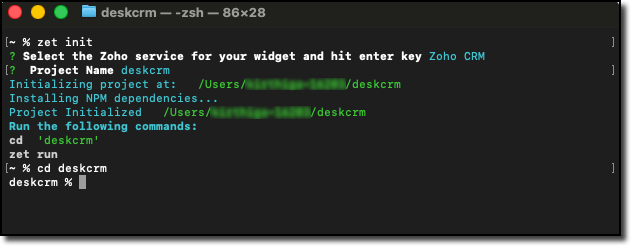
4. Create a local project folder for widget using Zoho CLI as mentioned in Creating your First Widget help guide. 
Step-by-Step Implementation

In the widget project directory, code the following logic in the widget.html file.

Step - 1: Get the Current CRM Contact ID

On page load, you can capture the entity ID with the help of PageLoad event listener. 

Also create a reusable ZRC instance configured with the Zoho Desk base URL and OAuth connection name. 

// Initialize the embedded app
ZOHO.embeddedApp.on("PageLoad", async function(data) {
    console.log("PageLoad data:", data);
    // Step 1: Get the entity (module) and entity ID (Contact record ID)
    if (data && data.Entity && data.EntityId) {
        entityModule = data.Entity;
        entityId = data.EntityId;
        console.log("Entity:", entityModule);
        console.log("Entity ID (CRM Contact ID):", entityId);
        // Create reusable ZRC instance for Zoho Desk API
        deskZrc = zrc.createInstance({
            baseUrl: 'https://desk.zoho.com/api/v1',
            connection: 'desk_oauth_connection'
        });
        await loadTickets();
    } else {
        showError("No contact context found");
    }
});
ZOHO.embeddedApp.init();

Step - 2: Fetch Desk Contacts and Match the CRM Contact ID

Make a GET Contacts API call to the Zoho Desk API using the ZRC instance. Loop through the returned contacts and find the one whose zohoCRMContact.id matches the current CRM Contact ID.

// Step 2: Make GET contacts API call to Desk using ZRC
const contactsResponse = await deskZrc.get('/contacts', {
    params: {
        limit: 100
    }
});
console.log("Desk Contacts Response:", contactsResponse);
if (contactsResponse && contactsResponse.data) {
    // Parse the response data 
    const contactsData = typeof contactsResponse.data === 'string' 
        ? JSON.parse(contactsResponse.data) 
        : contactsResponse.data;
    // Find the object where zohoCRMContact.id matches Contact record ID
    if (contactsData && contactsData.data && Array.isArray(contactsData.data)) {
        const matchingContact = contactsData.data.find(function(contact) {
            return contact.zohoCRMContact && 
                   contact.zohoCRMContact.id && 
                   contact.zohoCRMContact.id === entityId;
        });
        if (matchingContact) {
            // Pick the id (Desk contact record ID)
            const deskContactId = matchingContact.id;
            console.log("Desk Contact ID:", deskContactId);
            // Proceed to fetch tickets
            await fetchTickets(deskContactId);
        } else {
            showEmptyState("No Desk contact found linked to this CRM contact");
        }
    }
}

Step - 3: Fetch Open Tickets and Filter by Desk Contact ID

Make a GET Tickets API call to Zoho Desk with the following parameters:
  1. Specify status with Open value to retrieve only open tickets. 
  2. Specify include with value set to contacts fetch each ticket details with its associated contact details. 
Filter the API response with the matched Desk Contact ID and render the results. 

async function fetchTickets(deskContactId) {
    try {
        // Step 3: Make GET Tickets API call using ZRC 
        const ticketsResponse = await deskZrc.get('/tickets', {
            params: {
                include: 'contacts',
                status: 'Open',
                limit: 100
            }
        });
        console.log("Tickets Response:", ticketsResponse);
        if (ticketsResponse && ticketsResponse.data) {
            const ticketsData = typeof ticketsResponse.data === 'string' 
                ? JSON.parse(ticketsResponse.data) 
                : ticketsResponse.data;
            // Filter tickets where contact matches deskContactId
            if (ticketsData && ticketsData.data && ticketsData.data.length > 0) {
                const matchingTickets = ticketsData.data.filter(function(ticket) {
                    return ticket.contact && ticket.contact.id === deskContactId;
                });
                if (matchingTickets.length > 0) {
                    renderTickets(matchingTickets);
                } else {
                    showEmptyState("No open tickets found for this contact");
                }
            } else {
                showEmptyState("No open tickets found");
            }
        }
    } catch (error) {
        console.error("Error fetching tickets:", error);
        showError("Failed to fetch tickets: " + (error.message || error.toString()));
    }
}

Step - 4: Validate and Pack the Widget

Follow the steps given in the Widget help page to validate and package the widget. A complete working code sample is provided as attachment at the end of this post.

Creating a Related List Widget

1. Go to Zoho CRM > Setup > Developer Hub > Widgets and click Create New Widget.

2. Fill in the required details such as:
  1. Name: Zoho WorkDrive
  2. Type: Related List 
  3. Hosting: Zoho 
  4. File Upload: Upload the ZIP created in the dist folder within the widget project directory after packaging in the Step 4. 
  5. Index page: /widget.html

3. Go to Customization > Modules and Fields > Contacts > Standard > Detail View. Then, create and associate the related list widget. 

Refer to the Customize Related Lists help page for more information on creating a related list.

Try it Out! 

Let us look at the output from the Contacts detail page in Zoho CRM. 


Info
Key Points to Remember
  1. Two-way sync is mandatory to link Desk contacts with CRM contacts. 
  2. Connection setup in Zoho CRM for Desk is mandatory with Desk.tickets.READ and Desk.contacts.READ scopes. Ensure to replace the connection name in line 21.
  3. If the account has a large number of contacts or tickets, implement pagination using from and limit parameters to ensure all records are evaluated. 
  4. Ensure to replace the Desk URL to ticket in line 181 with your portal name and company name.
We hope this Kaizen helps your sales team to see active issues instantly. Next week, we will look at how to establish a ticket escalation mechanism from Zoho CRM

Have questions or suggestions? Drop them in the comments or write to us at  support@zohocrm.com

On to Better Building!

-----------------------------------------------------------------------------------------------------------

Related Reading 

2. Connections - An Overview
3. CRM Customizations - Related Lists
4. Desk APIs -  GET Tickets API and GET Contacts API
5. Desk Customizations - Integrate Zoho Desk with Zoho CRM
-----------------------------------------------------------------------------------------------------------
    • Sticky Posts

    • Kaizen #198: Using Client Script for Custom Validation in Blueprint

      Nearing 200th Kaizen Post – 1 More to the Big Two-Oh-Oh! Do you have any questions, suggestions, or topics you would like us to cover in future posts? Your insights and suggestions help us shape future content and make this series better for everyone.
    • Kaizen #226: Using ZRC in Client Script

      Hello everyone! Welcome to another week of Kaizen. In today's post, lets see what is ZRC (Zoho Request Client) and how we can use ZRC methods in Client Script to get inputs from a Salesperson and update the Lead status with a single button click. In this
    • Kaizen #222 - Client Script Support for Notes Related List

      Hello everyone! Welcome to another week of Kaizen. The final Kaizen post of the year 2025 is here! With the new Client Script support for the Notes Related List, you can validate, enrich, and manage notes across modules. In this post, we’ll explore how
    • Kaizen #217 - Actions APIs : Tasks

      Welcome to another week of Kaizen! In last week's post we discussed Email Notifications APIs which act as the link between your Workflow automations and you. We have discussed how Zylker Cloud Services uses Email Notifications API in their custom dashboard.
    • Kaizen #216 - Actions APIs : Email Notifications

      Welcome to another week of Kaizen! For the last three weeks, we have been discussing Zylker's workflows. We successfully updated a dormant workflow, built a new one from the ground up and more. But our work is not finished—these automated processes are

    Nederlandse Hulpbronnen


      • Recent Topics

      • Zoho CRM Copilot Connector

        Hello, Are there plans to release a connector for Zoho CRM and Copilot? I'm in the early research stages of potentially switching our CRM solution to Microsoft Dynamics because of its out of the box integration with Copilot. The advantage being that we
      • Mail bounces due to bad reputation

        Good evening. I'm seeing these errors from both hotmail/outlook and yahoo, as well as hard bounce from Virgin Media and talktalk for some time now. Bounce category: Connection issues Reason: uncategorized-bounce Message: 4.7.650 The mail server [136.143.188.237]
      • Sort by Project Name?

        How the heck do you sort by project name in the task list views??? Seems like this should be a no-brainer?
      • Bulk upload images and specifications to products

        Hi, Many users have asked this over the years and I am also asking the same. Is there any way in which we can bulk upload product (variant) images and product specifications. The current way to upload/select image for every variant is too cumbersome.
      • How to publish different instances of the same application.

        I am using Creator for my internal management my store. I am opening a new location, and I want to have a somewhat separate instance of the same app for my new store to use, since the data will all be different, and there is no need to interact between
      • Side bar menu

        It would be great if you could stop the auto collapse of expanded menus when selecting a different module. It would save a lot of mouse clicks for a lot of users that frequently switch between sales & purchases as we do, it's easier to collapse them manually when not required !
      • Re: Application Architecture in Zoho Creator — A Platform-Specific Deep Dive

        A recent community post on application architecture made some excellent points about planning architecture early in Zoho Creator projects. The core message is right — Creator applications have a habit of growing organically into maintenance nightmares,
      • What's New in Zoho Inventory | January - March 2026

        Hello users, The first quarter of 2026 has been dynamic! We’ve shipped a powerful set of updates in Zoho Inventory to enhance item control, improve warehouse efficiency, expand integration and reporting capabilities. From a unified item creation experience
      • Deliver timely updates across your organization

        Keeping your organization informed goes beyond sending emails or sharing links. It requires ensuring that the right information reaches users at the right time, without being missed. Whether it's communicating policy changes, maintenance schedules, webinar/training
      • Zoho Commerce -

        Zoho Commerce currently only allows merchants to define the United Kingdom as a single shipping zone, which creates a significant issue for businesses operating between the EU and the UK. Under the Northern Ireland Protocol, Northern Ireland follows EU
      • Connecting Portals from different Zoho apps

        Hi, I note that Zoho has functionality for customer portals for several of the Zoho apps, like CRM, Projects, Desk etc. Is there any way to connect these portals?  It would be great if we could give our customers access to a portal in which they could
      • Invalid value passed for line_item_category

        duplicating a previous used invoice and trying to save it (new invoice number / po number used) I keep encountering this error when trying to save the invoice Invalid value passed for line_item_category
      • Make Task ID and Issue ID columns filterable like all other columns

        Hello Zoho Projects Team, We hope you are doing well. We would like to submit a feature request regarding the Task ID and Issue ID columns in Zoho Projects list views. Current Limitation: As of now, in both the Tasks and Issues modules, almost every visible
      • Full Email Threading for Custom Modules

        My clients run their core business operations inside Custom Modules. They need to see their full email history directly within those records. Right now the integration is limited compared to the Deals module. Users have to jump back to the Contact record
      • Edit Active Workflows

        Workflows are great and extremely powerful, however the inability to edit active workflows makes iterating on their functionality extremely difficult. It would be great to have the ability to edit workflows even while active. When this is done, It would
      • Automation Series: Assign Subsequent Task Owner on Completion

        When a project progresses, tasks get piled up over time. As new tasks are created, tracking ownership and assigning them can become time consuming. In Zoho Projects, this can be addressed by automating task assignment using Custom Function, so that ownership
      • Multiple Pricing for single item

        We are doing billing based on batch number. We required multiple Price for an Single Item based on Batch. While billing the POS should fetch the price based on batch. Whether this could be done ?
      • Split Bills/Expsense between multiple projects and/or clients

        I need to be able to split vendor invoices/ expenses between multiple clients. Entering the bill multiple times is not only time consuming, it defeats the purpose of having a unquie identifity bill number and will allow for possible duplicated entry.  Below is an example from Quickbooks Desktop. Splitting costs over various projects is a common job costing function that I am very sad and surprised is not an option in Zoho Books. Unless I am missing it somewhere? Thanks for your help!
      • Disable - order online at zoho store

        I'm running cafe with Zoho POS. Doing good, however this enablement (Disable online order only on zakyastore.in) would enhance the business. Support asked to close -> "We can close the store from more options in the Mobile store > Overview > Store details
      • Worst product ever designed - Zoho Books.

        It is designed and conceptualised by people without any financial background. Basically bunch of software engineers who knows how to code. They dont have any idea how finance people will use this product, what are their requirements, how transactions
      • Configuring Email Notifications with Tautulli for Plex

        Hi I'm new to Zoho. I am from Canada and I have a I use a web based application called Tautulli for Plex that monitors my Plex media server. It also sends a newsletter to my followers. To set this up they require a "From" email address., a smtp server
      • Cliq iOS can't see shared screen

        Hello, I had this morning a video call with a colleague. She is using Cliq Desktop MacOS and wanted to share her screen with me. I'm on iPad. I noticed, while she shared her screen, I could only see her video, but not the shared screen... Does Cliq iOS is able to display shared screen, or is it somewhere else to be found ? Regards
      • Last activity time is acting like last modified time

        When i edit the description or any field in the potential, account, contact and lead, the Last Activity Time is being updated like the Modified Time. This is messing all workflows and reports and we are unable to track real last time of activities like
      • Total Saving in POS Screen

        Displaying the Total Saving in POS Screen, while adding the items before before recording the payment. Customer wish to know this total savings before making the payment (i.e., before recording the payment). Currently we can able to view this total saving
      • How to skip weekends and public holidays in a scheduled workflow using Deluge in Zoho Creator?

        Hi, I have a scheduled workflow in Zoho Creator that runs daily at a fixed time. I want it to execute only on working days skipping weekends and public holidays. Could anyone please help me with how to achieve this?
      • Can I hide empty Contact fields from view?

        Some contacts have a lot of empty fields, others are mostly filled. Is there a way I can hide/show empty fields without changing the actual Layout? I would like to de-clutter my view, and also be able to add information later as I am able. I would be
      • Building extensions #1: Creating, testing, and editing extensions for Zoho Sprints using Sigma Cloud Editor

        Hello all! We're delighted to announce the beginning of a new series called Building extensions for Zoho Sprints. Our primary goal for this series is to educate developers on the process of creating extensions for Zoho Sprints and guide them through the
      • How to use Picklist values language in email templates

        Hello, I'm using multi-language in Zoho CRM and I've prepared separate email templates for each language. My question: how do I make sure the picklist field values in each template are rendered in the language that matches the template itself? This is
      • Is it possible to create a meeting in Zoho Crm which automatically creates a Google Meet link?

        We are using Google's own "Zoho CRM for Google" integration and also Zoho's "Google Apps Sync" tools, but none of them provide us with the ability to create a meeting in Zoho CRM that then adds a Google Meet link into the meeting. Is this something that
      • Built-in Date Functions in Zoho Analytics Query Tables

        I have a doubt about whether Zoho Analytics Query Tables provide built-in functions for start date, end date, and the current month
      • Zoho Analytics: Clarification on Email Schedule Limits in Basic Plan

        Hi Team, I have a question regarding the email scheduling limits in the Zoho Analytics Basic Plan. The plan shows that I can create 4 email schedules. However, I understand that schedule consumption is calculated based on recipients (i.e., 1 schedule
      • Canvas and calendar

        Is it possible to have a canvas view that shows say a contacts details with the meetings calendar on the same page?
      • Urgent Security Feature Request – Add MFA to Zoho Projects Client Portal Hello Zoho Projects Team,

        Hello Zoho Projects Team, We hope you are doing well. We would like to submit an urgent security enhancement request regarding the Zoho Projects Client Portal. At this time, as far as we are aware, there is no Multi-Factor Authentication (MFA) available
      • Set Custom Icon for Custom Modules in new Zoho CRM UI

      • Standardize your booking forms with Centralized Customer Form

        We’re excited to introduce Centralized Customer Form, a new way to manage and standardize how customer information is collected across your event types. With this feature, you can define a common set of booking form fields once and apply them across your
      • Zoho Mail app update: Accessing Delegated Mailbox.

        Hello everyone! You can now access the delegated mailbox from within the iOS version of the Zoho Mail app. To access the delegated mailbox: Open the Zoho Mail app. Go on to the 'Email' module. Tap the profile picture. Choose the delegated mailbox Please
      • FSM- are we getting there

        We have now tried the FSM a couple of times. We have been defeated on the offline access. As you can imagine the enginner needs to know the customers details, the job and the equipment. This needs to be cache. Is it yet? Plus Our engineers do multiple
      • Cross Module Filtering – Use Fields from Lookup modules in Custom Views criteria and Advanced Filters

        Hello everyone, Zoho CRM now enables you to achieve deeper filtering of records in a module, using fields of a lookup, thereby enhancing your data management experience manifold. This filtering based on lookup module fields is now available in advanced
      • Ignroe_filtrers and drill through

        I have two charts, where one is connected to the other using drill-through. The issue is with the second chart (the drill-through target). It contains an aggregation formula that uses the ignore_filters function. Under normal conditions, the formula works
      • Introducing SlyteUI : From Idea to a Working Interface in Minutes

        Hello everyone! Are you spending hours building basic UIs? Does even the smallest customization feel like a major task? CRM customization should feel intuitive and straightforward, not time consuming or exhausting. SlyteUI makes this possible by simplifying
      • Next Page